

The Playwright Locator and Action Guide: From getByRole to filter/and/or, Frames, Shadow DOM, Uploads, Downloads and Dialogs
Silencing a strict mode error with first() does not fix the problem: in Bookstore, a test that picks the out-of-stock edition and times out shows why. With real runs on the institutional order screen we cover getByRole options, narrowing with filter, and and or, actions such as setInputFiles, selectOption and check, and shadow DOM, iframes, dialogs and downloads; the .NET equivalents are in a table.
Version note: The code in this post was built and run with .NET 10, Angular 22.2, Playwright 1.65 (@playwright/test) and Microsoft.Playwright 1.64.1.
Guess First
Bookstore, the online bookstore used as the shared example across this site's series, sells several editions of the same book. The test creates two Dune editions through the API: a hardcover that is out of stock and a paperback with five copies in stock. Both show up in the catalog; the test's goal is to put the edition in stock into the cart. To avoid the strict mode error we saw in post 6, it was written like this:
await data.book('Dune Hardcover', 89.9, 0);
await data.book('Dune Paperback', 64.9, 5);
await catalog.open();
await catalog.search(data.suffix);

const dune = catalog.results.filter({ hasText: 'Dune' });
await expect(dune).toHaveCount(2);
await dune.first().getByRole('button', { name: 'Add to cart' }).click({ timeout: 3_000 });
The catalog sorts books by title. Does this test pass? If it fails, with which error?
The Answer: first() Silences the Error, Not the Problem
    TimeoutError: locator.click: Timeout 3000ms exceeded.
    Call log:
      - waiting for getByRole('list', { name: 'Search results' }).getByRole('listitem').filter({ hasText: 'Dune' }).first().getByRole('button', { name: 'Add to cart' })
        - locator resolved to <button disabled type="button" class="btn-primary"> Add to cart </button>
      - attempting click action
        2 × waiting for element to be visible, enabled and stable
          - element is not enabled
        - retrying click action
        ...
        6 × waiting for element to be visible, enabled and stable
          - element is not enabled
"Dune Hardcover" comes first alphabetically, so first() picked the hardcover; its button was disabled, Playwright waited for a moment when it could click, and the time ran out. The strict mode error was asking "I found two elements, which one?"; first() hands that question to the sort order. When the order, the data or the layout changes, the test quietly works with a different element. The right fix is to narrow the card by what the user tells apart:
const inStock = dune.filter({ hasNotText: 'Out of stock' });
await inStock.getByRole('button', { name: 'Add to cart' }).click();
Post 6 explained the reasoning behind locator choice, auto-waiting and the trace viewer. This post puts the API you open while writing tests every day on top of that foundation: the options of the locator family, the narrowing tools, actions, shadow DOM, frames, dialogs and downloads. All examples come from Bookstore's catalog page and its new institutional order screen.
The Locator Family and Its Options
Besides the role and the accessible name, getByRole can also match the states a screen reader announces: checked, disabled, expanded, pressed, selected and, for headings, level. Counting the out-of-stock edition's button in the catalog test needed no extra filter:
await expect(dune.getByRole('button', { name: 'Add to cart', disabled: true })).toHaveCount(1);By default name is case-insensitive and matches a substring: { name: 'Cart' } also finds the "Cart (2)" link. For an exact match you pass exact: true, and if part of it changes you pass a regex; CatalogPage.card from post 7 looks up the heading with exact: true, because a search for "Dune" also catches "Dune Messiah". The same rule applies to getByText and getByLabel.
getByLabel finds a form field through its associated label, aria-label or aria-labelledby. getByPlaceholder is for fields without a label; since the placeholder disappears once the user starts typing, it does not replace a label, and that has to be fixed in the markup, not in the test. getByText is for text without a role, and getByTitle is for the title attribute; we will find the iframe with it shortly. getByTestId looks at data-testid by default; if the team uses another attribute, change it in the config with use: { testIdAttribute: 'data-qa' }.
Narrowing: Chaining, filter, and and or
Calling a locator on another locator moves the search inside that element: catalog.results is the listitems of the "Search results" list, and getByRole('button') on top of it searches only inside those cards. filter, on the other hand, queries the content of the element rather than the element itself. It has four options: hasText and hasNotText match text, has and hasNot look for another locator inside. Since 1.51, visible: true also keeps only visible elements. The full test that finds the edition in stock:
test('finds the Dune edition that is in stock', async ({ data, catalog, page }) => {
  await data.book('Dune Hardcover', 89.9, 0);
  const paperback = await data.book('Dune Paperback', 64.9, 5);

  await catalog.open();
  await catalog.search(data.suffix);

  const dune = catalog.results.filter({ hasText: 'Dune' });
  await expect(dune).toHaveCount(2);

  // filter queries the card's content, not the card itself: the text may appear anywhere inside it
  const inStock = dune.filter({ hasNotText: 'Out of stock' });
  await expect(inStock.getByRole('heading')).toHaveText(paperback.title);
  await expect(dune.getByRole('button', { name: 'Add to cart', disabled: true })).toHaveCount(1);

  await inStock.getByRole('button', { name: 'Add to cart' }).click();
  await expect(page.getByRole('link', { name: 'Cart (1)' })).toBeVisible();
  await expect(page.getByRole('status')).toHaveText(`${paperback.title} added to cart`);
});
data.suffix is the unique suffix that the BookstoreData fixture from post 7 gives every test; in this post I made it public. Searching with this suffix leaves only the books this test created in the catalog, so Dune copies from other workers do not throw off the count.
and requires two locators to point at the same element. It is an intersection, not a nested search:
await expect(page.getByRole('searchbox').and(page.getByLabel('Search books'))).toBeVisible();This assertion says the "Search books" label really belongs to a search box. or, in turn, collects elements that match either locator. On the institutional order screen, after a file is uploaded either a preview table or an error message appears; the helper shared by the success and failure scenarios waited for one of them:
await expect(page.getByRole('table', { name: 'Order lines' }).or(page.getByRole('alert'))).toBeVisible();With a file containing fewer than 20 books, the test failed like this:
    Error: expect(locator).toBeVisible() failed

    Locator: getByRole('table', { name: 'Order lines' }).or(getByRole('alert'))
    Expected: visible
    Error: strict mode violation: getByRole('table', { name: 'Order lines' }).or(getByRole('alert')) resolved to 2 elements:
        1) <table class="cart-lines" aria-label="Order lines">…</table> aka getByRole('table', { name: 'Order lines' })
        2) <p role="alert" class="error">Institutional orders need at least 20 copies.</p> aka getByText('Institutional orders need at')
The screen showed both the table and the error. Because or is a union, strict mode kicks in when both are visible. Here first() is the right tool: the helper's question is not "which element?" but "did at least one appear?". Each scenario checks the details with its own assertion.
const processed = page.getByRole('table', { name: 'Order lines' }).or(page.getByRole('alert'));
await expect(processed.first()).toBeVisible();
Actions: The Institutional Order Screen
In Bookstore's Institutional Order flow a school, library or company places a bulk order of at least 20 copies and gets a 10% discount; payment is by invoice rather than by card. This post adds the screen for that flow to Bookstore: Nevin Hanım, the purchasing officer, uploads a file she saved from Excel as CSV, picks a delivery day in the shipping company's embedded widget, accepts the terms of sale, submits the order and downloads the invoice as a PDF. The API has two endpoints for it: POST /api/institutional/orders (only for the institution-buyer role) and GET /api/orders/{id}/invoice. The setup project from post 7 got a second storageState for Nevin Hanım. upload is the helper that contains the or lines above. The full test:
test.use({ storageState: buyerStorageState });

function orderFile(rows: [string, number][]): { name: string; mimeType: string; buffer: Buffer } {
  const csv = ['isbn,quantity', ...rows.map(([isbn, quantity]) => `${isbn},${quantity}`)].join('\r\n');
  return { name: 'order.csv', mimeType: 'text/csv', buffer: Buffer.from(csv) };
}

test('a school uploads a bulk order and downloads the invoice', async ({ data, page }, testInfo) => {
  const emma = await data.book('Emma', 39.5, 50);
  const hobbit = await data.book('The Hobbit', 52, 50);

  await page.goto('/institutional/bulk-order');
  await upload(page, orderFile([[emma.isbn, 20], [hobbit.isbn, 10]]));
  await expect(page.getByText('2 lines, 30 copies, 10% institutional discount')).toBeVisible();

  const widget = page.getByTitle('Delivery slot').contentFrame();
  await widget.getByLabel('Delivery day').selectOption('Wednesday afternoon');
  await widget.getByRole('button', { name: 'Reserve slot' }).click();
  await expect(page.getByText('Delivery slot: Wednesday afternoon')).toBeVisible();

  await page.getByLabel('I accept the terms of sale').check();

  // Attach the handler BEFORE the action; Playwright waits for it when the dialog opens
  let question = '';
  page.once('dialog', (dialog) => {
    question = dialog.message();
    return dialog.accept();
  });
  await page.getByRole('button', { name: 'Submit order' }).click();
  await expect(page.getByRole('status')).toContainText('submitted. Total: ₺1,179.00');
  expect(question).toBe('Submit a bulk order for 30 copies?');

  const downloading = page.waitForEvent('download');
  await page.getByRole('button', { name: 'Download invoice' }).click();
  const download = await downloading;

  expect(download.suggestedFilename()).toMatch(/^invoice-INS-[0-9A-F]{12}\.pdf$/);
  const path = testInfo.outputPath(download.suggestedFilename());
  await download.saveAs(path);
  expect((await readFile(path)).subarray(0, 5).toString()).toBe('%PDF-');
});
setInputFiles takes either the path of a file on disk or content produced in memory. Since the test data is created with new ISBNs on every run, building the file inside the test as a Buffer is better than keeping a fixed CSV in the repo. Passing an empty array clears the selection. selectOption picks an option by its visible text or its value, and check also verifies after clicking that the checkbox really is checked. The total is 20 × 39.50 + 10 × 52 = 1,310 TRY minus 10%.
Actions that are not in the test work the same way. fill writes the value into the field in one go and fires the input event; it is the right choice almost every time. pressSequentially types the characters one by one; you only need it when the page handles each keystroke separately (autocomplete, masked fields). hover is for tooltips and dropdown menus, dragTo for drag and drop within the page; drop, added in 1.60, sends dragenter, dragover and drop events as if a file had been dragged in from outside the page, for testing file drop zones. All of these exist on the .NET side too; the table below was compiled against Microsoft.Playwright 1.64.1:
| Playwright Test (TypeScript) | Microsoft.Playwright (.NET) |
|---|---|
filter({ hasText, hasNotText, has, hasNot }) | Filter(new() { HasText = ..., HasNotText = ..., Has = ..., HasNot = ... }) |
a.and(b), a.or(b) | a.And(b), a.Or(b) |
first(), last(), nth(i) | First, Last, Nth(i) |
getByRole('button', { name, exact, disabled }) | GetByRole(AriaRole.Button, new() { Name = ..., Exact = true, Disabled = true }) |
setInputFiles({ name, mimeType, buffer }) | SetInputFilesAsync(new FilePayload { Name = ..., MimeType = ..., Buffer = ... }) |
locator.contentFrame() | locator.ContentFrame (property) |
selectOption, check, fill, pressSequentially | SelectOptionAsync, CheckAsync, FillAsync, PressSequentiallyAsync |
page.once('dialog', ...) | page.Dialog += ... |
page.waitForEvent('download') | page.RunAndWaitForDownloadAsync(...) |
Shadow DOM and Frames
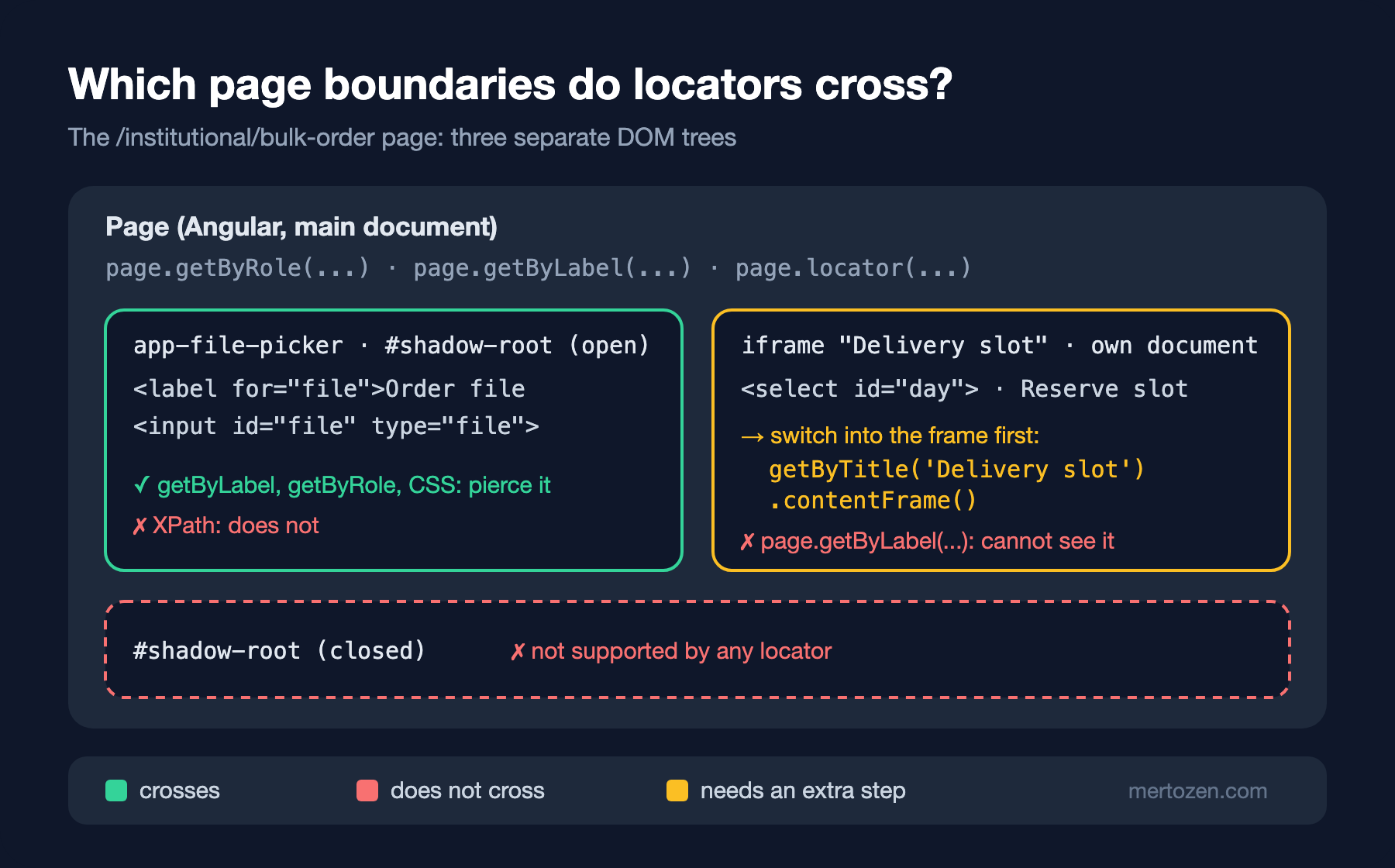
The institutional order screen has three separate DOM trees. The file picker renders in its own shadow root, like the web components in design systems; in Angular, encapsulation: ViewEncapsulation.ShadowDom does that. In the test, page.getByLabel('Order file') did not notice it at all. On the same page I printed how many elements three locators find:
css   #file: 1
xpath //input: 0
label Order file: 1
Playwright's locators pierce open shadow roots on their own, and so does a CSS selector. There are two exceptions: XPath does not pierce shadow roots, and closed shadow roots are not supported at all. An XPath in an old suite that quietly finds zero elements after a component moves to shadow DOM is one more reason behind post 6's advice against binding to CSS and XPath.
An iframe, on the other hand, is a separate document. page.getByLabel('Delivery day') does not see the select inside the iframe; you have to switch into the frame first. Since 1.43 the most readable way is to call contentFrame() on a locator that finds the iframe element: all the getBy* methods are the same on the returned FrameLocator. page.frameLocator('iframe[title="Delivery slot"]'), which you see in older tests, does the same thing with CSS. In production the widget will come from the shipping company's own origin; Playwright works with cross-origin iframes through the same API, so the test does not change.
Dialogs and Downloads
Playwright automatically dismisses alert, confirm and prompt dialogs that have no listener. For confirm that means pressing "Cancel". An attempt that attached the handler after the click ended like this:
await page.getByRole('button', { name: 'Submit order' }).click();
page.once('dialog', (dialog) => dialog.accept());

await expect(page.getByRole('status')).toContainText('submitted');
Error: expect(locator).toContainText(expected) failed
Locator: getByRole('status')
Expected substring: "submitted"
Timeout: 5000ms
Error: element(s) not foundBy the time click returned, the dialog had opened and been dismissed; the application took it as a cancel and did not submit the order. The error message never mentions a dialog, which makes this trap harder. There is also a rule in the other direction: once you attach a listener, you must close the dialog with accept or dismiss. A handler that does not close it leaves the action hanging, because the dialog blocks the page. page.once catches only the next dialog; if an unexpected second dialog appears in the test, it is dismissed automatically again.
Downloads follow the same rule from the other side: the promise that waits for the event is created before the action, then you click, then you await it. Bookstore fetches the invoice as a blob with an authenticated request and saves it through a temporary a[download]; that makes no difference to Playwright, the download event still arrives. The downloaded file is deleted when the browser context closes; to keep it, copy it into the test's output folder with saveAs. Since testInfo.outputPath gives every test its own folder, parallel tests do not overwrite each other's files.
In Production
I ran the whole suite with the new tests on five workers; 14 tests passed in 6.3 seconds. The bulk order test took 1.5 seconds: loading an iframe, two API requests and a file download are cheap for an E2E test. The real cost is in the test data. Because an institutional order reduces stock, each test creates its own books with 50 copies in stock; a test that used the seeded Dune could consume the stock of another test running in parallel.
Make a decision about embedded third-party widgets: will you load the real provider's test environment or your own fake page? The real provider is slow, rate limited and can break the test with a change you do not control. Bookstore's widget, like the WireMock fakes from post 7, is a fake that sits at the boundary; the contract with the real widget (the shape of the postMessage message) should be documented separately.
If you want to keep downloaded files as CI artifacts, saving them under testInfo.outputPath is enough; Playwright keeps that folder together with the test results. For files whose content needs checking, such as an invoice, check the first bytes or the page count, not just the name; an empty PDF can also arrive with the right name.
Common Pitfalls
Silencing the strict mode error with first() or nth(0). The test from the guessing section could pass one day and fail the next as the sort order changes. The legitimate place for first() is where the question is "at least one", like the or helper above.
Falling back to CSS and XPath. XPath found zero elements in a component that moved to shadow DOM, and class names change when the design system is updated. If an element cannot be found by role, label or text, first check whether the markup is accessible, then add a test id.
Attaching the dialog handler after the action. Since the error message does not mention a dialog, this is the trap people notice last. Keep the order between the subscription and the action as a rule: first page.once('dialog') or the waitForEvent promise, then the action.
Looking for an element inside an iframe through page. The page.getByLabel('Delivery day').selectOption(...) attempt ended with "Timeout 2000ms exceeded" and a one-line call log (waiting for getByLabel('Delivery day')); the error message does not mention a frame. For an element you cannot find, check in the trace viewer's DOM snapshot whether it sits inside an iframe.
A Small Experiment
★☆☆ Replace the filter({ hasNotText: 'Out of stock' }) line in the catalog test with filter({ has: page.getByRole('button', { name: 'Add to cart', disabled: false }) }). Which of the two approaches still works when the translation of the stock text changes?
★★☆ Turn FilePicker from ViewEncapsulation.ShadowDom into a custom element that uses attachShadow({ mode: 'closed' }) internally and run the bulk order test. Which line failed, with which error?
★★★ Move the invoice download step to .NET: add a test to the Bookstore.E2E.Tests project that writes Nevin Hanım's token to localStorage with AddInitScriptAsync, and verify the first bytes of the PDF with RunAndWaitForDownloadAsync.
Every test in this post ends with a few expect lines: toHaveCount, toHaveText, toContainText, toBeDisabled. In the next post we look at the full list of these matchers, the difference between toHaveText and toContainText, soft assertions, checks that retry with expect.poll and toPass, and writing your own matcher.