

What Is Infrastructure as Code? Terraform, OpenTofu, Bicep, Pulumi and When to Use Which
Infrastructure as Code means describing infrastructure in code and letting a tool bring it to the desired state; running the same code twice changes nothing, and a manual change shows up as drift in the next plan. We compare a bash script with Terraform on the same job, look at the code-plan-apply-state loop, place Terraform, OpenTofu, Bicep, Pulumi and Ansible, and work out selection criteria for a team after the BSL, OpenTofu and the retirement of CDKTF.
Version note: The examples in this post were run with Terraform 1.17.2, OpenTofu 1.13.9, the kreuzwerker/docker provider 4.7.0 and Docker Engine 29 (Docker Desktop).
Guess First
You have two things. The first is a five-line bash script that creates a Docker network and an API container. The second is a twenty-line Terraform file that describes the same two things. You run each of them twice in a row. What does the script do on the second run? What does Terraform do? And a third question: if someone deletes the container by hand from Docker Desktop, which of the two notices? The answers are in the middle of the post, with real output.
The Cost of Building by Clicking in the Portal
One day Bookstore, the online bookstore used as the shared example across this site's series, moves to Azure. Emre logs in to the portal, creates a resource group and puts an App Service Plan, a Web App, an Azure SQL Server with the BookstoreDb database and a Storage Account for cover images inside it. Everything is up in two hours. Six months later a staging environment is needed and Emre is on leave. Ayşe tries to build the same setup and cannot answer these questions: which app settings did the Web App have? Which IP ranges were open on the SQL Server firewall? What was the minimum TLS version on the storage account? She can find all this by clicking through the portal screen by screen, but what she finds is today's state; she cannot see who changed it, when, or why.
The industry calls building infrastructure by clicking in the portal "click-ops", and its problems always show up in the same places:
- Not repeatable: building the same environment a second time depends on the memory of whoever built the first one. Staging and production quietly drift apart.
- Drift: someone changes a setting in production "temporarily" and forgets to revert it. With no recorded target state, nothing notices the difference.
- Unreviewed changes: a one-line change in application code goes through a pull request and CI, while a database firewall rule can be opened without anyone seeing it.
- Speed in a disaster: when a region goes down or a subscription is deleted by mistake, rebuilding from scratch takes days.
Infrastructure as Code, IaC for short, is the answer to these problems. Infrastructure is defined in text files, lives in Git, is reviewed through pull requests, and a tool applies that definition to the real world. Every answer Ayşe was looking for sits in a file, and git log tells her who changed what and why.
Imperative and Declarative: Running the Same Job Twice
There are two ways to build infrastructure with code. In the imperative approach you write "what to do" step by step; scripts work this way. In the declarative approach you write "what you want to exist in the end" and the tool decides how to get there. Let's see the difference with a local experiment. First we build a small version of the Bookstore API as an image (the standard multi-stage Dockerfile covered in the Docker series; throughout the series it lives in the snapshot's app/Bookstore.Api folder):
docker build -t bookstore-api:1.0.0 app/Bookstore.ApiThen the imperative script:
#!/usr/bin/env bash
set -euo pipefail

docker network create tfseries-dev
docker run -d --name tfseries-dev-api --network tfseries-dev \
    -p 18480:8080 -e Bookstore__Environment=dev bookstore-api:1.0.0
Running the script twice:
$ ./setup.sh
992f5138d615ef7d1ce0289a7f9f4b0c5b3ca043c80a1cc73ffdafca009d67ba
0bab9cd89b64080a64557362a52fbd526cba2e23b6073ce32c5e15debaac7dc9
$ ./setup.sh
Error response from daemon: network with name tfseries-dev already exists
The first run created the network and the container. The second one failed on the first line, because the script says "create the network", not "create the network if it does not exist". To fix that you have to put a "does it already exist, and are its settings the same" check in front of every step. If the container's port or environment variable changed, you also write the code that stops it and starts it again. As the script grows, those checks become the real work.
The Terraform equivalent of the same goal:
terraform {
  required_providers {
    docker = {
      source  = "kreuzwerker/docker"
      version = "~> 4.7"
    }
  }
}

provider "docker" {}

resource "docker_network" "bookstore" {
  name = "tfseries-dev"
}

resource "docker_container" "api" {
  name  = "tfseries-dev-api"
  image = "bookstore-api:1.0.0"

  env = ["Bookstore__Environment=dev"]

  networks_advanced {
    name = docker_network.bookstore.name
  }

  ports {
    internal = 8080
    external = 18480
  }
}
This file is written in HCL, Terraform's own configuration language. None of its lines is a command; every resource block says "let something like this exist in the world". After terraform init downloads the provider, we run terraform apply twice. The Docker objects are prefixed with tfseries- so it is obvious they belong to this series' lab. The end of the first run:
docker_network.bookstore: Creating...
docker_network.bookstore: Creation complete after 2s [id=2c7682d8293a661c453ea92809589c7d60564fec3cde46232b1b0ce8c99d84d5]
docker_container.api: Creating...
docker_container.api: Creation complete after 0s [id=c91b708673da334de0189f09efdc4f5109e97cf4d069d55be069a2b2fc0cfa82]

Apply complete! Resources: 2 added, 0 changed, 0 destroyed.
The second run:
docker_network.bookstore: Refreshing state... [id=2c7682d8293a661c453ea92809589c7d60564fec3cde46232b1b0ce8c99d84d5]
docker_container.api: Refreshing state... [id=c91b708673da334de0189f09efdc4f5109e97cf4d069d55be069a2b2fc0cfa82]

No changes. Your infrastructure matches the configuration.

Terraform has compared your real infrastructure against your configuration
and found no differences, so no changes are needed.

Apply complete! Resources: 0 added, 0 changed, 0 destroyed.
That answers the first question. Terraform did nothing on the second run, because the desired state and the actual state were the same. This property is called idempotency, and it is the core promise of IaC: every time you run the code, the infrastructure is brought to the desired state described in the code. If it is already there, nothing is touched.
Now the opposite case. If you run Terraform for the first time while the network and container created by the script still exist:
Error: Unable to create network: Error response from daemon: network with name tfseries-dev already exists

  with docker_network.bookstore,
  on main.tf line 12, in resource "docker_network" "bookstore":
  12: resource "docker_network" "bookstore" {
Terraform does not take ownership of an object it did not create. There is a separate way to bring infrastructure built by hand in the portal under Terraform (import blocks); that is the subject of post 8.
The Code, Plan, Apply and State Loop
For Terraform to say "no changes" on the second run, it has to remember what it created. That memory is the state file. After the apply you will find terraform.tfstate in the folder, and you can list what is in it like this:
$ terraform state list
docker_container.api
docker_network.bookstore
Every terraform plan and apply follows the same loop:
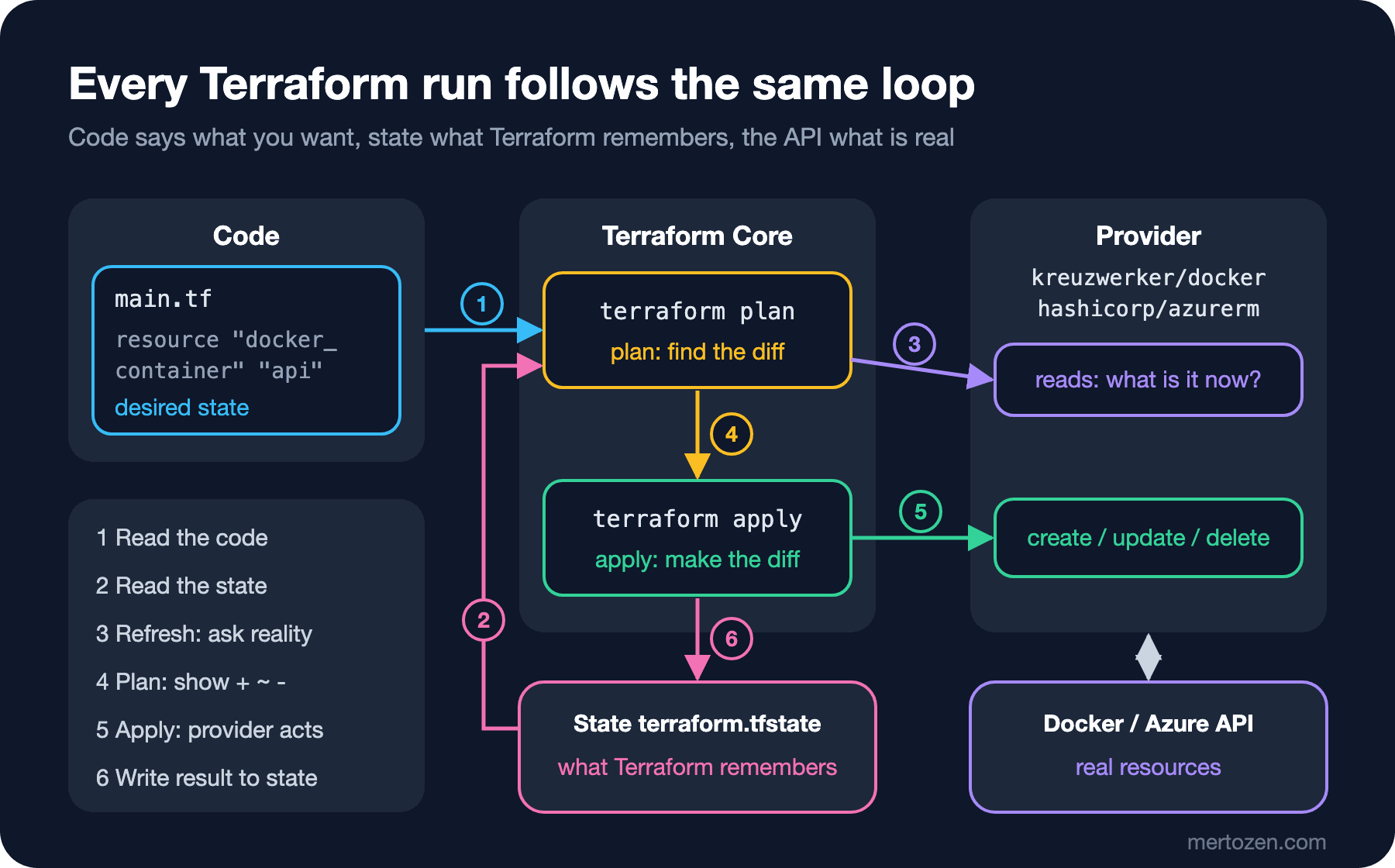
Terraform first reads the .tf files and works out the desired state. Then, for every resource in the state, it asks the provider "what does this object look like right now"; this is called a refresh. The provider is a separate program that calls the API of Docker or Azure Resource Manager. Terraform compares the desired state with the actual state and produces a plan: what will be created, changed and deleted. Apply carries out that plan through the provider and writes the result to the state.
The answer to the third question is in this loop too. We delete the container by hand from Docker (docker rm -f tfseries-dev-api) and only run a plan:
docker_network.bookstore: Refreshing state... [id=2c7682d8293a661c453ea92809589c7d60564fec3cde46232b1b0ce8c99d84d5]
docker_container.api: Refreshing state... [id=c91b708673da334de0189f09efdc4f5109e97cf4d069d55be069a2b2fc0cfa82]

Terraform used the selected providers to generate the following execution
plan. Resource actions are indicated with the following symbols:
  + create

Terraform will perform the following actions:

  # docker_container.api will be created
  + resource "docker_container" "api" {
      + env                                         = [
          + "Bookstore__Environment=dev",
        ]
      + image                                       = "bookstore-api:1.0.0"
      + name                                        = "tfseries-dev-api"
      ...
    }

Plan: 1 to add, 0 to change, 0 to destroy.
During the refresh the provider could not find the container, so Terraform proposed creating it again. This gap between the code and the real world is called drift. The script never notices it; Terraform notices it on every plan. The ... line in the plan output is my shortening: I removed about thirty lines full of provider defaults. We will read a real plan in detail in post 2.
The Tool Map: Terraform, OpenTofu, Bicep, Pulumi
IaC tools give different answers to the same question. The candidates the Bookstore team will run into are in the table below. MIT, Apache 2.0, MPL 2.0 and GPL 3.0 in the license column are open source licenses; BSL 1.1, the Business Source License, is the result of the license change I describe shortly: the source is available, but use in competing commercial products is restricted. The YAML playbooks in the Ansible row are Ansible's task files.
| Tool | Language | Target | State | License |
|---|---|---|---|---|
| Terraform | HCL | Any platform with a provider | State file, in a backend | BSL 1.1 (since 1.6) |
| OpenTofu | HCL | The same provider ecosystem | State file, optional client-side encryption | MPL 2.0 |
| Bicep | Bicep | Azure only | No separate state, Azure itself | MIT |
| Pulumi | C#, TypeScript, Python, Go, Java | Multi-cloud | State, in Pulumi Cloud or your own storage | Apache 2.0 |
| Ansible | YAML playbook | Inside the server | None | GPL 3.0 |
Terraform is the most widely used tool in this space. Its strength comes from the provider ecosystem: alongside Azure, AWS and Google Cloud, it manages GitHub repositories, DNS records, Kubernetes objects and, as here, Docker containers with the same language and the same plan/apply flow.
Bicep is Microsoft's Azure-specific language. A Bicep file compiles to an ARM template and Azure itself performs the deployment. There is no separate state file, and the equivalent of a plan is the az deployment group what-if command. For a team that uses only Azure and will stay that way, it is the option with the fewest moving parts; but it cannot manage GitHub settings or another cloud.
Pulumi builds the same declarative model with general-purpose programming languages. The Bookstore team could write its infrastructure in C#, build loops and abstractions with the language itself and write unit tests with xUnit. The price is that infrastructure code can become as complex as application code. On the Terraform side, CDKTF filled that gap, but it was deprecated on December 10, 2025 and its repository was archived. The README recommends generating HCL with cdktf synth --hcl and moving to standard Terraform. There is no reason to start a new project on CDKTF today.
Ansible belongs to another layer. Terraform creates the server, the network and the database; Ansible installs packages, copies files and configures services inside an existing server. That work is called configuration management. In an application like Bookstore that runs on containers and PaaS, the need to manage the inside of a server largely disappears: Docker builds the image and Terraform creates the platform that runs it. Ansible is outside the scope of this series.
License and Ecosystem: BSL, OpenTofu and IBM
In August 2023 HashiCorp moved Terraform's license from MPL 2.0 to BSL 1.1. The change started with version 1.6; the 1.5.x series was the last one released under MPL. The BSL does not stop you from using Terraform for your own infrastructure; it restricts embedding it in a commercial product that competes with HashiCorp. For a user like the Bookstore team there is no practical difference.
In response to the license change, the community forked OpenTofu from the last MPL code. OpenTofu became a Linux Foundation project in September 2023 and was accepted into the CNCF as a sandbox project in April 2025. On the HashiCorp side, IBM completed its acquisition of the company on February 27, 2025. Terraform is now an IBM product.
The two tools started out identical and now drift further apart with every release. OpenTofu has been able to encrypt the state file on the client side since 1.7; Terraform has no such feature. Terraform, in turn, adds features on its own schedule, such as terraform query from 1.14 and variables in module sources from 1.15. I also tried this series' code with OpenTofu. When I copied the main.tf above to a separate folder and ran tofu init, the provider came from OpenTofu's own registry:
Initializing provider plugins...
- Finding kreuzwerker/docker versions matching "~> 4.7"...
- Installing kreuzwerker/docker v4.7.0 to the shared cache directory...
- Installed kreuzwerker/docker v4.7.0 (signed, key ID 0DCE698927DAF8EC)
- Using kreuzwerker/docker v4.7.0 from the shared cache directory
tofu validate said "Success! The configuration is valid." and tofu plan returned Plan: 2 to add, 0 to change, 0 to destroy. It wants to add two resources because the new folder starts with its own empty state; state belongs to the folder. Simple code runs on both tools. The more you use features that arrive with new releases, the less compatible they become; details in post 12.
Choosing for a Team: Which One, When
For the Bookstore team I framed the question like this: will the infrastructure stay on Azure only, or will GitHub, DNS or a second cloud also be managed as code? Is the team closer to learning HCL or to writing infrastructure in C#? Are license and vendor risk decision criteria for the company?
- Azure only, small team, no extra tooling wanted: Bicep.
- Multiple platforms, a large community, plenty of ready-made modules and examples: Terraform.
- The same ecosystem under an open source license and foundation governance, or state encryption as a requirement: OpenTofu.
- Writing and testing infrastructure in the application's language is a real gain for the team: Pulumi.
This series covers Terraform. Bookstore's target infrastructure is on Azure: a resource group, a Linux App Service Plan with a Web App running a container, Azure SQL with BookstoreDb, Storage and Key Vault. Writing down the reasoning matters as much as the choice; the way to do that is an ADR. A two-paragraph record using the template from the "Writing ADRs" post of the Architecture Decisions series is enough: which options we weighed, why Terraform, and which condition would make us reopen the decision.
How the Examples Work in This Series
You will see two kinds of code in every post. The code in the infra/azure folder is Bookstore's real target, written with AzureRM provider 5.x. I did not use an Azure account while writing it: init, fmt and validate really ran, but no plan or apply was made against Azure. I take Azure-specific behaviour from the documentation and say so every time. The code in the infra/local folder is a local twin that runs the same concepts on your machine with the Docker provider; every plan, apply and error output in the posts comes from real runs there. Terraform's mechanics (state, plan, the dependency graph, lifecycle, modules) do not depend on the provider, so everything you learn on Docker applies to Azure as it is.
Production Notes
Moving to IaC does not mean "turning everything into code in one go". Build new environments with code first, and import the existing ones step by step. Narrow down who can make manual changes in production; in a subscription where everyone has the Contributor role in the portal, drift is inevitable.
Make the plan part of the review process. The code diff does not always tell you exactly what will change; a single variable can affect twenty resources. Seeing the plan output next to the code in a pull request is the main goal of the pipeline we will build in post 11.
The state file is now part of the infrastructure. It holds resource IDs, connection details and sometimes plain-text secrets. That is why it lives not on a laptop but in a remote backend with restricted access; that is the subject of post 4.
Common Pitfalls
Treating IaC as a script you run once and forget. Terraform code pays off not on the first build but in the years after it: as long as every change goes through the code, drift stays visible. A team that goes back to the portal after the initial build turns the code into a document that disagrees with reality within a few months.
Managing the same infrastructure from both the portal and the code. The next apply silently reverts a portal change made to a resource Terraform manages. That is the correct behaviour, but it surprises a team that does not expect it.
Choosing the tool by the license debate instead of by need. Moving to Terraform without ever considering Bicep when most of the team works only on Azure, or the reverse, trying to squeeze a multi-platform need into Bicep, gets expensive later.
A Small Experiment
★☆☆ Put the main.tf from this post in a folder, run terraform init and terraform apply, then open http://localhost:18480/health. Run apply a second time and see the "No changes." output yourself.
★★☆ Stop the container with docker stop tfseries-dev-api and run terraform plan. Does the plan want to change the container in place or recreate it? Which lines say forces replacement, and why?
★★★ Write a half-page ADR for your own team: which of Terraform, OpenTofu and Bicep would you pick, with what reasoning, and which condition would make you reopen the decision?
In the next post we install Terraform on Windows, work with required_version, provider version constraints and .terraform.lock.hcl, and then write Bookstore's first Azure resources (a resource group and a Storage Account). We will also read the +, ~ and -/+ symbols in the plan output one by one.