

Terraform with GitHub Actions: Plan/Apply with OIDC, a Plan Summary on the PR, Approved Apply and Drift Checks
In a safe Terraform pipeline the plan on the PR is for review; on main the plan is made again and saved, and exactly that file is applied after approval, with plan and apply running as separate identities through OIDC. We write workflows with checks, a plan summary comment, environment-approved apply and concurrency, keep fork PRs away from credentials, and build a drift script that is not fooled by check blocks or provider noise, with real trials.
Version note: The workflows in this post were checked with actionlint 1.7.12; the scripts they run were tried locally with Terraform 1.17.2, TFLint 0.66.0, Node.js 24, the kreuzwerker/docker provider 4.7.0 and Docker Engine 29. The workflows were not run on GitHub; OIDC, environment approval and plan/apply against Azure are described from the documentation.
Guess First
You are building a pipeline for the infrastructure code of Bookstore (the online bookstore used as the shared example across this site's series). When a pull request is opened a plan is made, and the team reads and approves it. After the merge, the apply job runs. Does the apply job apply the plan that was read in the PR, or does it make a new plan at that moment? What happens if another PR is merged in between? And one more: in a PR opened from a fork by an outside contributor, which identity should the plan job use to connect to Azure?
The Flow: From PR to Apply
The flow we will build is in the figure below. There are three workflows: checks and plan on the pull request, approved apply on main, and a drift check every morning.
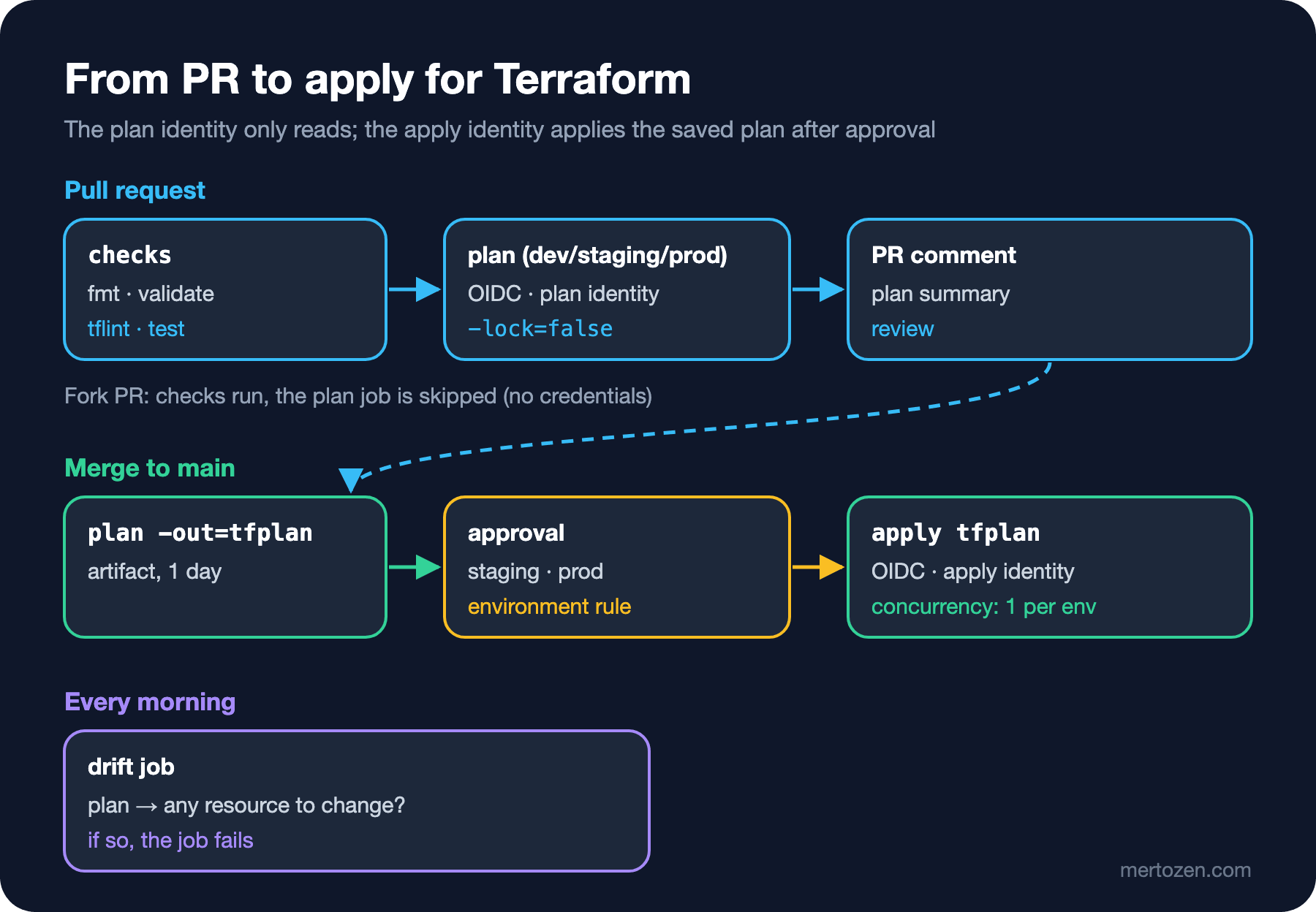
The answer to the first part of the guess is the foundation of this flow: apply should apply the plan the team approved. In post 2 we saw the saved plan (-out=tfplan) and how it goes stale: if the state changes after the plan was made, apply tfplan stops with "Saved plan is stale" and does nothing else. But the plan in the PR was made against the code before the merge and the state at that moment; every merge in between invalidates it. That is why the plan is made again on main, saved, and exactly that file is applied after approval. The PR plan is for review, the saved plan on main is for applying.
The Pull Request Workflow: Checks and Plan
.github/workflows/terraform-pr.yml:
name: terraform-pr

on:
  pull_request:
    paths:
      - "infra/**"
      - "scripts/check-infra.sh"
      - ".github/workflows/terraform-*.yml"

permissions:
  contents: read

jobs:
  checks:
    runs-on: ubuntu-24.04
    steps:
      - uses: actions/checkout@3d3c42e5aac5ba805825da76410c181273ba90b1 # v7.0.1
      - uses: hashicorp/setup-terraform@dfe3c3f87815947d99a8997f908cb6525fc44e9e # v4.0.1
        with:
          terraform_version: 1.17.2
          terraform_wrapper: false
      - uses: terraform-linters/setup-tflint@6ffdbaa3be476b3431f7275c26966ef32ff60337 # v6.3.2
        with:
          tflint_version: v0.66.0
      - run: ./scripts/check-infra.sh
        env:
          # tflint --init downloads the azurerm ruleset from GitHub
          GITHUB_TOKEN: ${{ github.token }}

  plan:
    needs: checks
    # Pull requests from forks get no cloud credentials
    if: github.event.pull_request.head.repo.full_name == github.repository
    runs-on: ubuntu-24.04
    strategy:
      fail-fast: false
      matrix:
        environment: [dev, staging, prod]
    # Holds the read-only plan identity; the federated credential trusts only this environment
    environment: ${{ matrix.environment }}-plan
    permissions:
      contents: read
      id-token: write
      pull-requests: write
    env:
      ARM_USE_OIDC: "true"
      ARM_CLIENT_ID: ${{ vars.AZURE_CLIENT_ID }}
      ARM_TENANT_ID: ${{ vars.AZURE_TENANT_ID }}
      ARM_SUBSCRIPTION_ID: ${{ vars.AZURE_SUBSCRIPTION_ID }}
      TF_IN_AUTOMATION: "true"
    defaults:
      run:
        working-directory: infra/azure/envs/${{ matrix.environment }}
    steps:
      - uses: actions/checkout@3d3c42e5aac5ba805825da76410c181273ba90b1 # v7.0.1
      - uses: hashicorp/setup-terraform@dfe3c3f87815947d99a8997f908cb6525fc44e9e # v4.0.1
        with:
          terraform_version: 1.17.2
          terraform_wrapper: false
      - run: terraform init -input=false
      # -lock=false: a plan for review must not block an apply that is running
      - run: terraform plan -input=false -lock=false -no-color -out=tfplan
      - run: terraform show -no-color tfplan > plan.txt
      - name: Comment the plan summary
        uses: actions/github-script@3a2844b7e9c422d3c10d287c895573f7108da1b3 # v9.0.0
        env:
          ENVIRONMENT: ${{ matrix.environment }}
        with:
          script: |
            const summary = require("./scripts/plan-summary.js");
            const body = summary(`infra/azure/envs/${process.env.ENVIRONMENT}/plan.txt`, process.env.ENVIRONMENT);
            await github.rest.issues.createComment({
              owner: context.repo.owner,
              repo: context.repo.repo,
              issue_number: context.issue.number,
              body,
            });
The first job runs scripts/check-infra.sh from post 10; it needs no cloud credentials. As in the security post of the GitHub Actions series, the actions are pinned to a commit SHA, with a comment showing the readable version. terraform_wrapper: false matters: by default setup-terraform wraps terraform with a wrapper that captures its output; our scripts work with plain output and do not need it.
The second job makes a separate plan per environment. Three details. First, the if line: for PRs from forks, the plan job does not run at all. A plan means running code; someone can change a provider or module and write code that leaks the credentials. For fork PRs only the credential-free checks run; the plan is made once a maintainer takes the code into their own branch. Second, -lock=false: a plan made for review does not write to state and should not hold up an apply that is running. Third, writing a summary of the plan to the PR rather than the whole plan:
// Builds a short pull request comment from `terraform show -no-color tfplan` output
const fs = require("fs");

module.exports = function summary(path, environment) {
  const lines = fs.readFileSync(path, "utf8").split("\n");
  const actions = lines.filter((line) => /^  # [^(]/.test(line));
  const total = lines.find((line) => /^(Plan:|No changes\.)/.test(line)) ?? "No plan summary found.";
  const destroys = actions.filter((line) => /will be destroyed|must be replaced/.test(line));
  const warning = destroys.length > 0 ? `\n**${destroys.length} resource(s) will be destroyed or replaced.**\n` : "";

  return [
    `### Terraform plan: ${environment}`,
    warning,
    "```",
    ...actions,
    total,
    "```",
  ].join("\n");
};

if (require.main === module) {
  console.log(module.exports(process.argv[2], process.argv[3] ?? "local"));
}
I tried the script locally in the dev environment with a plan where I had changed the image tag:
$ node scripts/plan-summary.js plan.txt dev
### Terraform plan: dev

**1 resource(s) will be destroyed or replaced.**

```
  # module.bookstore.data.http.health will be read during apply
  # module.bookstore.module.api.docker_container.this must be replaced
Plan: 1 to add, 0 to change, 1 to destroy.
```
The PR comment contains only resource addresses and the action to be taken; no attribute values. terraform show already hides sensitive values, but the whole plan still carries details such as internal IP ranges and resource IDs that not everyone who can see the PR needs to see. If there is a delete or a replace, a bold warning appears at the top of the comment; this is against the "missing the -/+ symbol" pitfall from post 2.
Secretless Login to Azure with OIDC
There is not a single secret in the workflow. ARM_CLIENT_ID, ARM_TENANT_ID and ARM_SUBSCRIPTION_ID come from repository variables; they are not secret. OIDC handles authentication: with the id-token: write permission GitHub issues a signed token for the job, and the federated credential of the identity in Azure accepts that token. We covered the Azure side of the setup in the GitHub Actions series post on deploying to Azure with OIDC; here there are two points specific to Terraform.
First, ARM_USE_OIDC=true affects both the provider and the backend. The AzureRM backend reads the same environment variables; together with the use_azuread_auth = true we put in versions.tf in post 4, the state is also accessed with the same OIDC identity and no storage key. There is no need for a separate azure/login step.
Second, separate identities for plan and apply. The plan job runs in the dev-plan, staging-plan and prod-plan environments, the apply job in dev, staging and prod. When a job is bound to an environment, the subject in GitHub's OIDC token contains the environment name; when you bind each federated credential in Azure to a single environment, the token of prod-plan cannot use the identity that can apply to prod. The AZURE_CLIENT_ID variable is defined with a different value in each environment. The plan identity gets by with read roles: Reader on the subscription, Storage Blob Data Reader on the state container, and Key Vault Secrets User so Terraform can refresh the secret in Key Vault. The apply identity must be able to write the resource groups and, since bookstore-webapp creates a role assignment, assign roles; that is the most sensitive permission, so limit it with a conditional role assignment permission if you can.
The Main Workflow: Saved Plan, Approval and Apply
.github/workflows/terraform-apply.yml:
name: terraform-apply

on:
  push:
    branches: [main]
    paths:
      - "infra/azure/**"
      - "infra/modules/**"

permissions:
  contents: read

jobs:
  plan:
    runs-on: ubuntu-24.04
    strategy:
      matrix:
        environment: [dev, staging, prod]
    environment: ${{ matrix.environment }}-plan
    permissions:
      contents: read
      id-token: write
    env:
      ARM_USE_OIDC: "true"
      ARM_CLIENT_ID: ${{ vars.AZURE_CLIENT_ID }}
      ARM_TENANT_ID: ${{ vars.AZURE_TENANT_ID }}
      ARM_SUBSCRIPTION_ID: ${{ vars.AZURE_SUBSCRIPTION_ID }}
      TF_IN_AUTOMATION: "true"
    defaults:
      run:
        working-directory: infra/azure/envs/${{ matrix.environment }}
    steps:
      - uses: actions/checkout@3d3c42e5aac5ba805825da76410c181273ba90b1 # v7.0.1
      - uses: hashicorp/setup-terraform@dfe3c3f87815947d99a8997f908cb6525fc44e9e # v4.0.1
        with:
          terraform_version: 1.17.2
          terraform_wrapper: false
      - run: terraform init -input=false
      - run: terraform plan -input=false -no-color -out=tfplan
      # The saved plan contains secrets in plain text: short retention, never public
      - uses: actions/upload-artifact@cf430e030ddbb5b0abf93d22962f4752f3646cd9 # v7.0.2
        with:
          name: tfplan-${{ matrix.environment }}
          path: infra/azure/envs/${{ matrix.environment }}/tfplan
          retention-days: 1

  apply:
    needs: plan
    runs-on: ubuntu-24.04
    strategy:
      max-parallel: 1
      matrix:
        environment: [dev, staging, prod]
    # Protection rules on staging and prod require a reviewer before this job starts
    environment: ${{ matrix.environment }}
    concurrency:
      group: terraform-${{ matrix.environment }}
      cancel-in-progress: false
    permissions:
      contents: read
      id-token: write
    env:
      ARM_USE_OIDC: "true"
      ARM_CLIENT_ID: ${{ vars.AZURE_CLIENT_ID }}
      ARM_TENANT_ID: ${{ vars.AZURE_TENANT_ID }}
      ARM_SUBSCRIPTION_ID: ${{ vars.AZURE_SUBSCRIPTION_ID }}
      TF_IN_AUTOMATION: "true"
    defaults:
      run:
        working-directory: infra/azure/envs/${{ matrix.environment }}
    steps:
      - uses: actions/checkout@3d3c42e5aac5ba805825da76410c181273ba90b1 # v7.0.1
      - uses: hashicorp/setup-terraform@dfe3c3f87815947d99a8997f908cb6525fc44e9e # v4.0.1
        with:
          terraform_version: 1.17.2
          terraform_wrapper: false
      - run: terraform init -input=false
      - uses: actions/download-artifact@9000827ccba6bdab643e8b6fd33ac0654aef8333 # v8.0.2
        with:
          name: tfplan-${{ matrix.environment }}
          path: infra/azure/envs/${{ matrix.environment }}
      # Applies exactly the reviewed plan; a stale plan fails instead of doing something else
      - run: terraform apply -input=false -no-color tfplan
The plan job uploads the saved plan for each environment as an artifact. As we saw in post 9, this file carries secrets in plain text; I cut the retention to one day. The apply job is bound to the staging and prod environments, and the protection rules on those environments require a reviewer before the job starts (the environments post of the GitHub Actions series). The reviewer sees exactly what will be applied in the log of the same run's plan job.
max-parallel: 1 applies the environments in order: dev, staging, prod. concurrency prevents two applies running against the same environment at the same time. The state lock from post 4 would stop that anyway, but a job waiting in line is better than a job that turns red with a lock error. cancel-in-progress: false is deliberate: an apply cut off halfway leaves partly applied infrastructure.
The second part of the guess: what happens if another merge happens between plan and apply? The second merge starts its own workflow run, and its apply waits for the first because of the concurrency group. When the first run's apply is done, the state changes; the second run's saved plan, made before the first apply, is now stale. apply tfplan stops with the stale plan error and the second change is not applied without being planned again. Stopping rather than doing the wrong thing is the behaviour we want. One detail: a concurrency group can have at most one running and one pending job at a time; if a third run arrives, the pending one is cancelled. So it is normal for the apply in the middle to be skipped when merges come back to back; if the last run's saved plan is stale too, it fails with the stale error and the run is re-run.
I checked the workflows with actionlint:
$ actionlint .github/workflows/*.yml
$ echo $?
0
actionlint checks that the matrix context may be used in environment and concurrency, the action inputs and the permissions keys. I did not run the workflows with act either: the real work of the jobs is getting an OIDC token and connecting to Azure, which act cannot imitate. I ran the part that needs no credentials, check-infra.sh and the drift script below, locally.
A Scheduled Drift Check
In post 5 we said that check block warnings only show up when someone makes a plan, and in post 8 that manual changes are only noticed in a plan. A workflow that makes a plan every morning, even when nobody opens a PR, closes that gap. terraform-drift.yml runs this script for every environment:
#!/usr/bin/env bash
# Fails when a plan would change a resource: drift or code that was never applied
set -euo pipefail

terraform plan -input=false -lock=false -no-color -out=drift.tfplan > drift.txt
cat drift.txt

# Data sources read during apply (our check block) are not changes
changes=$(terraform show -json drift.tfplan |
    jq '[.resource_changes[]? | select(.change.actions != ["no-op"] and .change.actions != ["read"])] | length')

if grep -q "Check block assertion failed" drift.txt; then
    echo "::warning::A check block failed; see the plan output."
fi

if [ "$changes" -gt 0 ]; then
    echo "::error::Drift detected: $changes resource(s) would change."
    exit 1
fi
echo "No drift."
It took three attempts to get the script to this shape. The first idea was plan -refresh-only -detailed-exitcode: it shows only changes made outside and exits with 2 when there is a difference. With the Docker provider, it gave this even when nothing had changed:
$ terraform plan -refresh-only -detailed-exitcode
...
Note: Objects have changed outside of Terraform
...
  # module.bookstore.module.api.docker_container.this has changed
...
      + dns                                         = []
...
      - networks_advanced {
...
      + networks_advanced {
...
$ echo $?
2
The provider returns empty lists in a different form when it reads the container; refresh-only reports these differences as "changed outside". A job that turns red every morning becomes a job nobody looks at. The second attempt was a normal plan with -detailed-exitcode:
$ terraform plan -detailed-exitcode
...
  # module.bookstore.data.http.health will be read during apply
  # (config will be reloaded to verify a check block)
...
Plan: 0 to add, 0 to change, 0 to destroy.
$ echo $?
2
The plan says "0 to add, 0 to change, 0 to destroy" but the exit code is still 2, because the check block's data source "will be read during apply" and Terraform counts that as a change too. The final version saves the plan and counts only resource changes with terraform show -json, leaving out data source reads and no-ops. I tried it in the local dev environment by stopping the container by hand:
$ cd infra/local/envs/dev
$ ../../../../scripts/drift-check.sh
...
Plan: 0 to add, 0 to change, 0 to destroy.
...
No drift.

$ docker stop tfseries-dev-api
$ ../../../../scripts/drift-check.sh
...
  # module.bookstore.module.api.docker_container.this must be replaced
...
      ~ must_run                                    = false -> true
...
Plan: 1 to add, 0 to change, 1 to destroy.
...
::error::Drift detected: 1 resource(s) would change.
If there is drift, the job fails; that is the signal to wire into the team's notification channel. The drift job runs only with the plan identity and fixes nothing; the fix is made through a PR, or with a deliberate apply once it is understood why the drift happened.
HCP Terraform: The Alternative Route
Everything we built so far (remote state, locking, plan on the PR, approved apply, drift, policy) has a ready-made counterpart in HCP Terraform. Plan and apply run on HashiCorp's runners, the VCS integration writes the plan result to the PR by itself, and state and variables are kept in the workspace. According to HashiCorp's announcement, the old free plan reached its end on 31 March 2026; the Free tier that replaced it is free with unlimited users and up to 500 managed resources, and beyond that it is billed per managed resource. Bookstore's current resource count is far below that limit. The choice is between running your own pipeline and backend and depending on a SaaS; the ADR from post 1 is exactly for writing down this kind of decision.
Production Notes
The plan artifact is as sensitive as the state. Anyone with read access to the repository can download artifacts; keep retention short, and in a public repo never upload the saved plan as an artifact. The alternative is to make the plan again in the apply job and compare its summary with the approved summary; more complex, but no plan file travels.
As the number of environments and folders grows, planning every environment on every PR gets slow. Narrowing the matrix to the changed folders (the path filters from the GitHub Actions series) and keeping TF_PLUGIN_CACHE_DIR with actions/cache cut the time. When a module changes, though, every environment that uses it must be planned.
Do not leave the drift job ignored. A job that regularly turns red and that nobody looks at is worse than none, because it hides a real drift in the same noise. Weed out false alarms as above, and give every remaining alarm an owner.
Common Pitfalls
Giving cloud credentials to the plan on fork PRs. Running a fork's code in a job with credentials through pull_request_target is the Terraform version of the attack we described in the security post of the GitHub Actions series: a malicious provider or external data source runs during plan and can send the token out. A plan runs code too.
Code changing between plan and apply. Making a new plan in the apply job with terraform apply -auto-approve means the plan that was approved and the plan that is applied can differ. Apply the saved plan, or at least compare the re-made plan with the approved one.
A single identity for plan and apply. If the plan job that runs on a PR uses an identity with write access, the code in the PR can use that access. The plan's identity reads; the apply's identity writes after approval.
A Small Experiment
★☆☆ Run plan-summary.js against a plan in the local staging environment where the container is missing. How many lines does the comment have, and does the warning appear?
★★☆ Make the matrix in terraform-pr.yml dynamic so it contains only the environment folders that changed (with a job that finds changed files and fromJSON). Which environments should be planned when infra/azure/bookstore changes?
★★★ Change the drift script so that, instead of failing the job when it finds drift, it opens a GitHub issue or updates an existing one. How do you avoid opening a new issue every morning for the same drift?
In the last post of the series we look back: the features that arrived from Terraform 1.5 to 1.17, what changed from AzureRM 3 to 5, reading old Terraform code, and how OpenTofu differs.