

Backup and Restore in SQL Server: Recovery Models, Full/Differential/Log Backups, Point-in-Time Restore and Transaction Log Growth

In FULL recovery only a log backup empties the log: after two full backups the log was still 19.6% full and waiting on LOG_BACKUP, and a 400 MB log finally raised Msg 9002. The full, differential and log chain, how a backup without COPY_ONLY breaks the differential (Msg 3136), ZSTD compression, bringing back 618 accidentally deleted orders from a side database with STOPAT and STOPBEFOREMARK, and untrusted .bak files.
Version note: The T-SQL examples in this post were run on SQL Server 2025 CU10 (17.0.5035.5, Enterprise Developer Edition) in a Linux container against the series' Bookstore lab database. The commands are the same on SQL Server for Windows; only the file paths differ.
Guess First: I Took a Full Backup, So Why Is the Log Still Full?
The series' lab database (the database of Bookstore, the online bookstore used as the shared example across this site's series) holds 1 million orders and 2.5 million order lines. I switched its recovery model to FULL and wrote a small view that shows the state of the log after each step:
CREATE OR ALTER VIEW dbo.LogState
AS
SELECT d.recovery_model_desc, d.log_reuse_wait_desc,
       CAST(u.used_log_space_in_percent AS decimal(5,1)) AS log_used_pct,
       CAST(u.total_log_size_in_bytes / 1048576 AS int) AS log_file_mb
FROM sys.databases AS d
CROSS JOIN sys.dm_db_log_space_usage AS u
WHERE d.database_id = DB_ID();
Then I went in this order: switch to FULL and update 300,000 payment rows, take a full backup, update 600,000 more rows, take a second full backup, and finally take a log backup:
ALTER DATABASE sqls_20 SET RECOVERY FULL;
UPDATE dbo.Payments SET Amount = Amount + 0.01 WHERE PaymentId <= 300000;
CHECKPOINT;
SELECT '0. FULL, no backup yet' AS step, * FROM dbo.LogState;

BACKUP DATABASE sqls_20 TO DISK = '/var/opt/mssql/backup/sqls_20_full_a.bak' WITH CHECKSUM, COMPRESSION, INIT;
SELECT '1. full backup' AS step, * FROM dbo.LogState;

UPDATE dbo.Payments SET Amount = Amount - 0.01 WHERE PaymentId <= 300000;
UPDATE dbo.Payments SET Amount = Amount + 0.01 WHERE PaymentId <= 300000;
CHECKPOINT;
SELECT '2. 600k row updates' AS step, * FROM dbo.LogState;

BACKUP DATABASE sqls_20 TO DISK = '/var/opt/mssql/backup/sqls_20_full_b.bak' WITH CHECKSUM, COMPRESSION, INIT;
CHECKPOINT;
SELECT '3. second full backup' AS step, * FROM dbo.LogState;

BACKUP LOG sqls_20 TO DISK = '/var/opt/mssql/backup/sqls_20_log_b.trn' WITH CHECKSUM, COMPRESSION, INIT;
SELECT '4. log backup' AS step, * FROM dbo.LogState;
What happens to log usage in the third row? Does the second full backup empty the log? The real output:
step                    recovery_model_desc  log_reuse_wait_desc  log_used_pct  log_file_mb
----------------------  -------------------  -------------------  ------------  -----------
0. FULL, no backup yet  FULL                 NOTHING              1.0           327
1. full backup          FULL                 NOTHING              1.0           327
2. 600k row updates     FULL                 LOG_BACKUP           19.6          327
3. second full backup   FULL                 LOG_BACKUP           19.6          327
4. log backup           FULL                 NOTHING              2.6           327
The full backup didn't touch the log. Only the log backup emptied it. That's why a team that says "we take a full backup every night" ends up with a log file that fills the disk within weeks on a database in FULL recovery. The first row is interesting too: after switching to FULL, the log keeps behaving like SIMPLE until the first full backup, because there is no log chain to start yet. In this post we look at recovery models, backup types, undoing a DELETE down to the moment, why the log grows, and where, how often and how to test backups, all with real commands.
Recovery Models and Log Truncation
In post 9 of the series we saw that the log is split into VLFs and that they get reused once the records in them are no longer needed (log truncation). The recovery model decides when a log record stops being needed, and with it which restore options you have:
| Recovery model | When the log is truncated | Log backup | Point-in-time restore |
|---|---|---|---|
SIMPLE | After the transaction ends and a checkpoint passes | None | None; only to the last full/differential |
FULL | Once the record is in a log backup | Required | Yes, to any moment |
BULK_LOGGED | Like FULL | Required | Can't stop inside a log backup that contains bulk operations |
The decision rule is simple: if you can accept losing everything after the last full or differential backup, use SIMPLE; if you can't, use FULL. A developer database, a reporting copy reloaded every night or a staging database can live in SIMPLE. Bookstore's order database can't. BULK_LOGGED is a mode you switch to briefly and back from, to run a big index rebuild or a bulk load (post 23) with minimal logging; it's not for permanent use.
sys.databases.log_reuse_wait_desc always tells you why the log can't be truncated. LOG_BACKUP from the opening, ACTIVE_TRANSACTION from post 9, and REPLICATION and AVAILABILITY_REPLICA with replication or availability groups are the most common. It's the first place to look when the log grows.
Backup Types: Full, Differential, Log and COPY_ONLY
A full backup takes the whole database plus the part of the log needed to make it consistent. A differential takes the extents (eight-page blocks) changed since the last full backup; SQL Server knows them from a bitmap in each data file, and every full backup resets that bitmap. A log backup takes the log records written since the previous log backup, and consecutive log backups form an unbroken LSN chain. This chain is independent of full backups: the two full backups in the opening didn't break it.
The fact that a full backup resets the differential bitmap leads to a common mistake in practice. After the weekly full backup, a developer takes their own full backup to bring to a test environment and deletes the file when done. At night the usual differential runs:
BACKUP DATABASE sqls_20 TO DISK = '/var/opt/mssql/backup/sqls_20_full_weekly.bak' WITH CHECKSUM, COMPRESSION, INIT;
UPDATE dbo.StockItems SET QuantityOnHand = QuantityOnHand + 1 WHERE BookId <= 1000;
BACKUP DATABASE sqls_20 TO DISK = '/var/opt/mssql/backup/sqls_20_for_dev.bak' WITH CHECKSUM, COMPRESSION, INIT;
UPDATE dbo.StockItems SET QuantityOnHand = QuantityOnHand - 1 WHERE BookId <= 1000;
BACKUP DATABASE sqls_20 TO DISK = '/var/opt/mssql/backup/sqls_20_diff_nightly.bak' WITH DIFFERENTIAL, CHECKSUM, COMPRESSION, INIT;
The next morning we try to restore the weekly full and the night's differential:
RESTORE DATABASE sqls_20_test FROM DISK = '/var/opt/mssql/backup/sqls_20_full_weekly.bak'
WITH MOVE 'sqls_20' TO '/var/opt/mssql/data/sqls_20_test.mdf',
     MOVE 'sqls_20_log' TO '/var/opt/mssql/data/sqls_20_test_log.ldf',
     NORECOVERY;
RESTORE DATABASE sqls_20_test FROM DISK = '/var/opt/mssql/backup/sqls_20_diff_nightly.bak' WITH RECOVERY;
Msg 3136, Level 16, State 1, Server sql1, Line 5
This differential backup cannot be restored because the database has not been restored to the correct earlier state.
Msg 3013, Level 16, State 1, Server sql1, Line 5
RESTORE DATABASE is terminating abnormally.The backup history in msdb shows why. Each backup's LSN range and the full backup a differential is based on are recorded there:
SELECT RIGHT(m.physical_device_name, CHARINDEX('/', REVERSE(m.physical_device_name)) - 1) AS file_name,
       b.type, b.is_copy_only, b.first_lsn, b.last_lsn, b.differential_base_lsn
FROM msdb.dbo.backupset AS b
JOIN msdb.dbo.backupmediafamily AS m ON m.media_set_id = b.media_set_id
WHERE b.database_name = 'sqls_20'
  AND b.backup_start_date >= DATEADD(MINUTE, -10, SYSDATETIME())
ORDER BY b.backup_set_id;
file_name type is_copy_only first_lsn last_lsn differential_base_lsn
------------------------ ---- ------------ ----------------- ----------------- ---------------------
sqls_20_full_a.bak D 0 67000000484000001 67000000486400001 NULL
sqls_20_full_b.bak D 0 74000001566400001 74000001568800001 NULL
sqls_20_log_b.trn L 0 67000000484000001 74000001576800001 NULL
sqls_20_full_weekly.bak D 0 74000001586400001 74000001588800001 NULL
sqls_20_for_dev.bak D 0 74000001623200001 74000001625600001 NULL
sqls_20_diff_nightly.bak I 0 74000001658400001 74000001660800001 74000001623200001The differential's differential_base_lsn is not the weekly full's but the first_lsn of the deleted sqls_20_for_dev.bak. This differential is now only useful together with that file. The fix is COPY_ONLY: a copy-only full backup doesn't reset the bitmap, and a copy-only log backup doesn't truncate the log or affect the chain. Every backup taken outside the planned schedule should be COPY_ONLY.
CHECKSUM, COMPRESSION and RESTORE VERIFYONLY
All the backups above have two options. WITH CHECKSUM verifies each page's checksum during the backup and writes a checksum for the whole backup file; if it finds a damaged page it stops the backup. It's off by default, so if you don't write it you can silently put a damaged page into a backup. COMPRESSION is off by default too. SQL Server 2025 added a new algorithm, Zstandard (ZSTD). I backed up the same database four ways, with COPY_ONLY so the chain isn't affected:
BACKUP DATABASE sqls_20 TO DISK = '/var/opt/mssql/backup/sqls_20_c0.bak' WITH COPY_ONLY, CHECKSUM, NO_COMPRESSION, INIT;
BACKUP DATABASE sqls_20 TO DISK = '/var/opt/mssql/backup/sqls_20_c1.bak' WITH COPY_ONLY, CHECKSUM, COMPRESSION, INIT;
BACKUP DATABASE sqls_20 TO DISK = '/var/opt/mssql/backup/sqls_20_c2.bak' WITH COPY_ONLY, CHECKSUM, COMPRESSION (ALGORITHM = ZSTD), INIT;
BACKUP DATABASE sqls_20 TO DISK = '/var/opt/mssql/backup/sqls_20_c3.bak' WITH COPY_ONLY, CHECKSUM, COMPRESSION (ALGORITHM = ZSTD, LEVEL = HIGH), INIT;
SELECT RIGHT(m.physical_device_name, 14) AS file_name, b.compression_algorithm,
CAST(b.backup_size / 1048576 AS decimal(8,1)) AS backup_mb,
CAST(b.compressed_backup_size / 1048576 AS decimal(8,1)) AS on_disk_mb,
CAST(b.backup_size / b.compressed_backup_size AS decimal(4,2)) AS ratio
FROM msdb.dbo.backupset AS b
JOIN msdb.dbo.backupmediafamily AS m ON m.media_set_id = b.media_set_id
WHERE b.database_name = 'sqls_20' AND m.physical_device_name LIKE '%sqls_20_c_.bak'
ORDER BY m.physical_device_name;file_name compression_algorithm backup_mb on_disk_mb ratio
-------------- --------------------- --------- ---------- -----
sqls_20_c0.bak NULL 407.1 407.1 1.00
sqls_20_c1.bak MS_XPRESS 407.1 111.9 3.64
sqls_20_c2.bak ZSTD 407.1 123.6 3.29
sqls_20_c3.bak ZSTD 407.1 92.1 4.42A COMPRESSION without an algorithm uses the old MS_XPRESS. ZSTD at its default level (LOW) produced a slightly bigger file than MS_XPRESS on this data, while level HIGH brought the file down from 407 MB to 92 MB. The ratio depends on the data. According to Microsoft, ZSTD came for faster and better compression; measure the CPU cost of level HIGH on your own server, in the nightly window.
RESTORE VERIFYONLY checks that a backup file is complete and readable. I wrote eight bytes into the middle of a copy and verified both:
RESTORE VERIFYONLY FROM DISK = '/var/opt/mssql/backup/sqls_20_c1.bak' WITH CHECKSUM;
RESTORE VERIFYONLY FROM DISK = '/var/opt/mssql/backup/sqls_20_damaged.bak' WITH CHECKSUM;
The backup set on file 1 is valid.
Msg 3203, Level 16, State 1, Server sql1, Line 2
Read on "/var/opt/mssql/backup/sqls_20_damaged.bak" failed: 13(The data is invalid.)
Msg 3013, Level 16, State 1, Server sql1, Line 2
VERIFY DATABASE is terminating abnormally.A useful check, but it has a limit: VERIFYONLY doesn't open the database and doesn't tell you that the data inside is logically sound. The only way to show that a backup actually works is to restore it and run DBCC CHECKDB on it (post 21).
Point-in-Time Restore: Bringing Back Accidentally Deleted Orders
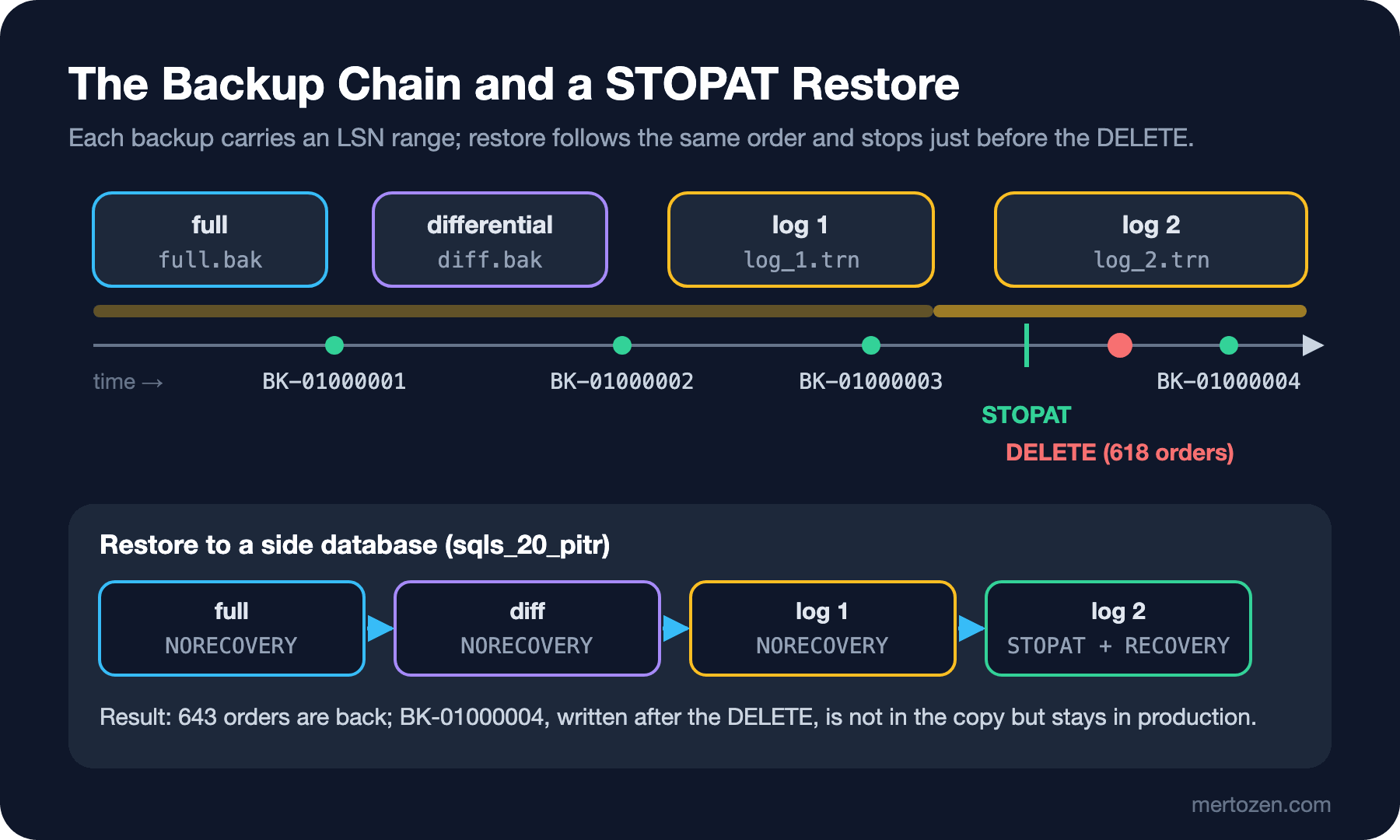
Bookstore's schedule: a full backup once a week, a differential every night, a log backup every five minutes. In the lab I built the same sequence in seconds instead of hours. One new order arrives between the full and the differential, one between the differential and the first log backup, and one after that. We note the last good moment:
BACKUP DATABASE sqls_20 TO DISK = '/var/opt/mssql/backup/sqls_20_full.bak' WITH CHECKSUM, COMPRESSION, INIT;
WAITFOR DELAY '00:00:03';
INSERT dbo.Orders (OrderNumber, CustomerId, Status, CreatedAt, TotalAmount, Currency)
VALUES ('BK-01000001', 42, 'Pending', SYSUTCDATETIME(), 0, 'TRY');
BACKUP DATABASE sqls_20 TO DISK = '/var/opt/mssql/backup/sqls_20_diff.bak' WITH DIFFERENTIAL, CHECKSUM, COMPRESSION, INIT;
WAITFOR DELAY '00:00:03';
INSERT dbo.Orders (OrderNumber, CustomerId, Status, CreatedAt, TotalAmount, Currency)
VALUES ('BK-01000002', 43, 'Pending', SYSUTCDATETIME(), 0, 'TRY');
BACKUP LOG sqls_20 TO DISK = '/var/opt/mssql/backup/sqls_20_log_1.trn' WITH CHECKSUM, COMPRESSION, INIT;
WAITFOR DELAY '00:00:03';
INSERT dbo.Orders (OrderNumber, CustomerId, Status, CreatedAt, TotalAmount, Currency)
VALUES ('BK-01000003', 44, 'Pending', SYSUTCDATETIME(), 0, 'TRY');
WAITFOR DELAY '00:00:02';
SELECT SYSUTCDATETIME() AS last_good_moment;
WAITFOR DELAY '00:00:02';
last_good_moment
---------------------------
2026-11-14 23:46:47.9355486Then a script runs that should clean up old orders whose payment never completed. The date condition is reversed: instead of the old ones it deletes every pending order since 20 October. The team has a rule to run risky bulk changes inside a named, marked transaction; we'll see shortly why that helps:
BEGIN TRANSACTION PendingCleanup WITH MARK 'pending order cleanup';
DELETE i FROM dbo.OrderItems AS i JOIN dbo.Orders AS o ON o.OrderId = i.OrderId
WHERE o.Status = 'Pending' AND o.CreatedAt >= '2026-10-20';
DELETE p FROM dbo.Payments AS p JOIN dbo.Orders AS o ON o.OrderId = p.OrderId
WHERE o.Status = 'Pending' AND o.CreatedAt >= '2026-10-20';
DELETE FROM dbo.Orders WHERE Status = 'Pending' AND CreatedAt >= '2026-10-20';
SELECT @@ROWCOUNT AS deleted_orders, SYSUTCDATETIME() AS deleted_at;
COMMIT;
deleted_orders deleted_at
-------------- ---------------------------
618 2026-11-14 23:46:50.2721927615 old orders and the three new orders that had just arrived are gone. Before anyone notices, one more order arrives (BK-01000004) and the five-minute log backup runs:
WAITFOR DELAY '00:00:03';
INSERT dbo.Orders (OrderNumber, CustomerId, Status, CreatedAt, TotalAmount, Currency)
VALUES ('BK-01000004', 45, 'Pending', SYSUTCDATETIME(), 0, 'TRY');
BACKUP LOG sqls_20 TO DISK = '/var/opt/mssql/backup/sqls_20_log_2.trn' WITH CHECKSUM, COMPRESSION, INIT;
Restoring over the production database would lose BK-01000004 and everything after the DELETE. The right way is to restore the chain to a side database up to the moment right before the DELETE and move back only the deleted rows.
The first attempt makes a common mistake:
RESTORE DATABASE sqls_20_pitr FROM DISK = '/var/opt/mssql/backup/sqls_20_full.bak'
WITH MOVE 'sqls_20' TO '/var/opt/mssql/data/sqls_20_pitr.mdf',
     MOVE 'sqls_20_log' TO '/var/opt/mssql/data/sqls_20_pitr_log.ldf';
RESTORE DATABASE sqls_20_pitr FROM DISK = '/var/opt/mssql/backup/sqls_20_diff.bak' WITH NORECOVERY;
Msg 3117, Level 16, State 1, Server sql1, Line 4
The log or differential backup cannot be restored because no files are ready to rollforward.
Msg 3013, Level 16, State 1, Server sql1, Line 4
RESTORE DATABASE is terminating abnormally.The default for RESTORE is RECOVERY: the full backup was restored, open transactions were rolled back and the database was opened for use. After recovery no more backups can be added to the chain; you have to start over. Every link in the chain is restored WITH NORECOVERY, only the last one WITH RECOVERY. The second attempt skips a link:
RESTORE DATABASE sqls_20_pitr FROM DISK = '/var/opt/mssql/backup/sqls_20_full.bak'
WITH MOVE 'sqls_20' TO '/var/opt/mssql/data/sqls_20_pitr.mdf',
     MOVE 'sqls_20_log' TO '/var/opt/mssql/data/sqls_20_pitr_log.ldf',
     NORECOVERY, REPLACE;
RESTORE DATABASE sqls_20_pitr FROM DISK = '/var/opt/mssql/backup/sqls_20_diff.bak' WITH NORECOVERY;
RESTORE LOG sqls_20_pitr FROM DISK = '/var/opt/mssql/backup/sqls_20_log_2.trn' WITH NORECOVERY;
Msg 4305, Level 16, State 1, Server sql1, Line 6
The log in this backup set begins at LSN 74000001714400001, which is too recent to apply to the database. An earlier log backup that includes LSN 74000001712800001 can be restored.
Msg 3013, Level 16, State 1, Server sql1, Line 6
RESTORE LOG is terminating abnormally.The error message names the missing link by its LSN: log_1 must come after the differential. This time the database is waiting in NORECOVERY, so there's no need to start over; we add the missing log and stop in the last one with STOPAT:
RESTORE LOG sqls_20_pitr FROM DISK = '/var/opt/mssql/backup/sqls_20_log_1.trn' WITH NORECOVERY;
RESTORE LOG sqls_20_pitr FROM DISK = '/var/opt/mssql/backup/sqls_20_log_2.trn'
WITH STOPAT = '2026-11-14T23:46:47.93', RECOVERY;
Processed 0 pages for database 'sqls_20_pitr', file 'sqls_20' on file 1.
Processed 86 pages for database 'sqls_20_pitr', file 'sqls_20_log' on file 1.
RESTORE LOG successfully processed 86 pages in 0.004 seconds (167.968 MB/sec).
Processed 0 pages for database 'sqls_20_pitr', file 'sqls_20' on file 1.
Processed 145 pages for database 'sqls_20_pitr', file 'sqls_20_log' on file 1.
RESTORE LOG successfully processed 145 pages in 0.005 seconds (226.562 MB/sec).SELECT 'production' AS db, COUNT(*) AS orders_since_1020, MAX(OrderNumber) AS last_order
FROM sqls_20.dbo.Orders WHERE CreatedAt >= '2026-10-20'
UNION ALL
SELECT 'restored copy', COUNT(*), MAX(OrderNumber)
FROM sqls_20_pitr.dbo.Orders WHERE CreatedAt >= '2026-10-20';db orders_since_1020 last_order
------------- ----------------- -----------
production 26 BK-01000004
restored copy 643 BK-01000003The side copy has 643 orders and the last one is BK-01000003; production has 26 left, but BK-01000004 is there. STOPAT is interpreted in server time; the container runs in UTC, so the example uses UTC as well. Now we move back only the missing rows, with the same identity values:
SET NOCOUNT ON;
SET XACT_ABORT ON;
BEGIN TRANSACTION;
SET IDENTITY_INSERT dbo.Orders ON;
INSERT dbo.Orders (OrderId, OrderNumber, CustomerId, Status, CreatedAt, TotalAmount, Currency)
SELECT r.OrderId, r.OrderNumber, r.CustomerId, r.Status, r.CreatedAt, r.TotalAmount, r.Currency
FROM sqls_20_pitr.dbo.Orders AS r
WHERE r.CreatedAt >= '2026-10-20'
  AND NOT EXISTS (SELECT 1 FROM dbo.Orders AS o WHERE o.OrderId = r.OrderId);
PRINT CONCAT('orders: ', @@ROWCOUNT);
SET IDENTITY_INSERT dbo.Orders OFF;
SET IDENTITY_INSERT dbo.OrderItems ON;
INSERT dbo.OrderItems (OrderItemId, OrderId, BookId, Quantity, UnitPrice)
SELECT r.OrderItemId, r.OrderId, r.BookId, r.Quantity, r.UnitPrice
FROM sqls_20_pitr.dbo.OrderItems AS r
WHERE r.OrderId IN (SELECT OrderId FROM sqls_20_pitr.dbo.Orders WHERE CreatedAt >= '2026-10-20')
  AND NOT EXISTS (SELECT 1 FROM dbo.OrderItems AS i WHERE i.OrderItemId = r.OrderItemId);
PRINT CONCAT('order items: ', @@ROWCOUNT);
SET IDENTITY_INSERT dbo.OrderItems OFF;
SET IDENTITY_INSERT dbo.Payments ON;
INSERT dbo.Payments (PaymentId, OrderId, Amount, Currency, Method, Status, CreatedAt)
SELECT r.PaymentId, r.OrderId, r.Amount, r.Currency, r.Method, r.Status, r.CreatedAt
FROM sqls_20_pitr.dbo.Payments AS r
WHERE r.OrderId IN (SELECT OrderId FROM sqls_20_pitr.dbo.Orders WHERE CreatedAt >= '2026-10-20')
  AND NOT EXISTS (SELECT 1 FROM dbo.Payments AS p WHERE p.PaymentId = r.PaymentId);
PRINT CONCAT('payments: ', @@ROWCOUNT);
SET IDENTITY_INSERT dbo.Payments OFF;
COMMIT;
orders: 618
order items: 1587
payments: 615Running the comparison query again shows 644 orders in production: the 618 that came back plus BK-01000004, which arrived later. The copy runs in a single transaction from parent table to child; the foreign keys enforce that order anyway.
If you don't know the exact time, you have two options. The first is to restore the log WITH STANDBY, which opens the database read-only after each step, and move forward step by step with different STOPAT values. The second is the marked transaction above: the name of a transaction opened WITH MARK is written to msdb.dbo.logmarkhistory, and restore can stop at that mark instead of at a time:
RESTORE DATABASE sqls_20_mark FROM DISK = '/var/opt/mssql/backup/sqls_20_full.bak'
WITH MOVE 'sqls_20' TO '/var/opt/mssql/data/sqls_20_mark.mdf',
     MOVE 'sqls_20_log' TO '/var/opt/mssql/data/sqls_20_mark_log.ldf',
     NORECOVERY;
RESTORE DATABASE sqls_20_mark FROM DISK = '/var/opt/mssql/backup/sqls_20_diff.bak' WITH NORECOVERY;
RESTORE LOG sqls_20_mark FROM DISK = '/var/opt/mssql/backup/sqls_20_log_1.trn' WITH NORECOVERY;
RESTORE LOG sqls_20_mark FROM DISK = '/var/opt/mssql/backup/sqls_20_log_2.trn'
WITH STOPBEFOREMARK = 'PendingCleanup', RECOVERY;
SELECT COUNT(*) AS orders_since_1020 FROM sqls_20_mark.dbo.Orders WHERE CreatedAt >= '2026-10-20';
SELECT mark_name, description, mark_time FROM msdb.dbo.logmarkhistory WHERE database_name = 'sqls_20';
orders_since_1020
-----------------
643
mark_name description mark_time
-------------- --------------------- -----------------------
PendingCleanup pending order cleanup 2026-11-14 23:46:50.283Same 643 orders, but this time there was no need to guess the millisecond. If the database is lost entirely (the disk is gone, the server won't start), the chain needs one more link: a tail-log backup to capture what was written after the last log backup (BACKUP LOG ... WITH NORECOVERY, plus NO_TRUNCATE if the data files are damaged). If the log disk survived, RPO drops to zero.
Why Does the Log Grow, and Why Isn't Shrink the Answer?
I pushed the opening scenario a bit further: I capped the log file at 400 MB and kept updating without taking a log backup:
ALTER DATABASE sqls_20 MODIFY FILE (NAME = 'sqls_20_log', MAXSIZE = 400MB);
DECLARE @i int = 1, @used int, @total int;
WHILE @i <= 20
BEGIN
    UPDATE dbo.Payments SET Amount = Amount + 0.01 WHERE PaymentId <= 300000;
    SELECT @used = used_log_space_in_bytes / 1048576, @total = total_log_size_in_bytes / 1048576
    FROM sys.dm_db_log_space_usage;
    RAISERROR('round %d: log used %d MB of %d MB', 0, 1, @i, @used, @total) WITH NOWAIT;
    SET @i += 1;
END;
round 1: log used 42 MB of 327 MB
round 2: log used 73 MB of 327 MB
...
round 9: log used 286 MB of 391 MB
round 10: log used 317 MB of 391 MB
Msg 9002, Level 17, State 2, Server sql1, Line 5
The transaction log for database 'sqls_20' is full due to 'LOG_BACKUP' and the holdup lsn is (74:17152:2).9002 is the error that arrives at three in the morning in production: the database no longer accepts writes. The message also says why: LOG_BACKUP. In real life the cap isn't MAXSIZE but the disk itself. The first reflex is usually to shrink the log file:
SELECT log_reuse_wait_desc, log_used_pct, log_file_mb FROM dbo.LogState;
DBCC SHRINKFILE ('sqls_20_log', 64);
log_reuse_wait_desc log_used_pct log_file_mb
------------------- ------------ -----------
LOG_BACKUP 91.1 399
Cannot shrink log file 2 (sqls_20_log) because the logical log file located at the end of the file is in use.Shrink gives the unused part of the log back to the operating system; it can't remove the part in use. What empties the log is removing the cause, here a log backup:
BACKUP LOG sqls_20 TO DISK = '/var/opt/mssql/backup/sqls_20_log_3.trn' WITH CHECKSUM, COMPRESSION, INIT;
SELECT log_reuse_wait_desc, log_used_pct, log_file_mb FROM dbo.LogState;
log_reuse_wait_desc log_used_pct log_file_mb
------------------- ------------ -----------
NOTHING .3 399The file stayed at 399 MB, and it should. If the log needed that size once, it will need it again; shrinking every night and growing again the next day means new VLFs on every growth and waits while it grows (the log file can't use instant file initialization, the grown part is zeroed; since SQL Server 2022, growths of up to 64 MB are the exception). Use shrink only after a one-off event (a forgotten open transaction, a one-time big load), then give the log a realistic initial size and a fixed growth increment in MB. Switching to SIMPLE and back is also offered as a "fix"; it breaks the log chain and removes point-in-time restore until the next full backup.
Where and How Often?
A backup on the same disk as the database means both are gone when that disk goes. In a container this is even more obvious: in a container without a volume, /var/opt/mssql/backup lives in the container's own layer and disappears with docker rm. The same command works on the reader's Windows machine:
docker volume create bookstore-sql-data
docker run -d --name sql1 -e "ACCEPT_EULA=Y" -e "MSSQL_SA_PASSWORD=$env:MSSQL_SA_PASSWORD" -e "MSSQL_PID=Developer" -p 1433:1433 -v bookstore-sql-data:/var/opt/mssql mcr.microsoft.com/mssql/server:2025-latest
docker exec sql1 mkdir -p /var/opt/mssql/backup
docker cp sql1:/var/opt/mssql/backup/sqls_20_full.bak D:\backup\
The backup folder is created inside the container by the mssql user; a mount point Docker creates on its own belongs to root, and SQL Server can't write there. A volume only makes you independent of the container, it's still on the same machine's disk; docker cp is a first step, the real copy has to be somewhere else. Since SQL Server 2022, BACKUP ... TO URL can write to S3-compatible object storage (MinIO, Ceph, cloud providers) in addition to Azure Blob Storage:
CREATE CREDENTIAL [s3://s3.example.com:9000/bookstore-backups]
WITH IDENTITY = 'S3 Access Key', SECRET = '<access-key-id>:<secret-key>';
BACKUP DATABASE BookstoreDb
TO URL = 's3://s3.example.com:9000/bookstore-backups/BookstoreDb_full.bak'
WITH CHECKSUM, COMPRESSION (ALGORITHM = ZSTD), FORMAT;
The endpoint must speak HTTPS with a TLS certificate SQL Server trusts, and SQL Server doesn't create the bucket. I didn't set up an S3 endpoint in this lab, so I didn't run this command; the syntax comes from the S3 article on Microsoft Learn. SQL Server 2025 also supports backup to immutable blob storage in Azure, a valuable layer against ransomware that encrypts the backups too. On Windows the default backup folder is C:\Program Files\Microsoft SQL Server\MSSQL17.MSSQLSERVER\MSSQL\Backup; on Linux it's the filelocation.defaultbackupdir setting of mssql-conf. In SSMS the same work is done by right-clicking the database and using Tasks → Back Up and Tasks → Restore → Database.
The schedule comes from RPO and RTO. Post 5 of the Database Performance and Scaling series, "High Availability and Failover", defined these terms and Bookstore's targets: RPO five minutes and RTO one hour in a disaster scenario. A five-minute RPO means a log backup every five minutes, but only if the copy of that backup also reaches another place within five minutes. RTO is the restore time: the size of the full backup, one differential and the number of that day's log backups. That's why the nightly differential exists; without it you would apply 2,000 log backups on top of a week-old full. As the restore drill in post 10 of the same series says, the only way to test a backup is to restore it: every quarter, rebuild the chain from this post on an empty server, measure the time and run DBCC CHECKDB. In Azure SQL Database the platform does most of this work; the differences in automatic backups and point-in-time restore are in the "Managed Databases" post of the Cloud Fundamentals series.
What's different in SQL Server 2019/2022: recovery models, chain logic, COPY_ONLY, STOPAT and STOPBEFOREMARK are the same in all three versions. Backup to S3-compatible storage and the COMPRESSION (ALGORITHM = ...) syntax came in 2022 (in 2022 the options are MS_XPRESS and QAT_DEFLATE, which runs on the Intel QAT hardware accelerator). ZSTD, immutable blob storage, and full and differential backups that aren't copy-only on availability group secondaries came in 2025. 2019 only has plain COMPRESSION, and backup to URL only writes to Azure Blob.
Restoring an Untrusted .bak File
A vendor or a customer may send a .bak file saying "see the problem in our database". The restore is usually done by someone with sysadmin rights, and all the code in the file comes onto the server. Microsoft Learn also warns that databases from unknown sources can contain code that runs unintended T-SQL. SQL Server has one protection: TRUSTWORTHY, the setting that lets code in a database use server-level permissions, is turned off on restore. I tried it:
SET NOCOUNT ON;
ALTER DATABASE sqls_20 SET TRUSTWORTHY ON;
BACKUP DATABASE sqls_20 TO DISK = '/var/opt/mssql/backup/sqls_20_vendor.bak' WITH COPY_ONLY, CHECKSUM, COMPRESSION, INIT;
ALTER DATABASE sqls_20 SET TRUSTWORTHY OFF;
RESTORE DATABASE sqls_20_vendor FROM DISK = '/var/opt/mssql/backup/sqls_20_vendor.bak'
WITH MOVE 'sqls_20' TO '/var/opt/mssql/data/sqls_20_vendor.mdf',
     MOVE 'sqls_20_log' TO '/var/opt/mssql/data/sqls_20_vendor_log.ldf',
     RESTRICTED_USER;
SELECT name, is_trustworthy_on, user_access_desc, SUSER_SNAME(owner_sid) AS owner
FROM sys.databases WHERE name = 'sqls_20_vendor';
name is_trustworthy_on user_access_desc owner
-------------- ----------------- ---------------- -----
sqls_20_vendor 0 RESTRICTED_USER saTRUSTWORTHY, on at the source, was off after the restore. But that alone isn't enough: the database owner became the login that restored it, and if you run a procedure inside that database as sysadmin, that code runs with your permissions. Inspect an untrusted file first with RESTORE HEADERONLY and FILELISTONLY, open it with RESTRICTED_USER on a server separate from production, change its owner to a login with no privileges (post 17), and read the code inside before running any of it.
In Production
Monitor the existence of backups, not the success of backup jobs. A query on msdb.dbo.backupset that checks the last full, differential and log backup time of each database and raises an alert when a threshold is crossed catches a job that silently stopped within minutes, not days. We'll build the jobs in post 22.
Monitor log_reuse_wait_desc and the log usage percentage. The log grows for hours before error 9002; if you see LOG_BACKUP, the log backup job isn't running, and if you see ACTIVE_TRANSACTION, there's an open transaction.
Backup files are sensitive data too. If they aren't encrypted on disk, whoever reads them reads the whole database; use WITH ENCRYPTION or encryption on the storage side, and back up the certificate itself separately, or you won't be able to restore.
Common Pitfalls
Not taking log backups in FULL recovery. The opening table shows it: a full backup doesn't empty the log, the log fills the disk, and in practice RPO becomes the time since the last full backup, that is 24 hours.
Putting backups on the same disk as the database or in the same container's layer. If the disk or the container goes, the backup goes with it.
Taking a full backup outside the planned schedule without COPY_ONLY. The following differentials get tied to the file you took and maybe deleted; Msg 3136 shows up during the restore, that is at the worst possible moment.
Doing a point-in-time restore over the production database. You also lose the orders that came after the DELETE; restore to a side database and move the rows back.
Shrinking the log every night when it grows, or switching to SIMPLE and back. It doesn't fix the cause, it increases the VLF count and it breaks the log chain.
A Small Experiment
★☆☆ List the recovery model and log_reuse_wait_desc of your own databases. Is there one in FULL without a log backup in the last 24 hours? Check with msdb.dbo.backupset.
★★☆ Repeat the point-in-time scenario with STANDBY instead of STOPAT: apply the last log first up to one second after the DELETE, then up to one second before it, and check the order count in the side database at each step.
★★★ Build the tail-log scenario: take a full and a log backup, add a few orders, then take a tail-log backup with BACKUP LOG ... WITH NORECOVERY and restore the database again. Did the last orders come back? Which option would you need if the data file were damaged?
We saw that backup is only one part of protecting a database; you also need to know that what you restore is sound inside. In the next post we'll build index maintenance, statistics updates, DBCC CHECKDB and Ola Hallengren's Maintenance Solution, which manages these jobs together, by measuring them.