

Locks and Blocking: Lock Modes, Granularity, Lock Escalation and Finding the Blocking Chain
Even a one-row UPDATE holds four locks, and SQL Server queues lock requests, so you look for the root of the chain with sys.dm_exec_requests and sys.dm_exec_sessions. Lock modes and the compatibility matrix, escalation measured at 6,249 locks in the lab, a safe upsert with UPDLOCK/SERIALIZABLE, a queue table with READPAST, LOCK_TIMEOUT, and a migration whose Sch-M stops every reader, with real output.
Version note: The SQL (Structured Query Language) examples in this post were run on SQL Server 2025 (17.0.5035.5, Cumulative Update 10) at compatibility level 170; RCSI (Read Committed Snapshot Isolation) and optimized locking are off in the database (the SQL Server 2025 default for a new database).
Guess First: How Many Locks Does a One-Row UPDATE Hold?
We change the status of one order in the Bookstore orders table and don't commit yet. From inside the same transaction we look at our own locks:
BEGIN TRANSACTION;
UPDATE dbo.Orders SET Status = 'Cancelled' WHERE OrderId = 999001;

SELECT resource_type, resource_description, request_mode, request_status
FROM sys.dm_tran_locks
WHERE request_session_id = @@SPID AND resource_database_id = DB_ID()
ORDER BY resource_type;
ROLLBACK;
One row changed. Guess how many rows the result has, with which modes and on which resources. And one more question: while this transaction is open, does another session running SELECT COUNT(*) on the same table wait?
resource_type|resource_description|request_mode|request_status
-------------|--------------------|------------|--------------
DATABASE|                    |S|GRANT
KEY|(94e983785ab1)          |X|GRANT
OBJECT|                    |IX|GRANT
PAGE|1:9915                |IX|GRANT
Four locks. An X on the row itself, an IX on the page holding the row and another on the whole table, and an S on the database. This post explains what those four rows say, why one row can suddenly lock the whole table, and how to find who is blocking whom when production "freezes". The examples run on the series' shared Bookstore data (1,000,000 orders, 2.5 million order lines).
We saw which anomaly each isolation level prevents in the 10th post of the series (Isolation Levels and Row Versioning). Here we are on the mechanical side of the same topic: how SQL Server delivers those guarantees with locks, and who pays for them.
Lock Modes and Granularity
SQL Server locks resources hierarchically: database, object (table), page and, at the bottom, the row. In a table with a clustered index a row shows up as KEY (the index key); in a heap it shows up as RID (Row Identifier). The (94e983785ab1) in the output is the hash of the OrderId = 999001 key; 1:9915 is page 9915 in file 1.
The modes:
S(Shared): reading. Several sessions can hold it on the same resource at the same time.U(Update): "I'm reading this and will change it shortly". Only one session can hold it at a time; it turns intoXwhen the row is modified.X(Exclusive): writing. Not granted together with any mode.IS,IX,SIX(Intent Shared, Intent Exclusive, Shared with Intent Exclusive): "intent" markers at the higher levels. A session holdingXon a row putsIXon the table so that anyone wanting to lock the whole table sees the conflict without checking millions of rows one by one.Sch-SandSch-M(Schema Stability, Schema Modification):Sch-Skeeps the schema from changing while a query compiles and runs;Sch-Mis for DDL (Data Definition Language) operations.
The compatibility matrix tells you which modes can sit side by side. What we call blocking is one of the red cells in this matrix:
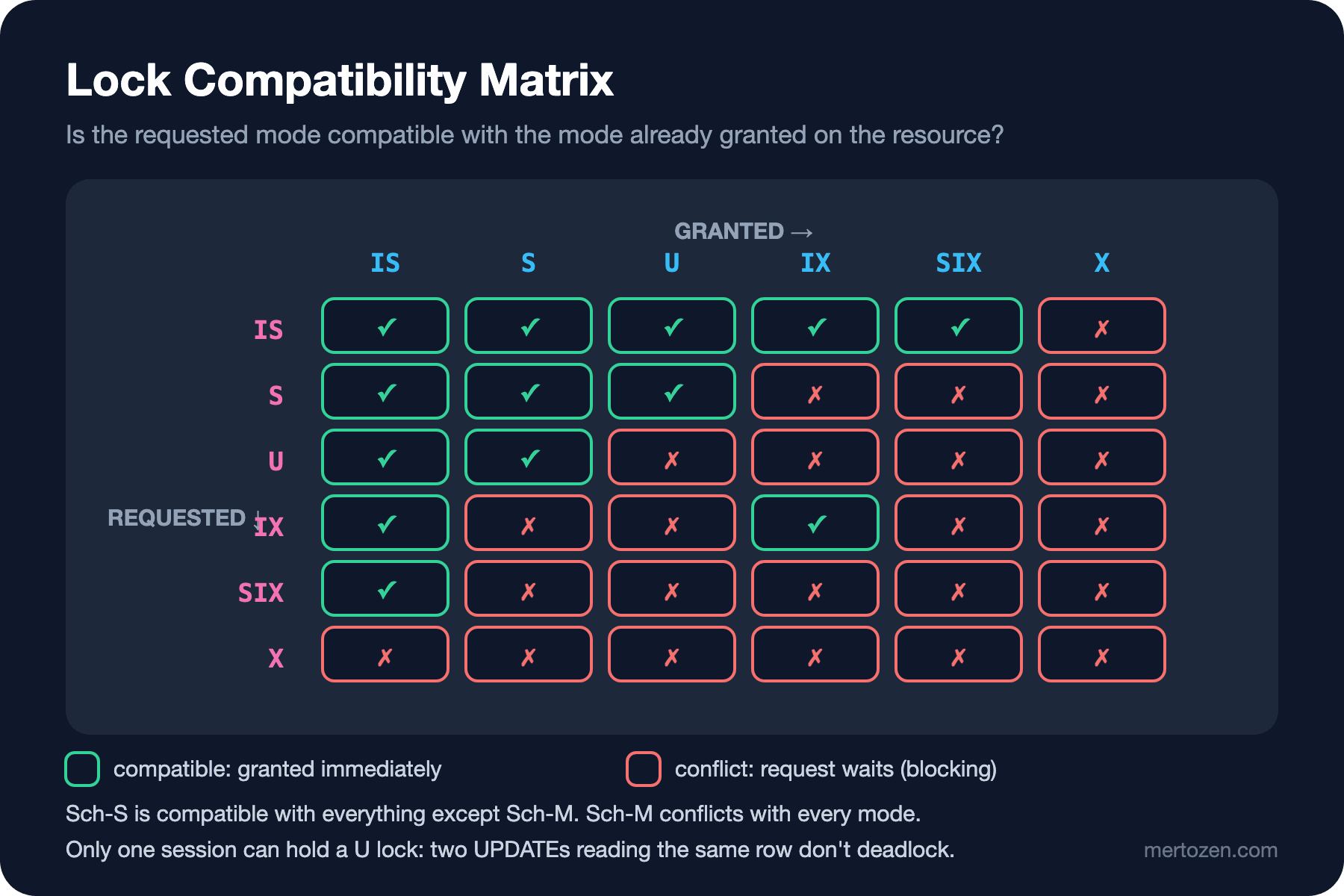
Back to the opening question. Because IX is compatible with IS, another session can put IS on the table and start reading. But when it reaches the OrderId = 999001 row it asks for S on that row, which conflicts with X. Under the default READ COMMITTED (with RCSI off) the reader waits for the writer to commit. We'll see this as a chain in a moment.
The matrix also tells you why U exists. If two sessions took S and then both tried to upgrade to X, each would wait for the other's S: the classic conversion deadlock. Because U is incompatible with U, the second UPDATE gets in line while it is still reading.
Lock Escalation: The 5,000 Rule in Practice
Holding one lock per row costs memory. So past a certain threshold SQL Server turns row and page locks into a single table lock. The documented rule: escalation is attempted when a single statement acquires at least 5,000 locks on a single table or index; if it can't happen because of a conflict, it is retried every 1,250 new locks. Escalation is also triggered when lock memory reaches 24 percent of the memory used by the Database Engine.
Let's measure it. We run the same query with different ranges and group the locks:
BEGIN TRANSACTION;
UPDATE dbo.Orders SET Status = 'Cancelled' WHERE OrderId BETWEEN 900001 AND 906300;

SELECT resource_type, request_mode, COUNT(*) AS locks
FROM sys.dm_tran_locks
WHERE request_session_id = @@SPID AND resource_database_id = DB_ID()
GROUP BY resource_type, request_mode;
ROLLBACK;
rows resource_type request_mode locks
5000 KEY X 5000
5000 PAGE IX 39
6200 KEY X 6200
6200 PAGE IX 48
6300 OBJECT X 1The table summarizes three separate runs (the DATABASE and OBJECT rows are left out). At 5,000 and 6,200 rows there is no escalation: 6,200 key locks and 48 page locks are still there. At 6,300 rows they all disappeared and a single X on the whole table took their place. Until this transaction ends, none of the million orders in the table can be read or updated.
Where exactly did the escalation happen? A short Extended Events session that captures the lock_escalation event tells us:
CREATE EVENT SESSION sqls_11_escalation ON SERVER
ADD EVENT sqlserver.lock_escalation
    (WHERE sqlserver.database_name = N'sqls_11')
ADD TARGET package0.ring_buffer
WITH (MAX_DURATION = 10 MINUTES);
event_name|escalation_cause|escalated_lock_count|hobt_lock_count|mode
----------|----------------|--------------------|---------------|----
lock_escalation|Lock threshold|6249|6248|X6,249 locks. The check runs every 1,250 locks, and when the 5,000th lock was taken, the lock count of this table's HoBT (Heap or B-Tree) itself was still below 5,000 because the database and object locks are counted too. At the next check, around 6,250, the threshold was crossed. The practical takeaway: "5,000 rows" is not a limit but a starting point. The event tells you the real number for your table.
You can control escalation per table: ALTER TABLE dbo.Orders SET (LOCK_ESCALATION = DISABLE). But that moves the problem into lock memory. The better fix is to split the big job into small pieces: update 50,000 orders not with a single UPDATE but in batches of 4,000, each in its own transaction. We'll see how optimized locking changes this picture in post 13.
Finding the Blocking Chain
The real-life story always starts the same way: "The orders screen froze." We build it in the lab with three sessions. A updates an order and waits without committing (in application code this is usually an HTTP (Hypertext Transfer Protocol) call made while the transaction is open). B wants to update the same order. C only reads:
/* Session A */
BEGIN TRANSACTION;
UPDATE dbo.Orders SET Status = 'Cancelled' WHERE OrderId = 999001;
WAITFOR DELAY '00:00:08';
ROLLBACK;

/* Session B */
UPDATE dbo.Orders SET Status = 'PaymentPending' WHERE OrderId = 999001;

/* Session C */
SELECT COUNT(*) AS pending
FROM dbo.Orders
WHERE OrderId BETWEEN 999000 AND 999010 AND Status = 'Pending';
From a fourth session we look at sys.dm_exec_requests:
SELECT r.session_id, r.blocking_session_id, r.wait_type, r.wait_resource, r.command,
       LEFT(t.text, 60) AS sql_text
FROM sys.dm_exec_requests AS r
CROSS APPLY sys.dm_exec_sql_text(r.sql_handle) AS t
WHERE r.database_id = DB_ID() AND r.session_id <> @@SPID
ORDER BY r.session_id;
session_id|blocking_session_id|wait_type|wait_resource|command
----------|-------------------|---------|-------------|-------
54|0|WAITFOR||WAITFOR
59|54|LCK_M_X|KEY: 38:72057594047430656 (94e983785ab1)|UPDATE
60|59|LCK_M_S|KEY: 38:72057594047430656 (94e983785ab1)|SELECTThree important details. First, the wait type names the lock mode: LCK_M_X waits for an X lock, LCK_M_S waits for an S lock. Second, wait_resource is the very key from the opening; 72057594047430656 is a hobt_id that maps to the clustered index of Orders in sys.partitions. Third, and least known: C is blocked not by A but by B. SQL Server queues lock requests; C's S request lines up behind B's X request, which arrived earlier and is waiting. So don't look just for the "first" link in the chain, look for its root.
The root, the head blocker, is the session that waits for nobody but makes others wait:
WITH blocked AS
(
    SELECT session_id, blocking_session_id
    FROM sys.dm_exec_requests
    WHERE blocking_session_id <> 0
)
SELECT DISTINCT b.blocking_session_id AS head_blocker,
       s.status, s.open_transaction_count, s.program_name
FROM blocked AS b
JOIN sys.dm_exec_sessions AS s ON s.session_id = b.blocking_session_id
WHERE b.blocking_session_id NOT IN (SELECT session_id FROM blocked);
head_blocker|status|open_transaction_count|program_name
------------|------|----------------------|------------
54|running|1|SQLCMDHere A shows as running because it is executing WAITFOR. The picture you see most often in production is different: the head blocker is sleeping, open_transaction_count is 1, and it has no row in sys.dm_exec_requests at all. The session is running nothing, but its transaction is open. That usually means an external call awaited after the transaction was opened in application code, or a transaction never closed because an exception was caught and swallowed. That's why the head blocker query uses sys.dm_exec_sessions, not sys.dm_exec_requests. For program_name to be useful, make a habit of adding Application Name=Bookstore.Api to the connection string.
The Blocked Process Report and Extended Events
DMVs (Dynamic Management Views) only show the present. To see in the morning a ten-second blocking episode from 03:00 at night you need a persistent record. SQL Server has a ready-made event for that: blocked_process_report. But the event is never produced unless the server-level blocked process threshold setting is greater than zero:
SELECT name, value_in_use FROM sys.configurations WHERE name = 'blocked process threshold (s)';name|value_in_use
----|------------
blocked process threshold (s)|0The default is 0, meaning off. This lab runs on a shared server, so we didn't change the server setting; on your own server you turn it on with sp_configure 'blocked process threshold (s)', 10 (10 seconds, for example; a very low value creates needless overhead). The session that collects the event:
CREATE EVENT SESSION sqls_11_blocking ON SERVER
ADD EVENT sqlserver.blocked_process_report
    (WHERE sqlserver.database_name = N'sqls_11')
ADD TARGET package0.event_file (SET filename = N'sqls_11_blocking.xel', max_file_size = 50)
WITH (MAX_DURATION = 2 HOURS);
Every threshold interval the report produces an XML (Extensible Markup Language) document: the input buffer of the blocked and blocking processes, their waitresource, isolation level and transaction name. As long as the same blocking lasts, the report keeps coming; so you read the XML documents grouped by their blocking-process and blocked-process pair. MAX_DURATION is the time-bound session feature that came with SQL Server 2025: a forgotten diagnostic session stops itself after two hours. We'll cover the diagnostic method as a whole in post 18.
Lock Hints: Safe Upsert, Queue Table and LOCK_TIMEOUT
Hints change the behavior of the lock manager, not the optimizer, and used in the right place they solve real problems. There are three typical uses.
Upsert with UPDLOCK + SERIALIZABLE
We keep a daily book sales counter. The first version everyone writes is this (we put a three-second wait in the middle to make the race visible):
CREATE TABLE dbo.DailyBookSales
(
    SalesDate date NOT NULL,
    BookId    int  NOT NULL,
    Quantity  int  NOT NULL,
    CONSTRAINT PK_DailyBookSales PRIMARY KEY (SalesDate, BookId)
);

DECLARE @d date = '2026-11-08', @b int = 42, @q int = 1;
BEGIN TRANSACTION;
IF NOT EXISTS (SELECT 1 FROM dbo.DailyBookSales WHERE SalesDate = @d AND BookId = @b)
BEGIN
    WAITFOR DELAY '00:00:03';
    INSERT dbo.DailyBookSales (SalesDate, BookId, Quantity) VALUES (@d, @b, @q);
END
ELSE
    UPDATE dbo.DailyBookSales SET Quantity += @q WHERE SalesDate = @d AND BookId = @b;
COMMIT;
Run by two sessions at the same time, both see "no row" and both go to the INSERT:
Msg 2627, Level 14, State 1, Server b8be943222fa, Line 7
Violation of PRIMARY KEY constraint 'PK_DailyBookSales'. Cannot insert duplicate key in object 'dbo.DailyBookSales'. The duplicate key value is (2026-11-08, 42).
The transaction didn't prevent this, because under READ COMMITTED the S lock taken by EXISTS is released as soon as the read is done, and you can't lock a row that doesn't exist anyway. The right way is to let the UPDATE itself do the check and protect the "missing row" with a range lock:
BEGIN TRANSACTION;
UPDATE dbo.DailyBookSales WITH (UPDLOCK, SERIALIZABLE)
SET Quantity += @q
WHERE SalesDate = @d AND BookId = @b;

IF @@ROWCOUNT = 0
    INSERT dbo.DailyBookSales (SalesDate, BookId, Quantity) VALUES (@d, @b, @q);
COMMIT;
With BookId 7 and 99 in the table, the UPDATE for BookId 42 finds no row but takes this lock:
resource_type|resource_description|request_mode
-------------|--------------------|------------
KEY|(c3384d858808)|RangeX-X
(c3384d858808) is the key of the BookId 99 row. RangeX-X locks the gap between 7 and 99; the second session can't write into that range, so it waits in its UPDATE, and once the first one commits it finds the row and updates it. The result is one row with Quantity = 2. No error, nothing lost. Writing HOLDLOCK instead of SERIALIZABLE is the same thing. MERGE needs the same hints too; being a single statement doesn't protect it from the race.
A queue table with READPAST
Several workers process order confirmation e-mails from an outbox table. Each worker takes the next New row and marks it Sending:
BEGIN TRANSACTION;
WITH next_email AS
(
    SELECT TOP (1) EmailOutboxId, OrderId, Status
    FROM dbo.EmailOutbox WITH (ROWLOCK, UPDLOCK, READPAST)
    WHERE Status = 'New'
    ORDER BY EmailOutboxId
)
UPDATE next_email
SET Status = 'Sending'
OUTPUT inserted.EmailOutboxId, inserted.OrderId;
/* send the e-mail here */
COMMIT;
When two workers run at the same time, one gets 1, the other gets 2, and neither waits. READPAST skips a locked row instead of waiting for it. When we remove READPAST from the hint, the second worker looks like this:
session_id|blocking_session_id|wait_type
----------|-------------------|---------
54|0|WAITFOR
59|54|LCK_M_U
The second worker waits in line until the first one finishes; adding workers gains nothing. READPAST only skips row and page locks; if the table has escalated it still waits. That's why it's used together with ROWLOCK and an index on Status, EmailOutboxId. We covered the outbox pattern itself in the Messaging and Event-Driven Architecture series; here the topic is only its locking behavior on the database side.
LOCK_TIMEOUT
The default LOCK_TIMEOUT is -1: wait forever. When the command timeout in the application (30 seconds by default in SqlClient) expires, the client cancels the request, but by then the chain has grown. For some work, getting an error immediately is better than waiting:
SET LOCK_TIMEOUT 3000;
ALTER TABLE dbo.Books ADD Subtitle2 nvarchar(200) NULL;
Msg 1222, Level 16, State 56, Server b8be943222fa, Line 2
Lock request time out period exceeded.Error 1222 only terminates the statement; it doesn't roll back the transaction. Without SET XACT_ABORT ON the transaction stays open; handling that is the caller's job (the TRY/CATCH pattern from post 9).
Sch-M: When a Migration Stops Everyone
Now let's see why we ran the ALTER TABLE above with a timeout. The scenario: A has opened a short transaction touching a book's price and hasn't committed yet. The deploy pipeline runs an Entity Framework Core (EF Core) migration that adds a column to Books. Meanwhile the catalog page reads a single book:
/* Session A */
BEGIN TRANSACTION;
UPDATE dbo.Books SET Price = Price WHERE BookId = 1;
WAITFOR DELAY '00:00:08';
COMMIT;

/* Session B: migration */
ALTER TABLE dbo.Books ADD Subtitle nvarchar(200) NULL;

/* Session C: catalog page */
SELECT Title, Price FROM dbo.Books WHERE BookId = 2;
session_id|blocking_session_id|wait_type|wait_resource|sql_text
----------|-------------------|---------|-------------|--------
54|0|WAITFOR||BEGIN TRANSACTION; UPDATE dbo.Books SET Price = Pr
59|54|LCK_M_SCH_M|OBJECT: 38:1253579504:0|ALTER TABLE dbo.Books ADD Subtitle nvarchar(200) N
60|59|LCK_M_SCH_S|OBJECT: 38:1253579504:0|SELECT Title, Price FROM dbo.Books WHERE BookId =C reads a different book that A never touched; it has no conflict with A at all. But B, waiting for Sch-M, is in line ahead of C, and Sch-S is incompatible with Sch-M. The new column is nullable and the change is metadata-only; it takes milliseconds by itself. But while it waits to get the lock, it lines up every reader of the table behind it. In production this shows up as "the site didn't respond for 40 seconds during the deploy".
The fix has three parts. Run migrations with a short LOCK_TIMEOUT and retry when they fail; find long open transactions first (the head blocker query from the previous section). For index operations, use WAIT_AT_LOW_PRIORITY together with ONLINE = ON; the waiting operation doesn't jump ahead of the others:
CREATE INDEX IX_Orders_Status ON dbo.Orders (Status)
WITH (ONLINE = ON (WAIT_AT_LOW_PRIORITY (MAX_DURATION = 1 MINUTES, ABORT_AFTER_WAIT = SELF)));
Online index operations are an Enterprise (and Developer) edition feature; even ONLINE = ON needs a short Sch-M at the start and at the end. WAIT_AT_LOW_PRIORITY manages those two moments. We saw how EF Core migrations turn into a script in the migrations post of the EF Core series; running that script in production by these rules is your job.
What's Different in SQL Server 2019/2022
The lock model in this post is identical in SQL Server 2019 and 2022: the same modes, the same escalation rule, the same DMVs. The differences are at the edges. WAIT_AT_LOW_PRIORITY for CREATE INDEX arrived with SQL Server 2022 (it has existed for ALTER INDEX ... REBUILD since 2014); on 2019 you can't create a new index with this option. Time-bound Extended Events sessions with MAX_DURATION are specific to 2025; on 2019/2022 you have to stop the session yourself. The biggest difference is optimized locking in SQL Server 2025: when it's on, most of the four locks from the opening are not held for the life of the transaction. It's off by default in 2025 and doesn't exist in 2019/2022; it's the topic of post 13.
Watch Out in Production
The cheapest way to measure blocking is wait statistics. If the total wait time of LCK_M_% waits is rising, you have a blocking problem; which lock mode is being waited for (LCK_M_U, LCK_M_X, LCK_M_SCH_M) tells you the kind of problem. But time alone isn't enough: who is blocking shows up in the blocked_process_report or in sys.dm_exec_requests snapshots taken at regular intervals.
Keep transactions short. Locks are held until the end of the transaction, not until the end of the statement. Making an HTTP call to the payment provider inside a transaction means keeping the order's row locked for as long as that call takes. Waiting for the payment result and then opening a short transaction is the right order.
Watch escalation. The lock_escalation event, or the index_lock_promotion_count column in sys.dm_db_index_operational_stats, shows which table escalated. Report queries and bulk updates are the usual suspects.
Separate readers from writers. In the opening example the reader waits because RCSI is off. With RCSI on, a reader takes no lock and reads the last committed version of the row. That one setting solves most blocking complaints; we saw its cost in post 10.
Common Pitfalls
"Solving" blocking with NOLOCK. WITH (NOLOCK) doesn't make the reader wait, but it reads uncommitted data that may be rolled back later, and if a page split happens during the scan it can show the same row twice or not at all. Finding a place where read consistency doesn't matter is harder than you think; the fix is RCSI.
Believing "SELECT doesn't lock". Under READ COMMITTED (RCSI off), SELECT takes a short S lock on the row it reads and waits on a row held with X. Under REPEATABLE READ and SERIALIZABLE those locks are held until the end of the transaction, and the reader makes the writer wait.
Putting the hint in the wrong place. Using UPDLOCK without SERIALIZABLE doesn't fix the upsert race, because it doesn't protect the missing row. Using READPAST on a table without an index makes the scan run into locked pages and can even cause escalation.
Forgetting a transaction open on the application side. A SqlTransaction opened without a using block, or a code path that doesn't call Rollback on an exception, is the most common source of head blockers. A connection returned to the pool is reset on its next use, but until then the locks stay. That's why the using pattern in the transaction post of the Dapper series matters.
A Small Experiment
★☆☆ Run the opening UPDATE with OrderId BETWEEN 999001 AND 999100. How many KEY and how many PAGE locks do you see? Explain the page count with the table's rows per page (sys.dm_db_index_physical_stats).
★★☆ Repeat the escalation experiment with a nonclustered index on Status. The UPDATE now writes to two indexes; does hobt_lock_count change, does escalation happen at fewer rows?
★★★ Run the blocking chain demo again after ALTER DATABASE sqls_11 SET READ_COMMITTED_SNAPSHOT ON. Does C still wait? What does B wait for? Then add WITH (READCOMMITTEDLOCK) to C and explain the difference.
We saw that locks wait in line and how to find the root of the chain. When two sessions wait for each other, though, the chain becomes a cycle and SQL Server picks one as the victim. In the next post we read the deadlock graph, build the common deadlock patterns and talk about safely retrying error 1205 on the .NET side.