

Managing Schema Changes: SQL Database Projects and DACPAC (State-Based) vs DbUp and Flyway (Migration-Based)
A state-based tool doesn't know about renames: after a column was renamed in the project, SqlPackage tried to drop and re-add it and was stopped only by BlockOnPossibleDataLoss; with a refactorlog it generated sp_rename. DACPACs with Microsoft.Build.Sql 2.3.0, deploy scripts and DeployReport, a hand-added index dropped by default, a CHECK definition that causes a false diff, and a changed migration DbUp misses and Flyway catches by checksum.
Version note: The examples in this post were run on SQL Server 2025 CU10 (17.0.5035.5) with the .NET 10 SDK, Microsoft.Build.Sql 2.3.0, SqlPackage 170.5.96, dbup-sqlserver 7.2.0 (with Microsoft.Data.SqlClient 7.1.2) and Flyway OSS Edition 13.12.2 (Apache 2.0 licensed) in Docker.
Guess First: Renaming a Column
The reporting database of Bookstore, the online bookstore used as the shared example across this site's series, doesn't use EF Core; its tables are the DailySalesReport filled by the nightly job from post 22 and the monthly targets. Its schema lives in a SQL Database Project and is published with SqlPackage on every deploy. The finance team asked for the Revenue column to be called NetRevenue. I changed one line in the project's table file (and the reference in the view), built the project and published as usual. The table has four rows of data:
NetRevenue decimal(14,2) NOT NULL,sqlpackage /Action:Publish /SourceFile:bin/Debug/Bookstore.Reporting.Db.dacpac /TargetServerName:"localhost,14333" /TargetDatabaseName:sqls_24_reporting /TargetUser:sa /TargetPassword:"$MSSQL_SA_PASSWORD" /TargetTrustServerCertificate:TrueDoes SqlPackage rename the column, or does it do something else?
Publishing to database 'sqls_24_reporting' on server 'localhost,14333'.
Initializing deployment (Start)
*** The column [dbo].[DailySalesReport].[Revenue] is being dropped, data loss could occur.
*** The column [dbo].[DailySalesReport].[NetRevenue] on table [dbo].[DailySalesReport] must be added, but the column has no default value and does not allow NULL values. If the table contains data, the ALTER script will not work. To avoid this issue you must either: add a default value to the column, mark it as allowing NULL values, or enable the generation of smart-defaults as a deployment option.
...
Updating database (Failed)
*** Could not deploy package.
Error SQL72014: Core Microsoft SqlClient Data Provider: Msg 50000, Level 16, State 127, Line 8 Rows were detected. The schema update is terminating because data loss might occur.
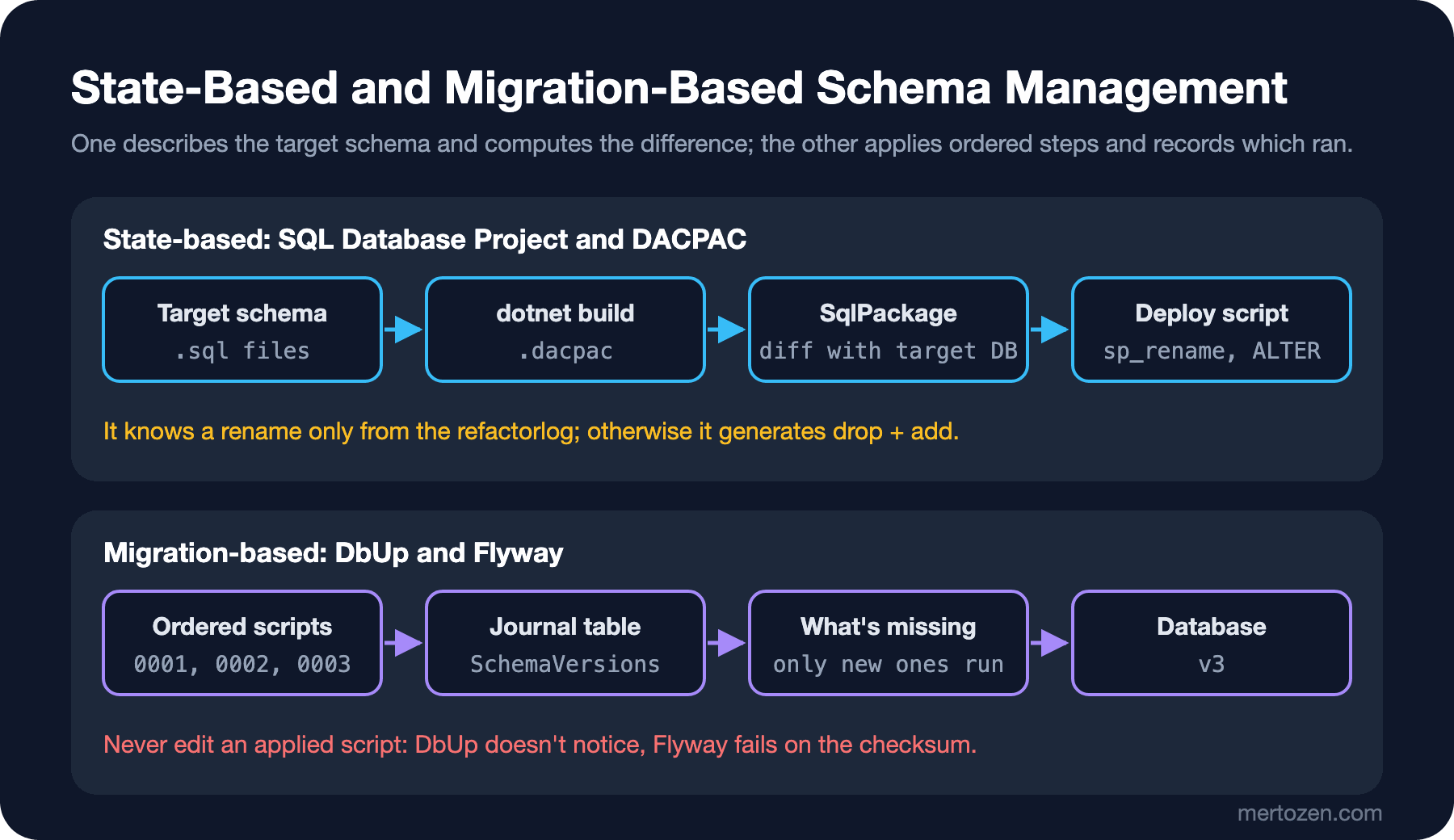
Something else: it tries to drop Revenue and add NetRevenue as a new column. The project only describes the target schema; the fact that "this column is the new name of the old one" isn't in that schema. What saved the data was SqlPackage's BlockOnPossibleDataLoss setting, which is on by default: seeing rows in the table, it stopped the deploy. In this post we run and compare two ways of managing schema changes, the state-based approach (SQL Database Project and DACPAC) and the migration-based approach (DbUp and Flyway), on the same Bookstore scenarios.
Two Approaches: Target Schema or Ordered Steps?
In the state-based approach, what's in source control is how the database should look: every table, view and procedure is a CREATE script. A tool compares this description with the target database and generates the script that closes the gap itself. In the migration-based approach, what's in source control is the changes themselves: numbered scripts. The tool keeps the scripts already applied in a journal table in the database and runs only the missing ones. EF Core Migrations belongs to the second group; it generates the scripts from the C# model (the migrations posts of the EF Core series).
SQL Database Project: A DACPAC from dotnet build
An SDK-style SQL Database Project builds with dotnet build like any .NET project, using the Microsoft.Build.Sql SDK; Visual Studio, the SQL Database Projects extension for VS Code, or just the command line will do. The project file is short:
<Project Sdk="Microsoft.Build.Sql/2.3.0">
  <PropertyGroup>
    <Name>Bookstore.Reporting.Db</Name>
    <DSP>Microsoft.Data.Tools.Schema.Sql.Sql170DatabaseSchemaProvider</DSP>
    <ModelCollation>1033, CI</ModelCollation>
  </PropertyGroup>
</Project>
DSP is the target platform; Sql170 is SQL Server 2025. Every .sql file in the folder is included in the project automatically. The tables are ordinary CREATE scripts:
CREATE TABLE dbo.DailySalesReport
(
    ReportDate date NOT NULL,
    Category varchar(30) NOT NULL,
    Orders int NOT NULL,
    Items int NOT NULL,
    Revenue decimal(14,2) NOT NULL,
    CreatedAt datetime2(0) NOT NULL CONSTRAINT DF_DailySalesReport_CreatedAt DEFAULT SYSUTCDATETIME(),
    CONSTRAINT PK_DailySalesReport PRIMARY KEY (ReportDate, Category)
);

CREATE TABLE dbo.SalesTarget
(
    TargetMonth date NOT NULL,
    Category varchar(30) NOT NULL,
    TargetRevenue decimal(14,2) NOT NULL,
    CONSTRAINT PK_SalesTarget PRIMARY KEY (TargetMonth, Category),
    CONSTRAINT CK_SalesTarget_FirstDay CHECK (DATEPART(DAY, [TargetMonth]) = (1))
);
The build compiles every object and validates their references to each other (a mistyped column name in the view is a build error) and writes the result into a single DACPAC file. The first publish also creates the database; the output below is from a publish to an empty test database:
  Bookstore.Reporting.Db -> /home/user/bookstore/db/Bookstore.Reporting.Db/bin/Debug/Bookstore.Reporting.Db.dacpac
Build succeeded.
Publishing to database 'sqls_24_v1check' on server 'localhost,14333'.
...
Creating database sqls_24_v1check...
Creating Table [dbo].[DailySalesReport]...
Creating Table [dbo].[SalesTarget]...
Creating Default Constraint [dbo].[DF_DailySalesReport_CreatedAt]...
Creating Check Constraint [dbo].[CK_SalesTarget_FirstDay]...
Creating View [dbo].[MonthlySalesVsTarget]...
Update complete.
Successfully published database.Rename, the Refactorlog, and Reading the Deploy Script
The fix for the opening problem is the refactorlog: a record of the rename operations in the project. When you rename the column with Rename in Visual Studio, this file is created for you; if you work on the command line, you write it by hand and add it to the project file:
<Operations Version="1.0" xmlns="http://schemas.microsoft.com/sqlserver/dac/Serialization/2012/02">
  <Operation Name="Rename Refactor" Key="5d4e3c2b-1a09-4f8e-9d7c-6b5a4f3e2d1c" ChangeDateTime="11/14/2026 21:00:00">
    <Property Name="ElementName" Value="[dbo].[DailySalesReport].[Revenue]" />
    <Property Name="ElementType" Value="SqlSimpleColumn" />
    <Property Name="ParentElementName" Value="[dbo].[DailySalesReport]" />
    <Property Name="ParentElementType" Value="SqlTable" />
    <Property Name="NewName" Value="[NetRevenue]" />
  </Operation>
</Operations>

<ItemGroup>
  <RefactorLog Include="Bookstore.Reporting.Db.refactorlog" />
</ItemGroup>
Before publishing, I asked SqlPackage what it would do. /Action:Script generates the deploy script without touching the database:
sqlpackage /Action:Script /SourceFile:bin/Debug/Bookstore.Reporting.Db.dacpac /TargetServerName:"localhost,14333" /TargetDatabaseName:sqls_24_reporting /TargetUser:sa /TargetPassword:"$MSSQL_SA_PASSWORD" /TargetTrustServerCertificate:True /OutputPath:deploy.sqlPRINT N'Rename [dbo].[DailySalesReport].[Revenue] to NetRevenue';
GO
EXECUTE sp_rename @objname = N'[dbo].[DailySalesReport].[Revenue]', @newname = N'NetRevenue', @objtype = N'COLUMN';
GO
PRINT N'Altering View [dbo].[MonthlySalesVsTarget]...';
GO
ALTER VIEW dbo.MonthlySalesVsTarget
...Now it's sp_rename, not DROP/ADD. The script also creates a dbo.__RefactorLog table in the database and writes the operation's key there, so the same rename isn't attempted again on the next publish. The publish succeeded and the four rows' values are in the NetRevenue column. In CI/CD this step should be a rule: the pipeline keeps the script generated from the DACPAC as an artifact, a person reads it, and the publish happens after that. The strength of the state-based tool is that it computes the difference itself; that's also its weakness, because you can't know what it will generate without reading it.
Drift: A Hand-Added Index and a False Difference
One night reporting slowed down and the on-call DBA added an index by hand in production. The project knows nothing about it. /Action:DeployReport shows what the next publish will do:
CREATE INDEX IX_DailySalesReport_Category ON dbo.DailySalesReport (Category) INCLUDE (NetRevenue);<DeploymentReport xmlns="http://schemas.microsoft.com/sqlserver/dac/DeployReport/2012/02"><Alerts /><Operations><Operation Name="Drop"><Item Value="[dbo].[DailySalesReport].[IX_DailySalesReport_Category]" Type="SqlIndex" /></Operation></Operations></DeploymentReport>With default settings. SqlPackage's dropping of objects that aren't in the project (DropObjectsNotInSource) is off by default, but indexes have a separate setting, and that one (DropIndexesNotInSource) is on by default. The index added at night silently disappears on the next deploy and the report slows down again. The right fix is to add the index to the project; so that you don't have to decide every time which of the project and the database is right, nobody changes production by hand, and if someone did, the change moves into the project right away.
The second source of drift is a false difference. In the first version of the project I had written the check constraint as CHECK (DAY(TargetMonth) = 1). The report I got without changing anything:
<DeploymentReport xmlns="http://schemas.microsoft.com/sqlserver/dac/DeployReport/2012/02"><Alerts /><Operations><Operation Name="Drop"><Item Value="[dbo].[CK_SalesTarget_FirstDay]" Type="SqlCheckConstraint" /></Operation><Operation Name="Create"><Item Value="[dbo].[CK_SalesTarget_FirstDay]" Type="SqlCheckConstraint" /></Operation></Operations></DeploymentReport>SQL Server stores the constraint as (datepart(day,[TargetMonth])=(1)) and SqlPackage finds the two expressions different; on every publish the constraint is dropped and recreated and the table is checked again. Writing the definition close to the form SQL Server stores (DATEPART(DAY, [TargetMonth]) = (1)) made the report come back empty. If you see a report that changes the same object on every publish, you're looking at a false difference like this.
DbUp: Migrations for a Service That Uses Dapper
Bookstore's price service (the service that processes the publishers' lists from post 23) uses Dapper and has its own small database. With no EF Core model, the automatic script generation of EF Core Migrations doesn't help here; the schema is small and the changes are small. DbUp is a good option for this case: you write the scripts, DbUp runs them in order and records them in a journal table. The migrations live in a separate console application, with the scripts as embedded resources:
<Project Sdk="Microsoft.NET.Sdk">

  <PropertyGroup>
    <OutputType>Exe</OutputType>
    <TargetFramework>net10.0</TargetFramework>
    <Nullable>enable</Nullable>
    <ImplicitUsings>enable</ImplicitUsings>
  </PropertyGroup>

  <ItemGroup>
    <PackageReference Include="dbup-sqlserver" Version="7.2.0" />
    <PackageReference Include="Microsoft.Data.SqlClient" Version="7.1.2" />
  </ItemGroup>

  <ItemGroup>
    <EmbeddedResource Include="Scripts\*.sql" />
  </ItemGroup>

</Project>
I added Microsoft.Data.SqlClient directly because version 6.1.4, which dbup-sqlserver 7.2.0 brings in, pulls a dependency that produces known vulnerability warnings (NU1902, NU1903) at build; with 7.1.2 the warning goes away and the migrations run without problems.
using System.Reflection;
using DbUp;
using DbUp.Engine;

string connectionString = Environment.GetEnvironmentVariable("BOOKSTORE_PRICES_DB")
    ?? throw new InvalidOperationException("Set the BOOKSTORE_PRICES_DB environment variable.");

EnsureDatabase.For.SqlDatabase(connectionString);

UpgradeEngine upgrader = DeployChanges.To
    .SqlDatabase(connectionString)
    .WithScriptsEmbeddedInAssembly(Assembly.GetExecutingAssembly())
    .WithTransactionPerScript()
    .LogToConsole()
    .Build();

DatabaseUpgradeResult result = upgrader.PerformUpgrade();
if (!result.Successful)
{
    Console.Error.WriteLine(result.Error);
    return 1;
}

Console.WriteLine($"Applied scripts: {result.Scripts.Count()}");
return 0;
CREATE TABLE dbo.PriceHistory
(
PriceHistoryId bigint IDENTITY(1,1) NOT NULL CONSTRAINT PK_PriceHistory PRIMARY KEY,
Isbn varchar(13) NOT NULL,
Price decimal(10,2) NOT NULL,
Currency char(3) NOT NULL,
ValidFrom date NOT NULL,
Source varchar(50) NOT NULL
);
CREATE INDEX IX_PriceHistory_Isbn_ValidFrom ON dbo.PriceHistory (Isbn, ValidFrom DESC) INCLUDE (Price, Currency);The first is Scripts/0001_create_price_history.sql, the second Scripts/0002_add_price_history_isbn_index.sql. DbUp orders scripts by name, which is why the numbers are zero-padded. The first and second runs:
2026-11-15 00:28:48 +00:00 [INF] Created database sqls_24_prices
2026-11-15 00:28:49 +00:00 [INF] Beginning database upgrade
2026-11-15 00:28:49 +00:00 [INF] Checking whether journal table exists
2026-11-15 00:28:49 +00:00 [INF] Journal table does not exist
2026-11-15 00:28:49 +00:00 [INF] Executing Database Server script 'Bookstore.PriceService.Migrations.Scripts.0001_create_price_history.sql'
2026-11-15 00:28:49 +00:00 [INF] Checking whether journal table exists
2026-11-15 00:28:49 +00:00 [INF] Creating the [SchemaVersions] table
2026-11-15 00:28:49 +00:00 [INF] The [SchemaVersions] table has been created
2026-11-15 00:28:49 +00:00 [INF] Executing Database Server script 'Bookstore.PriceService.Migrations.Scripts.0002_add_price_history_isbn_index.sql'
2026-11-15 00:28:49 +00:00 [INF] Upgrade successful
Applied scripts: 2

2026-11-15 00:28:49 +00:00 [INF] Beginning database upgrade
2026-11-15 00:28:49 +00:00 [INF] Checking whether journal table exists
2026-11-15 00:28:49 +00:00 [INF] Fetching list of already executed scripts.
2026-11-15 00:28:49 +00:00 [INF] No new scripts need to be executed - completing.
Applied scripts: 0
Now the trap: a developer notices that PriceHistory needs a CreatedAt column and picks the easiest place, adding the column to the already applied 0001 script. Build, run and check:
2026-11-15 00:28:50 +00:00 [INF] No new scripts need to be executed - completing.
Applied scripts: 0
SELECT ScriptName, Applied FROM dbo.SchemaVersions ORDER BY Id;
SELECT COL_LENGTH('dbo.PriceHistory', 'CreatedAt') AS created_at_length;ScriptName Applied
------------------------------------------------------------------------------- -----------------------
Bookstore.PriceService.Migrations.Scripts.0001_create_price_history.sql 2026-11-15 00:28:49.067
Bookstore.PriceService.Migrations.Scripts.0002_add_price_history_isbn_index.sql 2026-11-15 00:28:49.087
created_at_length
-----------------
NULLDbUp keeps only the script's name in the journal, not its content. It didn't notice the change; the column doesn't exist in this database, but it does in a test database built from scratch. The schemas of the two environments silently diverged. The right way is to leave applied scripts alone and add the change as a new script:
ALTER TABLE dbo.PriceHistory
    ADD CreatedAt datetime2(0) NOT NULL CONSTRAINT DF_PriceHistory_CreatedAt DEFAULT SYSUTCDATETIME();
2026-11-15 00:28:52 +00:00 [INF] Executing Database Server script 'Bookstore.PriceService.Migrations.Scripts.0003_add_price_history_created_at.sql'
2026-11-15 00:28:52 +00:00 [INF] Upgrade successful
Applied scripts: 1Flyway: The Same Migrations, With a Checksum
Flyway is a Java-based, language-independent implementation of the same idea, common in CI and in teams that don't use .NET. I ran its open source version (Flyway OSS Edition, Apache 2.0) with the official Docker image. File names are part of the contract: V1__create_price_history.sql and V2__add_price_history_isbn_index.sql are versioned migrations; R__latest_price_view.sql is a repeatable migration that runs again whenever its content changes (for views and procedures). The connection details are in a flyway.toml, the password in an environment variable:
[environments.dev]
url = "jdbc:sqlserver://host.docker.internal:14333;databaseName=sqls_24_flyway;encrypt=true;trustServerCertificate=true"
user = "sa"

[flyway]
environment = "dev"
locations = ["filesystem:sql"]
docker run --rm -e FLYWAY_PASSWORD -v "$PWD:/flyway/project" -w /flyway/project flyway/flyway:13.12.2 migrateFlyway OSS Edition 13.12.2 by Redgate
...
Database: jdbc:sqlserver:******** (Microsoft SQL Server 17.0)
Schema history table [sqls_24_flyway].[dbo].[flyway_schema_history] does not exist yet
Successfully validated 3 migrations (execution time 00:00.032s)
Creating Schema History table [sqls_24_flyway].[dbo].[flyway_schema_history] ...
Current version of schema [dbo]: << Empty Schema >>
Migrating schema [dbo] to version "1 - create price history"
Migrating schema [dbo] to version "2 - add price history isbn index"
Migrating schema [dbo] with repeatable migration "latest price view"
Successfully applied 3 migrations to schema [dbo], now at version v2 (execution time 00:00.025s)I tried the same trap in Flyway: in the applied V1 I made the Source column varchar(100) and ran migrate:
ERROR: Validate failed: Migrations have failed validation
Migration checksum mismatch for migration version 1
-> Applied to database : -1537186180
-> Resolved locally    : 473330901
Either revert the changes to the migration, or run repair to update the schema history.
Where DbUp stayed silent, Flyway stopped, because it keeps the checksum of every applied script in flyway_schema_history. I reverted the change, added V3__add_price_history_created_at.sql, and made the change that adds the new column to the view in the R__ file:
Successfully validated 5 migrations (execution time 00:00.028s)
Current version of schema [dbo]: 2
Migrating schema [dbo] to version "3 - add price history created at"
Migrating schema [dbo] with repeatable migration "latest price view"
Successfully applied 2 migrations to schema [dbo], now at version v3 (execution time 00:00.042s)
Which One When?
| Question | SQL Database Project + DACPAC | DbUp | Flyway | EF Core Migrations |
|---|---|---|---|---|
| What's in source | The target schema | Ordered scripts | Versioned and repeatable scripts | The C# model and generated migrations |
| Who writes the script | The tool generates it | You | You | The tool generates it, you fix it |
| Rename | Needs the refactorlog | Explicit sp_rename | Explicit sp_rename | RenameColumn, needs checking |
| If an applied script changes | No such concept; the difference is recomputed on every publish | Doesn't notice | Checksum error | Doesn't notice; the history table only has the migration name |
| Best fit | Databases with many objects and DBAs, reporting | .NET services that use Dapper | Teams with several languages and databases | Applications that use EF Core |
The rule is simple: one database is managed by one tool. At Bookstore, the order database is managed with EF Core Migrations (post 7 and the "Migrations in Practice" post of the EF Core series), the reporting database with a SQL Database Project, and the price service with DbUp. Running EF Core Migrations and SqlPackage against the same database means one tries to remove what the other added; the index example in the drift section is a small version of that.
Whatever the tool, two principles don't change. Scripts should survive being run again (the everyday DDL and idempotent scripts post of the SQL Fundamentals series); DbUp and Flyway run a script once, but you may have to rerun a script that stopped halfway by hand. And because the old version of the application keeps working against the same database for a while during an upgrade, changes are made backward compatible: add the column first, move the application, remove the old one later. The rename in the opening shouldn't have been done in a single step in production; this expand-contract approach is in the "Where Migrations Fit in a Deploy" post of the Deployment Strategies series.
What's different in SQL Server 2019/2022: the tools behave the same regardless of the server version; what changes is the target platform: in the project, DSP is Sql150 for 2019 and Sql160 for 2022. SqlPackage refuses to publish if the target server is older than the project's platform.
Watch Out in Production
Generate and keep a script in the pipeline before publishing (/Action:Script, info in Flyway). Every schema change that goes to production then has a readable record.
Don't turn off BlockOnPossibleDataLoss. It was the only thing that stopped the deploy in the opening.
Run migrations in a separate step of the deploy, not at application startup. When several instances start at once they all try the same migration; you'd also have to give the application's user the right to change the schema.
Common Pitfalls
A rename turning into drop and add in a state-based publish. Use the refactorlog and don't publish without reading the script.
Managing the same database with two tools. Each treats the other's change as drift.
Changing an applied migration script afterwards. DbUp silently skips it, Flyway stops; in both cases the right way is a new script.
Not moving a hand-made production change into the project. Because DropIndexesNotInSource is on by default, that index goes away on the next deploy.
A Small Experiment
★☆☆ Add the hand-added index to the reporting project as Indexes/IX_DailySalesReport_Category.sql and verify that the DeployReport comes back empty.
★★☆ Split renaming the price service's Source column to SourceName into expand-contract steps with DbUp: a new column, copying data, moving the application, removing the old column. How many scripts and how many deploys does it take?
★★★ Try what Flyway's flyway repair command does on a checksum mismatch. When is it right to use, and when is it dangerous?
We end the SQL Server Deep Dive series with this post. After the inside of the engine, data pages, indexes, the optimizer and locks, this last block moved to the work a developer meets in day-to-day operations: backup and restore, maintenance, Agent jobs, moving data and schema. The topics beyond a single server, that is replication, high availability, partitioning and sharding, are in the Database Performance and Scaling series.