

Isolation Levels and Row Versioning: READ COMMITTED, RCSI, SNAPSHOT, REPEATABLE READ and SERIALIZABLE
Isolation levels decide, through locking or row versioning, which anomalies concurrent transactions can see: the default READ COMMITTED makes readers wait for writers, RCSI returns the last committed version, and SNAPSHOT keeps the view from the start of the transaction and fails with 3960 on conflict. Two-session experiments on dirty reads, non-repeatable reads, phantoms, lost updates and write skew, the 14-byte cost of versioning and choosing an IsolationLevel from .NET.
Version note: The T-SQL (Transact-SQL, Microsoft's dialect of SQL (Structured Query Language)) examples in this post were run on SQL Server 2025 CU10 (17.0.5035.5, compatibility level 170), and the two-session experiments were run with a small test harness written with .NET 10, Microsoft.Data.SqlClient 7.1.1 and Dapper 2.1.89.
Guess First
Book 1 has a stock of 36. Session A starts an inventory correction and sets the stock to zero, but has not committed yet. At that very moment session B reads the stock for the product page. The database has SQL Server's default settings:
/* A */
BEGIN TRANSACTION;
UPDATE dbo.StockItems SET QuantityOnHand = 0 WHERE BookId = 1;

/* B */
SELECT QuantityOnHand FROM dbo.StockItems WHERE BookId = 1;
What does B see: 36, 0 or nothing at all? And what changes if B runs the same query WITH (NOLOCK), and then if the database has RCSI (Read Committed Snapshot Isolation) turned on? B's session has SET LOCK_TIMEOUT 1000, so it waits at most one second:
/* READ COMMITTED, default (locking) */
  B: Msg 1222: Lock request time out period exceeded.
/* WITH (NOLOCK) */
  B: QuantityOnHand=0
/* READ COMMITTED, RCSI on */
  B: QuantityOnHand=36
/* after A commits, RCSI on */
  B: QuantityOnHand=0
Three different answers. In the default mode, B waited for A's exclusive lock and timed out. NOLOCK read a value that was not committed and might never be (a dirty read): in this experiment A rolled back, so 0 was never real. With RCSI, B saw the last committed value, 36, without waiting. In this post we use two-session experiments to examine which anomaly each isolation level prevents and how, the difference between locking and row versioning, and the price of each.
Anomalies and Isolation Levels
The ANSI (American National Standards Institute) and ISO (International Organization for Standardization) SQL standard defines isolation levels by which anomalies they allow. SQL Server supports the four standard levels and two options based on row versioning. A summary of this post's experiments:
| Level | Mechanism | Dirty read | Non-repeatable read | Phantom | Update conflict |
|---|---|---|---|---|---|
READ UNCOMMITTED / NOLOCK | No locks when reading | Yes | Yes | Yes | - |
READ COMMITTED (locking) | S lock while a row is read, released immediately | No | Yes | Yes | - |
READ COMMITTED + RCSI | Committed version as of statement start | No | Yes | Yes | - |
REPEATABLE READ | S locks until the end of the transaction | No | No | Yes | - |
| SNAPSHOT | Committed version as of transaction start | No | No | No | Error 3960 |
| SERIALIZABLE | Key-range locks until the end of the transaction | No | No | No | - |
Two rows deserve emphasis. RCSI is not a new isolation level but READ COMMITTED implemented with versioning; applications use it without changing anything. SNAPSHOT, on the other hand, is a separate level and, unlike the standard's SERIALIZABLE, allows write skew; we will see it below.
Non-Repeatable Reads and REPEATABLE READ
B reads the stock inside a transaction, A sells one copy and commits, B reads the stock again and then makes its own sale. I ran the same scenario at two levels; A's session also has a one-second lock timeout:
/* B */ SET TRANSACTION ISOLATION LEVEL READ COMMITTED;   /* then REPEATABLE READ */
        BEGIN TRANSACTION;
        SELECT QuantityOnHand FROM dbo.StockItems WHERE BookId = 1;
/* A */ UPDATE dbo.StockItems SET QuantityOnHand = QuantityOnHand - 1 WHERE BookId = 1;
/* B */ SELECT QuantityOnHand FROM dbo.StockItems WHERE BookId = 1;
        UPDATE dbo.StockItems SET QuantityOnHand = QuantityOnHand - 1 WHERE BookId = 1;
        COMMIT;
/* READ COMMITTED */
B: QuantityOnHand=36
B: QuantityOnHand=35
final stock: 34
/* REPEATABLE READ */
B: QuantityOnHand=36
A: Msg 1222: Lock request time out period exceeded.
B: QuantityOnHand=36
final stock: 35Under READ COMMITTED, B saw two different values inside the same transaction: a non-repeatable read. This level takes a short shared (S) lock while reading a row and releases it as soon as the read is done; A's change can slip in between. Under REPEATABLE READ, B's S lock stayed until the end of the transaction, A's exclusive (X) lock request was incompatible with it, and A waited. In the experiment A gave up after one second; in a real application it would wait until B commits. The price of consistency is concurrency: the reader stops the writer.
Phantoms and SERIALIZABLE
REPEATABLE READ locks the rows it has read, but it cannot lock rows that do not exist yet. B counts customer 42's pending orders; A adds a new pending order for the same customer:
/* B */ SET TRANSACTION ISOLATION LEVEL REPEATABLE READ;   /* then SERIALIZABLE */
        BEGIN TRANSACTION;
        SELECT COUNT(*) AS pending FROM dbo.Orders WHERE CustomerId = 42 AND Status = 'Pending';
/* A */ INSERT dbo.Orders (OrderNumber, CustomerId, Status, CreatedAt, TotalAmount, Currency)
        VALUES ('PH-1', 42, 'Pending', '2026-10-21', 10, 'TRY');
/* B */ SELECT COUNT(*) AS pending FROM dbo.Orders WHERE CustomerId = 42 AND Status = 'Pending';
        COMMIT;
/* REPEATABLE READ */
B: pending=1
B: pending=2
/* SERIALIZABLE */
B: pending=1
A: Msg 1222: Lock request time out period exceeded.
B: pending=1Under REPEATABLE READ, a new row appeared in the second count: a phantom. Under SERIALIZABLE, B locked the range it read with key-range locks; no new row falling into that range could be inserted. Key-range locks are taken on an index, so the cost of SERIALIZABLE depends on index design: without a suitable index, the "range" becomes the whole table and a single query can stop every insert. We will look at lock types and the compatibility matrix in detail in the next post.
Lost Updates: Read, Compute, Write in the Application
The most common concurrency bug is not caught by any isolation level setting, because it lives in application code. Two requests read the stock, subtract one each and write the result:
int ra = await a.ExecuteScalarAsync<int>("SELECT QuantityOnHand FROM dbo.StockItems WHERE BookId = 1");
int rb = await b.ExecuteScalarAsync<int>("SELECT QuantityOnHand FROM dbo.StockItems WHERE BookId = 1");
await a.ExecuteAsync("UPDATE dbo.StockItems SET QuantityOnHand = @q WHERE BookId = 1", new { q = ra - 1 });
await b.ExecuteAsync("UPDATE dbo.StockItems SET QuantityOnHand = @q WHERE BookId = 1", new { q = rb - 1 });
two sales, stock 36 -> 35Two sales were made, and the stock went down by one. The default READ COMMITTED does not prevent this: both reads read the committed value, and both writes were valid at their time. There are three fixes. The best is to leave the computation to the database: SET QuantityOnHand = QuantityOnHand - 1 is atomic and gave the right result (34) in the earlier experiments. The second is to read WITH (UPDLOCK) and write in the same transaction; the second reader waits for the first to finish. The third is optimistic concurrency: a rowversion column and Entity Framework Core's (EF Core) concurrency token; the details are in the EF Core series' concurrency post.
RCSI and SNAPSHOT: Statement or Transaction?
The two versioning options use the same mechanism but "see" different moments. Under RCSI, each statement sees the data committed as of the moment that statement started. Under SNAPSHOT, all statements in the transaction see the data committed as of the transaction's first data access. I ran the previous scenario with both:
ALTER DATABASE sqls_10 SET ALLOW_SNAPSHOT_ISOLATION ON;
ALTER DATABASE sqls_10 SET READ_COMMITTED_SNAPSHOT ON WITH ROLLBACK IMMEDIATE;
/* READ COMMITTED, RCSI on */
B: QuantityOnHand=36
B: QuantityOnHand=35
B: QuantityOnHand=34
final stock: 34
/* SNAPSHOT */
B: QuantityOnHand=36
B: QuantityOnHand=36
B: Msg 3960: Snapshot isolation transaction aborted due to update conflict. You cannot use snapshot isolation to access
table 'dbo.StockItems' directly or indirectly in database 'sqls_10' to update, delete, or insert the row that has been
modified or deleted by another transaction. Retry the transaction or change the isolation level for the update/delete statement.
final stock: 35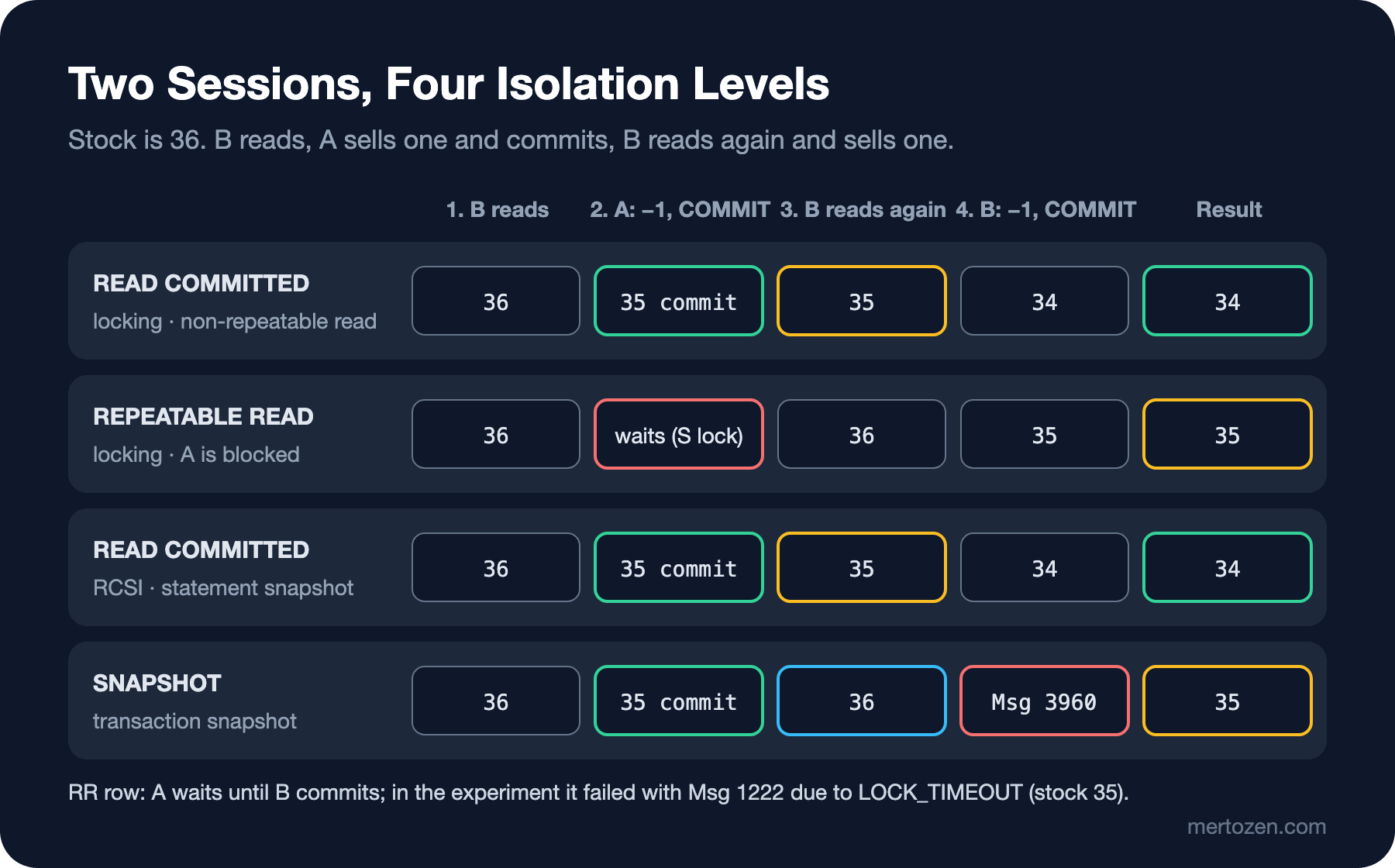
Under RCSI, B saw the 35 that A committed on its second read and made its own update on the current value. Under SNAPSHOT, B saw 36 every time; when it tried to update, SQL Server noticed that another transaction had changed the row after B's snapshot and stopped the transaction with 3960. This is not a bug but protection against a lost update: B's decision "I saw 36, let me write 35" is no longer valid. The application needs to catch this error and retry the transaction from the start.
There is one situation SNAPSHOT cannot protect against: two transactions change different rows and together break a rule that each of them read (write skew). The shipping team has the rule "at least one courier must be on duty"; Ada and Alan are on duty, and both request leave at the same time:
SET TRANSACTION ISOLATION LEVEL SNAPSHOT;
BEGIN TRANSACTION;
SELECT COUNT(*) AS on_duty FROM dbo.CourierShifts WHERE OnDuty = 1;
/* A: CourierId = 1, B: CourierId = 2 */
IF (SELECT COUNT(*) FROM dbo.CourierShifts WHERE OnDuty = 1) > 1
    UPDATE dbo.CourierShifts SET OnDuty = 0 WHERE CourierId = 1;
COMMIT;
A: on_duty=2
B: on_duty=2
couriers on duty: 0Both transactions saw two couriers on duty in their own snapshots, there was no conflict because they updated different rows, and in the end nobody was left on duty. SERIALIZABLE prevents this (the range read is locked), or the query that reads the rule locks both rows with UPDLOCK. If the rule can be expressed as a constraint in the database, that is the most robust option.
The Cost of Row Versioning and Isolation Levels from .NET
Versioning is not free. With versioning on, every modified row gets an extra 14 bytes pointing to the version chain, and the previous version is written to the version store. I rebuilt the 40,000-row StockItems table and updated every row once with snapshot isolation enabled:
page_count avg_rec max_rec     /* after a rebuild */
134        25.0    25
page_count avg_rec max_rec     /* after a single UPDATE with versioning on */
268        39.0    39
reserved_page_count reserved_space_kb   /* sys.dm_tran_version_store_space_usage */
440                 3520
The row grew from 25 to 39 bytes, and because the pages were full, the table doubled in size (page splits). The previous versions took 3.5 MB in tempdb. In a database with ADR (Accelerated Database Recovery) on, versions are kept in the database's own PVS (persistent version store) instead of tempdb. A long-running SNAPSHOT transaction prevents cleanup of every version created after it started; tempdb or the PVS grows.
In .NET, the isolation level is given when the transaction is opened. SNAPSHOT must be allowed in the database first:
await using var conn = new SqlConnection(connectionString);
await conn.OpenAsync();
await using var tx = (SqlTransaction)await conn.BeginTransactionAsync(System.Data.IsolationLevel.Snapshot);
int stock = await conn.ExecuteScalarAsync<int>(
    "SELECT QuantityOnHand FROM dbo.StockItems WHERE BookId = 1", transaction: tx);
short level = await conn.ExecuteScalarAsync<short>(
    "SELECT transaction_isolation_level FROM sys.dm_exec_sessions WHERE session_id = @@SPID", transaction: tx);
await tx.CommitAsync();
ALLOW_SNAPSHOT_ISOLATION=OFF: Msg 3952: Snapshot isolation transaction failed accessing database 'sqls_10' because snapshot isolation is not allowed in this database. Use ALTER DATABASE to allow snapshot isolation.
ALLOW_SNAPSHOT_ISOLATION=ON: stock 36, transaction_isolation_level 5In EF Core the same is done with await db.Database.BeginTransactionAsync(IsolationLevel.Snapshot). For RCSI, nothing changes in code; it is a database setting. In Azure SQL Database, RCSI is on by default for new databases; in SQL Server it is off. That is a common reason the same application behaves differently in two environments.
How SQL Server 2019/2022 differ: isolation levels, RCSI and SNAPSHOT behave the same in all three versions. Keeping versions in the PVS instead of tempdb when ADR (2019+) is on arrived with 2019. The "lock after qualification" part of SQL Server 2025's optimized locking requires RCSI to be on, which is a new reason to turn it on. We will cover it separately in an upcoming post in the series.
In Production
Review read-then-write code before turning on RCSI. RCSI removes readers waiting for writers, but if "read, check, write" logic happened to work correctly under locking READ COMMITTED thanks to blocking, it can start working incorrectly under RCSI. Turn such code into atomic statements or use UPDLOCK.
Monitor the version store. sys.dm_tran_version_store_space_usage, sys.dm_tran_persistent_version_store_stats and the longest-running active snapshot transaction (sys.dm_tran_active_snapshot_database_transactions) should be checked regularly.
If you use SNAPSHOT, retry 3960. The error is a deterministic conflict; retrying the transaction from the start with a new snapshot is the right response. We will discuss the idempotency requirement of retries in the deadlock post.
Common Pitfalls
Thinking NOLOCK is a "performance hint". Besides dirty reads, as Microsoft's locking and row versioning guide also points out, in allocation order scans it can read the same row twice or not at all. The right fix for reader-writer blocking is RCSI.
Mistaking SNAPSHOT for SERIALIZABLE. SNAPSHOT does not see phantoms, but it allows write skew; in the couriers experiment the rule was broken.
Forgetting that the isolation level is a session setting. SET TRANSACTION ISOLATION LEVEL is a session setting; it stays in effect for the next transaction too. Writing it explicitly is better than trusting the state of a connection coming from the connection pool.
Turning on REPEATABLE READ for a "consistent report". The S lock on every row a long report reads stays until the end of the transaction and stops writers; for a consistent report, SNAPSHOT is far cheaper.
A Small Experiment
★☆☆ With RCSI on, repeat the opening experiment with the WITH (READCOMMITTEDLOCK) hint. What did B see? When is this hint needed?
★★☆ Repeat the couriers scenario with SERIALIZABLE (two sessions, same order). What happened: blocking or a deadlock? Which session won?
★★★ Write the lost update experiment with EF Core: add a rowversion column to StockItem, read and save the same row with two DbContext instances. Which exception came, and what was the WHERE clause of the generated UPDATE statement?
In this post we always saw locks through their effects: 1222 timeouts, waiting sessions. In the next post we look at the locks themselves: lock modes, granularity, lock escalation and finding the blocking chain.