

Pages, Heaps and Clustered Indexes: How SQL Server Stores Data on Disk
SQL Server keeps data in 8 KB pages; a clustered index is a shallow B-tree that is the table itself, while a heap means unordered pages and forwarded records on update. Real pages, ROW_OVERFLOW/LOB, choosing a clustering key, an experiment showing Guid.CreateVersion7 values are as random as NEWID in SQL Server ordering, and fill factor and page density measurements.
Version note: The T-SQL (Transact-SQL, Microsoft's dialect of SQL (Structured Query Language)) examples in this post were run on SQL Server 2025 CU10 (17.0.5035.5, compatibility level 170), and the C# examples with .NET 10, Microsoft.Data.SqlClient 7.1.1, Dapper 2.1.89 and Entity Framework Core (EF Core) 10.0.14.
Guess First
Picture a table created in a hurry to hold order notes, with no clustered index. It has 20,000 rows and takes 129 pages on disk. We run a simple count query that reads every row once:
SET STATISTICS IO ON;
SELECT COUNT(*) AS NotesWithText FROM dbo.OrderNotes WHERE LEN(Note) > 2;
How many logical reads does a full scan of a 129-page table cost? 129 sounds reasonable. The real output:
NotesWithText
-------------
2000
Table 'OrderNotes'. Scan count 1, logical reads 2082, physical reads 0
2,082, sixteen times the page count. After rebuilding the table with ALTER TABLE ... REBUILD, the same query drops to 129 logical reads; the row count and the result do not change. To understand the difference we need to look at how SQL Server keeps data on disk: the 8 KB page, the structure of a row, heaps, the clustered index B-tree and how key choice affects all of them. At the end of the post we will also see experimentally why the Guid.CreateVersion7() values introduced in .NET 9 are not "sequential" in SQL Server.
The 8 KB Page and the Extent
A SQL Server data file is divided into 8 KB pages, and all reads and writes happen in page units. Every page starts with a 96-byte header; at its end sits the slot array (row offset array) that records where each row lives on the page. The in-row part of a row can be at most 8,060 bytes. Eight consecutive pages form an extent (64 KB), and space is allocated in extents. Since SQL Server 2016, new tables in user databases get uniform extents directly by default, meaning one extent is used by a single object.
We can see which page a row lives on with the undocumented but widely used %%physloc%%, and the page itself with sys.dm_db_page_info, introduced in SQL Server 2019:
SELECT TOP (3) OrderId, sys.fn_PhysLocFormatter(%%physloc%%) AS FilePageSlot
FROM dbo.Orders WHERE OrderId IN (1, 132, 133) ORDER BY OrderId;

SELECT page_type_desc, page_level, slot_count, free_bytes,
       prev_page_page_id, next_page_page_id, OBJECT_NAME(object_id) AS obj, index_id
FROM sys.dm_db_page_info(DB_ID(), 1, 2288, 'DETAILED');
OrderId FilePageSlot
------- ------------
1 (1:2288:0)
132 (1:2288:131)
133 (1:2290:0)
page_type_desc page_level slot_count free_bytes prev_page_page_id next_page_page_id obj index_id
-------------- ---------- ---------- ---------- ----------------- ----------------- ------ --------
DATA_PAGE 0 132 44 0 2290 Orders 1Page 2288 of file 1 is the first data page of Orders: 132 rows (slots 0 to 131) and only 44 bytes of free space left. prev_page_page_id = 0 shows it is the first page in the chain, and next_page_page_id = 2290 points to the next one. The leaf pages of a clustered index are doubly linked to each other this way.
Row Structure: IN_ROW, ROW_OVERFLOW and LOB
What happens when a row does not fit in 8,060 bytes? SQL Server moves variable-length columns out of the row. To see this, let's write three different rows:
CREATE TABLE dbo.BookReviews (
    ReviewId int IDENTITY PRIMARY KEY,
    BookId   int NOT NULL,
    Summary  varchar(5000) NOT NULL,
    Body     varchar(5000) NOT NULL,
    FullText nvarchar(max) NULL);

INSERT dbo.BookReviews (BookId, Summary, Body, FullText) VALUES
 (1, REPLICATE('s', 100), REPLICATE('b', 100), NULL),
 (2, REPLICATE('s', 5000), REPLICATE('b', 5000), NULL),
 (3, 'short', 'short', REPLICATE(CAST(N'r' AS nvarchar(max)), 20000));

SELECT au.type_desc, au.total_pages, au.used_pages
FROM sys.allocation_units AS au
JOIN sys.partitions AS p ON au.container_id = p.partition_id
WHERE p.object_id = OBJECT_ID('dbo.BookReviews');
type_desc total_pages used_pages
----------------- ----------- ----------
IN_ROW_DATA 9 2
LOB_DATA 9 6
ROW_OVERFLOW_DATA 9 2One table, three allocation units. The second row exceeds 10,000 bytes, so one of its columns moved to ROW_OVERFLOW_DATA and a 24-byte pointer stayed in the row. The 40,000-byte nvarchar(max) value in the third row went to LOB_DATA pages. The practical consequence: every overflow or LOB (Large Object) column fetched with SELECT * means extra page reads per row, and they show up separately in STATISTICS IO as lob logical reads. That is why not selecting wide columns unless you need them matters on the ORM (Object-Relational Mapping) side too.
The Clustered Index: A B-tree That Is the Table
A clustered index is not a separate structure; it is the table itself. Rows live at the leaf level of the B-tree (the docs say "B-tree"; in practice it is a B+ tree), sorted by the clustering key. Let's look at the levels of PK_Orders, the primary key of Orders:
SELECT index_level, page_count, record_count,
       CAST(avg_page_space_used_in_percent AS decimal(5,2)) AS avg_space_pct,
       min_record_size_in_bytes AS min_rec, max_record_size_in_bytes AS max_rec
FROM sys.dm_db_index_physical_stats(DB_ID(), OBJECT_ID('dbo.Orders'), 1, NULL, 'DETAILED')
ORDER BY index_level DESC;
index_level page_count record_count avg_space_pct min_rec max_rec
----------- ---------- ------------ ------------- ------- -------
2 1 27 4.31 11 11
1 27 7573 45.02 11 11
0 7573 1000000 99.43 57 64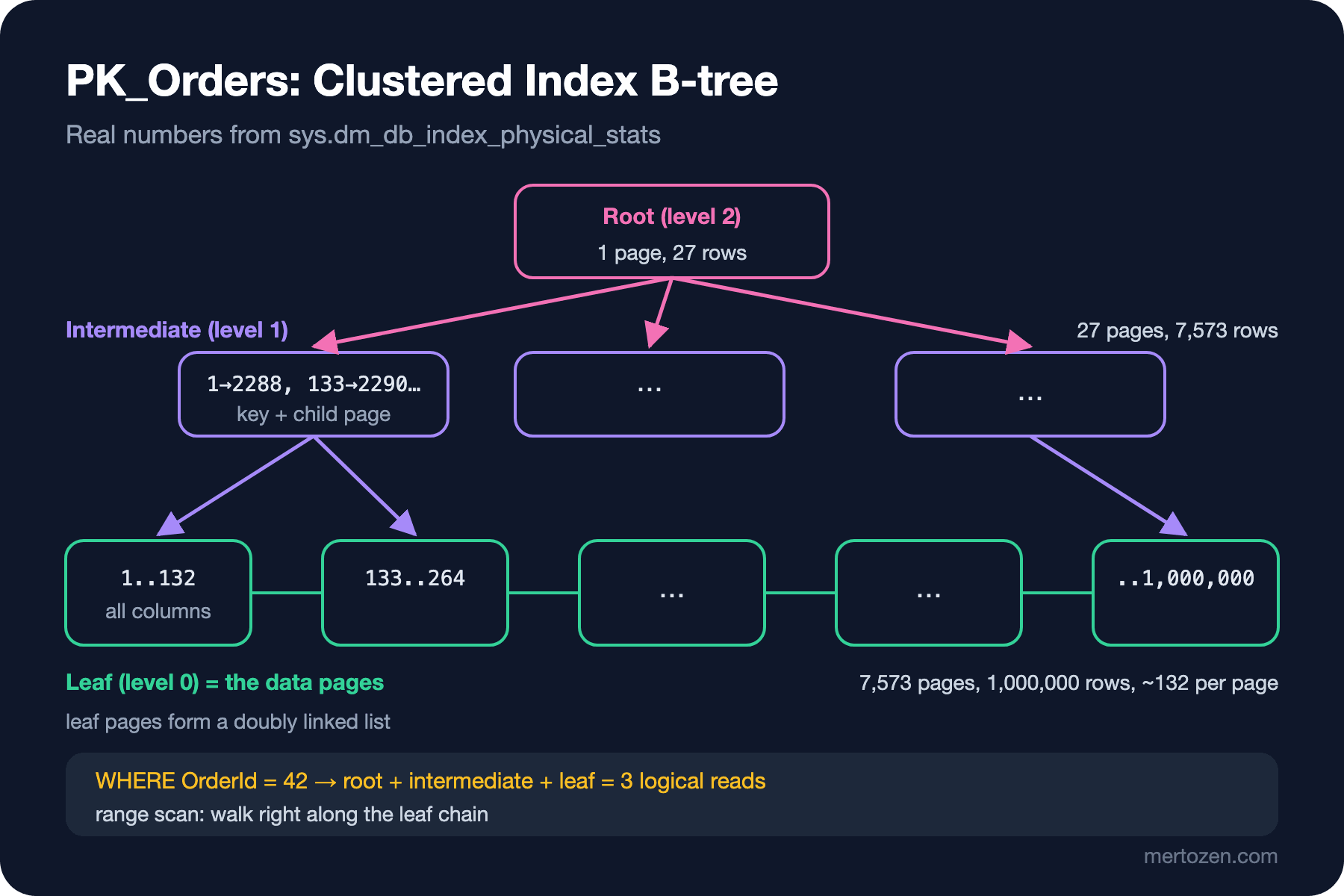
A million rows need only three levels. The leaf level has 7,573 data pages, each carrying full rows (57–64 bytes) and 99.43% full on average. Each record in the upper levels is only 11 bytes: the 4-byte OrderId key, a 6-byte child page address and one byte of row header. Thanks to such narrow records, a single intermediate page can address hundreds of leaf pages and the tree stays very shallow. That is why a single-row lookup by primary key costs as many reads as there are levels:
SET STATISTICS IO ON;
SELECT OrderNumber, Status FROM dbo.Orders WHERE OrderId = 42;
SELECT COUNT(*) FROM dbo.Orders WHERE OrderId BETWEEN 1 AND 131;
Table 'Orders'. Scan count 0, logical reads 3, ...
Table 'Orders'. Scan count 1, logical reads 3, ...The first query read three pages: root, intermediate and leaf. The second found 131 rows with three pages as well, because they all sit on the same leaf page. Range queries walk right along the leaf chain; since rows are in key order, they read consecutive pages.
Heaps and Forwarded Records
A table without a clustered index is a heap: rows are not kept in any particular order but written to a page with free space, and a row is reached by its physical address (RID, Row Identifier: file, page, slot). The table from the opening is such a heap. First I wrote 20,000 short notes, then grew every tenth note to 300 characters:
CREATE TABLE dbo.OrderNotes (OrderId int NOT NULL, Note varchar(1000) NOT NULL);  /* heap */
INSERT dbo.OrderNotes (OrderId, Note)
SELECT OrderId, 'ok' FROM dbo.Orders WHERE OrderId <= 20000;

UPDATE dbo.OrderNotes SET Note = REPLICATE('x', 300) WHERE OrderId % 10 = 0;

SELECT index_type_desc, page_count, record_count, forwarded_record_count
FROM sys.dm_db_index_physical_stats(DB_ID(), OBJECT_ID('dbo.OrderNotes'), 0, NULL, 'DETAILED');
index_type_desc page_count record_count forwarded_record_count
--------------- ---------- ------------ ----------------------
HEAP 47 20000 0
HEAP 129 21953 1953When a growing row no longer fit on its page, SQL Server moved it to another page but left a forwarding pointer with the new address in its old place. Why not move it and update the address? Because every nonclustered index on a heap points to rows by RID; if the row's address changed, every index would have to be updated. The price is paid during scans: a scan jumps to the new address at every forwarding pointer, finishes the read there and returns to where it was. The 2,082 logical reads from the opening come from these jumps. After ALTER TABLE dbo.OrderNotes REBUILD, the forwarded record count dropped to zero and logical reads to 129.
Heaps have a narrow niche: staging tables loaded once and then read from start to end. For a business table that is updated and queried by range, a clustered index should be the default. EF Core already creates the primary key as a clustered index.
Choosing the Clustering Key
The clustering key also goes into every nonclustered index: in a clustered table, nonclustered index rows point to the row by clustering key rather than by RID. So the list of requirements for a clustering key is short:
- Narrow: it repeats in every nonclustered index row. A 16-byte
uniqueidentifierinstead of a 4-byteintgrows every index on Orders. - Unique: if it is not, SQL Server adds a hidden 4-byte uniquifier to duplicate values.
- Static: if the key changes, the row moves in the B-tree and all nonclustered indexes are updated too.
- Ever-increasing: new rows always go to the last page, and full pages in the middle are not split.
The last one has an exception: under very heavy concurrent inserts, everyone waits for the same last page (PAGELATCH_EX, last-page insert contention). For that, SQL Server 2019 added the OPTIMIZE_FOR_SEQUENTIAL_KEY = ON index option. Bookstore's campaign peak of 120 orders per minute is far below that level.
GUID Keys: NEWID, NEWSEQUENTIALID and Guid.CreateVersion7
In distributed systems it is tempting to generate IDs in the application, which is why GUIDs (Globally Unique Identifiers) are a common choice. A random GUID puts every insert at a random point in the B-tree. When a row lands in the middle of a full page, the page is split in two: half moves to a new page and both pages end up roughly half full. Guid.CreateVersion7(), introduced in .NET 9, produces UUID (Universally Unique Identifier) version 7 values from RFC (Request for Comments) 9562 with a 48-bit Unix timestamp at the front, and it is easy to think "now we have sequential GUIDs". First, let's write five values a few milliseconds apart and let SQL Server sort them:
for (int seq = 1; seq <= 5; seq++)
{
    Guid id = Guid.CreateVersion7();
    await conn.ExecuteAsync("INSERT dbo.GuidOrder (Seq, Id) VALUES (@seq, @id)", new { seq, id });
    await Task.Delay(2);
}
foreach (var row in await conn.QueryAsync<(int Seq, Guid Id)>("SELECT Seq, Id FROM dbo.GuidOrder ORDER BY Id"))
    Console.WriteLine($"{row.Seq}  {row.Id}");
5 01a1bafa-505d-78f5-9d56-0c03fa9c3e22
1 01a1bafa-5040-7ac4-a7d2-65cfd477a27b
3 01a1bafa-5056-708f-8410-6c0fde44ccff
2 01a1bafa-5052-7baa-80bc-8efc4f8f45fe
4 01a1bafa-5059-71a0-93be-b62f62df25b9As text the values increase: 5040, 5052, 5056… But the ORDER BY Id order is 5, 1, 3, 2, 4. The reason is SQL Server's comparison rule for uniqueidentifier: it looks at the last 6 bytes (10–15) first, then 8–9, 6–7, 4–5 and finally 0–3. In version 7 the timestamp is in the leading bytes, while the last 6 bytes are random. So in SQL Server's eyes these values are as random as NEWID(). If one sample does not convince you, let's look at 100,000 values. I generated them one per millisecond to mimic an application doing about 1,000 inserts per second, and counted how many consecutive pairs are "ascending" by each side's rules; I also added SequentialGuidValueGenerator, which EF Core uses for Guid keys on SQL Server:
DateTimeOffset start = DateTimeOffset.UtcNow;
for (int seq = 1; seq <= 100_000; seq++)
    table.Rows.Add(seq, Guid.CreateVersion7(start.AddMilliseconds(seq)));
/* written to dbo.GuidStage (Seq, Id) with SqlBulkCopy */

int sqlAscending = await conn.ExecuteScalarAsync<int>("""
    SELECT COUNT(*) FROM (
        SELECT Id, LAG(Id) OVER (ORDER BY Seq) AS PrevId FROM dbo.GuidStage) AS x
    WHERE x.Id > x.PrevId
    """);
Guid[] ids = table.Rows.Cast<DataRow>().Select(r => (Guid)r["Id"]).ToArray();
int dotnetAscending = ids.Zip(ids.Skip(1)).Count(p => p.Second.CompareTo(p.First) > 0);

var generator = new Microsoft.EntityFrameworkCore.ValueGeneration.SequentialGuidValueGenerator();
/* the same measurement for 100,000 values from generator.Next(...) */
ascending pairs, SQL Server comparison: 49.944 / 99,999
ascending pairs, .NET Guid comparison: 99.999 / 99,999
ascending pairs, EF Core SequentialGuidValueGenerator (SQL Server comparison): 99.999 / 99,999By .NET's own comparison, version 7 increases perfectly; by SQL Server's comparison, half of the pairs go up and half go down, a coin toss. (The numbers are printed with the Turkish culture of my machine, so 49.944 means 49,944.) EF Core's generator puts the time-varying part in the last bytes, so it increases in SQL Server order. Now the effect on the index. I inserted 100,000 rows one by one into four tables, like an OLTP (Online Transaction Processing) application; the version 7 values came in the generation order above:
CREATE TABLE dbo.KeyInt   (Id int IDENTITY(1,1) NOT NULL PRIMARY KEY, Payload char(200) NOT NULL);
CREATE TABLE dbo.KeyNewId (Id uniqueidentifier NOT NULL DEFAULT NEWID() PRIMARY KEY, Payload char(200) NOT NULL);
CREATE TABLE dbo.KeySeq   (Id uniqueidentifier NOT NULL DEFAULT NEWSEQUENTIALID() PRIMARY KEY, Payload char(200) NOT NULL);
CREATE TABLE dbo.KeyV7    (Id uniqueidentifier NOT NULL PRIMARY KEY, Payload char(200) NOT NULL);

DECLARE @i int = 1, @id uniqueidentifier;
BEGIN TRANSACTION;
WHILE @i <= 100000
BEGIN
    INSERT dbo.KeyInt (Payload) VALUES ('order');
    INSERT dbo.KeyNewId (Payload) VALUES ('order');
    INSERT dbo.KeySeq (Payload) VALUES ('order');
    SELECT @id = Id FROM dbo.GuidStage WHERE Seq = @i;  /* v7 values in generation order */
    INSERT dbo.KeyV7 (Id, Payload) VALUES (@id, 'order');
    IF @i % 1000 = 0 BEGIN COMMIT; BEGIN TRANSACTION; END;  /* commit every 1,000 rows */
    SET @i += 1;
END;
COMMIT;
TableName page_count avg_space_pct frag_pct leaf_allocation_count
--------- ---------- ------------- -------- ---------------------
KeyInt 2632 100.0 .4 2632
KeySeq 2858 97.2 .7 2858
KeyV7 4147 67.0 99.2 4147
KeyNewId 4180 66.5 99.2 4180There is no difference between version 7 and NEWID(): both have about 4,100 pages, 67% density and 99% fragmentation. NEWSEQUENTIALID() and int IDENTITY stayed at roughly 2,600–2,900 pages. 58% more pages for the same data means 58% more I/O (Input/Output) to read the same table and 58% more memory in the buffer pool. If you need to generate GUIDs in the application, EF Core's generator is designed for exactly this. If you use version 7 for some other reason, such as sharing IDs with other systems, do not make it the clustering key; a narrow int/bigint clustered key plus a unique nonclustered index on the GUID is a better balance.
Fragmentation, Page Density and Fill Factor
The table above shows two different measures. Fragmentation (avg_fragmentation_in_percent) is how much the logical order of leaf pages disagrees with their order on disk. Page density (avg_page_space_used_in_percent) is how full the pages are. Microsoft's index maintenance guide says that in many workloads increasing page density has a bigger effect than reducing fragmentation, and that maintenance decisions should be based on measured impact rather than fixed thresholds. On modern SSDs (Solid-State Drives), where random I/O is about as fast as sequential I/O, fragmentation itself matters less; but half-empty pages mean more reads and more memory everywhere. I rebuilt the NEWID() table and looked at the effect of fill factor:
ALTER INDEX ALL ON dbo.KeyNewId REBUILD WITH (FILLFACTOR = 100);
/* 1,000 new random-key inserts */
ALTER INDEX ALL ON dbo.KeyNewId REBUILD WITH (FILLFACTOR = 80);
/* 1,000 new random-key inserts */| State | page_count | avg_page_space_used_in_percent | Full scan logical reads |
|---|---|---|---|
| Before rebuild | 4180 | 66.5 | 4199 |
FILLFACTOR = 100 rebuild | 2862 | 97.1 | 2875 |
| + 1,000 random inserts | 3674 | 76.4 | - |
FILLFACTOR = 80 rebuild | 3487 | 80.5 | - |
| + 1,000 random inserts | 3487 | 81.3 | - |
The rebuild cut the page count from 4,180 to 2,862, and a full scan dropped from 4,199 to 2,875 logical reads. But just 1,000 random inserts (1% of the data) into completely full pages opened 812 new pages: nearly every insert was a split. On the index rebuilt with fill factor 80, the same 1,000 inserts opened no new pages at all. That is Microsoft's recommendation too: set fill factor to something other than 100 only for indexes with many page splits, such as those whose leading column is a nonsequential GUID. Lowering fill factor on an ever-increasing key only leaves empty space behind.
Part of the speed-up seen after a rebuild also comes from the index statistics being updated with FULLSCAN, and you can often get the same effect much more cheaply by updating statistics. Statistics are the topic of post four.
How SQL Server 2019/2022 differ: page structure, heaps, B-trees and uniqueidentifier ordering are the same in all three versions. sys.dm_db_page_info and OPTIMIZE_FOR_SEQUENTIAL_KEY came with 2019; in 2017 and earlier you used the undocumented DBCC PAGE to look at a page. The measurements in this post give the same results on 2019 and 2022; only SCHEMA.sql does not run on 2019, which lacks GENERATE_SERIES.
In Production
Watch your heaps. In an updated heap, the forwarded record count grows silently, and scan cost grows with the number of forwarded records rather than the number of pages. For heaps, check forwarded_record_count in sys.dm_db_index_physical_stats; the permanent fix is adding a clustered index.
Tie index maintenance to measurement, not to the calendar. A job that rebuilds every index every night burns resources, produces log and often brings no measurable benefit. Target indexes with low page density that queries actually use, and measure the effect before and after with Query Store.
An index rebuild has a cost too. On Enterprise, ONLINE = ON is possible; on Standard, an offline rebuild locks the table for its duration, and we will see the effect of those locks in the upcoming lock post.
Common Pitfalls
Thinking version 7 GUIDs are "sequential for SQL Server". They increase in .NET order, not in SQL Server order. As a clustering key they give you the same splits and density problems as NEWID().
Choosing a wide or changing clustering key. Making a column like Email the clustered key both grows every nonclustered index and moves the row in the tree every time the email changes.
Deciding by fragmentation percentage. An index with 99% fragmentation but 95% density on an SSD can cause fewer problems than one with 10% fragmentation and 50% density. Look at both together, along with query measurements.
Choosing a heap for "faster inserts". Inserts may indeed be cheap, but the first growing UPDATE brings forwarded records, and every nonclustered index needs a RID lookup, which takes the gain back.
A Small Experiment
★☆☆ Run sys.dm_db_index_physical_stats for dbo.Customers. How many levels are there, and how full are the leaf pages? Guess how many logical reads a CustomerId = 50000 lookup costs, then measure.
★★☆ Add a clustered index on OrderId to the dbo.OrderNotes heap with CREATE CLUSTERED INDEX and run the same growing UPDATE again. What happens instead of forwarded records? Compare the page count and scan cost.
★★★ Redesign the KeyV7 table with a unique nonclustered index on Id and a clustered index on a bigint IDENTITY, then repeat the 100,000 inserts. Measure page count and density for both indexes separately and explain where the splits went.
We saw that the clustered index is the table itself and that its key goes into every nonclustered index. In the next post we will design nonclustered indexes: key column order, INCLUDE, covering indexes, the cost of key lookups and the tipping point where the optimizer abandons the index and scans the table.