

SQL Server 2025 Optimized Locking: TID Locking, Lock After Qualification and Behavior Changes
With optimized locking on, a transaction that updates 1,000 rows holds a single XACT lock instead of 1,017 locks and never escalates; with RCSI also on, LAQ evaluates the UPDATE predicate on the last committed version without locks, removing blocking but possibly changing the result of some concurrent work. The ADR prerequisite, new LCK_M_S_XACT waits, hints that disable LAQ, xactlock in the deadlock graph and the 2019/2022 difference, with real measurements.
Version note: The SQL (Structured Query Language) examples in this post were run on SQL Server 2025 (17.0.5035.5, Cumulative Update 10) at compatibility level 170. In SQL Server 2025 optimized locking is enabled per database and is off by default.
Guess First: Does the Sold-Out Book Get Restocked?
Two jobs run at the same time in the Bookstore. The first session sells the last copy of book 1 and sets its stock to zero; its transaction stays open for a few seconds. The second session is the warehouse job "add 10 copies to every sold-out book":
/* session 1: the last copy of book 1 is sold */
BEGIN TRANSACTION;
UPDATE dbo.StockItems SET QuantityOnHand = 0 WHERE BookId = 1;
WAITFOR DELAY '00:00:05';
COMMIT;

/* session 2: restock every sold-out book */
UPDATE dbo.StockItems SET QuantityOnHand += 10 WHERE QuantityOnHand = 0;
SELECT @@ROWCOUNT AS restocked;
At the start, 207 books have zero stock; book 1 has 36. The second session starts before the first one commits. When both transactions are done, what is the stock of book 1, 0 or 10? RCSI (Read Committed Snapshot Isolation) is on in the database; we ran the same experiment twice on the same data, and the only difference is one database setting:
setting                          restocked  BookId 1 QuantityOnHand  session 2 waited
OPTIMIZED_LOCKING = OFF          208        10                       LCK_M_U
OPTIMIZED_LOCKING = ON           207        0                        no
With classic locking the second session waited, saw book 1's stock at zero after the first one committed, and restocked it too. With optimized locking it didn't wait at all, skipped the book, and the book stayed out of stock. Both work correctly; but the results differ. This post covers SQL Server 2025's optimized locking: how it reduces locks, how it removes blocking, and where behavior changes, as in this table.
What Optimized Locking Is and How to Turn It On
Optimized locking has two parts. TID (Transaction ID) locking puts a single lock on the transaction's own identity instead of holding a separate lock for every modified row. Lock after qualification (LAQ) means that UPDATE and DELETE decide which rows to modify by looking at the row's last committed version, without taking locks. The second part works only when RCSI is on.
In SQL Server 2025 the feature is turned on per database, and its prerequisite is ADR (Accelerated Database Recovery): the transaction ID written into every row and the version store come from that infrastructure. In Azure SQL Database and SQL database in Microsoft Fabric it is always on and can't be turned off.
ALTER DATABASE sqls_13 SET ACCELERATED_DATABASE_RECOVERY = ON;
ALTER DATABASE sqls_13 SET OPTIMIZED_LOCKING = ON;
ALTER DATABASE sqls_13 SET READ_COMMITTED_SNAPSHOT ON WITH ROLLBACK IMMEDIATE;

SELECT DATABASEPROPERTYEX('sqls_13', 'IsOptimizedLockingOn') AS is_optimized_locking_enabled;
SELECT is_accelerated_database_recovery_on, is_read_committed_snapshot_on, is_optimized_locking_on
FROM sys.databases WHERE name = 'sqls_13';
is_optimized_locking_enabled
----------------------------
1
is_accelerated_database_recovery_on|is_read_committed_snapshot_on|is_optimized_locking_on
-----------------------------------|-----------------------------|-----------------------
1|1|1If DATABASEPROPERTYEX returns 0 the feature is off; NULL means it doesn't exist in that version. If you want to turn ADR off, you have to turn optimized locking off first. Changing READ_COMMITTED_SNAPSHOT requires no other active connections in the database; WITH ROLLBACK IMMEDIATE rolls back open transactions, so in production you do it in a maintenance window.
TID Locking: One Lock Instead of 1,000
We repeat the measurement from the 11th post of the series (Locks and Blocking). While a transaction that updated 1,000 orders is open we count our own locks; then we do the same for 20,000 orders:
BEGIN TRANSACTION;
UPDATE dbo.Orders SET Status = 'Cancelled' WHERE OrderId BETWEEN 990001 AND 991000;
SELECT resource_type, request_mode, COUNT(*) AS locks
FROM sys.dm_tran_locks
WHERE request_session_id = @@SPID AND resource_database_id = DB_ID()
GROUP BY resource_type, request_mode
ORDER BY resource_type;
ROLLBACK;
/* OPTIMIZED_LOCKING = OFF, 1,000 rows */
DATABASE|S|1
KEY|X|1000
OBJECT|IX|1
PAGE|IX|17
/* OPTIMIZED_LOCKING = OFF, 20,000 rows */
DATABASE|S|1
OBJECT|X|1
/* OPTIMIZED_LOCKING = ON, 1,000 rows */
DATABASE|S|1
OBJECT|IX|1
XACT|X|1
/* OPTIMIZED_LOCKING = ON, 20,000 rows */
DATABASE|S|1
OBJECT|IX|1
XACT|X|1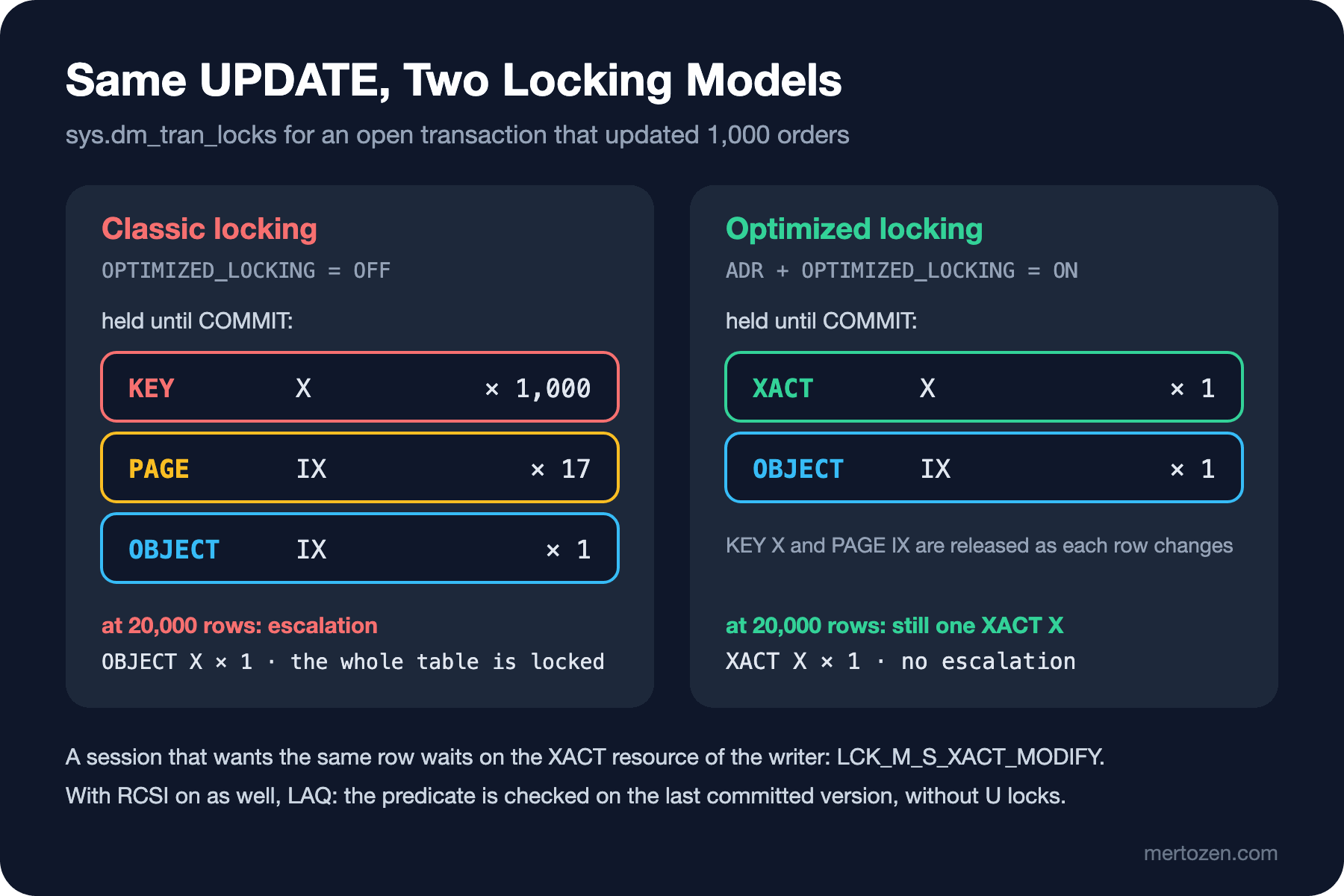
With classic locking, 1,000 key locks and 17 page locks stay until the end of the transaction; at 20,000 rows escalation kicks in and an X goes on the whole table. With optimized locking there is a single XACT lock no matter how many rows. Every row gets the ID (TID) of the transaction that last modified it. A short-lived X key lock is still taken while a row is modified, but it is released as soon as the row has changed. The only thing held for the life of the transaction is the X on its own TID. Because the number of locks doesn't grow with the number of rows, the escalation threshold is never reached; the operation that locked the whole table at 6,249 locks in post 11 leaves the table open here.
So what happens when another session wants to modify the same row? It looks at the TID written on the row, and if that transaction is still open it requests an S lock on the TID and waits:
/* session 2, while session 1 is open */
UPDATE dbo.StockItems SET QuantityOnHand += 10 WHERE BookId = 1;
session_id|blocking_session_id|wait_type|wait_resource
----------|-------------------|---------|-------------
54|0|WAITFOR|
60|54|LCK_M_S_XACT_MODIFY|XACT: 56:12750:0 KEY: 56:72057594047561728 (8194443284a0)Blocking is still there; of two transactions that want to modify the same row, one always waits. What changes is what the wait is on. The wait type is no longer LCK_M_U or LCK_M_X but LCK_M_S_XACT_MODIFY: it waits on the XACT (transaction) resource with the intent to modify. If it waits with the intent to read, you'll see LCK_M_S_XACT_READ. wait_resource shows both the transaction (XACT: 56:12750:0) and the row underneath. If your monitoring scripts filter on LCK_M_% they already catch these new waits; but if you set up alerts per wait type, you need to update the list.
Lock After Qualification: Blocking Goes Away
Back to the opening experiment, and this time we look at what the second session waits for. With classic locking (even with RCSI on):
session_id|blocking_session_id|wait_type|wait_resource
----------|-------------------|---------|-------------
54|0|WAITFOR|
62|54|LCK_M_U|KEY: 56:72057594047561728 (8194443284a0)
RCSI removes locks for readers, but the scan an UPDATE runs to find which rows to modify doesn't count as a read. In the classic model the UPDATE first takes a U lock on every row it scans, checks the predicate, and if the row doesn't match, releases the lock and moves on. The row of book 1 has the first session's X; U can't be granted and the scan stops there. It isn't even known yet whether the predicate matches that row.
LAQ reverses that order. The predicate is evaluated on the row's last committed version, without taking locks. If it doesn't match, the row is skipped; if it does, only then is an X lock taken and the row modified. Book 1's last committed stock is 36; it doesn't match QuantityOnHand = 0 and is skipped. The result: the second session has no row in its list to wait for, restocks 207 books and finishes.
That's why LAQ's biggest gain is removing blocking between jobs that touch different rows but scan the same ones. In the classic model an UPDATE with an unindexed predicate waited on every locked row it scanned. With LAQ it waits only if a row it will actually modify is locked.
LAQ works optimistically. If the row was modified by another transaction after the predicate was checked, SQL Server waits for that transaction to finish and evaluates the predicate again (requalification). Some plan operators don't support this; in that case the statement is aborted internally and rerun from the start without LAQ, and the lock_after_qual_stmt_abort event fires. If such reprocessing happens often, a feedback mechanism measured in logical reads temporarily turns LAQ off per plan or per database.
The Behavior Change: Where the Result Differs
The second row of the opening table is the price of LAQ. The second session's predicate is QuantityOnHand = 0. LAQ ruled out book 1 by looking at its last committed value, 36. The first session's reset to zero was not committed at that moment. In the classic model the second session waited, read the row's current value (0) after the first one committed, and restocked the book. So in the classic model the result follows "the order of the work", while with LAQ it follows "what was committed when the statement started".
Microsoft's documentation is clear here: under RCSI, without locking hints, you shouldn't assume the database engine puts transactions in a strict order; even without LAQ that isn't a guarantee. The recommended route for workflows that rely on strict ordering is stricter isolation levels: REPEATABLE READ or SERIALIZABLE. In the Bookstore example the real fix is a different one: if the restocking job misses half-finished sales, it catches them on its next run. This means that before turning LAQ on, you need to find out which jobs rely on ordering.
If you found such a job and want to isolate it, you can turn LAQ off for that statement with a hint:
/* session 2: restock every sold-out book */
UPDATE dbo.StockItems WITH (UPDLOCK) SET QuantityOnHand += 10 WHERE QuantityOnHand = 0;
SELECT @@ROWCOUNT AS restocked;
session_id|blocking_session_id|wait_type|wait_resource
----------|-------------------|---------|-------------
54|0|WAITFOR|
60|54|LCK_M_S_XACT_MODIFY|XACT: 56:12754:0 KEY: 56:72057594047561728 (8194443284a0)
restocked
---------
208The session waits again and the result is 208 books, as in the classic model; book 1 gets restocked too. The wait is still on XACT because TID locking is on; only LAQ is off. According to the documentation, LAQ isn't used in these cases:
- When conflicting locking hints such as
UPDLOCK,READCOMMITTEDLOCK,XLOCKorHOLDLOCKare used. - When the isolation level isn't
READ COMMITTEDorREAD_COMMITTED_SNAPSHOTis off. - When the table has a columnstore index, the statement has a variable assignment, or
OUTPUTwrites into a table variable or returns a result set. - When more than one seek/scan operator reads the rows to be modified, and in every
MERGEstatement. - When the LAQ heuristics turned it off for that plan or database.
Hints have one more side effect: a hint on one table doesn't affect another table in the same query. If you write UPDATE ... FROM t5 JOIN t6 WITH (UPDLOCK), only t6 takes locks; t5 keeps benefiting from optimized locking.
xactlock in the Deadlock Graph
We ran the opposite-access-order deadlock from the previous post again in the database with optimized locking on. The deadlock still happens; TID locking doesn't stop two transactions that want to modify the same rows from waiting for each other. But the graph looks different (we removed the id attributes for readability):
<resource-list>
  <xactlock xdesIdLow="12759" xdesIdHigh="0" dbid="56" mode="X">
    <UnderlyingResource>
      <keylock hobtid="72057594047430656" dbid="56" objectname="sqls_13.dbo.Orders" indexname="PK_Orders"/>
    </UnderlyingResource>
    <owner-list><owner id="processd9c930c58" mode="X"/></owner-list>
    <waiter-list><waiter id="processdb5a9f048" mode="S" requestType="wait"/></waiter-list>
  </xactlock>
  <xactlock xdesIdLow="12758" xdesIdHigh="0" dbid="56" mode="X">
    <UnderlyingResource>
      <keylock hobtid="72057594047561728" dbid="56" objectname="sqls_13.dbo.StockItems" indexname="PK_StockItems"/>
    </UnderlyingResource>
    <owner-list><owner id="processdb5a9f048" mode="X"/></owner-list>
    <waiter-list><waiter id="processd9c930c58" mode="S" requestType="wait"/></waiter-list>
  </xactlock>
</resource-list>
The resources are now xactlock, not keylock: each is a transaction ID, the owner in X, the waiter in S mode. Which row the wait is for is told by the keylock under UnderlyingResource; the reading method is the same, you just look one level deeper. If you wrote a script that groups deadlocks by index name, you need to update it to read UnderlyingResource as well. Victim selection hasn't changed: checkout, with the lower logused value, was the victim again.
What's Different in SQL Server 2019/2022
Optimized locking doesn't exist in SQL Server 2022 and earlier; the OPTIMIZED_LOCKING option, XACT resources, LCK_M_S_XACT_* waits and the xactlock element exist only in 2025. On 2019 and 2022 you can turn on ADR and RCSI, but UPDATEs scan with U locks in the classic way and hold key locks until the end of the transaction; the opening experiment always gives the result in the first row. This has a practical consequence: an application developed against Azure SQL Database and deployed to on-premises SQL Server 2022 can see different blocking and different results in the two environments. In Azure SQL Database RCSI and optimized locking are on by default; in 2022 neither is.
Watch Out in Production
Find the jobs that rely on ordering before you turn it on. What LAQ changes is the assumption "if I wait, I'll see the current value". Bulk UPDATEs driven by a status column (restocking, cancelling expired reservations, processing "Pending" orders) are the first candidates. Make them idempotent and safe to rerun, or run them under a stricter isolation level.
Turn it on with measurements. The locking_stats Extended Events event reports, for every database every few minutes, the number of escalations, whether TID locking and LAQ are on, and in how many queries LAQ wasn't used and why; it works even with the feature off. Collecting it for a week before turning the feature on and comparing afterwards is a good start. The lock_after_qual_stmt_abort event and the LAQ Feedback rows in sys.query_store_plan_feedback show reprocessed statements.
Review your lock hints. Optimized locking helps queries without hints the most. Hints left in old code as "we had deadlocks, so we added UPDLOCK" turn LAQ off for that statement. Keep the ones you really need and remove the rest with measurements.
Know its scope. Optimized locking only affects the row and page locks of DML (Data Manipulation Language) statements; schema locks stay the same. The Sch-M chain from post 11 still happens with optimized locking on. It isn't used in tempdb and temp tables at this time either.
Common Pitfalls
Turning on optimized locking without RCSI and expecting LAQ. TID locking works, the number of locks drops, escalation disappears; but UPDATEs still scan with U locks and the opening blocking continues as before. Most of the benefit comes from turning both on together.
Thinking "blocking is over". Two transactions that want to modify the same row still wait for each other; deadlocks continue too. Optimized locking changes the cause of blocking, not its existence. The retry and idempotency rules from the previous post still apply.
Alerts built on the old wait types. A dashboard that watches LCK_M_U and LCK_M_X can show blocking "disappearing" after optimized locking; in fact the waiting has moved to LCK_M_S_XACT_MODIFY.
Not testing the difference between Azure SQL and on-premises. The same integration test can give different results in the two environments. Run tests with the same settings as production; in the SQL Server 2025 image in Docker, optimized locking and RCSI are off by default.
A Small Experiment
★☆☆ With optimized locking on, turn RCSI off (READ_COMMITTED_SNAPSHOT OFF) and repeat the opening experiment. Does the second session wait, and with which wait type? What's the result?
★★☆ Write the restocking UPDATE with OUTPUT inserted.BookId and return a result set. Is LAQ used? Explain with the list of exceptions in the documentation.
★★★ Set up an Extended Events session with MAX_DURATION that collects the locking_stats event. Run the escalation experiment from post 11 with optimized locking off and on, and compare the escalation counts in the event.
We close the concurrency block here. Locks, deadlocks and optimized locking were about how the database protects work running at the same time. In the next post we move to code that runs inside the database: stored procedures, parameters, error handling, permissions with ownership chaining, and safe dynamic SQL.