

Using useEffect Correctly: Synchronization, Cleanup, Dependency Arrays and "You Might Not Need an Effect"
useEffect is not a lifecycle hook but a tool for synchronizing a component with an external system: every setup has a cleanup, and the dependency array lists the reactive values the effect reads. We connect the Bookstore catalog to API search and show with real network records that debounce and AbortController send one request even under StrictMode, that a late response overwrites the list without cleanup, and that useEffectEvent avoids a needless request.
Version note: The examples in this post were built and run with React 19.3, TypeScript 7.0, Vite 8.3, Oxlint 1.93 and Node.js 24; API calls went through the Vite dev proxy to a local copy of Bookstore.Api (ASP.NET Core 10), and network and console records were collected with Playwright 1.65 in headless Chromium.
Predict First
The React catalog of Bookstore, the online bookstore used as the shared example across this site's series, no longer takes its books from a fixed file but from the Bookstore API. Every letter typed into the search box changes the query state, and an effect sends a GET /api/books?search=... request. The effect waits 300 ms before sending (debounce), and on every new letter it cancels the previous wait and request.
The app is opened with npm run dev, the mode in which StrictMode runs effects twice on purpose. On the first load, how many requests go to the API: one or two? The user types "Jane", pauses for half a second, then adds " Eyre"; if, because of a network delay, the response for "Jane" arrives after the one for "Jane Eyre", which books stay on the screen? The answers to these two questions explain why effects exist and why cleanup is mandatory.
What Are Effects For? Synchronization, Not Lifecycle
react.dev defines useEffect as the hook that lets you synchronize a component with an external system, and adds that if you are not trying to synchronize with an external system, you probably do not need an effect. An external system is anything React does not control: the network, browser APIs, a WebSocket connection, a map library, document.title.
Someone coming from Angular tends to read an effect as a lifecycle hook: "I fetched data in ngOnInit, so I'll write useEffect(..., []); I closed the subscription in ngOnDestroy, so that's the cleanup". That reading works at first glance but asks the wrong question. An effect is not about "when was the component born and when did it die" but about "given the current props and state, what state should the outside world be in". In the catalog the question is: "if query is 'Dune' right now, the list on the screen should be the list the API returns for 'Dune'." When the query changes, the old synchronization ends (cleanup) and a new one starts (setup). Mount and unmount are just the first and last steps of this cycle.
Angular's own effect() is a similar tool, for side effects tied to signals. But in Angular the recommended way to fetch data is not an effect but resource and httpResource, and in React production code mostly uses a library such as TanStack Query. In this post we fetch data with an effect because it is the example that best shows how effects work; in the eighth post we move the same screen to TanStack Query.
The Catalog Comes from the API: Effect, Cleanup and Dependency Array
The new CatalogPage:
import { useEffect, useEffectEvent, useState } from 'react';
import { BookDetailsPanel } from '@/features/catalog/BookDetailsPanel';
import { BookList } from '@/features/catalog/BookList';
import { SearchBox } from '@/features/catalog/SearchBox';
import type { BookSummary, PagedResult } from '@/features/catalog/types';

type SortBy = 'title' | 'price';

type SearchResult =
  | { status: 'success'; query: string; books: BookSummary[]; total: number }
  | { status: 'error'; query: string; message: string };

type CatalogPageProps = {
  quantities: Record<string, number>;
  cartItemCount: number;
  onAdd: (book: BookSummary, amount: number) => void;
};

const debounceMs = 300;

export function CatalogPage({ quantities, cartItemCount, onAdd }: CatalogPageProps) {
  const [query, setQuery] = useState('');
  const [sortBy, setSortBy] = useState<SortBy>('title');
  const [selectedIsbn, setSelectedIsbn] = useState<string | null>(null);
  const [result, setResult] = useState<SearchResult | null>(null);

  // Not reactive: reads the latest cartItemCount without making the effect re-run
  const onSearchFinished = useEffectEvent((searched: string, total: number) => {
    console.info(`[search] "${searched}" -> ${total} book(s), cart has ${cartItemCount} item(s)`);
  });

  // Synchronizes the result list with the API for the current query
  useEffect(() => {
    const controller = new AbortController();
    const timer = setTimeout(async () => {
      try {
        const url = `/api/books?search=${encodeURIComponent(query.trim())}&pageSize=50`;
        const response = await fetch(url, { signal: controller.signal });
        if (!response.ok) {
          throw new Error(`HTTP ${response.status}`);
        }
        const page = (await response.json()) as PagedResult<BookSummary>;
        setResult({ status: 'success', query, books: page.items, total: page.total });
        onSearchFinished(query, page.total);
      } catch (error) {
        if (controller.signal.aborted) {
          return; // cleanup already ran: this response belongs to an old query
        }
        setResult({ status: 'error', query, message: error instanceof Error ? error.message : String(error) });
      }
    }, debounceMs);

    // Cleanup: runs before the next effect and on unmount
    return () => {
      clearTimeout(timer);
      controller.abort();
    };
  }, [query]);

  // Derived during render: no extra state, no extra effect
  const isLoading = result === null || result.query !== query;
  const books = result?.status === 'success'
    ? result.books.toSorted((a, b) => (sortBy === 'price' ? a.price - b.price : a.title.localeCompare(b.title)))
    : [];
  const selectedBook = books.find((b) => b.isbn === selectedIsbn) ?? null;

  return (
    <>
      <h1>Catalog</h1>
      <div className="toolbar">
        <SearchBox value={query} onChange={setQuery} />
        <label>
          Sort by{' '}
          <select value={sortBy} onChange={(e) => setSortBy(e.target.value as SortBy)}>
            <option value="title">Title</option>
            <option value="price">Price</option>
          </select>
        </label>
      </div>
      <p className="muted" role="status">
        {isLoading ? 'Loading…' : result.status === 'error' ? `Could not load books (${result.message})` : `${result.total} book(s) found`}
      </p>
      {(books.length > 0 || !isLoading) && (
        <BookList books={books} quantities={quantities} onAdd={onAdd} onSelect={setSelectedIsbn} />
      )}
      {selectedBook && <BookDetailsPanel key={selectedBook.isbn} book={selectedBook} />}
    </>
  );
}
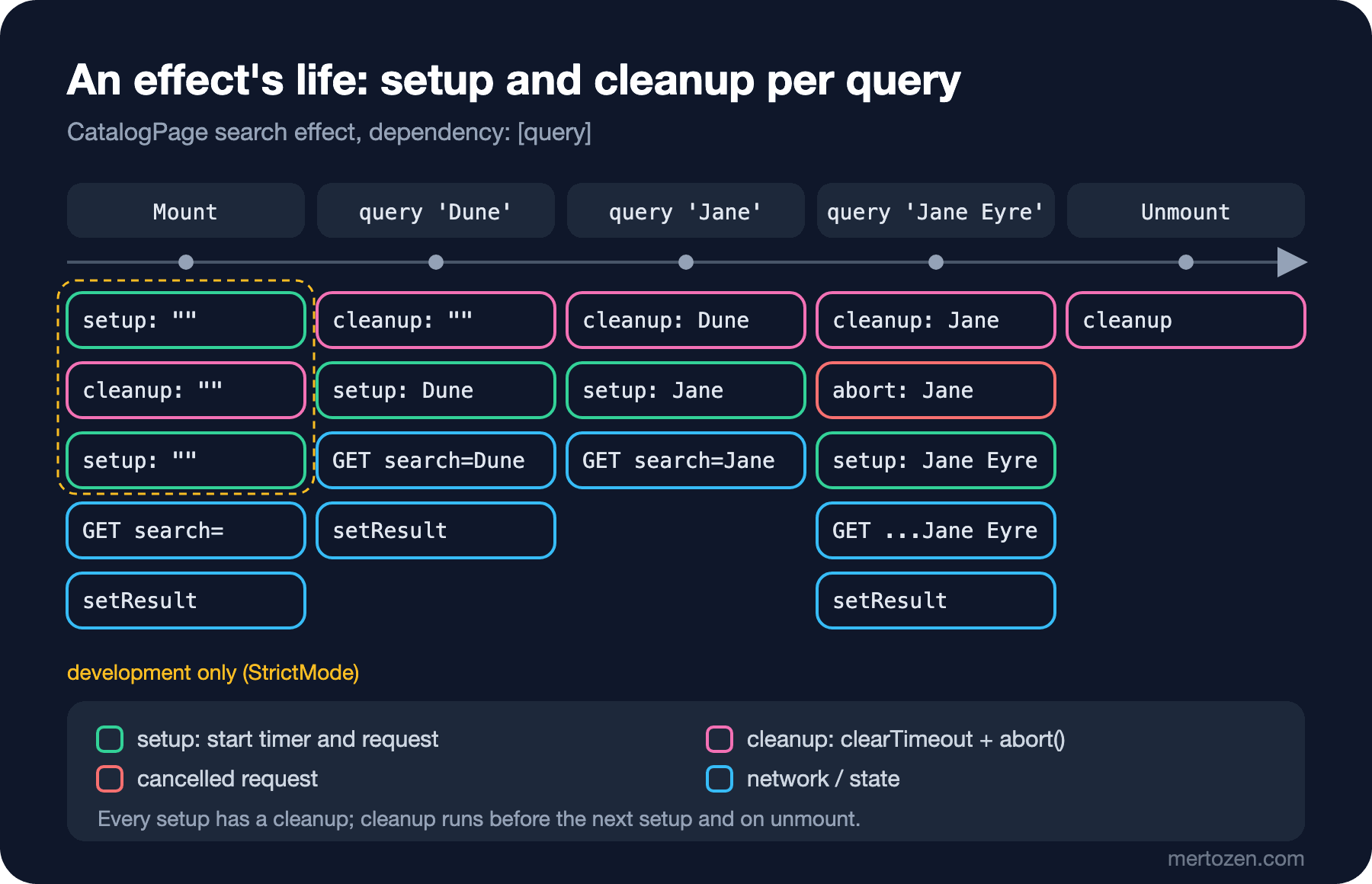
The effect function (setup) starts a timer; after 300 ms the request is sent and the response is written to state with setResult. The function the effect returns is the cleanup: it cancels the timer and, with AbortController, cuts off the request in flight. The second argument, the dependency array [query], tells React "this effect depends on query". After every render React compares the values in the array with the previous render's values using Object.is; if one changed, it runs the old effect's cleanup first and then the new setup. With an empty array ([]) the effect is set up only on mount and cleaned up on unmount; without an array it runs after every render.
The dependency array is not your choice; it is the list of reactive values used inside the effect. A reactive value is anything that can change from render to render: props, state and values computed from them inside the component. The effect reads query, so query must be in the array; leave it out and the effect keeps reading an old query. The exhaustive-deps rule we added in the second post checks this and reports nothing for this file.
There is no separate isLoading state. The result is stored together with the query it was fetched for; if result.query !== query, the list on the screen is stale, so we are loading. This is the effect version of the previous post's "do not put computable values into state" rule, and it also removes the extra render that calling setIsLoading(true) inside the effect would cause. The only change on the App side is passing the number of items in the cart to the catalog:
<CatalogPage quantities={quantities} cartItemCount={cartItemCount(lines)} onAdd={handleAdd} />We opened the page in development mode, typed "Dune", added Dune to the cart, then typed "Austen" into the box. The number on the left is milliseconds since the page opened:
  373 ms request:  ?search=&pageSize=50
  401 ms console: [search] "" -> 20 book(s), cart has 0 item(s)
  860 ms status:   20 book(s) found
 1405 ms request:  ?search=Dune&pageSize=50
 1413 ms console: [search] "Dune" -> 1 book(s), cart has 0 item(s)
 1451 ms status:   1 book(s) found | Dune
 2311 ms request:  ?search=Austen&pageSize=50
 2318 ms console: [search] "Austen" -> 2 book(s), cart has 1 item(s)
 2794 ms status:   2 book(s) found | Emma, Pride and Prejudice
Here is the answer to the first question in "Predict First": despite StrictMode, only one request went out on the first load. While typing "Dune", four letters set up the effect four times, but a request went out only 300 ms after the last letter; the cleanup cancelled the timers in between.
What Does the Double Run in StrictMode Show?
In development StrictMode cleans up and sets up every effect once more right after mount. In our effect the first setup's timer was cancelled by the cleanup, so its request never went out. We opened the same page with a version that drops the debounce and starts the request immediately inside the effect:
request: ?search=&pageSize=50
request: ?search=&pageSize=50
failed:  ?search=&pageSize=50 net::ERR_ABORTED
console: [search] "" -> 20 book(s), cart has 0 item(s)
status: 20 book(s) found
Two requests went out; the first was cut off by the abort() in the cleanup (net::ERR_ABORTED), and only the second one's result reached the screen and the console. In production only one request goes out. StrictMode is not showing a bug here; on the contrary, it proves the cleanup works. Without a cleanup both responses would have called setResult. If seeing two requests in development bothers you, the fix is not to turn StrictMode off but to hand data fetching to a library with a cache, which is the topic of the eighth post.
Race Conditions: The Old Response That Arrives Late
The classic bug of fetching data in an effect is that responses may not arrive in the order of the requests. We wrote a version without a cleanup:
  // WRONG: no cleanup, every response is applied in the order it arrives
  useEffect(() => {
    fetch(`/api/books?search=${encodeURIComponent(query.trim())}&pageSize=50`)
      .then((response) => response.json() as Promise<PagedResult<BookSummary>>)
      .then((page) => setResult({ status: 'success', query, books: page.items, total: page.total }));
  }, [query]);
With Playwright we delayed the search=Jane request by 1.5 seconds and left the other requests alone. We typed "Jane" into the box, changed it to "Jane Eyre" 400 ms later and waited 2.5 seconds:
input: Jane Eyre | status: Loading… | books: Emma, Jane Eyre, Pride and PrejudiceThe box says "Jane Eyre", but the list holds the three books of the "Jane" search: the Jane Eyre response arrived first and was written to the screen, then the delayed Jane response arrived and overwrote it. The status line saying "Loading…" is no accident: result.query is now "Jane" while the box holds "Jane Eyre"; the loading state we compute caught the mismatch but could not fix the list. On a real network this happens on a slow mobile connection, with an API under load, or wherever cached and uncached queries mix on the server.
The first fix is the ignore flag that react.dev also shows: once the cleanup has run, that effect's response no longer matters.
  // Fix 1: an "ignore" flag set by the cleanup
  useEffect(() => {
    let ignore = false;
    fetch(`/api/books?search=${encodeURIComponent(query.trim())}&pageSize=50`)
      .then((response) => response.json() as Promise<PagedResult<BookSummary>>)
      .then((page) => {
        if (!ignore) {
          setResult({ status: 'success', query, books: page.items, total: page.total });
        }
      });
    return () => {
      ignore = true;
    };
  }, [query]);
input: Jane Eyre | status: 1 book(s) found | books: Jane Eyreignore ignores the old response but does not cancel the request; the response still arrives and is still downloaded, it just does not get written to state. The AbortController in our real version cuts the request off at the browser level. The network record for the same delayed scenario:
request: ?search=&pageSize=50
request: ?search=Jane&pageSize=50
failed:  ?search=Jane&pageSize=50 net::ERR_ABORTED
request: ?search=Jane Eyre&pageSize=50
input: Jane Eyre | status: 1 book(s) found | books: Jane Eyre
The "Jane" request was cut off before its response arrived; fetch threw an AbortError, and the controller.signal.aborted check in the catch block swallowed it without showing an error. That check matters: if you show an abort as an error, the user sees "Could not load books" flash on every letter. On the Angular side, switchMap or httpResource did this cancellation for you; that is the behaviour covered in the RxJS series and in "Angular 20: Stable Signal APIs, httpResource and the New File Naming".
You Might Not Need an Effect
react.dev's "You Might Not Need an Effect" page lists the situations where effects are misused most. In Bookstore we already solved three of them correctly without noticing; here we measure their wrong versions.
An effect for derived data. A version that puts the "how many books were found" number into state and updates it with an effect:
  // WRONG: copying a derived value into state through an effect
  const [visibleCount, setVisibleCount] = useState(0);
  useEffect(() => {
    setVisibleCount(books.length);
  }, [books]);
Oxlint gives two separate warnings:
src/features/catalog/CatalogPage.tsx:69:5: warning react(set-state-in-effect): Calling setState synchronously within an effect can trigger cascading renders
src/features/catalog/CatalogPage.tsx:70:7: warning react-hooks(exhaustive-deps): React hook useEffect depends on `books`, which changes every render
We counted CatalogPage's renders in the production build for both versions. First with the computed value, then with the effect version:
renders after first load: 2 | status: 20 book(s) found
renders for typing "Dune": 5 | status: 1 book(s) found
renders after first load: 4 | status: 20 book(s) found
renders for typing "Dune": 11 | status: 1 book(s) foundThe screen is the same but the work is more than double: since a new books array is created on every render, the effect runs after every render and sets the same number again. This time React saw the same value and stopped; if the value were different each time, the loop would be endless. The rule: do not write an effect for something that can be computed during render.
An effect for logic that belongs to an event. Work such as "show a notification when an item is added to the cart" or "send a POST when an order is placed" is tied to a specific user action; it belongs in the event handler. Watching a state change and sending a POST in an effect makes the request go out again when the same state changes for another reason (a reload, the Back button, StrictMode).
An effect to reset state when a prop changes. We did this with key in the previous post; useEffect(() => setGiftNote(''), [book.isbn]) first renders with the old note, then resets it, and shows a wrong value on the screen for a moment.
useEffectEvent: Separating Non-Reactive Logic
When a search finishes we write an analytics line to the console, and that line includes the number of items in the cart. If we read cartItemCount directly inside the effect, lint wants it in the dependency array. We saw what happens if we add it:
request: ?search=&pageSize=50
console: [search] "" -> 20 book(s), cart has 0 item(s)
--- add Dune to the cart
request: ?search=&pageSize=50
console: [search] "" -> 20 book(s), cart has 1 item(s)
Adding Dune to the cart ran the search again and sent an unnecessary request to the API. The cart count is not part of what the effect synchronizes (the search result); we only want to read its current value when the "search finished" event happens. useEffectEvent, stable since React 19.2, makes that split: the function inside it always sees the latest props and state, but it does not count as a dependency of the effect. In the real code above onSearchFinished is defined this way, and the same scenario:
request: ?search=&pageSize=50
console: [search] "" -> 20 book(s), cart has 0 item(s)
--- add Dune to the cart
Adding to the cart caused no new request. In the first run, the "Austen" line saying "cart has 1 item(s)" shows that the function sees the current value. react.dev adds a warning: useEffectEvent is not an escape hatch for shortening the dependency list; use it only for "event" logic that is genuinely fired from an effect. Oxlint's exhaustive-deps rule did not ask for onSearchFinished as a dependency; with the React team's ESLint plugin, effect events must not be put in the array either.
useLayoutEffect has the same API but runs before the browser paints the screen. It exists for DOM measurements where the user must not see the wrong first state even for a moment, such as measuring a tooltip and adjusting its position. Since it blocks painting, the default choice is always useEffect.
In Production
Fetching data with an effect works, but there is no cache: when the user goes back to the "Dune" search, the same request goes out again. Results disappear when navigating between pages, two components asking for the same data send two requests, and nested components that load one after another create a request waterfall. These are exactly the problems a library such as TanStack Query solves. We keep the effect version as a reference so we can measure what we gain.
The debounce delay is a product decision: too short and every letter sends a request, too long and search feels sluggish. Think about exceptions too, such as searching immediately when the user presses Enter and showing the full list at once when the box is cleared. On the server, a search query should have an upper limit (page size); the Bookstore API caps pageSize at 50.
Tell aborts apart when debugging: do not report AbortErrors as errors in logs and error tracking. Otherwise every fast typist becomes a source of "errors" that trigger alerts.
Common Pitfalls
A missing dependency: not putting a prop or state the effect reads into the array means the effect keeps running with an old value. Instead of silencing the lint warning, rethink what the effect depends on.
An object or function dependency: an object created during render is a new reference on every render. A version that collects the search parameters in an object and makes that object a dependency:
  // WRONG: a new object on every render
  const params = { search: query.trim(), pageSize: 50 };
src/features/catalog/CatalogPage.tsx:61:7: warning react-hooks(exhaustive-deps): React hook useEffect depends on `params`, which changes every renderrequests in the first 5 s without typing anything: 16Without the user touching anything, 16 requests went out in five seconds: every response triggers a render through setResult, the render creates a new params object, and the effect runs again and sends a new request. Without the debounce the number would be far higher. The fix is to use primitive values (query) as dependencies or to create the object inside the effect.
Making the effect async: useEffect(async () => ...) returns a promise, while React expects a cleanup function. Put the async work into a separate function inside the effect (in our example, the timer callback).
Forgetting cleanup: timers, subscriptions, event listeners and requests turn into leaks without a cleanup. That is why StrictMode runs effects twice.
A Small Experiment
★☆☆ Add a line to the effect that updates document.title based on the search text ("Search: Dune · Bookstore"). Should you write a separate effect for this or add it to the existing one? Do you need to restore the title in a cleanup?
★★☆ Stop the API and run a search. What do you see on the screen? Add a "Retry" button to the error state; find a clean way to run the effect again for the same query when it is pressed (hint: add a counter to state and make it a dependency).
★★★ Delay the "Jane" response with Playwright or the browser's network throttling, remove the AbortController and work with the ignore flag only. How many responses are downloaded in the network tab? Then try with the AbortController only, without the aborted check in catch: what does the user see?
We have learned to use effects for synchronizing with an external system. In the next post we look at useRef for DOM access and for variables that do not trigger renders, Context as the counterpart of Angular's DI, and moving repeated logic into custom hooks; the search effect is a good candidate to move into one.