

Events and State in React: useState, Immutable Updates and When Re-renders Happen
In React state is a snapshot per render: setState does not change the variable, it asks for the next render; an update computed from the previous value needs an updater function, and objects and arrays always need a new reference. We add a quantity picker and a cart to the Bookstore catalog and show with render logs that three setAmount(amount + 1) calls give 2, that a mutated cart reaches the screen late and that three updates in one event become one render.
Version note: The examples in this post were built and run with React 19.3, TypeScript 7.0, Vite 8.3 and Node.js 24; render logs and screen values were collected with Playwright 1.65 in headless Chromium on the production build.
Predict First
In the React client of Bookstore, the online bookstore used as the shared example across this site's series, we add a quantity picker to every book card: "−", a number, "+" and an "Add 1 to cart" button. The card has its own state: const [amount, setAmount] = useState(1). For the experiment we put two more buttons on the card. Both try to raise the amount by three:
  function addThreeWithValue() {
    setAmount(amount + 1);
    setAmount(amount + 1);
    setAmount(amount + 1);
    console.log(`value version: amount is still ${amount}`);
  }

  function addThreeWithUpdater() {
    setAmount((a) => a + 1);
    setAmount((a) => a + 1);
    setAmount((a) => a + 1);
    console.log(`updater version: amount is still ${amount}`);
  }
With the amount at 1 we click "+3 (value)". What does the screen show, and what lands in the console? Then we click "+3 (updater)". What does it show now? If you wrote amount.set(amount() + 1) three times in Angular, what would the result be? The answer is in the section where we explain that state is a snapshot.
In this post we look at events, useState, updating state immutably and when React re-renders a component, by building an "add to cart" flow for the Bookstore catalog.
Event Handlers and React's Event Object
Handling an event in React is a matter of passing a prop: onClick, onChange, onSubmit. The value is a function, not a call. onClick={handleAddClick} is right; onClick={handleAddClick()} calls the function during render and passes its result (undefined) as the handler. When you need to pass arguments you wrap it in an arrow function: onClick={() => setAmount((a) => a - 1)}. That is the counterpart of the template expression (click)="add.emit(book().isbn)" in Angular.
The argument a handler receives is not the browser's native event but React's event object. react.dev also calls it a "synthetic event": it follows the same standard as DOM events, fixes some browser inconsistencies, and the original event is available as e.nativeEvent if you need it. React attaches its handlers at the root rather than to each element; from your side it makes no difference, e.stopPropagation() and e.preventDefault() work as you expect. The sort box's handler with its type:
  function handleSortChange(event: ChangeEvent<HTMLSelectElement>) {
    setSortBy(event.target.value as SortBy);
  }
Thanks to ChangeEvent<HTMLSelectElement>, event.target.value arrives typed as a string. The browser's event types were covered in "TypeScript in the Browser: DOM Types, querySelector and Events" in the TypeScript series; React's types build on them.
useState and Local State
The card with the quantity picker:
import { useState } from 'react';
import type { BookSummary } from '@/features/catalog/types';
import { formatPrice } from '@/shared/format';

type BookCardProps = {
  book: BookSummary;
  quantityInCart: number;
  onAdd: (book: BookSummary, amount: number) => void;
};

const maxAmount = 10;

export function BookCard({ book, quantityInCart, onAdd }: BookCardProps) {
  // Local state: only this card cares how many copies are picked
  const [amount, setAmount] = useState(1);

  function handleAddClick() {
    onAdd(book, amount);
    setAmount(1);
  }

  return (
    <li className="book-card">
      <strong>{book.title}</strong>
      <span className="muted">
        {book.author} · {book.publishedYear}
        {book.publishedYear < 1900 && <span className="badge">Classic</span>}
      </span>
      <strong>{formatPrice(book.price)}</strong>
      <div className="amount">
        <button type="button" aria-label={`Fewer copies of ${book.title}`} disabled={amount === 1}
          onClick={() => setAmount((a) => a - 1)}>−</button>
        <span aria-live="polite">{amount}</span>
        <button type="button" aria-label={`More copies of ${book.title}`} disabled={amount === maxAmount}
          onClick={() => setAmount((a) => a + 1)}>+</button>
      </div>
      <button type="button" onClick={handleAddClick}>Add {amount} to cart</button>
      {quantityInCart > 0 && <span className="muted">In cart: {quantityInCart}</span>}
    </li>
  );
}
useState(1) gives the component a memory. Even though the function runs from the top on every render, React keeps amount on its side, tied to this card's position in the tree, and hands it back on the next call. In Angular this value would be a field or a signal of the class; because the class instance lives on, so does the value. In React there is no instance; React holds the memory, which is why hooks must be called in the same order on every render.
Each card's amount is separate. Five cards mean five separate states; pressing "+" on one does not affect the others. Nobody outside the card knows this value, and nobody needs to: the chosen amount goes up only when "Add" is pressed, through onAdd(book, amount). This matches an Angular component that keeps its signal private and only tells the outside world through an output().
State Is a Snapshot: The Updater Function
The values Playwright read and the console after clicking the two buttons from "Predict First" in turn:
console: value version: amount is still 1
amount after +3 (value):   2
console: updater version: amount is still 2
amount after +3 (updater): 5
The first button took the amount from 1 to 2, not 4. The reason is that state is a snapshot per render. When the handler runs, amount is that render's value, 1. setAmount(amount + 1) says three times "make amount 2 on the next render". All three requests ask for the same thing, so the result is 2. The console confirms it: even after three setAmount calls, amount inside the handler is still 1. setAmount does not change the variable; it asks React for the next render.
The second button uses an updater function: setAmount((a) => a + 1). Here React gets not a value but a recipe: "take the previous value and add one". React queues the updates and applies them in order on the next render: 2 → 3 → 4 → 5. The screen showed 5, while amount in the handler was again that render's value, 2.
Angular signals behave differently: amount.set(amount() + 1) changes the signal immediately and amount() on the next line reads the new value. Three lines in a row make the amount 4. In React, until the handler finishes, the screen and the variables belong to the old render. The practical rule: if the new value is computed from the previous one, use an updater function. That is why the card's "+" and "−" buttons use setAmount((a) => a + 1).
Updating Object and Array State Immutably
The cart is an array in App: each line is an object of type CartLine.
// One line in the cart; same field names as CartLine in Bookstore.Api
export type CartLine = {
  isbn: string;
  title: string;
  unitPrice: number;
  quantity: number;
};
import { useState, type ChangeEvent } from 'react';
import { CartSummary } from '@/features/cart/CartSummary';
import type { CartLine } from '@/features/cart/types';
import { BookList } from '@/features/catalog/BookList';
import { sampleBooks } from '@/features/catalog/sample-books';
import type { BookSummary } from '@/features/catalog/types';
import { Layout } from '@/shared/Layout';
type SortBy = 'title' | 'price';
export default function App() {
const [lines, setLines] = useState<CartLine[]>([]);
const [sortBy, setSortBy] = useState<SortBy>('title');
const [lastAdded, setLastAdded] = useState<string | null>(null);
// Derived values: recomputed on every render from state, never stored
const books = sampleBooks.toSorted((a, b) =>
sortBy === 'price' ? a.price - b.price : a.title.localeCompare(b.title));
const quantities = Object.fromEntries(lines.map((line) => [line.isbn, line.quantity]));
const itemCount = lines.reduce((sum, line) => sum + line.quantity, 0);
const total = lines.reduce((sum, line) => sum + line.unitPrice * line.quantity, 0);
function handleAdd(book: BookSummary, amount: number) {
// Never mutate: build a new array (and a new object for the changed line)
setLines((current) =>
current.some((line) => line.isbn === book.isbn)
? current.map((line) => (line.isbn === book.isbn ? { ...line, quantity: line.quantity + amount } : line))
: [...current, { isbn: book.isbn, title: book.title, unitPrice: book.price, quantity: amount }]);
setLastAdded(`${amount} × ${book.title}`);
}
function handleSortChange(event: ChangeEvent<HTMLSelectElement>) {
setSortBy(event.target.value as SortBy);
}
return (
<Layout title="Bookstore" headerExtra={<CartSummary itemCount={itemCount} total={total} />}>
<h1>Catalog</h1>
<label>
Sort by{' '}
<select value={sortBy} onChange={handleSortChange}>
<option value="title">Title</option>
<option value="price">Price</option>
</select>
</label>
{lastAdded && <p className="muted" role="status">Added {lastAdded}</p>}
<BookList books={books} quantities={quantities} onAdd={handleAdd} />
</Layout>
);
}handleAdd never changes the cart; it builds a new one. If the book is already there, it produces a new array with map and creates a new object for the changed line with spread ({ ...line, quantity: ... }); the other lines move into the new array with the same references. If the book is not there, it appends with [...current, newLine]. For sorting we use toSorted, introduced in ES2023, instead of sort; sort changes the array in place while toSorted returns a new one. These methods were covered in "JavaScript Array Methods in Depth: map, filter, reduce, toSorted and Object.groupBy" in the JavaScript series.
Why all the care? React checks whether state changed with Object.is; according to react.dev, if the new value is identical to the previous one React can skip rendering that component and its children. Change the array in place and hand back the same reference, and React sees no change. We wrote a handleAdd that breaks this on purpose:
  function handleAdd(book: BookSummary, amount: number) {
    // WRONG: mutates the array React already has, then passes the same reference back
    const line = lines.find((l) => l.isbn === book.isbn);
    if (line) {
      line.quantity += amount;
    } else {
      lines.push({ isbn: book.isbn, title: book.title, unitPrice: book.price, quantity: amount });
    }
    setLines(lines);
  }
We added Dune, then Emma, then changed the sort box:
after Add Dune   : Cart: 0 item(s) · ₺0.00
after Add Emma   : Cart: 0 item(s) · ₺0.00
after sort change: Cart: 2 item(s) · ₺738.90
After two clicks the header still shows an empty cart; the data is actually inside the array. When the sort changed, App rendered for another reason and the mutated array suddenly appeared on the screen. Bugs like this are the hardest to find: the screen is not wrong, it is late, and it becomes right depending on some other interaction. In Angular, writing signal.update(items => { items.push(x); return items; }) produces the same problem, because a signal also checks reference equality by default; the immutable discipline you know from Angular applies to React as is.
With deep, nested objects the spread chains get long. For such cases react.dev suggests flattening the state or using Immer; copying the whole object with structuredClone also works but gives unchanged lines new references too and defeats optimizations you will do later with memo. For a flat structure like the cart, map and spread are enough.
When Does a Render Happen? Batching and Render Logs
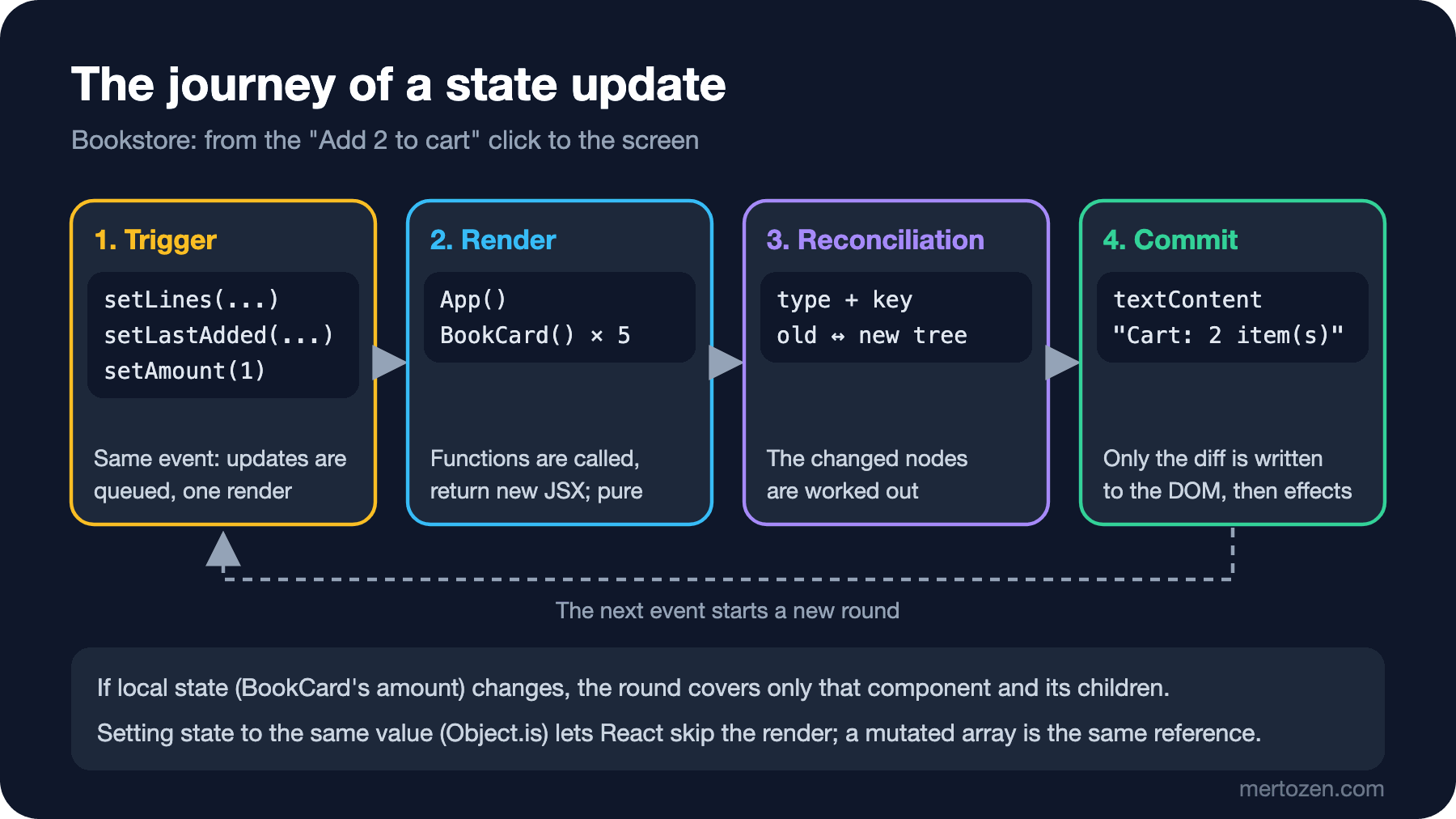
A component re-renders for three reasons: its own state changed, its parent rendered, or a context it reads changed (we cover context in the seventh post). To see this we put a console.log at the top of the App and BookCard functions and did two interactions in the production build:
  render App
  render BookCard 1984
  render BookCard Dune
  render BookCard Emma
  render BookCard Middlemarch
  render BookCard The Hobbit
--- click + on Dune (local state)
  render BookCard Dune
--- click Add on Dune (setLines + setLastAdded + setAmount)
  render App
  render BookCard 1984
  render BookCard Dune
  render BookCard Emma
  render BookCard Middlemarch
  render BookCard The Hobbit
The "+" button changed only the Dune card's own state, and only that card rendered; App and the other four cards did not run. The "Add" button made three updates in the same event: setLines and setLastAdded inside handleAdd, and setAmount(1) inside the card. The log has a single render App: React collects the updates of one event and applies them in a single render after the handler finishes. This is called batching, and since React 18 it is automatic for updates inside setTimeout, promises and native event handlers too.
The second lesson from the log: when App rendered, all five cards rendered too, including 1984, which has nothing to do with the cart. That is React's default; when a parent renders, its children are called. If the cards' props did not change, the resulting JSX is the same and nothing is written to the DOM; the cost is just the function call. Negligible for five cards, something to measure for five thousand. We measure how memo, useMemo and the React Compiler skip these calls in the performance post. The journey of an update from start to end:
What we see on the screen in the normal flow:
after + +      : Add 3 to cart | Cart: 0 item(s) · ₺0.00
after Add      : Add 1 to cart | Cart: 3 item(s) · ₺749.70 | Added 3 × Emma | In cart: 3
sort by title  : 1984, Dune, Emma, Middlemarch, The Hobbit
sort by price  : Emma, 1984, The Hobbit, Middlemarch, Dune
Before pressing "Add 3 to cart" the header is empty; the quantity picker was only the card's state. After adding, the cart holds 3 items for 749.70 lira, the card's amount went back to 1, and when the sort changed the list was reordered by price. The sorted list, the quantities, the total and the item count are not state; all of them are computed on every render from lines and sortBy.
In Production
Updating several pieces of state in one handler is fine; batching turns them into a single render. The problem is keeping two related pieces of state separately and forgetting to update one of them. If we had put the cart total into its own state, every add, remove and quantity change would have had to update it too. Compute what can be computed; we discuss the rules for that in the next post.
Mutation bugs look random in production: a user adds to the cart, nothing happens, and the item appears after clicking somewhere else. In code review, watch for push, splice, sort, reverse and obj.x = ... assignments when they operate on a value that came from state.
The cart in this post lives in the browser and disappears on reload. Bookstore's real cart lives in the API (/api/carts); when we connect it with TanStack Query, the split between client state and server state becomes clear.
Common Pitfalls
Reading x right after setX: the new value arrives on the next render. If you need the value right away, compute it in a variable and pass that both to setX and to wherever you use it.
Writing an update that depends on the previous value with a value: setAmount(amount + 1) seems to work for a single click, but gives the wrong result when called twice in the same handler or when it runs from an old closure inside a setTimeout. The updater function solves both.
Passing the call instead of the handler: write onClick={onAdd(book, amount)} in the card and onAdd runs on every render. TypeScript catches this at compile time because onAdd returns void:
src/features/catalog/BookCard.tsx(37,29): error TS2322: Type 'void' is not assignable to type 'MouseEventHandler<HTMLButtonElement> | undefined'.When we opened the same code in the dev server, which skips type checking, the console filled with the "Cannot update a component while rendering a different component" error, and after 1.5 seconds the header showed "Cart: 102366 item(s)": every render added to the cart, and every add triggered a new render. If you need arguments, write onClick={() => onAdd(book, amount)}.
Changing state directly and calling setX(sameReference): the late cart above. StrictMode does not always catch this, because the mutation happens in a handler, not during render.
A Small Experiment
★☆☆ Add an upper-limit hint to the card's quantity picker: when the amount reaches 10, show "Max 10 copies" under the card. Does this text need new state?
★★☆ Add a "Remove last added" button to App that removes the last added line from the cart. Write it with filter and make sure your code does not change the existing array. What happens when you write the same thing with pop()? Check the render log.
★★★ Make the "+" button's handler setTimeout(() => setAmount(amount + 1), 1000) and click three times within a second. What is the result? Try again with an updater function and explain the difference with the state snapshot.
The cart now lives in App, and as new screens such as search and a details panel arrive, the question of where state should live grows. In the next post we look at lifting state up, controlled inputs, the rules for derived state and moving the cart into a type-safe reducer with useReducer.