

React for Angular Developers: Library or Framework, Mental Model Differences and the Ecosystem Map
React is a UI library, not a framework: it gives you components, state and rendering, while the team picks routing, data fetching, forms and global state from the ecosystem. We write Bookstore's book card side by side in Angular and React, show with real output that one click makes React call the component function again yet change only two text nodes in the DOM, and map Angular concepts to their React counterparts in a table.
Version note: The React examples in this post were built and run with React 19.3, TypeScript 7.0, Vite 8.3 and Node.js 24; the Angular comparison code was built and run with Angular 22.2 (Angular 22.2 projects use TypeScript 6.0). Browser behaviour was observed with Playwright 1.65 in headless Chromium.
Predict First
In the Angular client of Bookstore, the online bookstore used as the shared example across this site's series, every book in the catalog appears as a card: title, author, year, price and an "Add to cart" button. We write this card in React and click the button twice. The card itself does not know the quantity in the cart; the component above it holds the quantity and passes it to the card as a number.
Two questions. After the first click, how many times does React call the function that draws the card, and which DOM nodes change during that call? When the same card is written in Angular with input() and a signal, what runs after the click? Make a guess; halfway through the post we compare it with the real output of both apps.
This series is written for developers who know Angular and want to learn React. Each post starts from the question "How did I do this in Angular?" and moves to the React counterpart. The goal of the first post is less about writing code and more about building the mental model: what React gives you, what it does not, and how the pieces of the two worlds line up.
Why Does React Call Itself a "Library"?
The react.dev home page introduces React as "The library for web and native user interfaces". That phrase is not marketing; it is an accurate statement of scope. The core of React deals with three things: defining components, holding their state and updating the screen when that state changes. Routing, HTTP requests, form validation, dependency injection and the build system are not inside the React package.
Angular is the opposite. As we explained in "What Is Angular and Why Does It Exist? The Reason Behind the Framework", Angular ships most of the parts an application needs in one package, with versions that fit together: @angular/router, HttpClient, Reactive Forms, Signal Forms, DI, the CLI and the test setup. A team does not argue about which router to use; Angular has a router.
In React these decisions belong to the team. The react.dev page "Build a React App from Scratch" says it plainly: a project that starts with a build tool such as Vite, Parcel or Rsbuild has no built-in answer for routing, data fetching or styling, and the team picks them. The same docs recommend starting a new app with a framework such as Next.js or React Router's framework mode. Create React App was deprecated for new projects in February 2025 and is no longer an option.
The practical consequence: when you move from an Angular project to a React project, your first week is as much about "which libraries were chosen here, and why" as it is about "how do I write React". In this series we make our choices up front: a single-page app built with Vite, React Router 8, TanStack Query for data, react-hook-form and zod for forms, and Zustand for global state when we need it. Next.js gets a single post near the end of the series.
UI = f(state): The Same Book Card Twice
React's mental model fits in one formula: the screen is a function of state. A component is a JavaScript function that takes props and its own state and answers the question "what should be on the screen right now?". When the state changes, React calls that function again, compares the new result with the old one and writes only the difference to the DOM.
The Angular side first. This card was added to and built in a copy of the Angular client in the Bookstore repository (bookstore-web):
import { CurrencyPipe } from '@angular/common';
import { Component, computed, input, output } from '@angular/core';
import { BookSummary } from '../core/api-models';

@Component({
  selector: 'app-book-card',
  imports: [CurrencyPipe],
  template: `
    <li class="book-card">
      <strong>{{ book().title }}</strong>
      <span class="muted">{{ book().author }} · {{ book().publishedYear }}</span>
      <strong>{{ book().price | currency: 'TRY' : 'symbol-narrow' }}</strong>
      <button type="button" (click)="add.emit(book().isbn)">{{ label() }}</button>
    </li>
  `,
})
export class BookCard {
  readonly book = input.required<BookSummary>();
  readonly quantity = input(0);
  readonly add = output<string>();

  // Derived value: recomputed only when quantity changes
  protected readonly label = computed(() => (this.quantity() === 0 ? 'Add to cart' : `In cart: ${this.quantity()}`));
}
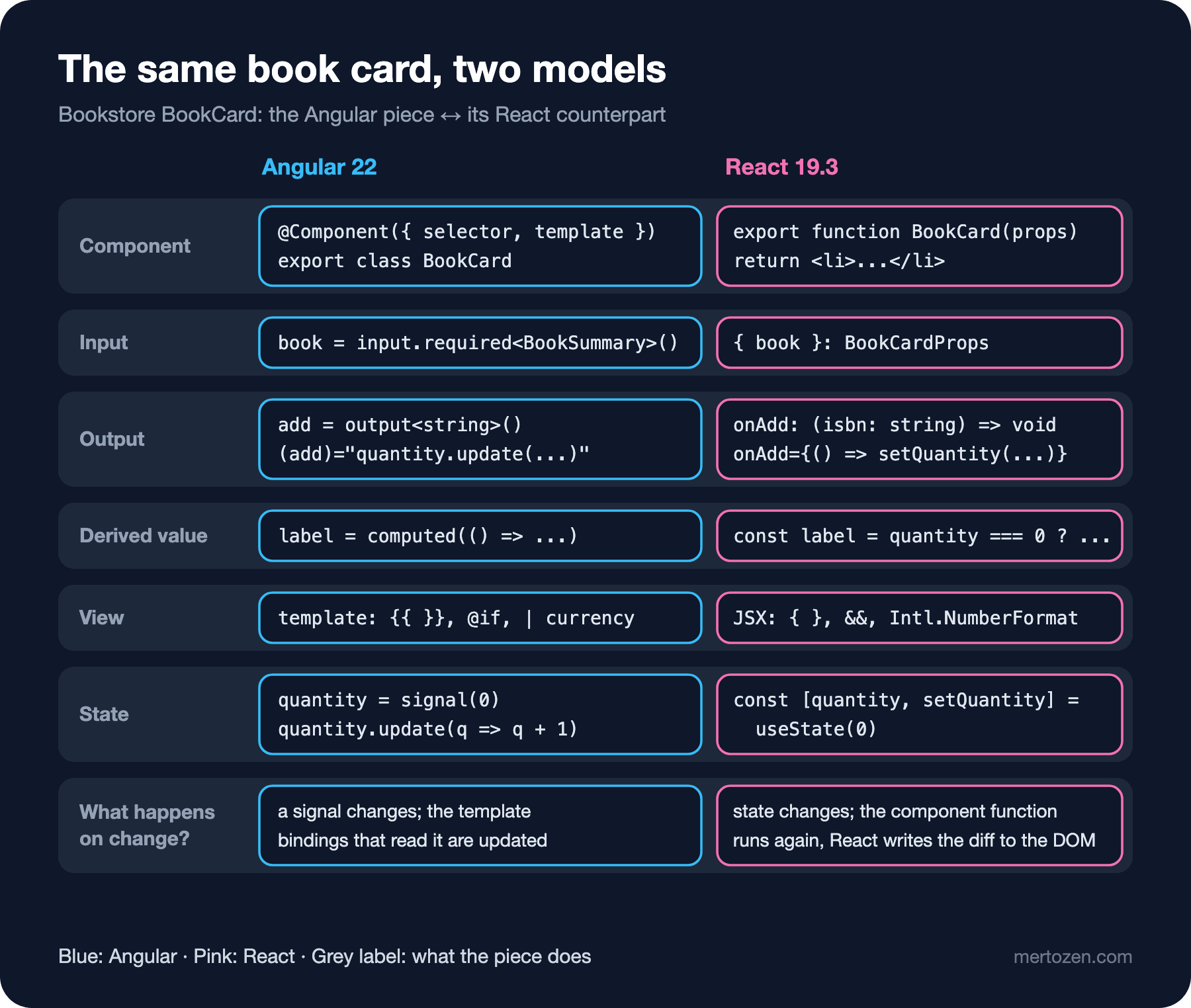
In Angular a component is a class. Inputs are input(), events are output(), the derived value is computed(). The template is written in a separate language: {{ }} interpolation, (click) event binding, the | currency pipe. The component that uses the card keeps the quantity in a signal and calls quantity.update(q => q + 1) on the (add) event.
Now the same card in React:
// Same shape as BookSummary returned by Bookstore.Api (GET /api/books).
export type BookSummary = {
  isbn: string;
  title: string;
  author: string;
  category: string;
  price: number;
  publishedYear: number;
};

type BookCardProps = {
  book: BookSummary;
  quantity: number;
  onAdd: (isbn: string) => void;
};

const price = new Intl.NumberFormat('en-US', { style: 'currency', currency: 'TRY', currencyDisplay: 'narrowSymbol' });

export function BookCard({ book, quantity, onAdd }: BookCardProps) {
  // A derived value: computed on every render, never stored
  const label = quantity === 0 ? 'Add to cart' : `In cart: ${quantity}`;

  return (
    <li className="book-card">
      <strong>{book.title}</strong>
      <span className="muted">{book.author} · {book.publishedYear}</span>
      <strong>{price.format(book.price)}</strong>
      <button type="button" onClick={() => onAdd(book.isbn)}>{label}</button>
    </li>
  );
}
The component is a function. Its inputs come from the props object, the function's parameter; thanks to the BookCardProps type the compiler knows which props are required. Instead of an output() there is a callback prop: onAdd. The card does not emit an event, it calls the function it was given. label is not a computed; it is an ordinary const inside the function and is recalculated every time the function is called. There is no template; the return value is JSX, a syntax inside JavaScript that looks like HTML. Instead of a pipe we format the price with Intl.NumberFormat directly.
The component that uses the card:
import { useState } from 'react';
import { BookCard, type BookSummary } from './BookCard.tsx';

const dune: BookSummary = {
  isbn: '9780441172719',
  title: 'Dune',
  author: 'Frank Herbert',
  category: 'Science Fiction',
  price: 489,
  publishedYear: 1965,
};

export default function App() {
  // State: the only value here that changes over time
  const [quantity, setQuantity] = useState(0);

  return (
    <main>
      <h1>Bookstore</h1>
      <p className="muted">Cart: {quantity} item(s)</p>
      <ul className="book-grid">
        <BookCard book={dune} quantity={quantity} onAdd={() => setQuantity((q) => q + 1)} />
      </ul>
    </main>
  );
}
useState(0) returns a pair: the current value and a function that changes it. That is the counterpart of signal(0) together with quantity.update(...) in Angular. The difference: quantity is not a signal but a plain number. We do not call a function to read it, because React does not learn about changes by tracking reads; it learns about them from the call to setQuantity.
What Happens on a Click? Change Detection vs Re-render
We opened both apps with Playwright and clicked the button twice. The React side:
initial        | Cart: 0 item(s) | Add to cart
after 1 click  | Cart: 1 item(s) | In cart: 1
after 2 clicks | Cart: 2 item(s) | In cart: 2
The Angular side:
initial        | Cart: 0 item(s) | Add to cart | ₺489.00
after 1 click  | Cart: 1 item(s) | In cart: 1 | ₺489.00
after 2 clicks | Cart: 2 item(s) | In cart: 2 | ₺489.00
The screen ends up the same; the mechanism behind it does not. In Angular 22, zoneless change detection and OnPush are the defaults ("Angular 21: Zoneless by Default, Experimental Signal Forms and Vitest" and "Angular 22: OnPush by Default, Stable Signal Forms and a File-by-File Comparison with Angular 12"). Calling quantity.update changes the signal, Angular marks the templates that read that signal as dirty and updates only those bindings in the next change detection pass. The component class's constructor does not run again; the class is created once and keeps living.
In React, calling setQuantity triggers a render. React calls the App function again; App returns a new JSX tree, and the card function is called again for the BookCard inside it. So the answer to the first question in "Predict First": on one click the BookCard function runs once (in development, StrictMode deliberately does it twice; we see the real output in the second post). React then compares the new tree with the previous one; this comparison is called reconciliation. To see what is written to the DOM, we attached a MutationObserver to #root and clicked once:
characterData in <p>: "Cart: 1 item(s)"
characterData in <button>: "In cart: 1"
Two functions ran again, yet only two text nodes changed in the DOM: the paragraph at the top and the button label. The <li>, title and price nodes stayed as they were; no new element was created.
If you read "Change Detection and Zone.js in Angular: OnPush, ChangeDetectorRef and NgZone" in the Angular series, think of it this way: in Angular the unit is the binding; in React the unit is the component function. When React calls a component again, by default it also calls every component below it. That sounds expensive, but calling a function and changing the DOM are not the same thing; the expensive DOM work is done only for the difference. Measuring unnecessary renders, and how the React Compiler reduces them automatically, is the topic of the performance post.
This model has an important consequence: the render function must be pure. Called with the same props and state, it must return the same JSX, it must not change a variable outside itself and it must not send an HTTP request. React decides when and how many times it calls the function, so side effects live in event handlers or effects, not inside render.
The Mapping Table: Angular Concept, React Counterpart
The mappings we will keep coming back to in this series:
| Angular | React | Note |
|---|---|---|
@Component class + template | Function component + JSX | No decorator, no separate template language |
input() / @Input | Props | Props are read-only; the component never changes them |
output() / @Output | Callback prop (onAdd) | Calling the given function instead of emitting an event |
signal() | useState | The value is a plain variable, the setter triggers a render |
computed() | A value calculated during render | useMemo if expensive; usually not needed |
effect() | useEffect | For synchronizing with an external system; the topic of post six |
ng-content | The children prop | Composition in post three |
| Service + DI | Custom hook + Context | No hierarchical injector |
@angular/router | React Router | A separate package; version 8 in this series |
HttpClient, httpResource | fetch, TanStack Query | React does not ship an HTTP client |
| Reactive Forms, Signal Forms | Controlled inputs, form actions, react-hook-form | Comparison table in the forms post |
The table is a starting point, not a word-for-word dictionary. The most misleading row is effect: in both Angular and React it looks like "code that runs when something changes", but in React using an effect as a lifecycle hook is the most common mistake. Someone looking for the ngOnInit counterpart is almost always trying to solve, with an effect, a problem that does not need one.
What React Does Not Give You: The Ecosystem Map
The React core gives you components, state, effects, context and rendering. The other parts a Bookstore app needs come from the ecosystem. The choices we use in this series, with their versions on the day of writing:
- Build and dev server: Vite 8.3 (
npm create vite, thereact-tstemplate). Alternatives: Parcel, Rsbuild. - Routing: React Router 8.5 (data mode,
createBrowserRouter). Alternative: TanStack Router. - Server state and data fetching: TanStack Query 5.107. Alternatives: SWR, React Router loaders.
- Forms and validation: React 19 form actions, react-hook-form 7.92 and zod 4.6.
- Global client state: Zustand 5.1; Redux Toolkit 2.14 in large teams.
- Testing: Vitest 5.1, React Testing Library and MSW.
- Full-stack framework: Next.js 16.4 or React Router's framework mode; a short look near the end of the series.
None of these is "official"; they are common choices. For someone coming from Angular the most important difference is that these libraries are versioned independently. In Angular, ng update upgrades all @angular/* packages together; in a React project, React Router shipping only as ECMAScript modules or a new major version of TanStack Query are separate pieces of work to plan.
The Series App: A First Setup with Vite
The app that grows throughout the series is called bookstore-react. It will connect to Bookstore's ASP.NET Core API and contain the catalog, book details, cart and order screens. The first step is Vite's react-ts template:
npm create vite@latest bookstore-react -- --template react-ts
cd bookstore-react
npm install
npm run dev
Vite 8 needs Node.js 20.19 or 22.12 and above; the series uses Node.js 24 LTS. The output of create-vite 9.3:
create-vite v9.3.4

│
◇  Scaffolding project in /home/user/src/bookstore-react...
│
└  Done. Now run:

  cd bookstore-react
  npm install
  npm run dev
We deleted the demo files the template brings (logos, App.css) and replaced App.tsx with the card above. The production build:
vite v8.3.8 building client environment for production...
transforming...
✓ 17 modules transformed.
rendering chunks...
computing gzip size...
dist/index.html                   0.45 kB │ gzip:  0.29 kB
dist/assets/index-DkxHVuhS.css    0.62 kB │ gzip:  0.36 kB
dist/assets/index-WmBcMOIe.js   220.38 kB │ gzip: 68.99 kB

✓ built in 228ms
npm run build first type-checks with tsc -b, then Vite bundles. The template's package.json brings TypeScript ~7.0.2, the new compiler written in Go ("TypeScript 7 and Beyond: The Go-Based Compiler and the New Defaults" in the TypeScript series), and Oxlint instead of ESLint for linting. Most of the 220 KB of JavaScript is react-dom; the app's own code is a few lines. The project structure, StrictMode and the dev proxy for reaching the API are the topics of the next post.
In Production
React being "just a UI library" brings the risk of decisions being made piecemeal in a large project. Seeing two data fetching approaches and three form approaches in the same codebase is not unusual. Keep a decision list from the start: which library, which version and why, for routing, server state, forms, global state, testing and styling. In React that list provides the consistency Angular hands you for free.
Plan version management accordingly. React, React Router, TanStack Query and Vite follow independent release schedules. Keeping updates small and frequent with Dependabot or Renovate causes far fewer problems than one "big upgrade" a year.
If the team comes from Angular, in the first few weeks you will see mistakes in two areas more than any other: changing state directly (the set/update discipline you know from signals means immutable updates in React) and using effects like lifecycle hooks. Watch for these two in code review; React's lint rules catch part of the second one.
Common Pitfalls
The first pitfall is thinking of React as a small Angular. Looking for class components, lifecycle methods and "services" leads you to old React docs and old patterns. React code in 2026 is written with function components and hooks; class components still work but are not used in new code.
The second pitfall is treating the render function as setup code that runs once. Every line in a component body runs on every render. That is why we put something that never changes, such as new Intl.NumberFormat(...), outside the component at module level. Doing work such as an HTTP request, a setInterval or writing to a global variable inside render is simply a bug.
The third pitfall is setting up a project from old material. A lot of content still starts with npx create-react-app; CRA is deprecated. Start a new project with a framework or with Vite.
The fourth pitfall is applying the mapping table literally. In React not every service needs to become a Context and not every computed a useMemo. Most derived values are a plain calculation during render, and Context can be expensive for data that changes often. We will measure these in the relevant posts.
A Small Experiment
★☆☆ Create your own bookstore-react project with Vite and add a line to BookCard that shows category. Did the JavaScript size in the build output change?
★★☆ Give the card a second button: "Remove". It should not appear while the quantity is 0. How would you write this with @if in Angular, and which JavaScript expression do you use in React? Make sure the card still does not hold the quantity itself.
★★★ Put a console.log at the top of the BookCard function, open the production build (npm run build and npm run preview) and click the button. How many lines do you see? Try the same with npm run dev; where does the difference come from?
The answer to the last question is the topic of the next post: project structure, path aliases, Oxlint's hook rules, the double render StrictMode does on purpose in development, and Vite's dev proxy for reaching the Bookstore API without running into CORS.