

Testing React: Vitest, React Testing Library and Mocking APIs with MSW
The practical way to test React is to run React Testing Library, which queries the UI as a user does, on Vitest, which reuses the Vite config, and to fake the API at the network level with MSW without touching the code. In Bookstore we test the pure applyChange function, useDebouncedValue and useCart with renderHook, BookCard with user-event, and the catalog and checkout screens through the real route tree in a memory router, with real failures for getBy vs findBy and leaking store state.
Version note: The examples in this post were run with React 19.3, Vitest 5.1, jsdom 31, React Testing Library 16.3 (@testing-library/dom 10.4), user-event 14.6, jest-dom 7.0, MSW 3.0, TanStack Query 5.107, React Router 8.5, Zustand 5.1, TypeScript 7.0, Vite 8.3 and Node.js 24.
Guess First
The React client of Bookstore, the online bookstore used as the shared example across this site's series, has grown for twelve posts: catalog, book details, a server-side cart, optimistic updates, a checkout form, router middleware. So far we checked every behaviour by hand in a browser driven by Playwright. In this post we turn those behaviours into lasting tests.
Three questions. If the first line of the catalog test looks for "4 book(s) found" with getByText, does the test pass? The Bookstore API is not running during the tests; who answers the fetch made by apiFetch, and what changed in the application code for that? Finally: one test signs Ada in, the next one expects a signed-out user. If you do not reset the store in between, what does the second test see? All three answers are below, with real test output.
Vitest: the Same Config as Vite
Vitest is a test runner built on Vite. It does not set up a second build pipeline: it reads vite.config.ts and uses the same plugins (including the React Compiler), the same @/ alias and the same TypeScript transform. Installing it takes six packages:
npm install -D vitest@5.1.0 jsdom@31.0.1 @testing-library/react@16.3.3 @testing-library/dom@10.4.2 @testing-library/user-event@14.6.10 @testing-library/jest-dom@7.0.1 msw@3.0.6We add one test block to the config and a "test": "vitest" script to package.json. In a terminal vitest runs in watch mode; in CI or with --run it runs once and exits:
/// <reference types="vitest/config" />
// ...
  test: {
    // A DOM in Node: jsdom implements document, window and localStorage
    environment: 'jsdom',
    setupFiles: ['./src/test/setup.ts'],
  },
The tests run in Node; jsdom provides document, window and localStorage. The alternative is happy-dom: lighter and usually faster, but less complete than jsdom for some browser APIs. We ran this app's eleven tests three times with each:
$ npx vitest run                          # environment: 'jsdom' (vite.config.ts)
      Tests  11 passed (11)
   Duration  1.45s · 864ms · 857ms        (three runs)
$ npx vitest run --environment happy-dom
      Tests  11 passed (11)
   Duration  763ms · 848ms · 741ms        (three runs)
The difference is around 100 ms; at this size it is no reason to choose. We stayed with jsdom. The Angular side looks the same: Angular 22's unit-test builder also uses Vitest and jsdom (the first post of the Frontend Testing series, "Testing Infrastructure in Angular 22: Vitest, the unit-test Builder, jsdom and What to Test at Which Level"). How many tests to write at which level is that series' subject.
The setup file runs before every test file:
import '@testing-library/jest-dom/vitest';
import { cleanup } from '@testing-library/react';
import { afterAll, afterEach, beforeAll } from 'vitest';
import { useAuthStore } from '@/features/auth/authStore';
import { useClientStore } from '@/shared/clientStore';
import { queryClient } from '@/shared/queryClient';
import { carts } from '@/test/handlers';
import { server } from '@/test/server';

// A request without a handler fails the test instead of going to the real network
beforeAll(() => server.listen({ onUnhandledFrame: 'error' }));

afterEach(() => {
  cleanup();
  server.resetHandlers();
  carts.clear();
  // Module-level stores and caches outlive a test: put them back to their initial state
  queryClient.clear();
  useAuthStore.setState(useAuthStore.getInitialState(), true);
  useClientStore.setState(useClientStore.getInitialState(), true);
  localStorage.clear();
});

afterAll(() => server.close());
By default Vitest does not make describe, it and expect global; the tests import them from vitest. Testing Library cleans up rendered components by itself when it finds a global afterEach; since there is none, we call cleanup() ourselves. The first line adds jest-dom's matchers such as toBeInTheDocument and toHaveFocus to expect.
Start with a Pure Function: applyChange
When we wrote the cart with useReducer in post five, we said the reducer would be the easiest part to test. In post eight the cart moved to the server and the reducer went away; its place was taken by the pure applyChange function that the optimistic update uses. The same idea holds: no React, no DOM, no mocks; give an input, check the output.
import { describe, expect, it } from 'vitest';
import { applyChange } from '@/features/cart/cartLines';
import type { Cart } from '@/features/cart/types';

const cart: Cart = {
  id: 'cart-1',
  currency: 'TRY',
  items: [{ isbn: '9780441172719', title: 'Dune', unitPrice: 489, quantity: 1, lineTotal: 489 }],
  total: 489,
};

describe('applyChange', () => {
  it('adds a new book, keeps the lines sorted by title and recalculates the total', () => {
    const next = applyChange(cart, { isbn: '9780141439587', title: 'Emma', unitPrice: 249.9, quantity: 2 });

    expect(next.items.map((line) => line.title)).toEqual(['Dune', 'Emma']);
    expect(next.items[1].lineTotal).toBeCloseTo(499.8);
    expect(next.total).toBeCloseTo(988.8);
  });

  it('changes the quantity of a book that is already in the cart', () => {
    const next = applyChange(cart, { isbn: '9780441172719', title: 'Dune', unitPrice: 489, quantity: 3 });

    expect(next.items).toHaveLength(1);
    expect(next.total).toBe(1467);
  });

  it('removes the line when the quantity is 0', () => {
    expect(applyChange(cart, { isbn: '9780441172719', title: 'Dune', unitPrice: 489, quantity: 0 }).items).toEqual([]);
  });

  it('does not touch the cart it was given', () => {
    const frozen = Object.freeze({ ...cart, items: Object.freeze([...cart.items]) as Cart['items'] });

    applyChange(frozen, { isbn: '9780141439587', title: 'Emma', unitPrice: 249.9, quantity: 1 });

    expect(frozen.items).toHaveLength(1);
  });
});
The last test uses Object.freeze to check that the function does not change its input; an implementation that tried to push onto a frozen array would throw a TypeError here. We use toBeCloseTo for money because of floating point: 249.9 × 2 is not exactly 499.8. That is the benefit of moving the calculation out of the component into a pure function: the test takes milliseconds.
Query Like a User: Testing Library and user-event
React Testing Library's approach is that a test should deal with what the user sees and does; the component's state, which hooks it uses or its CSS classes are not the test's business. In practice this means a priority order for queries: search first by names everyone can reach, such as getByRole and getByLabelText, and last with getByTestId.
import { render, screen } from '@testing-library/react';
import userEvent from '@testing-library/user-event';
import { MemoryRouter } from 'react-router';
import { expect, it, vi } from 'vitest';
import { BookCard } from '@/features/catalog/BookCard';
import { testBooks } from '@/test/books';

const dune = testBooks[0];

it('adds the picked number of copies and resets the counter', async () => {
  const user = userEvent.setup();
  const onAdd = vi.fn();
  // BookCard renders a <Link>, which needs a router around it
  render(<MemoryRouter><BookCard book={dune} quantityInCart={0} onAdd={onAdd} /></MemoryRouter>);

  await user.click(screen.getByRole('button', { name: 'More copies of Dune' }));
  await user.click(screen.getByRole('button', { name: 'More copies of Dune' }));
  await user.click(screen.getByRole('button', { name: 'Add 3 to cart' }));

  expect(onAdd).toHaveBeenCalledExactlyOnceWith(dune, 3);
  expect(screen.getByRole('button', { name: 'Add 1 to cart' })).toBeInTheDocument();
  expect(screen.getByRole('button', { name: 'Fewer copies of Dune' })).toBeDisabled();
});
We found the buttons by their aria-label: "More copies of Dune". Without that label the button would read only as "+", and the test could not find it by name; neither could a screen reader user. That is why role queries indirectly test accessibility too.
user.click, from userEvent.setup(), dispatches the events a real click produces (pointerdown, mousedown, focus, pointerup, click…) in order; user.type produces keydown, input and keyup for every character. Testing Library's older fireEvent dispatches a single event. The difference matters in form and input tests; user-event's methods return promises, so each one has to be awaited. The vi.fn() we pass as onAdd is the right tool here: the callback is the component's public contract, so checking it is not an implementation detail.
Testing a Custom Hook: renderHook
Testing a hook needs a component that uses it; renderHook creates that component for us and gives what the hook returns in result.current. We test useDebouncedValue from post seven with Vitest's fake timers:
import { act, renderHook } from '@testing-library/react';
import { afterEach, beforeEach, expect, it, vi } from 'vitest';
import { useDebouncedValue } from '@/shared/useDebouncedValue';

beforeEach(() => vi.useFakeTimers());
afterEach(() => vi.useRealTimers());

it('returns the new value only after it has been stable for the delay', () => {
  const { result, rerender } = renderHook(({ value }) => useDebouncedValue(value, 300), { initialProps: { value: 'du' } });

  rerender({ value: 'dun' });
  act(() => vi.advanceTimersByTime(200));
  rerender({ value: 'dune' });
  act(() => vi.advanceTimersByTime(299));
  expect(result.current).toBe('du');

  act(() => vi.advanceTimersByTime(1));
  expect(result.current).toBe('dune');
});
The lines that move time forward are inside act: React processes the setState fired by the timer and updates the DOM before act returns. Instead of waiting 300 ms the test takes 9 ms and checks the boundary exactly (old value at 299 ms, new value at 300 ms).
useCart is more interesting: it depends on TanStack Query, a Zustand store and the API. We wrote a small helper to wrap the hook in a QueryClientProvider:
import { QueryClient, QueryClientProvider } from '@tanstack/react-query';
import { render } from '@testing-library/react';
import type { ReactNode } from 'react';
import { createMemoryRouter, RouterProvider } from 'react-router';
import { routes } from '@/app/router';
import { queryClient } from '@/shared/queryClient';

// A fresh cache per test; no retries, so an error shows up at once instead of after three attempts
export function createTestQueryClient() {
  return new QueryClient({ defaultOptions: { queries: { retry: false }, mutations: { retry: false } } });
}

export function withQueryClient(client: QueryClient) {
  return ({ children }: { children: ReactNode }) => <QueryClientProvider client={client}>{children}</QueryClientProvider>;
}
Each test gets its own QueryClient, so the cache does not carry over between tests. retry: false matters: TanStack Query's default is to retry a failed query three times, which in a test means the error appears seconds later.
import { act, renderHook, waitFor } from '@testing-library/react';
import { http, HttpResponse } from 'msw';
import { expect, it } from 'vitest';
import { useCart } from '@/features/cart/useCart';
import { testBooks } from '@/test/books';
import { server } from '@/test/server';
import { createTestQueryClient, withQueryClient } from '@/test/render';

const [dune, emma] = testBooks;

it('creates a server cart on the first add and shows the saved lines', async () => {
  const { result } = renderHook(() => useCart(), { wrapper: withQueryClient(createTestQueryClient()) });

  act(() => result.current.add(dune, 2));

  await waitFor(() => expect(result.current.itemCount).toBe(2));
  expect(result.current.cartId).not.toBeNull();
  expect(result.current.total).toBe(978);
});

it('rolls back the optimistic change and exposes the error when the server refuses it', async () => {
  const { result } = renderHook(() => useCart(), { wrapper: withQueryClient(createTestQueryClient()) });
  act(() => result.current.add(dune, 1));
  await waitFor(() => expect(result.current.itemCount).toBe(1));

  // Only for this test: the API answers 409, but only when the test lets it
  let answer = () => {};
  const answered = new Promise<void>((resolve) => { answer = resolve; });
  server.use(http.put('/api/carts/:cartId/items/:isbn', async () => {
    await answered;
    return HttpResponse.json({ title: 'Not enough stock', status: 409 },
      { status: 409, headers: { 'Content-Type': 'application/problem+json' } });
  }));
  act(() => result.current.add(emma, 1));

  // Optimistic: Emma is in the cart before the server has answered
  await waitFor(() => expect(result.current.itemCount).toBe(2));
  answer();
  await waitFor(() => expect(result.current.error?.message).toBe('Not enough stock'));
  expect(result.current.lines.map((line) => line.title)).toEqual(['Dune']);
});
The second test sees both halves of the optimistic update separately. We tied the server's answer to a promise: the handler waits for answered, the test first checks that Emma shows up in the cart, then releases the answer with answer() and waits for the rollback. Our first attempt checked this without waitFor, right after act, and the test failed with "expected 1 to be 2": because of the await queryClient.cancelQueries(...) in onMutate, even the optimistic change is applied a little after the mutate call, not with it. This test also guards why we read the error state with useMutationState in post eight.
Mocking the API at the Network Level with MSW
There is no real HTTP request in the tests above, yet apiFetch did not change either. MSW does this: a library that catches requests at the network level and answers them. In the browser it works with a Service Worker; in Node it uses interceptors that catch fetch and Node's HTTP modules. The handlers imitate the API's URLs and response shapes:
import { http, HttpResponse } from 'msw';
import type { Cart } from '@/features/cart/types';
import type { BookSummary, PagedResult } from '@/features/catalog/types';
import { testBooks } from '@/test/books';

// In-memory carts, like the real API keeps them in its database; cleared after every test
export const carts = new Map<string, Cart>();

function cartView(cart: Cart): Cart {
  return { ...cart, total: cart.items.reduce((sum, line) => sum + line.lineTotal, 0) };
}

// The same URLs and response shapes as Bookstore.Api; fetch in the code under test is not changed at all
export const handlers = [
  http.get('/api/books', ({ request }) => {
    const url = new URL(request.url);
    const search = (url.searchParams.get('search') ?? '').toLowerCase();
    const page = Number(url.searchParams.get('page') ?? '1');
    const pageSize = Number(url.searchParams.get('pageSize') ?? '8');
    const found = testBooks.filter((b) => b.title.toLowerCase().includes(search) || b.author.toLowerCase().includes(search));
    const items: BookSummary[] = found.slice((page - 1) * pageSize, page * pageSize)
      .map(({ isbn, title, author, category, price, publishedYear }) => ({ isbn, title, author, category, price, publishedYear }));
    return HttpResponse.json<PagedResult<BookSummary>>({ items, total: found.length, page, pageSize });
  }),

  http.get('/api/books/:isbn', ({ params }) => {
    const book = testBooks.find((b) => b.isbn === params.isbn);
    return book ? HttpResponse.json(book) : new HttpResponse(null, { status: 404 });
  }),
  // ...
import { setupServer } from 'msw/node';
import { handlers } from '@/test/handlers';
// MSW in Node: intercepts fetch at the network level, the app's apiFetch runs unchanged
export const server = setupServer(...handlers);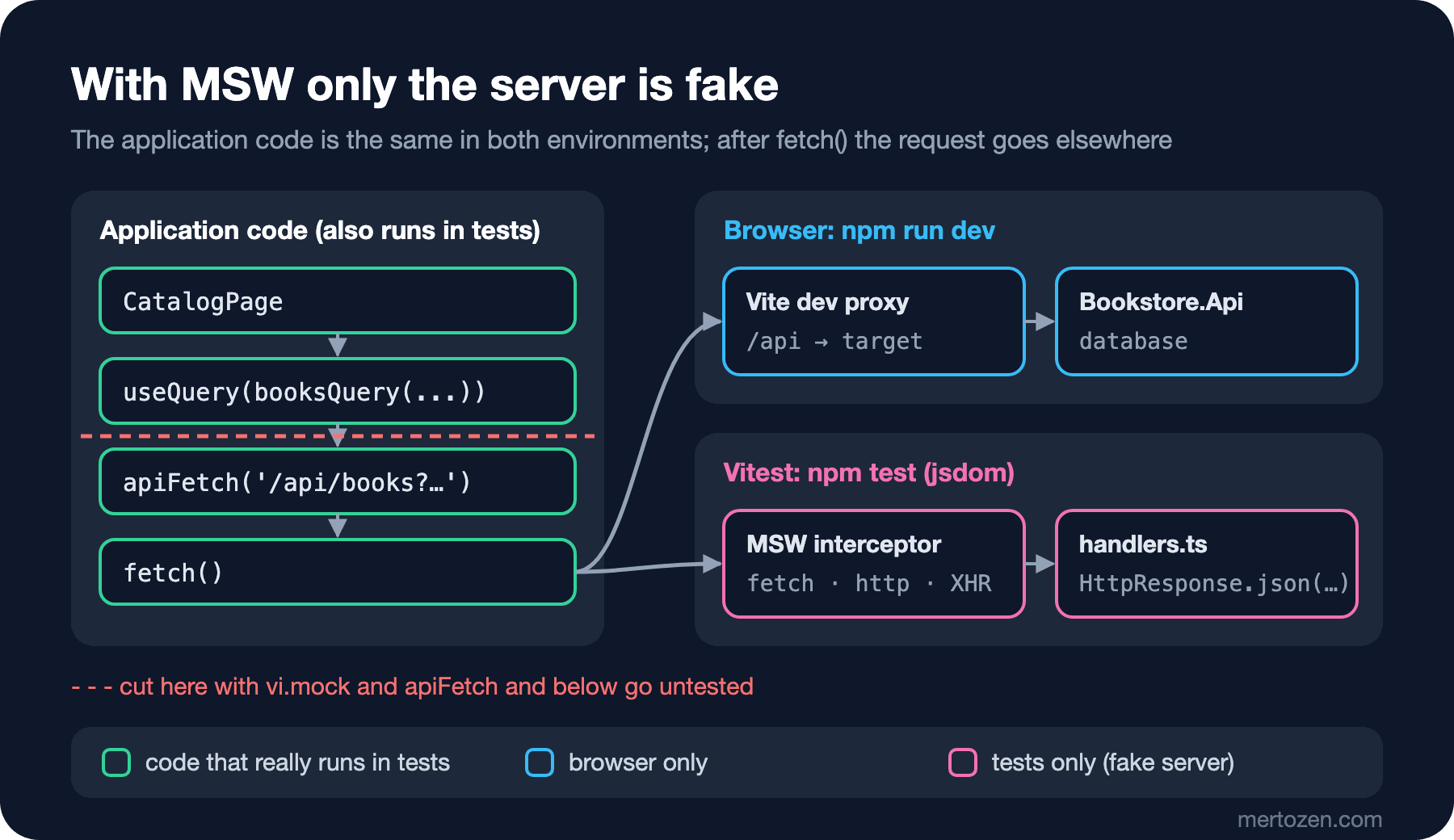
The difference from faking apiFetch or useQuery with vi.mock is where the tested code ends. With MSW the component, the hook, TanStack Query, apiFetch and the Problem Details parsing really run; only the server at the end of the wire is fake. Had you mocked apiFetch, no test would catch a bug in its Content-Type check.
In the setup file we passed onUnhandledFrame: 'error'. This option was renamed in MSW 3.0; MSW 2's onUnhandledRequest is now onUnhandledFrame. A request with no handler looks like this during a test (we removed the POST /api/orders handler from the checkout test):
[MSW] Error: intercepted a request without a matching request handler:

  • POST /api/orders

  • Request body: {"cartId":"cart-1","customerName":"Ada Lovelace","customerEmail":"ada@example.com"}

If you still wish to intercept this unhandled request, please create a request handler for it.
Read more: https://mswjs.io/docs/http/intercepting-requests

TestingLibraryElementError: Unable to find an element with the text: The CustomerEmail field is not a valid e-…
That answers the second question from Guess First: MSW answers fetch, and nothing changed in the application code. The same handlers can also run in the browser during development with msw/browser; MSW 3 also has a Vite plugin for that (msw/vite). We keep using the real API copy during development.
Testing a Whole Screen: a Memory Router and the Real Route Tree
The catalog page cannot be rendered on its own: useSearchParams needs a router, useCart needs a QueryClient, and the cart summary lives in the layout. Instead of faking all of that we use the route tree from post nine itself. The only change in router.tsx was to export the route list separately; the test opens it with createMemoryRouter, a router without an address bar:
// The real route tree in a memory router: loaders, middleware and lazy routes run as in the browser.
// Loaders use the app's shared queryClient, so the provider gets the same one (setup.ts clears it after each test).
export function renderApp(path: string) {
  const router = createMemoryRouter(routes, { initialEntries: [path] });
  render(<QueryClientProvider client={queryClient}><RouterProvider router={router} /></QueryClientProvider>);
  return router;
}
import { screen, within } from '@testing-library/react';
import userEvent from '@testing-library/user-event';
import { expect, it } from 'vitest';
import { renderApp } from '@/test/render';
it('searches the catalog, keeps the search in the URL and adds a book to the cart', async () => {
const user = userEvent.setup();
const router = renderApp('/');
// findBy* waits (1 s by default) until the API answer has been rendered
expect(await screen.findByText('4 book(s) found')).toBeInTheDocument();
await user.type(screen.getByRole('searchbox', { name: 'Search books' }), 'austen');
expect(await screen.findByText('2 book(s) found')).toBeInTheDocument();
expect(router.state.location.search).toBe('?q=austen');
const titles = within(screen.getByRole('list')).getAllByRole('link').map((link) => link.textContent);
expect(titles).toEqual(['Emma', 'Pride and Prejudice']);
await user.click(screen.getAllByRole('button', { name: 'Add 1 to cart' })[0]);
expect(await screen.findByText(/Cart: 1 item\(s\)/)).toBeInTheDocument();
});The answer to the first question: with getByText on the first line, the test fails at once:
 FAIL  src/features/catalog/CatalogPage.test.tsx > searches the catalog, keeps the search in the URL and adds a book to the cart
TestingLibraryElementError: Unable to find an element with the text: 4 book(s) found. This could be because the text is broken up by multiple elements. In this case, you can provide a function for your text matcher to make your matcher more flexible.
 ❯ Object.getElementError node_modules/@testing-library/dom/dist/config.js:37:19
 ❯ node_modules/@testing-library/dom/dist/query-helpers.js:76:38
 ❯ node_modules/@testing-library/dom/dist/query-helpers.js:52:17
 ❯ node_modules/@testing-library/dom/dist/query-helpers.js:95:19
 ❯ src/features/catalog/CatalogPage.test.tsx:11:17
      9|
     10|   // findBy* waits (1 s by default) until the API answer has been rend…
     11|   expect(screen.getByText('4 book(s) found')).toBeInTheDocument();
       |                 ^
getBy* looks at the DOM as it is now; on the first render the books have not arrived and the screen shows "Loading…". findBy* returns a promise and searches again and again until the element appears (1 second by default). The rule is simple: findBy for something that will appear asynchronously, queryBy for something that must not be there (it returns null instead of throwing), getBy for something that must be there right now. Typing "austen" into the search box sends a request after the 300 ms debounce; findByText waits for that as well, and we did not touch timers in this test.
The checkout test guards the server error mapping from post ten. What MSW gives us is easy access to responses that are hard to produce with the real API: the API returning a validation error for an email that zod accepts.
it('shows the API validation error next to the email field', async () => {
  // Arrange the state the route expects: a signed-in user and a cart with one line
  useAuthStore.getState().signIn({ name: 'Ada Lovelace', email: 'ada@example.com' });
  carts.set('cart-1', { id: 'cart-1', currency: 'TRY', total: 489,
    items: [{ isbn: '9780441172719', title: 'Dune', unitPrice: 489, quantity: 1, lineTotal: 489 }] });
  useClientStore.getState().setCartId('cart-1');
  // The same 400 Problem Details body Bookstore.Api sent in post 10
  server.use(http.post('/api/orders', () => HttpResponse.json({
    title: 'One or more validation errors occurred.', status: 400,
    errors: { CustomerEmail: ['The CustomerEmail field is not a valid e-mail address.'] },
  }, { status: 400, headers: { 'Content-Type': 'application/problem+json' } })));
  const user = userEvent.setup();
  renderApp('/checkout');

  await user.type(await screen.findByLabelText('Street and number'), 'Main Street 1');
  await user.type(screen.getByLabelText('City'), 'Ankara');
  await user.type(screen.getByLabelText('Postal code'), '06100');
  await user.click(screen.getByRole('button', { name: 'Place order' }));

  const email = screen.getByLabelText('Email');
  expect(await screen.findByText('The CustomerEmail field is not a valid e-mail address.')).toBeInTheDocument();
  expect(email).toHaveAttribute('aria-invalid', 'true');
  expect(email).toHaveAccessibleDescription('The CustomerEmail field is not a valid e-mail address.');
  expect(email).toHaveFocus();
});

it('sends a signed-out user to the sign-in page and remembers where they wanted to go', async () => {
  const router = renderApp('/checkout');

  expect(await screen.findByRole('heading', { name: 'Sign in' })).toBeInTheDocument();
  expect(router.state.location.pathname + router.state.location.search).toBe('/sign-in?redirectTo=%2Fcheckout');
});
We did not only look for the message on the screen: aria-invalid, toHaveAccessibleDescription (the message is tied to the input through aria-describedby) and the focus moving to that field are checked as well. On the first full run these tests also caught something else:
stderr | src/features/checkout/CheckoutPage.test.tsx > shows the API validation error next to the email field
No `HydrateFallback` element provided to render during initial hydration
When the app was opened directly on /checkout or a book address, React Router showed nothing until the first loaders finished, and printed this warning. We checked in the browser: while the book request was running #root was empty and the console had the same warning. We added a HydrateFallback to the root route and the warning went away:
// Shown instead of the whole app while the first route's loaders run (a cold start on /checkout or /books/:isbn)
export function InitialLoading() {
  return <p className="progress" role="status">Loading page…</p>;
}
Compared with Angular's TestBed
In Angular a component test starts by setting up a test module with TestBed; React has no such layer: the component is a function, and you render it wrapped in the providers it needs.
| Angular | React (this post) |
|---|---|
TestBed.configureTestingModule({ providers }) | render(...) wrapped in providers, or renderHook(..., { wrapper }) |
fixture.detectChanges(), whenStable() when zoneless | Not needed; act and findBy* wait for rendering |
Service test with TestBed.inject(Service) | renderHook for a hook, a plain function test for pure logic |
HttpTestingController | MSW handlers (whoever calls fetch) |
RouterTestingHarness | createMemoryRouter(routes) |
| Angular Testing Library | React Testing Library (the same @testing-library/dom queries) |
The biggest difference is the HttpTestingController row. Angular's tool catches only HttpClient and expects you to answer each request inside the test; MSW catches fetch itself and its handlers stay in place. MSW works in Angular too; post five of the Frontend Testing series, "Faking Dependencies in Angular Tests: Provider Overrides, vi.fn, ng-mocks, MSW and RouterTestingHarness", covers both side by side. Because the Testing Library queries come from the same package on both sides, what you know about getByRole carries over directly.
In Production
The whole suite runs in under a second:
 RUN  v5.1.0 C:/Users/user/bookstore-react

 ✓ src/shared/useDebouncedValue.test.ts > returns the new value only after it has been stable for the delay 8ms
 ✓ src/features/cart/cartLines.test.ts > applyChange > adds a new book, keeps the lines sorted by title and recalculates the total 6ms
 ✓ src/features/cart/cartLines.test.ts > applyChange > changes the quantity of a book that is already in the cart 0ms
 ✓ src/features/cart/cartLines.test.ts > applyChange > removes the line when the quantity is 0 0ms
 ✓ src/features/cart/cartLines.test.ts > applyChange > does not touch the cart it was given 0ms
 ✓ src/features/catalog/BookCard.test.tsx > adds the picked number of copies and resets the counter 61ms
 ✓ src/features/cart/useCart.test.tsx > creates a server cart on the first add and shows the saved lines 63ms
 ✓ src/features/checkout/CheckoutPage.test.tsx > shows the API validation error next to the email field 175ms
 ✓ src/features/checkout/CheckoutPage.test.tsx > sends a signed-out user to the sign-in page and remembers where they wanted to go 7ms
 ✓ src/features/cart/useCart.test.tsx > rolls back the optimistic change and exposes the error when the server refuses it 160ms
 ✓ src/features/catalog/CatalogPage.test.tsx > searches the catalog, keeps the search in the URL and adds a book to the cart 422ms

 Test Files  6 passed (6)
      Tests  11 passed (11)
   Start at  05:41:43
   Duration  1.03s (environment 46%, tests 24%, setup 19%, transform 6%, import 5%, worker 1%)
In CI npm test -- --run is enough; outside a terminal watch mode is off anyway. Keep it fast: the slowest test is the catalog test that opens the real route tree and waits for the debounce (420 ms). As the number of such tests grows, so does the time; pure function and hook tests are cheap, screen tests are expensive.
jsdom is not a browser: it does not compute layout, apply CSS or scroll. The virtualized table from post twelve shows no rows in jsdom because its box is 0 pixels high. For behaviour like that, Vitest Browser Mode runs the tests in a real Chromium (in the Frontend Testing series, "Vitest Browser Mode: Running Angular Tests in Real Chromium, Firefox and WebKit"). Testing the app end to end in a real browser, together with the API and the database, is the job of E2E tests; the Integration and E2E Testing series covers it in "Getting Started with Playwright: Playwright Test or Playwright for .NET, Locators, Auto-Waiting and Trace Viewer" and "End-to-End Testing Bookstore: Bringing Up the API, Angular and the Database Together".
Because the MSW handlers are a copy of the API, they can go stale when the API changes. We typed what the handlers return with the app's own types (PagedResult<BookSummary>, Cart); if a field name changes, TypeScript flags both sides together. That the API really returns this shape is what contract tests guarantee (in the Integration and E2E Testing series, "The Contract Between Angular and the API: OpenAPI Documents, Breaking Change Detection and When to Use Pact").
Common Pitfalls
Testing implementation details: tests that check a component's state, how many times it rendered, or a CSS class with container.querySelector('.book-card') break in a refactoring even though the behaviour stayed the same. Write the test from the user's side: which text they see, which button they press. data-testid is the last resort; most of the time it signals a missing accessible name.
State leaking between tests: in React components are created fresh for every test, but module-level stores and caches are not. With the useAuthStore reset removed from the setup, the test that follows the one that signs Ada in failed like this:
   × sends a signed-out user to the sign-in page and remembers where they wanted to go 1007ms
 FAIL  src/features/checkout/CheckoutPage.test.tsx > sends a signed-out user to the sign-in page and remembers where they wanted to go
TestingLibraryElementError: Unable to find role="heading" and name "Sign in"
The answer to the third question: the second test still sees a signed-in user; the middleware lets it through, the checkout loader finds no cart and the user ends up on the cart page. Worse, the test passes or fails depending on its position in the file. Zustand's testing guide shows a way to reset every store automatically with vi.mock('zustand') when there are many; for two stores, resetting them explicitly with getInitialState() is enough. Because the persist middleware writes to localStorage, we clear that too.
Not waiting for asynchronous updates: checking right away with getBy, or not awaiting user-event's methods. If the console shows a "not wrapped in act(...)" warning, it usually means the test finished before an update React had not completed yet; the fix is not to add act but to wait for what you expect to appear with findBy or waitFor.
Mocking the library instead of the network: making useQuery return a fake value with vi.mock('@tanstack/react-query') switches off half of the code under test; a wrong cache key, the enabled condition or the error parsing stay untested.
A Small Experiment
★☆☆ Write a test for CartPanel: with Dune in the cart, press "Remove", find the "Removed Dune." message and the "Undo" button, press "Undo" and check that the line comes back.
★★☆ Test that the undo time runs out: using fake timers together with user-event needs userEvent.setup({ advanceTimers: vi.advanceTimersByTime }). Check with queryByRole('status') that the message is gone after 5 seconds.
★★★ Test that the book details loader throws a 404 for an ISBN that does not exist and that RouteErrorPage shows "404 Not Found". Then switch the handler to return 500 with server.use and look at what appears on the screen; is it what you expected?
The app's behaviour is now guarded by tests. In the next post we finish the Bookstore SPA end to end: we give the feature folders a public API, replace the demo sign-in with a BFF that works with a cookie, discuss import.meta.env and where secrets belong, and deploy the build output with cache headers.