

Routing with React Router 8: Routes, Nested Layouts, URL Params, Loaders/Actions and Lazy Routes
In React Router 8's data mode, routes are passed to createBrowserRouter as objects; layout routes and Outlet give nested pages, loaders fetch data before entering a route, middleware acts as a guard, actions handle forms and lazy enables code splitting. We split Bookstore into URLs, move the search into the query string, and show state leaking to the next book without a key, a lazy chunk downloading before a middleware redirect, and why a static server needs an SPA fallback.
Version note: The examples in this post were built and run with React 19.3, React Router 8.5, TanStack Query 5.107, TypeScript 7.0, Vite 8.3, Oxlint 1.93 and Node.js 24; API calls went through the Vite dev proxy to a local copy of Bookstore.Api (ASP.NET Core 10), and navigation records were collected with Playwright 1.65 in headless Chromium.
Predict First
The React client of Bookstore, the online bookstore used as the shared example across this site's series, has been a single page so far: the catalog, the details panel and the cart sat on the same screen, and the address bar never changed. In this post every screen gets its own URL: /, /books/:isbn, /cart, /checkout, /orders/:orderId.
At the bottom of a book page there are links to other books by the same author. On the Emma page the user types "For Grace" into the gift note field and clicks the "Pride and Prejudice" link. The URL changes, the heading changes; what does the gift note field contain? Second question: when a user who is not signed in goes to /checkout, is the checkout page's JavaScript file downloaded?
Three Modes and Why Data Mode
React Router 8 lets you use the same package in three ways. Declarative mode, with <BrowserRouter> and <Routes>, gives you URL matching and navigation only. Data mode passes the routes to createBrowserRouter as objects and unlocks data features like loaders, actions, middleware and pending state. Framework mode is a full framework, the continuation of Remix, with a Vite plugin, file-based routes, SSR and automatic code splitting. react.dev recommends a framework for new projects; we chose data mode to stay an SPA throughout the series and compare one to one with the Angular Router. We will look at framework mode and Next.js in the fifteenth post.
Version 8, released in June 2026, is the first release on React Router's yearly major release schedule. Three changes concern us directly: the react-router-dom package is gone (everything comes from react-router, the DOM-specific RouterProvider from react-router/dom), the package is published as ESM only, and middleware, which sat behind the future.v8_middleware flag in v7, is now always on. The minimum requirements are React 19.2.7 and Node 22.22.
npm install react-router@8.5.1The Route Tree and Nested Layouts
import { createBrowserRouter } from 'react-router';
import { NotFoundPage } from '@/app/NotFoundPage';
import { RootLayout } from '@/app/RootLayout';
import { RouteErrorPage } from '@/app/RouteErrorPage';
import { requireUser } from '@/features/auth/requireUser';
import { SignInPage } from '@/features/auth/SignInPage';
import { CartPanel } from '@/features/cart/CartPanel';
import { bookLoader } from '@/features/catalog/bookLoader';
import { BookPage } from '@/features/catalog/BookPage';
import { CatalogPage } from '@/features/catalog/CatalogPage';
import { orderLoader } from '@/features/orders/orderLoader';
import { OrderPage } from '@/features/orders/OrderPage';

export const router = createBrowserRouter([
  {
    path: '/',
    Component: RootLayout,
    ErrorBoundary: RouteErrorPage,
    children: [
      { index: true, Component: CatalogPage },
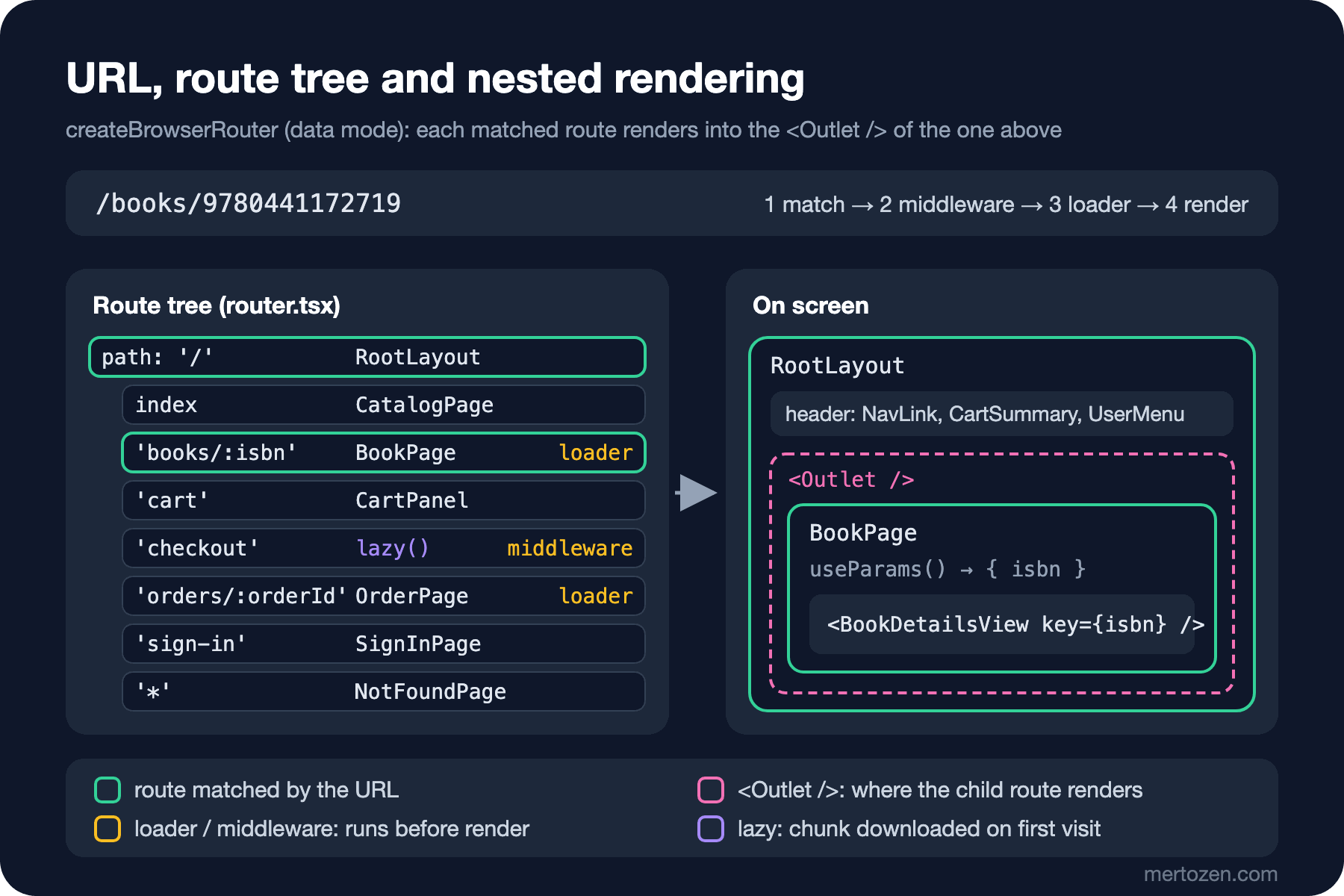
      { path: 'books/:isbn', loader: bookLoader, Component: BookPage },
      { path: 'cart', Component: CartPanel },
      {
        path: 'checkout',
        middleware: [requireUser],
        // Code splitting: the checkout chunk is downloaded on the first visit to /checkout
        lazy: async () => {
          const [{ CheckoutPage }, { checkoutAction }] = await Promise.all([
            import('@/features/checkout/CheckoutPage'),
            import('@/features/checkout/checkoutAction'),
          ]);
          return { Component: CheckoutPage, action: checkoutAction };
        },
      },
      { path: 'orders/:orderId', loader: orderLoader, Component: OrderPage },
      { path: 'sign-in', Component: SignInPage },
      { path: '*', Component: NotFoundPage },
    ],
  },
]);
import { QueryClientProvider } from '@tanstack/react-query'
import { StrictMode } from 'react'
import { createRoot } from 'react-dom/client'
import { RouterProvider } from 'react-router/dom'
import './index.css'
import { router } from '@/app/router'
import { queryClient } from '@/shared/queryClient'
import { ThemeProvider } from '@/shared/theme/ThemeProvider'
createRoot(document.getElementById('root')!).render(
<StrictMode>
<QueryClientProvider client={queryClient}>
<ThemeProvider>
<RouterProvider router={router} />
</ThemeProvider>
</QueryClientProvider>
</StrictMode>,
)It is the same idea as provideRouter(routes) in Angular: the routes are an array, each with a path and a component. App.tsx is gone; the root of the app is the router. The Layout component from the seventh post gave way to a layout route:
import { NavLink, Outlet, useNavigation } from 'react-router';
import { UserMenu } from '@/features/auth/UserMenu';
import { CartSummary } from '@/features/cart/CartSummary';
import { ThemeToggle } from '@/shared/theme/ThemeToggle';

// The layout route: header stays, <Outlet /> is replaced by the matching child route (like <router-outlet>)
export function RootLayout() {
  const navigation = useNavigation();

  return (
    <>
      <header className="site-header">
        <strong>Bookstore</strong>
        <nav className="main-nav">
          <NavLink to="/" end>Catalog</NavLink>
          <NavLink to="/cart">Cart</NavLink>
        </nav>
        <CartSummary />
        <ThemeToggle />
        <UserMenu />
      </header>
      {navigation.state !== 'idle' && <p className="progress" role="status">Loading page…</p>}
      <main>
        <Outlet />
      </main>
    </>
  );
}
<Outlet /> is the counterpart of <router-outlet>: whichever child route the URL matches renders here. The header stays the same on every page and is not remounted during navigation; only the inside of the Outlet changes. NavLink adds the active class on the active route (routerLinkActive); the root link needs end, otherwise it always looks active because / is a prefix of every URL.
We walked through the whole flow with Playwright: search, a book page, another book by the same author, the back button twice, the cart, checkout without signing in, an order and two bad URLs:
open /                       /                                | h1: Catalog
type "Austen"                /?q=Austen                       | h1: Catalog
click "Emma"                 /books/9780141439587             | h1: Emma
click "Pride and Prejudice"  /books/9780141439518             | h1: Pride and Prejudice
   gift note: ""
browser back                 /books/9780141439587             | h1: Emma
browser back                 /?q=Austen                       | h1: Catalog
   search box: "Austen"
click "Cart"                 /cart                            | h1: Cart
   chunk:  /src/features/checkout/CheckoutPage.tsx
   chunk:  /src/features/checkout/checkoutAction.ts
click "Checkout"             /sign-in?redirectTo=/checkout    | h1: Sign in
click "Sign in as Ada"       /checkout                        | h1: Checkout
click "Place order"          /orders/1                        | h1: Order #1
open /books/9780000000000    /books/9780000000000             | h1: 404 Not Found
   text: No book with ISBN 9780000000000
open /wishlist               /wishlist                        | h1: Page not found
URL Parameters and State in the URL
The book page reads the ISBN with useParams(); the counterpart of ActivatedRoute.paramMap. The search text and the page number are no longer a useState but the URL's query string:
export function CatalogPage() {
  // The search text and the page live in the URL: /?q=Dune&page=2 can be bookmarked and shared
  const [searchParams, setSearchParams] = useSearchParams();
  const query = searchParams.get('q') ?? '';
  const page = Number(searchParams.get('page') ?? '1');
  const { quantityOf, add } = useCart();
  const searchInput = useRef<HTMLInputElement>(null);
  useKeyboardShortcut('/', () => searchInput.current?.focus());

  const search = useDebouncedValue(query.trim(), 300);
  const { data, error, isFetching, isPlaceholderData } = useQuery(booksQuery(search, page));
  const pageCount = data ? Math.max(1, Math.ceil(data.total / pageSize)) : 1;

  function handleQueryChange(value: string) {
    // replace: typing should not add one history entry per letter; a new search starts on page 1
    setSearchParams(value ? { q: value } : {}, { replace: true });
  }

  function goToPage(next: number) {
    setSearchParams((params) => {
      params.set('page', String(next));
      return params;
    });
  }
The gain shows in the output above: after going back twice from the book page, the URL was /?q=Austen and the search box said "Austen". Had the state been in useState, it would have been lost the moment the catalog unmounted. The user can send the search's link to someone and sees the same results after a reload. replace: true stops every letter from adding its own history entry; the back button does not walk back letter by letter through "Auste", "Aust". Which state should live in the URL will be the first question of the decision table in the eleventh post.
The answer to the first Predict First question is also about URL parameters. Going from Emma to Pride and Prejudice stays within the same route; only :isbn changed. For React the same component type sits in the same place, so it reuses the component and keeps its state. Without a key:
export function BookPage() {
  const { isbn } = useParams();
  const { data: book } = useSuspenseQuery(bookQuery(isbn!));
  // WRONG: no key, the same BookDetailsView instance is reused for the next book
  return <BookDetailsView book={book} />;
}
on Emma: gift note = "For Grace"
on Pride and Prejudice: gift note = "For Grace"The note written for Emma moved over to Pride and Prejudice. In Angular, a component not being recreated when a parameter changes on the same route leads to the same problem; there we subscribed to paramMap and reset the fields by hand. In React the fix is familiar from the fifth post: the BookPage in the snapshot renders the details view with key={book.isbn}, and in the navigation output above the note comes back empty.
Loaders: Data Before Entering a Route
import { data, type LoaderFunctionArgs } from 'react-router';
import { bookQuery } from '@/features/catalog/catalogApi';
import { ApiError } from '@/shared/api';
import { queryClient } from '@/shared/queryClient';

// Like a resolver: the route renders only after the book is in the cache
export async function bookLoader({ params }: LoaderFunctionArgs) {
  try {
    await queryClient.ensureQueryData(bookQuery(params.isbn!));
  } catch (error) {
    if (error instanceof ApiError && error.status === 404) {
      throw data(`No book with ISBN ${params.isbn}`, { status: 404, statusText: 'Not Found' });
    }
    throw error;
  }
  return null;
}
export function BookPage() {
const { isbn } = useParams();
const { data: book } = useSuspenseQuery(bookQuery(isbn!));
// Same route, new :isbn → React keeps this component; the key gives every book its own form state
return <BookDetailsView key={book.isbn} book={book} />;
}A loader is the counterpart of a resolver in Angular: the router runs the loaders of the matched routes in parallel and does not render the new page until they have all finished. Our loader does not return the data itself; it puts the data into the TanStack Query cache from the eighth post, and the component reads the same query with useSuspenseQuery. This pairing is a common way to use React Router and TanStack Query together: the loader answers "when" (before navigating), the cache answers "where and for how long". If the data is already in the cache, even if stale, ensureQueryData sends no request and the loader finishes at once; useSuspenseQuery in the component refreshes stale data in the background.
We delayed the book details request by 1.2 seconds with Playwright and clicked Dune in the catalog, then went back to the catalog and clicked again:
  138 ms /                      | h1: Catalog  | progress: Loading page…
  743 ms /                      | h1: Catalog  | progress: Loading page…
 1527 ms /books/9780441172719   | h1: Dune     | progress: -
-- second visit (cached)
 1618 ms /books/9780441172719   | h1: Dune     | progress: -
While the loader ran, the URL was still / and the catalog was still on screen; since useNavigation().state was "loading", the "Loading page…" bar in the layout was visible. When the data arrived, the URL and the page changed together. On the second visit the data was fresh in the cache, so there was no delay at all. This is a different experience from the Suspense fallback in the eighth post: there the new screen opened at once with "Loading details…" inside it; here the old screen stays until the new one is ready. Both are valid; with slow loaders the user must see that the click did something, so a pending indicator is a must.
For an ISBN that does not exist, the loader throws a 404 response and the root route's ErrorBoundary catches it:
import { isRouteErrorResponse, Link, useRouteError } from 'react-router';

// errorElement of the root route: loader errors, thrown responses and render errors end up here
export function RouteErrorPage() {
  const error = useRouteError();
  const title = isRouteErrorResponse(error) ? `${error.status} ${error.statusText}` : 'Something went wrong';
  const detail = isRouteErrorResponse(error) ? String(error.data) : error instanceof Error ? error.message : '';

  return (
    <main>
      <h1>{title}</h1>
      <p>{detail}</p>
      <p><Link to="/">Back to the catalog</Link></p>
    </main>
  );
}
Undefined URLs fall through to NotFoundPage with path: '*'; both are in the last lines of the output. The difference is the source of the 404: there is no /wishlist route, while /books/9780000000000 is a valid route with no such book.
Auth Checks with Middleware and Forms with Actions
The checkout page wants a signed-in user. In Angular we would do this with a CanActivate guard; in React Router 8 the counterpart is middleware:
import { createContext, redirect, type MiddlewareFunction } from 'react-router';
import { authStore, type User } from '@/features/auth/authStore';

// Typed slot that loaders and actions below this middleware can read
export const userContext = createContext<User>();

// Runs before the route's loader/action on every navigation to it: the counterpart of a CanActivate guard
export const requireUser: MiddlewareFunction = ({ request, context }) => {
  const user = authStore.get();
  if (user === null) {
    const { pathname } = new URL(request.url);
    throw redirect(`/sign-in?redirectTo=${encodeURIComponent(pathname)}`);
  }
  context.set(userContext, user);
};
Middleware runs inside the router, outside the React tree; it cannot call a hook like useAuth or read a Context. That is why we turned the AuthProvider from the seventh post into a small external store, which components read with useSyncExternalStore, also from the seventh post:
// Demo sign-in kept outside React: components read it with useSyncExternalStore, router middleware with get()
export type User = { name: string; email: string };

let user: User | null = null;
const listeners = new Set<() => void>();

export const authStore = {
  get: () => user,
  subscribe(listener: () => void) {
    listeners.add(listener);
    return () => listeners.delete(listener);
  },
  signIn(next: User) {
    user = next;
    listeners.forEach((l) => l());
  },
  signOut() {
    user = null;
    listeners.forEach((l) => l());
  },
};
For the same reason the cart id moved from a Context into a similar module called cartIdStore: the order action also runs in the router and has to know which cart to order. State that must also be read from outside React cannot live inside React; this distinction is also the starting point of the Zustand stores in the eleventh post.
The middleware puts the user into the router's context with context.set(userContext, user); this is not React's Context but a typed box in which the router carries values to loaders and actions. The order action reads the user from there:
import { redirect, type ActionFunctionArgs } from 'react-router';
import { userContext } from '@/features/auth/requireUser';
import { cartApi } from '@/features/cart/cartApi';
import { cartIdStore } from '@/features/cart/cartIdStore';
import { ApiError } from '@/shared/api';
import { queryClient } from '@/shared/queryClient';

// Runs when <Form method="post"> is submitted; requireUser has already put the user into the context
export async function checkoutAction({ context }: ActionFunctionArgs) {
  const user = context.get(userContext);
  const cartId = cartIdStore.get();
  if (cartId === null) {
    return { error: 'Your cart is empty.' };
  }
  try {
    const order = await cartApi.placeOrder(cartId, user.name, user.email);
    cartIdStore.set(null);
    queryClient.removeQueries({ queryKey: ['cart'] });
    queryClient.invalidateQueries({ queryKey: ['book'] });
    return redirect(`/orders/${order.id}`);
  } catch (error) {
    if (error instanceof ApiError) {
      return { error: error.message };
    }
    throw error;
  }
}
import { Form, useActionData, useNavigation } from 'react-router';
import { useCart } from '@/features/cart/useCart';
import type { checkoutAction } from '@/features/checkout/checkoutAction';
import { formatPrice } from '@/shared/format';
export function CheckoutPage() {
const { lines, total } = useCart();
const result = useActionData<typeof checkoutAction>();
const navigation = useNavigation();
const placing = navigation.state === 'submitting';
return (
<>
<h1>Checkout</h1>
<ul>
{lines.map((line) => <li key={line.isbn}>{line.quantity} × {line.title} · {formatPrice(line.lineTotal)}</li>)}
</ul>
<p className="total">Total: {formatPrice(total)}</p>
{result?.error && <p className="error" role="alert">Order failed: {result.error}</p>}
<Form method="post">
<button type="submit" disabled={placing || lines.length === 0}>{placing ? 'Placing order…' : 'Place order'}</button>
</Form>
</>
);
}<Form method="post"> intercepts the browser's form submission and calls the route's action; if the action returns a redirect the router moves to the order page, if it returns an object useActionData hands it over. After the action finishes, the router reruns the loaders on that page, so the router itself answers part of the "which data went stale" question after a mutation. Since our data lives in the TanStack Query cache, we still do the invalidation ourselves. In the navigation output, the user who was not signed in clicked /checkout and was sent to /sign-in?redirectTo=/checkout, came back to checkout after signing in, and the order redirected to /orders/1.
Passing the redirectTo parameter straight to navigate() would be an open redirect; SignInPage only accepts values that start with / and do not start with //. Also remember that this check is a client check: middleware is a UX tool, not a security boundary. The server must verify who an order belongs to; we will set up real authentication in the fourteenth post.
Code Splitting with Lazy Routes
The checkout page is a screen only a small share of users open. With lazy we split it into its own chunk; the counterpart of loadComponent in Angular. The production build:
> bookstore-react@0.0.0 build
> tsc -b && vite build

vite v8.3.8 building client environment for production...
transforming...
✓ 180 modules transformed.
rendering chunks...
computing gzip size...
dist/index.html                           0.45 kB │ gzip:   0.29 kB
dist/assets/index-kdJ4VOl-.css            2.16 kB │ gzip:   0.83 kB
dist/assets/checkoutAction-DKsrLHwe.js    0.42 kB │ gzip:   0.30 kB
dist/assets/CheckoutPage-DWMT65wL.js      0.68 kB │ gzip:   0.42 kB
dist/assets/index-CIFBL3VZ.js           365.98 kB │ gzip: 115.03 kB

✓ built in 77ms
CheckoutPage and checkoutAction left the main bundle and became two small files. Since this page is small the gain is a few hundred bytes; on a large admin panel or a report page using a charting library, the difference can be hundreds of kilobytes. The answer to the second Predict First question is in the navigation output: the two chunks were downloaded for the user who was not signed in too, and then the middleware redirected. The router starts lazy loading without waiting for the middleware's result, which keeps navigation fast for an allowed user. Do not rely on lazy routes to keep code secret: JavaScript sent to the client is public anyway.
Oxlint is the reason we put the loaders and the action in files separate from the components. In the first version they were all in the same file as the component:
> bookstore-react@0.0.0 lint
> oxlint

src/features/orders/OrderPage.tsx:10:23: warning react(only-export-components): Fast refresh only works when a file only exports components. Use a new file to share constants or functions between components.
src/features/checkout/CheckoutPage.tsx:11:23: warning react(only-export-components): Fast refresh only works when a file only exports components. Use a new file to share constants or functions between components.
src/features/catalog/BookPage.tsx:12:23: warning react(only-export-components): Fast refresh only works when a file only exports components. Use a new file to share constants or functions between components.
Vite's Fast Refresh can refresh a file while keeping state only if the file exports nothing but components; when a loader is exported from the same file, a change reloads the whole page. Separate files also let the component and the action download in parallel on a lazy route; the lazy example in the React Router docs does the same with Promise.all.
SPA Fallback on a Static Host
When the user opens the link /books/9780441172719 in a new tab, the request first goes to the server. There is no such file on the server; if the server does not return index.html, React Router never runs:
$ curl -s -o /dev/null -w "%{http_code} %{content_type}\n" http://127.0.0.1:52143/books/9780441172719   # vite preview
200 text/html
$ curl -s -o /dev/null -w "%{http_code} %{content_type}\n" http://127.0.0.1:52145/books/9780441172719   # plain static server
404 text/html;charset=utf-8
vite preview does the SPA fallback itself; a plain static server (here Python's http.server) returned 404. In production you need try_files $uri /index.html; in nginx, navigationFallback in Azure Static Web Apps, and a rewrite rule in IIS. It is the same setting we covered in the Angular series post "Angular Build ve Deploy: ng build, Environment Dosyaları, Budgets ve SPA Routing"; the framework changed, but the problem sits between the browser and the server. We will set up the deployment side in detail in the fourteenth post.
In Production
Watch out for waterfalls in loaders. The router runs the loaders of matched routes in parallel; but if you write two awaits one after another inside a loader, or a component starts a second fetch once it renders (like our "More by Jane Austen" list), requests queue up again. We left it that way deliberately on the book page: the list is not the page's main content, and the page can open without waiting for it.
Do not neglect pending UI. A slow loader gives the impression that the user's click did nothing and makes them click again. A global indicator with useNavigation is the minimum; on slow pages a spinner next to the link is better.
Check the scroll behavior: in an SPA the browser does not reset the scroll position on its own when the page changes. In data mode the <ScrollRestoration /> component handles this; it matters for a user going from a long catalog to a details page.
React Router 8.5 deprecated its own view transition APIs in favor of the <ViewTransition> component in React 19.3; they keep working throughout v8 and will be removed in v9. If you add page transition animations, start directly with React's component; we will look at these release changes in the sixteenth post.
Common Pitfalls
Importing from react-router-dom: it was a compatibility layer in v7, in v8 the package is gone. Code copied from an old blog post fails at the import, not at npm install.
Assuming state resets when a parameter changes on the same route: as we saw above, the component is reused. Reset parameter-dependent state with a key.
Throwing an error with data() without a statusText. In the first version we threw the 404 with only a status:
open /books/9780000000000    /books/9780000000000             | h1: 404 Internal Server Error
   text: No book with ISBN 9780000000000
open /wishlist               /wishlist                        | h1: Page not found
For error responses without a statusText, the router defaults to "Internal Server Error"; seeing that text next to a 404 misleads both users and logs.
Writing the search text to the URL with push on every letter: the back button takes the user back letter by letter. Use replace: true while typing, and a new history entry for meaningful steps (changing the page, picking a filter).
Treating middleware as security: every check that runs on the client can be bypassed. Authorization happens in the API; middleware only takes the user to the right screen.
A Small Experiment
★☆☆ Add a category page: a /categories/:slug route listing the result of GET /api/books?category=classics. Write a loader that gets the category list from GET /api/categories and put NavLinks for the categories into the header.
★★☆ Do not let users enter the cart page while the cart is empty: write a middleware for /cart that redirects to the catalog when the cart is empty. Where can the middleware read the cart's content from while it runs outside React? queryClient.getQueryData, or a new request?
★★★ Instead of writing the catalog search to the URL on every letter, write only the debounced value. Where should the search box's value live now? How do you keep the box consistent with the URL when the user presses the back button?
The app is now an SPA split by URLs. The checkout page has no form yet; it has a single button, and the user's name and email come from the sign-in. In the next post we build a real order form with a delivery address and line items, and compare React 19's form actions, useActionState, useFormStatus, and react-hook-form with zod.