

From React 18 to 19.3: Concurrent Rendering, Actions, use(), ref as Prop, Activity, useEffectEvent, ViewTransition and Fragment Refs
React 18 laid the base for concurrent rendering (createRoot, batching, transitions), 19 brought Actions, use() and ref as a prop, 19.2 Activity and useEffectEvent, and 19.3 stable ViewTransition and Fragment refs. We add ViewTransition and a Fragment ref to Bookstore, apply React Router 8.5's deprecation, and upgrade a small React 18 project to 19.3 with the 18.3 warnings, the TypeScript codemod and manual fixes.
Version note: The examples in this post were run with React 18.3 and 19.3, @types/react 18.3 and 19.3, types-react-codemod 3.5, React Router 8.5, TypeScript 7.0, Vite 8.3, Vitest 5.1 and Node.js 24; browser behaviour was observed in headless Chromium with Playwright 1.65. npx codemod@latest react/19/migration-recipe was not run.
Guess First
This is the last post of the series. We wrote the React client of Bookstore, the online bookstore used as the shared example across this site's series, with React 19.3 from the start; but a React project you join has most likely started on 18, and part of it still uses old APIs. In this post we map the changes from 18 to 19.3 to the places this series used them, add the two stable 19.3 features to Bookstore, and really upgrade a small React 18 project.
Three questions. A component that runs fine on React 18.3 uses ReactDOM.render, a string ref and defaultProps on a function component; after moving to React 19.3, does the first error come from TypeScript or at runtime? How many of five type errors does the TypeScript codemod fix? React Router 8.5 deprecated its own viewTransition APIs; what do you write instead?
React 18: the Base of Concurrent Rendering
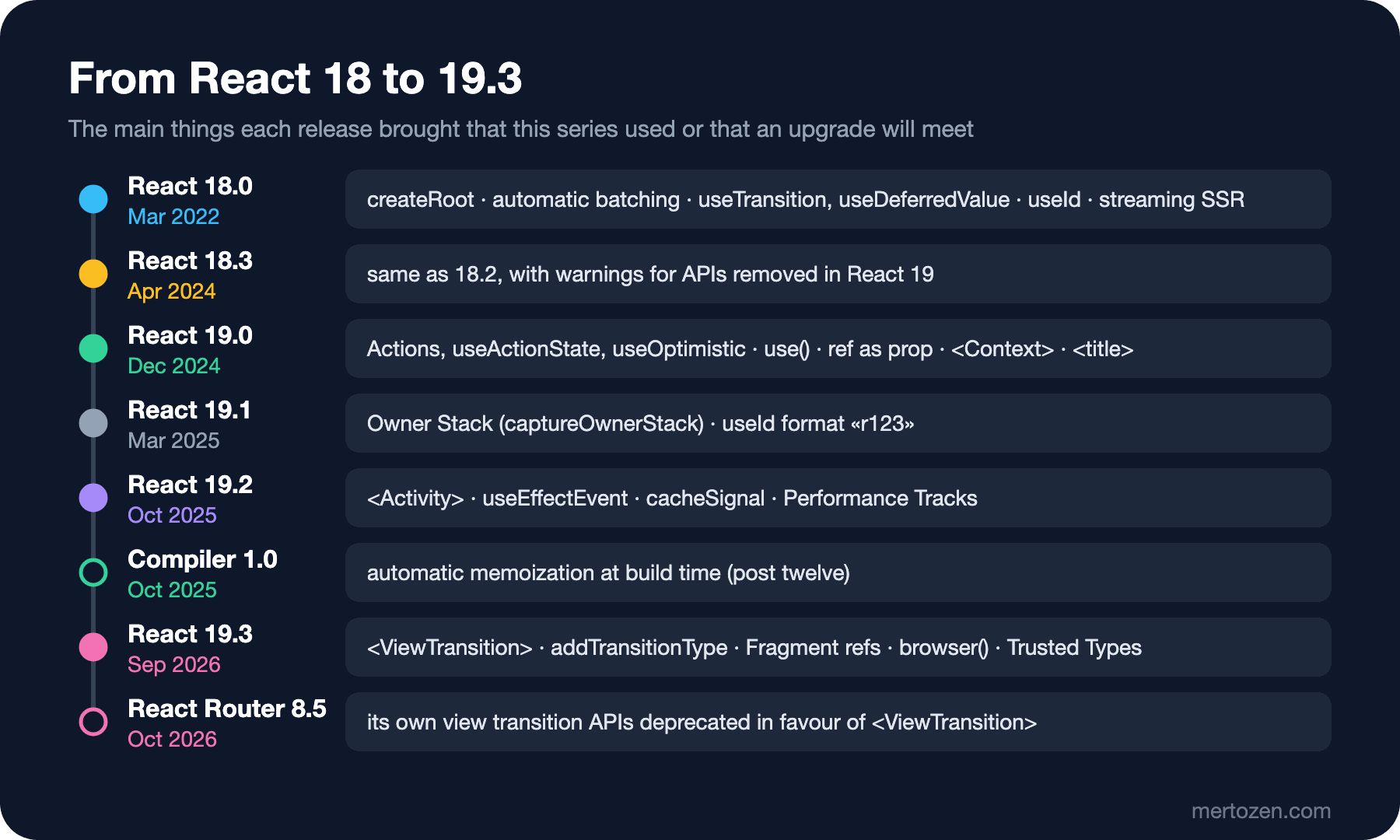
The real change in React 18 (March 2022) was the part you do not see: rendering can now be split and prioritised. Its entry point is createRoot, the first line of main.tsx in post two. The old ReactDOM.render kept working in 18 but kept the app in React 17 behaviour. Everything this series built on that base comes from 18: automatic batching from post four (setState calls outside event handlers, inside a promise for example, also merged into one render), useTransition and useDeferredValue from post twelve, useId and useSyncExternalStore from post seven, and the streaming SSR Next.js used in post fifteen. StrictMode running effects twice in development also arrived with 18.
React 19: Actions, use() and ref as a Prop
React 19 (December 5, 2024) is the release this series used most. startTransition began to accept async functions, and those functions were called Actions; useActionState, useFormStatus, useOptimistic and <form action> were the subject of post ten. use() made it possible to read promises and Context during render (posts eight and seven). ref became an ordinary prop and forwardRef unnecessary; a Context itself could be rendered as the provider (<ThemeContext value>). Document metadata support arrived too: React moves a <title>, <meta> or <link> rendered inside a component into <head>. In this post we added it to the book page:
      {/* React 19 document metadata: <title> is moved into <head> */}
      <title>{`${book.title} · Bookstore`}</title>
In Angular the Title service or a route's title does the same job; React has no separate service, the title lives inside the component that uses it.
19.1 and 19.2: Owner Stack, Activity and useEffectEvent
19.1 (March 2025) was a release for developers: Owner Stacks and captureOwnerStack arrived, and the values useId generates switched to the «r123» format so that they are valid CSS selectors. Code that relies on the old :r1: format in snapshot tests or CSS breaks here.
19.2 (October 1, 2025) added two important pieces. With <Activity> we hid the tabs of the stock page in post twelve without losing their state. With useEffectEvent we separated, in post six, the logic that an effect fires but that should not be one of its dependencies. On the Server Components side cacheSignal arrived, and React-specific Performance Tracks were added to Chrome DevTools in this release. The React Compiler 1.0 became stable in the same month (October 7, 2025).
19.3: ViewTransition and React Router 8.5
React 19.3 (September 9, 2026) made two experimental APIs stable. The first is <ViewTransition>: it uses the browser's View Transition API to animate updates that happen inside a transition. That is why React Router 8.5 (October 19, 2026) deprecated its own viewTransition prop and useViewTransitionState; they keep working throughout v8 and will be removed in v9. The recommended use is to wrap the <Outlet /> in a persistent layout:
      <main>
        {/* React 19.3: router navigations run in a transition, so switching pages cross-fades (replaces RR's viewTransition) */}
        <ViewTransition>
          <Outlet />
        </ViewTransition>
      </main>
Router navigations already run inside a transition, so nothing else is needed. We measured before and after with Playwright (by counting the browser's document.startViewTransition calls):
before: catalog → Dune: startViewTransition calls = 0, document.title = "Bookstore"
before: pager "Next": scrollY 1073 → 1073, top of the list -713px → -713px from the top of the viewport
after:  catalog → Dune: startViewTransition calls = 2, document.title = "Dune · Bookstore"
after:  pager "Next": scrollY 1073 → 360, top of the list -713px → 0px from the top of the viewport
Before the change there was no view transition at all; afterwards going from the catalog to a book page started two. We counted one call when moving to the cart page, which has no loader, and two when moving to the book page, which has one; in the second case the router first shows the "Loading page…" indicator and then the new page, and both updates are inside a transition:
catalog → cart (no loader): 1
catalog → Dune (bookLoader): 2
The default animation is a cross-fade. For a different animation per direction, you add a type to the update with addTransitionType and pick a class for it with <ViewTransition enter={{ ... }}>. Updates that are not transitions, the urgent ones, stay without animation; a letter typed into an input does not wait.
Fragment Refs
The second stable feature of 19.3 is <Fragment ref>. The ref gives you a FragmentInstance: methods such as focus, scrollIntoView, addEventListener and observeUsing that work on the Fragment's children without changing the DOM. In the catalog the page buttons are below the list; a user who pressed "Next" started in the middle of the new page. BookList takes no ref, and a Fragment ref reaches the list's DOM without changing it:
  const searchInput = useRef<HTMLInputElement>(null);
  // BookList takes no ref prop: a Fragment ref reaches the DOM it renders without changing BookList
  const results = useRef<FragmentInstance>(null);
// ...
  function goToPage(next: number) {
    // The pager is below the list: bring the top of the results back into view
    results.current?.scrollIntoView(true);
    setSearchParams((params) => {
      params.set('page', String(next));
      return params;
    });
  }
// ...
            <Fragment ref={results}>
              <BookList books={data.items} quantityOf={quantityOf} onAdd={add} />
            </Fragment>
The second line of the measurement above shows the result: the top of the list moved from -713 pixels to 0. To be fair, a ref on the div around the list would have done the same here; Fragment refs really pay off for sibling elements without a wrapper and for library components you cannot change that do not expose a ref. The first compile brought a surprise too:
$ npx tsc -b
src/features/catalog/CatalogPage.tsx(34,22): error TS2339: Property 'scrollIntoView' does not exist on type 'FragmentInstance'.
FragmentInstance is an empty interface in @types/react; @types/react-dom adds the DOM methods. Because the project never loaded react-dom's main type file (it only imported react-dom/client), we added a reference to vite-env.d.ts:
/// <reference types="vite/client" />
// FragmentInstance gets its DOM methods (focus, scrollIntoView, observeUsing…) from react-dom's types
/// <reference types="react-dom" />
Other Changes in 19.3
browser() (react-dom): in an app that renders on the server, use(browser()) keeps a component that only makes sense in the browser (the local time zone, localStorage) out of the server render; on the server the nearest Suspense fallback is rendered. Our SPA has no use for it, but in a Next.js project like the one in post fifteen it replaces the useEffect plus mounted state trick. React also supports Trusted Types: on a site that enforces require-trusted-types-for 'script', it now passes TrustedHTML values created by your policies to the DOM without turning them into strings (in the Frontend Security series, "Taking Trusted Types to Production: Angular Policies, Third-Party Libraries and Baseline 2026"). Server Components can now render a Context imported from a 'use client' module directly, without writing a separate provider component. Two more lines in the changelog stand out: independent transitions are no longer tied into a single render, and StrictMode also runs effects twice during hydration. Nothing in the changelog is marked as a breaking change.
Upgrade Checklist: Moving a Small React 18 Project to 19.3
The upgrade-lab/ folder in the snapshot holds a small component that uses old APIs on purpose. Its starting point:
import { Component, createContext, forwardRef, useContext, useRef } from 'react';
import ReactDOM from 'react-dom';

const ThemeContext = createContext('light');

// defaultProps on a function component
function PriceTag({ price, currency }: { price: number; currency?: string }) {
  const theme = useContext(ThemeContext);
  return <span className={theme}>{price} {currency}</span>;
}
PriceTag.defaultProps = { currency: 'TRY' };

// forwardRef only to hand the ref down to <input>
const SearchBox = forwardRef<HTMLInputElement, { placeholder: string }>((props, ref) => <input ref={ref} {...props} />);

// A class component with a string ref
class BookTitle extends Component<{ title: string }> {
  componentDidMount() {
    (this.refs.heading as HTMLElement).dataset.ready = 'yes';
  }
  render() {
    return <h2 ref="heading">{this.props.title}</h2>;
  }
}

export function App() {
  const search = useRef<HTMLInputElement>(null);
  const renders = useRef<number>();
  renders.current = (renders.current ?? 0) + 1;
  let box: HTMLDivElement | null = null;
  return (
    <ThemeContext.Provider value="dark">
      <div ref={(node) => (box = node)} onClick={() => box?.focus()}>
        <BookTitle title="Dune" />
        <PriceTag price={489} />
        <SearchBox ref={search} placeholder="Search" />
      </div>
    </ThemeContext.Provider>
  );
}

export function mount(container: HTMLElement) {
  ReactDOM.render(<App />, container);
}
The first step of the React 19 upgrade guide is to move to 18.3 first: it is the same as 18.2 but warns about APIs that go away in 19. We collected the warnings in a Vitest test:
$ npx vitest run --silent=false        # react@18.3.1
stdout | src/legacy.test.tsx > renders the app and lists what React warns about
<div><h2 data-ready="yes">Dune</h2><span class="dark">489 TRY</span><input placeholder="Search"></div>
- Warning: ReactDOM.render is no longer supported in React 18. Use createRoot instead. Until you switch to the new API, your app will behave as if it's running React 17. Learn more: https://reactjs.org/link/switch-to-createroot
- Warning: Component "BookTitle" contains the string ref "heading". Support for string refs will be removed in a future major release. We recommend using useRef() or createRef() instead. Learn more about using refs safely here: https://reactjs.org/link/strict-mode-string-ref
- Warning: PriceTag: Support for defaultProps will be removed from function components in a future major release. Use JavaScript default parameters instead.
Then we moved to React 19.3 and its types (npm install --save-exact react@19.3.1 react-dom@19.3.1, @types/react@19.3.0, @types/react-dom@19.3.0). The answer to the first question: both. TypeScript reported five errors and the test failed at runtime:
$ npx tsc --noEmit
src/legacy.tsx(19,11): error TS2339: Property 'refs' does not exist on type 'BookTitle'.
src/legacy.tsx(22,16): error TS2322: Type 'string' is not assignable to type 'Ref<HTMLHeadingElement> | undefined'.
src/legacy.tsx(28,19): error TS2554: Expected 1 arguments, but got 0.
src/legacy.tsx(33,12): error TS2322: Type '(node: HTMLDivElement | null) => HTMLDivElement | null' is not assignable to type 'Ref<HTMLDivElement> | undefined'.
  Type '(node: HTMLDivElement | null) => HTMLDivElement | null' is not assignable to type '(instance: HTMLDivElement | null) => void | (() => VoidOrUndefinedOnly)'.
    Type 'HTMLDivElement | null' is not assignable to type 'void | (() => VoidOrUndefinedOnly)'.
      Type 'null' is not assignable to type 'void | (() => VoidOrUndefinedOnly)'.
src/legacy.tsx(43,12): error TS2339: Property 'render' does not exist on type 'typeof import("C:/Users/user/react-upgrade-lab/node_modules/@types/react-dom/index")'.
$ npx vitest run
FAIL src/legacy.test.tsx > renders the app and lists what React warns about
TypeError: default.render is not a function
❯ mount src/legacy.tsx:43:12
41|
42| export function mount(container: HTMLElement) {
43| ReactDOM.render(<App />, container);
| ^We ran the TypeScript codemod the guide recommends:
$ npx types-react-codemod@3.5.3 preset-19 ./src --yes
Results:
0 errors
1 unmodified
0 skipped
1 ok
$ git diff src/legacy.tsx
@@ -25,12 +25,14 @@

 export function App() {
   const search = useRef<HTMLInputElement>(null);
-  const renders = useRef<number>();
+  const renders = useRef<number>(undefined);
   renders.current = (renders.current ?? 0) + 1;
   let box: HTMLDivElement | null = null;
   return (
     <ThemeContext.Provider value="dark">
-      <div ref={(node) => (box = node)} onClick={() => box?.focus()}>
+      <div ref={node => {
+        (box = node);
+      }} onClick={() => box?.focus()}>
         <BookTitle title="Dune" />
         <PriceTag price={489} />
         <SearchBox ref={search} placeholder="Search" />
The answer to the second question: two of five. The codemod added an argument to useRef and turned the ref callback that returned a value into a block body; ReactDOM.render, the string ref and refs are API changes, not type changes. For those the guide recommends npx codemod@latest react/19/migration-recipe; we did not run that tool and fixed the rest by hand:
import { Component, createContext, createRef, useContext, useRef, type Ref } from 'react';
import { createRoot } from 'react-dom/client';

const ThemeContext = createContext('light');

// A default parameter instead of defaultProps
function PriceTag({ price, currency = 'TRY' }: { price: number; currency?: string }) {
  const theme = useContext(ThemeContext);
  return <span className={theme}>{price} {currency}</span>;
}

// ref is an ordinary prop: no forwardRef
function SearchBox({ ref, ...props }: { placeholder: string; ref?: Ref<HTMLInputElement> }) {
  return <input ref={ref} {...props} />;
}

// createRef instead of a string ref
class BookTitle extends Component<{ title: string }> {
  heading = createRef<HTMLHeadingElement>();
  componentDidMount() {
    this.heading.current!.dataset.ready = 'yes';
  }
  render() {
    return <h2 ref={this.heading}>{this.props.title}</h2>;
  }
}

export function App() {
  const search = useRef<HTMLInputElement>(null);
  const renders = useRef<number>(undefined);
  renders.current = (renders.current ?? 0) + 1;
  let box: HTMLDivElement | null = null;
  return (
    <ThemeContext value="dark">
      <div ref={(node) => { box = node; }} onClick={() => box?.focus()}>
        <BookTitle title="Dune" />
        <PriceTag price={489} />
        <SearchBox ref={search} placeholder="Search" />
      </div>
    </ThemeContext>
  );
}

export function mount(container: HTMLElement) {
  createRoot(container).render(<App />);
}
$ npx tsc --noEmit && npx vitest run --silent=false # react@19.3.1
stdout | src/legacy.test.tsx > renders the app and lists what React warns about
<div><h2 data-ready="yes">Dune</h2><span class="dark">489 TRY</span><input placeholder="Search"></div>
(no warnings)Because createRoot does not render synchronously, the test had to wrap mount in act(). The checklist:
- Move to 18.3 first and clear the warnings; keep StrictMode on.
- Switch to
createRoot/hydrateRoot; in tests importactfromreact. - Make sure you use the new JSX transform; React 19 requires it.
- Upgrade React and its types together; run
npx types-react-codemod@latest preset-19and fix the remaining type errors by hand. - Remove string refs, legacy context,
defaultPropson function components,propTypes,findDOMNodeandreact-test-renderer. forwardRefand<Context.Provider>still work; use therefprop and<Context>in new code and move the old ones when you get the chance.- Check your libraries' React 19 support; in React Router, switch from
viewTransitionto<ViewTransition>.
In Production
Do the upgrade as a step separate from code changes: first 18.3, then 19.x, with all tests and at least one Playwright flow at every step. Peer dependencies can be the slowest part of an upgrade; one library without React 19 support holds up the whole app. Do not switch on the React Compiler at the same time; measure the upgrade first and the compiler afterwards as a separate change (post twelve). <ViewTransition> relies on the browser's View Transition API; remember to tone down the animations you add according to the user's prefers-reduced-motion setting.
Common Pitfalls
Skipping 18.3: going straight to 19 gives you errors instead of warnings, and it gets harder to tell which one comes from which change.
Assuming the codemod fixes everything: as the output shows, the type codemod does not touch API changes; after a codemod, run tsc, the tests and the app itself again.
Expecting animation from urgent updates: <ViewTransition> only runs for transitions, Suspense reveals and useDeferredValue updates; a direct setState inside onClick produces no animation.
Relying on the format of a useId value: it changed in 19.1 and may change again; use it only to connect id and aria-* attributes.
A Small Experiment
★☆☆ Give the <ViewTransition> in RootLayout default="none" and animate only when going to a book page: what has to change to use addTransitionType('details') when a book link is clicked?
★★☆ Wrap the RecentlyViewed list in a Fragment and attach an IntersectionObserver with observeUsing: log to the console when the list enters the screen. Check in the DOM that it works without adding a wrapper div.
★★★ Add a component to upgrade-lab that imports act from react-dom/test-utils and uses findDOMNode, look at the warnings on 18.3 and the errors on 19.3, and try on your own machine how the react/19/migration-recipe codemod changes them.
The series ends here. Starting out as someone who knows Angular, we wrote Bookstore's catalog, cart, checkout and stock screens with React 19.3, and saw state, effects, data fetching, routing, forms, global state, performance, testing, deployment and the server side on the same app. The next step is your project: when you join a React codebase, the first job is to find out how that team made the decisions we made one by one in this series.