

A Brief Look at Next.js: Server Components, the App Router, Server Actions, Cache Components and When an SPA Is Enough

Next.js runs React on the server: Server Components await data directly and their code never reaches the browser, Cache Components let you choose what is cached with 'use cache' and cacheLife, and every Server Function is a public endpoint that needs validation and authorization. We serve Bookstore's book details as a Partial Prerender with Next.js 16.4, call a Server Function directly with curl, and discuss when an SPA is enough.
Version note: The examples in this post were run with Next.js 16.4 (Turbopack), React 19.3, TypeScript 7.0, zod 4.6 and Node.js 24; the app was run locally with next build and next start, and the browser steps were observed in headless Chromium with Playwright 1.65. Deploying to Vercel was not tried.
Guess First
For fourteen posts we wrote the React client of Bookstore, the online bookstore used as the shared example across this site's series, as an SPA running in the browser. In this post we render one screen, the book details, on the server with Next.js. The goal is not a full Next.js course; it is to see the server side of React and be able to decide when an SPA is enough.
Three questions. What HTTP status does a page return when it calls notFound() for an ISBN that does not exist? What happens if you send quantity=1000 with curl to the Server Function behind the add-to-cart form? Can you pass a function called onAdded from a Server Component to a client component?
Server Components: the Boundary Between Server and Client
Every component we have written so far ran in the browser. In the React Server Components model the default flips: the component runs on the server, can be async, can go straight to a database or an API, and its code never reaches the browser. The book page:
import { notFound } from 'next/navigation';
import { Suspense } from 'react';
import { getBook, getBooksByAuthor, getStock } from '@/lib/bookstoreApi';
import { AddToCartForm } from './AddToCartForm';
import { MoreByAuthor } from './MoreByAuthor';

// Prerendered at build time; any other ISBN is rendered on its first request
export async function generateStaticParams() {
  return [{ isbn: '9780441172719' }, { isbn: '9780141439587' }];
}

// A Server Component: async, runs only on the server, its code never reaches the browser
export default async function BookPage({ params }: PageProps<'/books/[isbn]'>) {
  const { isbn } = await params;
  const book = await getBook(isbn);
  if (book === null) {
    notFound();
  }
  // Not awaited: the promise travels to the client component, which waits for it with use()
  const moreByAuthor = getBooksByAuthor(book.author).then((books) => books.filter((b) => b.isbn !== book.isbn));

  return (
    <article>
      <h1>{book.title}</h1>
      <p>{book.author}, {book.publishedYear} · {book.category} · {book.price.toFixed(2)} TRY</p>
      <p>{book.description}</p>
      <Suspense fallback={<p className="muted">Checking stock…</p>}>
        <Stock isbn={isbn} />
      </Suspense>
      <AddToCartForm isbn={book.isbn} />
      <Suspense fallback={<p className="muted">Loading more books…</p>}>
        <MoreByAuthor author={book.author} books={moreByAuthor} />
      </Suspense>
    </article>
  );
}

async function Stock({ isbn }: { isbn: string }) {
  const available = await getStock(isbn);
  return <p className="muted">{available > 0 ? `${available} in stock` : 'Out of stock'}</p>;
}
No useEffect, no useQuery, no loading state: the component awaits the data and renders the result. In post eight we said that use(promise) really belongs to promises handed over by a framework; here the moreByAuthor promise starts on the server, goes to a client component as a prop, and React streams the result to the browser:
'use client';

import Link from 'next/link';
import { use, useState } from 'react';

type MoreByAuthorProps = {
  author: string;
  // A promise created on the server; React streams its result to the browser
  books: Promise<{ isbn: string; title: string }[]>;
};

export function MoreByAuthor({ author, books }: MoreByAuthorProps) {
  const list = use(books);
  const [showAll, setShowAll] = useState(false);
  if (list.length === 0) {
    return null;
  }
  const shown = showAll ? list : list.slice(0, 1);
  return (
    <section>
      <h2>More by {author}</h2>
      <ul>
        {shown.map((b) => <li key={b.isbn}><Link href={`/books/${b.isbn}`}>{b.title}</Link></li>)}
      </ul>
      {list.length > 1 && !showAll && <button type="button" onClick={() => setShowAll(true)}>Show all {list.length}</button>}
    </section>
  );
}
'use client' is the boundary that puts a file, and everything it imports, into the browser bundle. Components that need state, effects or event handlers live on this side. Props that cross the boundary must be serializable: strings, numbers, plain objects, arrays, Dates, promises, JSX and Server Functions can cross; an ordinary function cannot. The answer to the third question came during the build:
Error: Event handlers cannot be passed to Client Component props.
  {isbn: ..., onAdded: function onAdded}
                       ^^^^^^^^^^^^^^^^
If you need interactivity, consider converting part of this to a Client Component.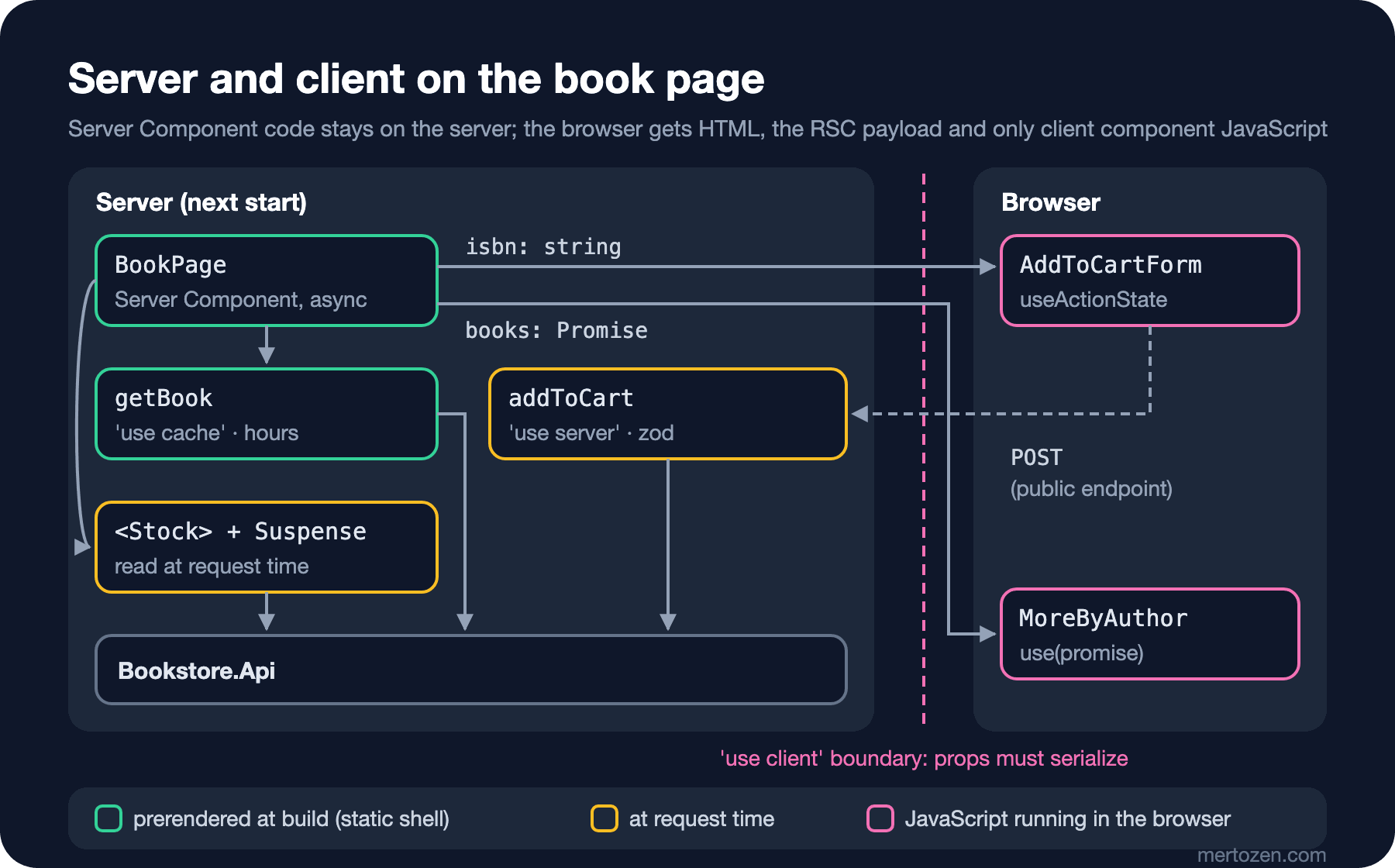
The App Router's File Conventions
Routes come from the folders under app/; the route tree we had in React Router is defined here by the folder structure:
next/
  next.config.ts
  lib/bookstoreApi.ts            // 'server-only': can only be imported on the server
  lib/cart.ts
  app/layout.tsx                 // root layout; RootLayout in the SPA
  app/page.tsx                   // /
  app/books/[isbn]/page.tsx      // /books/:isbn
  app/books/[isbn]/loading.tsx   // Suspense fallback while the page renders
  app/books/[isbn]/error.tsx     // error boundary ('use client')
  app/books/[isbn]/not-found.tsx // when notFound() is called
  app/books/[isbn]/actions.ts    // 'use server': Server Functions
A project starts with create-next-app. Since 16.4 new projects come with this config:
$ npx create-next-app@16.4.6 bookstore-next --yes --use-npm --disable-git --no-agent-feedback --skip-install
$ cat bookstore-next/next.config.ts
import type { NextConfig } from "next";

const nextConfig: NextConfig = {
  /* config options here */
  cacheComponents: true,
  partialPrefetching: true,
  turbopack: {
    rules: {
      "*.css": {
        loaders: ["@tailwindcss/turbopack"],
        as: "*.css",
      },
    },
  },
};

export default nextConfig;
According to the Next.js 16.4 announcement, Cache Components are the default for new projects and will become the default for all projects in Next.js 17. In this model nothing is cached on its own; you mark the places you want cached with 'use cache'.
Cache Components: 'use cache', cacheLife and the Static Shell
// Cached on the server: the same ISBN does not reach Bookstore.Api again for an hour
export async function getBook(isbn: string): Promise<Book | null> {
  'use cache';
  cacheLife('hours');
  cacheTag(`book-${isbn}`);
  const book = await getJson<BookWithStock>(`/api/books/${isbn}`, 'getBook');
  if (book === null) {
    return null;
  }
  // The stock figure must not be cached for an hour: leave it out of the cached value
  const { available: _, ...rest } = book;
  return rest;
}
// ...
// Not cached: stock changes with every order, so it is read on every request
export async function getStock(isbn: string): Promise<number> {
  return (await getJson<BookWithStock>(`/api/books/${isbn}`, 'getStock'))?.available ?? 0;
}
According to the Next.js docs, the cacheLife('hours') preset means 5 minutes stale (how long the client router uses it without asking the server), 1 hour revalidate (background refresh) and 1 day expire. With cacheTag you can drop one book's cache in a targeted way with revalidateTag or updateTag when its price changes. Stock changes with every order, so it is not cached. Because prerendering calls the API during the build, Bookstore.Api has to be running while next build runs (BOOKSTORE_API, default http://localhost:5080). The build output shows these decisions:
▲ Next.js 16.4.6 (Turbopack)
✓ Running next.config.ts took 24ms
- Cache Components enabled
- Partial Prefetching enabled

  Creating an optimized production build ...
✓ Compiled successfully in 190ms
  Running TypeScript ...
  Finished TypeScript in 223ms ...
  Collecting page data using 5 workers ...
  Generating static pages using 5 workers (0/6) ...
✓ Generating static pages using 5 workers (6/6) in 294ms
  Finalizing page optimization ...

Route (app)                 Revalidate  Expire
┌ ○ /                               1m      1h
├ ○ /_not-found
└   /books/[isbn]
  ├ ◐ /books/[isbn]
  ├ ◐ /books/9780441172719          1h      1d
  └ ◐ /books/9780141439587          1h      1d


○  (Static)             prerendered as static content
◐  (Partial Prerender)  prerendered as static HTML with dynamic server-streamed content
Dune and Emma, which we listed in generateStaticParams, were prerendered during the build; ◐ is a Partial Prerender: the static part of the page (title, description, price) is ready HTML, the stock line is a hole streamed at request time. We asked for Dune three times with next start:
GET /books/9780441172719 → 200 in 0.019572s
GET /books/9780441172719 → 200 in 0.012198s
GET /books/9780441172719 → 200 in 0.014251s
# next start log
[api] getStock: GET /api/books/9780441172719
[api] getStock: GET /api/books/9780441172719
[api] getStock: GET /api/books/9780441172719
[api] getStock: GET /api/books/9780441172719
[api] getStock: GET /api/books/9780441172719
[api] getStock: GET /api/books/9780441172719
getBook was never called; the book had entered the cache during the build. Each request read only the stock, but twice. When we repeated the same measurement with partialPrefetching: false, it dropped to one call per request; if the data you read at request time is expensive, measure this behaviour in your own app. A book that was not prerendered (1984) called getBook and getBooksByAuthor on the first request and came from the cache on the second.
The <Suspense> around the stock line is required. With it and loading.tsx removed, the build stopped:
Error: Route "/books/[isbn]": Next.js encountered uncached or runtime data during prerendering.

`fetch(...)`, `cookies()`, `headers()`, `params`, `searchParams`, or `connection()` accessed outside of `<Suspense>` prevents the route from being prerendered, blocking the page load and leading to a slower user experience.

Ways to fix this:
  - [stream] Provide a placeholder with `<Suspense fallback={...}>` around the data access
  - [cache] For uncached data (`fetch`, database calls): cache the access with `"use cache"` (does not apply to `connection()`)
  - [block] Set `export const instant = false` to allow a blocking route

Learn more: https://nextjs.org/docs/messages/blocking-prerender-dynamic
Next.js wants a decision here: cache the data, stream it with a fallback, or knowingly accept a blocking page. It is the same decision we made on the client with TanStack Query in post eight, this time asked on the server and at build time.
Server Functions and Forms
In post ten we used form actions with functions running on the client and said the same API works with Server Functions. A function marked with 'use server' runs on the server; the client component receives it as a reference:
'use server';

import { cookies } from 'next/headers';
import * as z from 'zod';
import { addToServerCart } from '@/lib/cart';

export type AddToCartState = { message: string } | null;

const addToCartInput = z.object({
  isbn: z.string().regex(/^\d{13}$/),
  quantity: z.coerce.number().int().min(1).max(10),
});

// A Server Function is a public POST endpoint: anyone can call it with any body, not only this form
export async function addToCart(_previous: AddToCartState, formData: FormData): Promise<AddToCartState> {
  const input = addToCartInput.safeParse({ isbn: formData.get('isbn'), quantity: formData.get('quantity') });
  if (!input.success) {
    return { message: 'Invalid request.' };
  }
  const cookieStore = await cookies();
  const cart = await addToServerCart(cookieStore.get('cartId')?.value, input.data.isbn, input.data.quantity);
  // The cart id stays on the server side of the wire: an HttpOnly cookie, not localStorage
  cookieStore.set('cartId', cart.id, { httpOnly: true, sameSite: 'lax', path: '/' });
  const count = cart.items.reduce((sum, line) => sum + line.quantity, 0);
  return { message: `Added. Your cart has ${count} item(s).` };
}
'use client';
import { useActionState } from 'react';
import { addToCart, type AddToCartState } from './actions';
// The form posts to a Server Function; useActionState keeps the message it returns
export function AddToCartForm({ isbn }: { isbn: string }) {
const [state, formAction, isPending] = useActionState<AddToCartState, FormData>(addToCart, null);
return (
<form action={formAction}>
<input type="hidden" name="isbn" value={isbn} />
<label>Copies <input name="quantity" type="number" min={1} max={10} defaultValue={1} /></label>{' '}
<button type="submit" disabled={isPending}>{isPending ? 'Adding…' : 'Add to cart'}</button>
{state && <p role="status">{state.message}</p>}
</form>
);
}This time the cart id lives in an HttpOnly cookie, not in localStorage; the job the BFF did in post fourteen is done here by the Next.js server. We tried it with Playwright, with JavaScript on and off:
JavaScript on : status = "Added. Your cart has 2 item(s)."
                cookie cartId: httpOnly=true sameSite=Lax
JavaScript off: visible text after the POST = ""
                result inside the response = "Added. Your cart has 1 item(s)."
With JavaScript on, useActionState showed the result without a page reload. With JavaScript off, the form posted like a classic HTML form and the Server Function ran (the result is in the response), but the browser showed an empty page: the response only had the hidden streamed parts, and the scripts that put them in place need JavaScript. If you rely on progressive enhancement, try your own pages with JavaScript switched off.
Every Server Function Is a Public Endpoint
The hidden inputs in the form carry the action's id in the HTML; anyone who knows it can call the action without the form. The answer to the second question:
$ curl -s $NEXT/books/9780441172719 | grep -o "ACTION_1:0[^/]*"
ACTION_1:0" value="{"id":"60f4e072abc6…","bound":"$@1"}"
$ curl -s -F '$ACTION_REF_1=' -F '$ACTION_1:0={"id":"<action-id>","bound":"$@1"}' -F '$ACTION_1:1=[null]' \
       -F '$ACTION_KEY=<key>' -F isbn=9780441172719 -F quantity=3 $NEXT/books/9780441172719 | grep -o 'Added[^"]*\|Invalid request\.'
Added. Your cart has 3 item(s).
$ curl -s -F '$ACTION_REF_1=' -F '$ACTION_1:0={"id":"<action-id>","bound":"$@1"}' -F '$ACTION_1:1=[null]' \
       -F '$ACTION_KEY=<key>' -F isbn=9780441172719 -F quantity=1000 $NEXT/books/9780441172719 | grep -o 'Added[^"]*\|Invalid request\.'
Invalid request.
The Next.js docs say it plainly: an exported Server Function can be called with a direct POST. Next.js generates encrypted, build-specific action ids, removes unused actions from the bundle and rejects calls from other sites by comparing the Origin header with Host. None of this replaces input validation and authorization checks. That is why our zod schema rejected quantity=1000. A session check on the page does not protect the page's Server Functions; each action has to check the user and the owner of the resource itself, like a controller action in ASP.NET Core. Had we written an action that places an order, we would take the customer from the session, not from the form.
Next.js, Angular SSR and ASP.NET Core MVC
The table compares Next.js with Angular SSR and ASP.NET Core MVC:
| Concern | Next.js App Router | Angular SSR | ASP.NET Core MVC |
|---|---|---|---|
| What runs on the server | Server Components; client components too, for the first HTML | The whole app, then hydration in the browser | Controllers and Razor views |
| JavaScript sent to the browser | Only client components | The whole app | Only the scripts you add |
| Writing data | Server Functions | An API through HttpClient | Form POST, controller action |
| Caching | 'use cache', cacheLife | HttpClient transfer cache (TransferState) | Output caching, response caching |
| Runtime | A Node.js server (next start) | A Node.js server | .NET (Kestrel) |
Hydration covers the whole app in Angular SSR; with Server Components it covers only the client components. To think about server-side rendering from the .NET side, the first post of the MVC series, "When Server-Side Rendering? Choosing Between MVC, Razor Pages, Blazor SSR and an Angular SPA", is a good start. For those who want to stay with React Router, framework mode answers the same question: the loaders from post nine run on the server and the page is rendered there.
In post eleven we said that a module-level store would be shared by all users during server-side rendering. That is why Zustand's advice for Next.js is a store per request instead of a global one: a factory with createStore, created in a provider with useState(() => createStore()) and handed to client components through Context. Server Components do not read the store; they cannot use hooks or Context.
When Is an SPA Enough?
Bookstore's back office (stock, order approval, the institutional portal) consists of screens where signed-in users stay for a long time and search engines never look; an SPA with a BFF in front is enough there, and simpler. The catalog and the book details are pages that must show up in search engines and open fast the first time; server rendering and caching bring real benefit there. If your team is .NET-heavy, Razor is an option for those pages too; you do not have to move everything to one framework. Decide per page type: does SEO and the first load matter, or long-running interaction?
In Production
Next.js needs a Node.js server: next start or a Docker image that runs it. According to Next.js's self-hosting guide, Cache Components work with next start by default, but a few things need attention. The default cache lives in each instance's own memory; with several instances you need a shared cache handler (Redis, for example) and revalidateTag has to reach every instance. The key that encrypts Server Function closures is regenerated on every build; all instances must use the same key (NEXT_SERVER_ACTIONS_ENCRYPTION_KEY). If you put nginx in front, you have to switch off response buffering for streaming, otherwise the fast static shell loses its point.
The practical summary of the vendor lock-in debate: the code is React, but 'use cache', cacheLife, the file conventions and how Server Functions travel are specific to Next.js. On Vercel this infrastructure is part of the platform; running it on your own server is possible, but the work above is yours. We did not try deploying to Vercel in this post.
Common Pitfalls
Assuming notFound() returns 404. The answer to the first question:
$ curl -s -o /dev/null -w "%{http_code}\n" $NEXT/books/9999999999999
200
$ curl -s $NEXT/books/9999999999999 | grep -o "<meta name=\"robots\"[^>]*>"
<meta name="robots" content="noindex"/>
With Cache Components the static shell is sent first and fixes the status at 200; Next.js adds noindex for search engines. If you need a real 404 (analytics, monitoring), the check has to happen before the stream starts, in proxy.ts for example.
Leaking secrets into a client component: every prop passed from a Server Component to a client component goes to the browser. Pass the fields the screen needs, not the whole record from the API; the server-only import turns server code accidentally ending up on the client side into a build error. Variables with the NEXT_PUBLIC_ prefix are written into the bundle, like VITE_ in Vite.
Putting request-time data into a cached function: had we left the stock inside getBook, an hour-old stock figure would have been shown. That is why we took available out of the cached value.
A Small Experiment
★☆☆ Change cacheLife('hours') in getBook to cacheLife('seconds') and run next build again. How did the Revalidate and Expire columns and the ◐ rows in the route table change?
★★☆ Write a Server Function for a price change that drops the book's cache with updateTag(`book-${isbn}`). How do you check who may call it?
★★★ Write a proxy.ts that returns a 404 status for an ISBN that does not exist. Answer without calling the API if the ISBN format is invalid; what do you do if the format is valid?
We have now seen the server side of React too. In the last post of the series we look back at what changed from React 18 to 19.3: concurrent rendering, Actions, use(), ref as a prop, Activity, useEffectEvent, <ViewTransition> and Fragment refs, plus a checklist for upgrading an existing project.