

Finishing the Bookstore SPA End to End: Feature Folders, Authentication, Environments and Deployment
Getting a React SPA ready for production means guarding feature boundaries with a lint rule, knowing that VITE_ variables are written into the bundle at build time so secrets stay out of the browser, and handing the session to a BFF that uses an HttpOnly cookie instead of a token. We add a small ASP.NET Core and YARP BFF to Bookstore and show the sign-in flow, the SPA fallback, cache headers, an nginx config and bundle analysis with real output.
Version note: The examples in this post were run with React 19.3, React Router 8.5, TanStack Query 5.107, Zustand 5.1, Vite 8.3, TypeScript 7.0, Oxlint 1.93, Vitest 5.1, rollup-plugin-visualizer 7.1, Node.js 24, .NET 10 (ASP.NET Core 10), Yarp.ReverseProxy 2.3 and nginx 1.30; the browser steps ran in headless Chromium with Playwright 1.65.
Guess First
In this post we get the React client of Bookstore, the online bookstore used as the shared example across this site's series, ready for production. Three questions. You put two values into .env.production.local, VITE_PAYMENT_KEY and PAYMENT_SECRET; after the build, which one shows up in the JavaScript sent to the browser? After the user signs in, can the page's JavaScript read the session cookie? When the user opens /books/9780441172719 from a bookmark, what does the server return? The answers are in the post, with real output.
Feature Folders and a Public API
Since post two the code has lived in folders such as features/catalog and features/cart, but any file could import any other: the checkout page reached straight into the cart's cartApi.ts, the router into auth's requireUser.ts. Changing a feature's insides meant searching for who used what. We added an index.ts to every feature; what it exposes is only there:
// Public API of the cart feature
export { cartApi, cartKey, cartQuery } from './cartApi';
export { CartPanel } from './CartPanel';
export { CartSummary } from './CartSummary';
export type { Cart, CartLine, Order, OrderLine } from './types';
export { useCart } from './useCart';
Files inside a feature import each other with relative paths such as ./useCart; other features and app/ import @/features/cart. So that people do not have to remember the rule, we added it to Oxlint:
    "no-restricted-imports": ["error", {
      "patterns": [{
        "regex": "^@/features/[^/]+/",
        "message": "Import another feature through its public API ('@/features/<name>'); inside a feature use relative imports."
      }]
    }]
$ npx oxlint
src/features/catalog/BookPage.tsx:4:1: error eslint(no-restricted-imports): '@/features/cart/useCart' import is restricted from being used by a pattern. help: Import another feature through its public API ('@/features/<name>'); inside a feature use relative imports.We described the same separation for Angular in the UI Architecture Patterns series post "Boundaries in Large Angular Apps: Feature Folders, Facades and Layers"; on the React side the framework enforces nothing, so a lint rule draws the boundary. Lazy routes now load the feature itself:
        lazy: async () => {
          const { CheckoutPage, checkoutLoader } = await import('@/features/checkout');
          return { Component: CheckoutPage, loader: checkoutLoader };
        },
Barrel files have a price: statically import even one thing from a lazily loaded feature's index.ts and the bundler has to pull that feature into the main chunk. We open checkout and admin only through the router's import().
Environment Variables: import.meta.env Is Written at Build Time
Vite reads .env, .env.local, .env.[mode] and .env.[mode].local; the mode-specific file overrides the generic one, and .local files stay out of Git. The code only sees variables that start with VITE_:
# Public, build-time settings for every mode. Only VITE_ variables reach the browser, and all of them do.
VITE_SUPPORT_EMAIL=support@example.com
/// <reference types="vite/client" />
interface ViteTypeOptions {
// import.meta.env.VITE_TYPO is a compile error instead of undefined
strictImportMetaEnv: unknown;
}
interface ImportMetaEnv {
readonly VITE_SUPPORT_EMAIL: string;
}
interface ImportMeta {
readonly env: ImportMetaEnv;
}Without strictImportMetaEnv, import.meta.env accepts any key and a typo shows up at runtime as undefined. With it switched on, the error comes at compile time:
$ npx tsc -b
src/typo.ts(1,40): error TS2551: Property 'VITE_SUPORT_EMAIL' does not exist on type 'ImportMetaEnv'. Did you mean 'VITE_SUPPORT_EMAIL'?
To answer the first question we really wrote both values and used them from a temporary file:
// Experiment: which of the two values ends up in the bundle?
console.log('payment key', import.meta.env.VITE_PAYMENT_KEY);
console.log('payment secret', import.meta.env.PAYMENT_SECRET);
$ cat .env.production.local
VITE_PAYMENT_KEY=example-key-not-real
PAYMENT_SECRET=example-secret-not-real
$ npx vite build
$ grep -o 'console.log(`payment [^)]*)' dist/assets/index-*.js
console.log(`payment key`,`example-key-not-real`)
console.log(`payment secret`,void 0)The VITE_ value was written into the bundle as plain text; the unprefixed one became void 0. Vite does not read these values at runtime; it puts them into the code during the build. Two things follow: a variable that reaches the browser cannot hold a secret (anyone who opens DevTools sees it), and you cannot move the same build from test to production, every environment needs its own build. Angular's environment.ts plus fileReplacements works at build time in the same way (in the Angular series, "Angular Build and Deploy: ng build, Environment Files, Budgets and SPA Routing"). Settings that change per environment need either a build per environment or a config endpoint the server answers at runtime; secrets should never reach the browser at all. In Bookstore their place is the BFF below.
Authentication: a Cookie and a BFF Instead of a Token
Since post seven, sign-in was a demo store: the user lived in memory and the server knew nobody. In a real SPA the most common mistake is putting the access token in localStorage: any script running on the page, an XSS hole or a compromised npm package for example, can read the token and send it elsewhere. The Frontend Security series post "Where Should Tokens Live? The Threat Model of localStorage, Memory, Cookies, Service Workers and the BFF" compares the options; the conclusion is a BFF: the token never reaches the browser, which carries only an HttpOnly session cookie.
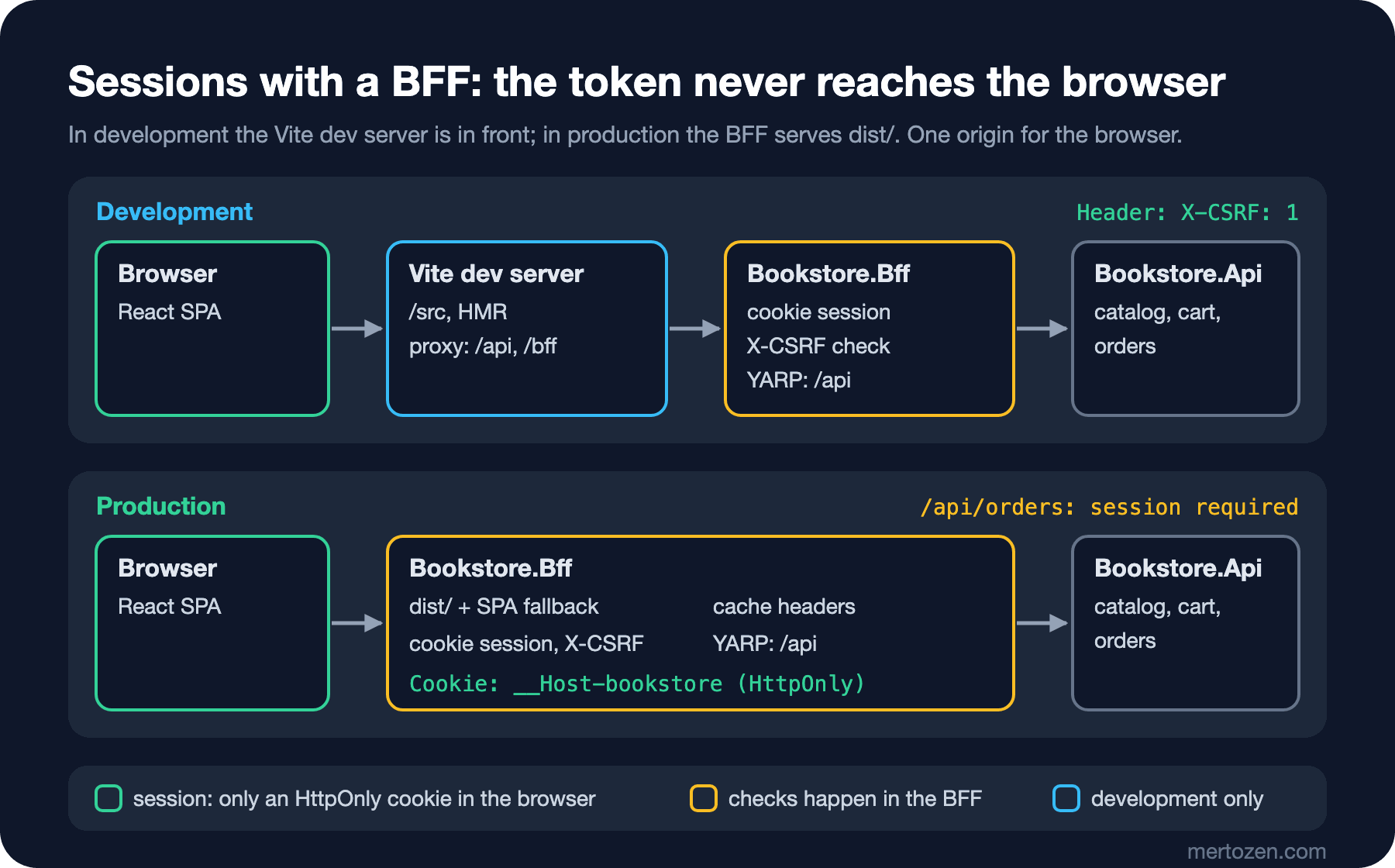
We added a small ASP.NET Core 10 project to the snapshot, bff/Bookstore.Bff. First the cookie:
builder.Services.AddAuthentication(CookieAuthenticationDefaults.AuthenticationScheme)
    .AddCookie(options =>
    {
        // __Host- prefix: the browser accepts it only with Secure, Path=/ and no Domain
        options.Cookie.Name = "__Host-bookstore";
        options.Cookie.HttpOnly = true;
        options.Cookie.SecurePolicy = CookieSecurePolicy.Always;
        options.Cookie.SameSite = SameSiteMode.Lax;
        options.ExpireTimeSpan = TimeSpan.FromHours(8);
        options.SlidingExpiration = true;
        // A fetch without a session gets 401 instead of a redirect to a login page
        options.Events.OnRedirectToLogin = context =>
        {
            context.Response.StatusCode = StatusCodes.Status401Unauthorized;
            return Task.CompletedTask;
        };
    });
builder.Services.AddAuthorization();
builder.Services.AddReverseProxy().LoadFromConfig(builder.Configuration.GetSection("ReverseProxy"));
HttpOnly hides the cookie from JavaScript. The __Host- prefix tells the browser to accept the cookie only with Secure, Path=/ and no Domain; a subdomain cannot overwrite it. Because the cookie goes with every request automatically, we also need protection against CSRF:
// Anti-CSRF: fetch calls to /api and /bff must send a custom header, which another site cannot send without a CORS preflight
app.Use(async (context, next) =>
{
    bool isCall = context.Request.Path.StartsWithSegments("/api")
        || (context.Request.Path.StartsWithSegments("/bff") && !context.Request.Path.StartsWithSegments("/bff/login"));
    if (isCall && context.Request.Headers["X-CSRF"] != "1")
    {
        context.Response.StatusCode = StatusCodes.Status400BadRequest;
        await context.Response.WriteAsync("Missing X-CSRF header");
        return;
    }
    await next();
});
A form or an <img> on another site cannot send a custom header; if it tries with fetch, the browser first sends a CORS preflight request and the BFF does not allow it. SameSite=Lax also keeps the cookie off POST requests coming from other sites; the two measures complement each other. /api requests go to Bookstore.Api through YARP; orders require a session:
  "ReverseProxy": {
    "Routes": {
      "orders": {
        "ClusterId": "bookstore-api",
        "AuthorizationPolicy": "default",
        "Match": { "Path": "/api/orders/{**rest}" }
      },
      "api": {
        "ClusterId": "bookstore-api",
        "Match": { "Path": "/api/{**rest}" }
      }
    },
    "Clusters": {
      "bookstore-api": {
        "Destinations": {
          "api": { "Address": "http://localhost:5080/" }
        }
      }
    }
  }
A real sign-in is an OpenID Connect redirect to an identity provider; in this post we did not set up a cloud account or Keycloak. In development, /bff/login is a stand-in that signs the user in as Ada and sends them back:
if (app.Environment.IsDevelopment())
{
    // Development only: stands in for the OpenID Connect redirect to an identity provider
    app.MapGet("/bff/login", async (string? returnUrl, HttpContext http) =>
    {
        ClaimsIdentity identity = new(
            [new Claim(ClaimTypes.Name, "Ada Lovelace"), new Claim(ClaimTypes.Email, "ada@example.com")],
            CookieAuthenticationDefaults.AuthenticationScheme);
        await http.SignInAsync(new ClaimsPrincipal(identity));
        // Only paths inside this site: no open redirect
        bool isLocal = returnUrl is not null && returnUrl.StartsWith('/') && !returnUrl.StartsWith("//") && !returnUrl.StartsWith("/\\");
        return Results.Redirect(isLocal ? returnUrl! : "/");
    });
}

app.MapGet("/bff/user", (ClaimsPrincipal user) => user.Identity?.IsAuthenticated == true
    ? Results.Ok(new { Name = user.Identity.Name, Email = user.FindFirstValue(ClaimTypes.Email) })
    : Results.Unauthorized());

app.MapPost("/bff/logout", async (HttpContext http) =>
{
    await http.SignOutAsync();
    return Results.NoContent();
});
The OIDC flow, keeping the access token in the BFF and adding it to API calls with YARP, and refreshing tokens are covered in the Authentication series post "The BFF Pattern for SPAs: The Architecture RFC 10017 Recommends with Angular, ASP.NET Core and YARP"; the client there is Angular, the BFF side is the same. Our API copy expects no token, so here the BFF only checks the session. We ran the BFF on 5100 (a different port in our run) and tried it with curl; the relevant header lines:
$ curl -i $BFF/bff/user
HTTP/1.1 400 Bad Request
Missing X-CSRF header

$ curl -i -H "X-CSRF: 1" $BFF/bff/user
HTTP/1.1 401 Unauthorized

$ curl -i -X POST -H "X-CSRF: 1" -H "Content-Type: application/json" -d "{}" $BFF/api/orders
HTTP/1.1 401 Unauthorized

$ curl -i "$BFF/bff/login?returnUrl=/checkout"
HTTP/1.1 302 Found
Location: /checkout
Set-Cookie: __Host-bookstore=<ticket>; path=/; secure; samesite=lax; httponly

$ curl -b cookies.txt -H "X-CSRF: 1" $BFF/bff/user
{"name":"Ada Lovelace","email":"ada@example.com"}

$ curl -i "$BFF/bff/login?returnUrl=//evil.example.com"
HTTP/1.1 302 Found
Location: /
The React Side: Asking the BFF Who the User Is
We deleted the auth store from Zustand. The server now knows who we are and React only asks, which makes it server state, the job of TanStack Query:
import { queryOptions } from '@tanstack/react-query';
import { ApiError, apiFetch } from '@/shared/api';

export type User = { name: string; email: string };

// Who is signed in is known only by the BFF: the session cookie is HttpOnly, JavaScript cannot read it
export const userQuery = queryOptions({
  queryKey: ['user'],
  queryFn: async ({ signal }) => {
    try {
      return await apiFetch<User>('/bff/user', { signal });
    } catch (error) {
      if (error instanceof ApiError && error.status === 401) {
        return null;
      }
      throw error;
    }
  },
  // Changes only on sign-in (a full page load) and sign-out (we update the cache ourselves)
  staleTime: Infinity,
});

export const authApi = {
  signOut: () => apiFetch<void>('/bff/logout', { method: 'POST' }),
};
// Runs before the route's loader/action on every navigation to it: the counterpart of a CanActivate guard.
// It only decides what to show; the BFF still refuses /api/orders without a session.
export const requireUser: MiddlewareFunction = async ({ request, context }) => {
const user = await queryClient.ensureQueryData(userQuery);
if (user === null) {
const { pathname } = new URL(request.url);
throw redirect(`/sign-in?redirectTo=${encodeURIComponent(pathname)}`);
}
context.set(userContext, user);
};The sign-in button is now a link: a full page navigation, not fetch, because in the real flow the browser goes to the identity provider's page and comes back. apiFetch adds the X-CSRF header to every request:
      {/* A full page navigation, not fetch: the BFF answers with a redirect and sets the session cookie */}
      <a className="button" href={`/bff/login?returnUrl=${encodeURIComponent(redirectTo)}`}>Sign in</a>
const response = await fetch(path, {
...init,
headers: {
Accept: 'application/json',
// The BFF refuses /api and /bff calls without it (anti-CSRF); every path here is on our own origin
'X-CSRF': '1',
...(init?.body ? { 'Content-Type': 'application/json' } : {}),
},
});In development the Vite dev server proxies /api and /bff to the BFF; for the browser everything is one origin. Running it takes three processes:
# 1. Bookstore.Api (README: http://localhost:5080)
# 2. BFF: http://localhost:5100, /api → http://localhost:5080
cd bff/Bookstore.Bff && dotnet run
# 3. SPA: /api and /bff → http://localhost:5100
npm run dev
We walked through the flow end to end with Playwright: a book into the cart, /checkout, sign in, order, sign out:
1 /checkout while signed out → /sign-in?redirectTo=%2Fcheckout
2 after "Sign in"              → /checkout · name field: Ada Lovelace
3 cookie __Host-bookstore: httpOnly=true secure=true sameSite=Lax
4 document.cookie in the page   → ""
5 order placed                  → Order #1
6 after "Sign out"              → / · cookie left: false
The answer to the second question is on line four: the cookie is in the browser, but document.cookie is empty. Chromium treats localhost and 127.0.0.1 as secure origins, so the Secure cookie also worked over HTTP locally; in production HTTPS is required. The middleware redirecting a signed-out user is only a UI decision; the real check is in the BFF, as the 401 in the curl output shows. In the tests we replaced the store reset with an MSW handler for /bff/user.
Build Output, SPA Fallback and Cache Headers
The result of npm run build:
$ npm run build
dist/index.html                     0.45 kB │ gzip:   0.29 kB
dist/assets/index-DxuAccDu.css      3.19 kB │ gzip:   1.09 kB
dist/assets/admin-_JfYAWWS.js      40.11 kB │ gzip:  12.88 kB
dist/assets/checkout-CBZ3kQ-j.js  132.97 kB │ gzip:  40.57 kB
dist/assets/index-C75X_fI2.js     377.34 kB │ gzip: 119.32 kB
✓ built in 582ms
Our choice is to let the BFF serve dist/: the SPA, /api and /bff stay on one origin and no CORS or cookie problems come up. There are two rules. The file names under /assets contain a content hash; when the content changes so does the name, so they can be cached for a year. index.html must be checked with the server every time, otherwise after a new deployment users keep getting the old index.html that points at the old hashed files:
// The SPA's build output (npm run build → dist), served by the BFF from the same origin as /api and /bff
PhysicalFileProvider spaFiles = new(Path.GetFullPath(app.Configuration["Spa:Root"]!, app.Environment.ContentRootPath));
app.UseStaticFiles(new StaticFileOptions
{
    FileProvider = spaFiles,
    OnPrepareResponse = context => context.Context.Response.Headers.CacheControl =
        // Vite puts a content hash into every file name under /assets: such a file never changes
        context.Context.Request.Path.StartsWithSegments("/assets") ? "public, max-age=31536000, immutable" : "no-cache"
});
// ...
// SPA fallback: /books/9780441172719 is not a file, so index.html answers and React Router takes over
app.MapFallbackToFile("index.html", new StaticFileOptions
{
    FileProvider = spaFiles,
    OnPrepareResponse = context => context.Context.Response.Headers.CacheControl = "no-cache"
});
$ curl -I $BFF/books/9780441172719
HTTP/1.1 200 OK
Content-Type: text/html
Cache-Control: no-cache
$ curl -I $BFF/assets/index-C75X_fI2.js
HTTP/1.1 200 OK
Content-Type: text/javascript
Cache-Control: public, max-age=31536000, immutable
$ curl -I $BFF/assets/missing-abc123.js
HTTP/1.1 404 Not FoundThe answer to the third question: for a path that is not a file, index.html comes back and React Router opens the page. MapFallbackToFile does not cover paths with an extension, so a missing JavaScript file returns 404 instead of HTML; had it returned HTML, the browser would try to run it as a script. If you put the SPA on a static host such as nginx, the same two rules are needed there:
# The SPA on a static host (nginx). Same two rules as the BFF: SPA fallback and cache headers.
server {
    listen 80;
    root /usr/share/nginx/html;

    # Vite puts a content hash into every file name under /assets: cache for a year
    location /assets/ {
        add_header Cache-Control "public, max-age=31536000, immutable";
        try_files $uri =404;
    }

    # A real file if there is one, otherwise index.html: React Router handles /books/9780441172719
    location / {
        add_header Cache-Control "no-cache";
        try_files $uri /index.html;
    }
}
$ curl -I $WEB/books/9780441172719
HTTP/1.1 200 OK
Content-Type: text/html
Cache-Control: no-cache
$ curl -I $WEB/assets/index-C75X_fI2.js
HTTP/1.1 200 OK
Content-Type: application/javascript
Cache-Control: public, max-age=31536000, immutable
$ curl -I $WEB/assets/missing-abc123.js
HTTP/1.1 404 Not FoundWe ran this with the nginx:1.30 image, mounting dist/ read-only into the container. If you use it together with the BFF, nginx needs one more location that forwards /api and /bff to the BFF; we did not run that. On Azure Static Web Apps the same fallback is navigationFallback in staticwebapp.config.json, on IIS a URL Rewrite rule; we did not try either in this post.
Bundle Analysis
To see which package takes how much space, we switched on rollup-plugin-visualizer only in the analyze mode:
npm install -D rollup-plugin-visualizer@7.1.3 // `vite build --mode analyze`: dist/stats.html shows which modules fill each chunk
mode === 'analyze' && visualizer({ filename: 'dist/stats.html', template: 'treemap', gzipSize: true }),dist/stats.html opens a treemap. To put it into the post, we took the same data with the plugin's raw-data template and summed it per package:
# raw-data report (template: 'raw-data'), rendered module sizes summed per chunk and package
index-C75X_fI2.js  (904.9 kB before minification)
  react-dom                   536.7 kB
  react-router                213.0 kB
  @tanstack/query-core         64.8 kB
  src (our code)               43.7 kB
  react                        17.7 kB
  scheduler                     9.2 kB
admin-_JfYAWWS.js  (72.9 kB before minification)
  @tanstack/virtual-core       57.0 kB
  src (our code)               11.9 kB
  @tanstack/react-virtual       4.0 kB
checkout-CBZ3kQ-j.js  (271.0 kB before minification)
  zod                         155.6 kB
  react-hook-form             102.4 kB
  src (our code)                8.3 kB
  @hookform/resolvers           4.7 kB
Most of the main chunk is react-dom and React Router, the fixed cost of every React SPA. The useful information is in the checkout chunk: zod is bigger than react-hook-form. zod 4 has a smaller zod/mini entry point; if the first load of checkout becomes a measured problem, that is the first place to look. The details of code splitting and tree shaking are in the Build Tools series post "Code Splitting, Tree Shaking and Bundle Analysis: Finding What Bloats Your Bundle".
A Last Comparison with Angular
The app is finished: about 1,170 lines of TypeScript without tests and blank lines (catalog 243, cart 212, checkout 170, admin 160), 9 runtime dependencies and a 92-line BFF. Writing the same screens in Angular, most of the decisions you would take would already have been taken by the framework:
| Concern | Angular | What we chose for React in this series |
|---|---|---|
| Routing | @angular/router | React Router 8 (data mode) |
| Data fetching and caching | HttpClient, httpResource | fetch + TanStack Query |
| Forms and validation | Reactive Forms, Signal Forms | react-hook-form + zod |
| Shared state | Service + signal, dependency injection | Context, Zustand |
| Feature boundaries | Lazy routes, standalone components | index.ts + an Oxlint rule |
| Testing | TestBed, Vitest | Vitest, Testing Library, MSW |
Every row is a decision a React team discusses once and writes down. For a small team that is flexibility: you pick what you need. As the team and the code grow, the decisions have to be documented and guarded with lint rules; in Angular most of them are the framework's defaults. In both ecosystems the product is the same Bookstore; what changes is who makes the decision.
In Production
Persisted data is a contract. In post eleven, when we moved the cart id into the bookstore.client key, we said the old bookstore.cartId key was no longer read and that a real app would need to move it. We added a function that runs once before the store is created; it has two tests (the old key is moved; if both keys exist, the newer one wins):
const storageKey = 'bookstore.client';
const legacyCartIdKey = 'bookstore.cartId';

// One-time migration: up to post 10 the cart id had a key of its own. Without this, users who
// already have a cart would lose it (the server keeps it, but this browser would forget its id).
export function migrateLegacyCartId(storage: Storage) {
  const legacyCartId = storage.getItem(legacyCartIdKey);
  if (legacyCartId === null) {
    return;
  }
  if (storage.getItem(storageKey) === null) {
    // The shape persist writes: { state, version }
    storage.setItem(storageKey, JSON.stringify({ state: { cartId: legacyCartId, recentlyViewed: [] }, version: 1 }));
  }
  storage.removeItem(legacyCartIdKey);
}

// Runs once when the module loads, before the store below reads localStorage
migrateLegacyCartId(localStorage);
During a deployment old tabs stay open: a user who loaded the old index.html may ask for a lazy chunk that has already been deleted from the server. Keeping the previous release's /assets files online for a while solves this. Deploying the BFF and the SPA together matters as well; a contract such as X-CSRF changes on both sides at once.
Common Pitfalls
Putting a secret into a VITE_ variable: the output above is clear enough. If an API key has to be in the browser it is public anyway; if not, it stays in the BFF or on the server.
Mistaking a route guard for security: requireUser only keeps the page from showing; someone who skips the middleware can send a request straight to /api/orders. The server checks permissions.
Caching index.html for a long time, or giving immutable to files without a hash: after a deployment users stay on the old release, or new code gets mixed with old files.
Applying the SPA fallback to everything: a server that returns index.html for /api/... or a missing .js answers 200 and HTML instead of 404, and debugging gets harder.
A Small Experiment
★☆☆ After npm run build, search for support@example.com inside a file under dist/assets. Then create .env.production, change the value and build again; which file names changed?
★★☆ Add a rule to the BFF that checks who owns an order on /api/orders: when placing an order, take the customer email from the session's claim instead of the request. Is a YARP request transform enough, or does the API have to change too?
★★★ Use zod/mini instead of zod in checkout and repeat the bundle analysis. How many KB did you save, and what did you lose in readability?
The Bookstore React SPA is finished. In the next post we render one of the same screens, the book details, on the server with Next.js: Server Components, Server Functions, Cache Components and when an SPA is enough.