

Where Do Pods Land? nodeSelector, Affinity/Anti-Affinity, Taints/Tolerations, Topology Spread and PriorityClass
kube-scheduler picks a node for a pod in a filter step and a score step; required rules can leave a pod Pending, preferences guarantee nothing. With real output we see required anti-affinity lock a rollout, zone spread get stuck on a cordon and recover with nodeTaintsPolicy: Honor, a tainted worker pool, preemption with PriorityClass, and how to read the "0/3 nodes are available" message.
Version note: The examples in this post were run with kind 0.33 on Kubernetes 1.37 and kubectl 1.37, using a Bookstore API image built with .NET 10.
Guess First
Three replicas of the Bookstore API run on a three-node cluster. So that losing one node never takes two replicas with it, you gave the Deployment a required pod anti-affinity rule saying "never put two api pods on the same node", and you left the rolling update settings alone. To ship a new version you run kubectl rollout restart. How many seconds until the rollout finishes? A hint: the default strategy is maxSurge: 25% and maxUnavailable: 25%; think about what those round to for three replicas. We see the answer, and the way out, with real output in the middle of this post.
How Does the Scheduler Pick a Node for a Pod?
When a pod is created its spec.nodeName is empty. kube-scheduler takes such pods from its queue and decides in two steps. The filter step removes nodes that cannot accept the pod at all: the requests do not fit (the ninth post of the series), a taint has no matching toleration, a nodeSelector or required affinity does not match, a topology spread rule would be broken. The score step ranks the remaining nodes: a less loaded node, a node matching a preferred affinity, a node that spreads pods more evenly scores higher. The highest-scoring node wins and the pod is bound to it. If no node passes the filter, the pod stays Pending and the scheduler tries preemption, which means making room by removing lower-priority pods.
Every rule in this post lands in one of those two steps: the "required" ones (required, DoNotSchedule, NoSchedule) in the filter, the "preferred" ones (preferred, ScheduleAnyway, PreferNoSchedule) in the score. A filter rule can leave a pod Pending; a score rule never does, but it guarantees nothing either.
The lab runs on Bookstore, the online bookstore used as the shared example across this site's series. The series used PostgreSQL as its database; since these extra posts are about scheduling, I run the API without a database, with Database__Provider=InMemory. In the kind cluster I labelled the three nodes as three separate zones; in the cloud the provider sets this label itself:
kind: Cluster
apiVersion: kind.x-k8s.io/v1alpha4
nodes:
  - role: control-plane
    labels:
      topology.kubernetes.io/zone: zone-a
  - role: worker
    labels:
      topology.kubernetes.io/zone: zone-b
  - role: worker
    labels:
      topology.kubernetes.io/zone: zone-c
$ kind create cluster --name k8sseries-lab --config kind-config.yaml
$ docker build -f src/Bookstore.Api/Dockerfile -t k8sseries-bookstore-api:1.0.0 .
$ kind load docker-image k8sseries-bookstore-api:1.0.0 --name k8sseries-lab
$ kubectl taint nodes k8sseries-lab-control-plane node-role.kubernetes.io/control-plane:NoSchedule-
$ kubectl get nodes -o custom-columns='NAME:.metadata.name,ZONE:.metadata.labels.topology\.kubernetes\.io/zone,TAINTS:.spec.taints[*].key'
NAME ZONE TAINTS
k8sseries-lab-control-plane zone-a <none>
k8sseries-lab-worker zone-b <none>
k8sseries-lab-worker2 zone-c <none>I removed the control-plane node's taint only in this lab, so that application pods can run in each of the three zones. In production you do not put applications on the control plane; on a managed cluster you cannot even see it.
nodeSelector and Node Affinity: Required and Preferred
The simplest tool is nodeSelector: the pod only goes to nodes with these labels. Node affinity does the same with expressions (In, NotIn, Exists, Gt…) and comes in two kinds. requiredDuringSchedulingIgnoredDuringExecution joins the filter step; preferredDuringSchedulingIgnoredDuringExecution is added to the score with a weight between 1 and 100. The "IgnoredDuringExecution" at the end of the name matters: if the node's labels change after the pod has landed, the pod does not move.
      affinity:
        nodeAffinity:
          requiredDuringSchedulingIgnoredDuringExecution:
            nodeSelectorTerms:
              - matchExpressions:
                  - key: kubernetes.io/os
                    operator: In
                    values: ["linux"]
          preferredDuringSchedulingIgnoredDuringExecution:
            - weight: 100
              preference:
                matchExpressions:
                  - key: topology.kubernetes.io/zone
                    operator: In
                    values: ["zone-a"]
I started the API with 6 replicas and this harmless-looking rule, "prefer zone-a but don't insist":
$ kubectl -n bookstore get pods -l app.kubernetes.io/name=api -o custom-columns=NAME:.metadata.name,STATUS:.status.phase,NODE:.spec.nodeName
NAME                   STATUS    NODE
api-78849fcdc8-28cw7   Running   k8sseries-lab-control-plane
api-78849fcdc8-28t6s   Running   k8sseries-lab-control-plane
api-78849fcdc8-8fbb2   Running   k8sseries-lab-control-plane
api-78849fcdc8-cc8d6   Running   k8sseries-lab-control-plane
api-78849fcdc8-fdkpl   Running   k8sseries-lab-control-plane
api-78849fcdc8-tj58h   Running   k8sseries-lab-control-plane
All six pods are in zone-a. "Preferred" is a score, and a weight of 100 easily beat the scheduler's default tendency to spread. If zone-a goes, the whole API goes. Use preferred affinity when you really want pods together, for example "same zone for cost"; if you want them spread, look at the tools below.
Pod Anti-Affinity: Separating Replicas and Locking the Rollout
Pod affinity and anti-affinity look not at node labels but at the pods already running in that topology: "go to the node (or zone) where a pod with this label runs" or "don't". The Deployment from Guess First:
      affinity:
        podAntiAffinity:
          requiredDuringSchedulingIgnoredDuringExecution:
            - topologyKey: kubernetes.io/hostname
              labelSelector:
                matchLabels:
                  app.kubernetes.io/name: api
$ kubectl -n bookstore rollout restart deploy/api
deployment.apps/api restarted
$ kubectl -n bookstore rollout status deploy/api --timeout=45s
Waiting for deployment "api" rollout to finish: 1 out of 3 new replicas have been updated...
error: timed out waiting for the condition
$ kubectl -n bookstore events --for pod/api-5f897cb965-rxnpn
LAST SEEN TYPE REASON OBJECT MESSAGE
45s Warning FailedScheduling Pod/api-5f897cb965-rxnpn 0/3 nodes are available: 3 node(s) didn't match pod anti-affinity rules. preemption: 0/3 nodes are available: 3 No preemption victims found for incoming pod.The rollout never finishes. With three replicas, maxUnavailable: 25% rounds down to 0 and maxSurge: 25% rounds up to 1: the Deployment wants to start a fourth pod first and stop an old one afterwards. But each of the three nodes already runs an api pod, and the rule leaves no room for a fourth. The old pods will not be removed, because the new pod has to be ready first; the loop locks up right here.
My first idea was to add matchLabelKeys: [pod-template-hash] to the rule (GA in 1.33). That adds the pod's own revision hash to the selector, so a new pod only avoids pods of the same revision. I applied it; the new pod still stayed Pending, but the message changed:
0/3 nodes are available: 3 node(s) didn't satisfy existing pods anti-affinity rules. preemption: 0/3 nodes are available: 3 No preemption victims found for incoming pod."didn't satisfy existing pods" instead of "didn't match". Required anti-affinity is symmetric: the scheduler checks not only the new pod's rule but also the rules of the pods already on the node. The three old pods still carry the rule without the hash and still say "no api pod next to me". The way through this one-time transition is to let one old pod stop first:
  strategy:
    rollingUpdate:
      maxSurge: 1
      maxUnavailable: 1
With that the rollout finished, and the next rollout restart went through without getting stuck, thanks to the rule with the hash. But when I scaled to 4 replicas, the fourth pod was Pending again with didn't match pod anti-affinity rules: required hostname anti-affinity caps the replica count at the node count. For a Deployment that the HPA (the eleventh post of the series) wants to grow, that means not being able to scale under load. In most cases the right tool is not anti-affinity but topology spread.
Spreading Across Zones with Topology Spread
In the eleventh post we used topologySpreadConstraints at node level and saw a rollout get stuck because of nodeTaintsPolicy. Here we set up the same tool at zone level: required for zones, preferred for nodes.
      topologySpreadConstraints:
        - maxSkew: 1
          topologyKey: topology.kubernetes.io/zone
          whenUnsatisfiable: DoNotSchedule
          matchLabelKeys:
            - pod-template-hash
          labelSelector:
            matchLabels:
              app.kubernetes.io/name: api
        - maxSkew: 1
          topologyKey: kubernetes.io/hostname
          whenUnsatisfiable: ScheduleAnyway
          matchLabelKeys:
            - pod-template-hash
          labelSelector:
            matchLabels:
              app.kubernetes.io/name: api
maxSkew: 1 says the pod count difference between the busiest and the emptiest zone may be at most 1. An honest note: when I started the same 6 replicas three times with no rule at all, they spread 2/2/2 every time. The scheduler has default spreading rules (maxSkew: 3 for hostname, maxSkew: 5 for zone, both ScheduleAnyway) and they do well on an empty cluster. The explicit rule earns its keep when things go wrong. I closed the node in zone-c for maintenance with kubectl cordon and started a rollout:
$ kubectl cordon k8sseries-lab-worker2
node/k8sseries-lab-worker2 cordoned
$ kubectl -n bookstore rollout restart deploy/api
deployment.apps/api restarted
$ kubectl -n bookstore get pods -o custom-columns=NAME:.metadata.name,STATUS:.status.phase,NODE:.spec.nodeName --sort-by=.metadata.name
NAME                   STATUS    NODE
api-54c4d8bbdc-2tc4r   Running   k8sseries-lab-worker2
api-54c4d8bbdc-n8jk9   Running   k8sseries-lab-control-plane
api-54c4d8bbdc-njzv7   Running   k8sseries-lab-worker2
api-7db5d94b78-298xk   Pending   <none>
api-7db5d94b78-9nhps   Pending   <none>
api-7db5d94b78-dsckw   Pending   <none>
api-7db5d94b78-m2scf   Running   k8sseries-lab-worker
api-7db5d94b78-rcq9h   Running   k8sseries-lab-control-plane
$ kubectl -n bookstore events --for pod/api-7db5d94b78-298xk
LAST SEEN   TYPE      REASON             OBJECT                     MESSAGE
39s         Warning   FailedScheduling   Pod/api-7db5d94b78-298xk   0/3 nodes are available: 1 node(s) were unschedulable, 2 node(s) didn't match pod topology spread constraints. preemption: 0/3 nodes are available: 1 Preemption is not helpful for scheduling, 2 No preemption victims found for incoming pod.
The new revision put one pod each in zone-a and zone-b and stopped. Cordon adds the node.kubernetes.io/unschedulable taint to the node; because nodeTaintsPolicy defaults to Ignore, zone-c still counts as a domain and holds 0 pods of the new revision. A second pod in zone-a would make the difference 2, which maxSkew: 1 does not allow. That is exactly what you don't want when you lose a zone: pods stay Pending while the other two zones have room. When I added nodeTaintsPolicy: Honor, the cordoned node dropped out of the calculation and the rollout finished:
$ kubectl -n bookstore get pods -o custom-columns=NAME:.metadata.name,STATUS:.status.phase,NODE:.spec.nodeName
NAME                   STATUS    NODE
api-599c5b474c-4pbhn   Running   k8sseries-lab-worker
api-599c5b474c-5s8kk   Running   k8sseries-lab-worker
api-599c5b474c-6vgfj   Running   k8sseries-lab-control-plane
api-599c5b474c-88cc8   Running   k8sseries-lab-control-plane
api-599c5b474c-gfmwc   Running   k8sseries-lab-worker
api-599c5b474c-mcknf   Running   k8sseries-lab-control-plane
$ kubectl uncordon k8sseries-lab-worker2
node/k8sseries-lab-worker2 uncordoned
$ kubectl -n bookstore scale deploy/api --replicas=7
deployment.apps/api scaled
$ kubectl -n bookstore get pods -o custom-columns=NAME:.metadata.name,STATUS:.status.phase,NODE:.spec.nodeName
NAME                   STATUS    NODE
api-599c5b474c-4pbhn   Running   k8sseries-lab-worker
api-599c5b474c-5s8kk   Running   k8sseries-lab-worker
api-599c5b474c-6vgfj   Running   k8sseries-lab-control-plane
api-599c5b474c-88cc8   Running   k8sseries-lab-control-plane
api-599c5b474c-gfmwc   Running   k8sseries-lab-worker
api-599c5b474c-jfwgd   Running   k8sseries-lab-worker2
api-599c5b474c-mcknf   Running   k8sseries-lab-control-plane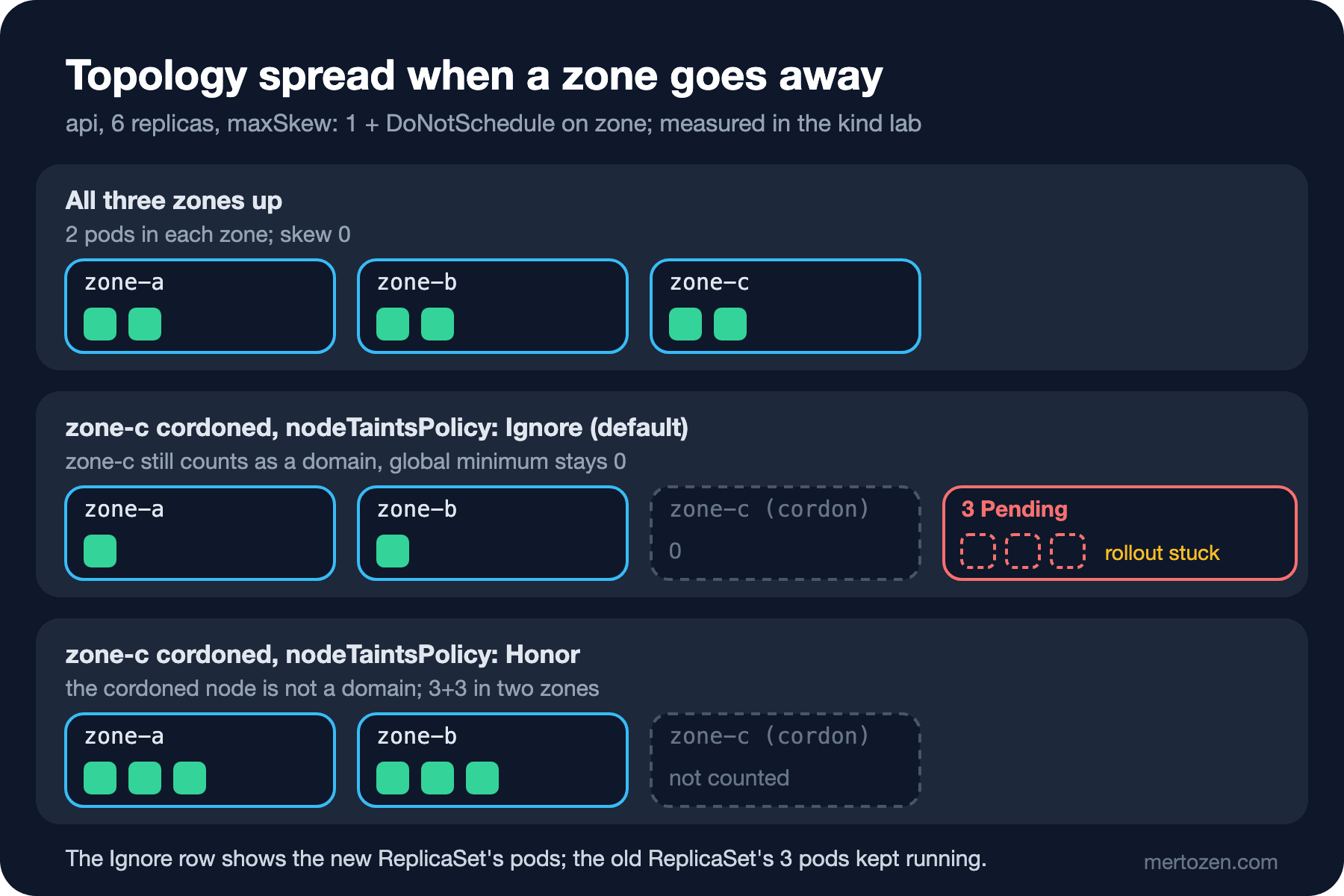
The last listing matters too: when the node comes back, the existing pods do not spread out again on their own. The scheduler only places new pods; the 3/3/0 layout stays until a new rollout or a separate component such as the Descheduler. There is also minDomains: in clusters where the autoscaler shrinks a zone to zero nodes, the scheduler cannot see that zone; minDomains: 3 says "there must be at least three domains, otherwise treat the global minimum as 0" and keeps pods from piling into the two zones at hand.
A Dedicated Node Pool with Taints and Tolerations
You don't want Bookstore's background workers (the order outbox, report generation) on the same nodes as the API: when report jobs eat the CPU, the API's latency goes up. The answer is a separate node pool for workers. In the lab I turned the node in zone-c into that pool:
$ kubectl label node k8sseries-lab-worker2 bookstore.example.com/pool=workers
node/k8sseries-lab-worker2 labeled
$ kubectl taint node k8sseries-lab-worker2 bookstore.example.com/pool=workers:NoSchedule
node/k8sseries-lab-worker2 tainted
The taint says "pods without a toleration stay away". On the worker Deployment (in the lab busybox stands in for the worker) I first added only the toleration:
      tolerations:
        - key: bookstore.example.com/pool
          operator: Equal
          value: workers
          effect: NoSchedule
$ kubectl -n bookstore get pods -o custom-columns=NAME:.metadata.name,STATUS:.status.phase,NODE:.spec.nodeName
NAME STATUS NODE
api-599c5b474c-4pbhn Running k8sseries-lab-worker
api-599c5b474c-5s8kk Running k8sseries-lab-worker
api-599c5b474c-jfwgd Running k8sseries-lab-worker2
order-worker-5fc778b585-tdw4r Running k8sseries-lab-worker
order-worker-5fc778b585-wmr2r Running k8sseries-lab-worker2Two lessons in one output. A toleration is a permission, not an attraction: one of the worker pods went to a node outside the pool. And NoSchedule does not touch running pods: the api pod that landed before the taint keeps running on worker2. To remove pods right away you would need the NoExecute effect. The pattern the Kubernetes documentation recommends uses both: the taint keeps others out, and a label on the same node plus a nodeSelector (or required node affinity) on the pod ties the workers to it:
    spec:
      nodeSelector:
        bookstore.example.com/pool: workers
      tolerations:
        - key: bookstore.example.com/pool
          operator: Equal
          value: workers
          effect: NoSchedule
With that both worker pods went to worker2; after restarting the API (its spread rule had nodeTaintsPolicy: Honor) the api pods moved to zone-a and zone-b too. On a managed cluster you do the same at node pool level: the label and taint are given when you create an AKS user node pool, as in the seventeenth post, or an EKS managed node group, and every new node in the pool comes with them.
Does a DaemonSet go to every node?
A DaemonSet puts a pod on every eligible node, and "eligible" includes taints. I started a DaemonSet standing in for a log collector without a toleration, then added one:
NAME         DESIRED   CURRENT   READY   UP-TO-DATE   AVAILABLE   NODE SELECTOR   AGE
node-agent   2         2         2       2            2           <none>          15s
NAME         DESIRED   CURRENT   READY   UP-TO-DATE   AVAILABLE   NODE SELECTOR   AGE
node-agent   3         3         3       3            3           <none>          26s
The DaemonSet controller adds tolerations for not-ready, unreachable, disk-pressure, memory-pressure, pid-pressure and unschedulable to its pods by itself (I saw them in the pod's spec.tolerations); it cannot know about your own taints. A log or metrics DaemonSet that skips the dedicated pool means no logs from those nodes, and nobody may notice.
PriorityClass and Preemption
The worker pool runs two kinds of work: order processing must not wait, report generation can. You tell the scheduler with PriorityClasses:
apiVersion: scheduling.k8s.io/v1
kind: PriorityClass
metadata:
  name: bookstore-critical
value: 100000
description: "Order processing: may preempt batch work."
---
apiVersion: scheduling.k8s.io/v1
kind: PriorityClass
metadata:
  name: bookstore-batch
value: -100
preemptionPolicy: Never
description: "Reports and exports: run when there is room, never preempt."
NAME VALUE GLOBAL-DEFAULT AGE PREEMPTIONPOLICY
bookstore-batch -100 false 0s Never
bookstore-critical 100000 false 0s PreemptLowerPriority
system-cluster-critical 2000000000 false 9m31s PreemptLowerPriority
system-node-critical 2000001000 false 9m31s PreemptLowerPriorityUser-defined values can be at most one billion; higher values are reserved for the cluster's own critical components. Pods without a PriorityClass have priority 0 (unless a class has globalDefault: true). I gave the report pods bookstore-batch and a 3 CPU request each, filling almost all of worker2's allocatable CPU. Then I raised the order worker to 3 replicas with bookstore-critical and a 1 CPU request per pod:
$ kubectl -n bookstore events --types=Warning,Normal | grep Preempted
2s                      Normal    Preempted           Pod/report-batch-6d4dff8c7d-tq2rv    Preempted by pod <pod-uid> on node k8sseries-lab-worker2
$ kubectl -n bookstore get pods -l app.kubernetes.io/name=order-worker -o custom-columns=NAME:.metadata.name,PRIORITY:.spec.priority,NODE:.spec.nodeName
NAME                            PRIORITY   NODE
order-worker-7d87fd759d-ckbmz   100000     k8sseries-lab-worker2
order-worker-7d87fd759d-plhrs   100000     k8sseries-lab-worker2
order-worker-7d87fd759d-xphc2   100000     k8sseries-lab-worker2
$ kubectl -n bookstore get pods -l app.kubernetes.io/name=report-batch -o custom-columns=NAME:.metadata.name,PRIORITY:.spec.priority,STATUS:.status.phase
NAME                            PRIORITY   STATUS
report-batch-6d4dff8c7d-l8tgs   -100       Running
report-batch-6d4dff8c7d-pzpjk   -100       Running
report-batch-6d4dff8c7d-x76qw   -100       Pending
The scheduler removed one report pod (preemption) and placed the order workers instead. The ReplicaSet started a replacement for the removed pod; it found no room and stayed Pending, and it cannot remove anyone to win its place back, because its class says preemptionPolicy: Never. During preemption the victims get their normal graceful shutdown time; I gave the report pods terminationGracePeriodSeconds: 5 so that the critical pod does not wait 30 seconds. When choosing victims the scheduler tries to respect PDBs but does not guarantee it: if there is no other victim, it violates the PDB.
Reading the "0/3 nodes are available" Message
A Pending pod's message always follows the same pattern: first how many nodes were filtered out and why each group was, then, after the full stop, whether preemption would help. The report pod's message:
0/3 nodes are available: 1 Insufficient cpu, 2 node(s) didn't match Pod's node affinity/selector. preemption: not eligible due to preemptionPolicy=Never.Add up the numbers: 1 + 2 = 3, each node is counted once. Two nodes do not match the nodeSelector (they are outside the pool), and the only matching node lacks CPU. The preemption part says this pod never even tried. A pod that went for the pool with a nodeSelector but forgot the toleration got this:
0/3 nodes are available: 1 node(s) had untolerated taint(s), 2 node(s) didn't match Pod's node affinity/selector. preemption: 0/3 nodes are available: 3 Preemption is not helpful for scheduling."Preemption is not helpful": whichever pod you remove, the taint and the selector stay. "No preemption victims found" is the case where preemption could help but no suitable victim (a lower-priority pod) exists. In Kubernetes 1.37 the message does not name the taint; you find it yourself with kubectl get nodes -o custom-columns=NAME:.metadata.name,TAINTS:.spec.taints. The same message also sits in the pod's PodScheduled condition, so you can still read it after the events are gone.
Production Notes
Base the zone spreading decision on the number of zones in the region and the number of replicas. You cannot spread 2 replicas over three zones; keeping the HPA's minimum replica count a multiple of the zone count makes the layout predictable. If you use DoNotSchedule for zones, add nodeTaintsPolicy: Honor and matchLabelKeys: [pod-template-hash]; without them, cordon, drain and rollouts produce unexpected Pending pods. Do the capacity math for a zone loss as well: if one of three zones goes, can the other two carry the whole load? If they can't, the pods the spread rule leaves Pending are only the visible part of the problem.
Keep PriorityClasses to a few cluster-wide classes and restrict who may use which class with ResourceQuota; in a cluster where everyone can pick the highest priority, priority loses its meaning. Check the tolerations of DaemonSets on dedicated pools. Track the number of Pending pods as a metric (like the alerts in the Observability series); scheduler failures are silent.
Common Pitfalls
The most expensive one is required anti-affinity and a PDB together locking up node maintenance. The API had hostname anti-affinity and a PDB with maxUnavailable: 1; I drained two nodes one after the other:
$ kubectl drain k8sseries-lab-worker2 --ignore-daemonsets
node/k8sseries-lab-worker2 cordoned
Warning: ignoring DaemonSet-managed Pods: kube-system/kindnet-2hhjh, kube-system/kube-proxy-lwdq6
evicting pod bookstore/api-6d44f5-rqk4f
pod/api-6d44f5-rqk4f evicted
node/k8sseries-lab-worker2 drained
$ kubectl -n bookstore get pdb api
NAME   MIN AVAILABLE   MAX UNAVAILABLE   ALLOWED DISRUPTIONS   AGE
api    N/A             1                 0                     53s
$ kubectl drain k8sseries-lab-worker --ignore-daemonsets --timeout=30s
node/k8sseries-lab-worker cordoned
Warning: ignoring DaemonSet-managed Pods: kube-system/kindnet-gr2f8, kube-system/kube-proxy-bbllj
evicting pod bookstore/api-6d44f5-nsrh9
error when evicting pods/"api-6d44f5-nsrh9" -n "bookstore" (will retry after 5s): Cannot evict pod as it would violate the pod's disruption budget.
...
error: unable to drain node "k8sseries-lab-worker" due to error: error when evicting pods/"api-6d44f5-nsrh9" -n "bookstore": global timeout reached: 30s, continuing command...
The replacement for the pod evicted by the first drain fit nowhere (the other two nodes already have an api pod, worker2 is cordoned) and stayed Pending. That is why the PDB already counts one pod as "lost" and allows 0 disruptions. Maintenance of the second node now waits for a pod that, because of anti-affinity, can never come up. This is exactly how a managed cluster's node upgrade gets stuck. The way out: topology spread instead of required hostname anti-affinity, or fewer replicas than nodes.
The rest: taking preferred affinity for a spreading guarantee (six of six pods in zone-a). Leaving the toleration without a nodeSelector and not expecting workers to spill onto API nodes. Assuming a NoSchedule taint removes running pods. Writing a topology spread labelSelector that does not match the pod's own labels; the documentation says plainly that such pods throw the calculation off. Setting spec.nodeName by hand and bypassing the scheduler completely; then taints and part of the request checks are skipped too.
A Small Experiment
★☆☆ In your own cluster list the zones with kubectl get nodes -L topology.kubernetes.io/zone and use -o custom-columns to see which zones the Bookstore API pods are spread across. Does any zone hold more than one pod?
★★☆ Apply this post's zone spread rule without nodeTaintsPolicy, cordon a node and start a rollout. Read the Pending message piece by piece, then add Honor and see the difference. Repeat the experiment with whenUnsatisfiable: ScheduleAnyway.
★★★ Fill the worker pool with report pods in the bookstore-batch class and trigger preemption by starting a bookstore-critical pod. Add a PDB to the report pods (minAvailable equal to all replicas) and check in the events whether the scheduler violates it.
In this post we mostly used kubectl with -o custom-columns, events --for and --field-selector. The next post covers these and more in one place: output formats, jsonpath, patch types, server-side apply, k9s, stern and krew, to use kubectl efficiently in daily work.