

Kubernetes Pods: Running a .NET Container, Lifecycle, Init Containers and Native Sidecars
A pod is the unit of execution for containers sharing one network; .NET 8+ images listen on 8080, chiseled images come non-root and shell-less, while the full aspnet image trips runAsNonRoot. With real output we look at pod phases, CrashLoopBackOff's doubling backoff, the limits of a wait-for-db init container, native sidecars (stable in 1.33) and why a sidecar that ignores SIGTERM stretches pod deletion by 30 seconds.
Version note: The examples in this post were run with kind 0.33 on Kubernetes 1.37, kubectl 1.37, .NET 10 (ASP.NET Core runtime 10.0.14) and PostgreSQL 18.
Guess First
You run the Bookstore API (Application Programming Interface) from two different images with the same pod spec. The spec has securityContext.runAsNonRoot: true. The first image is built on mcr.microsoft.com/dotnet/aspnet:10.0-noble-chiseled, the second on mcr.microsoft.com/dotnet/aspnet:10.0; neither Dockerfile has a USER line. Which one starts? Can you get into the one that starts with kubectl exec -- sh? Last question: you deleted a pod with kubectl delete pod; does a new one take its place?
A First Pod Spec for the Bookstore API
A pod is the smallest unit Kubernetes runs: one or more containers on the same node that share a network namespace (a single IP (Internet Protocol) address, a shared localhost) and, optionally, volumes. In the previous post we created pods through a Deployment; in this post we look at the pod itself. How the Dockerfile and the image are produced is the subject of the Docker series; here we assume the image is ready.
apiVersion: v1
kind: Pod
metadata:
  name: api-standalone
  namespace: bookstore
  labels:
    app.kubernetes.io/name: api-standalone
spec:
  containers:
    - name: api
      image: bookstore-api:1.0.0
      ports:
        - name: http
          containerPort: 8080
      env:
        - name: ASPNETCORE_ENVIRONMENT
          value: Staging
      securityContext:
        runAsNonRoot: true
        allowPrivilegeEscalation: false
The ports list is informational; if the container already listens on 8080 it receives traffic even without the entry. But naming the port, as http here, lets us bind a Service to it by name instead of number in post 5. ASPNETCORE_ENVIRONMENT is the Kubernetes side of the mechanism from the Environments post in the ASP.NET Core Web API series: passing the environment name through a variable.
$ kubectl apply -f pod.yaml
pod/api-standalone created
$ kubectl get pod api-standalone -o wide
NAME             READY   STATUS    RESTARTS   AGE   IP           NODE
api-standalone   1/1     Running   0          1s    10.244.2.9   k8swork1-1-worker
$ kubectl logs api-standalone
03:37:47.172 info: Bookstore.Api[0] Bookstore.Api 1.0.0 starting on api-standalone: cpus=10 serverGC=True gcHeapLimitMB=7836
03:37:47.195 info: Microsoft.Hosting.Lifetime[14] Now listening on: http://[::]:8080
03:37:47.196 info: Microsoft.Hosting.Lifetime[0] Hosting environment: Staging
$ kubectl port-forward pod/api-standalone 18710:8080 &
$ curl -s localhost:18710/api/info
{"pod":"api-standalone","version":"1.0.0","environment":"Staging","storeName":"Bookstore","discountPercent":0,"database":"in-memory"}
The application sees the pod's name as Environment.MachineName; Kubernetes sets the pod's hostname to the pod name. The cpus=10 and gcHeapLimitMB=7836 values are interesting too: since we haven't given the pod resource limits yet, .NET treats all of the node's CPUs (Central Processing Unit) and memory as its own. We'll measure the production cost of that in post 9. kubectl port-forward is a debugging route from your machine to the pod; it tunnels traffic through the API server and isn't meant for real traffic.
Defaults of the .NET Container Images
Since .NET 8 the official Linux images carry two important defaults. The first is the port: ASP.NET Core now listens on 8080 instead of 80, baked into the image as the ASPNETCORE_HTTP_PORTS=8080 environment variable. The reason is running as non-root: ports below 1024 require root privileges in some environments. The second is the user: the images define a user named app with UID (User Identifier) 1654 and an APP_UID variable pointing at it. Our image's actual settings:
$ docker inspect bookstore-api:1.0.0 --format '{{.Config.User}} {{json .Config.Env}}'
1654 ["PATH=/usr/local/sbin:/usr/local/bin:/usr/sbin:/usr/bin:/sbin:/bin","APP_UID=1654","ASPNETCORE_HTTP_PORTS=8080","DOTNET_RUNNING_IN_CONTAINER=true","DOTNET_SYSTEM_GLOBALIZATION_INVARIANT=true","DOTNET_VERSION=10.0.14","ASPNET_VERSION=10.0.14","APP_VERSION=1.0.0"]
$ docker inspect bookstore-api:1.0.0-full --format '{{.Config.User}}'
The second line is empty. That's where the difference comes from: chiseled images ship with USER set to 1654, while the full Ubuntu-based aspnet:10.0 image defines the app user but runs as root by default; switching to non-root is your choice. The answer to the first question:
$ kubectl get pod api-full
NAME       READY   STATUS                       RESTARTS   AGE
api-full   0/1     CreateContainerConfigError   0          4s
$ kubectl describe pod api-full
  Warning  Failed     3s (x2 over 3s)  kubelet            spec.containers{api}: Error: container has runAsNonRoot and image will run as root (pod: "api-full_bookstore(dba6f453-9516-4eaa-8eab-e5160506244e)", container: api)
The kubelet saw that the image would run as root and never started the container. That's a good thing: runAsNonRoot is insurance. The fix is either adding USER $APP_UID to the Dockerfile or setting runAsUser: 1654 on the pod; the first makes the image safe in every environment. The Pod Security Standards restricted profile already requires this setting; we'll cover security settings as a whole in post 15.
Second question: does the chiseled image have a shell?
$ kubectl exec api-standalone -- sh -c 'id'
error: Internal error occurred: Internal error occurred: error executing command in container: failed to exec in container: failed to start exec "5804ebd957b839fade007c678e61230b76bd9cd9d2fbef242a3d89dd2f0ab009": OCI runtime exec failed: exec failed: unable to start container process: exec: "sh": executable file not found in $PATH
$ kubectl exec api-standalone -- dotnet --list-runtimes
Microsoft.AspNetCore.App 10.0.14 [/usr/share/dotnet/shared/Microsoft.AspNetCore.App]
Microsoft.NETCore.App 10.0.14 [/usr/share/dotnet/shared/Microsoft.NETCore.App]
Chiseled images have no shell and no package manager; only the files .NET needs to run. The dotnet binary is there, so that runs; sh doesn't. The attack surface and the image size shrink (our chiseled image is 187 MB, the full one 372 MB), but so does the "I'll just get into the pod and look" habit. Kubernetes' answer to that is ephemeral debug containers, which we'll see in post 16. Later in this post we'll also run into a consequence of shell-based images.
Pod Phases, Container States and restartPolicy
A pod's status.phase field takes one of five values: Pending (accepted but the containers aren't running yet; includes scheduling and image download), Running (bound to a node, at least one container running or restarting), Succeeded (all containers finished successfully and won't restart), Failed (all containers finished, at least one with an error) and Unknown. Each container also has its own state: Waiting, Running or Terminated. The CrashLoopBackOff, Init:0/2 or Terminating you see in the STATUS column of kubectl get pods is none of these; it's a summary kubectl builds from the phase, container states and reasons.
spec.restartPolicy says what happens when the pod's containers finish: Always (the default), OnFailure or Never. For a web API the right value is Always; the other two are for Jobs (post 13). To see what a container that crashes immediately does, I started the API with Startup__FailFast=true; with this setting the application writes a log line and exits with code 1:
$ kubectl apply -f pod-crash.yaml
# every second: time, READY, STATUS, RESTARTS (only lines that changed)
03:39:50 0/1 ContainerCreating 0
03:39:51 1/1 Running 0
03:39:52 1/1 Running 1
03:39:53 0/1 Error 1
03:40:04 0/1 Error 2
03:40:29 0/1 Error 3
03:41:29 1/1 Running 4
03:41:30 0/1 Error 4
03:42:36 0/1 CrashLoopBackOff 4
03:42:52 1/1 Running 5
03:42:53 0/1 Error 5
$ kubectl logs api-crash --previous
03:43:42.610 info: Bookstore.Api[0] Bookstore.Api 1.0.0 starting on api-crash: cpus=10 serverGC=True gcHeapLimitMB=7836
03:43:42.617 crit: Bookstore.Api[0] Startup:FailFast is true, exiting with code 1
The gap between restarts grows: roughly 12, 25, 60 and 83 seconds. According to the Kubernetes documentation, the kubelet delays restarts with an exponential backoff that starts at 10 seconds, doubles each time and caps at 300 seconds (5 minutes); if the container runs cleanly for 10 minutes, the counter resets. My measurement comes from a kubectl loop sampling once a second, so it drifts by a few seconds, but the doubling is clearly visible. Meanwhile the STATUS column flips between Error, Running and CrashLoopBackOff; CrashLoopBackOff isn't a phase, it means "I'm currently waiting out the backoff". The real information is in the previous container's log, read with --previous. The ReduceDefaultCrashLoopBackOffDecay feature gate, alpha since 1.33, experiments with starting these delays at 1 second and capping them at 60, but it's off by default.
Init Containers and the "wait-for-db" Approach
Init containers run before the application containers, in order, each until it completes; if one fails, the kubelet retries it and doesn't move on. The most common use is "wait until the database is ready":
apiVersion: v1
kind: Pod
metadata:
  name: api-with-sidecar
  namespace: bookstore
spec:
  initContainers:
    - name: wait-for-db
      image: busybox:1.37
      command: ["sh", "-c", "until nc -z -w 2 postgres 5432; do echo waiting for postgres; sleep 2; done"]
    - name: log-forwarder
      image: busybox:1.37
      restartPolicy: Always
      command: ["sh", "-c", "echo sidecar up; while true; do sleep 3600; done"]
  containers:
    - name: api
      image: bookstore-api:1.0.0
      ports:
        - name: http
          containerPort: 8080
I applied the pod while the cluster had no Service called postgres yet:
$ kubectl get pod api-with-sidecar
NAME               READY   STATUS     RESTARTS   AGE
api-with-sidecar   0/2     Init:0/2   0          8s
$ kubectl logs api-with-sidecar -c wait-for-db
nc: bad address 'postgres'
waiting for postgres
nc: bad address 'postgres'
Init:0/2 says neither of the two init containers has completed yet. When I applied the PostgreSQL Deployment and Service, the init container finished with exit code 0 after a 25-second wait and the pod became 2/2 Running.
You need to know the limits of this approach. First, it only runs at startup: if the database goes away after the API is up, the init container doesn't protect you; the application has to survive connection errors with retries. Second, an open port doesn't mean a ready database; PostgreSQL may still be in recovery while listening. Third, it bakes the dependency into deploy order: while the database is under maintenance, new API pods never start. That's why in most cases the healthier solution is an application that is resilient by itself and says it isn't ready through a readiness probe (post 8). Running migrations in an init container is a separate trap; we'll solve it with a Job in post 13.
Native Sidecars: an Init Container with restartPolicy: Always
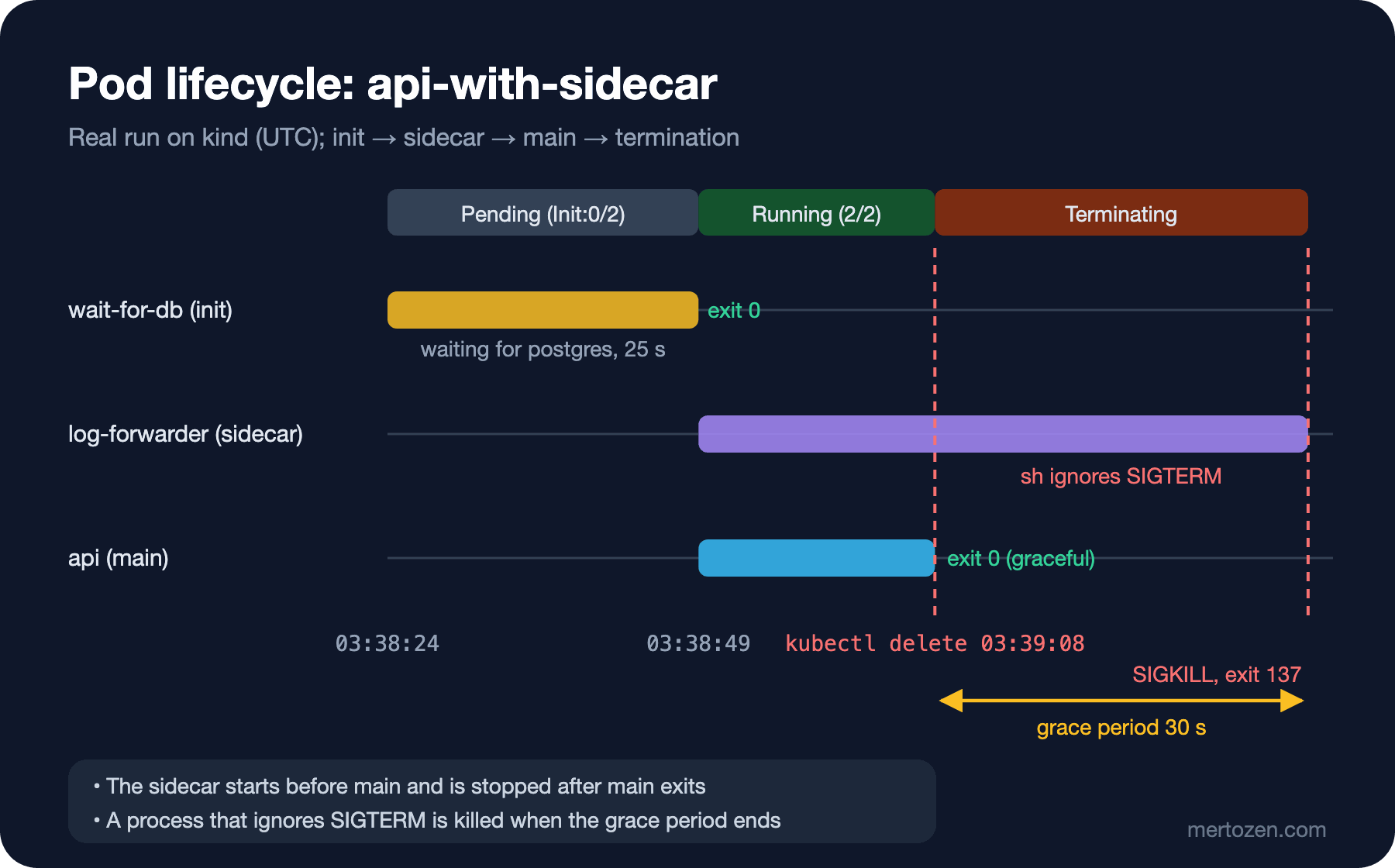
The second init container in the spec above is different: it carries restartPolicy: Always. That's Kubernetes' native sidecar. It arrived as alpha in 1.28, was enabled by default in 1.29 and became stable in 1.33. It's designed for helpers that must run next to the main application for the pod's entire life: log collectors, proxies, certificate renewers.
Before native sidecars, a sidecar was written as an ordinary second container in the containers list. That had three problems: startup order wasn't guaranteed (the API could send requests before the proxy was ready), shutdown order wasn't guaranteed (the proxy could exit before the API finished its last requests), and in Jobs a never-ending sidecar prevented the Job from completing. Native sidecars solve all three: they start in init container order, the kubelet waits for them to start (or for their startup probe to succeed, if there is one) before moving to the next container, they're stopped in reverse order after the main containers exit, and they don't block Job completion. The timestamps from the real run:
wait-for-db: started=2026-11-08T03:38:24Z finished=2026-11-08T03:38:49Z reason=Completed exit=0
log-forwarder: started=2026-11-08T03:38:49Z
api: started=2026-11-08T03:38:49Z
On the shutdown side I saw something I didn't expect. I deleted the pod at 03:39:08 and recorded the container states every second:
03:39:08 wait-for-db=T@2026-11-08T03:38:49Z/exit0 log-forwarder=running api=running
03:39:39 wait-for-db=T@2026-11-08T03:38:49Z/exit0 log-forwarder=T@2026-11-08T03:39:38Z/exit137 api=T@2026-11-08T03:39:08Z/exit0
03:39:40 Error from server (NotFound): pods "api-with-sidecar" not found
The .NET application shut down cleanly the second it received SIGTERM (the termination signal), exit code 0. The ordering worked: the sidecar only got SIGTERM after the API had stopped. But the sidecar didn't exit for 30 seconds and was finally killed with exit code 137, i.e. SIGKILL (the kill signal). Why: busybox's sh, running as PID (Process Identifier) 1, ignores SIGTERM unless you define a handler for it. On Linux, default signal actions aren't applied to PID 1. So the pod waited until the end of the default 30-second terminationGracePeriodSeconds.
Adding a trap to the sidecar command changed the picture:
command: ["sh", "-c", "trap 'echo sidecar stopping; exit 0' TERM; echo sidecar up; while true; do sleep 1 & wait; done"]delete at 03:40:52
03:40:53 wait-for-db=T@2026-11-08T03:40:51Z/exit0 log-forwarder=T@2026-11-08T03:40:52Z/exit0 api=T@2026-11-08T03:40:52Z/exit0
03:40:54 Error from server (NotFound): pods "api-with-sidecar" not foundThe pod was gone in 2 seconds instead of 31. This small detail directly affects rolling updates: every old pod waiting an extra 30 seconds stretches a 10-replica deploy by minutes. We'll cover graceful shutdown in detail, together with the .NET side, in post 10.
Why You Don't Create Bare Pods
$ kubectl delete pod api-standalone
pod "api-standalone" deleted from bookstore namespace
$ kubectl get pod api-standalone
Error from server (NotFound): pods "api-standalone" not found
The answer to the last question: no. A pod created on its own has no owner; there's no controller watching it and recreating it. On node failure, when the node is drained for maintenance (kubectl drain) or on eviction, the pod disappears and doesn't come back. A pod's spec is also largely immutable: you can't update most container fields other than the image on a live pod; you have to create a new pod. In production always create pods through a controller: a Deployment for long-running services (post 4), a StatefulSet for stateful workloads, a Job for one-off work. A bare pod is only for experiments and debugging like those in this post.
Production Notes
Build the image to run as non-root and enforce it in the pod spec with runAsNonRoot: true. With chiseled images the two line up on their own; with the full image don't forget to add USER $APP_UID to the Dockerfile. Plan the operational side of shell-less images (debug containers, taking dumps) in advance.
Define sidecars as native sidecars and make sure they handle SIGTERM correctly. If you use an off-the-shelf proxy or log agent this is usually fine; in shell-based sidecars you write yourself, use trap or exec. Don't forget resource requests for the sidecar either; it counts towards the pod's total.
Keep init containers short and deterministic. Long-running init steps or ones that depend on external systems make deploy times unpredictable and lead to rollouts that exceed progressDeadlineSeconds.
Common Pitfalls
Port confusion. In manifests left over from the .NET 6 era you'll see containerPort: 80 and ASPNETCORE_URLS=http://+:80. In .NET 8 and later images the application listens on 8080; if the manifest says 80, probes and the Service fail silently.
Taking CrashLoopBackOff for a Kubernetes problem. It only means "the container keeps exiting and the kubelet restarts it, waiting longer each time". The cause is almost always in the application: missing configuration, an unreachable dependency, a wrong command. The first place to look is kubectl logs --previous.
Images whose main container runs sh. If the entrypoint is a shell wrapper like sh -c "dotnet Bookstore.Api.dll", SIGTERM stays in the shell, never reaches the application, and every shutdown takes 30 seconds. Use the exec form in the Dockerfile (ENTRYPOINT ["dotnet", "Bookstore.Api.dll"]).
Running migrations in an init container. Three replicas try to run the same migration three times at once. We'll look at this in detail in post 13.
A Small Experiment
★☆☆ Apply the api-standalone pod, find the status.conditions list in the output of kubectl get pod api-standalone -o yaml and order the timestamps of the PodScheduled, Initialized, ContainersReady and Ready conditions.
★★☆ Leave the sidecar without a trap but give the pod terminationGracePeriodSeconds: 5. Delete the pod and measure the sidecar's exit code and shutdown time. Then repeat with the trap sidecar.
★★★ Add a startup probe to the sidecar that checks for a /tmp/ready file, and change its command so the file is only created after 15 seconds. Verify from containerStatuses that the API container's start time also shifts by 15 seconds.
We got to know the pod and saw why we shouldn't create it directly. In the next post we move to the Deployment, which manages pods for us: labels and selectors, the ReplicaSet's role, rolling update parameters, rollout history and undo.