

Kubernetes Services: ClusterIP, NodePort, LoadBalancer, DNS and EndpointSlices
A Service puts a stable virtual IP and a DNS name such as api.bookstore.svc.cluster.local in front of changing pod IPs, taking addresses from EndpointSlices and routing from kube-proxy rules. With real output we look at named targetPorts, per-connection load balancing and HttpClient, readiness pulling every pod out of traffic, NodePort vs LoadBalancer vs headless, the 1.36 externalIPs deprecation and empty-endpoint traps.
Version note: The examples in this post were run with kind 0.33 on Kubernetes 1.37, kubectl 1.37, .NET 10, Npgsql 10.0 and PostgreSQL 18.
Guess First
Three pods of the Bookstore API (Application Programming Interface) run behind a Service, and their readiness probes check the PostgreSQL connection. You scale PostgreSQL down to zero replicas. When a client inside the cluster sends a request to http://api/api/info, what does it get: a 503, a timeout or "connection refused"? Second question: you mistakenly set the Service's targetPort to 80. Does kubectl get endpointslices look empty or full?
Why Pod IPs Aren't Enough
Every pod gets its own IP (Internet Protocol) address, and other pods in the cluster can reach that address directly. But as we saw in earlier posts, these addresses aren't permanent: on a rolling update, a node failure or a simple restart, the pod comes back with a new address. The nginx serving the Angular app, or a worker, needs to know which address to reach the API at. The Service solves this: it puts a stable virtual IP, a stable DNS (Domain Name System) name and a load balancing layer in front of a changing set of pods.
A ClusterIP Service and a Named targetPort
apiVersion: v1
kind: Service
metadata:
  name: api
  namespace: bookstore
  labels:
    app.kubernetes.io/name: api
spec:
  type: ClusterIP
  selector:
    app.kubernetes.io/name: api
  ports:
    - name: http
      port: 80
      targetPort: http
Like a Deployment, a Service finds pods through a label selector. port is the port the Service listens on, targetPort the port traffic goes to on the pod. Here targetPort isn't a number but a name: http. That name binds to the container port definition in the Deployment (name: http, containerPort: 8080). If the application's port changes tomorrow, you only change the Deployment; the Service and probes use the name and stay untouched. In this post the API pods connect to PostgreSQL; they get the connection string from a Secret as the ConnectionStrings__Default environment variable (details in post 7).
$ kubectl get svc api
NAME   TYPE        CLUSTER-IP    EXTERNAL-IP   PORT(S)   AGE
api    ClusterIP   10.96.24.23   <none>        80/TCP    59s
$ kubectl get pods -l app.kubernetes.io/name=api -o wide
NAME                  READY   IP            NODE
api-75dcdbd96-2dzgt   1/1     10.244.2.21   k8swork1-1-worker
api-75dcdbd96-cv2g4   1/1     10.244.1.17   k8swork1-1-worker2
api-75dcdbd96-np2nj   1/1     10.244.2.22   k8swork1-1-worker
$ kubectl get endpointslices -l kubernetes.io/service-name=api
NAME        ADDRESSTYPE   PORTS   ENDPOINTS                             AGE
api-456cl   IPv4          8080    10.244.2.22,10.244.2.21,10.244.1.17   22s
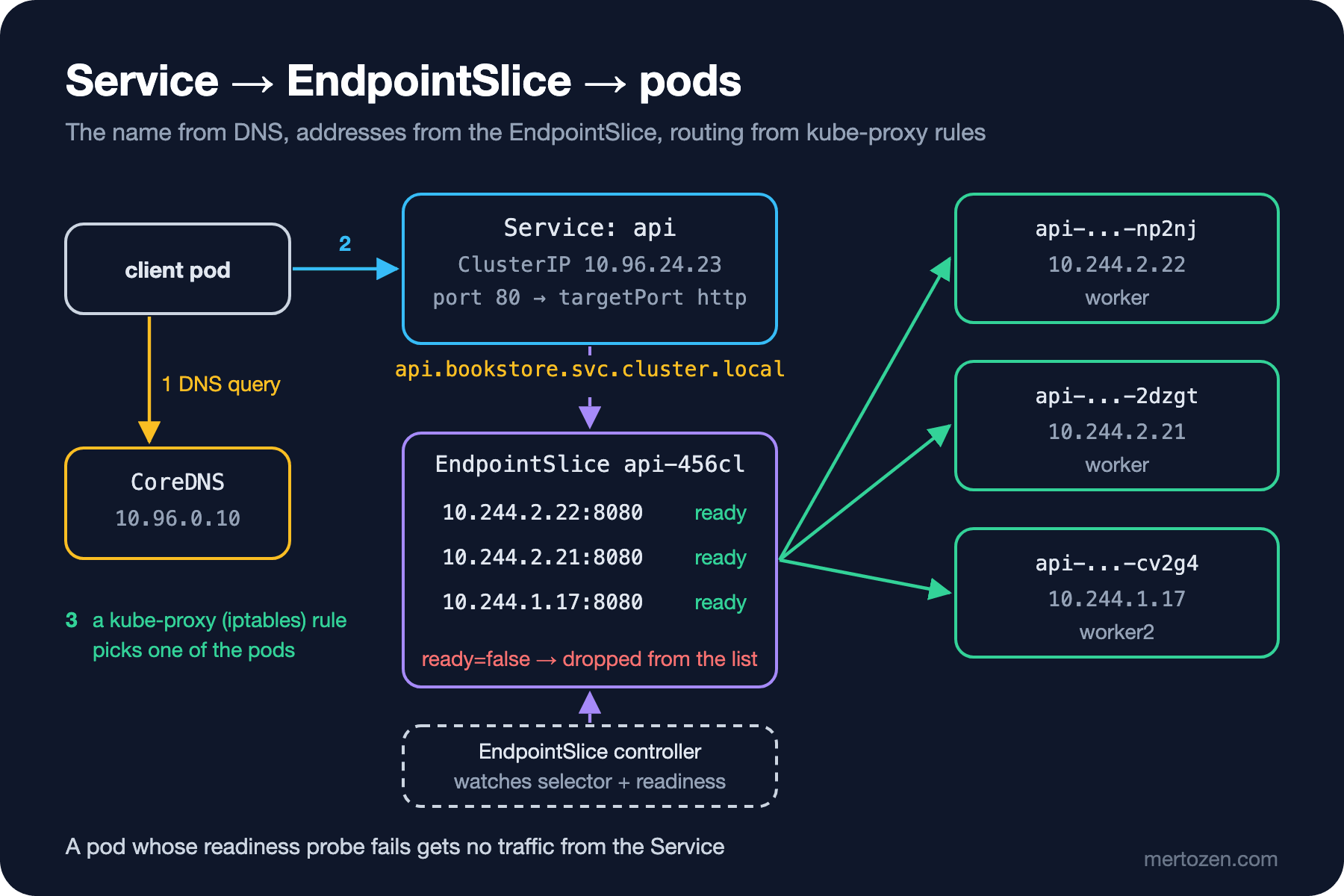
10.96.24.23 is a virtual address that lives on no network interface; it's reachable only from inside the cluster. The real addresses behind the Service live in a separate object: the EndpointSlice. It's called api-456cl and holds three pod IPs and port 8080, the named port resolved to a number.
Cluster DNS: api.bookstore.svc.cluster.local
To test from inside the cluster, I started a busybox pod:
$ kubectl run client --image=busybox:1.37 --restart=Never --command -- sleep 3600
$ kubectl exec client -- nslookup api.bookstore.svc.cluster.local
Server:		10.96.0.10
Address:	10.96.0.10:53

Name:	api.bookstore.svc.cluster.local
Address: 10.96.24.23
$ kubectl exec client -- cat /etc/resolv.conf
search bookstore.svc.cluster.local svc.cluster.local cluster.local
nameserver 10.96.0.10
options ndots:5
Every Service gets the name <service>.<namespace>.svc.cluster.local, which resolves to its ClusterIP. The DNS server 10.96.0.10 is CoreDNS in kube-system. Thanks to the search line, a pod in the same namespace can write just api, and a pod in another namespace api.bookstore. I sent six requests:
$ for i in 1 2 3 4 5 6; do kubectl exec client -- wget -qO- http://api/api/info; echo; done
{"pod":"api-75dcdbd96-2dzgt","version":"1.0.0","environment":"Production","storeName":"Bookstore","discountPercent":0,"database":"postgres"}
{"pod":"api-75dcdbd96-np2nj","version":"1.0.0","environment":"Production","storeName":"Bookstore","discountPercent":0,"database":"postgres"}
{"pod":"api-75dcdbd96-cv2g4","version":"1.0.0","environment":"Production","storeName":"Bookstore","discountPercent":0,"database":"postgres"}
{"pod":"api-75dcdbd96-np2nj","version":"1.0.0","environment":"Production","storeName":"Bookstore","discountPercent":0,"database":"postgres"}
{"pod":"api-75dcdbd96-np2nj","version":"1.0.0","environment":"Production","storeName":"Bookstore","discountPercent":0,"database":"postgres"}
{"pod":"api-75dcdbd96-2dzgt","version":"1.0.0","environment":"Production","storeName":"Bookstore","discountPercent":0,"database":"postgres"}
$ kubectl exec client -- wget -qO- http://api.bookstore.svc.cluster.local/api/books
[{"id":1,"title":"Clean Architecture","author":"Robert C. Martin","price":42.50},{"id":2,"title":"Designing Data-Intensive Applications","author":"Martin Kleppmann","price":55.00},{"id":3,"title":"Kubernetes in Action","author":"Marko Luksa","price":49.90}]
The distribution isn't round robin: np2nj got three requests, 2dzgt two and cv2g4 one. kube-proxy's iptables mode picks an endpoint with a random probability for each new connection; it evens out over enough requests but looks unbalanced in a short sample. A more important detail: the choice is made per connection, not per request. If a .NET service connects to the API with HttpClient and keeps the connection open (keep-alive), all of its requests go to the same pod. New pods don't get traffic when you scale out either. Capping SocketsHttpHandler.PooledConnectionLifetime at a few minutes makes connections renew from time to time and spread across new pods; with protocols that multiplex over a single connection, such as HTTP (Hypertext Transfer Protocol) 2 and gRPC (gRPC Remote Procedure Calls), the effect is even stronger.
The API's database connection uses the same mechanism. Host=postgres in the connection string resolves to the postgres Service in the same namespace; the /api/books response came that way. The application doesn't know a single pod IP.
The ndots:5 setting has a side effect. When resolving a name with fewer than five dots (for example api.payments.example.com), the resolver first tries the suffixes from the search list: api.payments.example.com.bookstore.svc.cluster.local and the rest. For an application that calls external services a lot, that's several wasted DNS queries per lookup. Ending the name with a dot (a fully qualified name) or lowering ndots in the pod's dnsConfig avoids it.
EndpointSlices and Readiness
Let's look inside the EndpointSlice:
$ kubectl get endpointslice -l kubernetes.io/service-name=api -o yaml
- addressType: IPv4
  apiVersion: discovery.k8s.io/v1
  endpoints:
  - addresses:
    - 10.244.2.22
    conditions:
      ready: true
      serving: true
      terminating: false
    nodeName: k8swork1-1-worker
    targetRef:
      kind: Pod
      name: api-75dcdbd96-np2nj
      namespace: bookstore
...
Each endpoint has three conditions: ready, serving and terminating. The EndpointSlice controller watches pods matching the Service's selector along with their readiness; a pod whose readiness probe fails stays in the list but becomes ready: false, and kube-proxy sends it no traffic. serving and terminating exist to tell shutting-down pods apart; we'll come back to them for graceful shutdown in post 10.
Now the first question. I scaled PostgreSQL to zero:
$ kubectl scale deploy/postgres --replicas=0
deployment.apps/postgres scaled
$ kubectl get pods -l app.kubernetes.io/name=api
NAME                  READY   STATUS    RESTARTS   AGE
api-75dcdbd96-2dzgt   0/1     Running   0          67s
api-75dcdbd96-cv2g4   0/1     Running   0          67s
api-75dcdbd96-np2nj   0/1     Running   0          67s
$ kubectl get endpointslice -l kubernetes.io/service-name=api -o jsonpath='{range .items[*].endpoints[*]}{.targetRef.name} ready={.conditions.ready}{"\n"}{end}'
api-75dcdbd96-np2nj ready=false
api-75dcdbd96-2dzgt ready=false
api-75dcdbd96-cv2g4 ready=false
$ kubectl exec client -- wget -T 3 -qO- http://api/api/info
wget: can't connect to remote host (10.96.24.23): Connection refused
command terminated with exit code 1
The pods are running (Running, no restarts) but none is ready, and all three endpoints in the EndpointSlice are ready=false. kube-proxy's rule rejects connections to a Service with no ready endpoints; the client gets "connection refused". Note that /api/info, an endpoint that never touches the database, became unreachable too. Putting a database check in the readiness probe means "if the database is gone, pull the whole API out of traffic". Sometimes that's exactly what you want, sometimes not; we'll discuss that decision in detail in post 8. When I brought PostgreSQL back, all three pods were 1/1 again within 12 seconds.
NodePort, LoadBalancer and Headless Services
| Type | Reachable from | When |
|---|---|---|
| ClusterIP | Only inside the cluster | Service-to-service traffic; the default and most common |
| NodePort | A port between 30000 and 32767 on every node's IP | When you put your own load balancer in front, or local experiments |
| LoadBalancer | An external IP opened by the cloud provider | Exposing a single service on a managed cluster |
Headless (clusterIP: None) | DNS returns pod IPs directly | StatefulSets, client-side load balancing |
I tried three of them at once:
$ kubectl get svc
NAME                TYPE           CLUSTER-IP     EXTERNAL-IP   PORT(S)        AGE
api                 ClusterIP      10.96.24.23    <none>        80/TCP         2m31s
api-lb              LoadBalancer   10.96.162.54   <pending>     80:32695/TCP   5s
api-nodeport        NodePort       10.96.166.39   <none>        80:30080/TCP   5s
postgres            ClusterIP      10.96.28.37    <none>        5432/TCP       22m
postgres-headless   ClusterIP      None           <none>        5432/TCP       5s
$ curl -s localhost:18780/api/info
{"pod":"api-75dcdbd96-2dzgt","version":"1.0.0","environment":"Production","storeName":"Bookstore","discountPercent":0,"database":"postgres"}
$ kubectl exec client -- nslookup postgres-headless.bookstore.svc.cluster.local
Address: 10.244.1.18
$ kubectl exec client -- nslookup postgres.bookstore.svc.cluster.local
Address: 10.96.28.37
I gave the NodePort Service nodePort: 30080; since the kind config from post 2 binds that port to the machine's 18780, curl localhost:18780 reached the API directly. The LoadBalancer Service's EXTERNAL-IP stayed <pending>: the external IP is assigned by a cloud provider's controller or an add-on like MetalLB, and kind has neither. Every LoadBalancer Service also opens a NodePort (32695). The headless Service's DNS record returned the pod's IP (10.244.1.18) directly instead of a ClusterIP.
In production, exposing HTTP traffic with a separate LoadBalancer per service gets expensive and messy: each one means a separate cloud load balancer and a separate IP. The right tool for external HTTP traffic is the Gateway API, the subject of the next post.
kube-proxy's Role and the End of externalIPs
What translates a Service's virtual IP into real pods are the rules kube-proxy installs on each node. In our cluster the mode is iptables:
$ kubectl logs -n kube-system kube-proxy-7sz4f | grep -i proxier
I1108 03:20:11.217309       1 server_linux.go:144] "Using iptables Proxier"
kube-proxy doesn't sit in the packet path; it only writes rules into the kernel, and the kernel forwards the packets. Besides iptables there are the ipvs mode and the nftables mode, stable since 1.33; some CNI (Container Network Interface) plugins like Cilium disable kube-proxy entirely and do the same job with eBPF (extended Berkeley Packet Filter). As an application developer you usually don't need to know which one is in use; but when debugging "I can't reach the Service", it helps to know that kernel rules, not a proxy, carry the traffic.
A field you'll see in old manifests is now on its way out: spec.externalIPs. This field, which lets you assign an arbitrary external IP to a Service, has been recommended for disabling since 1.21 because of a security issue documented as CVE (Common Vulnerabilities and Exposures) 2020-8554; it was formally deprecated in Kubernetes 1.36. Using it now triggers a warning from the API server:
$ kubectl apply --dry-run=server -f extip.yaml
Warning: spec.externalIPs is deprecated and may no longer be implemented in some clusters
service/api-externalip created (server dry run)
According to the schedule on the Kubernetes blog, kube-proxy support will be disabled by default in 1.40 at the earliest (with an opt-in to re-enable it during migration) and removed entirely in 1.43 at the earliest. The recommended alternatives are LoadBalancer Services (in the cloud or with MetalLB) and the Gateway API.
Production Notes
Design the effect of readiness on traffic. A Service only sends traffic to ready pods; every dependency you put into readiness can mean all replicas being pulled out of traffic at once when that dependency goes away.
Account for long-lived connections. A Service does L4 (Layer 4, at the level of the TCP (Transmission Control Protocol) connection) load balancing; it distributes connections, not requests. For service-to-service .NET HttpClient traffic, cap connection lifetime; for gRPC consider client-side load balancing or an L7 (Layer 7, at the HTTP level) proxy.
In configuration, write Service names with their namespace when needed (postgres.bookstore), not just the short name. When the same manifest is applied to another namespace, the short name resolves to the Service in that namespace, which may not exist.
Common Pitfalls
Selector and label mismatch. If the pods carry app.kubernetes.io/name: api but the Service selects app: api, the Service raises no error, it just stays empty:
$ kubectl get endpointslices -l 'kubernetes.io/service-name in (api-wrong-selector,api-wrong-port)'
NAME                       ADDRESSTYPE   PORTS     ENDPOINTS                             AGE
api-wrong-port-wxnrm       IPv4          80        10.244.1.17,10.244.2.22,10.244.2.21   3s
api-wrong-selector-vbpl2   IPv4          <unset>   <unset>                               3s
$ kubectl describe svc api-wrong-selector
Selector:                 app=api
Endpoints:
$ kubectl exec client -- wget -T 3 -qO- http://api-wrong-selector/api/info
wget: can't connect to remote host (10.96.88.40): Connection refused
$ kubectl exec client -- wget -T 3 -qO- http://api-wrong-port/api/info
wget: can't connect to remote host (10.96.163.162): Connection refused
The empty Endpoints: line is the first place to look: compare the selector with the output of kubectl get pods --show-labels.
Mixing up port 80 and 8080. The answer to the second question is above: the EndpointSlice of the Service with targetPort: 80 is full and everything looks healthy, because the pods are ready. But no process listens on 80 in the pods, so the connection is refused. .NET 8 and later images listen on 8080; using a named port prevents this mistake at the root.
Looking only at the Service. Most "the Service doesn't work" complaints aren't about the Service but about the pod's readiness or port. The order: kubectl get endpointslices, then the pods' READY column, then a request straight to the pod.
A Small Experiment
★☆☆ Run wget -qO- http://api/api/info 30 times from the client pod and count how many requests each pod got. Then scale the API to 5 replicas and repeat the measurement.
★★☆ Remove an API pod from the selector with kubectl label pod <name> app.kubernetes.io/name-. Observe that it drops out of the EndpointSlice, that the Deployment creates a replacement pod and that the unlabelled pod keeps running. Who will delete the unlabelled pod?
★★★ Add sessionAffinity: ClientIP to the api Service and measure the distribution again. Then send 100 requests with a single HttpClient from a .NET console app (running as a pod in the cluster) and compare how many distinct pod names you see with and without PooledConnectionLifetime set.
We can reach the API from inside the cluster through a stable name. But Bookstore's users are outside the cluster. In the next post we bring external traffic in: why Ingress was frozen, the retirement of ingress-nginx, and routing /api requests to .NET and everything else to Angular with the Gateway API.