

CPU-Bound Work with worker_threads: Workers, MessageChannel, Transferables, Worker Pools (Piscina) and How It Differs from cluster
In Node.js you move CPU-bound work to worker_threads, preferably a worker pool such as Piscina, so the event loop never freezes; large data is transferred as an ArrayBuffer instead of copied, and the worker returns only a summary. With real output: a 947 ms event loop stall versus 11 ms, an 11 ms copy versus a zero-copy transfer, a pooled Buffer that cannot be transferred, a counter losing updates without Atomics, and a new worker per task running 40 times slower.
Version note: The examples in this post were run with Node.js 26.13.1 (LTS), Piscina 5.3.2 and TypeScript 7.0.2.
Guess First
The suppliers of Bookstore, the online bookstore used as the shared example across this site's series, send their whole catalog as CSV files of 500,000 rows and 26 MB. We send such a file to a worker thread twice: once normally, once with a transferList:
import { readFile } from "node:fs/promises";
import { once } from "node:events";
import { Worker } from "node:worker_threads";

// The 26 MB catalog from labs/21/make-catalog.ts, sent to a worker twice
const worker = new Worker(new URL("./echo-worker.ts", import.meta.url));

for (const mode of ["copy", "transfer"] as const) {
    const bytes = (await readFile("labs/21/out/catalog-500k.csv")).buffer as ArrayBuffer;
    const started = performance.now();
    worker.postMessage(bytes, mode === "transfer" ? [bytes] : []);
    const [received] = await once(worker, "message");
    console.log(`${mode.padEnd(8)}: worker got ${received} bytes in ${(performance.now() - started).toFixed(1)} ms, main thread still has ${bytes.byteLength} bytes`);
}
await worker.terminate();
How long does each send take, and how many bytes are left on the main thread afterwards?
copy    : worker got 26720752 bytes in 11.1 ms, main thread still has 26720752 bytes
transfer: worker got 26720752 bytes in 0.0 ms, main thread still has 0 bytes
The normal postMessage copied the 26 MB: 11 ms and twice the memory. The transfer copied nothing; ownership of the ArrayBuffer moved to the worker, and the variable on the main thread dropped to 0 bytes. Workers run in the same process but do not share a heap; data between them is either copied or handed over. In this post we take a detailed look at moving CPU-heavy work off the event loop, as hinted in post 06: Worker, messaging, transferables, SharedArrayBuffer, a worker pool with Piscina, and how all this differs from cluster.
Why Workers? Work That Blocks the Event Loop
The rule from post 06: your JavaScript runs on a single thread, and while a synchronous computation runs, no other request gets an answer. The parseCatalogCsv of post 08 parses 500,000 rows in about 270 ms on this machine. What happens when four suppliers upload at the same time? We measured on the main thread and in a pool of four workers:
async function measure(label: string, work: () => Promise<unknown>): Promise<void> {
    const histogram = monitorEventLoopDelay({ resolution: 1 });
    histogram.enable();
    // The histogram needs a first tick before it can measure the gap to the next one
    await delay(20);
    const started = performance.now();
    await work();
    const elapsed = performance.now() - started;
    // One more turn of the loop, so that the histogram's timer can record a stall that just ended
    await delay(20);
    histogram.disable();
    console.log(`${label}: 4 catalogs in ${Math.round(elapsed)} ms, longest event loop stall ${Math.round(histogram.max / 1e6)} ms`);
}

await measure("main thread", async () => {
    for (let i = 0; i < 4; i++) {
        parseCatalogCsv(file.toString("utf8"));
    }
});
await measure("worker pool", () => Promise.all(Array.from({ length: 4 }, () => pool.parse(Buffer.from(file)))));
main thread: 4 catalogs in 946 ms, longest event loop stall 947 ms
worker pool: 4 catalogs in 279 ms, longest event loop stall 11 msOn the main thread the four catalogs took 946 ms, and the event loop's longest stall was 947 ms: no request, /health included, was answered during that time. In the pool the same work finished in 279 ms, because the four catalogs were parsed in parallel; the event loop stalled for at most 11 ms. Those 11 ms come from the Buffer.from(file) copies we made on the main thread. In C# you would hand the same work to the ThreadPool with Task.Run or Parallel.ForEach (post 12 of the C# async series); in Node the counterpart is a worker thread.
Writing async does not solve this: a synchronous loop inside an async function still runs on the main thread (the "async function = another thread" misconception of post 06). A worker only makes sense for CPU-bound work: parsing, compression, image processing, heavy calculations. File and network I/O already run asynchronously in libuv and the operating system; moving them to a worker only adds the cost of messaging.
Worker, workerData and postMessage
new Worker(file) starts a new thread with its own V8 isolate, its own heap and its own event loop. Initial data goes through workerData, later messages through postMessage and parentPort. Messages are copied with the structured clone algorithm: objects, arrays, Map, Date and typed arrays cross over; functions and the prototypes of class instances do not. The type stripping of post 05 works for worker files too; we start workers from .ts files.
The way around the cost of copying is a transfer: postMessage(value, [arrayBuffer]). As we saw in Guess First, ownership of the ArrayBuffer moves to the other side. There is a trap: small Buffers are cut from Node's shared buffer pool, and the ArrayBuffer underneath them belongs to other Buffers too:
// A small Buffer is cut from Node's shared buffer pool; its ArrayBuffer belongs to other Buffers too
const isbn = Buffer.from("9780441172719");
console.log(`byteOffset ${isbn.byteOffset}, buffer ${isbn.buffer.byteLength} bytes for ${isbn.length} bytes of data`);
const { port1, port2 } = new MessageChannel();
try {
    port1.postMessage(isbn, [isbn.buffer as ArrayBuffer]);
} catch (err) {
    console.log(`${(err as Error).name}: ${(err as Error).message}`);
byteOffset 552, buffer 65600 bytes for 13 bytes of data
DataCloneError: Cannot transfer object of unsupported type.The 13-byte ISBN starts at byte 552 of a 65,600-byte ArrayBuffer, and Node refuses to transfer that ArrayBuffer. Had it been transferred, every Buffer using the same pool would have broken. That is why Bookstore's pool transfers only a Buffer that owns all of its memory and copies the others first.
SharedArrayBuffer and Atomics
A transfer moves data, it does not share it. To really share the same memory there is SharedArrayBuffer: two threads see the same bytes. But shared memory also brings the races you know from C#. Four workers add to one counter a million times each:
import { workerData } from "node:worker_threads";

const { shared, mode } = workerData as { shared: Int32Array; mode: string };
for (let i = 0; i < 1_000_000; i++) {
    if (mode === "atomics") {
        // Read, add and write as one indivisible step
        Atomics.add(shared, 0, 1);
    } else {
        // Read, add, write: another thread can write in between
        shared[0]++;
    }
}
plain : 1,109,490 (expected 4,000,000)
atomics: 4,000,000 (expected 4,000,000)With a plain ++ the result is 1.1 million instead of four: reading, adding and writing are separate steps, and the threads overwrite each other's writes. Atomics.add makes those three steps one indivisible operation; it is C#'s Interlocked.Increment. In Node you rarely need SharedArrayBuffer; apart from cases such as a progress counter or sharing a large read-only table, messaging is simpler and safer.
Bookstore: Validating Catalogs with a Worker Pool
Starting a new Worker for each request is the first idea that comes to mind, and it is expensive:
new Worker per task: 756 ms for 50 tasks
one warm pool thread: 18 ms for 50 tasks
Starting each worker (the isolate, loading the modules, type stripping) took about 15 ms; a single thread waiting ready did the same 50 tasks in 18 ms. The answer is a worker pool: threads start once and take tasks in turn. Node has no built-in pool; the most common package is Piscina, a library written by developers from the Node.js core team. Bookstore's pool:
// One pool per process, created at startup: threads stay warm instead of starting for every request
export function createCatalogParsePool(options: { maxThreads?: number } = {}): CatalogParsePool {
    const pool = new Piscina<CatalogParseTask, CatalogParseResult>({
        filename: new URL("../workers/catalogParseWorker.ts", import.meta.url).href,
        minThreads: 1,
        // Leave a core for the main thread's event loop
        maxThreads: options.maxThreads ?? Math.max(1, availableParallelism() - 1),
        idleTimeout: 60_000,
        // A full queue rejects new work instead of piling uploads up in memory
        maxQueue: 16,
    });
    return {
        parse: (csv, signal) => {
            // Transfer, do not copy: the ArrayBuffer moves to the worker. A small Buffer may share
            // Node's internal pool, which cannot be transferred, so only a Buffer that owns its memory moves as is
            const owned = csv.byteOffset === 0 && csv.byteLength === csv.buffer.byteLength;
            const bytes = (owned ? csv.buffer : csv.buffer.slice(csv.byteOffset, csv.byteOffset + csv.byteLength)) as ArrayBuffer;
            // "as never": piscina 5.3's TransferList type infers the wrong postMessage overload from @types/node 26
            return pool.run({ csv: bytes }, { transferList: [bytes] as never, signal });
        },
        close: () => pool.close(),
    };
}
Each setting has a reason. maxThreads is one less than the number of cores, leaving a core for the main thread's event loop. One more thing: according to Piscina's README, idleTimeout defaults to zero, so an idle worker shuts down at once; with 60 seconds we keep threads warm when tasks come often. maxQueue fails instead of adding work to a full queue, which beats piling up 64 MB uploads in memory. TypeScript had one snag: Piscina 5.3's transferList type infers the wrong overload of postMessage from @types/node 26 and rejects an array; since runtime is fine, we got past it with as never.
The worker side is a single function:
// Errors lose their class and properties on the way back to the main thread, so the outcome is plain data
export type CatalogParseResult =
    | { ok: true; imported: number; skipped: number; errors: string[]; parseMs: number }
    | { ok: false; reason: string };

export default function parseCatalog({ csv }: CatalogParseTask): CatalogParseResult {
    const started = performance.now();
    let result;
    try {
        result = parseCatalogCsv(new TextDecoder().decode(csv));
    } catch (err) {
        return { ok: false, reason: (err as Error).message };
    }
    // Only a summary goes back: half a million Book objects would be copied into the main thread
    return {
        ok: true,
        imported: result.books.length,
        skipped: result.errors.length,
        errors: result.errors.slice(0, 20),
        parseMs: Math.round(performance.now() - started),
    };
}
Two decisions stand out. First, the worker returns a summary, not 499,500 Book objects; the return value is copied with structured clone too, and copying half a million objects can take as long as the parsing itself. Second, a bad header comes back as data, not as an exception. We tried it: when the worker threw a custom error class with name and code properties, the main thread received a plain Error carrying only the message; the class, the name and the code were gone. If you decide by error type across the thread boundary, return the outcome as data.
The route is POST /api/catalog/validate for the StoreStaff role; the body is accepted as text/csv up to 64 MB, and the request's signal (post 07) goes to the pool. According to Piscina's documentation, cancelling a running task stops the worker that runs it; when the client closes the connection, no CPU is burned for nothing. The tests run with real threads:
✔ validates a catalog upload for store staff (9.892375ms)
✔ answers 400 for a wrong header and 403 for customers (2.436833ms)
▶ catalog parse pool (real worker threads)
  ✔ parses on a worker and moves the bytes there (18.101292ms)
  ✔ returns a format error as data (0.511083ms)
  ✔ stops a running task when the caller aborts (24.74975ms)
✔ catalog parse pool (real worker threads) (46.780292ms)
ℹ tests 5
ℹ pass 5
ℹ fail 0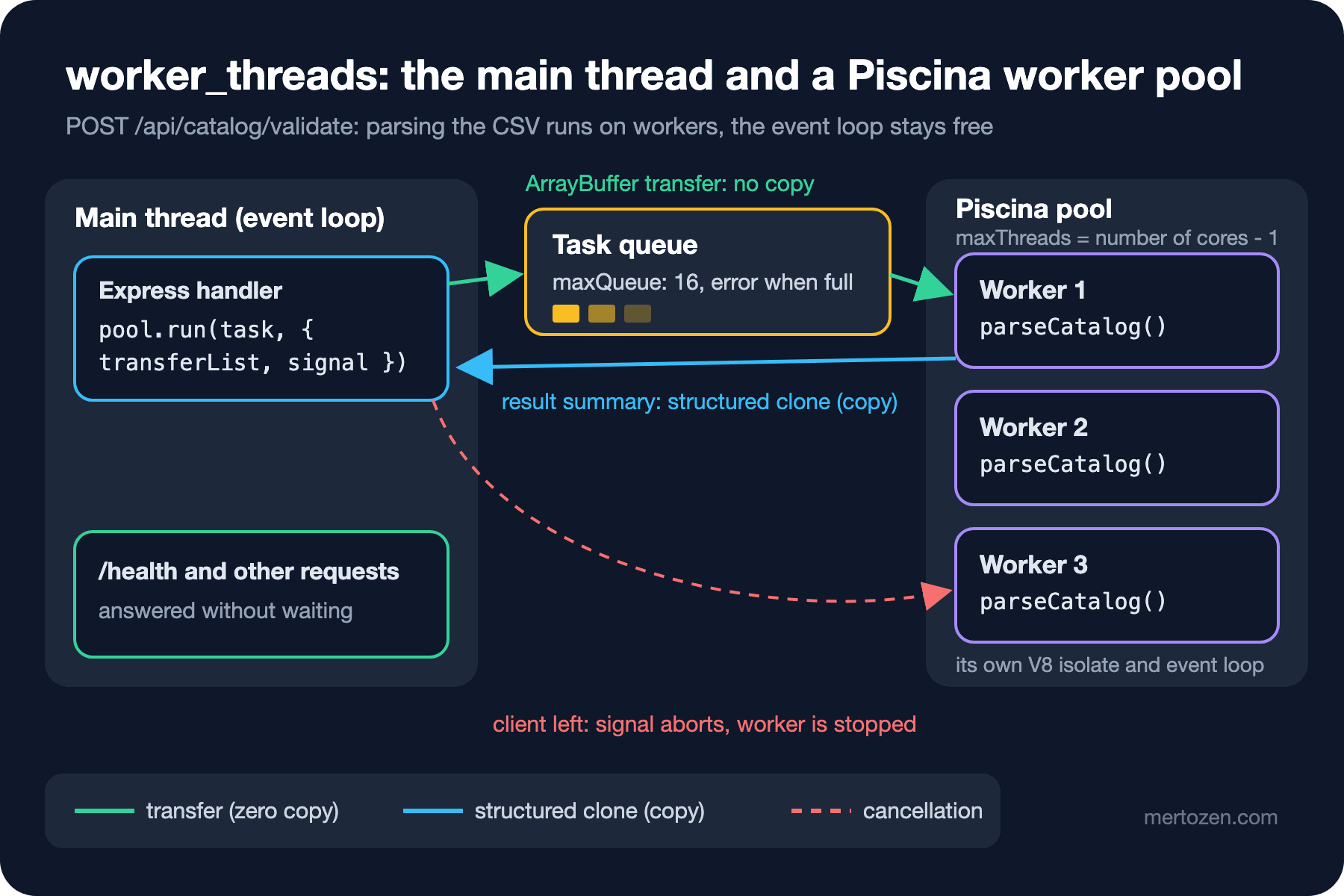
We also added the pool to the shutdown sequence: the closeAfterServer list from post 18 contains catalogPool.close(); once the server stops taking new requests, the pool finishes running tasks and closes its threads.
worker_threads or cluster?
In post 14 we saw the cluster module and the one-process-per-container model. They solve different problems:
| Topic | cluster / several processes | worker_threads |
|---|---|---|
| What runs in parallel | Requests: every process is a separate copy of the API | CPU work inside a single request |
| Memory | Separate per process; nothing shared | Same process; separate heaps, sharing possible with SharedArrayBuffer |
| Uncaught error | Only that process crashes | The worker stops, the error reaches the main thread as an error event |
| In containers | Orchestrator replicas are usually preferred | Useful inside a single container too |
| .NET counterpart | Several instances behind a load balancer | Task.Run, Parallel.ForEach |
The decision for Bookstore: scale with replicas, and handle heavy work inside a request with a worker pool. Using one in place of the other does not work; even with ten replicas, each one freezes while parsing 500,000 rows on its own event loop.
Production Notes
Set the number of threads by the container's CPU limit; reading maxThreads from configuration is the shortest way to state the environment's real CPU quota explicitly. Workers do not use the libuv thread pool that runs the scrypt of post 20; they use threads of their own, and the two together should not exceed the number of cores.
Memory: every worker has its own heap. The transferred 26 MB turns into strings and objects while the worker parses it; four parallel tasks mean four times the peak memory. That is why maxQueue and the body limit have to be considered together. Publish the pool's queueSize and utilization as metrics, as in post 14.
Common Pitfalls
Starting a new worker per request. The start-up cost can exceed the work itself; use a pool.
Sending or receiving large objects by copy. Transfer the ArrayBuffer and summarise the result.
Moving I/O work to a worker. Reading files and calling HTTP are already asynchronous; there is no gain, only the cost of messaging.
Expecting a custom error class from a worker. When we tried it with Piscina, only the message survived the thread boundary; return the outcome as data.
Transferring a shared Buffer. Small Buffers come from Node's pool; you get a DataCloneError.
A Small Experiment
★☆☆ Run labs/21/blocking.ts with maxThreads: 1 and maxThreads: 8. How do the total time and the event loop stall change?
★★☆ Add progress reporting to the pool: create a MessageChannel, transfer port2 inside the task, have the worker send port.postMessage(rowCount) every 100,000 rows, and log it on the main thread.
★★★ You want the worker to return the valid books too, but without copying half a million objects. Write the books as fixed-length records into an ArrayBuffer, return it transferred with Piscina.move(), and read it on the main thread. Compare the time with the structured clone version.
In the last post of the series we return to data access: with node:sqlite, pg, Kysely and Prisma we write the same query four ways and look at which one fits when.