

SSH in Depth: ~/.ssh/config, ProxyJump Through a Bastion, Port Forwarding to a Remote Database and the Risk of Agent Forwarding
Hop to private servers through a bastion with ProxyJump, not ssh -A: with agent forwarding on, someone who is root on the bastion can log into the database server with your key, and ControlPersist keeps that window open for minutes. We cover the first-value-wins rule of ~/.ssh/config, Match and ControlMaster, tunnels with -L, -R and -D, narrowing the bastion with AllowTcpForwarding and PermitOpen, FIDO2 keys and SSH certificates, with real output.
Version note: The examples in this post were run in a three-machine lab with OpenSSH 9.6p1 on Ubuntu Server 24.04.5 LTS (a client, a bastion and a database server; containers on the same Docker network). The location of the forwarded agent socket was also tested with OpenSSH 10.2p1 on Ubuntu 26.04.1 LTS. The Windows 11 OpenSSH client and SSMS were not run; those parts rely on the Microsoft and Win32-OpenSSH documentation.
Guess First
The database server of Bookstore, the online bookstore used as the shared example across this site's series, is closed to the internet; it can only be reached through a bastion, the one entry server that is reachable from outside. Connecting to the bastion with ssh -A and hopping to the database server from there has become a habit: -A turns on agent forwarding, and the key on your laptop can be used from the bastion as well. The private key file never leaves the laptop.
$ ssh -A bastion 'echo "SSH_AUTH_SOCK=$SSH_AUTH_SOCK"'
SSH_AUTH_SOCK=/tmp/ssh-63L55kGOzg/agent.644
The command finished, the session closed. Can someone with sudo rights on the bastion (or an attacker who took over the bastion) now log into the database server as you? The answer is in the "The Risk of Agent Forwarding" section.
In the first post we covered connecting over SSH with a key, a single host alias and a simple tunnel. This is the last post of the series, and it gathers the parts of SSH that help most in daily work but are least known: the rules of ~/.ssh/config, hopping to private servers through a bastion, building a tunnel to the database with port forwarding, and limiting all of this on the server side.
~/.ssh/config: Host Patterns, First Value Wins and Match
The config file of the client in the lab. In the lab, HostName holds container names; in real life the server's DNS name or IP address goes here:
# ~/.ssh/config
Match originalhost bookstore-db exec "printenv BOOKSTORE_VPN >/dev/null"
    ProxyJump none

Host bastion
    HostName linuxseries-bastion

Host bookstore-db
    HostName linuxseries-db
    ProxyJump bastion

Host bookstore-db-tunnel
    HostName linuxseries-bastion
    LocalForward 127.0.0.1:14330 linuxseries-db:1433
    SessionType none
    ExitOnForwardFailure yes

Host *
    User ada
    IdentityFile ~/.ssh/id_ed25519
    IdentitiesOnly yes
    StrictHostKeyChecking accept-new
    ServerAliveInterval 30
    ServerAliveCountMax 3
ssh reads the file from top to bottom and uses the first value it finds for each setting; later matches do not change that setting. That is why the specific blocks are at the top and Host * at the bottom. I saw what happens in the reverse order with a small file:
$ cat /tmp/order.conf
Host *
    User ada

Host bastion
    HostName linuxseries-bastion
    User deploy
$ ssh -F /tmp/order.conf -G bastion | grep "^user "
user ada
The User deploy in the bastion block was never applied. ssh -G tells you which settings end up in effect for a host; it is the first place to look after you change the config:
$ ssh -G bookstore-db | grep -E "^(user|hostname|port|proxyjump|identityfile|identitiesonly|serveraliveinterval|serveralivecountmax) "
user ada
hostname linuxseries-db
port 22
identitiesonly yes
serveralivecountmax 3
serveraliveinterval 30
identityfile ~/.ssh/id_ed25519
proxyjump bastion
A Host line can take several patterns (Host bookstore-db bookstore-app, Host bookstore-*, exclusion with !). Match looks at conditions instead: originalhost checks the name you typed on the command line, host the name after HostName has been applied, exec the exit code of a command. The block at the top of the file says "if I am on the VPN, I do not need the bastion"; because the first value wins, it sits at the very top:
$ ssh -G bookstore-db | grep "^proxyjump "
proxyjump bastion
$ BOOKSTORE_VPN=1 ssh -G bookstore-db | grep -c "^proxyjump "
0
IdentitiesOnly yes stops ssh from trying every key in the agent one after another; it is the cure for the "Too many authentication failures" error from the first post. ServerAliveInterval 30 sends an encrypted probe to the server every 30 seconds while the connection is idle, and ServerAliveCountMax 3 closes the connection after three unanswered probes. That way the session stays open even if a firewall or NAT device in between forgets idle connections, and when the network really is gone your terminal does not freeze for minutes.
The OpenSSH client in Windows 11 reads the same file from C:\Users\user\.ssh\config, and the settings in this section apply there too. There is one exception: ControlMaster, which we will see below, is not supported in Win32-OpenSSH; the project's issue about it is still in the backlog. On Windows, either leave those lines out or use ssh in WSL. I did not run the Windows side.
ProxyJump: Through a Bastion to Private Servers
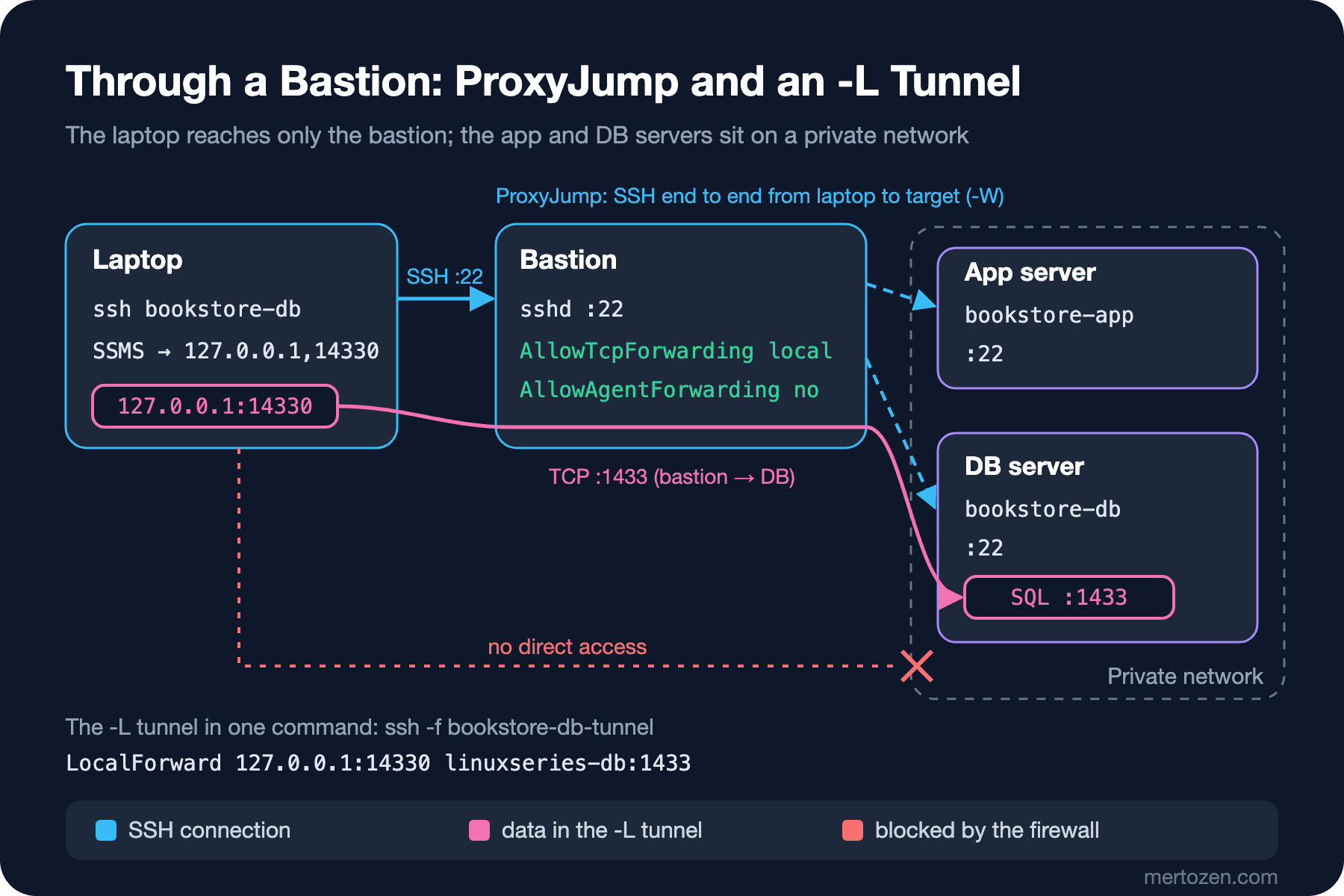
The database server only accepts connections that come from the bastion:
$ ssh -o ProxyJump=none -o ConnectTimeout=5 bookstore-db hostname
ssh: connect to host linuxseries-db port 22: Connection timed out
$ ssh bookstore-db hostname
linuxseries-db
$ ssh -v bookstore-db true 2>&1 | grep -i -E "proxy|Authenticated|Connecting to"
debug1: Setting implicit ProxyCommand from ProxyJump: ssh -v -W '[%h]:%p' bastion
debug1: Executing proxy command: exec ssh -v -W '[linuxseries-db]:22' bastion
debug1: Connecting to linuxseries-bastion [<ip>] port 22.
Authenticated to linuxseries-bastion ([<ip>]:22) using "publickey".
Authenticated to linuxseries-db (via proxy) using "publickey".
ProxyJump (-J on the command line) first connects to the bastion and, with -W, opens a raw TCP channel from the bastion to port 22 of the target. The SSH conversation with the target happens inside that channel, end to end from the laptop to the target: the two separate "Authenticated" lines show this. The bastion carries the traffic but cannot decrypt it, and it does not need your key either. For a one-off connection you do not need the config: ssh -J ada@bastion-address ada@db-address.
ControlMaster: Sharing a Connection
I added three lines to the Host * block:
    ControlMaster auto
    ControlPath ~/.ssh/cm-%C
    ControlPersist 10m
$ time ssh bookstore-db hostname
linuxseries-db
real 0m0.282s
user 0m0.034s
sys 0m0.001s
$ time ssh bookstore-db hostname
linuxseries-db
real 0m0.045s
user 0m0.002s
sys 0m0.001s
$ ssh -O check bookstore-db
Master running (pid=268)
$ ls ~/.ssh/ | grep cm-
cm-301cd87b27fbfcd54676dbd2e64207a1149b5e98
cm-6de0cd5011a6c1e35bdbe7821fa6f4d9330d07ec
$ ssh -O exit bookstore-db
Exit request sent.The first connection creates a master and puts its socket at ControlPath; later connections are opened inside this connection without a new SSH handshake. Even in the lab on the same network the time dropped to a sixth; on a remote server and through a bastion the difference is seconds. There are two sockets because ProxyJump's connection to the bastion is shared as well. %C is a hash built from the connection details (local machine, host, port, user). ControlPersist 10m keeps the master open for 10 minutes after the last session closes; this duration becomes important below, together with agent forwarding.
Port Forwarding: -L, -R and -D
Bookstore's SQL Server listens on 1433, and only the bastion can reach that port too. To connect with SSMS, the bookstore-db-tunnel block in the config defines a one-command tunnel. In the lab, instead of SQL Server there is a test listener on 1433 that accepts a connection and writes one line; I did not run the SQL Server image because it requires accepting a license.
$ nc -w 3 linuxseries-db 1433; echo "exit=$?"
exit=1
$ ssh -f bookstore-db-tunnel
$ ss -tln | grep 14330
LISTEN 0      128        127.0.0.1:14330      0.0.0.0:*
$ nc -w 3 127.0.0.1 14330
linuxseries-db: test listener on 1433 (stand-in for SQL Server)
$ ssh -O exit bookstore-db-tunnel
Exit request sent.
LocalForward 127.0.0.1:14330 linuxseries-db:1433 is the equivalent of -L 127.0.0.1:14330:linuxseries-db:1433 on the command line: listen on 14330 on the laptop, carry every incoming connection through SSH to the bastion, and connect it to linuxseries-db:1433 as seen from the bastion. The bastion resolves the target address; the laptop does not need to know that name. SessionType none runs no remote command (-N), and ExitOnForwardFailure yes makes ssh exit with an error when the tunnel cannot be set up because the port is taken, instead of silently staying open. In SSMS the server name is written as 127.0.0.1,14330 (SQL Server separates the port with a comma); because the tunnel changes the name the certificate is checked against, you also have to think about certificate validation in the connection settings. I did not run the SSMS part.
-R works in the opposite direction: it opens a port on the server and carries incoming connections to your machine. For example, to receive a callback from the server in the application running on your own machine:
$ ssh -f -N -R 9090:127.0.0.1:5080 bastion
# on the bastion:
$ ss -tln | grep 9090
LISTEN 0      128        127.0.0.1:9090       0.0.0.0:*
LISTEN 0      128            [::1]:9090          [::]:*
$ curl -s http://127.0.0.1:9090/ping
{"received":true,"from":"local dev"}
The port was opened only on the server's loopback; the server's GatewayPorts no default does not expose it. -D, on the other hand, opens a SOCKS proxy on the laptop; when a browser or curl uses that proxy, connections leave from the bastion:
$ ssh -f -N -D 1080 bastion
$ curl -sS --max-time 5 http://linuxseries-db:8080/health
curl: (28) Connection timed out after 5003 milliseconds
$ curl -sS --socks5-hostname 127.0.0.1:1080 http://linuxseries-db:8080/health
{"status":"Healthy","server":"linuxseries-db"}
Handy for looking at an admin page on the private network, but for the same reason a feature you will want to limit on the bastion.
The Risk of Agent Forwarding
The answer to the guess is yes. With a user who has sudo rights on the bastion, after your ssh -A command had finished, I did this:
$ sudo find /tmp -type s -name "agent.*"
/tmp/ssh-63L55kGOzg/agent.644
$ sudo SSH_AUTH_SOCK=/tmp/ssh-63L55kGOzg/agent.644 ssh-add -l
256 SHA256:mYAvoGnZ9vvvXaJmqLUi6CvE2dnmYEbrJdJgitJbDSU ada@linuxseries-client (ED25519)
$ sudo SSH_AUTH_SOCK=/tmp/ssh-63L55kGOzg/agent.644 ssh -o StrictHostKeyChecking=accept-new ada@linuxseries-db hostname
Warning: Permanently added 'linuxseries-db' (ED25519) to the list of known hosts.
linuxseries-db
Agent forwarding does not copy the key to the bastion; it opens a socket on the bastion and carries signing requests that arrive there to the agent on the laptop. Anyone who can reach the socket (root always can) can get signatures made with your key for as long as the socket is open. The key file was not stolen, and there was no need to: someone logged into the database server in your name. One more detail makes it worse: the socket was still there even though the command had finished, because ControlPersist keeps the master connection open for 10 minutes and the forwarded agent lives along with that connection. After closing the master and doing the same job with ProxyJump, no agent socket was left on the bastion:
$ ssh -O exit bastion
Exit request sent.
$ ssh bookstore-db hostname
linuxseries-db
# on the bastion:
$ sudo find /tmp -type s -name "agent.*" | wc -l
0
The rule is simple: do not use agent forwarding to hop through a bastion; that is ProxyJump's job. If you really need it (for example a git pull over SSH from the server to GitHub), turn it on only for a trusted server where nobody else is root, only for that host, and ask for confirmation on every use with ssh-add -c. With OpenSSH 10.2 in Ubuntu 26.04, the forwarded socket is created in the user's ~/.ssh/agent/ directory instead of /tmp (an OpenSSH 10.1 change). I tried it: root could still list the key with ssh-add -l in the same way; the location changed, the risk did not.
Narrowing the Bastion on the Server Side
However carefully you set up the client, the server sets the limit. Ubuntu's defaults are too open for a bastion:
$ sudo sshd -T | grep -E "^(allowagentforwarding|allowtcpforwarding|gatewayports|permitopen) "
gatewayports no
allowtcpforwarding yes
allowagentforwarding yes
permitopen any
On top of the hardening from the eleventh post, I added another drop-in to the bastion; in the repo it is deploy/linux/ssh/bastion/sshd_config.d/10-bastion.conf:
# /etc/ssh/sshd_config.d/10-bastion.conf
# Bastion: only a hop to the private servers
AllowAgentForwarding no
AllowTcpForwarding local
PermitOpen linuxseries-db:22 linuxseries-db:1433
X11Forwarding no
GatewayPorts no
After sshd -t and a reload (the order from the fourteenth post) I tried it from the client:
$ ssh -A bastion 'echo "SSH_AUTH_SOCK=$SSH_AUTH_SOCK"'
SSH_AUTH_SOCK=
$ ssh bookstore-db hostname
linuxseries-db
$ ssh -N -o ExitOnForwardFailure=yes -R 9090:127.0.0.1:5080 bastion
Error: remote port forwarding failed for listen port 9090
$ ssh -N -o ControlMaster=no -L 18080:linuxseries-db:8080 bastion &
$ curl -sS http://127.0.0.1:18080/health
channel 2: open failed: administratively prohibited: open failed
curl: (56) Recv failure: Connection reset by peer
Agent forwarding is off, ProxyJump works, -R was refused, and a tunnel to a target not in the PermitOpen list could not be opened. Setting AllowTcpForwarding to no may look safer, but it makes the bastion useless, because ProxyJump's -W is a local forwarding too:
$ ssh bookstore-db hostname
Connection closed by UNKNOWN port 65535
The message on the client says nothing useful; the reason is in the bastion's sshd log (on Ubuntu, journalctl -u ssh): refused local port forward: originator 127.0.0.1 port 65535, target linuxseries-db port 22. For the application and database servers it is the other way round: if no tunnel needs to start there, AllowTcpForwarding no and AllowAgentForwarding no are the right defaults.
An Introduction to FIDO2 Keys and SSH Certificates
A private key file can be stolen. With FIDO2 keys (ed25519-sk), the private key stays inside a hardware security key that you plug into the computer or tap against the phone, the file on disk is only a reference to it, and you have to touch the key on every connection. Since there is no hardware key in the lab, I could only see the error message:
$ ssh-keygen -t ed25519-sk -f ~/.ssh/id_ed25519_sk -N ""
Generating public/private ed25519-sk key pair.
You may need to touch your authenticator to authorize key generation.
Key enrollment failed: device not found
As the number of servers and the team grow, managing authorized_keys on every server gets harder. With an SSH certificate, a CA signs your public key, and the servers trust the CA instead of authorized_keys. I created a CA and signed my key for the deploy user for 8 hours:
$ ssh-keygen -q -t ed25519 -N "" -C bookstore-user-ca -f ~/ca/bookstore-user-ca
$ ssh -o BatchMode=yes -l deploy bastion whoami
deploy@linuxseries-bastion: Permission denied (publickey,password).
$ ssh-keygen -s ~/ca/bookstore-user-ca -I ada-2026-11-15 -n deploy -V +8h ~/.ssh/id_ed25519.pub
Signed user key /home/ada/.ssh/id_ed25519-cert.pub: id "ada-2026-11-15" serial 0 for deploy valid from 2026-11-15T07:40:00 to 2026-11-15T15:41:58
$ ssh-keygen -L -f ~/.ssh/id_ed25519-cert.pub
/home/ada/.ssh/id_ed25519-cert.pub:
        Type: ssh-ed25519-cert-v01@openssh.com user certificate
        Public key: ED25519-CERT SHA256:mYAvoGnZ9vvvXaJmqLUi6CvE2dnmYEbrJdJgitJbDSU
        Signing CA: ED25519 SHA256:5f4oWzbXoMc3tH45BLHhyB8n9+yFIAtVFCgu4VGRTBY (using ssh-ed25519)
        Key ID: "ada-2026-11-15"
        Serial: 0
        Valid: from 2026-11-15T07:40:00 to 2026-11-15T15:41:58
        Principals:
                deploy
        Critical Options: (none)
        Extensions:
                permit-X11-forwarding
                permit-agent-forwarding
                permit-port-forwarding
                permit-pty
                permit-user-rc
On the bastion only one line is needed: TrustedUserCAKeys /etc/ssh/bookstore-user-ca.pub. The deploy user has no authorized_keys file, yet the same command now worked, and the sshd log recorded the login with the certificate's identity:
$ ssh -o BatchMode=yes -l deploy bastion whoami
deploy
When the certificate expires, access ends by itself; there is no need to delete a departing employee's key from every server. This is an introduction: the CA's private key should not be on a laptop but in a secret store or a separate signing service. We do not build that infrastructure in this post.
Production Notes
Use the bastion for a single job: hopping. No applications, tools or other users' shells on it; the less that runs there, the less there is that can reach an agent socket or tunnels. The bastion's own log (who, when, to which target) is valuable for auditing; journalctl _COMM=sshd from the eleventh post applies here too.
Do not use tunnels as permanent services. The application's connection to the database should rely on the private network and firewall rules, not on an SSH tunnel; a tunnel is for a developer's temporary access. Do not forget that it is temporary: check what is still open with ssh -O exit or ss -tlnp.
Deploying from CI to a server (the "Your Own Linux Server over SSH" post of the GitHub Actions series) follows the same rules: a separate deploy key, a host key written into known_hosts in advance and ProxyJump if needed. In CI there is no need for agent forwarding at all.
Common Pitfalls
Binding a tunnel to 0.0.0.0. I tried it in the lab:
$ ssh -f -N -L 0.0.0.0:14331:linuxseries-db:1433 bastion
$ ss -tln | grep 14331
LISTEN 0      128          0.0.0.0:14331      0.0.0.0:*
# from another machine on the same network:
$ nc -w 3 linuxseries-client 14331
linuxseries-db: test listener on 1433 (stand-in for SQL Server)
Everyone on the same network as your laptop (café Wi-Fi included) can now connect to the private database; your tunnel punched a hole in the firewall. Leave the bind address empty or write 127.0.0.1 explicitly; -g and GatewayPorts yes lead to the same result.
Turning on agent forwarding to hop through a bastion, especially with ControlPersist. Use ProxyJump, and AllowAgentForwarding no on the bastion.
Writing Host * at the top of the file. The first value wins; the specific blocks are not applied. When in doubt, ssh -G.
Breaking ProxyJump with AllowTcpForwarding no on the bastion and losing time over the meaningless error message on the client. The reason is in the server log.
A Small Experiment
★☆☆ Open your own ~/.ssh/config and look at the ssh -G output for each host. Is there a user or identityfile you did not expect?
★★☆ Set up a bastion and a private server with two VMs or containers. Connect first with ssh -A, then with ProxyJump, and compare the output of sudo find /tmp -type s on the bastion in each case. What changes when you remove ControlPersist?
★★★ Allow only the database's port 1433 on the bastion with PermitOpen, then put into a table which connections work with -L, -D and -J. Sign an SSH certificate with -O no-port-forwarding and repeat the same test.
This is where the series ends. Starting from connecting to a server over SSH, we went through the filesystem, permissions, processes, systemd, reading logs, the network, packages, resources, hardening, troubleshooting and release upgrades; in the last three posts we added editing files on the server, packaging and moving files, and the bastion, tunnel and agent side of SSH. All on the same Bookstore server, with every setting in the repo. Turning what you learned here into scripts continues in the Bash Scripting series, and running the same application in containers in the Docker series.