

What Is Kubernetes and When Don't You Need It? Control Plane, Nodes and Desired State
Kubernetes is a container orchestration platform where you declare what you want and it keeps pulling the actual state towards it. We watch a deleted pod come back, map the control plane and node components, measure how long a dead node really takes to recover, look at the three-releases-a-year support calendar and ask when Kubernetes is an unnecessary cost.
Version note: The examples in this post were run with kind 0.33 on Kubernetes 1.37, kubectl 1.37, Docker 29 and .NET 10.
Guess First
Three copies of the Bookstore API (Application Programming Interface) are running in three separate pods. You delete one with kubectl delete pod. A few seconds later, how many pods does kubectl get pods show: two or three? If three, who created the new pod when you never issued a command? A harder one: if you shut down not a pod but one of the machines the pods run on, how long until the pods on that machine are running again somewhere else? Seconds or minutes?
The Real Problem: Not Running Containers, Keeping Them Running
Imagine you run Bookstore today on a single VM (Virtual Machine) with Docker Compose. You type docker compose up -d and the API, the Angular web app and PostgreSQL come up. With restart: unless-stopped a crashed process gets its container restarted. For a small team and predictable traffic this setup works perfectly well.
The trouble starts with the second machine. Traffic has grown and you want to spread the API across three machines. Which container runs on which machine? If a machine dies, who moves its containers to another one? When you ship a new version, do you stop all three copies at once or one at a time? Which IP (Internet Protocol) addresses do you put into the load balancer when they change on every restart? All of these questions together are called container orchestration, and Kubernetes is the de facto standard tool for it.
Kubernetes' promise fits in one sentence: "Tell me what you want; getting there and staying there is my job." Two words in that sentence carry the whole series: desired state and reconciliation.
Desired State and the Reconciliation Loop
Let's write a Deployment for the Bookstore API. We'll unpack the details in the third and fourth posts; for now it only says: in the bookstore namespace, I want three copies of the bookstore-api:1.0.0 image.
apiVersion: v1
kind: Namespace
metadata:
  name: bookstore
---
apiVersion: apps/v1
kind: Deployment
metadata:
  name: api
  namespace: bookstore
spec:
  replicas: 3
  selector:
    matchLabels:
      app.kubernetes.io/name: api
  template:
    metadata:
      labels:
        app.kubernetes.io/name: api
    spec:
      containers:
        - name: api
          image: bookstore-api:1.0.0
          ports:
            - containerPort: 8080
Notice that this file contains no commands. We don't say "start three containers"; we say "there should be three copies". That is the declarative approach. When we apply it:
$ kubectl apply -f api.yaml
namespace/bookstore created
deployment.apps/api created
$ kubectl get pods -n bookstore -o wide
NAME                   READY   STATUS    AGE   NODE
api-7dd799865f-8tpf7   1/1     Running   1s    k8swork1-1-worker2
api-7dd799865f-fv9dt   1/1     Running   1s    k8swork1-1-worker2
api-7dd799865f-vftck   1/1     Running   1s    k8swork1-1-worker
(I trimmed the output to a few columns with awk to keep it readable; the column names are real.) Now the first question. We delete a pod:
$ kubectl delete pod -n bookstore api-7dd799865f-8tpf7
pod "api-7dd799865f-8tpf7" deleted from bookstore namespace
$ kubectl get pods -n bookstore -o wide
NAME                   READY   STATUS    AGE   NODE
api-7dd799865f-85m2z   1/1     Running   4s    k8swork1-1-worker
api-7dd799865f-fv9dt   1/1     Running   11s   k8swork1-1-worker2
api-7dd799865f-vftck   1/1     Running   11s   k8swork1-1-worker
Still three pods; the deleted one has been replaced by the 4-second-old api-7dd799865f-85m2z. The ReplicaSet controller running underneath the Deployment did that. Its work is a loop: read the desired state (spec.replicas: 3), observe the actual state (running pods: 2), take one step to close the gap (create a pod), then observe again. The Kubernetes documentation calls this a control loop; you'll also see it called a reconciliation loop. Think of a thermostat: you ask for 22 degrees, the thermostat measures the room, turns the heater on when it's cold and off when it's warm; you don't press the button every minute.
This model has an important consequence. You don't give Kubernetes an order like "restart the pod"; you change the desired state and the system pulls the actual state towards it. The Deployment itself carries both halves explicitly: spec is your request, status is the system's observation.
$ kubectl get deploy api -n bookstore -o yaml
...
status:
  availableReplicas: 3
  conditions:
  - message: ReplicaSet "api-7dd799865f" has successfully progressed.
    reason: NewReplicaSetAvailable
    status: "True"
    type: Progressing
  - message: Deployment has minimum availability.
    reason: MinimumReplicasAvailable
    status: "True"
    type: Available
  observedGeneration: 1
  readyReplicas: 3
  replicas: 3
  terminatingReplicas: 0
  updatedReplicas: 3
observedGeneration tells you which version of the spec the controller has seen. When you change the spec, metadata.generation goes up; until the two match, the controller hasn't processed your new request yet. This detail is the basis for correctly answering "is the deploy done?" in CI (Continuous Integration) pipelines; kubectl rollout status looks at exactly this.
The Parts of a Cluster: Control Plane and Nodes
The Control Plane: Where Is the Brain?
A Kubernetes cluster has two parts: the control plane, which manages the cluster's state, and the nodes, where applications run. In the local cluster we'll use in this series (we build it in the next post) the control plane components themselves run as pods, so we can see them:
$ kubectl get pods -n kube-system -o wide
NAME                                               STATUS    NODE
coredns-559f6c778d-c6t8g                           Running   k8swork1-1-control-plane
coredns-559f6c778d-t6cp4                           Running   k8swork1-1-control-plane
etcd-k8swork1-1-control-plane                      Running   k8swork1-1-control-plane
kindnet-d5dpj                                      Running   k8swork1-1-control-plane
kindnet-lwf62                                      Running   k8swork1-1-worker
kindnet-v4brw                                      Running   k8swork1-1-worker2
kube-apiserver-k8swork1-1-control-plane            Running   k8swork1-1-control-plane
kube-controller-manager-k8swork1-1-control-plane   Running   k8swork1-1-control-plane
kube-proxy-7sz4f                                   Running   k8swork1-1-worker
kube-proxy-8mhcf                                   Running   k8swork1-1-control-plane
kube-proxy-llznk                                   Running   k8swork1-1-worker2
kube-scheduler-k8swork1-1-control-plane            Running   k8swork1-1-control-plane
Four components form the core of the control plane:
kube-apiserver is the cluster's only door. kubectl, the controllers, the scheduler and the kubelets on the nodes don't talk to each other, only to the API server. Every request passes authentication, authorization and admission control here and is then persisted. Your YAML (YAML Ain't Markup Language) file is really an HTTP (Hypertext Transfer Protocol) request to this API.
etcd is the cluster's memory: a consistent, distributed key/value store. The Deployment, the pods and the Secrets all live here. Lose etcd and you lose your cluster; in managed Kubernetes services (AKS (Azure Kubernetes Service), EKS (Amazon Elastic Kubernetes Service), GKE (Google Kubernetes Engine)) the provider runs etcd and its backups, which is one of the big reasons to choose them.
kube-scheduler watches pods that haven't been assigned to a node yet and picks a suitable node for each: is there enough CPU (Central Processing Unit) and memory, affinity rules, taints, topology spread. It records its choice by writing the pod's spec.nodeName field; it doesn't start the container itself.
kube-controller-manager runs dozens of controllers in a single process: the Deployment, ReplicaSet, Job, Node and EndpointSlice controllers and others. Each runs the loop we just saw for its own resource type. Cloud-specific work (opening a load balancer, attaching a disk) lives in a separate, optional component, cloud-controller-manager; local clusters such as kind don't have it.
The Node: Where the Work Happens
Three pieces run on every node. kubelet is the node's agent: it watches the API server, sees the pods assigned to its node and tells the container runtime "start this container from this image". It then tracks the container's health, runs probes and reports the pod's status back to the API server.
The container runtime is the software that actually runs containers. The kubelet talks to it through the CRI (Container Runtime Interface); the two most common runtimes today are containerd and CRI-O. Docker itself hasn't been used directly since Kubernetes 1.24, but images you build with Docker follow the OCI (Open Container Initiative) standard and run unchanged on containerd; we'll get to that in post 18 along with old manifests. Our cluster's runtime is containerd://2.3.4.
kube-proxy installs, on every node, the network rules that route Services' virtual IP addresses to pods. The documentation marks it as optional; some network plugins (for example the eBPF (extended Berkeley Packet Filter) based Cilium) can take over this job. Pod-to-pod networking is set up by the CNI (Container Network Interface) plugin; in kind that's kindnet.
From kubectl apply to a Running Container
Now let's put the pieces together. After the deletion above, the namespace's events show who did what, in which order:
$ kubectl get events -n bookstore --sort-by=.lastTimestamp
LAST SEEN   TYPE     REASON             OBJECT                     MESSAGE
4s          Normal   Killing            pod/api-7dd799865f-8tpf7   Stopping container api
4s          Normal   Scheduled          pod/api-7dd799865f-85m2z   Successfully assigned bookstore/api-7dd799865f-85m2z to k8swork1-1-worker
4s          Normal   SuccessfulCreate   replicaset/api-7dd799865f  Created pod: api-7dd799865f-85m2z
3s          Normal   Pulled             pod/api-7dd799865f-85m2z   Container image "bookstore-api:1.0.0" already present on machine and can be accessed by the pod
3s          Normal   Created            pod/api-7dd799865f-85m2z   Container created
3s          Normal   Started            pod/api-7dd799865f-85m2z   Container started
Read it like this: the kubelet stopped the old container (Killing), the ReplicaSet controller noticed the missing copy and created a new pod object (SuccessfulCreate), the scheduler assigned it to k8swork1-1-worker (Scheduled), and the kubelet on that node found the image, created the container and started it. Lines falling into the same second can appear out of order; events don't guarantee strict ordering. The figure below shows the same flow through the components.
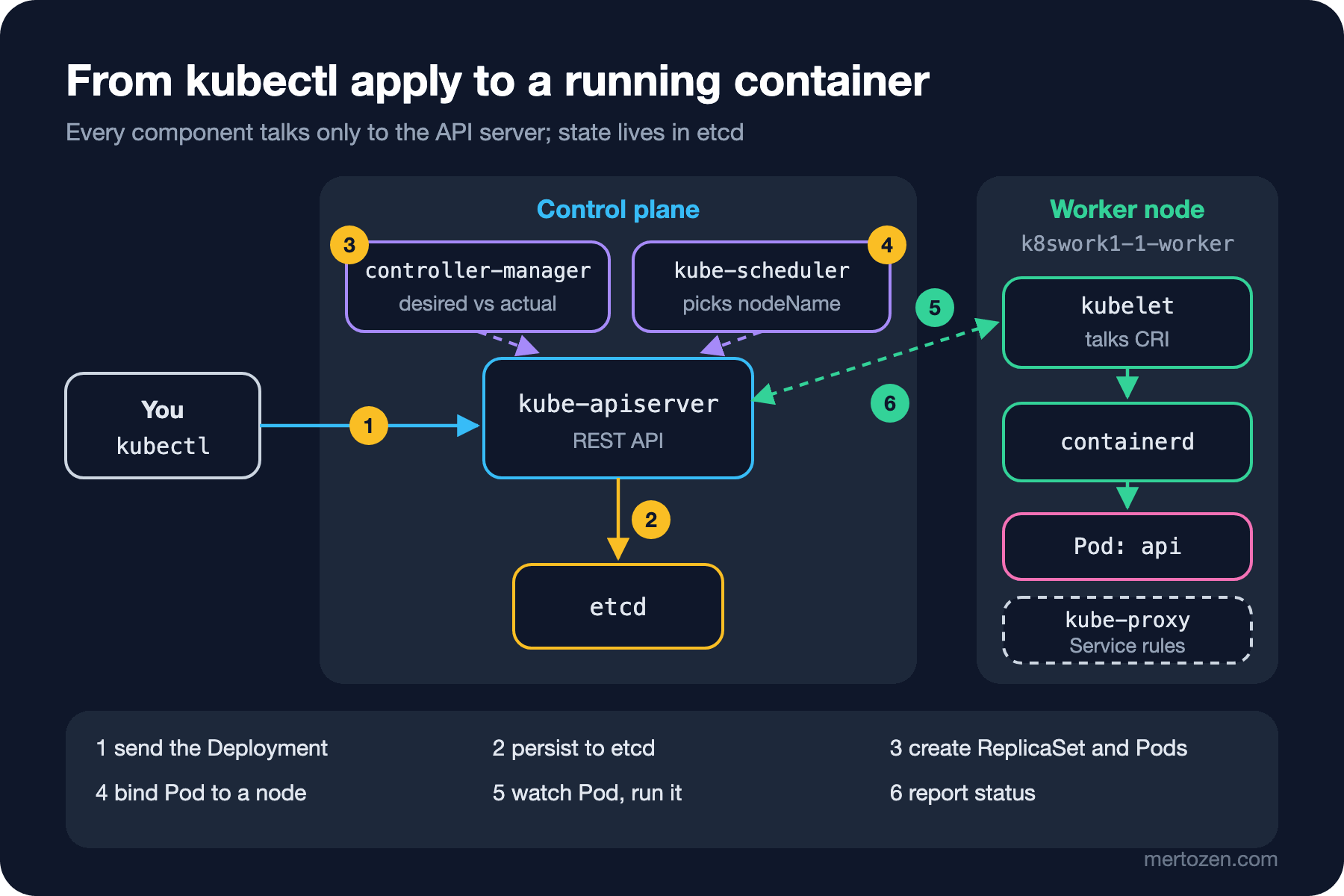
The most important idea in the figure is in the dashed arrows: no component calls another to say "do this". The scheduler doesn't call the kubelet; it writes a node name onto the pod, and the kubelet sees that change by watching the API server. Thanks to this loose coupling, if a component crashes for a while, when it comes back it just reads the current state and carries on.
What Happens When a Machine Goes Down?
Deleting a pod is an easy test. The real-world failure is a whole node disappearing. In kind every node is a Docker container, so we can simulate it with docker stop. With one API pod on k8swork1-1-worker2, I stopped that node and recorded the state every 10 seconds:
$ docker stop k8swork1-1-worker2
stopped worker2 at 06:24:18
--- 06:24:58
k8swork1-1-worker2 Ready
api-7dd799865f-fv9dt Running k8swork1-1-worker2
--- 06:25:08
k8swork1-1-worker2 NotReady
api-7dd799865f-fv9dt Running k8swork1-1-worker2
# ... unchanged for 5 minutes
--- 06:30:02
k8swork1-1-worker2 NotReady
api-7dd799865f-fv9dt Running k8swork1-1-worker2
--- 06:30:12
k8swork1-1-worker2 NotReady
api-7dd799865f-fv9dt Terminating k8swork1-1-worker2
api-7dd799865f-j8nz5 Running k8swork1-1-worker
(I trimmed the output to worker2 and its pod.) There are three moments to read. Between 40 and 50 seconds after the node stopped, the control plane marked it NotReady; when the kubelet's regular heartbeats stop, the Node controller waits a while and then considers the node unhealthy. But the pod didn't move right away: it kept showing Running for another five minutes. The reason is a toleration added to the pod automatically: the output of kubectl get pod -o jsonpath='{.spec.tolerations}' shows "tolerationSeconds":300 for node.kubernetes.io/unreachable and not-ready. Kubernetes waits five minutes so that a short network blip doesn't move every pod for nothing. At the end of that window (06:30:12) the old pod went Terminating and the ReplicaSet controller created api-7dd799865f-j8nz5 on the healthy node. The old pod stayed in Terminating until the node came back at 06:31:53; a kubelet on a dead node can't say "I stopped it". So the answer to the second question is "about 5 minutes 50 seconds". Meanwhile the other two copies carried the traffic; a single-replica application would have been down for the whole time.
When Don't You Need Kubernetes?
This may be the most honest section of the series. Kubernetes is powerful but not free; it hands you a platform and leaves running that platform to you as well. Three minor releases ship each year and each gets roughly 14 months of patches, so you must upgrade at least once a year. On top of that come the network plugin, a Gateway for external traffic, certificates, log and metric collection, RBAC (Role-Based Access Control), backups and security patches. Even with a managed service, responsibility for nodes, manifests and upgrades largely stays with you.
| Option | Good enough when | The cost |
|---|---|---|
| Single VM + Docker Compose | One team, a few services, short outages are tolerable | Lose the machine, lose everything; vertical scaling only |
| PaaS (App Service, Container Apps, Cloud Run) | Stateless web/API, fast start, small ops team | The platform's limits and pricing model; little fine-tuning |
| Managed Kubernetes (AKS, EKS, GKE) | Many services, many teams, need for a standard platform | Upgrades, networking, security and observability are on you |
| Self-managed Kubernetes | On-premise requirement, special hardware, a platform team exists | The control plane and etcd are on you too |
PaaS (Platform as a Service) options look like "Kubernetes lite" at first glance; some, like Azure Container Apps, already run on Kubernetes behind the scenes without showing it to you. If Bookstore has one API, one Angular app and one database, running them on a PaaS or on a two-VM Compose setup is usually cheaper and less risky. The cost of Kubernetes pays back at the point where several teams run dozens of services on the same platform and need a shared language for deploying, scaling and observing. The decision question shouldn't be "is Kubernetes good?" but "do I have the people and the time to operate this complexity?"
Release Calendar and Support Window
With KEP (Kubernetes Enhancement Proposal) 2572 in 2021 Kubernetes moved from four releases a year to three. Versions take the form x.y.z; a minor release (y) brings new features, a patch release (z) bug and security fixes. The project maintains release branches for the three most recent minor versions, and each minor version gets about 14 months of patches: a 12-month standard period plus two months of maintenance mode. As I write this in November 2026, the kubernetes.io/releases page lists 1.37, 1.36 and 1.35 (plus 1.34, which reached end of life on 28 October 2026); 1.37's end of life is 28 October 2027. The examples in this series ran on 1.37.0, kind's default node image.
The practical consequence: you need to move your production cluster up a minor version at least once a year, and check removed APIs on every hop. Managed services have their own support calendars and usually trail upstream a little; we'll get into that in post 17.
Production Notes
The desired state model changes what "working" means. A pod being Running doesn't mean the application can serve requests; Kubernetes only looks at the signals you give it. Until you define readiness and liveness probes (post 8) and resource requests (post 9), the scheduler and controllers are flying blind.
When a node fails, moving its pods takes minutes with default settings, not seconds. That's why a single-replica API gives you no more availability on Kubernetes than a single-machine Compose setup. At least two replicas, pods spread over different nodes and a PodDisruptionBudget (post 11) are the minimum for real resilience.
The control plane itself is a dependency. When the API server is unreachable, running pods keep running, but you can't deploy, dead pods aren't replaced and scaling stops. With managed services, check the control plane's SLA (Service Level Agreement) and the difference between free and paid tiers.
Common Pitfalls
Using Kubernetes like an imperative tool. If you change a value by hand in production with kubectl edit, the manifest in Git and the actual state of the cluster diverge, and the next kubectl apply silently reverts your change. Let files always be the source.
Thinking of a pod as a long-lived server. A pod's name, IP address and disk are temporary; the pod that replaced the one we deleted got a new name and a new IP. Anything the application writes to local disk goes away with the pod.
Believing "we moved to Kubernetes, so now we scale". Kubernetes easily multiplies a stateless application; but if the application keeps sessions in memory, writes files to local disk or runs migrations every time a replica starts, multiplying it multiplies the problem too. We'll look at each of these traps one by one later in the series.
Building a cluster for a small workload. While the team learns Kubernetes, the actual product waits. Look honestly at the table above first.
A Small Experiment
★☆☆ After building the kind cluster in the next post, apply the Deployment above, delete a pod and find the SuccessfulCreate, Scheduled and Started lines in the output of kubectl get events -n bookstore --sort-by=.lastTimestamp.
★★☆ Run kubectl scale deploy/api -n bookstore --replicas=5, then compare the Deployment's metadata.generation and status.observedGeneration. Next, try scaling the ReplicaSet (kubectl get rs -n bookstore) directly to 1 replica; explain what happens and why.
★★★ Fill in the table above for Bookstore as it stands today (one API, one Angular app, one PostgreSQL) from your own team's point of view: how many people, how many deploys a week, how much downtime is acceptable? Write one paragraph on when Kubernetes would start adding value for you.
In this post we saw what Kubernetes is and why it exists. In the next post we build a multi-node cluster on your own machine: we compare kind, k3d and minikube, and meet kubectl's contexts and namespaces along with ways to avoid running commands against the wrong cluster.