

External Traffic in Kubernetes: Ingress, the ingress-nginx Retirement and Gateway API with HTTPRoute
The Ingress API is frozen and ingress-nginx retired in March 2026; the way forward is the Gateway API, split into GatewayClass, Gateway and HTTPRoute. We install Envoy Gateway on kind, route /api to .NET and everything else to Angular, and look at why PathPrefix doesn't catch /apifoo, route status conditions, TLS and forwarded header notes, and the warnings of an ingress2gateway migration, all with real output.
Version note: The examples in this post were run with kind 0.33 on Kubernetes 1.37, kubectl 1.37, Helm 4.3, Envoy Gateway 1.10, ingress2gateway 1.2, .NET 10 and Angular 22.
Guess First
Bookstore's Angular app and .NET API (Application Programming Interface) sit behind the same domain: requests starting with /api go to the API, everything else to the nginx serving Angular. In the HTTPRoute you use PathPrefix for /api. Where does a request for /apifoo go: to the API or to Angular? And this one: your company's cluster has run ingress-nginx without trouble for years. Does that installation stop working after March 2026?
Ingress and the Controller Concept
In the previous post we saw that ClusterIP Services are reachable only from inside the cluster, while a LoadBalancer Service opens a separate external IP (Internet Protocol) for every service. Web applications need something different: a single entry point, routing by host and path, TLS (Transport Layer Security) termination. Kubernetes' first answer for this was the Ingress resource:
apiVersion: networking.k8s.io/v1
kind: Ingress
metadata:
  name: bookstore
  namespace: bookstore
  annotations:
    nginx.ingress.kubernetes.io/proxy-body-size: "10m"
spec:
  ingressClassName: nginx
  rules:
    - host: bookstore.localtest.me
      http:
        paths:
          - path: /api
            pathType: Prefix
            backend:
              service:
                name: api
                port:
                  number: 80
          - path: /
            pathType: Prefix
            backend:
              service:
                name: web
                port:
                  number: 80
An Ingress is a list of rules; it does nothing on its own. You need to install an Ingress controller that reads the rules and configures a real proxy (nginx, Envoy, HAProxy, a cloud load balancer). Kubernetes doesn't ship that controller. Since the Ingress API defines little beyond host, path and TLS, every controller filled the gaps with its own annotations: nginx.ingress.kubernetes.io/proxy-body-size above only means something to ingress-nginx. The result was annotation-laden manifests that couldn't move from one controller to another.
Ingress Is Frozen, ingress-nginx Is Retired
The Ingress page in the Kubernetes documentation now opens like this: the project recommends using Gateway instead of Ingress, and the Ingress API has been frozen. Frozen doesn't mean it will be removed; the API is stable and its GA (General Availability) guarantees remain, but no new features or changes are coming.
The second piece of news is more concrete. On 11 November 2025 Kubernetes SIG (Special Interest Group) Network and the Security Response Committee announced the retirement of ingress-nginx: best-effort maintenance until March 2026, then no new releases, no bugfixes, no updates for any security vulnerabilities that may be discovered; the GitHub repositories become read-only. According to the announcement, one or two people kept the project alive for years in their spare time, and features once considered flexibility, such as injecting arbitrary nginx configuration through "snippets" annotations, are now seen as serious security flaws. Note: this is the Kubernetes community's ingress-nginx project; the separate project from F5 (the company behind nginx), nginxinc/kubernetes-ingress, isn't covered by the announcement.
The answer to the second question: no, it doesn't stop. The announcement says explicitly that existing installations won't break and Helm charts and images stay available. The problem is that it keeps running: an internet-facing proxy that no longer gets patches. You can check whether your cluster uses it with the command from the announcement:
$ kubectl get pods --all-namespaces --selector app.kubernetes.io/name=ingress-nginx
No resources found
$ kubectl get ingressclass
No resources found
Not in our cluster. If your output isn't empty, the migration plan is the real subject of this post.
Gateway API: Three Layers Split by Role
The Gateway API is a family of APIs designed to replace Ingress and installed as CRDs (Custom Resource Definitions), not as part of Kubernetes core. It has four design principles: role-oriented, portable, expressive and extensible. The first makes the biggest difference: instead of a single Ingress object, responsibility is split across three resources.
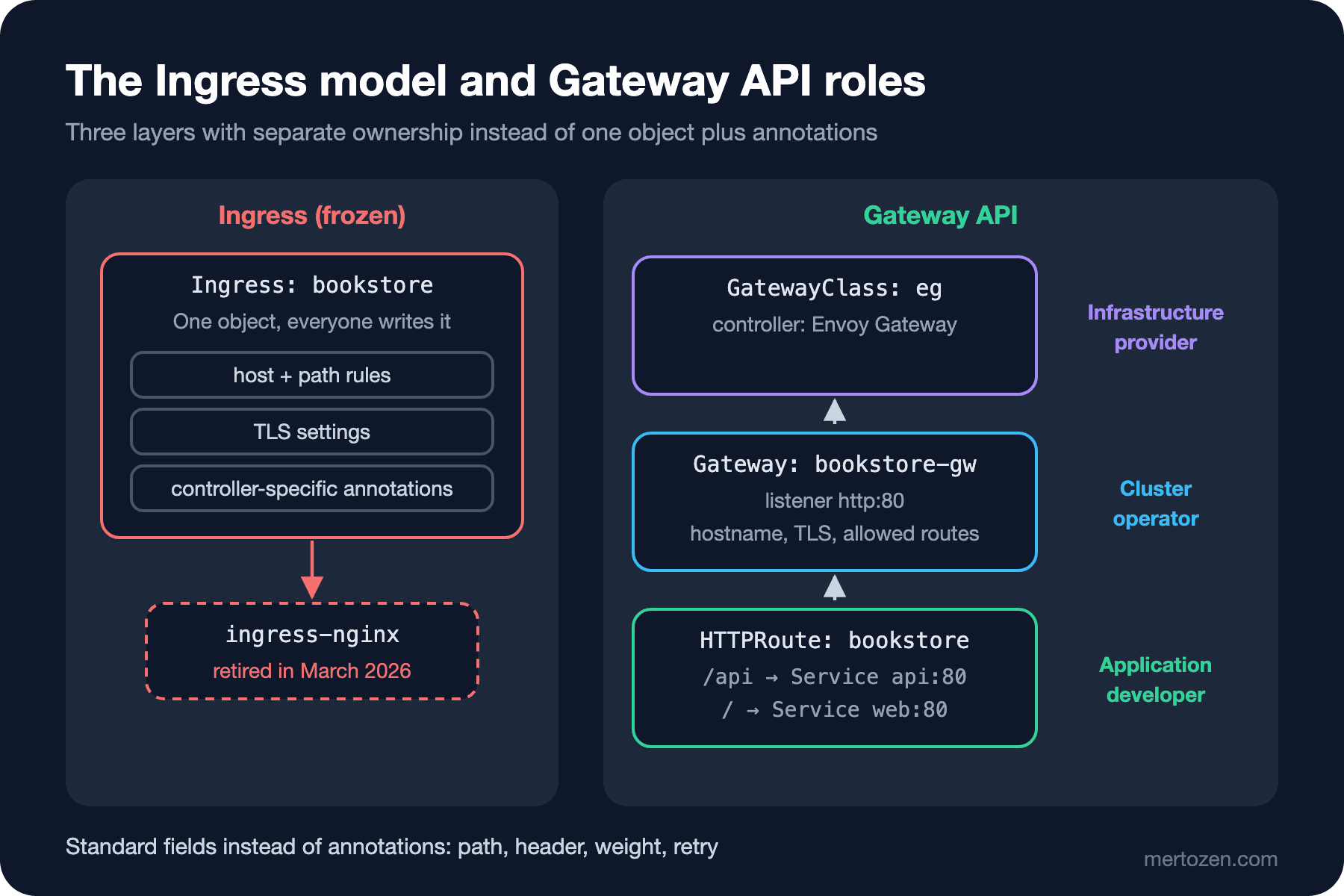
A GatewayClass is the "type of gateway" defined by the infrastructure provider: it says which controller (Envoy Gateway, NGINX Gateway Fabric, Istio, a cloud load balancer) manages these gateways. A Gateway is the concrete entry point opened by the cluster operator: which port, which protocol, which hostname, which certificate, from which namespaces routes are accepted. An HTTPRoute is the application team's job: which path and header go to which Service. The Bookstore team writes its own HTTPRoute but can't touch the Gateway's TLS settings or another team's route; RBAC (Role-Based Access Control) can draw these boundaries by resource type.
Installing Envoy Gateway on kind
The Gateway API has several implementations; in this series we use Envoy Gateway (the same manifests work with NGINX Gateway Fabric or Traefik; only the GatewayClass changes). Installation is with Helm (outside this series; covered in detail in the Helm series):
helm install eg oci://docker.io/envoyproxy/gateway-helm --version v1.10.0 \
  -n envoy-gateway-system --create-namespace
kubectl wait --timeout=5m -n envoy-gateway-system deployment/envoy-gateway --for=condition=Available
The chart installs the Gateway API CRDs along with it. Let's check which version:
$ kubectl get crd gateways.gateway.networking.k8s.io -o jsonpath='{.metadata.annotations.gateway\.networking\.k8s\.io/bundle-version} {.metadata.annotations.gateway\.networking\.k8s\.io/channel}'
v1.6.1 experimental
Envoy Gateway 1.10 brings Gateway API 1.6.1 with the experimental channel; the Gateway API's own latest release is 1.7.0, out on 29 October 2026. Since CRDs exist once per cluster, if a cluster runs several implementations, decide up front who manages the CRD version. One more note: on my heavily loaded local cluster the chart's CRD installation hit an API server timeout; applying the CRD files one by one with kubectl apply --server-side and installing the chart with --skip-crds solved it.
Since kind has no LoadBalancer IPs, we switch Envoy's Service to NodePort. That's done with the Envoy Gateway-specific EnvoyProxy resource, which the GatewayClass links to through parametersRef. We define the Gateway in the same file:
apiVersion: gateway.envoyproxy.io/v1alpha1
kind: EnvoyProxy
metadata:
  name: kind-nodeport
  namespace: envoy-gateway-system
spec:
  provider:
    type: Kubernetes
    kubernetes:
      envoyService:
        type: NodePort
        externalTrafficPolicy: Cluster
        patch:
          type: StrategicMerge
          value:
            spec:
              ports:
                - port: 80
                  nodePort: 30080
---
apiVersion: gateway.networking.k8s.io/v1
kind: GatewayClass
metadata:
  name: eg
spec:
  controllerName: gateway.envoyproxy.io/gatewayclass-controller
  parametersRef:
    group: gateway.envoyproxy.io
    kind: EnvoyProxy
    name: kind-nodeport
    namespace: envoy-gateway-system
---
apiVersion: gateway.networking.k8s.io/v1
kind: Gateway
metadata:
  name: bookstore-gw
  namespace: bookstore
spec:
  gatewayClassName: eg
  listeners:
    - name: http
      protocol: HTTP
      port: 80
      hostname: "bookstore.localtest.me"
      allowedRoutes:
        namespaces:
          from: Same
We chose port 30080 because of the kind config from post 2: the control plane container's 30080 is bound to the machine's 18780. bookstore.localtest.me is a name that resolves to 127.0.0.1 in public DNS (Domain Name System); it lets us try host-based routing without touching /etc/hosts. allowedRoutes.namespaces.from: Same says only routes in the bookstore namespace can attach to this Gateway.
An HTTPRoute for /api → .NET, / → Angular
The Angular side is a separate Deployment: the bookstore-web:1.0.0 image serves the Angular 22 build output with a non-root nginx (port 8080), fronted by a ClusterIP Service called web. Its runtime configuration (config.json) is mounted from a ConfigMap; we'll unpack that in post 7. The route:
apiVersion: gateway.networking.k8s.io/v1
kind: HTTPRoute
metadata:
  name: bookstore
  namespace: bookstore
spec:
  parentRefs:
    - name: bookstore-gw
  hostnames:
    - "bookstore.localtest.me"
  rules:
    - matches:
        - path:
            type: PathPrefix
            value: /api
      backendRefs:
        - name: api
          port: 80
    - matches:
        - path:
            type: PathPrefix
            value: /
      backendRefs:
        - name: web
          port: 80
$ kubectl get gatewayclass
NAME CONTROLLER ACCEPTED AGE
eg gateway.envoyproxy.io/gatewayclass-controller True 21s
$ kubectl get gateway
NAME CLASS ADDRESS PROGRAMMED AGE
bookstore-gw eg 172.20.0.2 True 21s
$ kubectl get svc -n envoy-gateway-system
NAME TYPE CLUSTER-IP EXTERNAL-IP PORT(S) AGE
envoy-bookstore-bookstore-gw-ee7dcdcd NodePort 10.96.214.153 <none> 80:30080/TCP 21s
envoy-gateway ClusterIP 10.96.224.23 <none> 18000/TCP,18001/TCP,18002/TCP,19001/TCP,9443/TCP 42s
$ kubectl get httproute bookstore -o jsonpath='{range .status.parents[*].conditions[*]}{.type}={.status} ({.reason}){"\n"}{end}'
Accepted=True (Accepted)
ResolvedRefs=True (ResolvedRefs)When the Gateway was applied, the Envoy Gateway controller opened an Envoy Deployment and a NodePort Service dedicated to this Gateway in the envoy-gateway-system namespace. The HTTPRoute's status says two things: the Gateway accepted the route (Accepted) and the Services it references were found (ResolvedRefs). When a route doesn't work, this is the first place to look; for example, with the Gateway saying from: Same, a route attaching from another namespace shows Accepted=False here. Now let's send requests from the machine:
$ curl -s -i -H "Host: bookstore.localtest.me" localhost:18780/api/info
HTTP/1.1 200 OK
content-type: application/json; charset=utf-8
server: Kestrel

{"pod":"api-75dcdbd96-np2nj","version":"1.0.0","environment":"Production","storeName":"Bookstore","discountPercent":0,"database":"postgres"}
$ curl -s -H "Host: bookstore.localtest.me" localhost:18780/config/config.json
{
  "apiBaseUrl": "",
  "storeName": "Bookstore"
}
$ curl -s -H "Host: bookstore.localtest.me" localhost:18780/ | head -5
<!doctype html>
<html lang="en" data-beasties-container>
<head>
  <meta charset="utf-8">
  <title>BookstoreWeb</title>
$ curl -s -i -H "Host: other.localtest.me" localhost:18780/api/info
HTTP/1.1 404 Not Found
$ curl -s -o /dev/null -w "%{http_code} %{content_type}\n" http://bookstore.localtest.me:18780/apifoo
200 text/html
/api/info came from Kestrel, the root path from Angular's index.html; an unknown host got a 404. The answer to the first question is in the last line: /apifoo went to Angular. In the Gateway API, PathPrefix matches by path element, not character by character: the /api prefix matches /api and /api/books but not /apifoo. The request fell through to the next rule, /, and nginx's SPA (Single Page Application) fallback returned index.html. That's also why the Angular app's apiBaseUrl is empty: the browser reaches the API from the same origin via /api/..., and no CORS (Cross-Origin Resource Sharing) setup is needed.
TLS, cert-manager and Forwarded Headers
In production you add an HTTPS (Hypertext Transfer Protocol Secure) listener to the Gateway: protocol: HTTPS, port: 443 and a reference to a Secret through tls.certificateRefs. Instead of renewing certificates by hand, cert-manager is a common choice: once its Gateway API support is enabled, it issues the certificate from an annotation on the Gateway (for example cert-manager.io/cluster-issuer), writes it into a Secret and renews it before it expires. Certificates, ACME (Automatic Certificate Management Environment) and TLS details are the subject of the upcoming SSL (Secure Sockets Layer)/TLS series.
There's a detail on the .NET side you mustn't forget: when TLS terminates at the Gateway, the API receives the request as plain HTTP (Hypertext Transfer Protocol) and from Envoy's IP. The real client IP and scheme arrive in the X-Forwarded-For and X-Forwarded-Proto headers; for ASP.NET Core to trust them you need to configure the Forwarded Headers middleware and the trusted proxy networks. We'll cover that in detail in the Forwarded Headers post of the upcoming Web Servers and Hosting series; the Kubernetes-specific part is that the trusted network isn't a single IP but the pod CIDR (Classless Inter-Domain Routing).
Moving from Ingress to the Gateway API: ingress2gateway
Kubernetes SIG Network's ingress2gateway tool converts existing Ingresses into Gateway API resources. I gave it the Ingress file above:
$ ingress2gateway print --input-file ingress.yaml --providers ingress-nginx
WARN  Ingress NGINX serves TLS traffic for host "bookstore.localtest.me" with a self-signed certificate. This behavior will not be translated and the host will not be accessible via HTTPS.
WARN  Failed to apply bookstore.bookstore.metadata.annotations."nginx.ingress.kubernetes.io/proxy-body-size" from bookstore/bookstore: Most Gateway API implementations have reasonable body size and buffering defaults
WARN  Gateway API does not support configuring URL normalization (RFC 3986, Section 6). Please check if this matters for your use case and consult implementation-specific details.
apiVersion: gateway.networking.k8s.io/v1
kind: Gateway
metadata:
  annotations:
    gateway.networking.k8s.io/generator: ingress2gateway-1.2.0
  name: nginx
  namespace: bookstore
spec:
  gatewayClassName: nginx
  listeners:
  - hostname: bookstore.localtest.me
    name: bookstore-localtest-me-http
    port: 80
    protocol: HTTP
---
apiVersion: gateway.networking.k8s.io/v1
kind: HTTPRoute
metadata:
  annotations:
    gateway.networking.k8s.io/generator: ingress2gateway-1.2.0
  name: bookstore-bookstore-localtest-me
  namespace: bookstore
spec:
  hostnames:
  - bookstore.localtest.me
  parentRefs:
  - name: nginx
  rules:
  - backendRefs:
    - name: api
      port: 80
    matches:
    - path:
        type: PathPrefix
        value: /api
...
(I stripped the colour codes from the warnings, put each on one line and showed the body size warning, printed twice, only once.) The output is almost identical to the route we wrote by hand. The really valuable part is the warnings: they tell you, one by one, which annotations couldn't be translated and which implicit ingress-nginx behaviours (a self-signed certificate, URL (Uniform Resource Locator) normalization) will be lost. In a real migration use this list as a checklist: for each warning, find either a standard Gateway API equivalent or the implementation's policy resource (ClientTrafficPolicy, BackendTrafficPolicy in Envoy Gateway), or decide the behaviour isn't really needed. Options like --emitter envoy-gateway let the tool generate implementation-specific resources as well.
Production Notes
Think of the Gateway as shared infrastructure. Many teams' HTTPRoutes can attach to a single Gateway; restrict explicitly with allowedRoutes which namespaces can attach, and keep the Gateway in a namespace only the platform team can change.
The Gateway itself is an application too: the Envoy pods' replica count, resources, PodDisruptionBudget and upgrades are your responsibility. Running the component all external traffic flows through with a single replica makes ten API replicas pointless.
Run the migration in parallel. Without shutting down the old Ingress controller, open the Gateway on a separate IP, shift traffic gradually at the DNS level and compare metrics. Make reverting the DNS record your rollback path.
Common Pitfalls
CRD version mismatch. Gateway API CRDs exist once per cluster; if two implementations bring different versions, one can overwrite the other's CRDs. Mixing the experimental and standard channels also leads to surprise fields.
Not checking the route's status. Applying an HTTPRoute says "created", but the Gateway may not have accepted it. Check the Accepted and ResolvedRefs conditions.
Treating prefix matching like a string. As you saw above, the /api prefix doesn't catch /apifoo. pathType: Prefix in Ingress was element-based too; but regex behaviours that some controllers enable through annotations change during migration.
Carrying annotations over blindly. If an ingress-nginx-specific annotation has no equivalent in the Gateway world, maybe you don't need that behaviour at all; maybe you need a policy resource. Don't skip ingress2gateway's warnings.
A Small Experiment
★☆☆ Remove the /api rule from the HTTPRoute, reapply it and explain why the output of curl http://bookstore.localtest.me:18780/api/info is Angular's index.html.
★★☆ Run the same API in a second namespace called bookstore-staging and write an HTTPRoute there that attaches to bookstore-gw. Note what you see in the route's status; then widen the Gateway's allowedRoutes with a namespace selector and try again.
★★★ Use two backendRefs in the /api rule: weight: 90 for the api Service and weight: 10 for an api-canary Service running version 1.1.0. Send 100 requests and measure the split by the version field. Consider that this is the first step of a canary release, and how the upcoming Deployment Strategies series automates it with metrics.
Traffic now flows from outside to the right places. But the API's store name, discount rate and database password are still baked into the image or the manifest. In the next post we feed .NET configuration from Kubernetes with ConfigMaps and Secrets, and measure how and when changes reach the pod.