

API Integration in Flutter: http/dio, JSON Serialization, Repositories and Connecting to the ASP.NET Core Bookstore API
The solid way to connect a Flutter app to an ASP.NET Core API is to keep HTTP in one ApiClient (timeout, retry only for GET, a single refresh on 401), to turn JSON into the domain model in one place and to swap the repository without touching the ViewModel. With real responses from a SQLite copy of the Bookstore API, ProblemDetails mapping, and the 10.0.2.2, cleartext and CORS traps.
Version note: The examples in this post were run with Flutter 3.47.8 (Dart 3.13.7), http 1.6.0, material_ui 1.11.0, provider 6.1.5+1 and go_router 18.1.4; the API side with .NET 10 (SDK 10.0.402), Entity Framework Core SQLite 10.0.15 and ASP.NET Core Identity 10.0.15. The output comes from flutter test runs, from curl requests to the API and from opening the web build in Playwright's headless Chromium. The Android emulator, the iOS simulator and real devices were not run; those parts are described from the docs.
Guess First
The API of Bookstore, the online bookstore used as the shared example across this site's series, sends the price of Jane Eyre as 269.9 in JSON. In the app, money is an int of kurus (the Money type from the fourth post). If you write the conversion like this:
final kurus = (269.9 * 100).toInt();what is kurus? 26990? The answer shows why the single point where JSON enters the app has to be written carefully.
Running the Bookstore API Locally
Until now the catalog came from SampleCatalog and the orders from a fixed list. In this post we connect the app to Bookstore's ASP.NET Core API. The API itself is the subject of the ASP.NET Core Web API series; here we copied Bookstore.Api from the repo into an api/ folder and changed four things for the mobile app:
- SQLite instead of SQL Server, so that the API runs without a container. The SQL Server migrations cannot be used with SQLite, so in Development the schema and the seed data are created with
EnsureCreated. - Sign-in: ASP.NET Core Identity's ready-made endpoints under
/api/auththroughMapIdentityApi(/register,/login,/refresh). - Orders need a signed-in user: the
/api/ordersgroup is protected withRequireAuthorization(), and aGET /api/ordersthat returns the user's orders was added. - CORS only in Development and only for the configured origins. The mobile app does not need it; the web build does, as we will see below.
dotnet run --project api/Bookstore.Api -- --urls http://127.0.0.1:52813The default port in the launch profile is 5080; the output in this post comes from port 52813. With the API running, the real responses:
GET /api/books?page=1&pageSize=2
{"items":[{"isbn":"9780451524935","title":"1984","author":"George Orwell","category":"Dystopian","price":279.0,"publishedYear":1949},{"isbn":"9780143035008","title":"Anna Karenina","author":"Leo Tolstoy","category":"Classics","price":429.0,"publishedYear":1878}],"total":20,"page":1,"pageSize":2}
GET /api/books/0000000000000
HTTP/1.1 404 Not Found
Content-Type: application/problem+json
{"type":"https://tools.ietf.org/html/rfc9110#section-15.5.5","title":"Not Found","status":404,"traceId":"00-a8d2ff1b54e8aaf47695883a1cfb6aba-13f33ce1c1a1d652-00"}
POST /api/orders
HTTP/1.1 401 Unauthorized
WWW-Authenticate: Bearer
The last request was sent without a token. Error responses use the ProblemDetails format; the errors dictionary that we mapped to form fields in the tenth post is part of the same format.
http or dio? ApiClient: the Single HTTP Door
There are two common HTTP packages in Flutter. http is the Dart team's package: small, it works on every platform (on the web it uses the browser's fetch), and it comes with MockClient for tests. dio offers ready-made pieces such as an interceptor chain, a CancelToken to cancel requests, separate connect and receive timeouts and upload/download progress; it also has QueuedInterceptor, which queues 401s that arrive at the same time. The criterion is simple: if you need most of these features, dio; if not, http and a small wrapper of your own. For Bookstore we chose http, because the three things we need (timeout, retry, token) are a few dozen lines and all of them live in one testable class.
In the official architecture guide, a service is the stateless layer that wraps the outside world. ApiClient is the only class in the app that talks to the API: repositories get JSON from it, never see a Response, and every failure comes back as a Result:
Future<Result<Object?>> get(
  String path, {
  Map<String, String>? query,
  bool auth = false,
}) => _send('GET', path, query: query, auth: auth, retries: 2);

// POST and PUT are not retried: a second POST /api/orders is a second order
Future<Result<Object?>> post(
  String path,
  Object? body, {
  bool auth = false,
}) => _send('POST', path, body: body, auth: auth);
for (var attempt = 0; ; attempt++) {
try {
var response = await _request(method, uri, body, auth: auth);
if (response.statusCode == 401 && auth && await _refreshTokens()) {
response = await _request(method, uri, body, auth: auth);
}
// 5xx may be temporary; 4xx will not change by asking again
if (response.statusCode < 500 || attempt >= retries) {
return _decode(response);
}
} on TimeoutException {
if (attempt >= retries) {
return const Result.failure(NetworkException('timeout'));
}
} on http.ClientException catch (e) {
if (attempt >= retries) {
return Result.failure(NetworkException(e.message));
}
}
await Future<void>.delayed(retryDelay * (attempt + 1));
}A timeout is added to every request with .timeout(timeout) (10 seconds by default); package:http itself puts no time limit on a request. Retry happens only for GET and only on a 5xx, a timeout or a connection error. The output of the tests we wrote with MockClient:
GET: Ok<Object?> after 3 attempts
POST: HTTP 503 after 1 attempt
Could not reach the server (timeout)
From JSON to the Domain Model
The answer to "Guess First", from a test:
269.9 * 100 = 26989.999999999996
(269.9 * 100).toInt() = 26989
moneyFromJson(269.9) = 26990 kurus
C#'s decimal is written to JSON as a number, jsonDecode turns it into a double, and 269.9 cannot be represented exactly in binary. When toInt() drops the fraction, one kurus is lost. That is why moneyFromJson is the only place where a double touches money; the value is converted to kurus there, once, with round(). The book conversion lives in the same file and uses Dart 3's map patterns:
Money moneyFromJson(num value) => Money((value * 100).round());

Book bookFromJson(Object? json) => switch (json) {
  final Map<String, Object?> map &&
      {
        'isbn': String isbn,
        'title': String title,
        'author': String author,
        'price': num price,
        'publishedYear': int year,
      } =>
    Book(
      isbn: isbn,
      title: title,
      author: Author(name: author),
      price: moneyFromJson(price),
      publishedYear: year,
      // Only the details endpoint sends a description
      description: map['description'] as String?,
    ),
  _ => throw FormatException('Not a book: $json'),
};
The pattern checks both that the fields exist and their types in one step; unexpected JSON becomes a FormatException, and the repository turns that into a Failure. We used num, not double, for price: the API on SQLite sends 279.0, but on another database the same price could arrive as 279, and a double pattern does not match an int.
The alternative is code generation. We generated the same model with json_serializable 6.15.2 in a separate trial package: once you write @JsonSerializable() and the part line, dart run build_runner build generates fromJson/toJson; the first run took "Built with build_runner/aot in 11s", the run after a change took 0 seconds. freezed (4.0.3) adds immutable models, copyWith, value equality and union types on top of that; we did not run it. The criterion: for an API with dozens of DTOs, generated code shrinks the room for mistakes; for Bookstore's three JSON shapes, hand-written conversions with patterns are shorter and need no build step.
Swapping the Repository Without Touching the ViewModel
This is where keeping BookRepository abstract in the eleventh post pays off. ApiBookRepository implements the same two methods with the API:
@override
Future<Result<List<Book>>> getPage(int page) async {
  // The app counts pages from 0, the API from 1
  final result = await _api.get(
    '/api/books',
    query: {'page': '${page + 1}', 'pageSize': '$pageSize'},
  );
  return switch (result) {
    Ok(value: {'items': List<Object?> items}) => parseJson(
      () => [for (final item in items) bookFromJson(item)],
    ),
    Ok(:final value) => Result.failure(FormatException('Not a page: $value')),
    Failure(:final error) => Result.failure(error),
  };
}

@override
Future<Result<Book>> getByIsbn(String isbn) async {
  return switch (await _api.get('/api/books/$isbn')) {
    Ok(:final value) => parseJson(() => bookFromJson(value)),
    Failure(error: ApiException(statusCode: 404)) => Result.failure(
      BookNotFound(isbn),
    ),
    Failure(:final error) => Result.failure(error),
  };
}
A 404 becomes BookNotFound, which the app already knows; the details page shows its "This book could not be found." state unchanged. Not a single line changed in CatalogViewModel or BookDetailsViewModel. The only thing that changed is the object graph: main now provides the API repositories, while tests and widget previews keep the sample data:
/// What main() runs: every repository talks to Bookstore.Api.
List<SingleChildWidget> apiProviders(ApiClient api) => appProviders(
  bookRepository: ApiBookRepository(api),
  authRepository: ApiAuthRepository(api),
  orderRepository: ApiOrderRepository(api),
);
The orders screen got rid of its fixed list too: the new OrdersViewModel loads from OrderRepository, and since the repository notifies its listeners when a new order is placed, the list refreshes by itself.
Placing an Order and ProblemDetails
The API keeps the cart on the server; the app keeps its cart on the device. To place an order, ApiOrderRepository first creates a cart, adds the lines and then places the order. Each step depends on the previous one's answer, so these awaits are sequential. The requests sent in the test:
POST /api/carts
PUT /api/carts/01a1dde5-644f-7a17-8756-48f00ede6927/items/9780441172719 {"quantity":2}
POST /api/orders {"cartId":"01a1dde5-644f-7a17-8756-48f00ede6927","customerName":"Ada Lovelace","customerEmail":"ada@example.com"}
order 1, total 978.00 TRY
The server calculates the total with its own prices; the price in the app is only for display. The API's validation errors do not use the same names as the form fields. The real response to an order sent with a 201-character name:
HTTP/1.1 400 Bad Request
{"type":"https://tools.ietf.org/html/rfc9110#section-15.5.1","title":"One or more validation errors occurred.","status":400,"errors":{"CustomerName":["The field CustomerName must be a string with a maximum length of 200."]},"traceId":"00-33bb513dd8aa1f1840feac054853229b-b61b78e44a0c78f9-00"}
The form calls that field "Full name". We put the mapping in the data layer, in a single function, not in the screen:
/// The API calls the recipient CustomerName; the address form calls it
/// FullName. The renaming happens here, once, not in the screen.
Map<String, Object?> toFormProblem(Map<String, Object?> problem) => {
  ...problem,
  if (problem['errors'] case final Map<String, Object?> errors)
    'errors': {
      for (final MapEntry(:key, :value) in errors.entries)
        key == 'CustomerName' ? 'ShippingAddress.FullName' : key: value,
    },
};
400: {FullName: The field CustomerName must be a string with a maximum length of 200.}
Not enough stock for: 9780060934347.The second line is the 409 response for Don Quixote, whose stock is zero. That response has no errors, only a detail, and the form from the tenth post did not show it. We added a small branch to DeliveryAddressScreen that shows the detail above the form when a problem has no field errors, and verified it with a widget test.
Tokens and Refresh on 401
Sign-in is real now: ApiAuthRepository.signIn sends the email and password to POST /api/auth/login and writes the two tokens in the response to a TokenStore. The response from a run where we set the token lifetime to 1 minute (we shortened the tokens; expiresIn is in seconds):
{'tokenType': 'Bearer', 'accessToken': '<710 chars>', 'expiresIn': 60, 'refreshToken': '<710 chars>'}These tokens are not JWTs; they use ASP.NET Core's own protected format. For the client there is no difference: the access token goes in the Authorization: Bearer header, and when it expires a new one is obtained with the refresh token. Issuing JWTs is covered in the ASP.NET Core Web API series in "Authentication with JWT in ASP.NET Core Web API: Issuing and Validating Tokens", and the server side of refresh tokens in the Authentication and Authorization series in "Refresh Tokens: Rotation, Reuse Detection, Revocation and Secure Server-Side Storage".
Instead of adding the header to every request by hand, ApiClient adds it to requests with auth: true; if a 401 comes back, it tries one refresh and sends the same request again. This is the same job an interceptor does in dio and an HttpInterceptor does in Angular:
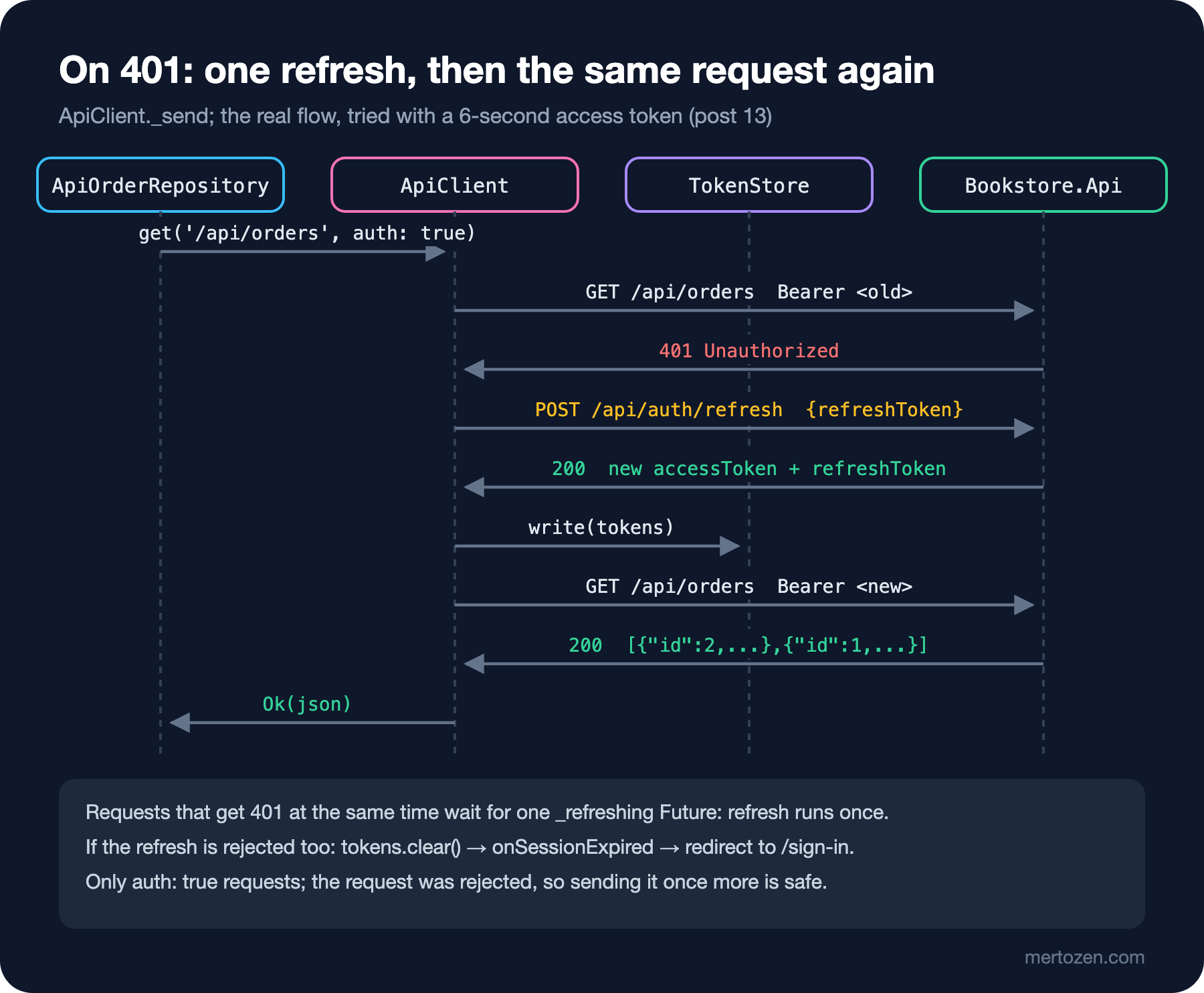
/// Several requests can get 401 at the same moment; they share one refresh.
Future<bool> _refreshTokens() =>
    _refreshing ??= _refresh().whenComplete(() => _refreshing = null);
Without this line, when the catalog and the orders get a 401 at the same time, two separate refreshes go out, and on a server that rotates tokens the second one is rejected. The real log of the test with two parallel requests:
GET /api/orders Bearer old-access
GET /api/orders Bearer old-access
POST /api/auth/refresh
GET /api/orders Bearer new-access
GET /api/orders Bearer new-access
results: Ok<Object?>, Ok<Object?>
If the refresh is rejected too, ApiClient deletes the tokens and calls onSessionExpired; ApiAuthRepository notifies, and the redirect from the twelfth post takes the user to the sign-in page. We also ran the same flow against the real API: we started the API with a 6-second access token lifetime (--Auth:AccessTokenMinutes=0.1), and the test in test/live signed in with the app's repositories, placed an order, waited 8 seconds and asked for the orders:
  GET /api/books -> 200
page 0: 20 books, first: 1984 279.00 TRY, Anna Karenina 429.00 TRY, Brave New World 299.00 TRY
  POST /api/auth/login -> 401
wrong password: The email or password is not correct.
  POST /api/auth/login -> 200
signed in: true
  GET /api/books/9780441172719 -> 200
  POST /api/carts -> 201
  PUT /api/carts/01a1dde6-0e91-7b85-a4a9-e325c5a78425/items/9780441172719 -> 200
  POST /api/orders -> 201
order 2: 489.00 TRY
waiting for the access token to expire...
  GET /api/orders -> 401
  POST /api/auth/refresh -> 200
  GET /api/orders -> 200
my orders: 2, 1
In this post the tokens are kept in memory (InMemoryTokenStore); when the app closes, the user has to sign in again. Storing them securely on the device is the subject of the next post.
Emulator, Simulator and Web: Local Development Traps
The API address is given at build time: String.fromEnvironment('API_BASE_URL'), with http://127.0.0.1:5080 as the default. The address depends on where the app runs:
- Android emulator: inside the emulator,
127.0.0.1is the emulator itself; the development machine is reached through10.0.2.2:flutter run --dart-define=API_BASE_URL=http://10.0.2.2:5080. - Plain HTTP on Android: for apps that target API 28 (Android 9), cleartext traffic is off by default. We allowed
10.0.2.2and127.0.0.1with anetwork_security_config.xmlfor debug builds only. Also, the template'sINTERNETpermission was only in the debug manifest; not so that release builds have no network, but because it is easy to forget. We added it to the main manifest. - The iOS simulator uses the development machine's network, so
127.0.0.1works. ATS blocks plain HTTP; for local development there is theNSAllowsLocalNetworkingkey in Info.plist. Apple's older documentation and developers' observations disagree on whether IP addresses are exempt from the rule, so we do not state anything definite without trying it on a device. - A real device: the development machine's address on the local network, and the API has to listen on that address, not only on loopback.
These steps need devices and emulators, so they were not run. The web brings a different trap. When we served the web build from http://127.0.0.1:52823 and opened it in Chromium while the API had no CORS settings:
#/catalog
  GET /api/books -> failed (net::ERR_FAILED)
  GET /api/books -> failed (net::ERR_FAILED)
  GET /api/books -> failed (net::ERR_FAILED)
  shows: could not, Try again
  console error: Access to fetch at 'http://127.0.0.1:52813/api/books?page=1&pageSize=20' from origin 'http://127.0.0.1:52823' has been blocked by CORS policy: No 'Access-Control-Allow-Origin' header is present on the requested resource.
Two things show up. First, even a different port makes a different origin, and the browser does not hand the response to the app. Second, the CORS error reaches Dart as an ordinary ClientException; retry took it for a temporary network error and tried the request three times. With the API started with --Cors:DevOrigins:0=http://127.0.0.1:52823:
#/catalog
  GET /api/books?page=1&pageSize=20 -> 200
  shows: 1984, Anna Karenina, Dune
#/catalog/books/9780441172719
  GET /api/books?page=1&pageSize=20 -> 200
  GET /api/books/9780441172719 -> 200
  shows: Dune, A desert planet
Production Notes
HTTPS is mandatory. The cleartext permissions we enabled for debug are only under src/debug; they must not reach the release build. The production API address is given at build time and is managed with flavors in the next post on publishing.
Measure the timeout. Ten seconds is a long wait even on a mobile network; users will not look at a loading indicator that long. But a timeout that is too short turns every request on a slow connection into an error. Decide from real user data (the distribution of request durations).
Limit retries and use them only for idempotent requests. Our GET makes at most three attempts and waits longer before each one; if the server is already struggling, thousands of devices retrying at the same time make things worse. If the network drops during the order POST, the order may already have been created; the right fix there is an idempotency key on the server and, in the app, refreshing the order list.
You cannot force users onto a new version. Old versions in the store keep calling the API for months; adding a field to the JSON is safe, removing or renaming one is not. That is why it helps that the pattern-based conversion ignores unknown fields.
Common Pitfalls
The first pitfall is calculating money with double or truncating it with toInt(). The one kurus from the start of this post becomes an accounting difference over thousands of orders.
The second pitfall is calling http.get inside a widget or a ViewModel. Error handling, headers and timeouts spread everywhere, and tests need a real server.
The third pitfall is relying on the real network in tests. HTTP requests inside testWidgets do not reach a real server (the statusCode: 400 that Image.network got in the eighth post); test the network layer with MockClient or a fake repository, and try the real API in a separate, tagged test (@Tags(['live'])).
The fourth pitfall is refreshing the token separately on every 401. Parallel requests invalidate each other's refresh tokens, and the user ends up signed out for no reason.
A Small Experiment
★☆☆ Add a parameter to ApiClient that adds an Accept-Language header to every request, and verify with MockClient that the header is sent.
★★☆ Add search to the catalog screen: carry the API's search query parameter into BookRepository and call it from CatalogViewModel with a 300 ms debounce. How many books does the API return for "austen"?
★★★ What happens if the connection drops during the order POST before the response arrives? Add a check to the API that reads an Idempotency-Key header and returns the first order for a second request with the same key, generate the key once per cart in the app, and show with a test that two POSTs create a single order.
In the next post we make the app persistent on the device: shared_preferences for settings, flutter_secure_storage for the token, SQLite and drift for the catalog cache, a catalog that works without the internet and a cart that is not lost when the app closes.