

What Is Flutter? One Codebase, Its Own Rendering Engine and Where It Stands Against .NET MAUI, React Native and Native
Flutter is a UI toolkit that draws every pixel with its own engine (Impeller) instead of using the platform's native controls, and builds Android and iOS apps from one Dart codebase. We walk through its layers, show with real measurements how Dart is JIT-compiled in development and AOT-compiled for release, compare it with .NET MAUI, React Native and native development, and explain when not to choose Flutter.
Version note: The examples in this post were run with Flutter 3.47.8 and Dart 3.13.7. The versions in the comparison come from official sources on the day of writing (15 November 2026): .NET MAUI 10/11 and React Native 0.88. Flutter 3.50 became stable on 11 November 2026; this series is written on the 3.47 line, and we collect the differences in the last post of the series.
Guess First
So far Bookstore, the online bookstore used as the shared example across this site's series, has been told through its ASP.NET Core API and its Angular client. In this series we build the store's customer mobile app: catalog, book details, cart, order history and sign-in. One Dart codebase will produce both the Android and the iOS app.
Two questions to start. First: is the "Add to cart" button you write in Flutter an android.widget.Button on Android and a UIButton on iOS? In other words, does Flutter use the platform's own controls like React Native and .NET MAUI do, or does it do something else?
Second: the small Dart program below computes a cart total. We will run the same file once with dart run and once after turning it into machine code with dart compile exe. In which case does the body of main() finish faster, and by how much? Guess both answers; we will see them with real output in the middle of the post.
What Does Flutter Do? A UI Toolkit That Draws Its Own Pixels
Flutter is Google's open-source UI toolkit. You write the app in Dart, and the same code compiles for Android, iOS, the web, Windows, macOS and Linux. At first glance that description resembles .NET MAUI and React Native, but the model behind it is different.
When you write a Button in .NET MAUI, Microsoft's cross-platform UI framework that succeeded Xamarin.Forms, the handler layer turns it into Android's button on Android, UIKit's on iOS and WinUI's on Windows. React Native likewise maps the components on the JavaScript side to the platform's native views. In both approaches the operating system draws the control on screen.
Flutter does not. Its own rendering engine draws every pixel on the screen: buttons, text, lists, shadows and animations. All it asks of the platform is a drawing surface, touch and keyboard events, and information about the app's lifecycle. That is why the answer to the first question is "no": a FilledButton in Flutter is neither Android's nor iOS's button; it is a shape Flutter draws according to the Material Design rules.
We will see this in a measurable form in the second post: when we open the web build of the Bookstore app in a headless browser, there is not a single HTML <button> element on the page; everything lives inside a canvas that Flutter draws. On mobile it is the same, only with the platform's graphics surface instead of a canvas.
This model has two direct consequences. The good side: the app looks the same pixel for pixel on every platform, control behaviour does not change with the operating system version, and you see the same list on Android 7 and on Android 16. The cost: if you want the platform's own look (the feel of an iOS settings screen, Android's system dialogs), you have to imitate it with Flutter widgets. The Cupertino widgets exist for that, but when the operating system brings a new visual language, it is up to the Flutter team to catch up.
Layers: Framework, Engine and Embedder
Flutter's architecture has three layers, and each layer depends on the one below it:
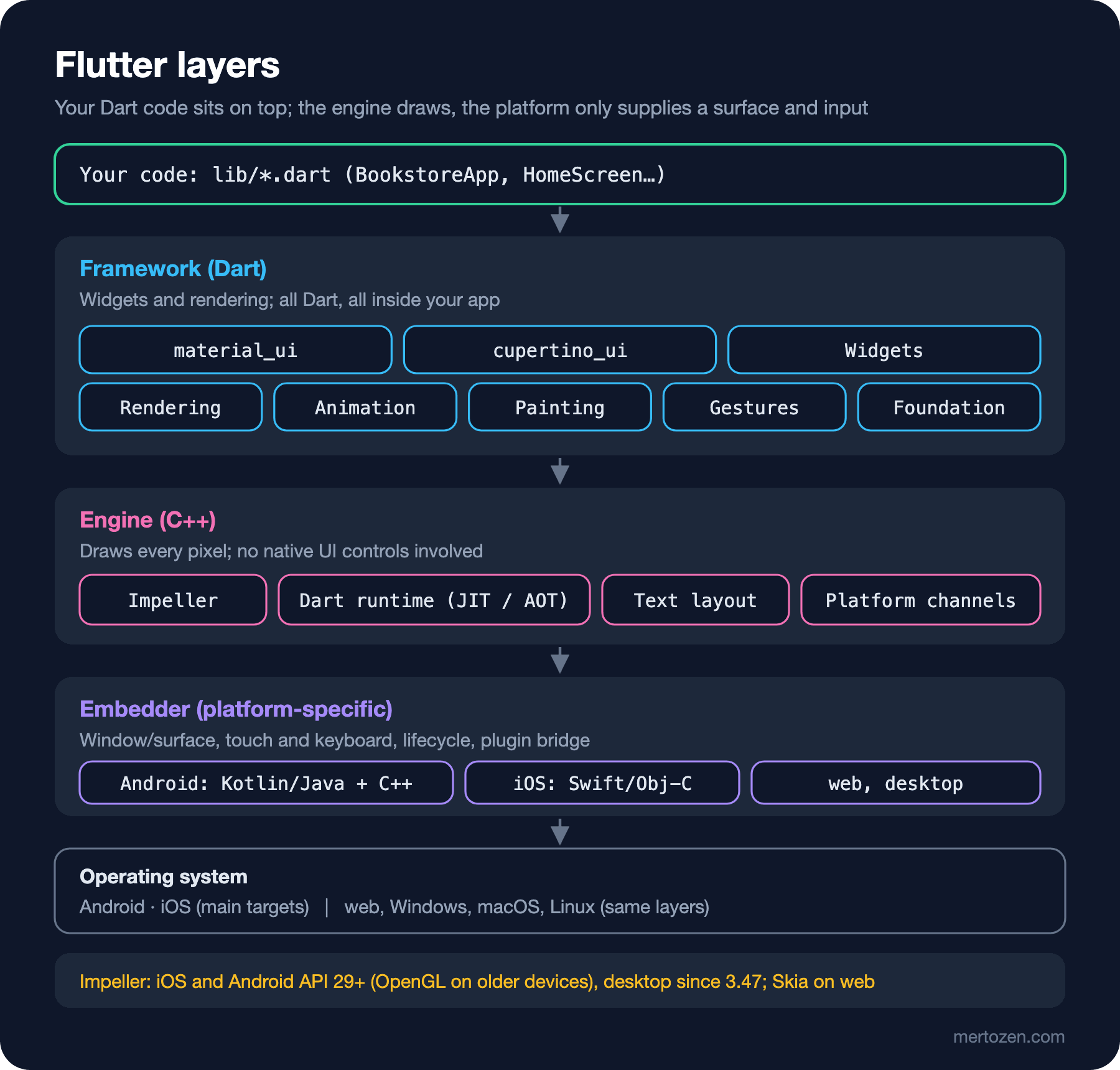
At the top sits the framework: a set of libraries written entirely in Dart. Foundation, Animation, Painting and Gestures provide the basic building blocks, Rendering provides the layout and painting model, and Widgets provides the composition model you use when writing an app. The Material and Cupertino design languages sit on top of these. With 3.47 the two moved out of the SDK and were published on pub.dev as the material_ui and cupertino_ui packages; in 3.50 the old libraries inside the SDK were formally deprecated. We use these packages from the start of the series.
Below the framework is the engine, written in C++. Impeller does the drawing; the Dart runtime, text layout and the platform channels that talk to native code live here too. Impeller is the only rendering engine on iOS; on Android it is the default on API 29 and above, and older devices without Vulkan support fall back to the legacy OpenGL-based renderer. Since 3.47 it is also the default on Windows, macOS and Linux. The web still uses Skia.
At the bottom is the embedder: a thin layer written separately for each platform that connects the app to the operating system. On Android it is Kotlin/Java and C++, on iOS Swift and Objective-C. It prepares the drawing surface, forwards touches to the engine and reports when the app goes to the background. When a Flutter app is uploaded to a store, the operating system sees an ordinary Android or iOS app that carries your compiled Dart code and the Flutter engine.
A rough analogy for someone coming from Angular: the framework layer corresponds to Angular itself, the engine to the browser's rendering engine, and the embedder to the part of the browser that talks to the operating system. The difference is that a browser draws the DOM, whereas Flutter sends its own render tree straight to the GPU without a DOM-like intermediate layer.
Why Dart? JIT for Development, AOT for Release
The most practical reason Flutter chose Dart is that the language supports two separate compilation modes. During development the code runs on the Dart VM with JIT compilation. That lets you inject changed code into the running app and update the screen in under a second; this is called hot reload. In a release build the code is compiled ahead of time straight to ARM or x64 machine code. No compiler runs when the app starts.
We can see the difference without setting up a Flutter app, using only the Dart SDK. The series repository keeps a small Dart package called dart_samples; its first file computes the cart total:
// Bookstore cart total: the same file runs on the JIT (dart run) and as AOT machine code (dart compile exe).
void main() {
  final watch = Stopwatch()..start();

  // Prices are in kurus (1 TRY = 100 kurus), so we never add doubles.
  final cart = [
    {'title': 'Dune', 'price': 48900, 'quantity': 1},
    {'title': 'Emma', 'price': 21500, 'quantity': 2},
    {'title': 'The Hobbit', 'price': 32000, 'quantity': 1},
  ];

  var total = 0;
  for (final line in cart) {
    total += (line['price'] as int) * (line['quantity'] as int);
  }

  final lira = total ~/ 100;
  final kurus = (total % 100).toString().padLeft(2, '0');
  print('Items: ${cart.length}, total: $lira.$kurus TRY');
  print('main() took ${watch.elapsedMicroseconds} us');
}
First on the JIT, twice:
dart run bin/cart_total.dartItems: 3, total: 1239.00 TRY
main() took 888 us
Items: 3, total: 1239.00 TRY
main() took 888 usNow let's compile the same file into a single executable and run it:
dart compile exe bin/cart_total.dart
bin/cart_total.exe
Generated: /home/user/src/bookstore-flutter/dart_samples/bin/cart_total.exe
Items: 3, total: 1239.00 TRY
main() took 51 us
Items: 3, total: 1239.00 TRY
main() took 43 usThe answer to the second question: the body of main() took 43–51 microseconds with AOT and about 890 microseconds on the JIT; in this small program most of the gap comes from the JIT compiling the code on its first run. When we time the whole process with time, the gap grows: dart run took 0.13–0.14 seconds in three runs, the compiled file 0.00 seconds, below the precision of the measurement. The compiled file is 5.7 MB; it contains a small AOT build of the Dart runtime and your code, and the machine does not need the Dart SDK installed. On Windows the same command produces bin\cart_total.exe.
Flutter uses the same split in its build modes. flutter run runs in debug mode by default: JIT, hot reload, asserts and the DevTools connection are on. flutter build apk or flutter build ipa produces AOT code in release mode. In between there is profile mode: the code is compiled AOT, but the tooling needed for performance measurements stays available. That is why it is normal for an app to feel slow in debug mode; never measure performance on a debug build.
Seen from C#, the picture is familiar: .NET also uses a JIT by default and can produce single-file machine code with Native AOT. The difference is that in Flutter development and release are split into these two modes from the start. Since iOS does not allow generating code at run time, AOT is mandatory in release anyway.
Comparison: Flutter, .NET MAUI, React Native and Native
Roughly, the options in front of a .NET team for mobile look like this:
| Topic | Flutter | .NET MAUI | React Native | Swift + Kotlin |
|---|---|---|---|---|
| Language | Dart | C#, XAML | TypeScript/JavaScript | Swift (iOS), Kotlin (Android) |
| Who draws the UI | The Flutter engine (Impeller) | The platform's native controls (handlers) | The platform's native views (Fabric renderer) | The platform itself |
| Number of codebases | 1 | 1 | 1 | 2 |
| Targets | Android, iOS, web, Windows, macOS, Linux | Android, iOS, macOS (Mac Catalyst), Windows | Android, iOS; others through community projects | Each its own platform |
| Development loop | Hot reload, state is kept | .NET hot reload and XAML hot reload | Fast Refresh | Xcode Previews, Compose Preview |
| Version on the day of writing | 3.47 (3.50 just released) | MAUI 10, MAUI 11 (with .NET 11) | 0.88 | Xcode 26/27, Android Studio |
The most attractive side of .NET MAUI for a C# team is obvious: the language, the IDE, NuGet, the test tools and very likely the domain models on the backend are the same. You can share view models, validation rules and even part of the business logic with the ASP.NET Core API. Because it uses native controls, the platform feel comes without extra work. In return, every platform's control differences reach you: a control may behave one way on Android and another on iOS, and fixing that can mean customising the handler per platform.
React Native is a natural choice if the team already knows React. Since 0.82 it runs only on the New Architecture (the old asynchronous bridge between JavaScript and the native side is gone), and since 0.84 Hermes V1 is the default JavaScript engine. Our reader knows Angular, so that advantage is limited; React knowledge is something to learn separately. The site has a React series, and the mental-model differences it covers apply here too.
Native (Swift + Kotlin) gives the most control and day-one access to the platform's new APIs; the cost is two codebases, two teams or a team that knows both languages. In this table Flutter is the answer to "is one more language worth learning?": for someone who knows C# and TypeScript, Dart becomes readable in a few days, and the UI behaving the same on every platform lowers testing and design costs.
When Not to Choose Flutter
It is not the right choice for every project. In three situations it makes sense to look elsewhere:
When the app must match the platform's look exactly. If, for example, a bank's iOS app wants to adopt the new visual language of iOS 26 on day one, it has to wait for Flutter's widgets to catch up. Native code, or a framework that uses native controls, is less work here.
When the weight of the app is in platform APIs rather than UI. In an app that talks to Bluetooth devices in the background, or offers system widgets, CarPlay or Android Auto screens, most of the code will be Kotlin and Swift anyway. Flutter's shared-UI advantage stays small while the cost of bridging with platform channels stays large.
When the team and the existing code point the other way. If the team owns a large Xamarin.Forms app, moving to MAUI is usually cheaper than rewriting from scratch in Flutter. Likewise, rewriting an existing React Native app only because "Flutter is faster" is not a good investment unless there is a measured problem.
Bookstore's customer app falls into none of these: most screens are lists, details, forms and a cart, with no heavy platform-specific feature. This kind of app is where Flutter is most useful.
Platforms: Android and iOS First, Where Do Web and Desktop Stand?
This series targets Android and iOS. As of Flutter 3.50, the lowest supported versions are API 24 (Android 7.0) on Android and 15 on iOS. Building and signing the iOS app requires a Mac and Xcode; a developer on Windows develops the Android side completely and needs a Mac, or a CI machine running macOS, for the iOS build. The setup details come in the next post.
Web support is stable. The default build produces JavaScript; the build that compiles to WebAssembly with the --wasm flag is also stable, and the Flutter team is moving towards making Wasm the default. But because Flutter web draws everything on a canvas, it is weak at what a classic website provides: search engine indexing, text selection and the browser's accessibility tree only come through extra layers. That is why Bookstore's web front end is written in Angular and covered in the Angular series; in this series we use the web build only for the quick check in the second post.
On the desktop, Windows, macOS and Linux are stable, and with 3.47 Impeller became the default on all three. There is a transition on the Mac side: Flutter is gradually ending support for Intel-based Macs; macOS 26 is the last release that supports Intel, and macOS 27 requires Apple Silicon. This affects the hardware plans of teams developing on a Mac; it does not affect people developing for Android on Windows.
The Series Plan and the Decisions We Made
The series has 17 posts. The first five cover setup and Dart; we assume you know C# and focus only on the differences. Then come widgets, layout, lists, theming and forms, followed by state management, navigation, connecting to the Bookstore API, local storage, testing and publishing to the stores. At the end of every post the code is kept in the series repository as a separate commit.
The decisions we made up front:
- The Flutter 3.47 line (the examples in this post ran on 3.47.8) and Dart 3.13. Flutter 3.50 became stable four days before this post; we collect its changes in the last post.
- The
material_uipackage instead ofpackage:flutter/material.dartfor Material widgets. Since the Material and Cupertino libraries inside the SDK are deprecated in 3.50, there is no point in starting a new project with the old import. - Flutter's official guide for architecture: MVVM in the UI layer (View + ViewModel), repositories and services in the data layer.
provider+ChangeNotifierfor state management; Riverpod and Bloc only in the comparison. go_routerfor navigation, and the Bookstore API written with ASP.NET Core for HTTP.
In Production
Because a Flutter app carries the engine and the AOT-compiled Dart code, it is larger than a native app that does the same job; even the small console program above came to 5.7 MB. The size the store downloads to the user shrinks for the device's architecture thanks to Android App Bundles and iOS App Thinning. If size is critical for you, take a release build and measure it in the first sprint (flutter build apk --analyze-size --target-platform android-arm64), then measure again whenever you add a large package.
Never measure performance in debug mode. A debug build runs on the JIT, has asserts on and is slow on purpose. Profile mode (flutter run --profile) exists for measuring on a real device, with AOT code and DevTools attached. Emulators and simulators are not reliable for performance either.
Common Pitfalls
The first pitfall is assuming Flutter means "native controls everywhere". A team that expects the system date picker to appear on iOS automatically gets a surprise: in Flutter showDatePicker is a Material-looking widget and CupertinoDatePicker is an iOS-looking one; you decide which one goes where.
The second pitfall is using Flutter web as a replacement for Angular. Getting a web version out of the mobile app's code is tempting, but for a content-heavy site that needs to be found by search engines, Flutter web is not the right tool. It suits internal tools, dashboards or a short-lived demo of the mobile app better.
The third pitfall is deciding based on the jank you see in debug mode. A good share of the teams that conclude "Flutter is slow" tried a debug build on an emulator. Do not talk about performance before running a release build on a real device.
A Small Experiment
★☆☆ Add a fourth book to cart_total.dart (Middlemarch, 275.00 TRY, quantity 1) and run the program both with dart run and as the compiled file. Note the total and the time in both modes.
★★☆ Write the same calculation in C#: a console app, decimal prices and a Stopwatch. Run it first with dotnet run, then with dotnet publish -p:PublishAot=true. Do the file size and the time resemble Dart's JIT/AOT difference?
★★★ Prepare a decision table for the four options in the table, with Bookstore's customer app in mind: the languages the team knows, the number of Macs needed for iOS builds, the share of common code and the platform changes you expect over two years. Under which conditions would you choose .NET MAUI?
In the next post we install the Flutter SDK: what you need on Windows for Android and on macOS for Android and iOS, reading the output of flutter doctor, creating the bookstore_app project, and seeing the difference between hot reload and hot restart with real output.