

State Management in Flutter: From setState to ChangeNotifier, DI with provider and the Official Architecture Guide
Flutter's official architecture guide recommends View, ViewModel, Repository and Service layers for app state, unidirectional data flow, and dependency injection with provider. We build Bookstore's cart with a ChangeNotifier-based CartViewModel, Commands and a sealed Result, show with real test output how Selector cuts an unneeded rebuild on a price change, and compare the approach with Riverpod, Bloc and signals.
Version note: The examples in this post were run with Flutter 3.47.8 (Dart 3.13.7), material_ui 1.11.0 and provider 6.1.5+1. All output comes from flutter test runs; running on an emulator or a device was not done for this post. The versions in the comparison are from pub.dev (2026-11-15): flutter_riverpod 3.5.0, flutter_bloc 9.1.1, signals_flutter 7.1.0; no code was run with these packages.
Guess First
The catalog screen of Bookstore, the online bookstore used as the shared example across this site's series, has a badge showing how many books are in the cart. The cart's state lives in CartViewModel; we wrote the badge in two ways. One listens to the whole ViewModel with context.watch<CartViewModel>(), the other selects only itemCount with provider's Selector:
Selector<CartViewModel, int>(
  selector: (_, cart) => cart.itemCount,
  builder: (context, count, _) {
    selectorBuilds++;
    return Text('selector: $count');
  },
)
The user adds Dune to the cart. Then the server lowers Dune's price and the cart is reloaded: the total changes, the number of books stays the same. Which badge is rebuilt on the price change: both, only one, or neither? The answer also shows why the structure we build in this post is split into layers.
Ephemeral State and App State
So far we kept state in widgets: the favorite button its own _isFavorite, the catalog screen its pages, HomeScreen the cart counter. The Flutter docs split state in two. Ephemeral state concerns no one outside a single widget: whether a tab is selected, how far an animation has progressed, whether the password is visible. StatefulWidget and setState are the right tools for it. App state is shared by several screens and must not be lost when a screen closes: the cart, the signed-in user, the catalog. The cart count appears on the catalog, the book details and the cart screen; if it stays in one widget's State, the other screens have to reach it through chains of callbacks.
The Official Architecture Guide: Layers and One-Way Flow
Flutter's architecture guide (docs.flutter.dev/app-architecture) proposes a structure for app state and labels each recommendation by strength. The "Strongly recommend" ones are: separating the UI and data layers, using repositories in the data layer, MVVM in the UI layer, unidirectional data flow, immutable models, dependency injection with provider, and fakes instead of mocks in tests. The Command pattern is "Recommend", and ChangeNotifier is "Conditional", meaning one of the options. Bookstore as of the end of post 11:
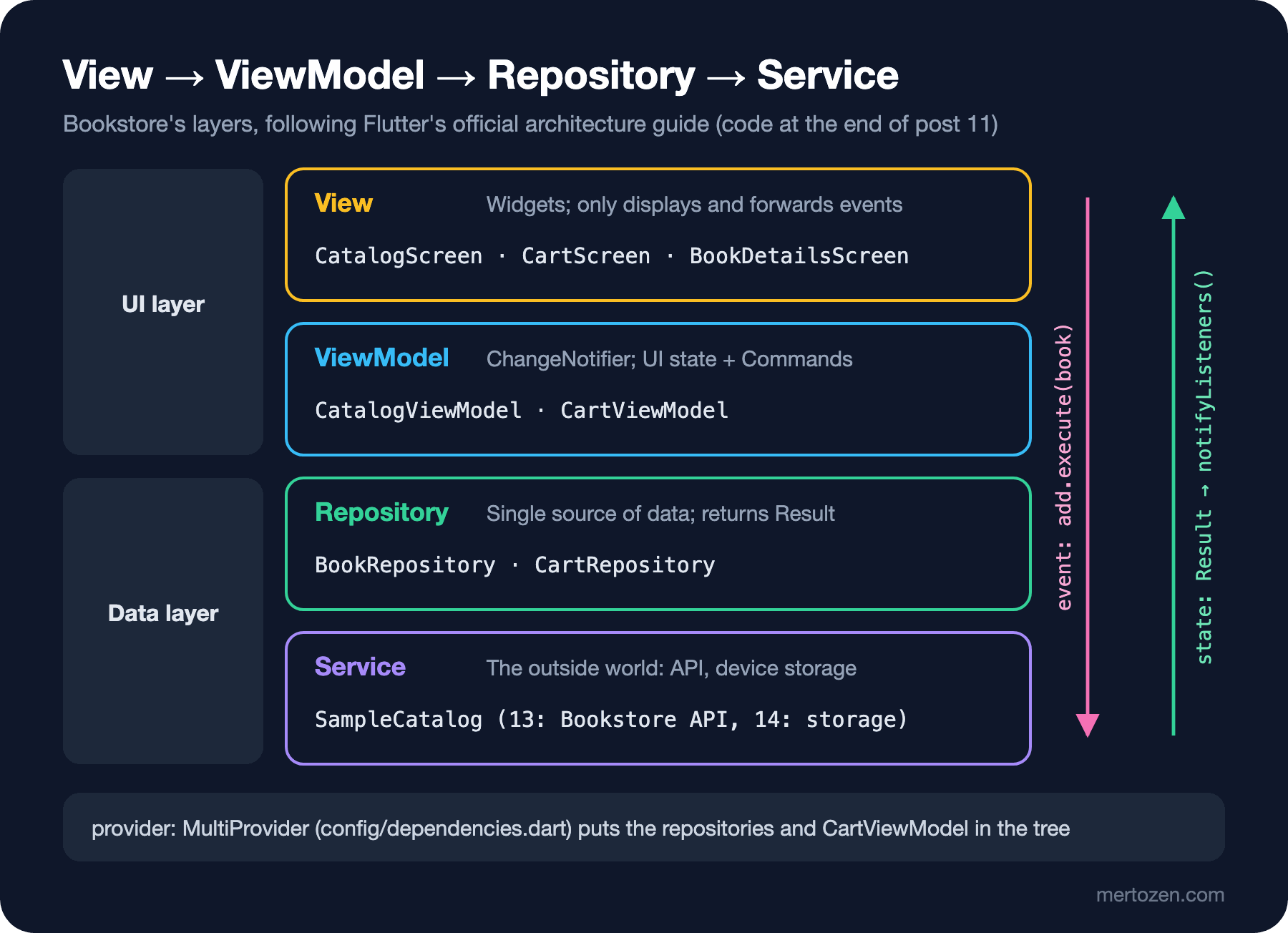
The View is a widget: it displays and passes what the user does to the ViewModel, with no business logic. The ViewModel holds the screen's state, exposes user events as Commands and notifies its listeners when it changes. The repository is the single source of data: caching, error handling and transformation happen there. The service is the thin layer that talks to the outside world: today the temporary SampleCatalog, the Bookstore API in the API integration post, device storage in the local storage post. Events flow down, state flows up; the ViewModel changes state only with the result that comes from the repository. This is the idea from the "MVVM and Presentation Model: Data Binding, Commands and the ViewModel" and "Flux and Unidirectional Data Flow: Why Didn't Two-Way Binding Scale?" posts of the UI Architecture Patterns series; here we build its Flutter counterpart.
Result and Command
Repositories return a Result instead of throwing exceptions. It is the same kind of sealed class as in the fourth post:
/// The outcome of an operation that can fail, returned instead of throwing.
/// Named Ok/Failure so that it does not hide dart:core's Error.
sealed class Result<T> {
  const Result();

  const factory Result.ok(T value) = Ok<T>;
  const factory Result.failure(Object error) = Failure<T>;
}

final class Ok<T> extends Result<T> {
  const Ok(this.value);
  final T value;
}

final class Failure<T> extends Result<T> {
  const Failure(this.error);
  final Object error;
}
The official guide's sample app names the subtypes Ok and Error; we called the second one Failure, because the name Error hides the dart:core class and gets confusing when on Error catch is written in the same file. Because it is sealed, a switch that does not handle both cases does not compile; it is the Dart counterpart of what the union types coming in C# 15 do.
A command wraps a single user action of a ViewModel: is it running, and how did it end. Our own version:
/// Wraps one user action of a ViewModel: whether it is running and how it
/// ended. The View listens to the command, not to the whole ViewModel.
abstract class Command<T> extends ChangeNotifier {
  bool _running = false;
  Result<T>? _result;

  bool get running => _running;
  Result<T>? get result => _result;
  bool get completed => _result is Ok<T>;
  bool get failed => _result is Failure<T>;

  /// Call after the View has shown the error, so it is not shown twice.
  void clearResult() {
    _result = null;
    notifyListeners();
  }

  Future<void> _run(Future<Result<T>> Function() action) async {
    if (_running) return; // a second tap while running is ignored
    _running = true;
    _result = null;
    notifyListeners();
    try {
      _result = await action();
    } finally {
      _running = false;
      notifyListeners();
    }
  }
}
Command0 for actions without parameters and Command1<T, A> for actions with one parameter extend this class. The _isLoading flag and the "no double requests" check from the eighth post are no longer written separately for each action; they live inside the command. We listened to the lifecycle of the add-to-cart command:
running=true completed=false failed=false
running=false completed=true failed=false
ViewModel and Repository: the Cart
CartViewModel holds the cart lines and exposes three commands:
class CartViewModel extends ChangeNotifier {
  CartViewModel({required CartRepository cartRepository})
    : _repository = cartRepository {
    load = Command0(_load);
    add = Command1(_add);
    setQuantity = Command1(_setQuantity);
    // The constructor cannot await; the command reports the outcome itself
    unawaited(load.execute());
  }

  final CartRepository _repository;
  List<CartLine> _lines = const [];

  late final Command0<void> load;
  late final Command1<void, Book> add;
  late final Command1<void, CartLine> setQuantity;

  List<CartLine> get lines => _lines;
  int get itemCount => summarizeCart(_lines).itemCount;
  Money get total => summarizeCart(_lines).total;

  int quantityOf(Book book) =>
      _lines.where((line) => line.book == book).firstOrNull?.quantity ?? 0;

  Future<Result<void>> _load() => _apply(_repository.getLines());

  Future<Result<void>> _add(Book book) =>
      _apply(_repository.setQuantity(book, quantityOf(book) + 1));

  Future<Result<void>> _setQuantity(CartLine line) =>
      _apply(_repository.setQuantity(line.book, line.quantity));

  /// The only place the state changes: one direction, repository -> state -> View.
  Future<Result<void>> _apply(Future<Result<List<CartLine>>> change) async {
    switch (await change) {
      case Ok(:final value):
        _lines = List.unmodifiable(value);
        notifyListeners();
        return const Result.ok(null);
      case Failure(:final error):
        return Result.failure(error);
    }
  }
}
The lines are the CartLine record from the third post, and the total is the summarizeCart from there; the ViewModel does not do the math, it uses existing domain code. The list given out is List.unmodifiable; the View cannot change it and sends change requests through commands. The unawaited in the constructor was demanded by the discarded_futures lint we turned on in the fifth post: our first version said load.execute(), and flutter analyze flagged it as "'Future'-returning calls in a non-'async' function". In a unit test we added the same book twice:
lines 1, quantity 2, items 2, total 978.00 TRY, ViewModel notifications 3Three notifications: the first load and two adds. On the repository side, CartRepository is an abstract class; for now there is InMemoryCartRepository, which keeps it in memory, and the local storage post will bring an implementation that stores it on the device without touching the ViewModel. The repository also enforces the rule: at most 10 copies of a book per order. The eleventh add:
failed=true, error: At most 10 copies of a book per order, quantity 10The error did not fly out as an exception; it reached the command as a Failure, and the state did not change. The catalog screen listens to the add command, shows a SnackBar when it is failed, and calls clearResult(). The page loading logic from the eighth post moved into CatalogViewModel the same way: loadMore and refresh are two commands, and the screen just calls them.
The View: ListenableBuilder
The View takes the ViewModel through its constructor and listens to it with ListenableBuilder. The skeleton of the cart screen:
class CartScreen extends StatelessWidget {
  const CartScreen({super.key, required this.viewModel, this.onCheckout});

  final CartViewModel viewModel;
  final VoidCallback? onCheckout;

  @override
  Widget build(BuildContext context) {
    return Scaffold(
      appBar: AppBar(title: const Text('Cart')),
      body: ListenableBuilder(
        listenable: viewModel,
        builder: (context, _) {
          if (viewModel.lines.isEmpty) {
            return const EmptyView(
              message: 'Your cart is empty.',
              icon: Icons.shopping_cart_outlined,
            );
          }
When the given Listenable notifies, ListenableBuilder reruns only its own builder; Scaffold and AppBar are not rebuilt. CartScreen is now a StatelessWidget: the screen's state lives in the ViewModel. The catalog screen listens to two things at once: Listenable.merge([viewModel, viewModel.loadMore]), the book list and the loading state. It is an idea similar to Angular's signals: when a value changes, the part that depends on it is updated, but Flutter does not track the dependency for you; you say which Listenable to listen to.
Dependency Injection with provider
ViewModels take their repositories through the constructor; who creates the repositories and hands them out? The provider package puts objects into the widget tree and lets every widget in the subtree find them. In the sixth post we said Theme.of(context) searches up the tree; provider is built on the same mechanism. Bookstore's object graph lives in one file:
/// The app's object graph. Tests pass their own repositories.
List<SingleChildWidget> appProviders({
  BookRepository? bookRepository,
  CartRepository? cartRepository,
}) => [
  Provider<BookRepository>(
    create: (_) => bookRepository ?? SampleBookRepository(SampleCatalog()),
  ),
  Provider<CartRepository>(
    create: (_) => cartRepository ?? InMemoryCartRepository(),
  ),
  ChangeNotifierProvider(
    create: (context) => CartViewModel(cartRepository: context.read()),
  ),
];
In main.dart the app starts with MultiProvider(providers: appProviders(), child: const BookstoreApp()). If you have read the "Angular Services and Dependency Injection: providedIn, the Injector Tree and Providers" post of the Angular series, the mapping is easy: Provider is a provider definition, context.read<T>() is an inject(T), and the position in the tree is the injector hierarchy. The differences: provider checks types at run time rather than at compile time (ask for a type that is not in the tree and you get ProviderNotFoundException), and the position in the tree decides the lifetime. CartViewModel sits at the top because the cart belongs to the whole app; CatalogViewModel lives in the catalog screen's State, created in initState and closed in dispose.
There are three ways to read. context.read<T>() gets the object once without listening; it is used in callbacks and in initState. context.watch<T>() listens to the object and rebuilds the widget on every notification. Selector picks a part of the object and rebuilds only when that part changes. The output of the test from "Guess First":
after add: watch 2 builds, Selector 2 builds
after price change: watch 3 builds, Selector 2 builds, total 399.00 TRY
On the price change the ViewModel notified, and the badge that uses watch was rebuilt; Selector saw that itemCount was still 1 and did not rebuild. That is why the badge in the catalog screen's app bar is written with Selector. The price change in the test comes from a fake repository derived from the real one; the official guide's "fakes instead of mocks" advice is covered in detail in the testing post.
Alternatives: Riverpod, Bloc and signals
There is no single right answer for state management in Flutter; the official guide also presents provider and ChangeNotifier as one option. Three alternatives you will often come across:
| Approach | Model | Strength | Cost |
|---|---|---|---|
provider + ChangeNotifier | Objects in the tree, manual notifyListeners | Few concepts, the official guide's examples | A missing type is caught at run time; easy to forget a notification |
| Riverpod 3 | Globally defined providers, ref.watch | A missing dependency is caught at compile time, independent of the widget tree, auto-dispose | New concepts (ref, family, notifier); optional code generation adds a build step |
| Bloc 9 | An event comes in, a new state goes out (streams) | Strict, predictable flow, consistency in large teams | Event and state classes for every action; more code |
| signals | Signal, computed, effect | Dependencies are tracked automatically; very close to Angular signals | Less common in the Flutter ecosystem |
Selection criteria: the size and experience of the team (Bloc's strictness pays off in a large team), the testing strategy (all are testable, but Riverpod and Bloc have their own test tools), and what the people who will read the code over the app's lifetime know. In this series we continue with provider and ChangeNotifier: it matches the official guide one to one, adds few concepts, and because the ViewModels stay plain Dart classes, the Views and repositories do not change if we ever need to move to another solution.
In Production
Dispose the ViewModel. provider disposes a ViewModel created with ChangeNotifierProvider(create: ...) itself; a ViewModel you create by hand in a State must be closed by you, or its listeners and pending requests outlive the screen. ChangeNotifierProvider.value does not dispose the given object; whoever created the object closes it.
Measure notifications. With the DevTools rebuild counter from the sixth post, look at which widget is built how often on a screen; if every small change in a ViewModel rebuilds the whole screen, use Selector or a smaller ListenableBuilder.
Keep BuildContext out of the ViewModel. UI work such as navigation and SnackBar stays in the View; the ViewModel only produces state and command results. That way ViewModels are tested with fast unit tests, without widgets.
Common Pitfalls
The first pitfall is changing state without calling notifyListeners(). The value changes, the screen does not. Routing every change through a single method such as _apply prevents this.
The second pitfall is reading a value with context.read inside build. The value is read, but because the widget is not listening it is not updated on later changes, and no warning appears either. The opposite, reading while listening inside a button callback, is caught by provider with an assertion in debug mode. The rule: watch or Selector in build, read in callbacks.
The third pitfall is creating the ViewModel inside build. That means a new ViewModel and a new request on every rebuild. A ViewModel is created once: either in the State's initState or in the route's builder (next post).
The fourth pitfall is handing out a mutable list. If the View can write viewModel.lines.add(...), one-way flow is over; give out a read-only view with List.unmodifiable or UnmodifiableListView.
A Small Experiment
★☆☆ Replace the Selector on the catalog screen with context.watch<CartViewModel>().itemCount and measure, with DevTools or a counter, how many times the app bar is built on a price change.
★★☆ Add a Command0 called clear to CartViewModel; put an "Empty the cart" button on the cart screen and disable it while the command runs. Verify the command's running value in a widget test.
★★★ Move the themeMode from the ninth post into a SettingsViewModel: the light/dark/system choice should change through a Command1<void, ThemeMode>, and MaterialApp should read only themeMode with Selector.
In the next post we bring order to moving between screens: push/pop and returning results with Navigator, declarative routing with go_router, StatefulShellRoute for the bottom navigation, deep links, and sending users who are not signed in to the sign-in screen with redirect.