

Error Pages in MVC and Razor Pages: UseExceptionHandler, Status Code Pages, Custom 404/500 Views and Error Ids

For pages, use UseExceptionHandler and UseStatusCodePagesWithReExecute: the status code is kept and the address doesn't change, while WithRedirects produces a soft 404 with a 302 and a 200. In Bookstore.Web we show a 404 with suggestions, a 503 page with a trace id, ProblemDetails for /api, IExceptionHandler for domain exceptions and the pitfalls where the error page itself breaks, with real output.
Version note: The code in this post was built and run with .NET 10 (SDK 10.0.404, runtime 10.0.15). I also ran the same app on .NET 11 (SDK 11.0.100) targeting net11.0; every scenario in this post returned the same status codes.
Guess First
Bookstore.Web is the MVC side of Bookstore, the online bookstore used as the shared example across this site's series, and it is running in production. The catalog database suddenly stops answering. The UseExceptionHandler call from the template is in place, and the error view uses _Layout.cshtml like every other page. The category menu in the layout is a view component that loads categories from the database. What does the user see when they open /books/1/dune: the carefully designed "Something went wrong" page, or something else?
Second question: you use UseStatusCodePagesWithRedirects("/error/{0}") for missing pages, and your 404 page looks great. When Googlebot requests /kitaplar/the-hobbit, which status code does it see?
One Screen in Development, Another in Production
In an app built with WebApplication.CreateBuilder, the developer exception page is on by default in the Development environment. When a controller throws, the browser shows a page with the stack trace, request headers and route values. With a setting that simulates a catalog outage (Catalog__SimulateOutage=true), I sent a request in Development:
HTTP/1.1 500 Internal Server Error
Content-Type: text/html; charset=utf-8

<title>Internal Server Error</title>
<h1>An unhandled exception occurred while processing the request.</h1>
...
TimeoutException: Catalog store did not answer within 5 seconds.
The code lives in the src/Bookstore.Web project of the Bookstore repo. In Development, dotnet run --project src/Bookstore.Web is enough; to see the production behavior I pass the environment and the outage switch on the command line:
dotnet run --project src/Bookstore.Web -- --environment Production --Catalog:SimulateOutage=trueThe developer exception page is for developers. In production, exception messages, file paths and source lines must not reach the user. That's the job of UseExceptionHandler: it logs the exception, clears the response and runs the request again through the pipeline at the path you give it. That's why the template has the if (!app.Environment.IsDevelopment()) check, and Bookstore.Web keeps it. The consequence: you don't see the custom 500 page in Development; use the command above to try it.
The 500 Page: UseExceptionHandler, StatusCodeSelector and an Error Code
This is the branch of the pipeline that serves pages:
static int StatusFor(Exception exception) => exception switch
{
    DomainException domain => domain.StatusCode,
    TimeoutException => StatusCodes.Status503ServiceUnavailable,
    _ => StatusCodes.Status500InternalServerError
};

app.UseWhen(context => !IsApi(context), web =>
{
    // In Development the developer exception page runs instead
    if (!app.Environment.IsDevelopment())
    {
        web.UseExceptionHandler(new ExceptionHandlerOptions
        {
            ExceptionHandlingPath = "/error",
            StatusCodeSelector = StatusFor
        });
    }
    web.UseStatusCodePagesWithReExecute("/error/{0}");
});
StatusCodeSelector arrived in .NET 9. Before that, the exception handler always returned 500, and changing the status meant setting Response.StatusCode by hand in the error action. Here a database timeout becomes a 503. The distinction matters: 503 says "I can't serve you right now". Load balancers and search engines treat it differently from a permanent failure.
The error action:
[AllowAnonymous]
[Route("error")]
[ResponseCache(Duration = 0, Location = ResponseCacheLocation.None, NoStore = true)]
public sealed class ErrorController(IBookCatalog catalog, ILogger<ErrorController> logger) : Controller
{
    // No [HttpGet]: an exception thrown during a POST is re-executed as a POST
    [Route("")]
    public IActionResult ServerError()
    {
        IExceptionHandlerFeature? feature = HttpContext.Features.Get<IExceptionHandlerFeature>();
        if (feature is null)
        {
            return NotFound(); // someone typed /error into the address bar
        }

        string errorCode = Activity.Current?.TraceId.ToString() ?? HttpContext.TraceIdentifier;
        string? userMessage = (feature.Error as DomainException)?.UserMessage;
        return View(new ServerErrorViewModel(Response.StatusCode, errorCode, userMessage));
    }
}
The real production response during the outage:
HTTP/1.1 503 Service Unavailable
Content-Type: text/html; charset=utf-8
Cache-Control: no-cache,no-store
Expires: -1
Pragma: no-cache
<main><h1>We'll be right back</h1>
<p>Our team has been notified. Please try again in a few minutes.</p>
<p>Error code: <code>bfae8147ccfd821a59dc1659636dd98d</code></p>
</main>The error code on the page is the request's trace id: the 32-character hex value carried by the trace context standard. Because IncludeScopes is on for the console logger, the same value is in the log line:
fail: Microsoft.AspNetCore.Diagnostics.ExceptionHandlerMiddleware[1] => SpanId:ac25ad9704472b12, TraceId:bfae8147ccfd821a59dc1659636dd98d, ParentId:0000000000000000 => ConnectionId:0HNQ2TLIVCI62 => RequestPath:/books/1/dune RequestId:0HNQ2TLIVCI62:00000001 An unhandled exception has occurred while executing the request. System.TimeoutException: Catalog store did not answer within 5 seconds. at Bookstore.Web.Catalog.InMemoryBookCatalog.ThrowIfOutage() in .../Catalog/InMemoryBookCatalog.cs:line 51 ...When a user writes to customer service with "error code bfae81...", one search finds their request in the logs. RequestPath is the original address as well; even though the error action runs at /error, the log scope was opened at the start of the request, so it shows the right path. HttpContext.TraceIdentifier (the RequestId above) would also work, but the trace id is the value that travels between services in distributed tracing. The Logging series' post on correlation ids and trace context showed how this id travels all the way to the queue; showing the same value on the error page completes the chain.
404: ReExecute or Redirects?
The status code pages middleware catches a 400–599 response with an empty body and produces content in its place. It doesn't catch exceptions; that's the exception handler's job. There are three options: UseStatusCodePages() writes plain text, WithRedirects redirects the browser to the error page, and WithReExecute runs the error page inside the same request. I measured the difference between the last two with the same request:
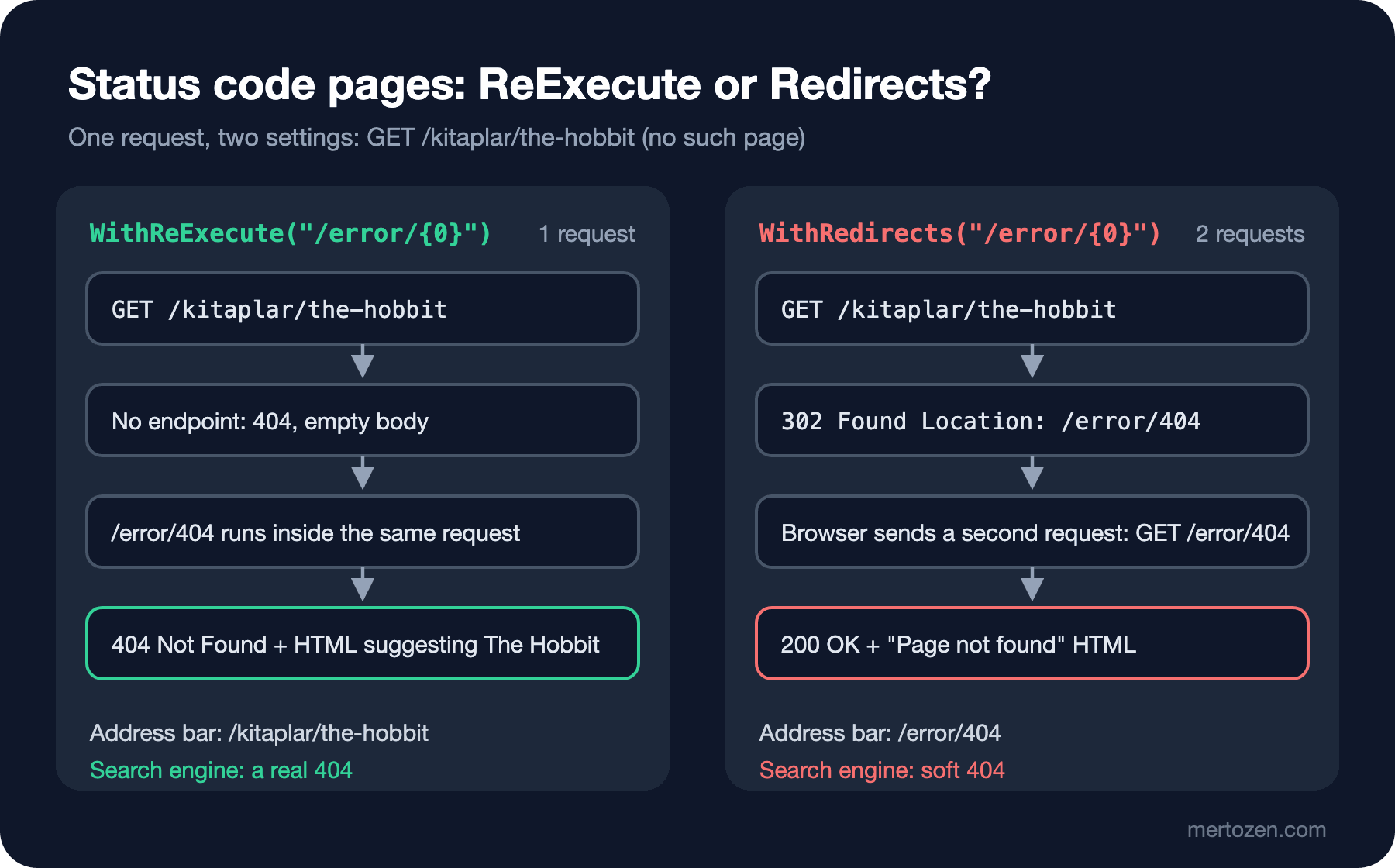
##### WithReExecute("/error/{0}")
HTTP/1.1 404 Not Found
Content-Type: text/html; charset=utf-8

##### WithRedirects("/error/{0}")
HTTP/1.1 302 Found
Location: /error/404
followed: 200 http://127.0.0.1:52216/error/404 redirects=1
In this measurement the error action did not set the status itself; that's how templates and most projects have it.
WithRedirects breaks two things. First, the client's first response is a 302, and on the second request the error page returns 200. The page says "Page not found", but the status is 200. Google flags a 2xx response whose content reports an error as a soft 404; the Technical SEO series' post on HTTP status codes and soft 404s covered what that does to the index. Second, the address bar now shows /error/404. The user can't see their typo, and sharing the link shares the error page's address. With WithReExecute the address stays and the status stays 404. That's the choice for pages.
In the re-executed action, IStatusCodeReExecuteFeature carries the original path, path base and query string. Bookstore's 404 page uses it for suggestions:
[Route("{statusCode:int}")]
public async Task<IActionResult> Status(int statusCode, CancellationToken cancellationToken)
{
    // Direct visits to /error/404 must not answer 200
    Response.StatusCode = statusCode;
    IStatusCodeReExecuteFeature? reExecute = HttpContext.Features.Get<IStatusCodeReExecuteFeature>();

    if (statusCode == StatusCodes.Status404NotFound)
    {
        IReadOnlyList<Book> suggestions = [];
        try
        {
            suggestions = await catalog.SuggestAsync(reExecute?.OriginalPath, 3, cancellationToken);
        }
        catch (Exception ex)
        {
            // The 404 page must work even when the catalog does not
            logger.LogWarning(ex, "No suggestions for the 404 page");
        }

        return View("NotFound", new NotFoundViewModel(reExecute?.OriginalPath, suggestions));
    }

    return statusCode == StatusCodes.Status403Forbidden ? View("Forbidden") : View("Status", statusCode);
}
The page for /kitaplar/the-hobbit (the response is a 404):
<main><h1>Page not found</h1>
<p>There is no page at <code>/kitaplar/the-hobbit</code>.</p>
    <p>You might be looking for:</p>
    <ul class="books">
            <li><a href="/books/2/the-hobbit">The Hobbit</a></li>
    </ul>
<p><a href="/books">Browse all books</a></p>
</main>
The Response.StatusCode = statusCode line is small but needed. During re-execution the status is already 404, but if someone opens /error/404 directly, the action would return 200. With the line in place, the real results for three addresses: /error → 404, /error/404 → 404, /error/500 → 500.
A Missing Book: The Controller's Own 404
An old link to a book that was removed from the catalog (/books/21/dune-messiah) matches the route, so the controller produces the 404. Here we have more context: we can suggest similar books from the words in the slug.
[HttpGet("{id:int}/{slug?}")]
public async Task<IActionResult> Details(int id, string? slug, CancellationToken cancellationToken)
{
    Book? book = await catalog.FindAsync(id, cancellationToken);
    if (book is not null)
    {
        return View(book);
    }

    // The book was removed or the link is wrong: a real 404 with suggestions taken from the slug
    IReadOnlyList<Book> suggestions = await catalog.SuggestAsync(slug, 3, cancellationToken);
    ViewResult notFound = View("BookNotFound", suggestions);
    notFound.StatusCode = StatusCodes.Status404NotFound;
    return notFound;
}
HTTP/1.1 404 Not Found
Content-Type: text/html; charset=utf-8
<main><h1>We couldn't find that book</h1>
<p>It may have been removed from the catalog. Maybe one of these?</p>
<ul class="books">
<li><a href="/books/1/dune">Dune</a> · Frank Herbert</li>
</ul>
</main>The status code pages middleware leaves this response alone because its body isn't empty. The rule is simple: if an action returns NotFound(), the body is empty and the general 404 page takes over; if you return your own page with a ViewResult, that page goes out. If you don't want the general page for an action, turn it off with the [SkipStatusCodePages] attribute or IStatusCodePagesFeature.Enabled = false.
ProblemDetails for /api in the Same App
Bookstore.Web contains a small JSON API for the cart and books. Returning an HTML error page to the JavaScript that calls it is the same problem we saw in post 13, where a login page was parsed as JSON. So the pipeline splits in two with UseWhen:
builder.Services.AddProblemDetails();

static bool IsApi(HttpContext context) => context.Request.Path.StartsWithSegments("/api");

// /api: JSON ProblemDetails
app.UseWhen(IsApi, api =>
{
    api.UseExceptionHandler(new ExceptionHandlerOptions { StatusCodeSelector = StatusFor });
    api.UseStatusCodePages();
});
UseExceptionHandler() without a path and UseStatusCodePages() write JSON through IProblemDetailsService when AddProblemDetails() is registered. During the same outage, /api/books/1 and an API address that doesn't exist:
HTTP/1.1 503 Service Unavailable
Content-Type: application/problem+json; charset=utf-8

{"type":"https://tools.ietf.org/html/rfc9110#section-15.6.4","title":"Service Unavailable","status":503,"traceId":"00-7b79d7bc2321e84771e021b0a87ec027-6a615b117825d85f-00"}

HTTP/1.1 404 Not Found
Content-Type: application/problem+json

{"type":"https://tools.ietf.org/html/rfc9110#section-15.5.5","title":"Not Found","status":404,"traceId":"00-19f9f865256e8cee37070c9dbb9cc53f-1e9d7c7a6e48fef7-00"}
The 32 characters in the middle of the traceId field have the same shape as the error code on the HTML page. ProblemDetails in detail and global error handling on the API side are in the ASP.NET Core Web API series' post on global error handling; here we only look at how the two worlds are separated inside one app.
Turning Domain Exceptions into Page Messages: IExceptionHandler
Not every exception is an error. "War and Peace is out of stock" is a business rule; telling the user "Something went wrong" is wrong. In Bookstore.Web, rules that can be shown to the user derive from a common base class:
// A business rule the user can understand and fix; UserMessage is safe to show on a page
public abstract class DomainException(string userMessage, int statusCode) : Exception(userMessage)
{
    public string UserMessage { get; } = userMessage;
    public int StatusCode { get; } = statusCode;
}

public sealed class OutOfStockException(string title)
    : DomainException($"\"{title}\" is out of stock right now.", StatusCodes.Status409Conflict);
CartService.AddAsync throws this exception when there isn't enough stock. When the cart form is posted, we want the user to go back to the book page and see a warning instead of an error page. IExceptionHandler, introduced in .NET 8, is the place for it:
public sealed class DomainExceptionHandler(
    IProblemDetailsService problemDetails,
    ITempDataDictionaryFactory tempDataFactory,
    ILogger<DomainExceptionHandler> logger) : IExceptionHandler
{
    public async ValueTask<bool> TryHandleAsync(HttpContext context, Exception exception, CancellationToken cancellationToken)
    {
        if (exception is not DomainException domain)
        {
            return false; // not ours: the 500 page takes over
        }

        // Request.Path is already the error path (/error) here; the original path is in the feature
        string path = context.Features.Get<IExceptionHandlerPathFeature>()?.Path ?? context.Request.Path;
        logger.LogInformation("Rule {Rule} stopped {Method} {Path}: {Message}",
            domain.GetType().Name, context.Request.Method, path, domain.UserMessage);

        if (path.StartsWith("/api/", StringComparison.OrdinalIgnoreCase))
        {
            context.Response.StatusCode = domain.StatusCode;
            return await problemDetails.TryWriteAsync(new ProblemDetailsContext
            {
                HttpContext = context,
                Exception = exception,
                ProblemDetails = { Status = domain.StatusCode, Title = domain.UserMessage }
            });
        }

        if (HttpMethods.IsPost(context.Request.Method))
        {
            // Form post: back to the page the form came from, with a flash message (Post-Redirect-Get)
            ITempDataDictionary tempData = tempDataFactory.GetTempData(context);
            tempData["Flash"] = domain.UserMessage;
            tempData.Save();
            context.Response.Redirect(LocalReferer(context) ?? "/");
            return true;
        }

        return false; // GET: the error page shows UserMessage with the status from StatusCodeSelector
    }
}
Registration is builder.Services.AddExceptionHandler<DomainExceptionHandler>(). A handler that returns true is considered to have written the response; neither the remaining handlers nor the /error path run. If it returns false, the exception continues on its way. LocalReferer uses the Referer header only if it belongs to the same host; when I tried a Referer from another site, the redirect went to /. Without this check the handler would be an open redirect.
The real flow: War and Peace has a stock of 0 and the user submits the form.
HTTP/1.1 302 Found
Location: /books/15/war-and-peace
Set-Cookie: .AspNetCore.Mvc.CookieTempDataProvider=CfDJ8Fsw...; path=/; samesite=lax; httponly
<!-- then GET /books/15/war-and-peace -->
<p class="flash" role="status">"War and Peace" is out of stock right now.</p>
<h1>War and Peace</h1>When the same exception comes from /api/cart/items, the response is 409 Conflict with a ProblemDetails body containing "title":"\"War and Peace\" is out of stock right now.". I caught an interesting detail in the log: in my first attempt the handler logged context.Request.Path, and the line said stopped POST /error. The exception handler changes the path to ExceptionHandlingPath before calling the handlers; for the original address you have to look at IExceptionHandlerPathFeature.Path.
A note: from .NET 10 on, exceptions handled by a handler that returns true are no longer logged at error level by the middleware (we saw this in post 13). That's why the handler has its own Information log: a business rule violation isn't an alert, but it should leave a trace.
Production Notes
The error page must not need any data. In Bookstore.Web, every error view uses _ErrorLayout.cshtml: no view components, no services, no TempData, and a <meta name="robots" content="noindex">. Even the suggestions on the 404 page are inside a try/catch; during the catalog outage, /nope still opened the 404 page, just without suggestions.
Don't put an HTTP method constraint on the error action. The exception handler re-executes the request with its original method. When I added [HttpGet] to ServerError and submitted the cart form during the outage, the user saw Error 405 instead of the 503 page; the GET-only endpoint rejected the POST, and the status code pages caught the 405. The .NET 10 documentation says the same applies to status code re-execution.
The same pages work for 401 and 403. Bookstore.Web's demo authentication handler (in Development it turns the X-Demo-Role header into a user) returns 401 on challenge and 403 on forbid; when someone without StoreStaff opens /reports/sales, they get 403 Forbidden with the "You don't have access to this page" page. With cookie authentication, 401 and 403 become redirects to the login and AccessDeniedPath addresses, and you design the access denied page there. The details are in the Authentication and Authorization series' post on cookie authentication.
Error responses must not be cached. The exception handler marks the response with Cache-Control: no-cache,no-store. The [ResponseCache(NoStore = true)] on ErrorController also covers error pages opened directly.
Middleware order matters. Status code re-execution runs routing again plus the middleware added after the status code pages middleware. That's why the UseWhen branches come before UseRouting. This section is based on the official documentation.
Common Pitfalls
The error page itself failing. The answer to the first question: when I ran the error view with _Layout, the category menu threw the same exception. The middleware logged "An exception was thrown attempting to execute the error handler.", rethrew the original exception, and the user got this:
HTTP/1.1 500 Internal Server Error
Content-Length: 0
An empty page, 500 instead of 503, and no error code.
Redirecting a 404 to the home page with a 302. The answer to the second question is close to this: with WithRedirects, Googlebot sees a 302 first and then a 200 carrying error text. Sending every removed page to the home page causes the same soft 404 problem. Return 404 or 410 for a removed page; if the content has a new address, use a 301.
Showing a stack trace on the error page. An error view that prints @Model.Exception.ToString() or ex.Message hands file paths, SQL error texts and sometimes connection details to users in production. Send the user only the trace id and the message you wrote (UserMessage). Leaving ASPNETCORE_ENVIRONMENT=Development on a production server is the same leak.
The error view sitting behind [Authorize]. If ErrorController derives from a base class that every controller derives from and that carries [Authorize], an anonymous user's 404 turns into an empty response instead of the 404 page. In my attempt with [AllowAnonymous] replaced by [Authorize], /kitaplar/the-hobbit returned:
HTTP/1.1 401 Unauthorized
Content-Length: 0
The same request with a signed-in user opened the 404 page. So only people without a session, most likely including search engines, see the problem.
A Small Experiment
★☆☆ Run Bookstore.Web with --environment Production and check the status codes of /error, /error/404, /books/999 and /kitaplar/dune with curl -i. Delete the Response.StatusCode = statusCode line in ErrorController.Status and try again: which one changed?
★★☆ Write a separate view for 410 Gone and keep the ids of books permanently removed from the catalog in a list. Make the Details action return 410 instead of 404 for those ids. When is 404 right, and when is 410?
★★★ During a catalog outage, the 404 page can't show suggestions. Write a SuggestAsync that keeps suggestions in IMemoryCache and shows the last known list during an outage. How do you balance this with the "the error page must not call for data" rule: is reading from the cache an acceptable dependency for an error page?
While writing the error pages we deliberately left open where the cart lives: CartService only checks the stock for now. In the last post of the series we'll cover state across requests: TempData's cookie and session providers, Session with Redis, plain cookies and query strings. We'll add an anonymous user's cart and a three-step institutional order form to Bookstore.Web and decide which data belongs where.