

A Map of the dotnet CLI: SDK vs Runtime, the Command Families, global.json and SDK Version Selection
The dotnet command picks its SDK from the first global.json it finds walking up from the current folder; without rollForward it only moves within the same feature band, while runtimeconfig.json decides which runtime runs the app. We add projects to Bookstore.slnx with the CLI, compare the rollForward policies with three installed SDKs, and show the difference between the 10.0.1xx and 10.0.4xx bands, workloads and the .NET 11 CLI changes with real output.
Version note: The code in this post was built and run with .NET 10 (SDK 10.0.404, runtime 10.0.15); the feature band comparison also uses SDK 10.0.115, and the .NET 11 section uses SDK 11.0.100.
Guess First
Three .NET SDKs are installed on your machine: 10.0.115, 10.0.404 and 11.0.100. The global.json at the repo root contains only this:
{
  "sdk": {
    "version": "10.0.100"
  }
}
10.0.100 is not installed. What does dotnet --version print in this folder? Most people say either "an error" or "the newest one, 11.0.100". The real output:
10.0.115Add "rollForward": "latestFeature" to the same file and the answer becomes 10.0.404; write "latestMajor" and it becomes 11.0.100. A three-line JSON file decides which build tools everyone on the team and the CI server use. This post shows how that decision is made, why the SDK and the runtime are different things, how the dotnet commands call each other behind the scenes, and when you actually need workloads, all through Bookstore, the online bookstore used as the shared example across this site's series.
The ASP.NET Core Web API series post "Your First ASP.NET Core Web API Project: .NET SDK, global.json and Project Structure" introduced global.json for a first project, and the C# Fundamentals series covered the basics of solutions and NuGet. This series steps back and focuses on the layer you touch every day but rarely study: the SDK, the CLI and MSBuild.
The SDK and the Runtime Are Not the Same Thing
A .NET installation has two separate parts. The runtime is what runs a compiled app: the CLR, the base class library and shared frameworks such as ASP.NET Core. The SDK is what produces the app: the dotnet CLI commands, MSBuild, NuGet, the Roslyn compiler and the templates. Servers get only the runtime; developer machines and CI get the SDK, which brings its own runtime along. dotnet --info shows both separately:
dotnet --info.NET SDK:
Version: 10.0.404
Commit: 2ab2854867
Workload version: 10.0.404
MSBuild version: 18.9.15+2ab285486
Host:
Version: 11.0.0
Commit: 297acf930f
.NET SDKs installed:
10.0.115 [C:\Program Files\dotnet\sdk]
10.0.404 [C:\Program Files\dotnet\sdk]
11.0.100 [C:\Program Files\dotnet\sdk]
.NET runtimes installed:
Microsoft.AspNetCore.App 10.0.15 [C:\Program Files\dotnet\shared\Microsoft.AspNetCore.App]
Microsoft.AspNetCore.App 11.0.0 [C:\Program Files\dotnet\shared\Microsoft.AspNetCore.App]
Microsoft.NETCore.App 8.0.34 [C:\Program Files\dotnet\shared\Microsoft.NETCore.App]
Microsoft.NETCore.App 9.0.22 [C:\Program Files\dotnet\shared\Microsoft.NETCore.App]
Microsoft.NETCore.App 10.0.15 [C:\Program Files\dotnet\shared\Microsoft.NETCore.App]
Microsoft.NETCore.App 11.0.0 [C:\Program Files\dotnet\shared\Microsoft.NETCore.App]
global.json file:
C:\src\Bookstore\global.jsonThere are three version numbers here and all three differ. SDK 10.0.404 was selected because Bookstore's global.json asks for it. The host is 11.0.0 because the hostfxr that the dotnet command (the muxer) loads to find an SDK comes from the newest version installed on the machine. The runtime list has four versions side by side, from 8 to 11. dotnet sdk check tells you whether the installed versions are still supported:
.NET SDKs:
Version       Status
-------------------------
10.0.115      Up to date.
10.0.404      Up to date.
11.0.100      Up to date.

.NET Runtimes:
Name                          Version      Status
----------------------------------------------------------------------
Microsoft.NETCore.App         8.0.34       .NET 8.0 is out of support.
Microsoft.NETCore.App         9.0.22       .NET 9.0 is out of support.
Microsoft.AspNetCore.App      10.0.15      Up to date.
Microsoft.NETCore.App         10.0.15      Up to date.
Microsoft.AspNetCore.App      11.0.0       Up to date.
Microsoft.NETCore.App         11.0.0       Up to date.
Support for .NET 8 and .NET 9 ended on November 10, 2026, the day .NET 11 shipped. Projects that target them still build, but they no longer receive security patches.
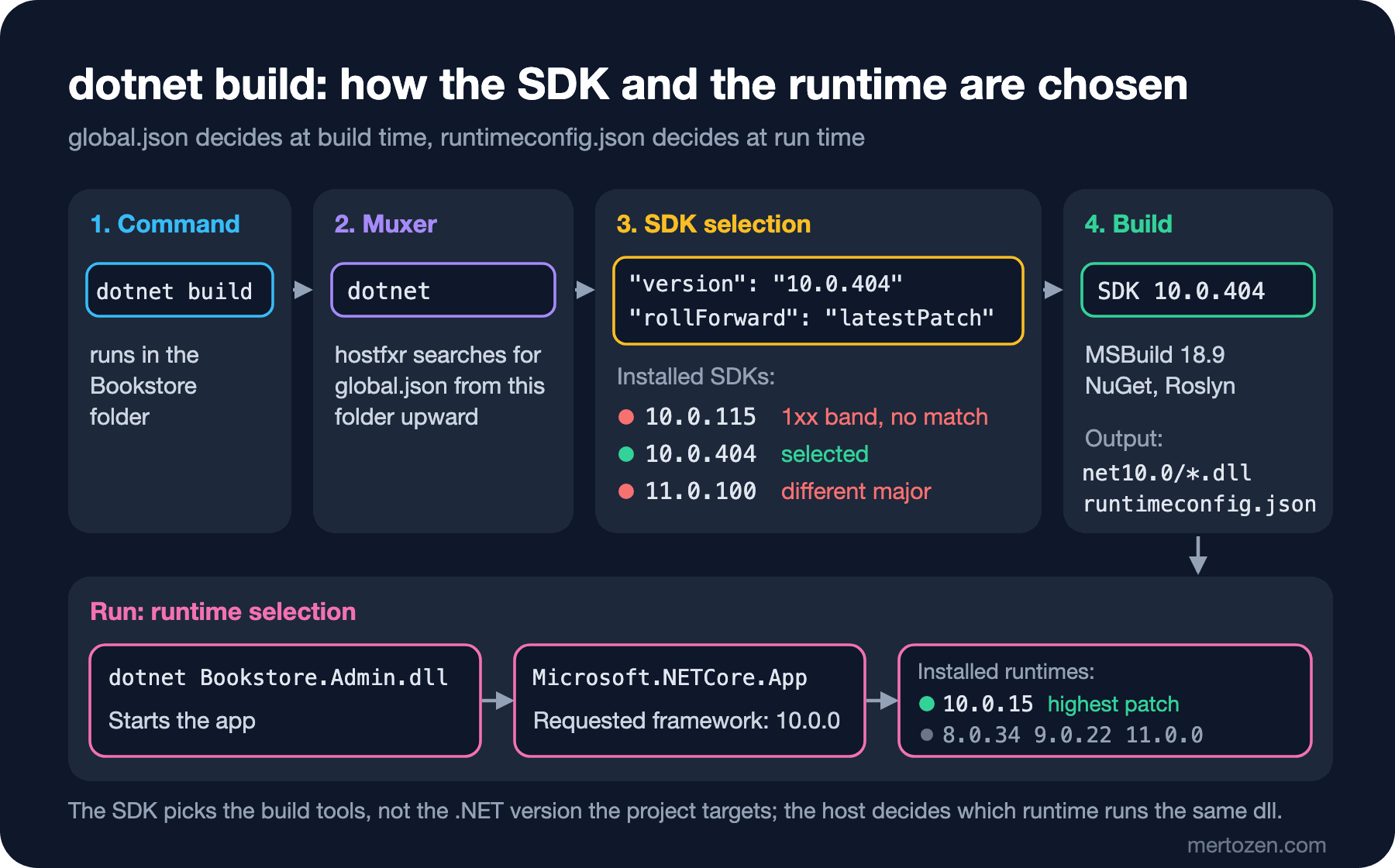
Which runtime runs a compiled app is decided not by the SDK but by the runtimeconfig.json next to the app. An app that targets net10.0 asks for "Microsoft.NETCore.App 10.0.0 or later", and the host picks the highest installed 10.0.x patch. It does not move up a major version on its own, but you can force it:
dotnet Bookstore.Admin.dll info
DOTNET_ROLL_FORWARD=LatestMajor dotnet Bookstore.Admin.dll info
Runtime: .NET 10.0.15
Environment: (not set)
Runtime: .NET 11.0.0
Environment: (not set)The same dll ran on 10.0.15 first and then on 11.0.0. So "I built the project with the .NET 11 SDK" does not mean the app runs on .NET 11. The csproj's TargetFramework sets the target framework, global.json sets the build tools, and the host sets the runtime at run time:
The Command Families and Their Implicit Steps
The dotnet CLI commands look independent, but most of them call the previous step on their own. Knowing which command triggers what keeps CI scripts from doing the same work twice:
| Command | What it does | What it calls implicitly |
|---|---|---|
dotnet new | Creates a project, solution or file from a template | Restore for project templates |
dotnet restore | Downloads NuGet packages, writes obj/project.assets.json | - |
dotnet build | Compiles and produces the bin/ output | restore (off with --no-restore) |
dotnet run | Builds and runs the project | restore + build (--no-build) |
dotnet test | Runs the test projects | restore + build (--no-build) |
dotnet pack | Produces a NuGet package, Release by default | restore + build |
dotnet publish | Produces deployable output, Release by default | restore + build |
dotnet watch | Rebuilds on file changes, applies hot reload | run or test |
dotnet format | Formats code according to .editorconfig rules | restore |
dotnet sln, dotnet reference, dotnet package | Manage solutions, project references and package references | package add restores |
.NET 10 added noun-first forms such as dotnet package add, dotnet package list and dotnet reference add. The old dotnet add package spelling keeps working, but the noun-first form reads better in new scripts.
The easiest way to see what the implicit restore does is to pass --no-restore in a fresh clone:
dotnet build tools/Bookstore.Admin --no-restoreC:\Program Files\dotnet\sdk\10.0.404\Sdks\Microsoft.NET.Sdk\targets\Microsoft.PackageDependencyResolution.targets(266,5): error NETSDK1004: Assets file 'C:\src\Bookstore\tools\Bookstore.Admin\obj\project.assets.json' not found. Run a NuGet package restore to generate this file. [C:\src\Bookstore\tools\Bookstore.Admin\Bookstore.Admin.csproj]
0 Warning(s)
1 Error(s)Build cannot work without the project.assets.json that restore writes. The right order in CI is one dotnet restore, then dotnet build --no-restore, then dotnet test --no-build. Each step uses the previous step's output and nothing is repeated. Locally you don't need this split; dotnet build restores by itself. Since .NET 9, what you see in the terminal is the terminal logger's output:
Restore complete (0.4s)
  Bookstore.Contracts net10.0 succeeded (0.1s) → src\Bookstore.Contracts\bin\Debug\net10.0\Bookstore.Contracts.dll
  Bookstore.Admin net10.0 succeeded (0.1s) → tools\Bookstore.Admin\bin\Debug\net10.0\Bookstore.Admin.dll
  Bookstore.Contracts.Tests net10.0 succeeded (0.1s) → tests\Bookstore.Contracts.Tests\bin\Debug\net10.0\Bookstore.Contracts.Tests.dll
  Bookstore.Api net10.0 succeeded (0.5s) → src\Bookstore.Api\bin\Debug\net10.0\Bookstore.Api.dll
  Bookstore.Api.Tests net10.0 succeeded (0.2s) → tests\Bookstore.Api.Tests\bin\Debug\net10.0\Bookstore.Api.Tests.dll
Build succeeded in 1.2s
When the output is redirected to a file or a CI log, the SDK falls back to the classic console logger and prints Bookstore.Admin -> ...dll lines instead. On a Turkish or other localized Windows, SDK messages arrive in that language; to search for an error code online, switch them to English with the DOTNET_CLI_UI_LANGUAGE=en environment variable. All output in this post was captured that way.
Building Bookstore.slnx with the CLI
Since .NET 10, dotnet new sln produces an XML-based .slnx file by default; you need --format sln for the old format. In an empty folder:
dotnet new sln -n Bookstore
dotnet new webapi -o src/Bookstore.Api
dotnet sln add src/Bookstore.Api
<Solution>
<Folder Name="/src/">
<Project Path="src/Bookstore.Api/Bookstore.Api.csproj" />
</Folder>
</Solution>The GUIDs and configuration blocks of the old .sln file are gone, and the solution folder was derived from the project path. Bookstore's reference app already has this file with two projects: Bookstore.Api and Bookstore.Api.Tests. Over this series we add three more: Bookstore.Contracts, which holds shared types and which we publish as a package in post 4, bookstore-admin, a small command-line tool for admin tasks, and its tests. We add all of them with the CLI:
dotnet new classlib -n Bookstore.Contracts -o src/Bookstore.Contracts
dotnet new console -n Bookstore.Admin -o tools/Bookstore.Admin
dotnet new console -n Bookstore.Contracts.Tests -o tests/Bookstore.Contracts.Tests
dotnet sln add src/Bookstore.Contracts tools/Bookstore.Admin tests/Bookstore.Contracts.Tests
dotnet reference add src/Bookstore.Contracts --project tools/Bookstore.Admin
dotnet reference add src/Bookstore.Contracts --project tests/Bookstore.Contracts.Tests
dotnet package add xunit.v3 --project tests/Bookstore.Contracts.Tests
Project `src/Bookstore.Contracts/Bookstore.Contracts.csproj` added to the solution.
Project `tools/Bookstore.Admin/Bookstore.Admin.csproj` added to the solution.
Project `tests/Bookstore.Contracts.Tests/Bookstore.Contracts.Tests.csproj` added to the solution.
Reference `..\..\src\Bookstore.Contracts\Bookstore.Contracts.csproj` added to the project.
Reference `..\..\src\Bookstore.Contracts\Bookstore.Contracts.csproj` added to the project.
info : PackageReference for package 'xunit.v3' added to 'C:\src\Bookstore\tests\Bookstore.Contracts.Tests\Bookstore.Contracts.Tests.csproj' and PackageVersion added to central package management file 'C:\src\Bookstore\Directory.Packages.props'.You may wonder why the test project starts from the console template. An xUnit v3 test project is a standalone exe, and the built-in xunit template in the .NET 10.0.4xx SDK still produces xUnit v2. The console template sets OutputType to Exe, the xunit.v3 package generates the entry point, and deleting the template's Program.cs is all that is left. Note the last message too: Bookstore uses central package management, so package add wrote a version-less PackageReference to the csproj. The xunit.v3 version was already in Directory.Packages.props, so the file did not change; the message is the same either way. Post 3 covers central package management in detail.
We put a small ISBN-13 validation type into Bookstore.Contracts, and the bookstore-admin tool uses it:
return args switch
{
    ["info"] => PrintInfo(),
    ["isbn", string input] => CheckIsbn(input),
    _ => PrintUsage(),
};

static int PrintInfo()
{
    Console.WriteLine($"Runtime:     {RuntimeInformation.FrameworkDescription}");
    Console.WriteLine($"Environment: {Environment.GetEnvironmentVariable("BOOKSTORE_ENVIRONMENT") ?? "(not set)"}");
    return 0;
}
dotnet run --project tools/Bookstore.Admin -- isbn 978-0-441-17271-9
dotnet test --project tests/Bookstore.Contracts.Testsvalid: 9780441172719
Running tests from C:\src\Bookstore\tests\Bookstore.Contracts.Tests\bin\Debug\net10.0\Bookstore.Contracts.Tests.dll (net10.0|x64)
C:\src\Bookstore\tests\Bookstore.Contracts.Tests\bin\Debug\net10.0\Bookstore.Contracts.Tests.dll (net10.0|x64) passed (134ms)
Test run summary: Passed!
total: 5
failed: 0
succeeded: 5
skipped: 0
duration: 513msThe -- separator in dotnet run matters: everything after it goes to the app, everything before it to dotnet run. dotnet test takes a --project option because Bookstore's global.json selects Microsoft Testing Platform, the runner that replaces VSTest, as the test runner. The Unit Test series post "A Test Project with xUnit v3" covers the details.
Feature Bands: More Than One SDK Inside a Major Version
A runtime version such as 10.0.15 has three parts. The third part of an SDK version carries two pieces of information: in 10.0.404, the hundreds digit (4) is the feature band and the last two digits (04) are the patch within that band. Microsoft ships a new band every quarter, and each band lines up with a Visual Studio release: 10.0.1xx shipped with Visual Studio 18.0, 10.0.4xx with Visual Studio 18.9. A new band targets the same runtime but can bring new MSBuild, NuGet and CLI features. In the November 10, 2026 servicing update Microsoft released two .NET 10 SDKs, 10.0.115 and 10.0.404, both carrying the same 10.0.15 runtime.
Support depends on the band. According to Microsoft's version table, the 1xx band and the final band of a major version (4xx for .NET 10) are supported for the life of the runtime, while the 2xx and 3xx bands went out of support when the next band shipped. A small CLI command shows the difference. Creating a solution filter (.slnf) so Bookstore's two test projects can be built on their own, and adding projects to it, works on 10.0.404:
dotnet new slnf --parent-solution Bookstore.slnx --name Bookstore.Tests
dotnet sln Bookstore.Tests.slnf add tests/Bookstore.Contracts.Tests/Bookstore.Contracts.Tests.csproj tests/Bookstore.Api.Tests/Bookstore.Api.Tests.csproj
The template "Solution Filter File" was created successfully.
Project `tests/Bookstore.Contracts.Tests/Bookstore.Contracts.Tests.csproj` added to the solution.
Project `tests/Bookstore.Api.Tests/Bookstore.Api.Tests.csproj` added to the solution.Creating the file also works on 10.0.115, but the add command:
Unhandled exception: Object reference not set to an instance of an object.Both are ".NET 10 SDKs" and both are supported. But one carries the CLI of the Visual Studio 18.9 era and the other the CLI of the 18.0 era. That is why "everyone is on .NET 10" is not enough; you need to pin the band as well.
global.json and the rollForward Policies
When a dotnet command runs, the muxer starts from the current folder and walks up the parent folders to find the first global.json. If it finds one, it picks an installed SDK according to the sdk section; if not, it uses the newest one. version must be a full version (10.0.100; 10.0 or 10.0.x is invalid and the file is ignored). Without rollForward the default is patch. The SDK each policy selects on a machine with three SDKs and "version": "10.0.100":
| rollForward | Selected SDK | Rule |
|---|---|---|
patch (default) | 10.0.115 | If the version is missing, the highest patch of the same band |
latestPatch | 10.0.115 | Same band, highest patch |
feature, minor, major | 10.0.115 | Same band first; moves up only if nothing is found |
latestFeature | 10.0.404 | Highest band and patch within the same major.minor |
latestMinor | 10.0.404 | Highest version within the same major |
latestMajor | 11.0.100 | Highest installed version |
disable | Error | Exact version only |
The policies starting with latest say "take the highest installed one", the others say "try what was asked first, move one step further only if it is missing". The difference only shows up when several bands are installed; on a machine with a single SDK they all give the same result. That is why the problem usually appears not on a developer machine but on CI agents with several SDKs installed.
The .NET 10 SDK added two new fields to global.json. errorMessage sets the message shown when no matching SDK is found, and paths lists the folders to search for an SDK (".dotnet" for an SDK installed inside the repo, "$host$" for the machine-wide installation). We updated Bookstore's global.json with this in mind:
{
  "sdk": {
    "version": "10.0.404",
    "rollForward": "latestPatch",
    "errorMessage": "Bookstore needs .NET SDK 10.0.4xx (10.0.404 or later). Install it from https://dotnet.microsoft.com/download/dotnet/10.0"
  },
  "test": {
    "runner": "Microsoft.Testing.Platform"
  }
}
The reference app had "10.0.100" with latestFeature, which accepted anything from 10.0.1xx to 10.0.4xx. The new version pins the 4xx band: 10.0.404 and later 4xx patches are accepted, 10.0.1xx and 11 are not. Because 4xx is the final band of .NET 10, it stays supported for the life of the runtime, so the file does not need to change every quarter. When a teammate without this SDK runs a command, the error tells them exactly what to do:
The command could not be loaded, possibly because:
  * You intended to execute a .NET application:
      The application '--version' does not exist or is not a managed .dll or .exe.
  * You intended to execute a .NET SDK command:
      Bookstore needs .NET SDK 10.0.4xx (10.0.404 or later). Install it from https://dotnet.microsoft.com/download/dotnet/10.0
Where the file lives matters as much as what it says. The search starts from the folder you run the command in, not from the project. With global.json accidentally placed in src/:
dotnet --version
cd src/Bookstore.Api
dotnet --version
11.0.100
10.0.404A CI script running from the repo root builds with 11, while a developer working under src builds with 10. global.json always belongs next to the solution file, at the repo root.
Workloads: When Do You Need Them?
The tools some app types need are not part of the SDK; they are installed as separate workloads: .NET MAUI, Android and iOS, or wasm-tools for ahead-of-time compilation and relinking in Blazor WebAssembly. Bookstore's ASP.NET Core API, console tool and tests need no workload, and the Angular client is not on the .NET side. Still, here is what happens when a teammate wants to try Blazor WebAssembly:
dotnet workload search wasm
dotnet workload install wasm-tools
dotnet workload list
Installing workload version 10.0.404.
...
Successfully installed workload(s) wasm-tools.
Workload version: 10.0.404
Installed Workload Id Manifest Version Installation Source
---------------------------------------------------------------------
wasm-tools 10.0.115/10.0.100 SDK 10.0.400The Installation Source column matters: a workload is installed not into an SDK but into the SDK's feature band. On the same machine, dotnet workload list with SDK 11.0.100 returned an empty list. Workloads are written into the folder where the SDK is installed; on Windows that is C:\Program Files\dotnet, so the command needs administrator rights. This installation downloaded more than 1 GB of packs. Instead of naming each workload, dotnet workload restore reads the project files and installs what they need, and after an SDK update you need to run dotnet workload update. The Workload version: 10.0.404 line shows workload sets: manifest versions tested for a given SDK version are pinned under one number.
What Changed on the CLI Side in the .NET 11 SDK
In the .NET 11 SDK, the entry point of the dotnet command ships compiled with Native AOT. --version, --info, every command's --help and commands such as dotnet sln list run without starting the managed runtime at all. We switched global.json in the same folder, ran each command twelve times, dropped the first two runs and took the median:
SDK 10.0.404  dotnet --version: median 57 ms
SDK 11.0.100  dotnet --version: median 12 ms
SDK 11.0.100  dotnet --version (DOTNET_CLI_ENABLEAOT=false): median 58 ms
For a single command the difference is small, but you notice it in shell completion and in scripts that call dotnet many times. DOTNET_CLI_ENABLEAOT=false restores the old behavior.
The second change is that the MSBuild server is on by default. After a build finishes, the MSBuild process stays alive in the background and later builds reuse it. To see and stop the processes that stay alive:
dotnet build-server shutdownShutting down MSBuild server...
Shutting down VB/C# compiler server...
VB/C# compiler server shut down successfully.
MSBuild server shut down successfully.To turn it off, use the DOTNET_CLI_USE_MSBUILD_SERVER=false or MSBUILDUSESERVER=0 environment variable; post 9 shows why you might need that in CI.
Two features listed on the .NET 11 "what's new" page are actually present in 10.0.404 as well. dotnet run -e KEY=VALUE passes an environment variable to the app and has existed since 9.0.200; what .NET 11 adds is that these values also reach MSBuild as RuntimeEnvironmentVariable items:
dotnet run --project tools/Bookstore.Admin -e BOOKSTORE_ENVIRONMENT=Staging -- infoRuntime: .NET 10.0.15
Environment: StagingCreating and editing solution filter files (dotnet new slnf, dotnet sln X.slnf add) is on the same page, but as we saw above it also works in the 10.0.4xx band and fails in 10.0.1xx. Verify which SDK has a feature by trying it on the SDK you actually use, not by reading release notes.
In Production
Run dotnet --info as the first step of your CI pipeline. When a build breaks only in CI, the first thing to check is which SDK and which MSBuild version were selected; without that line in the log you end up guessing. In GitHub Actions the step that installs the SDK can read the same global.json; the GitHub Actions series covers the details.
Pinning the SDK does not pin the runtime. An app built with 10.0.404 runs on the highest 10.0.x runtime installed on the server at that moment. That is a good thing, because security patches arrive without rebuilding the app. But if you ship a container image or a self-contained publish, the runtime is baked in, and you need a new build to get the patch. Post 6 covers this together with the publish options.
Check for out-of-support runtimes with dotnet sdk check regularly. 8 and 9 can still build, but they are out of support.
Common Pitfalls
SDK 11 on the developer's machine, SDK 10 in CI. Without a global.json in the repo, everyone builds with the newest SDK on their own machine. The developer who updates Visual Studio gets 11.0.100, the CI agent stays on 10.0.404, and you end up with two different builds with different analyzer rules and different CLI behavior. Put a global.json at the repo root and pin the band.
Putting global.json in the wrong folder. If the file lives under src/, commands run from the root don't see it. The reverse also happens: if your repo has no global.json but a parent folder has one left over from another project, that file wins.
Saying "we're all on .NET 10". 10.0.115 and 10.0.404 target the same runtime but their CLIs differ; in the solution filter example one worked and the other threw an exception.
Running dotnet workload install in every CI job. Installing a workload you don't need costs minutes and gigabytes; if you do need one, install only what the projects ask for with dotnet workload restore and prepare an image that already contains the SDK.
Using dotnet run in production. dotnet run is a development command: it checks restore and build every time and reads packages from the NuGet cache. The server gets the output of dotnet publish.
A Small Experiment
★☆☆ Run dotnet --info in the Bookstore folder and find the global.json file line. Then go one folder up and run the same command again. Did the selected SDK or the Host version change?
★★☆ Change rollForward in global.json to latestFeature, latestMajor and disable in turn, and note the dotnet --version output for each. With disable, set version to a version that isn't installed and confirm that errorMessage is shown.
★★★ Publish bookstore-admin with dotnet publish tools/Bookstore.Admin and open Bookstore.Admin.runtimeconfig.json in the output folder. Run the app with and without DOTNET_ROLL_FORWARD=LatestMajor; then write the same setting into runtimeconfig.json as a rollForward field and show that the environment variable is no longer needed.
In this post we saw which SDK the dotnet command selects and how the commands call each other. The three csproj files we created with the CLI, however, are full of repetition that came from the templates. In the next post we read a csproj line by line: the implicit behaviors of an SDK-style project, common properties, items, and seeing the final shape of a project file with dotnet msbuild -getProperty.