

Publish Options: Framework-Dependent, Self-Contained, Single-File, Trimming, ReadyToRun and Native AOT
A framework-dependent publish gives the smallest output and gets runtime patches from the machine; self-contained, single-file, trimming and Native AOT make shipping easier but tie patches to republishing. We publish bookstore-admin in seven modes and measure size, startup and memory, and show with real output why trimming without R2R slows startup, how to move trim warnings into the build, AOT's cross-OS limit and a publish profile.
Version note: The code in this post was built and run with .NET 10 (SDK 10.0.404, runtime 10.0.15); the PublishAot output was produced in the mcr.microsoft.com/dotnet/sdk:10.0.404-noble-aot image, and the UseOptimizedPublish check used SDK 11.0.100.
Guess First
We want to ship bookstore-admin, the small admin CLI of Bookstore, the online bookstore used as the shared example across this site's series, as a single exe to Windows machines that have no .NET installed. A self-contained single-file publish is 70.2 MB. Add PublishTrimmed and the file drops to 12.6 MB. What happens to the tool's startup time: does it go down, stay the same, or go up?
When we measured it, it went up: from 16 ms to 21 ms. While trimming removes unused code, it also removes the precompiled code inside the framework assemblies, so every remaining method is compiled at run time by the JIT compiler, which turns a method into machine code the first time it is called. In this post we go through the options of dotnet publish one by one, publish the same tool seven ways, and put the size and startup time side by side.
What Does dotnet publish Produce?
dotnet publish tools/Bookstore.Admin Bookstore.Contracts -> C:\src\Bookstore\artifacts\bin\Bookstore.Contracts\release_net10.0\Bookstore.Contracts.dll
Bookstore.Admin -> C:\src\Bookstore\artifacts\bin\Bookstore.Admin\release\bookstore-admin.dll
Bookstore.Admin -> C:\src\Bookstore\artifacts\publish\Bookstore.Admin\release\Note the release in the folder name: since .NET 8, dotnet publish uses the Release configuration by default, so there is no need to write -c Release. dotnet build still defaults to Debug. Thanks to the artifacts layout we set up in post 3, the publish output also lands under artifacts/publish.
This default output is framework-dependent: the machine needs a .NET runtime installed. Which runtime version runs is decided by bookstore-admin.runtimeconfig.json:
{
  "runtimeOptions": {
    "tfm": "net10.0",
    "framework": {
      "name": "Microsoft.NETCore.App",
      "version": "10.0.0"
    },
    ...
  }
}
10.0.0 is a lower bound. The host picks the highest 10.0.x patch on the machine, which is the roll-forward rule from post 1. So when Microsoft Update or a package manager moves the runtime to 10.0.16, the tool gets the security fix without being republished. That is the real advantage of a framework-dependent publish; the small size comes second.
RuntimeIdentifier, Self-Contained and Single-File
To tie the output to a platform you pass a runtime identifier, or RID, a name for an operating system and CPU architecture such as win-x64 or linux-x64. With a RID the SDK adds that platform's apphost (bookstore-admin.exe) and picks the platform-specific native files. Add --self-contained and the runtime itself is copied into the output:
dotnet publish tools/Bookstore.Admin -r win-x64 --self-contained false -o artifacts/fd
dotnet publish tools/Bookstore.Admin -r win-x64 --self-contained -o artifacts/sc
dotnet publish tools/Bookstore.Admin -r win-x64 --self-contained -p:PublishSingleFile=true -o artifacts/single
The framework-dependent folder has seven files, not counting pdbs:
   9216 Bookstore.Contracts.dll
   2990 Bookstore.Contracts.xml
     67 appsettings.json
    869 bookstore-admin.deps.json
   6656 bookstore-admin.dll
 162304 bookstore-admin.exe
    330 bookstore-admin.runtimeconfig.json
In the self-contained folder the file count goes up to 194 and the size to 76.9 MB; the System.*.dll files, coreclr.dll and the rest of the runtime are now part of the tool. runtimeconfig.json changes too:
    "includedFrameworks": [
      {
        "name": "Microsoft.NETCore.App",
        "version": "10.0.15"
      }
    ],
There is no lower bound here, just a fixed version. The tool lives with the 10.0.15 runtime that the SDK brought on the day it was published; .NET updates on the machine don't touch it. When 10.0.16 fixes a security vulnerability, the only way to get that fix into a self-contained tool is to publish again with a newer SDK and ship it again.
Single-file packs the self-contained folder into one exe: a 70.2 MB bookstore-admin.exe with only appsettings.json and Bookstore.Contracts.xml next to it. appsettings.json is not inside because content files stay separate, which is why the tool is right to read the file from AppContext.BaseDirectory. Assembly.Location returns an empty string in a single-file app; code that derives file paths from it breaks here, and the SDK's single-file analyzer reports it as a warning. EnableCompressionInSingleFile brings the exe down to 35.9 MB, but turns it into an archive that has to be unpacked on every start; in our measurement startup went from 16 ms to 43 ms.
Where did the XML file come from? In post 2 we turned on GenerateDocumentationFile in Bookstore.Contracts, and the SDK also copies the XML documentation of referenced projects into the publish folder. A CLI tool doesn't need it; the PublishReferencesDocumentationFiles property turns it off.
Trimming and Trim Warnings
Trimming uses the ILLink tool during publish to delete code that the app and the framework don't use. It only makes sense for self-contained output, because the framework itself gets trimmed as well:
dotnet publish tools/Bookstore.Admin -r win-x64 --self-contained -p:PublishSingleFile=true -p:PublishTrimmed=true -o artifacts/trimThe exe went down to 12.6 MB. Trimming works through static analysis: ILLink has to see how the code reaches each type. Code that works through reflection gets past that analysis. To see this, we rewrote the part of the tool that reads appsettings.json with JsonSerializer.Deserialize<AdminSettings>, which uses reflection, instead of JsonDocument. dotnet build passed silently; the warning only showed up in a trimmed publish. To move it into the build we added a single property to the project:
<PropertyGroup>
  <OutputType>Exe</OutputType>
  <AssemblyName>bookstore-admin</AssemblyName>
  <!-- Trim, single-file and AOT analyzers run on every build, not only on publish. -->
  <IsAotCompatible>true</IsAotCompatible>
</PropertyGroup>
C:\src\Bookstore\tools\Bookstore.Admin\Program.cs(30,31): error IL2026: Using member 'System.Text.Json.JsonSerializer.Deserialize<TValue>(String, JsonSerializerOptions)' which has 'RequiresUnreferencedCodeAttribute' can break functionality when trimming application code. JSON serialization and deserialization might require types that cannot be statically analyzed. Use the overload that takes a JsonTypeInfo or JsonSerializerContext, or make sure all of the required types are preserved. [C:\src\Bookstore\tools\Bookstore.Admin\Bookstore.Admin.csproj]
C:\src\Bookstore\tools\Bookstore.Admin\Program.cs(30,31): error IL3050: Using member 'System.Text.Json.JsonSerializer.Deserialize<TValue>(String, JsonSerializerOptions)' which has 'RequiresDynamicCodeAttribute' can break functionality when AOT compiling. JSON serialization and deserialization might require types that cannot be statically analyzed and might need runtime code generation. Use System.Text.Json source generation for native AOT applications. [C:\src\Bookstore\tools\Bookstore.Admin\Bookstore.Admin.csproj]IsAotCompatible turns on the trim, single-file and AOT analyzers together, and TreatWarningsAsErrors turns the warnings into errors. A change like this is now caught in the pull request, before anyone publishes. We added the same property to Bookstore.Contracts, which we ship as a package, so that an app using the library gets no surprises when it publishes with trimming or AOT. Fixing the code itself, with the System.Text.Json source generator and a JsonSerializerContext, is covered in the Native AOT post of the ASP.NET Core Web API series; we reverted the experiment and stayed with JsonDocument, which is already trim-safe.
ReadyToRun
ReadyToRun, or R2R, puts precompiled machine code next to the IL, the platform-independent intermediate code the C# compiler produces. When the app starts, most of the work the JIT would do is already done. .NET's own framework assemblies already ship as R2R. So in a framework-dependent app R2R only affects your own assemblies: bookstore-admin.dll grew from 6.5 KB to 20 KB and the startup time did not change. A tool this small has very little code to compile in the first place.
The answer to the opening question is here too. When ILLink rewrites assemblies it does not keep the R2R code; the trimmed framework goes back to plain IL and the JIT compiles everything. When you turn on PublishReadyToRun together with trimming, the SDK compiles the trimmed assemblies to R2R again:
dotnet publish tools/Bookstore.Admin -r win-x64 --self-contained -p:PublishSingleFile=true -p:PublishTrimmed=true -p:PublishReadyToRun=true -o artifacts/trim-r2rThe exe went from 12.6 MB to 16.6 MB and startup came down from 21 ms to 12 ms. R2R can cross-compile, so you can build it for win-x64 on another operating system. That is not true for Native AOT.
Native AOT
Native AOT compiles the whole app to machine code at publish time and removes the JIT completely. The output is a single native executable with the runtime embedded in it, together with the trimmed libraries. Trimming is always on, and code that relies on reflection or on generating code at run time either does not work or produces warnings; that is why we turned on IsAotCompatible first.
AOT compilation uses the target operating system's native linker, so it does not cross-compile across operating systems: if you try it for a different OS you get the error Cross-OS native compilation is not supported. Publishing for win-x64 on Windows needs Visual Studio's C++ tools (the "Desktop development with C++" workload); we did not try that setup or the Windows output in this post. In Bookstore, AOT would be used in Linux containers, so we published for linux-x64 in Microsoft's SDK image that comes with the tools AOT needs:
docker run --rm -v ${PWD}:/src -w /src mcr.microsoft.com/dotnet/sdk:10.0.404-noble-aot dotnet publish tools/Bookstore.Admin -r linux-x64 -p:PublishAot=true -o artifacts/aot Bookstore.Admin -> /src/artifacts/bin/Bookstore.Admin/release_linux-x64/bookstore-admin.dll
Generating native code
Bookstore.Admin -> /src/artifacts/aot/
-rw-r--r-- 1 root root 11828 Nov 15 06:15 Bookstore.Contracts.pdb
-rw-r--r-- 1 root root 2990 Nov 15 06:15 Bookstore.Contracts.xml
-rw-r--r-- 1 root root 67 Nov 15 06:14 appsettings.json
-rwxr-xr-x 1 root root 1649048 Nov 15 06:15 bookstore-admin
-rwxr-xr-x 1 root root 2810728 Nov 15 06:15 bookstore-admin.dbgThe executable is 1.6 MB; the .dbg file holds the debug symbols kept on the side and is not shipped. bookstore-admin info printed .NET 10.0.15 in the container.
A setting often recommended for AOT projects is InvariantGlobalization, which turns off the culture data that comes through ICU, the operating system's library of language and region rules. In our case the size went from 1.65 MB to 1.53 MB, but the price command crashed:
Unhandled exception. System.Globalization.CultureNotFoundException: Only the invariant culture is supported in globalization-invariant mode. See https://aka.ms/GlobalizationInvariantMode for more information. (Parameter 'name')
tr-tr is an invalid culture identifier.
   at System.Globalization.CultureInfo.GetCultureInfo(String) + 0x184
   at Program.<<Main>$>g__FormatPrice|0_3(String) + 0x74
   at Program.<Main>$(String[] args) + 0xdd
The tool formats the price with the tr-TR culture, and that culture does not exist in invariant mode. Changing behavior for about 120 KB isn't worth it, so we left the setting off. In Linux containers the real benefit of this setting is not size but not needing the ICU library in the image; that decision belongs to choosing an image in the Docker series.
Comparing the Seven Modes
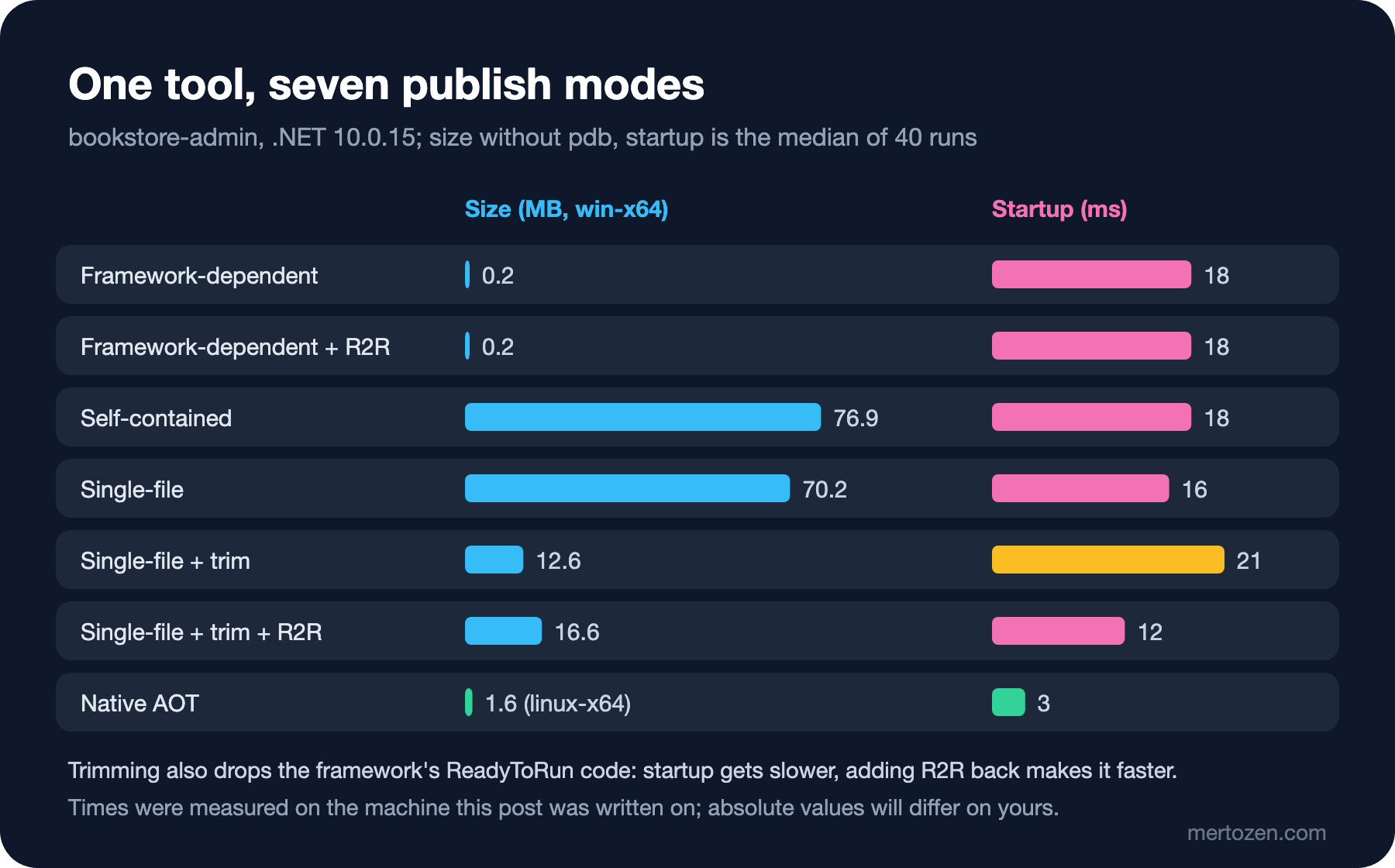
Sizes come from the win-x64 publishes (except AOT, which is linux-x64), without pdb and .dbg files. Startup time and memory were measured by publishing the same modes for the RID of the machine this post was written on, running bookstore-admin isbn 978-0-441-17271-9 three times as a warm-up and then 40 times; the values are medians. Memory is the peak resident set size the process reached, that is, how much physical memory it held. Absolute values will be different on your Windows machine; what matters is the difference between modes.
| Mode | Files | Size | Startup | Memory |
|---|---|---|---|---|
| Framework-dependent | 7 | 0.2 MB | 18 ms | 40 MB |
| Framework-dependent + R2R | 7 | 0.2 MB | 18 ms | 40 MB |
| Self-contained | 194 | 76.9 MB | 18 ms | 40 MB |
| Single-file | 3 | 70.2 MB | 16 ms | 37 MB |
| Single-file + trim | 3 | 12.6 MB | 21 ms | 18 MB |
| Single-file + trim + R2R | 3 | 16.6 MB | 12 ms | 23 MB |
Native AOT (linux-x64) | 3 | 1.6 MB | 3 ms | 7 MB |
What the table says: framework-dependent and self-contained run the same runtime, so their speed is the same; the only difference is distribution. Trimming cuts size and memory by more than half and, without R2R, slows startup down. Native AOT is clearly ahead on startup and memory, but it has to be compiled on the target platform and the code has to be AOT-compatible. For an 18 ms CLI tool none of this is noticeable to the user; distribution decides, not speed. The same table means something very different for a serverless function started thousands of times a second or a service with hundreds of replicas.
Making the Choice Permanent with a Publish Profile
Instead of typing the long command line every time, we put the choice in a publish profile: a trimmed, R2R single file for the store staff's Windows machines, which have no .NET installed:
<Project>
  <!-- Single exe for Windows staff machines without a .NET runtime: dotnet publish -p:PublishProfile=win-x64 -->
  <PropertyGroup>
    <RuntimeIdentifier>win-x64</RuntimeIdentifier>
    <SelfContained>true</SelfContained>
    <PublishSingleFile>true</PublishSingleFile>
    <PublishTrimmed>true</PublishTrimmed>
    <PublishReadyToRun>true</PublishReadyToRun>
    <PublishReferencesDocumentationFiles>false</PublishReferencesDocumentationFiles>
  </PropertyGroup>
</Project>
dotnet publish tools/Bookstore.Admin -p:PublishProfile=win-x64 Bookstore.Admin -> C:\src\Bookstore\artifacts\publish\Bookstore.Admin\release_win-x64\The file is at tools/Bookstore.Admin/Properties/PublishProfiles/win-x64.pubxml, and dotnet publish looks for the profile name in that folder. The output now has the exe, appsettings.json and the pdbs; the XML file is gone. Before committing, git status did not show the profile:
git check-ignore -v tools/Bookstore.Admin/Properties/PublishProfiles/win-x64.pubxml.gitignore:195:*.pubxml tools/Bookstore.Admin/Properties/PublishProfiles/win-x64.pubxmlThe file that dotnet new gitignore generates ignores *.pubxml, because Visual Studio's web deploy profiles can contain connection details and passwords. Our profile has no secrets, so we added an exception line to .gitignore: !**/PublishProfiles/*.pubxml. If a profile ever needs a secret, that value belongs in the CI system's secret store, not in the profile.
A container image is also a publish target: since .NET 10, console apps can produce an image with dotnet publish -t:PublishContainer without any extra property. Choosing the image, layers and registries is the topic of the Docker series; we did not run it here. .NET 11 brought two things in this area: identical image digests from identical inputs through the SOURCE_DATE_EPOCH environment variable (reproducible containers), and UseOptimizedPublish, which skips the full Build target in a Native AOT publish. The latter is opt-in in SDK 11.0.100; the SDK's Microsoft.NET.Publish.targets file explicitly sets the default to false. With it on, about 200 files of managed output were not written to the bin folder, but custom targets hooked with AfterTargets="Build" don't run either; we will come back to this when we write targets in post 8.
In Production
Keep a republish schedule for self-contained and AOT outputs. A framework-dependent tool gets patched by the runtime update on the machine; a self-contained one gets patched only when you publish it again. When .NET's monthly servicing release comes out, updating the SDK in CI and rebuilding these outputs should be a scheduled job. The runtime line printed by bookstore-admin info is enough to see who runs which version.
Measure in your own environment. Our table shows a small CLI tool on a single machine. In a web API, startup time also includes dependency loading, configuration and the first requests, and R2R and AOT behave differently there. Before deciding, publish your own app with the same modes and measure it.
On the day you turn on trimming or AOT, run all your tests against that output as well. The analyzers find what static analysis can find; a plugin loaded through reflection, a type name read from configuration, or a type that goes into serialization may stay invisible until run time. A trimmed publish without warnings is a good sign, not proof.
Common Pitfalls
Suppressing trim warnings. Silencing IL2026 with SuppressTrimAnalysisWarnings or NoWarn turns the publish green, but the deleted type comes back at run time as a MissingMethodException or as an object that silently stays empty. Close the warning by changing the code.
Forgetting security patches in a self-contained app. Having .NET 10.0.16 installed on the machine gives a self-contained tool nothing; it keeps running on the 10.0.15 it carries.
Trying to compile AOT for every platform on one machine. Native AOT does not compile across operating systems; in CI you need a job or container running on each target OS. R2R and trimming don't have this limit.
Deriving file paths from Assembly.Location in a single-file app. The value is empty there; use AppContext.BaseDirectory for files next to the app.
Not noticing that .gitignore kept the publish profile out of the commit. When a teammate runs the same command, it fails because the profile can't be found.
A Small Experiment
★☆☆ Build the exe with dotnet publish tools/Bookstore.Admin -p:PublishProfile=win-x64 and run the info, isbn and price commands. Then add EnableCompressionInSingleFile to the profile; write down the size and the startup time you measure with Measure-Command in PowerShell.
★★☆ Publish the same tool as framework-dependent and as self-contained and compare the two runtimeconfig.json files. When the next 10.0.x runtime arrives on your machine, check which version each tool prints in its info output.
★★★ Write ReadApiBaseUrl with JsonSerializer.Deserialize<AdminSettings>, look at the IL2026 and IL3050 errors, then remove them with a JsonSerializerContext. Produce the AOT output in the container and check that info still prints the right address.
In this post we measured the ways to ship bookstore-admin. In the next post we ship it another way: we package it as a .NET tool, add it to the team's local tool manifest, run tools with dnx without installing them, and write a dotnet new template for new modules.