

Multi-Project Solution Layout: Directory.Build.props/targets, Central Package Management and Shared Settings
Directory.Build.props is read from inside Sdk.props before the csproj, so it cannot see values such as OutputType or IsPackable; project-dependent decisions belong in Directory.Build.targets, though values the SDK derived earlier don't change there either. We set up a nested props chain, artifacts output, central package management, transitive pinning, VersionOverride and an analyzer added with GlobalPackageReference in Bookstore, with real build output.
Version note: The code in this post was built and run with .NET 10 (SDK 10.0.404, MSBuild 18.9) and Microsoft.CodeAnalysis.BannedApiAnalyzers 5.6.0.
Guess First
We want every Bookstore library that gets published as a package to produce an XML documentation file. Instead of writing that into each csproj, we add a rule to the Directory.Build.props at the repo root:
<PropertyGroup Condition="'$(IsPackable)' == 'true' and '$(OutputType)' == 'Library'">
  <GenerateDocumentationFile>true</GenerateDocumentationFile>
</PropertyGroup>
Bookstore.Contracts is a library and it is packable. Does the rule apply to it? Most people say yes. We delete the GenerateDocumentationFile line from the project file and ask:
dotnet msbuild src/Bookstore.Contracts -getProperty:GenerateDocumentationFile -getProperty:OutputType -getProperty:IsPackable{
"Properties": {
"GenerateDocumentationFile": "false",
"OutputType": "Library",
"IsPackable": "true"
}
}In the final project OutputType is Library and IsPackable is true; the condition looks true, yet the rule was not applied. When Directory.Build.props was read, both properties were still empty. In this post we use Bookstore, the online bookstore used as the shared example across this site's series, to look at which file evaluates shared settings and in what order, at nested Directory.Build.props chains, at central package management and at the artifacts output layout.
When Is Directory.Build.props Read?
When MSBuild evaluates a project it reads Sdk.props first, then the body of the csproj, and Sdk.targets last. Directory.Build.props is imported at the very start of that sequence, from inside Sdk.props; Directory.Build.targets comes after the csproj. This is the order of the files in the -preprocess output from the previous post:
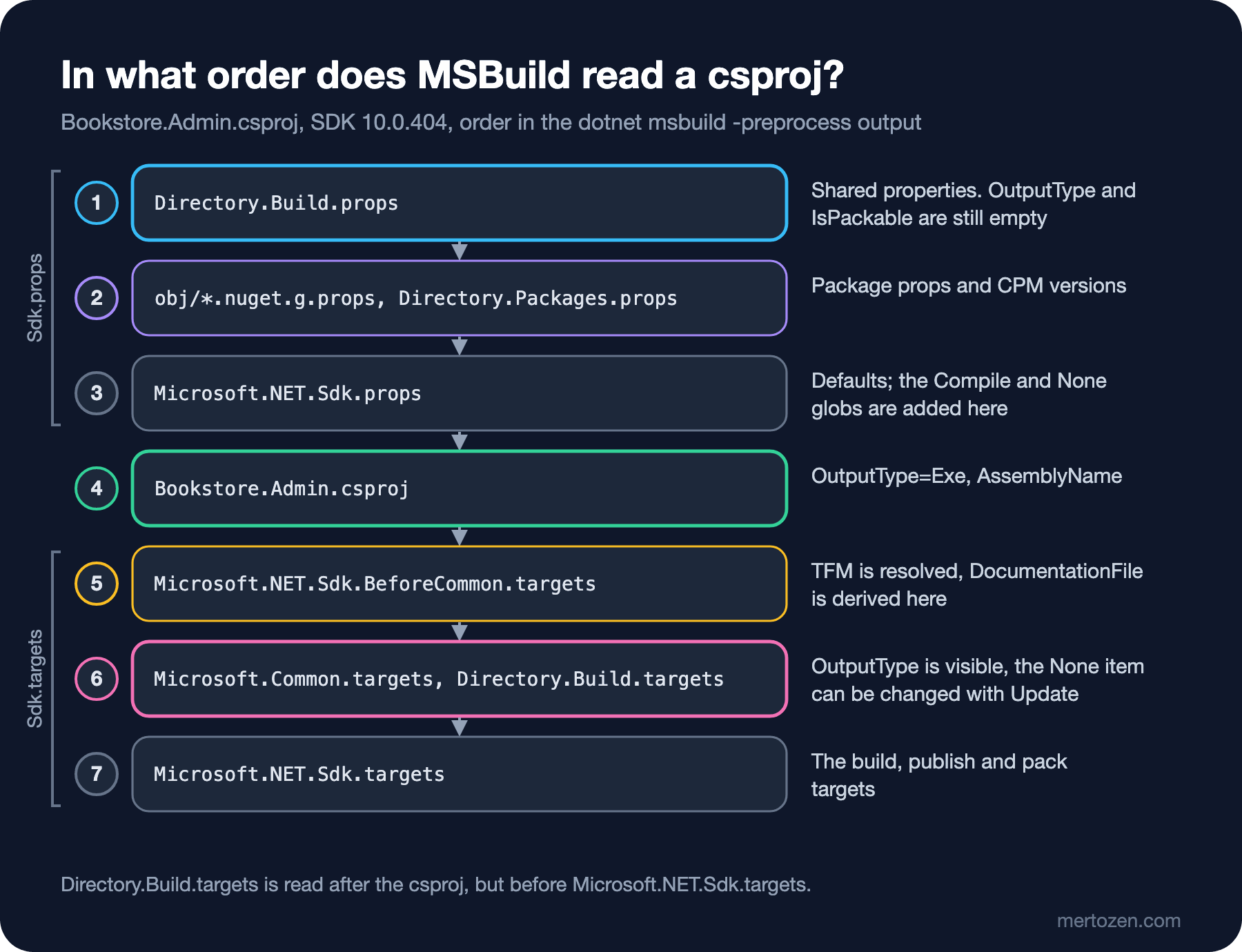
Properties are evaluated top to bottom in a single pass. When a file is read, it only sees properties set before it. To see this directly we added a line to both files that copies the current values into other properties (such as <SeenOutputType>$(OutputType)</SeenOutputType>) and read them with -getProperty:
| Property | Seen in Directory.Build.props | Seen in Directory.Build.targets | Final value |
|---|---|---|---|
OutputType (Contracts) | empty | Library | Library |
OutputType (bookstore-admin) | empty | Exe | Exe |
TargetFrameworkIdentifier | empty | .NETCoreApp | .NETCoreApp |
IsPackable (Contracts) | empty | empty | true |
OutputType is written in the csproj (or is the SDK default), so Directory.Build.props can't see it. TargetFrameworkIdentifier is derived by the SDK from TargetFramework and computed at the start of Sdk.targets. The default for IsPackable comes with the pack targets, even after Directory.Build.targets. The rule is simple: in Directory.Build.props, only write conditions based on values you set yourself and on environment variables. Decisions that depend on the project or the SDK go into Directory.Build.targets, and even that file doesn't see every value.
Directory.Build.targets: Decisions That Come Late
Let's drop IsPackable from the condition and move the rule to Directory.Build.targets, where OutputType is now visible:
<Project>
  <PropertyGroup Condition="'$(OutputType)' == 'Library'">
    <GenerateDocumentationFile>true</GenerateDocumentationFile>
  </PropertyGroup>
</Project>
dotnet msbuild src/Bookstore.Contracts -getProperty:GenerateDocumentationFile -getProperty:DocumentationFile{
"Properties": {
"GenerateDocumentationFile": "true",
"DocumentationFile": ""
}
}The property became true, but no Bookstore.Contracts.xml appeared after the build, and a type without documentation produced no CS1591 warning either. The reason is that DocumentationFile is empty. The SDK looks at GenerateDocumentationFile and computes the XML file's path in Microsoft.NET.Sdk.BeforeCommon.targets, step 5 in the figure. Directory.Build.targets comes in step 6, so we changed the input after the value derived from it had already been computed. -getProperty saying true doesn't prove the setting works; verify the actual effect in the build output.
In Bookstore we left this setting in Bookstore.Contracts.csproj. Into Directory.Build.targets we put a rule where the order really matters. In the previous post we added a None Update line to the csproj to copy bookstore-admin's appsettings.json to the output. Instead of repeating that line in every console tool Bookstore adds:
<Project>
  <!-- OutputType is known only after the csproj, and the SDK's None glob only exists after Sdk.props. -->
  <ItemGroup Condition="'$(OutputType)' == 'Exe' and '$(UsingMicrosoftNETSdkWeb)' != 'true'">
    <None Update="appsettings*.json" CopyToOutputDirectory="PreserveNewest" />
  </ItemGroup>
</Project>
This rule doesn't work in Directory.Build.props. Apart from the condition, Update only modifies items added before it, and the SDK's None glob is added in step 3, after Directory.Build.props. When we tried it, the appsettings.json item stayed without metadata. In Directory.Build.targets the items exist and OutputType is known. Bookstore.Api is left out of the rule because the Web SDK already copies the file as Content; the test projects are Exe but have no appsettings.json, so the rule changes nothing there.
Nested Files and Building the Chain on Purpose
MSBuild imports the first Directory.Build.props it finds walking up from the project folder and stops searching there. We wanted to gather the shared settings of the two test projects (the OutputType for xUnit v3, the package reference, the global using) into tests/Directory.Build.props. First attempt:
<Project>
  <PropertyGroup>
    <OutputType>Exe</OutputType>
  </PropertyGroup>
</Project>
C:\Program Files\dotnet\sdk\10.0.404\Sdks\Microsoft.NET.Sdk\targets\Microsoft.NET.TargetFrameworkInference.targets(109,5): error NETSDK1013: The TargetFramework value '' was not recognized. It may be misspelled. If not, then the TargetFrameworkIdentifier and/or TargetFrameworkVersion properties must be specified explicitly. [C:\src\Bookstore\tests\Bookstore.Contracts.Tests\Bookstore.Contracts.Tests.csproj]The new file replaced the root one; TargetFramework, Nullable and TreatWarningsAsErrors vanished from the test projects. You have to build the chain by hand:
<Project>
  <!-- A nested Directory.Build.props stops the upward search, so import the root one explicitly. -->
  <Import Project="$([MSBuild]::GetPathOfFileAbove('Directory.Build.props', '$(MSBuildThisFileDirectory)../'))" />

  <PropertyGroup>
    <OutputType>Exe</OutputType>
  </PropertyGroup>

  <ItemGroup>
    <PackageReference Include="xunit.v3" />
    <Using Include="Xunit" />
  </ItemGroup>
</Project>
GetPathOfFileAbove searches for the file starting from the given folder and walking up. The ../ in the second argument matters: if the search started from its own folder, the file would find itself and enter an infinite import loop. The import line sits at the top of the file because we want the root values first, so the test folder can override them when needed. Now the two test csproj files only contain project references and the packages specific to that test project:
<Project Sdk="Microsoft.NET.Sdk">

  <ItemGroup>
    <ProjectReference Include="..\..\src\Bookstore.Contracts\Bookstore.Contracts.csproj" />
  </ItemGroup>

</Project>
The same search rule reaches outside the repo too. A teammate clones a small tools repo into C:\src\bookstore-tools; the repo has no Directory.Build.props, but C:\src has one left behind years ago for another project. After deleting the TargetFramework line the template wrote, assuming, as we did in the previous post, that it comes from the shared file:
dotnet msbuild Seeder -getProperty:TargetFramework -getProperty:DirectoryBuildPropsPath{
"Properties": {
"TargetFramework": "net8.0",
"DirectoryBuildPropsPath": "C:\src\Directory.Build.props"
}
}The project quietly went back to .NET 8. The DirectoryBuildPropsPath property tells you directly which file was imported; it is the first place to look when in doubt. Bookstore has its own Directory.Build.props at the root, so the search stops there and no outside file can get in. That is why keeping a Directory.Build.props at the repo root, even an empty one, is a good habit.
Artifacts Output: All Output in One Folder
The artifacts output layout, introduced in .NET 8, collects all output under an artifacts/ folder at the repo root instead of separate bin/ and obj/ folders per project. In CI it becomes easier to know where each file is, to cache it and to clean it. We turned it on by writing UseArtifactsOutput into Directory.Build.props. Because the SDK computes output paths inside Sdk.props, a value written in the csproj comes too late, and the SDK rejects it explicitly:
C:\Program Files\dotnet\sdk\10.0.404\Sdks\Microsoft.NET.Sdk\targets\Microsoft.NET.DefaultOutputPaths.targets(161,5): error NETSDK1199: The ArtifactsPath and UseArtifactsOutput properties cannot be set in a project file, due to MSBuild ordering constraints. They must be set in a Directory.Build.props file or from the command line. See https://aka.ms/netsdk1199 for more information. [C:\src\Bookstore\tools\Bookstore.Admin\Bookstore.Admin.csproj]With the setting in Directory.Build.props, the first build looked like this:
  Bookstore.Contracts net10.0 succeeded (0.1s) → artifacts\bin\Bookstore.Contracts\debug\Bookstore.Contracts.dll
  Bookstore.Admin net10.0 succeeded (0.1s) → artifacts\bin\Bookstore.Admin\debug\bookstore-admin.dll
  Bookstore.Contracts.Tests net10.0 succeeded (0.1s) → tests\artifacts\bin\Bookstore.Contracts.Tests\debug\Bookstore.Contracts.Tests.dll
  Bookstore.Api net10.0 succeeded (0.4s) → artifacts\bin\Bookstore.Api\debug\Bookstore.Api.dll
  Bookstore.Api.Tests net10.0 succeeded (0.1s) → tests\artifacts\bin\Bookstore.Api.Tests\debug\Bookstore.Api.Tests.dll
The test projects wrote to tests\artifacts. The default location is next to the nearest Directory.Build.props, and for the test projects that is now the file in tests/. We pinned the path to the root file's folder:
<PropertyGroup>
  <!-- Must be set before the SDK props: all build output goes to artifacts/ at the repo root. -->
  <UseArtifactsOutput>true</UseArtifactsOutput>
  <!-- Without this, projects under a nested Directory.Build.props get their own artifacts/ folder. -->
  <ArtifactsPath>$(MSBuildThisFileDirectory)artifacts</ArtifactsPath>
</PropertyGroup>
$(MSBuildThisFileDirectory) is the folder of the file it is written in; it doesn't change per project. The layout is artifacts/<type>/<project>/<pivot>: the type is bin, obj, publish or package, and the pivot is the lowercase configuration, combined with the TFM and RID when needed (debug, release_linux-x64). Pack and publish follow the same layout:
  Successfully created package 'C:\src\Bookstore\artifacts\package\release\Bookstore.Contracts.1.0.0.nupkg'.
  Bookstore.Admin -> C:\src\Bookstore\artifacts\publish\Bookstore.Admin\release\
The reference app's .gitignore already had an artifacts/ line; bin and obj folders no longer appear inside the projects.
Central Package Management: Versions in One File
Bookstore has used central package management since the reference app. ManagePackageVersionsCentrally is on in Directory.Packages.props, each package's version lives in a PackageVersion item, and the csproj files only write version-less PackageReference items. In this setup, adding a package to a project with a version is an error. Here is why we didn't create the test project with dotnet new xunit in post 1:
dotnet new xunit -o tests/Bookstore.Catalog.TestsC:\src\Bookstore\tests\Bookstore.Catalog.Tests\Bookstore.Catalog.Tests.csproj : error NU1008: The following PackageReference items cannot define a value for Version: coverlet.collector, Microsoft.NET.Test.Sdk, xunit, xunit.runner.visualstudio. Projects using Central Package Management must define a Version value on a PackageVersion item. For more information, visit https://aka.ms/nuget/cpm/gettingstartedTemplates know nothing about central package management and write the versions into the csproj. Migrating a solution that doesn't use it yet is the reverse of this error: collect the Version attributes from every project, write them into Directory.Packages.props as PackageVersion items, delete them from the csproj files and merge different versions of the same package into one. That last step is the real work, because when two projects use different versions of a package you have to decide which one stays. dotnet package add, on the other hand, understands central management: it writes the version into Directory.Packages.props and the reference into the csproj.
Like Directory.Build.props, Directory.Packages.props is searched upward and the first one found is used. If you add a second file in a subfolder, you need to import the parent one with the same GetPathOfFileAbove pattern. In the Modular Monolith series the number of projects grows when modules are split into separate projects, but the setup stays the same: versions stay in one file.
Transitive Pinning, VersionOverride and GlobalPackageReference
Central package management only manages the versions of packages you reference directly. Microsoft.EntityFrameworkCore.SqlServer, used by the API, brought in Azure.Identity 1.17.1 transitively through Microsoft.Data.SqlClient; dotnet package list --include-transitive --outdated showed that the latest version is 1.21.0. To upgrade a transitive package without referencing it directly, we turned on transitive pinning:
<PropertyGroup>
  <ManagePackageVersionsCentrally>true</ManagePackageVersionsCentrally>
  <CentralPackageTransitivePinningEnabled>true</CentralPackageTransitivePinningEnabled>
</PropertyGroup>
<ItemGroup>
  <!-- Transitive pin: Microsoft.Data.SqlClient brings 1.17.1. -->
  <PackageVersion Include="Azure.Identity" Version="1.21.0" />
</ItemGroup>
dotnet package list --project src/Bookstore.Api --include-transitive Transitive Package Resolved
...
> Azure.Identity 1.21.0
...Pinning only upgrades; if you write a version lower than the one a dependency asks for, restore fails with NU1109. If you produce a package from this project, the pinned version is written explicitly into the package's dependency list, so use pinning carefully in libraries published as packages. Finding which transitive package has a vulnerability is NuGetAudit's job, which the DevSecOps series covers.
When one project temporarily needs a different version, you use VersionOverride. The test projects' xunit.v3 reference now comes from tests/Directory.Build.props, so in the csproj we write Update, not Include:
<PackageReference Update="xunit.v3" VersionOverride="4.0.2" /> Top-level Package Requested Resolved
> xunit.v3 4.0.2 4.0.2Overrides pile up over time and defeat the purpose of central management. If you don't want to allow them on the team, set CentralPackageVersionOverrideEnabled to false; the same line then fails at restore:
C:\src\Bookstore\tests\Bookstore.Contracts.Tests\Bookstore.Contracts.Tests.csproj : error NU1013: The following PackageReference items cannot specify a value for VersionOverride: xunit.v3. Projects using Central Package Management are currently configured to disable this functionality. For more information, visit https://aka.ms/nuget/cpm/versionoverrideThe last tool is GlobalPackageReference: for analyzer, versioning or build-extension packages that every project needs. NuGet adds the reference with PrivateAssets="All" and without a compile reference; the package doesn't enter the code and doesn't flow to other projects. In Bookstore we want time to be read through TimeProvider everywhere, because the API registers it in dependency injection and tests can supply a fake clock. We added the banned API analyzer to every project and listed the banned members in a BannedSymbols.txt at the root:
<ItemGroup>
  <!-- Added to every project as a private, analyzer-only reference. -->
  <GlobalPackageReference Include="Microsoft.CodeAnalysis.BannedApiAnalyzers" Version="5.6.0" />
</ItemGroup>
P:System.DateTime.Now;Inject TimeProvider instead
P:System.DateTime.UtcNow;Inject TimeProvider instead
P:System.DateTimeOffset.Now;Inject TimeProvider instead
P:System.DateTimeOffset.UtcNow;Inject TimeProvider insteadSo the analyzer can read the file, we added <AdditionalFiles Include="$(MSBuildThisFileDirectory)BannedSymbols.txt" /> to the root Directory.Build.props. With DateTime.UtcNow written into bookstore-admin as a test:
C:\src\Bookstore\tools\Bookstore.Admin\Program.cs(16,39): error RS0030: The symbol 'DateTime.UtcNow' is banned in this project: Inject TimeProvider instead (https://github.com/dotnet/roslyn/blob/main/src/RoslynAnalyzers/Microsoft.CodeAnalysis.BannedApiAnalyzers/BannedApiAnalyzers.Help.md) [C:\src\Bookstore\tools\Bookstore.Admin\Bookstore.Admin.csproj]Thanks to TreatWarningsAsErrors, the rule arrived as an error. Managing which analyzer rule runs at which severity in which project is the subject of the Static Analysis series; what matters here is that a single line adds an analyzer to the whole solution.
A Slice of the Solution with a Solution Filter
The Bookstore.Tests.slnf we created in post 1 is a view of the solution that contains only the test projects and their dependencies:
dotnet sln Bookstore.Tests.slnf list
dotnet build Bookstore.Tests.slnf
Project(s)
----------
tests/Bookstore.Api.Tests/Bookstore.Api.Tests.csproj
tests/Bookstore.Contracts.Tests/Bookstore.Contracts.Tests.csproj
Bookstore.Contracts -> C:\src\Bookstore\artifacts\bin\Bookstore.Contracts\debug\Bookstore.Contracts.dll
Bookstore.Contracts.Tests -> C:\src\Bookstore\artifacts\bin\Bookstore.Contracts.Tests\debug\Bookstore.Contracts.Tests.dll
Bookstore.Api -> C:\src\Bookstore\artifacts\bin\Bookstore.Api\debug\Bookstore.Api.dll
Bookstore.Api.Tests -> C:\src\Bookstore\artifacts\bin\Bookstore.Api.Tests\debug\Bookstore.Api.Tests.dllbookstore-admin wasn't built, because no test project references it. The filter file lists projects; dependencies come from the ProjectReference items. In large solutions, for a CI test job or for a developer working on a single module in the IDE, this means not loading projects you don't need. Creating and editing .slnf files from the CLI is listed among the .NET 11 SDK features; as we saw in post 1, it also works in the 10.0.4xx band and fails in 10.0.1xx.
In Production
After adding a rule to a shared file, verify its effect separately for each project type. The two attempts in this post were cases where -getProperty showed the expected value but the rule was either never applied or changed nothing. Checking the build output for one library, one console, one web and one test project takes a few minutes.
When Directory.Build.props or Directory.Packages.props changes, every project is evaluated again and incremental builds lose their advantage. Instead of adding temporary experiments to these files, try them from the command line with -p:.
Keep a record of the packages you upgrade with transitive pinning. When the reason for a pin disappears (the parent package upgrades in its new version anyway), the line becomes unnecessary and one day turns into an attempted downgrade that fails with NU1109. Keeping pins in their own ItemGroup in Directory.Packages.props, with a comment, makes this easier.
Common Pitfalls
Directory.Build.props being read from a parent folder outside the repo. If the repo has no file of its own, a forgotten file in C:\src or in the user folder applies to all of its projects. Keep a Directory.Build.props at the root and check DirectoryBuildPropsPath when in doubt.
Forgetting to import the parent from a nested file. The file in the subfolder breaks the chain, and shared settings silently disappear from the projects in that folder. If you get an error like NETSDK1013 you are lucky; losing a setting such as TreatWarningsAsErrors produces no error at all.
Applying production rules to test projects unchanged. Requiring XML documentation makes sense for a packaged library, not for a test project. Instead of writing a general rule into the shared file and hunting for exceptions later, give the test folder its own Directory.Build.props and keep the differences there.
Writing project-dependent conditions in Directory.Build.props. Values such as OutputType, IsPackable and TargetFrameworkIdentifier are still empty there; the condition is never true for any project and raises no error either.
Using a template as-is in a repo with central package management. You get NU1008; move the versions into Directory.Packages.props and delete the Version attributes from the csproj.
A Small Experiment
★☆☆ Run dotnet msbuild tests/Bookstore.Contracts.Tests -getProperty:DirectoryBuildPropsPath -getProperty:ArtifactsPath. Then comment out the import line in tests/Directory.Build.props and run the same command again; which values changed?
★★☆ Add a PropertyGroup to Directory.Build.targets that records the values visible during evaluation (such as <SeenTfm>$(TargetFramework)</SeenTfm>), and put the same lines into Directory.Build.props. Compare the values seen in the two files for TargetFramework, AssemblyName, OutputPath and IntermediateOutputPath.
★★★ Pin Azure.Identity in Directory.Packages.props to a version below 1.17.1 and read the NU1109 error restore reports. Then remove the pin and compare Azure.Identity's version with dotnet package list --project src/Bookstore.Api --include-transitive.
In this post we gathered package versions into one file, but we didn't touch where the packages are downloaded from: Bookstore only uses nuget.org right now. In the next post we put Bookstore.Contracts on an internal company feed and use it safely together with nuget.org: the nuget.config hierarchy, package source mapping, lock files and the minimum publish age setting in .NET 11.