

How CSS Decides: The Cascade, Specificity, Inheritance and Cascade Layers (@layer)
The cascade decides which of the values written for an element wins, in this order: origin and importance, context, the style attribute, layers, specificity, order of appearance; layers come before specificity. We debug Bookstore's "why isn't this button red?" bug step by step through the protocol DevTools uses, move third-party CSS below our own styles with @layer, and measure inherit/initial/unset/revert/revert-layer in two browser engines.
Version note: This post follows the CSS Cascading and Inheritance Level 5 specification and the state of Baseline in November 2026; the examples were run in Chrome 158 and WebKit 27.2 via Playwright 1.65, and Firefox support is taken from web-features data.
Guess First
We are on the book detail page of Bookstore, the online bookstore used as the shared example across this site's series. The product team wants the "Add to cart" button to be red during a campaign. The project's button styles come from a third-party UI kit, and someone added that kit to the page directly with a <link>:
/* Third-party UI kit, shipped as plain (unlayered) CSS */
.btn {
    display: inline-flex;
    align-items: center;
    gap: 0.5rem;
    padding: 0.5rem 1rem;
    border: 1px solid transparent;
    border-radius: 0.375rem;
    font-weight: 600;
    cursor: pointer;
}

.btn-primary {
    background-color: #2563eb;
    color: #ffffff;
}

.btn-primary:hover {
    background-color: #1d4ed8;
}
Our own styles live inside a cascade layer called components. The first attempt was a plain .add-to-cart rule, and the button stayed blue. Assuming specificity was the problem, someone added an id to the selector:
<!doctype html>
<html lang="en">
<head>
    <meta charset="utf-8">
    <title>Lab 01: unlayered vendor CSS</title>
    <link rel="stylesheet" href="../css/vendor/ui-kit.css">
    <style>
        @layer components {
            #book-page .add-to-cart {
                background-color: #b91c1c;
            }
        }
    </style>
</head>
<body>
    <main id="book-page">
        <button class="btn btn-primary add-to-cart" type="button">Add to cart</button>
    </main>
</body>
</html>
Our selector has an id and a class; the kit's has a single class. Our rule also comes later in the page. What color is the button now: red or blue? Is the next step to add !important?
Keep your answer in mind. This is the first post of the CSS3: Flexbox, Grid and Modern CSS series, and it lays the groundwork for the rest: when several values are written for the same property on the same element, which one does the browser pick? The mechanism that makes this decision is called the cascade. It needs to be settled before layout topics like Flexbox and Grid, because most "my CSS doesn't work" complaints are not about layout at all; they come from a shaky understanding of the cascade.
The Steps of the Cascade
When several declarations for the same property match an element, the browser sorts them by a series of criteria, and the one on top wins. In the Cascade Level 5 specification the criteria are applied in this order: origin and importance, context, element-attached styles, layers, specificity, and finally order of appearance. The key point: if a criterion can tell two declarations apart, the decision is made there and later criteria are never consulted. Specificity only comes into play when the four steps before it end in a tie.
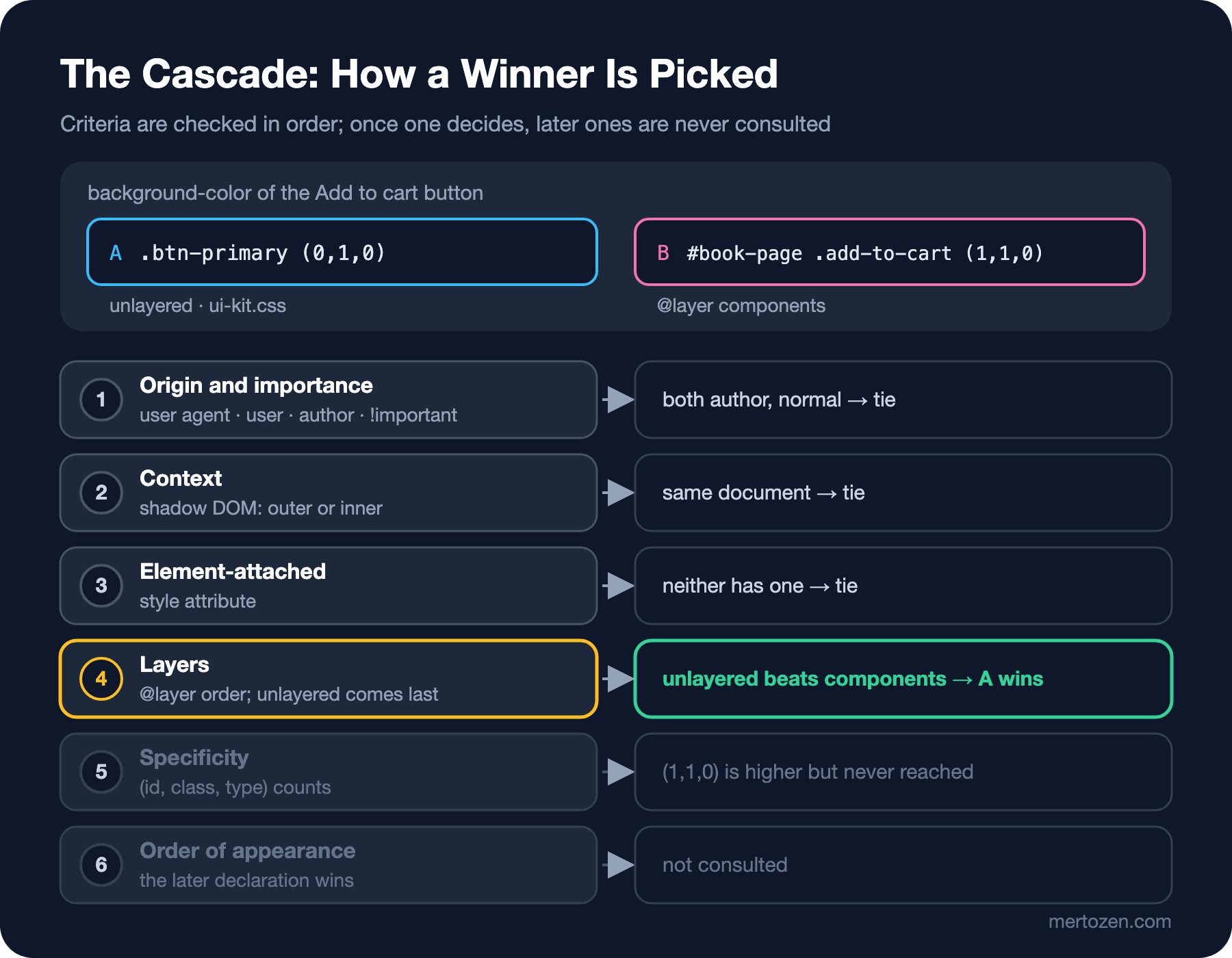
The answer to the opening question is hidden in this order. Both candidates are in the author origin and normal, without !important; both are in the same document; neither is a style attribute. The difference appears at the fourth step, layers: the kit's rule is in no layer at all, ours is in the components layer. Unlayered styles always rank above every layer. The decision was made at this step; our selector's (1,1,0) specificity was never compared. The button stayed blue, and adding the id changed nothing.
Origin, Importance and the Style Attribute
The first step looks at where a declaration comes from. There are three origins: the browser's own default styles, called user agent styles; styles the user sets through browser settings, called user styles; and what we write as the page's authors, called author styles. For normal declarations the order is author, user, user agent: what we write beats the browser's defaults. !important reverses this order: an important user agent declaration beats an important user declaration, which beats an important author declaration. The reversal is deliberate, so that an !important setting a user applies for accessibility can always override the site's styles. The spec has two more origins in between: the values of a running CSS animation sit above normal author declarations and below important ones, while values in a transition sit above everything.
The second step is context. A web component that uses shadow DOM has two sources of styles: those in the component's own shadow root and those of the page outside. For normal declarations the outer one wins; for important ones the inner one wins. I tried this with a small stock-badge custom element:
<style>
    stock-badge { color: #b91c1c; }
    stock-badge.strict { color: #b91c1c !important; }
</style>
<stock-badge>In stock</stock-badge>
<stock-badge class="strict">In stock</stock-badge>
<script>
    customElements.define('stock-badge', class extends HTMLElement {
        constructor() {
            super();
            this.attachShadow({ mode: 'open' }).innerHTML = `<style>
                :host { color: #15803d; }
                :host(.strict) { color: #15803d !important; }
            </style><slot></slot>`;
        }
    });
</script>
chromium normal rgb(185, 28, 28) | strict rgb(21, 128, 61)
webkit normal rgb(185, 28, 28) | strict rgb(21, 128, 61)On the first badge the outer red beat the component's own green, so that the page using a component can style it. On the second, both sides are !important and the component's inside won; this is how a component author can protect a rule that must not be overridden. Both browser engines gave the same result.
The third step is element-attached styles, which in practice means the style attribute. Older material describes inline styles as having a specificity of (1,0,0,0). The Level 5 spec defines them as a separate step, and that step comes even before layers. So no layer and no selector can beat a normal inline style; the only thing that can is an !important.
Specificity: Counting (id, class, type)
If the first four steps tie, specificity is checked. The parts of a selector are counted in three columns: id selectors in the first; classes, attribute selectors and pseudo-classes in the second; type selectors such as button or p and pseudo-elements in the third. The comparison goes left to right: a single id beats any selector made only of classes, however many there are. * and the combinators, which are the space, >, + and ~, are not counted. :is(), :not(), :has() and :where(), whose specificity is always zero, need their own calculation; we will measure them in the series' post on modern selectors.
The last step is order of appearance: if everything else is equal, the later declaration wins. "Later" covers the order of <link> and <style> elements in the document, where @import rules sit, and the line order within a file.
Cascade Layers: You Decide the Order with @layer
The trouble with specificity is that in a growing project it turns into an arms race: you add an id to beat the kit's rule, the next developer adds two more classes to beat yours, and eventually !important shows up. Cascade layers exist to end that race. They have been Baseline since March 2022 and widely available since September 2024. The idea is simple: you put your styles into named layers and write the priority order of those layers once, explicitly. Between layers, the layer order decides; specificity only matters within the same layer.
I set up Bookstore's style files the way we will use them for the rest of the series. The entry file only declares the layer order and pulls in the other files:
/* Layer order is declared once, before anything else: later layers win */
@layer reset, vendor, base, components, utilities;

@import url("reset.css") layer(reset);
@import url("vendor/ui-kit.css") layer(vendor);
@import url("base.css") layer(base);
@import url("components/button.css") layer(components);
@import url("utilities.css") layer(utilities);
The @layer statement on the first line fixes the order: reset has the lowest priority, utilities the highest. Since a layer's position is set where it first appears, putting this line at the very top guarantees the order regardless of which file loads in which order. The layer(vendor) in the @import puts all of the third-party kit's rules into our vendor layer. We moved the kit below our own styles without touching its file. Our button rule is now plain:
.add-to-cart {
    background-color: var(--color-accent);
}
Layers can be nested too. A dot opens a sublayer inside components:
/* nested layer: components.cards sits inside components */
@layer components.cards {
    .book-card {
        border-radius: 0.5rem;
    }
}
There are anonymous layers as well, written as @layer { … } or @import url(…) layer;, but their position is fixed where they are written and no rules can be added to them later, so in a project I prefer named layers.
Now let's state the rule behind the trap in the opening question: every style that is not in a layer behaves as if it were in an invisible layer declared last, and for normal declarations it beats all layers. If someone adds a library with a <link> to a project that uses layers, even that library's weakest selector beats your strongest layered rule. HTML currently has no way to put a file loaded with <link> directly into a layer, which is why third-party CSS should come in through @import … layer().
"Why Isn't This Button Red?" Step by Step in DevTools
In real life we answer this question in the Elements panel of Chrome DevTools. The steps: right-click the button and choose Inspect, then look for background-color in the Styles tab. Styles shows the winning rule at the top and strikes through the losing declarations. Layered rules have a header such as @layer components above them; unlayered rules have none. Because rules are grouped by layer first, you immediately see that the blue comes from the unlayered ui-kit.css and that our rule with the id is struck through. The "Toggle CSS layers view" button in the Styles toolbar opens the page's layer order as a list. The Computed tab shows the final value of the property and which line of which file provided it. The panel itself is covered in detail in the Browser DevTools series post on Chrome DevTools and the Elements panel.
To keep the output in this post real, I collected the same information with a script. DevTools talks to the browser over the Chrome DevTools Protocol, and the list in the Styles tab comes from the CSS.getMatchedStylesForNode command. I wrote a small helper that calls the same command through Playwright:
// Asks Chromium (via CDP, the protocol DevTools uses) which rules declare a property on an element
export async function explain(page, selector, property) {
    const cdp = await page.context().newCDPSession(page);
    const sheets = new Map();
    cdp.on('CSS.styleSheetAdded', ({ header }) =>
        sheets.set(header.styleSheetId, header.sourceURL.split('/').pop() || '<style>'));
    await cdp.send('DOM.enable');
    await cdp.send('CSS.enable');
    const { root } = await cdp.send('DOM.getDocument');
    const { nodeId } = await cdp.send('DOM.querySelector', { nodeId: root.nodeId, selector });
    const { matchedCSSRules, inlineStyle } = await cdp.send('CSS.getMatchedStylesForNode', { nodeId });

    const rows = [];
    for (const { rule, matchingSelectors } of matchedCSSRules) {
        const declared = rule.style.cssProperties.filter(p => p.name === property && p.value);
        // Author rules list each declaration twice (source text + parsed); keep the source text one
        const own = declared.some(p => p.text) ? declared.filter(p => p.text) : declared.slice(0, 1);
        for (const p of own) {
            const sel = rule.selectorList.selectors[matchingSelectors[0]];
            const s = sel.specificity;
            rows.push({
                origin: rule.origin,
                layer: rule.layers?.map(l => l.text).join('.') || (rule.origin === 'user-agent' ? '' : '(unlayered)'),
                selector: sel.text,
                specificity: s ? `(${s.a},${s.b},${s.c})` : '',
                value: p.value,
                file: rule.origin === 'user-agent' ? 'user agent' : sheets.get(rule.styleSheetId) ?? '',
                important: p.important
            });
        }
    }
    const inline = (inlineStyle?.cssProperties ?? []).filter(p => p.name === property && p.text);
    for (const p of inline) {
        rows.push({ layer: '', selector: 'style=""', specificity: '', value: p.value, file: 'style attribute', important: p.important });
    }
    const computed = await page.$eval(selector, (el, prop) => getComputedStyle(el).getPropertyValue(prop), property);
    await cdp.detach();
    // rows are in ascending cascade order; for !important the order flips (earlier layer wins)
    const important = rows.filter(r => r.important);
    const normal = rows.filter(r => !r.important).reverse();
    return { computed, rows: [...important, ...normal] };
}

export function print({ computed, rows }, property) {
    console.log(`computed ${property}: ${computed}`);
    rows.forEach((r, i) => {
        console.log(`${i === 0 ? '✓' : '✗'} ${r.layer.padEnd(18)} ${r.selector.padEnd(36)} ${r.specificity.padEnd(8)} ${r.value.padEnd(22)} ${r.file}`);
    });
}
import { open } from './browser.mjs';
import { explain, print } from './cascade-report.mjs';
async function report(file, checks) {
const { browser, page } = await open(file);
console.log(`--- ${file}`);
for (const [selector, property] of checks) {
print(await explain(page, selector, property), property);
}
await browser.close();
}
// 1) The bug: vendor CSS linked unlayered, our rule inside a layer
await report('lab/01-unlayered-vendor.html', [['.add-to-cart', 'background-color']]);
// 2) The fix: vendor imported into its own, lower layer
await report('book.html', [['.add-to-cart', 'background-color']]);
// 3) !important flips the layer order; the style attribute beats every layer
await report('lab/01-importance.html', [['.stock-note', 'display'], ['.add-to-cart', 'background-color']]);To run the example project on your own machine, in the project folder:
npm install
npx playwright install chromium webkit
node scripts/01-cascade.mjs
--- lab/01-unlayered-vendor.html
computed background-color: rgb(37, 99, 235)
✓ (unlayered) .btn-primary (0,1,0) #2563eb ui-kit.css
✗ components #book-page .add-to-cart (1,1,0) #b91c1c 01-unlayered-vendor.html
✗ button (0,0,1) buttonface user agent
--- book.html
computed background-color: rgb(185, 28, 28)
✓ components .add-to-cart (0,1,0) var(--color-accent) button.css
✗ vendor .btn-primary (0,1,0) #2563eb ui-kit.css
✗ button (0,0,1) buttonface user agent
--- lab/01-importance.html
computed display: none
✓ reset [hidden] (0,1,0) none !important reset.css
✗ components .stock-note (0,1,0) block !important 01-importance.html
✗ p (0,0,1) block user agent
computed background-color: rgb(21, 128, 61)
✓ style="" #15803d style attribute
✗ components .add-to-cart (0,1,0) var(--color-accent) button.css
✗ vendor .btn-primary (0,1,0) #2563eb ui-kit.css
✗ button (0,0,1) buttonface user agentRead the lines the way you read DevTools: the top one wins (✓), the ones below lose (✗); the columns are layer, matching selector, specificity, value and file. The first block shows the bug: our rule with (1,1,0) specificity lost to the (0,1,0) .btn-primary, because the layer column for .btn-primary says (unlayered). The second block is after the fix: the kit is in the vendor layer, our rule is in components, and although both have the same specificity ours wins and the button is red. Neither an id nor !important was needed.
The third block shows two rules together. [hidden] { display: none !important; } in the reset layer beat display: block !important in components. For important declarations the layer order flips: the !important of the lowest layer is the strongest. The same applies to unlayered styles; per the spec, an important unlayered declaration loses to an important layered one. This means the rule we put in the reset, "anything with the hidden attribute stays hidden", cannot be broken by accident in any component. In the last part of the block, the green from the style attribute beat both layers, because the element-attached step comes before layers.
Inheritance and the CSS-wide Keywords
If the cascade finds no declaration at all for a property on an element, there are two possibilities. If the property is inherited, as most text-related ones such as color, font-family and line-height are, it takes the value from the parent element. If it is not inherited, as box-related ones such as background-color, border and margin are, it uses its initial value. Five keywords valid on every property let you ask for this behavior explicitly: inherit, initial, unset, revert and revert-layer. I measured their differences on the same button:
@layer components {
    .buy-box {
        color: #1f2937;
        background-color: #fef3c7;
    }
    .kw-inherit { color: inherit; background-color: inherit; }
    .kw-initial { color: initial; background-color: initial; }
    .kw-unset { color: unset; background-color: unset; }
    .kw-revert { color: revert; background-color: revert; }
    .kw-revert-layer { color: revert-layer; background-color: revert-layer; }
}
All buttons carry the btn btn-primary classes, so they get white text and a blue background from the vendor layer. Their parent, .buy-box, has dark gray text and a light yellow background:
--- chromium 158.0.8127.18
inherit       color: rgb(31, 41, 55)      background-color: rgb(254, 243, 199)
initial       color: rgb(0, 0, 0)         background-color: rgba(0, 0, 0, 0)
unset         color: rgb(31, 41, 55)      background-color: rgba(0, 0, 0, 0)
revert        color: rgb(0, 0, 0)         background-color: rgb(239, 239, 239)
revert-layer  color: rgb(255, 255, 255)   background-color: rgb(37, 99, 235)
--- webkit 27.2
inherit       color: rgb(31, 41, 55)      background-color: rgb(254, 243, 199)
initial       color: rgb(0, 0, 0)         background-color: rgba(0, 0, 0, 0)
unset         color: rgb(31, 41, 55)      background-color: rgba(0, 0, 0, 0)
revert        color: rgba(0, 0, 0, 0.847) background-color: rgb(192, 192, 192)
revert-layer  color: rgb(255, 255, 255)   background-color: rgb(37, 99, 235)
inherit took the parent's value for both properties. initial went back to the property's initial value from the spec: black for color, transparent for background-color. unset is the clever one: it acts like inherit on inherited properties and like initial on the rest, so the text became dark gray and the background transparent. revert ignores everything in the author origin and goes back to the browser's own style, and here the two engines differed: Chromium's default button background is rgb(239, 239, 239), WebKit's is rgb(192, 192, 192). The result of revert can change from browser to browser, because every browser has a different user agent stylesheet. revert-layer ignores only the layer it is in and falls back to the layer below, the kit's white-on-blue style. It is the cleanest way to say "drop my own style for this component and keep the kit's".
In practice the one you will use most is inherit. The input, button, select, textarea { font: inherit; } line in our reset is the classic example: form elements do not inherit the font by default, and you have to say so explicitly for them to use the page's font.
In Production
The layer order is an architectural decision and belongs at the start of a project. The reset, vendor, base, components, utilities order I chose for Bookstore is a common starting point: the most general rules at the bottom, the most specific ones, which should be used most sparingly, at the top. Having utility classes on top ensures that a helper like .visually-hidden is never overridden by a component. Tailwind CSS v4 puts its own CSS into native layers in a similar way; the details are in the upcoming Tailwind CSS series.
Watch out for @import chains. The browser discovers an imported file only after it has downloaded and read the file that imports it; in a large project that means downloading in series. In production these files should be merged into one at build time. Tools such as the Lightning CSS bundler can merge them while keeping the layer() information, but always check your tool's output: are the @layer blocks still in the merged file? If the layer information is lost, the whole kit becomes unlayered and you get the bug from the start of this post in production. The performance impact of loading CSS is covered in the upcoming Web Performance series.
Agree on a team rule for where new CSS goes. The most common mistake I see is someone in a layered project quickly adding a <style> block or a new CSS file and forgetting to put it into a layer. Every rule in that file silently beats everything else. Questioning unlayered CSS in code review is the cheapest guard against this.
Firefox support is broad for everything this post covers: cascade layers since Firefox 97, revert since 67. I ran the examples in this post in Chromium and WebKit; for Firefox I rely on web-features data.
Common Pitfalls
First, !important wars. Adding !important when you cannot beat a rule saves the moment, but it forces the next person who wants to override your rule to write !important too. And in a layered project !important works in reverse: an !important in a higher layer loses to one in a lower layer. Keep !important for the few rules that must never be overridden, like [hidden] in the reset.
Second, styling with id selectors. An id's specificity is so high that overriding it takes either another id or !important. Use ids for link targets, form labels and JavaScript; classes are enough for styling.
Third, competing with inline styles. If a component library or a script writes a style attribute on an element, no layer and no selector can win against it. Either fix the source or pass the value through a custom property; we will see that technique in the series' post on custom properties and theming.
Fourth, setting a layer's position by accident. If a @layer utilities { … } block in the middle of some file loads before the ordering line at the top, the position of utilities is set there. Make the ordering line the first line of the entry file and do not invent new layer names elsewhere.
A Small Experiment
★☆☆ Open book.html in Chrome, inspect the "Add to cart" button and find the @layer headers in the Styles tab. Then swap components and vendor in the first line of main.css; reload and compare the button's color and the struck-through rule in Styles.
★★☆ Repeat the measurement in scripts/01-keywords.mjs for font-weight and border-radius. Which one is inherited and which is not? Use the results to explain why unset behaves differently on the two properties.
★★★ List the third-party CSS files in your own project and move all of them into a layer with @import … layer(vendor). Then count the !important declarations in the project and note how many you could delete once the layers were in place.
In the next post we move on to selectors: we will use the same helper to measure how :is(), :where(), :has() and :not() affect specificity, and style book cards with and without a cover separately using :has().