

Unicode and UTF-8/UTF-16: Code Points, Surrogate Pairs, Rune and Why string.Length Breaks on Emoji
string.Length breaks on emoji because .NET and JavaScript count strings in UTF-16 code units; the family emoji is one grapheme but 5 code points, 8 code units and 18 UTF-8 bytes. From ASCII to Unicode, code points, planes and scalar values, encoding UTF-8 and surrogate pairs by hand, Rune, u8 literals and the BOM, and counting a 280-character review limit correctly with StringInfo and Intl.Segmenter.
Version note: The code in this post was built and run with .NET 10 (C# 14), TypeScript 7.0 and Node.js 24; the C# examples are tested with xUnit v3 4.0.3. The post is based on Unicode 18.0 (September 2026) and RFC 3629; .NET 10's character data follows Unicode 16.0.
Guess First
Book reviews at Bookstore are limited to 280 characters, and the backend check looks like this: if (review.Length > 280) return BadRequest();. A user adds the family emoji 👨👩👧 to a review. How much does this single emoji add to Length? 1, 2, or more?
Second question: when the same review is written to a file, how many bytes does that emoji take? And how many bytes does the letter "ş" take? Is there a single answer?
In the earlier posts of the series we looked at the bits of numbers. Text is numbers in the end too: each character gets a number, and that number is turned into bytes. The problems come from the word "character" meaning something different at each of these layers.
From ASCII to Code Pages, and Then to Unicode
ASCII was defined in the 1960s. A is 65, a 97, 0 48. Since a byte has 8 bits, 128–255 was left empty, and everyone filled that half according to their own language. For Turkish, Windows used Windows-1254 and the ISO side used ISO-8859-9; these tables are called code pages. The same byte, for example 0xFE, meant "ş" in the Turkish table and "þ" in the Western European table (Windows-1252). Since the byte itself doesn't say which table it was written with, anyone who opened the file with the wrong table saw broken characters.
Unicode solves this with a single table: it gives every character in the world one number. As of Unicode 18.0, released in September 2026, more than 170 thousand characters are defined. Unicode only defines the number; how the number is turned into bytes is a separate matter, the job of an encoding. The encodings defined for Unicode have names starting with UTF: UTF-8, UTF-16 and UTF-32.
Code Points, Planes and Scalar Values
Each number in Unicode is called a code point and is written in hex with U+: "a" U+0061, "ç" U+00E7, "₺" U+20BA, "📚" U+1F4DA. The code point range runs from U+0000 to U+10FFFF, that is, 17 blocks of 65,536. These blocks are called planes. The first, U+0000–U+FFFF, is the BMP, the Basic Multilingual Plane, which holds almost all widely used languages. Most emoji and historic scripts are in the other planes.
The range U+D800–U+DFFF is special: these numbers are never assigned to a character; they are reserved for UTF-16's internal mechanism. Code points outside this range are called scalar values; what we call "a valid Unicode character" is technically this. The Rune type in .NET represents exactly one scalar value.
UTF-8: Variable Length, ASCII Compatible
UTF-8 writes a code point in 1 to 4 bytes. Small numbers take few bytes, large numbers more:
| Code point range | Bytes | Bit pattern |
|---|---|---|
| U+0000 – U+007F | 1 | 0xxxxxxx |
| U+0080 – U+07FF | 2 | 110xxxxx 10xxxxxx |
| U+0800 – U+FFFF | 3 | 1110xxxx 10xxxxxx 10xxxxxx |
| U+10000 – U+10FFFF | 4 | 11110xxx 10xxxxxx 10xxxxxx 10xxxxxx |
With the bitwise operations from the second post of the series, you can turn the table straight into code:
// UTF-8 by hand, following the RFC 3629 table
public static byte[] EncodeUtf8(int codePoint) => codePoint switch
{
    <= 0x7F => [(byte)codePoint],
    <= 0x7FF => [(byte)(0xC0 | (codePoint >> 6)), (byte)(0x80 | (codePoint & 0x3F))],
    <= 0xFFFF => [(byte)(0xE0 | (codePoint >> 12)), (byte)(0x80 | ((codePoint >> 6) & 0x3F)), (byte)(0x80 | (codePoint & 0x3F))],
    _ => [(byte)(0xF0 | (codePoint >> 18)), (byte)(0x80 | ((codePoint >> 12) & 0x3F)), (byte)(0x80 | ((codePoint >> 6) & 0x3F)), (byte)(0x80 | (codePoint & 0x3F))],
};

Console.WriteLine(Convert.ToHexString(TextUnits.EncodeUtf8(0x1F4DA)));  // F09F939A
Console.WriteLine(Convert.ToHexString(TextUnits.EncodeUtf8(0x00E7)));   // C3A7
In a test I compared this function with Encoding.UTF8 over scalar values between 0 and U+10FFFF, and the results match. The design has three consequences. ASCII text stays byte for byte the same in UTF-8; an English file from the 1990s is already valid UTF-8. No byte of a multi-byte character is below 0x80, so when you search UTF-8 text for / or " you never land in the middle of a Turkish character by accident. And by looking at the leading bits of any byte you can tell whether it's at the start or in the middle of a character; in a corrupted stream it's easy to find the start of the next character.
All Turkish characters (ç, ğ, ı, İ, ö, ş, ü) take 2 bytes, ₺ takes 3, emoji take 4. That's the answer to the second question too: "ş" is 2 bytes in UTF-8, but as we'll see below, a "ş" that looks the same can also take 3 bytes.
UTF-16 and Surrogate Pairs
UTF-16 writes each code point in 16-bit units. Characters inside the BMP take a single unit (code unit). Those outside the BMP are split into two units; this is called a surrogate pair, and it's why the U+D800–U+DFFF range is reserved:
// UTF-16 surrogate pair by hand
public static (char High, char Low) ToSurrogates(int codePoint)
{
    int v = codePoint - 0x10000;
    return ((char)(0xD800 + (v >> 10)), (char)(0xDC00 + (v & 0x3FF)));
}
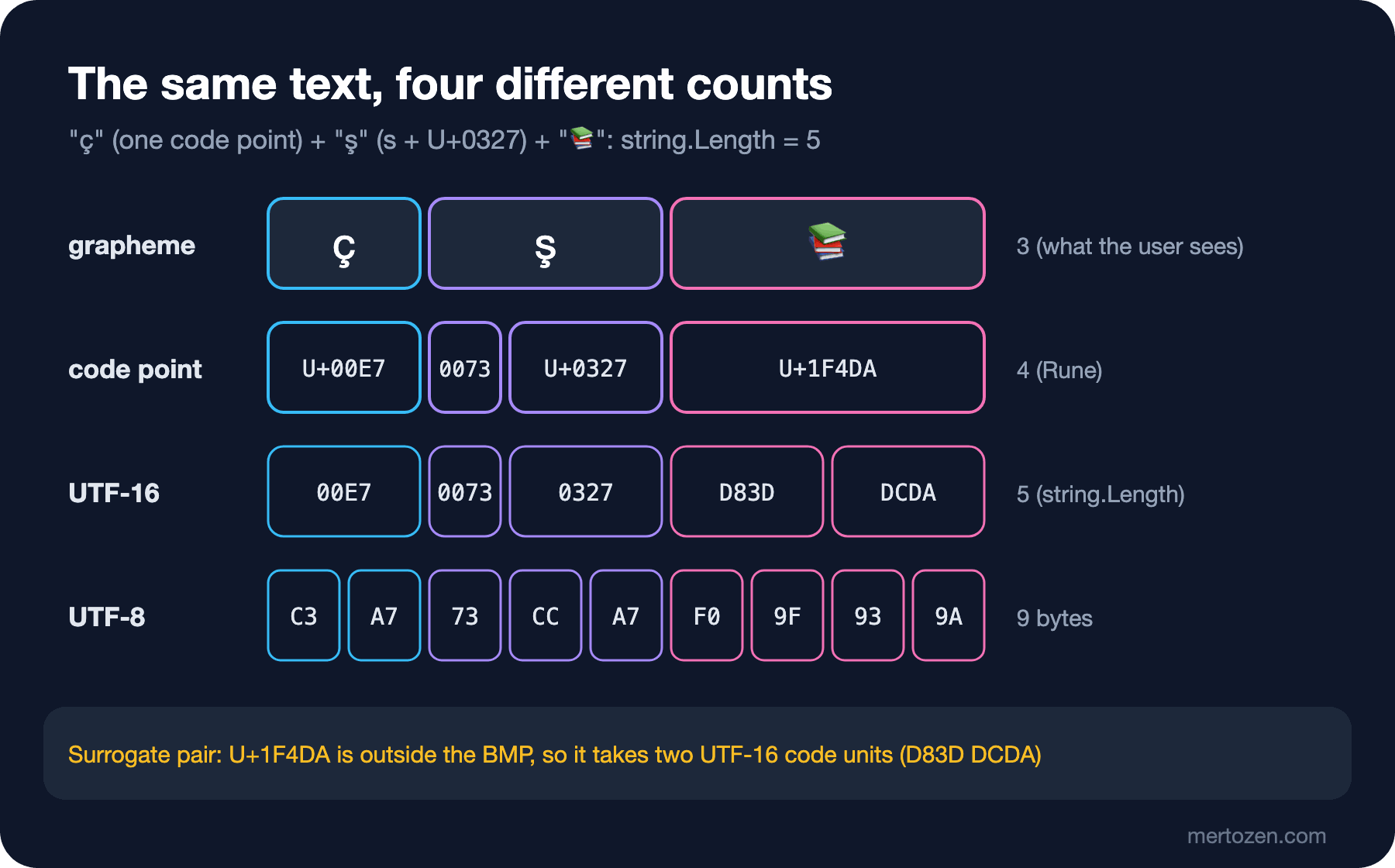
Subtract 0x10000 from U+1F4DA and a 20-bit number remains. The upper 10 bits are added to 0xD800, the lower 10 bits to 0xDC00: D83D DCDA. The result matches .NET's own string:
string books = "\U0001F4DA";
Console.WriteLine($"{(int)books[0]:X4} {(int)books[1]:X4} {char.IsHighSurrogate(books[0])} {char.ConvertToUtf32(books, 0):X}");
// D83D DCDA True 1F4DA
The key point: in .NET, a string is a sequence of UTF-16 code units, and a char isn't a character but a code unit. string.Length gives the number of code units. Strings in JavaScript and TypeScript hold UTF-16 the same way. UTF-32 writes every code point in a fixed 4 bytes; it's simple but takes space, so it's rarely used for storage or on the network.
Rune, EnumerateRunes and u8 Literals in .NET
System.Text.Rune, which came with .NET Core 3.0, represents a scalar value and combines surrogate pairs for you:
foreach (Rune rune in "aç₺\U0001F4DA".EnumerateRunes())
{
    byte[] utf8 = new byte[4];
    int n = rune.EncodeToUtf8(utf8);
    char[] utf16 = new char[2];
    int m = rune.EncodeToUtf16(utf16);
    Console.WriteLine($"U+{rune.Value:X4}  {rune}  utf8={Convert.ToHexString(utf8, 0, n),-8}  utf16={string.Join(" ", utf16[..m].Select(c => ((int)c).ToString("X4")))}  {Rune.GetUnicodeCategory(rune)}");
}
U+0061 a utf8=61 utf16=0061 LowercaseLetter
U+00E7 ç utf8=C3A7 utf16=00E7 LowercaseLetter
U+20BA ₺ utf8=E282BA utf16=20BA CurrencySymbol
U+1F4DA 📚 utf8=F09F939A utf16=D83D DCDA OtherSymbolInformation such as the character category comes from the runtime's own Unicode data. .NET 10's data follows Unicode 16.0; for U+10940, the first character of the Sidetic script added in Unicode 17.0, CharUnicodeInfo.GetUnicodeCategory returns OtherNotAssigned, while for U+10D40 in the Garay script added in Unicode 16.0 it returns DecimalDigitNumber. Even if new emoji show up in the browser, a category check on the server may not recognize them yet.
Since C# 11 you can produce UTF-8 bytes directly at compile time: "Kitapçı"u8 gives a ReadOnlySpan<byte>. It's used for fixed text such as HTTP headers and JSON property names, so they aren't encoded every time:
ReadOnlySpan<byte> literal = "Kitapçı"u8;
Console.WriteLine($"{literal.Length} {Convert.ToHexString(literal)}");   // 9 4B69746170C3A7C4B1
A detail to watch when writing files is the BOM, the Byte Order Mark placed at the start of a file to signal its encoding. In UTF-8 the BOM is EF BB BF. File.WriteAllText writes UTF-8 without a BOM by default, but if you pass Encoding.UTF8 explicitly, it adds one:
File.WriteAllText("default.txt", "Kitapçı");
File.WriteAllText("with-bom.txt", "Kitapçı", Encoding.UTF8);
File.WriteAllText("no-bom.txt", "Kitapçı", new UTF8Encoding(false));
default.txt 9 bytes 4B69746170C3A7C4B1
with-bom.txt 12 bytes EFBBBF4B69746170C3A7C4B1
no-bom.txt 9 bytes 4B69746170C3A7C4B1General file reading and writing was covered in the C# Fundamentals series post "Files and the Console in C#: ReadLine, File, Path, Directory, using and Encoding". When a BOM is needed, and how Excel breaks Turkish characters when it's missing, is covered in the next post of the series.
Grapheme Clusters: The Character the User Sees
What you see on screen as a single character can consist of more than one code point. "ş" can be written two ways: as the single code point U+015F, or as "s" (U+0073) followed by a combining cedilla (U+0327). The family emoji is written as three person emoji with two ZWJ characters (U+200D, the invisible joiner that combines emoji into one) between them:
string family = "\U0001F468\u200D\U0001F469\u200D\U0001F467";
Console.WriteLine(string.Join(" ", family.EnumerateRunes().Select(r => $"U+{r.Value:X4}")));
// U+1F468 U+200D U+1F469 U+200D U+1F467
This unit that the user perceives as one character is called a grapheme cluster; how to find its boundaries is defined in Unicode Standard Annex #29, Text Segmentation. Since .NET 5, StringInfo follows these rules. The four different counts side by side:
public static string Describe(string text) =>
    $"chars={text.Length} runes={text.EnumerateRunes().Count()} " +
    $"utf8={Encoding.UTF8.GetByteCount(text)} graphemes={new StringInfo(text).LengthInTextElements}";
Kitap chars=5 runes=5 utf8=5 graphemes=5
Kitapçı chars=7 runes=7 utf8=9 graphemes=7
ş (U+015F) chars=1 runes=1 utf8=2 graphemes=1
ş (s + U+0327) chars=2 runes=2 utf8=3 graphemes=1
books emoji chars=2 runes=1 utf8=4 graphemes=1
family emoji chars=8 runes=5 utf8=18 graphemes=1The answer to the first question: the family emoji adds 8 to Length. The user typed one character; Length is 8, the rune count 5, UTF-8 18 bytes. Code that checks the 280 limit with Length rejects the review after 35 family emoji.
The same four counts in TypeScript:
const books = "\u{1F4DA}";
const family = "\u{1F468}\u200D\u{1F469}\u200D\u{1F467}";
const segmenter = new Intl.Segmenter("tr", { granularity: "grapheme" });
const graphemes = (s: string) => [...segmenter.segment(s)].length;

for (const s of ["Kitapçı", "s\u0327", books, family]) {
  console.log(s.length, [...s].length, new TextEncoder().encode(s).length, graphemes(s));
}
// 7 7 9 7
// 2 2 3 1
// 2 1 4 1
// 8 5 18 1
console.log(books.charCodeAt(0).toString(16), books.charCodeAt(1).toString(16), books.codePointAt(0)?.toString(16));
// d83d dcda 1f4da
[...s] splits a string into code points (like EnumerateRunes in C#), and Intl.Segmenter into graphemes. TextEncoder always produces UTF-8.
The Bookstore Review Field: How to Count 280 Characters
The "280 characters" rule has two separate needs. The limit shown to the user should be counted in graphemes, because that's how the user sees characters, and the counter in the frontend should give the same result with Intl.Segmenter. The database limit depends on what the column counts. In SQL Server, the n in nvarchar(n) is the number of UTF-16 code units, the same unit as string.Length in .NET. A rule that does both checks separately:
public sealed record ReviewCheck(int Graphemes, int Utf16Units, int Utf8Bytes, bool FitsUi, bool FitsColumn);

public static class ReviewRules
{
    public const int MaxGraphemes = 280;
    public const int ColumnUnits = 1000; // nvarchar(1000)

    public static ReviewCheck Check(string text)
    {
        int graphemes = new StringInfo(text).LengthInTextElements;
        return new ReviewCheck(graphemes, text.Length, Encoding.UTF8.GetByteCount(text),
            graphemes <= MaxGraphemes, text.Length <= ColumnUnits);
    }
}
ReviewCheck { Graphemes = 38, Utf16Units = 38, Utf8Bytes = 38, FitsUi = True, FitsColumn = True }
ReviewCheck { Graphemes = 280, Utf16Units = 2240, Utf8Bytes = 5040, FitsUi = True, FitsColumn = False }
ReviewCheck { Graphemes = 281, Utf16Units = 281, Utf8Bytes = 281, FitsUi = False, FitsColumn = True }The second line is a review of 280 family emoji: within the limit from the user's point of view, but at 2240 code units it doesn't fit in nvarchar(1000). Instead of sizing the column as "280 × 8", check both limits explicitly and give a meaningful error for the case that fits the user limit but not the database. Also remember there's no practical upper bound on how many code units one grapheme can take; combining marks can be stacked.
When you need to shorten text, respect grapheme boundaries too. To show the first few characters of a review on the list page:
public static string TruncateGraphemes(string text, int maxGraphemes)
{
    int length = 0;
    int count = 0;
    while (length < text.Length && count < maxGraphemes)
    {
        length += StringInfo.GetNextTextElementLength(text.AsSpan(length));
        count++;
    }
    return text[..length];
}
In Production
State the encoding explicitly at every boundary: when writing files, in HTTP responses, in database columns, in message queues. Defaults can change from platform to platform; an explicit new UTF8Encoding(false) doesn't.
Do the server-side length check in the same unit as the frontend counter. If the frontend shows 280 with Intl.Segmenter while the backend counts 300 with Length, the user can't save a review they believe is under 280 and won't understand the error.
Know your runtime's Unicode version. If you validate by character category (for example "letters and digits only"), newly added characters may show up as OtherNotAssigned on the server. Limit such checks to places where they're really needed.
In text sent to an LLM, the character count and the token count are different things. Model limits are measured in tokens, and Turkish text takes more tokens than English; the details are in the LLM Fundamentals series post "Tokens and Tokenizers in LLMs: Why Does Turkish Take More Tokens?".
Common Pitfalls
Splitting a surrogate pair in the middle with Substring. A lone high surrogate isn't a valid character, and when converted to UTF-8 it's replaced with U+FFFD, the replacement character shown as �:
string banner = "\U0001F4DA New arrivals";
string cut = banner.Substring(0, 1);
Console.WriteLine($"{cut.Length} {char.IsSurrogate(cut[0])}");          // 1 True
Console.WriteLine(Convert.ToHexString(Encoding.UTF8.GetBytes(cut)));     // EFBFBD
Console.WriteLine(TextUnits.TruncateGraphemes(banner, 1));               // 📚
Nothing throws; the data is silently corrupted. If you'd rather get an error than accept broken data, use new UTF8Encoding(false, throwOnInvalidBytes: true); this encoder throws EncoderFallbackException for the same string. In JavaScript, isWellFormed() and toWellFormed(), added in ES2024, do the same check.
Assuming that converting to upper case won't change the length. JavaScript applies the full Unicode upper case mapping; .NET uses simple per-character mapping and keeps the length:
Console.WriteLine($"{"straße".ToUpperInvariant()} {"straße".ToUpperInvariant().Length}");  // STRAßE 6
Console.WriteLine($"{"\uFB01le".ToUpperInvariant()} {"\uFB01le".ToUpperInvariant().Length}");        // fiLE 3
console.log("straße".toUpperCase(), "straße".toUpperCase().length); // STRASSE 7
console.log("\uFB01le".toUpperCase(), "\uFB01le".toUpperCase().length); // FILE 4The same text is upper-cased to a different length and different content on the two sides. If you use upper-cased text for comparisons or as a unique key, account for the two sides not giving the same result. The culture trap with the Turkish I is a separate topic, covered in the C# Fundamentals series post "Strings in C#: Interpolation, StringBuilder and the Turkish I Trap".
Confusing a byte limit with a character limit. If a message queue, an HTTP header or a varchar column works with a byte limit, 100 characters of Turkish text aren't 100 bytes. Always name the limit by the unit you measure it in: bytes, code units or graphemes.
A Small Experiment
★☆☆ Measure your own first and last name with TextUnits.Describe. If it contains Turkish characters, check how much larger the UTF-8 byte count is than Length, and print the code point of each Turkish character with Rune.
★★☆ Write the inverse of EncodeUtf8: a DecodeUtf8 that extracts code points from a byte array. Have it produce U+FFFD when it sees an invalid lead byte or a missing continuation byte. Compare the result with Encoding.UTF8.GetString on a few broken inputs.
★★★ Write a character counter using Intl.Segmenter on the Angular side of the Bookstore review form, and validation using ReviewRules on the backend. Prepare a test showing that both sides give the same count for 20 sample texts containing emoji, combining marks and Turkish characters.
In this post we saw how a character becomes bytes. The last post of the series, "Handling Text Correctly: Normalization, Diagnosing Mojibake and Base64", covers the reverse direction: why two strings that look the same aren't equal, how to diagnose broken characters like "ÅŸ" with a hex dump, and Base64, which turns binary data into text.