

How Floating Point Works: IEEE 754, 0.1 + 0.2, NaN and double vs decimal
0.1 + 0.2 isn't 0.3 because a double stores numbers in base 2 with a sign, an exponent and a 52-bit mantissa, and 0.1 can't be written exactly in that base. The binary64 bit layout, gaps that widen as numbers grow, ±0, NaN and subnormals, comparing with relative tolerance, Half/float/double/decimal, the saturating conversions of .NET 9 and .NET 11, banker's rounding and culture-dependent parsing.
Version note: The code in this post was built and run with .NET 10 (C# 14), TypeScript 7.0 and Node.js 24; the conversion comparison was also run on .NET 11 (11.0.100 SDK). The C# examples are tested with xUnit v3 4.0.3. The post is based on the IEEE 754-2019 standard.
Guess First
A Bookstore cart holds two digital products at 0.1 and 0.2 lira, and the code adds the amounts with double. What does 0.1 + 0.2 == 0.3 return? Most people know that one. But what is f once this loop finishes?
float f = 0;
for (int i = 0; i < 20_000_000; i++) f += 1.0f;
20 million? A little less or a little more? And a third question: with double x = 300.0;, what is (byte)x? 255, 44, or an exception? The answer depends on the .NET version.
In the previous post of the series, "Integer Representation", we left for later why JavaScript loses integers after 2^53. The answer to all three questions is in how a double uses its 64 bits.
64 Bits, Three Fields: Sign, Exponent, Mantissa
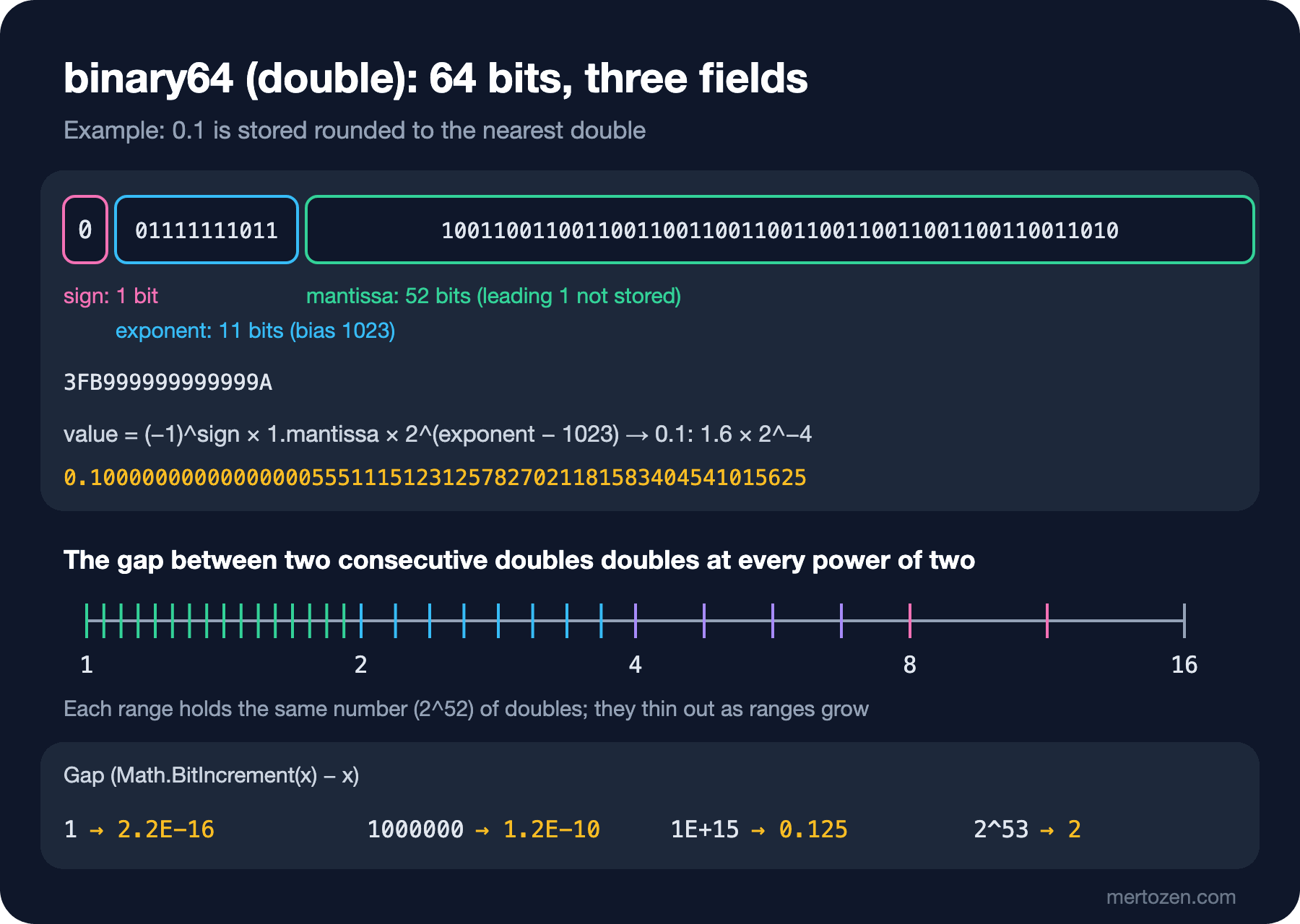
The bit layout of floating point numbers is defined by the IEEE 754 standard; the current edition is from 2019. double in C# and number in JavaScript are the standard's binary64 format. The idea is the same as scientific notation, like 6.02 × 10^23, but in base 2. The 64 bits are split into three fields: 1 sign bit, 11 exponent bits and 52 mantissa bits (the standard calls it the significand).
public static (int Sign, int Exponent, long Mantissa) Split(double value)
{
    long bits = BitConverter.DoubleToInt64Bits(value);
    int sign = (int)(bits >>> 63);
    int exponent = (int)((bits >> 52) & 0x7FF);
    long mantissa = bits & 0xF_FFFF_FFFF_FFFF;
    return (sign, exponent, mantissa);
}
0.1 3FB999999999999A sign=0 exp=1019 (-4) mantissa=999999999999A
0.2 3FC999999999999A sign=0 exp=1020 (-3) mantissa=999999999999A
0.3 3FD3333333333333 sign=0 exp=1021 (-2) mantissa=3333333333333
0.30000000000000004 3FD3333333333334 sign=0 exp=1021 (-2) mantissa=3333333333334
1 3FF0000000000000 sign=0 exp=1023 (0) mantissa=0000000000000
-2.5 C004000000000000 sign=1 exp=1024 (1) mantissa=4000000000000So that the exponent can also hold negative values, it's stored with 1023 added (the bias): 1019 really means 2^-4. The mantissa is the fractional part of the number's value between 1 and 2. A normalized number always starts with 1., so that 1 isn't stored, and 52 bits give 53 bits of precision. That's why the mantissa of 1.0 is zero. -2.5 = -1.25 × 2^1: sign 1, exponent 1023 + 1, mantissa the binary form of 0.25. float (binary32) uses the same structure with 1 + 8 + 23 bits and a bias of 127.
Why 0.1 Can't Be Written Exactly
In decimal, 1/3 becomes 0.333… forever, because 3 doesn't divide 10. In binary the same holds for 1/10: 10 has a factor of 5, and 5 doesn't divide 2. The binary expansion of 0.1 goes on forever as 0.0001100110011…. It has to be cut somewhere within 52 bits; the trailing A in the mantissa's 999…9A is the trace of that rounding. You can see the exact value that is stored:
Console.WriteLine(0.1.ToString("F55"));   // 0.1000000000000000055511151231257827021181583404541015625
Console.WriteLine(0.1.ToString("G17"));   // 0.10000000000000001
Console.WriteLine(0.1 + 0.2);             // 0.30000000000000004
Console.WriteLine(0.1 + 0.2 == 0.3);      // False
Console.WriteLine(0.1m + 0.2m == 0.3m);   // True
We see "0.1" on screen because since .NET Core 3.0, ToString writes the shortest text that parses back to the same double. The number in memory is slightly larger than 0.1. 0.2 is slightly larger too; their sum is rounded to the double one step above the double nearest to 0.3. You can see the difference in the table above: ...3333 versus ...3334, only the last bit differs. That's the nature of the double error: it isn't that it can't hold 0.3, it's that the result of 0.1 + 0.2 isn't equal to the value stored for 0.3.
This isn't a bug in the code; it's a property of the representation. David Goldberg's 1991 paper "What Every Computer Scientist Should Know About Floating-Point Arithmetic" explains the mathematics of these rounding errors in detail; if you want to go deeper, it's the first source to read.
Precision and Range: The Gaps Widen as Numbers Grow
A 53-bit mantissa always means about 15–17 significant decimal digits. The exponent decides where those digits sit. The result: for large numbers, the gap between two doubles grows too.
foreach (double x in new[] { 1.0, 1000.0, 1e6, 1e15, 9007199254740992.0 })
{
    Console.WriteLine($"{x,-22:R} next={Math.BitIncrement(x) - x:R}");
}
1 next=2.220446049250313E-16
1000 next=1.1368683772161603E-13
1000000 next=1.1641532182693481E-10
1000000000000000 next=0.125
9007199254740992 next=2Around 1, the gap between two doubles is about 2.2 × 10^-16; around 10^15 it's 0.125; at 2^53 it's 2. The last line explains the JSON bug from the previous post: past 2^53, a double can only hold even numbers, 9007199254740993 can't be written and is rounded to the nearest value, 9007199254740992. The range is huge (double.MaxValue is about 1.8 × 10^308), but the precision is the same number of digits everywhere.
The answer to the float loop in Guess First is 16777216, that is, 2^24. float has 24 bits of precision; at 2^24 two neighbouring float values are 2 apart. 16777216 + 1 lands exactly in the middle and, by the "round to even" rule, goes back to 16777216. The loop runs 20 million times, but the total gets stuck at 16777216. That's the risk of keeping counters and large sums in float.
Special Values: ±0, Infinity, NaN and Subnormals
Two values of the exponent field have special meaning. If all its bits are 1 (2047), the number is Infinity or NaN; if all are 0, it's zero or a subnormal number.
double zero = 0.0, negZero = -0.0;
Console.WriteLine(zero == negZero);           // True
Console.WriteLine(1 / zero);                  // Infinity
Console.WriteLine(1 / negZero);               // -Infinity
Console.WriteLine(double.IsNegative(negZero)); // True

double nan = zero / zero;
Console.WriteLine(nan == nan);                // False
Console.WriteLine(nan.Equals(nan));           // True
Console.WriteLine(double.IsNaN(nan));         // True
Console.WriteLine(Math.Sqrt(-1));             // NaN
Console.WriteLine(Math.Max(nan, 1));          // NaN
Console.WriteLine(BitConverter.DoubleToInt64Bits(double.PositiveInfinity).ToString("X16"));  // 7FF0000000000000
Console.WriteLine(BitConverter.DoubleToInt64Bits(double.Epsilon).ToString("X16"));           // 0000000000000001
Because the sign bit is separate, there are two zeros: +0 and -0. They compare equal, but in division they lead to different infinities. NaN, the result of an undefined operation, is any bit pattern with exponent 2047 and a non-zero mantissa. According to IEEE 754, NaN is equal to nothing, not even itself: nan == nan returns False. When the C# compiler sees this, it warns with warning CS1718: Comparison made to same variable. But .NET's Equals method treats NaN as equal to itself; collections need that to work. It's one of the rare places where == and Equals give different answers.
When the exponent is zero, the hidden leading 1 goes away and the number is subnormal. This keeps values very close to zero from suddenly dropping to zero. The smallest positive double, the subnormal whose last bit is 1, is about 4.9 × 10^-324, and in C# its name is double.Epsilon. Careful: this isn't what numerical analysis calls "machine epsilon". The gap between 1 and the next double, 2.2 × 10^-16, carries the name Number.EPSILON in JavaScript. The same name points to different values in the two languages.
Comparison: Why a Fixed Epsilon Isn't Enough
Most of us know we shouldn't compare doubles with ==. The common fix is to compare the difference with a small fixed number:
double total = 0;
for (int i = 0; i < 10; i++) total += 0.1;
Console.WriteLine(total);                              // 0.9999999999999999
Console.WriteLine(Math.Abs(total - 1.0) < 1e-9);       // True

double big1 = 1e15 + 0.1, big2 = 1e15 + 0.2;
Console.WriteLine(Math.Abs(big1 - big2) < 1e-9);       // False
1e-9 works around 1 but is meaningless around 10^15, where even two neighbouring doubles are 0.125 apart. A fixed epsilon either calls everything "different" for large numbers or everything "equal" for small ones. The right approach is to measure the difference relative to the size of the numbers (relative tolerance) and also define an absolute floor for values near zero:
// Like Python's math.isclose: relative tolerance plus an absolute floor near zero
public static bool AlmostEqual(double a, double b, double relTol = 1e-9, double absTol = 0.0)
{
    if (a == b)
    {
        return true;
    }
    if (double.IsInfinity(a) || double.IsInfinity(b))
    {
        return false;
    }
    double diff = Math.Abs(a - b);
    return diff <= Math.Max(relTol * Math.Max(Math.Abs(a), Math.Abs(b)), absTol);
}
Console.WriteLine(FloatBits.AlmostEqual(big1, big2)); // True
Console.WriteLine(FloatBits.AlmostEqual(total, 1.0)); // True
Console.WriteLine(FloatBits.AlmostEqual(1e-12, 0.0)); // False
Console.WriteLine(FloatBits.AlmostEqual(1e-12, 0.0, absTol: 1e-9)); // TrueThe tolerance value depends on the domain; a sensor reading and a coordinate calculation don't need the same tolerance. The same logic applies to tests: xUnit's Assert.Equal(expected, actual, tolerance) overload uses an absolute tolerance, so keep that in mind for large values.
Floating point addition has one more property: the order of operations changes the result. In mathematics (a + b) + c = a + (b + c), but not here:
double[] values = [1e16, 1.0, -1e16, 1.0];
Console.WriteLine(values[0] + values[1] + values[2] + values[3]);   // 1
Console.WriteLine(values[0] + values[2] + values[1] + values[3]);   // 2
Adding 1 to 1e16 doesn't change it (neighbouring doubles at that size are 2 apart), so in the first order one of the 1s is lost. The practical consequence: code that sums a double array in parallel or with SIMD can produce a different result than a sequential loop. Both results are "correct"; only the order of addition differs. When two systems' totals don't match in the last digit of a report, this is usually why.
Half, float, double and decimal
| Type | Size | Base | Significant digits | Largest value |
|---|---|---|---|---|
Half | 2 bytes | 2 | about 3 | 65504 |
float | 4 bytes | 2 | about 6–9 | about 3.4 × 10^38 |
double | 8 bytes | 2 | about 15–17 | about 1.7 × 10^308 |
decimal | 16 bytes | 10 | 28–29 | about 7.9 × 10^28 |
Half (.NET 5+) exists for places like machine learning and graphics data, where precision matters less and memory matters more; it's not for business logic. decimal is a completely different representation: a 96-bit integer plus a scale (0–28) that says how many digits to shift it right. Because the base is 10, 0.1 is stored exactly as 1 × 10^-1:
int[] parts = decimal.GetBits(0.1m);
Console.WriteLine($"{parts[0]} {parts[1]} {parts[2]} scale={(parts[3] >> 16) & 0xFF}");  // 1 0 0 scale=1
Console.WriteLine(1m / 3m);         // 0.3333333333333333333333333333
Console.WriteLine(1m / 3m * 3m);    // 0.9999999999999999999999999999
Console.WriteLine(1.0 / 3.0 * 3.0); // 1
decimal has limits too: it can't write 1/3 exactly either, and on the last line double happens to round back to the right answer. The strength of decimal is that it holds values people write in decimal, such as prices and tax rates, exactly. The details of using decimal for money, rounding and distributing cents are in the Solution Patterns series post "Money and Rounding". The cost is performance: decimal operations are done in software, not in hardware.
In TypeScript there's no choice: every number is a number, that is, a double. If the frontend needs money calculations, keep amounts as integers in cents and divide only when displaying, or use a library that does decimal arithmetic:
const priceKurus = [1990, 450, 1200];
const totalKurus = priceKurus.reduce((sum, p) => sum + p, 0);
console.log(totalKurus, (totalKurus / 100).toFixed(2));   // 3640 36.40

const view = new DataView(new ArrayBuffer(8));
view.setFloat64(0, 0.1);
console.log(view.getBigUint64(0).toString(16));           // 3fb999999999999a
The second part shows that JavaScript's number is bit for bit the same as C#'s double.
Conversions: Truncation, Saturation and Parsing
A cast from floating point to integer drops the fractional part (toward zero): (int)3.99 is 3, (int)-3.99 is -3. What happens when the value doesn't fit in the target type depended on the platform for a long time. With .NET 9, conversions to int, uint, long and ulong became saturating on x86 and x64 too: a value that doesn't fit goes to the target type's limit, and NaN goes to 0.
double[] inputs = [3.99, -3.99, double.NaN, 1e10, -1e10];
foreach (double x in inputs)
{
    Console.WriteLine($"{x} -> {(int)x}");
}
// 3.99 -> 3
// -3.99 -> -3
// NaN -> 0
// 10000000000 -> 2147483647
// -10000000000 -> -2147483648
Small types such as byte, sbyte, short, ushort and char still behave differently in .NET 10: the common path in CoreCLR is to convert the value to int with saturation and then drop the upper bits (Microsoft notes that this was never a guaranteed behavior). .NET 11 made these saturating as well. I ran the same program on both runtimes:
double[] inputs = [300.0, -42.0, 65578.0, double.NaN];
Console.WriteLine(RuntimeInformation.FrameworkDescription);
foreach (double x in inputs)
{
    Console.WriteLine($"{x,8}  byte={(byte)x,3}  short={(short)x,6}  ushort={(ushort)x,5}");
}
.NET 10.0.13
300 byte= 44 short= 300 ushort= 300
-42 byte=214 short= -42 ushort=65494
65578 byte= 42 short= 42 ushort= 42
NaN byte= 0 short= 0 ushort= 0
.NET 11.0.0
300 byte=255 short= 300 ushort= 300
-42 byte= 0 short= -42 ushort= 0
65578 byte=255 short= 32767 ushort=65535
NaN byte= 0 short= 0 ushort= 0The answer to the third Guess First question: 44 on .NET 10 (the low 8 bits of 300, that is 300 − 256), 255 on .NET 11. Microsoft documents this in the .NET 11 breaking change list. checked((byte)x), on the other hand, throws OverflowException on both versions. Code that relies on an out-of-range value being converted "somehow" by a cast silently produces a different result after a runtime upgrade; check the range before the cast.
Rounding doesn't behave the way you'd expect by default either. Math.Round uses "banker's rounding" by default, rounding a value exactly in the middle to the even neighbour:
Console.WriteLine(Math.Round(2.5));                                // 2
Console.WriteLine(Math.Round(3.5));                                // 4
Console.WriteLine(Math.Round(2.5, MidpointRounding.AwayFromZero)); // 3
Console.WriteLine(2.675.ToString("F20"));                          // 2.67499999999999982236
console.log(Math.round(2.5), Math.round(-2.5), Math.round(3.5)); // 3 -2 4
console.log((2.675).toFixed(2), (1.005).toFixed(2)); // 2.67 1.00JavaScript's Math.round rounds a middle value toward positive infinity, so it gives -2 for -2.5. (2.675).toFixed(2) gives 2.67, because the value in memory isn't 2.675 but 2.67499999…. If you want to round a value written in decimal to a given number of digits, that value shouldn't live in a double.
Finally, parsing. double.Parse uses the thread's culture by default and allows a thousands separator:
Console.WriteLine(double.Parse("3,14", CultureInfo.GetCultureInfo("tr-TR")));   // 3.14
Console.WriteLine(double.Parse("3,14", CultureInfo.InvariantCulture));          // 314
Console.WriteLine(double.Parse("3.14", CultureInfo.GetCultureInfo("tr-TR")));   // 314
Console.WriteLine(double.TryParse("3,14", NumberStyles.Float, CultureInfo.InvariantCulture, out double parsed)); // False
In Turkish culture the comma is the decimal separator and the dot the thousands separator; in the invariant culture it's the other way round. The wrong culture doesn't throw; it makes the number 100 times bigger. Always parse data from an external system with CultureInfo.InvariantCulture and NumberStyles.Float; since the thousands separator isn't accepted, a wrong format is rejected instead of being silently accepted. The general behavior of cultures was covered in the C# Fundamentals series post "Strings in C#: Interpolation, StringBuilder and the Turkish I Trap".
In Production
Use decimal for values defined in decimal, such as money, tax and stock quantities; use double for values that are approximate anyway, such as measurements, statistics, coordinates and physics. The same split applies in the database: decimal(p, s) and float in SQL Server.
When two systems' totals don't match in financial reports, look at the order of addition and the type first. If one sums in parallel with double and the other sequentially with decimal, the last digits will differ. Compute the reported total in one place, with one type.
Catch NaN at the edge of the system. A NaN created by division by zero, Math.Sqrt or Math.Log spreads through every calculation it touches; when it finally gets written to JSON, System.Text.Json throws by default. Check results with double.IsFinite and produce a meaningful error.
Read the breaking change list when upgrading the runtime. The conversion changes in .NET 9 and .NET 11 don't cause compile errors; they only produce different results for out-of-range values. If you haven't written tests with such values, you'll see the difference in production.
Common Pitfalls
Comparing doubles with ==. When comparing two computed doubles, always use a tolerant comparison, and pick the tolerance based on the size of the numbers.
Not knowing how NaN behaves in collections. Array.Sort puts NaN first, LINQ's Min returns NaN, and Max ignores it:
double[] prices = [19.9, double.NaN, 4.5, 12.0];
Array.Sort(prices);
Console.WriteLine(string.Join(", ", prices));   // NaN, 4.5, 12, 19.9
Console.WriteLine(prices.Max());                // 19.9
Console.WriteLine(prices.Min());                // NaN
var byPrice = new Dictionary<double, string> { [double.NaN] = "unknown" };
Console.WriteLine(byPrice.ContainsKey(double.NaN));   // True
Dictionary and Contains find NaN because they use Equals; your own search code written with == won't. JavaScript has a similar split: [NaN].includes(NaN) is true, [NaN].indexOf(NaN) is -1. Use double.IsNaN / Number.isNaN to check for NaN in both languages. TypeScript stops you when you write NaN === NaN with error TS2845: This condition will always return 'false'.
Using double.Epsilon as a comparison tolerance. Its value is 4.9 × 10^-324, the smallest subnormal. Math.Abs(a - b) < double.Epsilon is almost the same as a == b.
Thinking float is "good enough". 24 bits of precision is about 7 digits; it can't even hold integers above 16,777,216 exactly. Unless memory is a real problem, use double.
A Small Experiment
★☆☆ Run FloatBits.Split for 0.5, 0.75, 1.5 and 1e-310. Which one has an exponent of 0, and why? Explain the result with the definition of subnormal.
★★☆ Add one million copies of 0.1 sequentially with double, then add the same values with the Kahan summation algorithm. Compare both results with the 100000 you get with decimal.
★★★ Write Bookstore's discount calculation in a version that uses double and one that uses decimal. For 10,000 random carts, count how many times the two results differ at the cent level, and explain one differing cart at the bit level.
With this post we've finished the representation of numbers. The next post in the series moves on to text and explains how Unicode text is stored with UTF-8 and UTF-16: we'll see why a character sometimes takes 1, sometimes 2 and sometimes 4 bytes, and why an emoji shows up as 2, or even 8, in string.Length.