

Integer Representation: Two's Complement, Overflow, Endianness and the Lost long ID in JSON
Computers store negative integers in two's complement: invert the bits and add 1, so a single adder both adds and subtracts and there is only one zero. The int.MinValue asymmetry and the Math.Abs exception, wrap-around, widths from byte to Int128, endianness and BinaryPrimitives, a long ID above 2^53 silently changing in JSON, Y2038 and an exhausted int identity.
Version note: The code in this post was run with .NET 10 (C# 14, ASP.NET Core 10), TypeScript 7.0, Node.js 24 and SQL Server 2025; the C# examples are tested with xUnit v3 4.0.3.
Guess First
Bookstore's new catalog service generates book IDs as 64-bit long values. The API returns the book with ID 9007199254740993 as JSON; the Angular app sends a request to /books/{id}/reviews to load that book's reviews. Which ID does the request go out with?
The second question is shorter: what does Math.Abs(int.MinValue) return? 2147483648, -2147483648, or neither?
In the previous post of the series, "Bitwise Operations", we saw that the bit pattern of -16 is 11111111111111111111111111110000 but left the reason for later. This post starts with that question; the answer to both questions lies in the same representation.
Three Ways to Write a Negative Number in Bits
In an unsigned number every bit carries a positive value; 8 bits hold 0–255. For negative numbers you have to use one of the bits as a "sign" somehow. Three methods have been tried over time:
public static string Bits8(int value) => Convert.ToString(value & 0xFF, 2).PadLeft(8, '0');

public static int SignMagnitude(int value) => value < 0 ? 0x80 | -value : value;

public static int OnesComplement(int value) => value < 0 ? ~(-value) & 0xFF : value;

public static int TwosComplement(int value) => value & 0xFF;
value sign-magnitude one's complement two's complement
5 00000101 00000101 00000101
-5 10000101 11111010 11111011
0 00000000 00000000 00000000
127 01111111 01111111 01111111
-127 11111111 10000000 10000001
-128 - - 10000000Sign-magnitude is the most intuitive: the leftmost bit is the sign, the remaining 7 bits the magnitude. One's complement writes a negative number by inverting all the bits of its positive counterpart. Two's complement inverts the bits and adds 1. For positive numbers all three are the same; they only differ for negatives.
The common problem of the first two is that they have two zeros. In sign-magnitude 10000000, in one's complement 11111111 is "minus zero". Every comparison needs extra logic to treat the two zeros as equal. The bigger problem shows up in addition: to compute 5 + (-5) in these two representations, the hardware has to look at the signs and take a separate path.
Why Two's Complement Won: One Adder, One Zero
In two's complement, a negative number takes advantage of the "overflow" of unsigned addition. In 8 bits, -5 = 11111011, which is 251 as unsigned. Add 5 and you get 256; 256 needs nine bits, the top bit is dropped, and 0 remains:
byte five = 5;
byte minusFiveBits = 0b1111_1011;
Console.WriteLine(unchecked((byte)(five + minusFiveBits)));          // 0
Console.WriteLine(unchecked((sbyte)minusFiveBits));                  // -5
Console.WriteLine(~5 + 1);                                           // -5
byte three = 3;
Console.WriteLine(unchecked((sbyte)(byte)(three + minusFiveBits)));  // -2
The important part of this code: the operation that adds is exactly the same as unsigned addition. Without asking "is this number signed", the hardware computes both 3 + 251 = 254 and 3 + (-5) = -2 with the same adder; you decide how to interpret the result. Subtraction doesn't need a separate circuit either: a - b = a + (~b + 1). There is only one zero, 00000000. The cost is a small asymmetry: in 8 bits the smallest number is -128 and the largest 127. The positive side is one short, because zero takes up a slot on the positive side.
The easiest way to think about it is as a circle. The 256 values are arranged like a clock face; on the right half are the numbers from 0 to 127 whose sign bit is 0, on the left half those from -128 to -1 whose sign bit is 1:
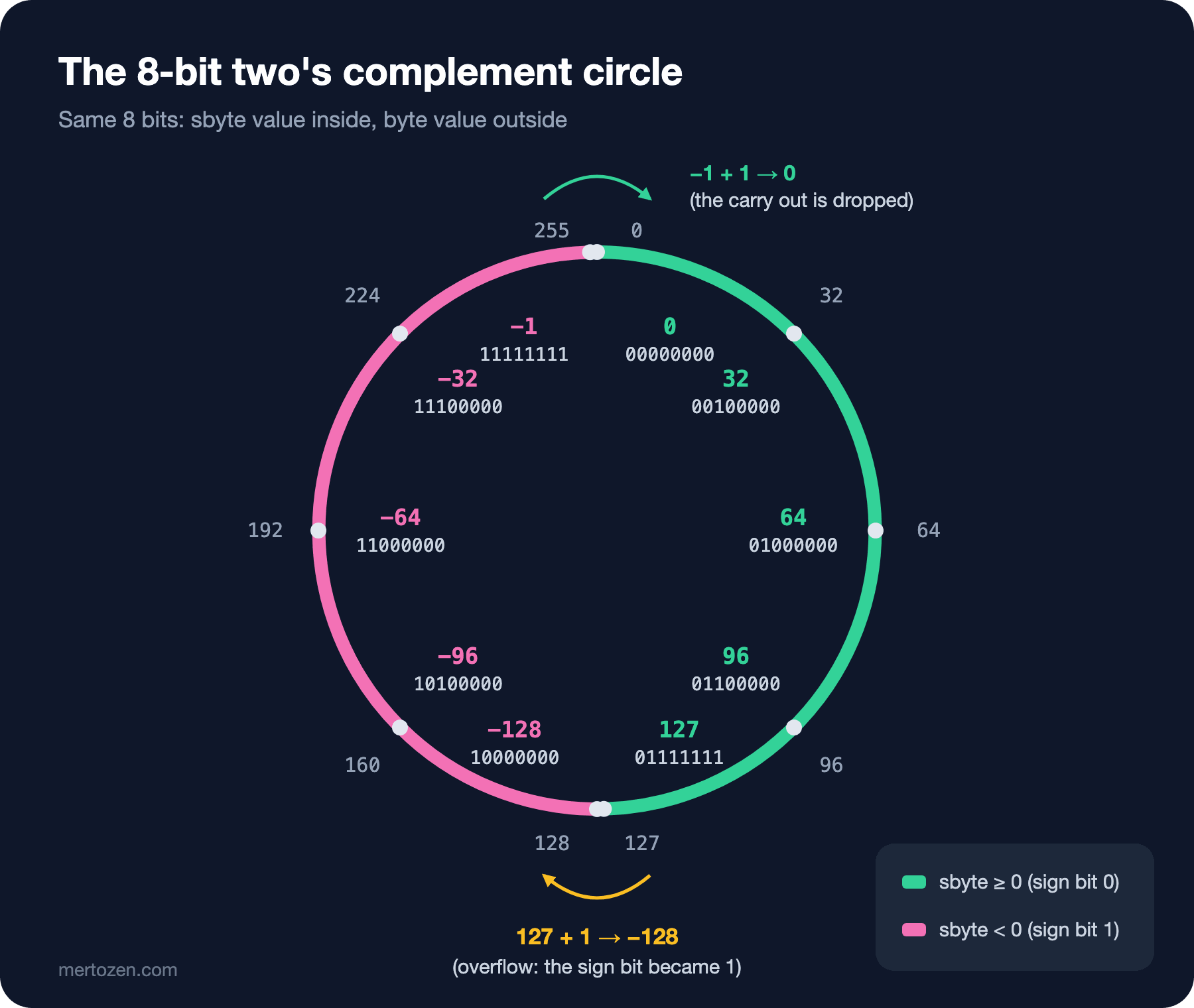
One step forward from -1 brings you to 0; that's correct. One step forward from 127 brings you to -128; that's overflow. At 32 and 64 bits the circle is bigger, but its shape is the same.
Overflow: Going Past the Circle
In C#, integer arithmetic runs unchecked by default, meaning that on overflow it goes around the circle and no exception is thrown. How to change that with checked was covered in the C# Fundamentals series post "Numbers and Arithmetic in C#: int, double, decimal and Overflow". Here we look at the same event at the bit level:
int max = int.MaxValue;
int wrapped = unchecked(max + 1);
// 2147483647   01111111111111111111111111111111
// -2147483648  10000000000000000000000000000000
The addition only carried through the lower 31 bits and set the sign bit to 1. From the processor's point of view nothing happened; only the interpretation changed.
The price of the asymmetry is paid at int.MinValue. The positive counterpart of -2147483648 doesn't fit in a 32-bit signed number:
int min = int.MinValue;
Console.WriteLine(unchecked(-min));   // -2147483648

int minusOne = -1;
try { Console.WriteLine(unchecked(min / minusOne)); }
catch (OverflowException ex) { Console.WriteLine($"{ex.GetType().Name}: {ex.Message}"); }
// OverflowException: Arithmetic operation resulted in an overflow.

try { Console.WriteLine(Math.Abs(min)); }
catch (OverflowException ex) { Console.WriteLine($"{ex.GetType().Name}: {ex.Message}"); }
// OverflowException: Negating the minimum value of a twos complement number is invalid.

Console.WriteLine(Math.Abs((long)min));   // 2147483648
The answer to the second question: Math.Abs(int.MinValue) throws an exception. -min silently gives int.MinValue again; apply the ~x + 1 rule and 10000000… becomes 01111111… when inverted, and 10000000… again after adding 1. int.MinValue / -1 throws OverflowException even inside unchecked. The C# specification leaves this case implementation-defined in an unchecked context (it may throw or give a silent result); the .NET runtime throws.
In real life you hit this most often when computing buckets from a hash. Math.Abs(hash) % buckets blows up once in four billion times, when the hash is exactly int.MinValue. On top of that, the % operator can return a negative result in C# (-17 % 16 = -1), so skipping Math.Abs isn't a fix either. The right way is to read the bits as unsigned:
// Wrong: Math.Abs(int.MinValue) throws
public static int BucketNaive(int hash, int buckets) => Math.Abs(hash) % buckets;

// Right: reinterpret as unsigned, never negative
public static int Bucket(int hash, int buckets) => (int)((uint)hash % (uint)buckets);
Width: From byte to Int128
The same logic holds at every width; only the size of the circle changes:
| Type | Bits | Range |
|---|---|---|
sbyte / byte | 8 | -128 … 127 / 0 … 255 |
short / ushort | 16 | -32768 … 32767 / 0 … 65535 |
int / uint | 32 | about ±2.1 billion / 0 … 4294967295 |
long / ulong | 64 | about ±9.2 × 10^18 / 0 … 18446744073709551615 |
Int128 / UInt128 | 128 | about ±1.7 × 10^38 / 0 … 3.4 × 10^38 |
nint / nuint | 32 or 64 | the process's pointer width |
Int128 and UInt128 arrived with .NET 7; Int128.MaxValue is 170141183460469231731687303715884105727. nint takes the pointer width of the process it runs in; in a 64-bit process nint.Size is 8. Outside interop and low-level memory code you won't need nint.
Endianness: In Which Order Are the Bytes Written
A 32-bit number takes four bytes in memory. Which byte comes first is a choice. In little endian the least significant byte is written first, in big endian the most significant byte. x64 and the Arm64 systems Windows runs on are little endian:
Console.WriteLine(BitConverter.IsLittleEndian);                          // True
int value = 0x0A0B0C0D;
Console.WriteLine(BitConverter.ToString(BitConverter.GetBytes(value)));  // 0D-0C-0B-0A

byte[] buffer = new byte[4];
BinaryPrimitives.WriteInt32BigEndian(buffer, value);
Console.WriteLine(BitConverter.ToString(buffer));                        // 0A-0B-0C-0D
Console.WriteLine(BinaryPrimitives.ReadInt32BigEndian(buffer).ToString("X8"));     // 0A0B0C0D
Console.WriteLine(BinaryPrimitives.ReadInt32LittleEndian(buffer).ToString("X8"));  // 0D0C0B0A
BitConverter always uses the machine's own order. If a file format or network protocol defines a specific order, use System.Buffers.Binary.BinaryPrimitives; the method name states the order explicitly, and it gives the same result whatever machine it runs on.
Network protocols use big endian; this is called network byte order. PNG files do too. Starting at byte 16 of the cover.png we looked at in the first post, the image width and height are written as 4 bytes each:
byte[] png = File.ReadAllBytes("cover.png");
Console.WriteLine(BitConverter.ToString(png, 16, 8));   // 00-00-07-08-00-00-05-00
Console.WriteLine($"{BinaryPrimitives.ReadInt32BigEndian(png.AsSpan(16))} x {BinaryPrimitives.ReadInt32BigEndian(png.AsSpan(20))}");
// 1800 x 1280
Console.WriteLine($"{BitConverter.ToInt32(png, 16)} x {BitConverter.ToInt32(png, 20)}");
// 134676480 x 327680
Read in the right order you get 1800 × 1280; read in the machine's order you get an image 134 million pixels wide. This kind of bug doesn't throw; it produces a wrong number that looks valid.
A mixed case you meet often in .NET is Guid. The first three groups of the text form are stored inside the struct as little-endian numbers, so ToByteArray returns them in reverse order:
Guid id = Guid.Parse("00112233-4455-6677-8899-aabbccddeeff");
Console.WriteLine(Convert.ToHexString(id.ToByteArray()));                  // 33221100554477668899AABBCCDDEEFF
Console.WriteLine(Convert.ToHexString(id.ToByteArray(bigEndian: true)));   // 00112233445566778899AABBCCDDEEFF
If you pass GUIDs as bytes to another language's UUID type, use the bigEndian: true parameter that came with .NET 8; otherwise the two sides show the same ID with different text.
The Lost long ID in JSON
Now the answer to the first question. The catalog service is written with ASP.NET Core Minimal APIs:
app.MapGet("/books/{id:long}", (long id) => new BookDto(id, "Dune"));

public record BookDto(long Id, string Title);
$ curl -i http://localhost:5731/books/9007199254740993
HTTP/1.1 200 OK
Content-Type: application/json; charset=utf-8
{"id":9007199254740993,"title":"Dune"}Everything is right on the server: the number in the JSON is exactly 9007199254740993. The JSON format puts no limit on the number of digits; RFC 8259, which defines JSON, only advises not to rely on more than double precision for interoperability. The problem is on the reading side. In JavaScript, number is a 64-bit floating point value and can hold integers without loss only up to 2^53; we'll see why in the next post of the series. Angular's HttpClient reads JSON responses with JSON.parse, so it goes through the same thing:
interface Book {
  id: number;
  title: string;
}

const response = await fetch("http://localhost:5731/books/9007199254740993");
const book = (await response.json()) as Book;
console.log(book.id);                                                   // 9007199254740992
console.log(Number.MAX_SAFE_INTEGER, Number.isSafeInteger(book.id));    // 9007199254740991 false
console.log(`/books/${book.id}/reviews`);                               // /books/9007199254740992/reviews
console.log(2 ** 53, 2 ** 53 + 1, 2 ** 53 + 2);                         // 9007199254740992 9007199254740992 9007199254740994
The ID arrived one short and the request went to a different book. No error anywhere, no warning in the log; if a book exists with that ID, the user sees the wrong book's reviews, otherwise a 404. Number.MAX_SAFE_INTEGER is 2^53 − 1; above it, two consecutive integers can land on the same number.
The options and their costs:
Write the ID as a string in the JSON. System.Text.Json supports this per property:
public record BookDtoV2(
    [property: JsonNumberHandling(JsonNumberHandling.WriteAsString | JsonNumberHandling.AllowReadingFromString)]
    long Id,
    string Title);
$ curl http://localhost:5731/v2/books/9007199254740993
{"id":"9007199254740993","title":"Dune"}This is a contract change: existing clients expect id to be a number. You need a new API version or a new field to migrate. Making the same setting global through ConfigureHttpJsonOptions looks tempting, but it turns every number, prices and stock included, into a string; apply it only to IDs.
Model the ID as a string in the frontend. An ID isn't a quantity, it's a name; you don't add to it. On the TypeScript side id: string is the right type; if you really need arithmetic, BigInt(v2.id) + 1n → 9007199254740994n.
Parse the number as a BigInt. The JSON.parse source text access feature, which reached Stage 4 in the TC39 process, passes the number's original text in the JSON to the reviver function, and it works in Node.js 24:
const raw = '{"id":9007199254740993,"title":"Dune"}';
const parsed = JSON.parse(raw, function (key, value, context?: { source?: string }) {
  return key === "id" && context?.source !== undefined ? BigInt(context.source) : value;
});
console.log(parsed.id);   // 9007199254740993n
For this you have to take the response as text and parse it yourself. Also, JSON.stringify throws TypeError: Do not know how to serialize a BigInt on an object containing a BigInt; sending it back needs a custom conversion too.
One more detail: bigint identity values generated by the database practically never reach 2^53. The problem comes with IDs built by combining bits: Snowflake-style IDs that put a timestamp in the upper bits and a machine number and sequence in the lower bits, or random 64-bit IDs, are above 2^53 from the start. For every API that exposes such IDs, consider the string option from day one.
Other Real Cases: Y2038, Counters and Identity
Unix time is the number of seconds since 1970-01-01 UTC. Systems that keep it in a 32-bit signed number go past the circle in 2038:
Console.WriteLine(DateTimeOffset.FromUnixTimeSeconds(int.MaxValue).ToString("u"));               // 2038-01-19 03:14:07Z
Console.WriteLine(DateTimeOffset.FromUnixTimeSeconds(unchecked(int.MaxValue + 1)).ToString("u")); // 1901-12-13 20:45:52Z
Console.WriteLine(DateTimeOffset.FromUnixTimeSeconds(uint.MaxValue).ToString("u"));              // 2106-02-07 06:28:15Z
One second later the clock goes back to 1901. .NET's DateTime isn't affected, but file formats, embedded devices and old database schemas that store time in a 4-byte field are. If your system has a column or message field that stores time as an int, fixing it today is cheaper than fixing it in 2037.
Counters overflow the same way. A service that keeps the page view counter in an int shows negative numbers after 2.1 billion:
int pageViews = int.MaxValue - 1;
for (int i = 0; i < 3; i++)
{
    Interlocked.Increment(ref pageViews);
    Console.WriteLine(pageViews);
}
// 2147483647
// -2147483648
// -2147483647
Interlocked.Increment is thread-safe but gives no protection against overflow; its documentation states the wrap-around behavior explicitly.
The database is no different. In SQL Server, an int identity column stops at 2147483647. I saw it with a table seeded close to the limit:
CREATE TABLE dbo.Orders
(
    Id int IDENTITY(2147483646, 1) PRIMARY KEY,
    CustomerName nvarchar(100) NOT NULL
);
INSERT INTO dbo.Orders (CustomerName) VALUES (N'Ada');
INSERT INTO dbo.Orders (CustomerName) VALUES (N'Alan');
INSERT INTO dbo.Orders (CustomerName) VALUES (N'Grace');
(1 rows affected)
(1 rows affected)
Msg 8115, Level 16, State 1, Server b8be943222fa, Line 8
Arithmetic overflow error converting IDENTITY to data type int.
Arithmetic overflow occurred.When you see this error in production, no more orders can be written. On a table with many rows, changing the column to bigint is a long operation that locks the table; foreign keys and indexes change as well.
In Production
Monitor the identity values of growing tables. A simple check that compares IDENT_CURRENT('dbo.Orders') with the type's upper limit and alerts above 70 percent gives you time to plan the migration. For new tables whose row count could reach billions, pick bigint from the start; the 4-byte difference rarely matters.
Think about the JavaScript client for every 64-bit ID you expose. Ask "can this ID go above 2^53" at API design time; if the answer is yes, send a string from the first version. Changing it later is a breaking change.
In any code that reads or writes binary data, name the order. Write BinaryPrimitives.ReadInt32BigEndian or ReadInt32LittleEndian instead of BitConverter.ToInt32. Whoever reads the code doesn't have to guess which order the format uses.
Use checked in calculations where you don't want overflow to be silent. For quantities, stock and money, throwing an exception is better than carrying on with a wrong number; for hashes and checksums, wrap-around is the desired behavior anyway.
Common Pitfalls
Assuming the result of Math.Abs is always positive. It throws for int.MinValue, while -x silently stays negative. If you work with hashes, random numbers or values from outside, test this edge case.
Treating the % operator as the mathematical mod. In C# and JavaScript the result takes the sign of the dividend: -17 % 16 = -1. If you compute an array index from negative values, use ((x % n) + n) % n or an unsigned cast.
Using only small IDs in tests. As long as the IDs in your test data are 1, 2, 3, JSON precision loss, 32-bit bitwise operations and int overflows never show up. Write at least one test with values near each numeric type's limit (int.MaxValue, 2^53 + 1).
Careless casts between signed and unsigned. (uint)-1 becomes 4294967295; if a "remaining quantity" is accidentally computed as negative and cast to uint, you see a stock of 4 billion. Check the range before the cast, or use checked.
A Small Experiment
★☆☆ Write out by hand the bit patterns of -1, -32768 and 32767 for the 16-bit short, then check them with Convert.ToString((ushort)x, 2). Show on the circle why short.MinValue has no positive counterpart.
★★☆ Write a program with BinaryPrimitives that lists all the chunks of a PNG file: each chunk consists of a 4-byte big-endian length, a 4-byte type (IHDR, IDAT, IEND…), the data and a 4-byte CRC. For cover.png your output should end with IEND.
★★★ Add a book with ID 2^53 + 1 to the Bookstore API and write two Angular services, one working with a number ID and one with a string ID. Write a test that shows one of them fetching the wrong book, then change the API with a new version so that it sends the ID as a string.
In this post we saw the bits of integers and left for later why JavaScript stops at 2^53. The next post in the series, "How Floating Point Works", explains the source of that limit: we'll see how the 64 bits of a double are split into sign, exponent and mantissa, why 0.1 can't be written exactly, and why NaN isn't equal to itself.