

Getting Started with ChatGPT in 2026: Chat, ChatGPT Work and Codex Modes, Surfaces and Plans
In ChatGPT, use Chat for questions and short drafts, ChatGPT Work for a reviewable file or a multi-step result, and Codex for code and tests; Work and Codex share the same usage limit and credits. Cloud and local work, the web, desktop, mobile and Slack/Teams surfaces, the Free, Go, Plus, Pro, Business and Enterprise plans as of 15 November 2026, feature maturity labels, and choosing a mode for the Bookstore team.
Version note: This post describes ChatGPT (web, the Windows and macOS desktop app, iOS and Android) as it stood on 15 November 2026; mode, plan, price and limit details were checked the same day in the ChatGPT documentation (learn.chatgpt.com) and the OpenAI Help Center (help.openai.com). This post is based on the official documentation. OpenAI rolls out new features gradually, so some of what is described here may not be in your account yet.
Guess First
Three people on the team behind Bookstore, the online bookstore used as the shared example across this site's series, bought ChatGPT Plus in the same week. Gül from customer service wants draft replies to incoming return complaints. Selin, the Product Owner, wants a comparison table built from three competitors' public pages and a draft PRD, a product requirements document, for the institutional ordering feature. Emre, a developer, wants to find a bug in the cart calculation and have tests written for it. On Wednesday a limit warning appeared for Emre in the middle of a long debugging session, and for Selin at the end of a large report task. Gül never saw a warning.
What is your guess? Should all three have used the same screen? Why did Selin's report and Emre's debugging session hit the same kind of limit while Gül's chats did not? The answer lies in ChatGPT's three modes in 2026 and in one sentence of the documentation: Work and Codex share usage.
This series is about using ChatGPT well as a developer and knowledge worker: model choice, personalization, projects, plugins and MCP, research, big tasks with Work, documents and sharing, images and voice, and privacy settings. The last post compares ChatGPT with Claude job by job. The CLI, IDE and cloud side of Codex belongs to the "OpenAI Codex" series; here we only look at the existence of the Codex mode and how it differs from Work. The first job is to make clear which mode belongs to which kind of work and how much of it you can use.
Three Modes: Chat, ChatGPT Work and Codex
The "Use ChatGPT" page of the ChatGPT documentation (https://learn.chatgpt.com/docs/use-chatgpt, 15 November 2026) splits the product into three ways of working. Chat is the mode where you move forward through back-and-forth: asking a question, searching the web, brainstorming, drafting a short message, comparing options. ChatGPT Work is the mode where you define an outcome and get a reviewable result: building a deck, analyzing files, drafting a report, a project plan. Codex is the developer view: debugging code, running tests, reviewing a pull request, implementing a feature.
You choose in two steps. In ChatGPT, the switch above the composer moves you between Chat and Work; in the desktop app there is also a product selector between ChatGPT and Codex. As the documentation puts it, Work plans a task, gathers context, uses tools and carries the job through to a result you can review. Searching the web, browsing sites, reading files, analyzing data, running code and shell commands, producing documents, sheets, decks and PDFs, splitting work across subagents and setting up scheduled tasks are all part of it. The multi-step work ChatGPT agent (formerly agent mode) used to do now lives here: the Help Center's "ChatGPT agent" article (https://help.openai.com/en/articles/11752874) says that feature is no longer available and points to Work instead.
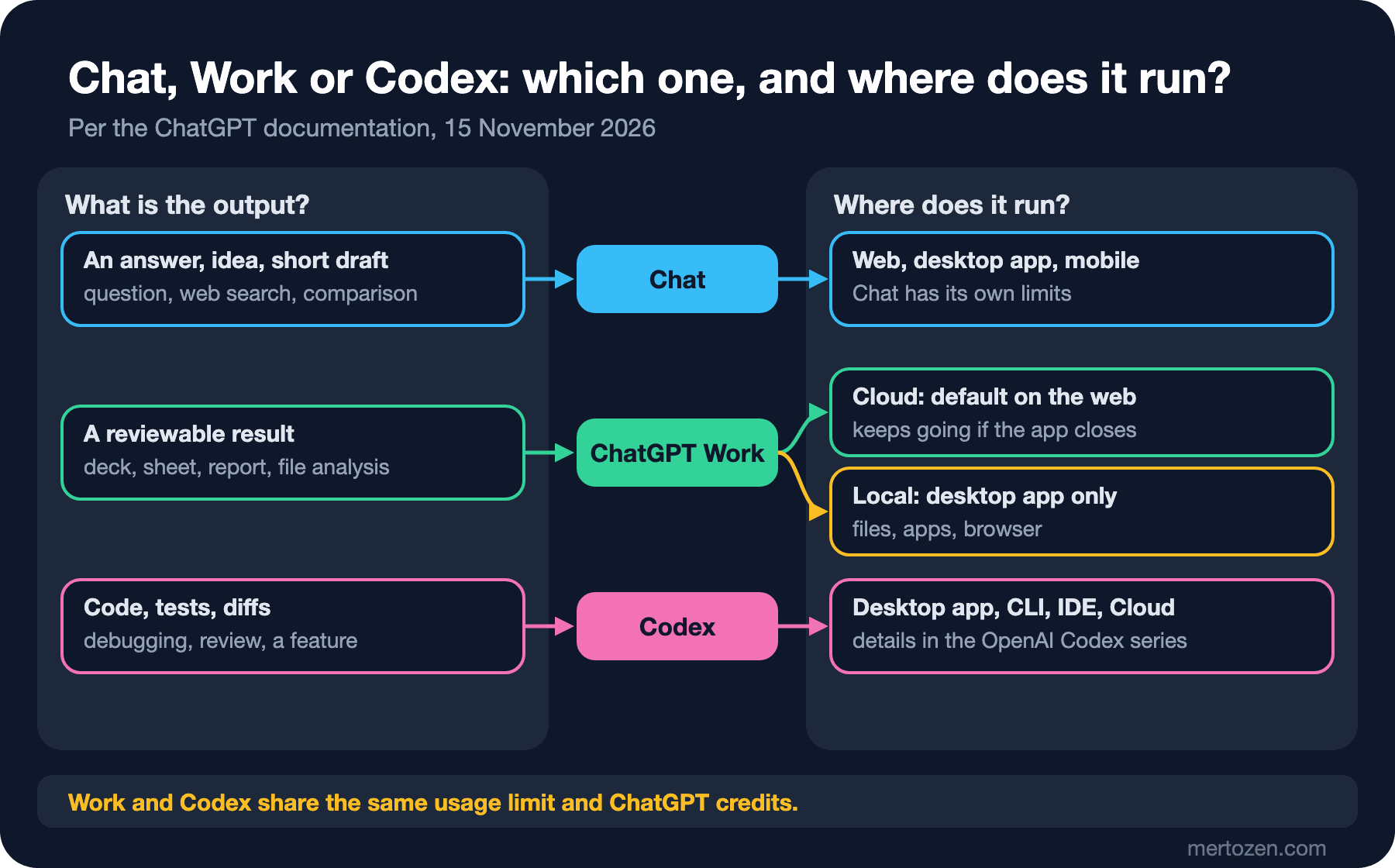
Work and Codex overlap heavily in capability. In the desktop app, what separates them is mostly presentation: Work hides technical details such as Git and shell commands and focuses on the finished output, while Codex shows diff and review views, technical detail and the pull request pane. The chat list you see in Work also includes the chats you started with Chat on web and mobile; Codex focuses on its own chats and development projects. If you are used to doing non-coding work in Codex, you can keep doing so; the documentation explicitly allows it.
Cloud or Local?
Where Work runs directly decides what it can do. On the web, Work always runs in an isolated cloud environment managed by OpenAI. In the desktop app, if it is enabled for your account or workspace, there are two options:
- Cloud: the task runs in a hosted environment; it keeps going after you close the desktop app and can be followed from the web or mobile. It can use uploaded files, connected tools and websites you approved.
- Local: the task uses the files, apps and browser on your computer; the desktop app has to be open for this.
With "Work across devices", which arrived at DevDay 2026 on 29 September 2026, you can start a task with Cloud selected on desktop and continue it on your phone or on the web, provided your workspace has enabled local computer access. According to the "Get started with Work" page (https://learn.chatgpt.com/docs/get-started-with-work), the cloud then coordinates the task, but your laptop has to stay on and connected for steps that need its files. If the computer is offline at the start of a new step, eligible tasks continue in a cloud container, but that container cannot reach the local files. In both cases ChatGPT shows its progress and pauses when it needs information or approval.
Surfaces: Where It Runs
The same account is used from several surfaces: the web at chatgpt.com; the desktop app for Windows and macOS; the Linux desktop app in preview, with packages for Ubuntu 24.04 and 26.04, Debian 13 and Fedora; and the iOS and Android apps. The desktop app is designed for running projects in parallel, opening generated files in the same window, and using the browser and the apps on your computer. On the Codex side, the mobile app lets you start cloud tasks and work on a connected Mac or Windows PC, and approve requested actions.
Two surfaces matter for teams. Since DevDay 2026, people can type @ChatGPT in Slack and Microsoft Teams conversations to ask for a summary, a draft reply or the use of approved tools. Workspace admins set this up, and there is an important detail: according to the documentation (https://learn.chatgpt.com/docs/enterprise/chatgpt-slack-and-teams), @ChatGPT works with the permissions of the company account the admin connected; it does not inherit the file, app or private-channel access of the person in the conversation. One surface has disappeared: Atlas, OpenAI's browser, was announced for retirement on 9 July 2026 and stopped working on 9 August 2026, according to the Atlas release notes in the Help Center. The sixth post covers how to get work done in a browser in 2026.
Plans (15 November 2026)
The Pricing page on learn.chatgpt.com (https://learn.chatgpt.com/docs/pricing) and the plan list on chatgpt.com/pricing looked like this on 15 November 2026. Prices are in US dollars and may exclude tax; check the current pages before you buy.
| Plan | Price | Work and Codex | Highlights |
|---|---|---|---|
| Free | Free | Limited, desktop app only | Chat; research, uploads and memory limited; projects included |
| Go | 8 dollars a month | Limited, desktop app only | More messages, uploads, image creation and voice than Free; may include ads |
| Plus | 20 dollars a month | On desktop, web and mobile | Advanced reasoning models, deep research, projects, scheduled tasks, extra usage with ChatGPT credits |
| Pro | 100, 200 or 500 dollars a month | Longer sessions; currently no five-hour limit | Everything in Plus, a dot as an always-on agent, maximum deep research; Ultrafast mode on the 500-dollar plan |
| Business | 20 dollars per user per month billed annually, 25 dollars billed monthly; at least 2 users | On web, desktop and mobile; larger machines for cloud tasks | Dedicated workspace, single sign-on, no training on business data by default, credits |
| Enterprise and Edu | Through sales | Depends on admin settings | Role-based access, Compliance API and audit logs, data retention and data residency controls, no fixed limits with flexible pricing |
The two pages differ in small ways: chatgpt.com/pricing still lists custom GPTs among the Plus features, while custom GPTs retire on 11 December 2026 (post five). Differences like this show that plan pages change as fast as the product does; do not base a decision on a single screenshot or blog post.
Usage Limits: The Five-Hour Window and Credits
The first sentence of the Pricing page is half of the answer to Guess First: ChatGPT Work and Codex use the same pricing, the same credits and the same usage limits. Selin's Work report and Emre's Codex session, each on their own account, both drew from this shared Work and Codex pool, and both used it up with a single long, context-heavy job. Gül's short Chat conversations are not part of that pool; Chat has its own limits, described separately on the plan page.
The limit is not a fixed number of messages. The documentation says usage depends on the model, the size and complexity of the task, and whether the work runs locally or in the cloud; tasks that keep a long context, run for a long time or touch many files use much more per message. The estimate given for Plus and Business standard is the number of local messages in a five-hour window: 5–45 with GPT-6 Astra, 15–160 with GPT-6.1 Sol, 350–3,000 with GPT-6 Luna. Cloud tasks can cost more than the same job run locally, and weekly limits may apply as well. The current state is shown in the usage dashboard on chatgpt.com.
What happens at the limit depends on the plan. Plus and Pro users can buy ChatGPT credits without upgrading; Business, Enterprise and Edu workspaces on flexible pricing buy workspace credits. If you hit the limit in the middle of a turn, the agent can finish that turn. The fast modes have a price too: Fast mode uses included usage 2.5 times faster than Standard, Ultrafast 8 times; image generation also uses 3–5 times more on average than a similar turn without images.
Feature Maturity Labels
Some features in ChatGPT and Codex ship with a maturity label. The "Feature Maturity" page (https://learn.chatgpt.com/docs/feature-maturity) defines five levels, and each means something different to you as a reader. Under development is not ready for use. Experimental is unstable, and OpenAI may change or remove it; use it at your own risk. Beta is ready for broad testing and complete in most respects, but expect small changes based on feedback; it is fine for evaluation and pilots. Stable is fully supported and behaves consistently over time; removing it usually goes through a deprecation process. Deprecated still works but is no longer recommended; do not build new work on it, plan a migration.
The practical consequence: if you tie one of Bookstore's recurring workflows to an Experimental feature, that feature may change next month. That is why it matters that the Linux desktop app is in preview or that Sites is in public beta; check the label before you put a feature into a team process.
Bookstore: Who Should Use Which Mode?
Back to the three people from Guess First. Translating the documentation's definitions into the team's work gives this table:
| Person and job | Mode | Why | Watch out |
|---|---|---|---|
| Gül: draft reply to a return complaint | Chat | A short draft refined back and forth; no file needed | Remove the customer name and order number before pasting |
| Selin: competitor comparison table and PRD draft | ChatGPT Work | Several sources, a plan, a reviewable file as output | Ask it to show the plan first; Work shares limits with Codex |
| Emre: cart bug, tests and code review | Codex | Needs diffs, test results and a review view | Details in the OpenAI Codex series; draws from the same pool |
| Hakan: e-mail to an institutional customer from meeting notes | Chat | Short text, quick edits | Company data belongs in a Business workspace, not a personal account |
What the table says is simple: the kind of work decides the mode, not the person's role. If Selin only has a question one day, Chat is enough; if Gül one day wants a hundred complaints classified into a table, she should switch to Work. The second decision for the team is a Business workspace instead of personal Plus accounts: according to the documentation, business data on Business is not used for model training by default, and the admin can control access to Work, plugins, the browser and network access. The tenth post covers privacy settings in detail.
In Production
Feature visibility depends on the plan, platform, region, gradual rollout and workspace settings. The documentation itself repeats this on many pages. When someone on the team cannot see a menu, the first question should be "which plan, which surface, did an admin turn it off?"; "it's broken" comes later.
Measure usage. Checking the usage dashboard every couple of weeks is what the Pricing page recommends as well. If you often get close to your limit, first check whether a smaller model or a narrower task scope would be enough; the second post covers model and reasoning effort choice for exactly this.
Check the result. The last section of the "Use ChatGPT" page recommends verifying important numbers, names, dates and quotes, opening every tab and slide of a generated file, and asking ChatGPT which sources it used. Legal, financial and security decisions need expert review.
Common Pitfalls
Learning from old blog posts. Guides written in 2025 describe agent mode, Canvas and creating custom GPTs. Work replaced agent mode; Canvas was removed from the new models on 28 May 2026, according to the Help Center's release notes, and replaced by writing and code blocks inside the chat. Check the date of the guide you are reading.
Mistaking a gradual rollout for a bug. If a feature has been announced but you cannot see it, it has most likely not reached your account yet. The documentation says this on many pages with "subject to rollout" and "availability depends on".
Thinking Work and Codex have separate quotas. They share one pool; a large Work report affects your Codex work on the same day.
Giving every job to Work. Opening Work for a short question uses more than necessary because of planning and tool use. If you do not expect a file or a multi-step job as the output, Chat is enough.
A Small Experiment
★☆☆ List ten jobs you gave ChatGPT in the last week and write Chat, Work or Codex next to each. In which of them did you really expect a file or a reviewable result?
★★☆ Open the usage dashboard in your own account and note where the five-hour window stands. Give Work a small task the same day, for example turning a three-paragraph note into a table, and record the change in the dashboard.
★★★ Write a plan proposal for your team: how many people, who uses which mode how often, is company data involved? Calculate the monthly cost of the Plus, Pro and Business options at current prices and compare it with the dashboard data a month later.
The setting that affects your limit most is which job you give to which model and at which reasoning effort. The second post looks at the GPT-6 menu in Chat, the Thinking setting, the Power presets in Work and Codex, and which jobs Astra, Sol, Terra and Luna suit, using Bookstore's campaign pricing analysis.