

Claude or ChatGPT? A Job-by-Job Comparison for Developers and Knowledge Workers
Choose between Claude and ChatGPT by the job and with your own task set, not by asking which is better; the business defaults and team plan prices of the two products are very close, and the real difference is between personal and business accounts. Concept mapping as of 15 November 2026, research, documents, files, browser and background work, portability with MCP and SKILL.md, a privacy and plan table, and a decision for the Bookstore team.
Version note: This post compares ChatGPT and Claude as of 15 November 2026; the ChatGPT side was checked the same day against this series' sources (learn.chatgpt.com, help.openai.com, chatgpt.com/pricing) and the Claude side against the sources of the Working with Claude series (support.claude.com, privacy.claude.com, claude.com/pricing). This post is based on the official documentation. The comparison rests only on the documented features of the two products; it contains no comparison of model quality and no benchmarks. Both products change every month; check the tables again before you decide.
Guess First
For a year, everyone on the team of Bookstore, the online bookstore used as the shared example across this site's series, has used their own tool: Emre and Ayşe work with personal Claude Pro accounts, Selin and Gül with personal ChatGPT Plus accounts. Hakan called a meeting to move the company to a single tool. Emre showed a benchmark table from a blog post: "Claude is 12 percent better at coding". Selin brought a table from another blog that said the opposite. The meeting lasted an hour and ended without a decision.
What is your guess? Which question should the team have asked? Where does a benchmark table help in this decision? The answer is an approach that comes up in every post of this series and of the Working with Claude series: choose the tool by the job, and measure the claim on your own work.
Why "Which Is Better?" Is the Wrong Question
The model families of both products changed several times this year. In this series we saw Astra, Sol, Terra and Luna from the GPT-6 family, and in the Claude series Opus, Sonnet, Haiku and Fable; both have dates on which a model retired and a new one replaced it. A general benchmark measures someone else's task set, on another date, with other settings; it does not measure your support e-mails, your API definition or your slide template. That is why this post does not compare model quality. What it compares is what the official documentation says: which job is done with which feature, on which plan, under which data rules. At the end of the post we will see how to answer the quality question with your own small task set.
Mapping the Concepts
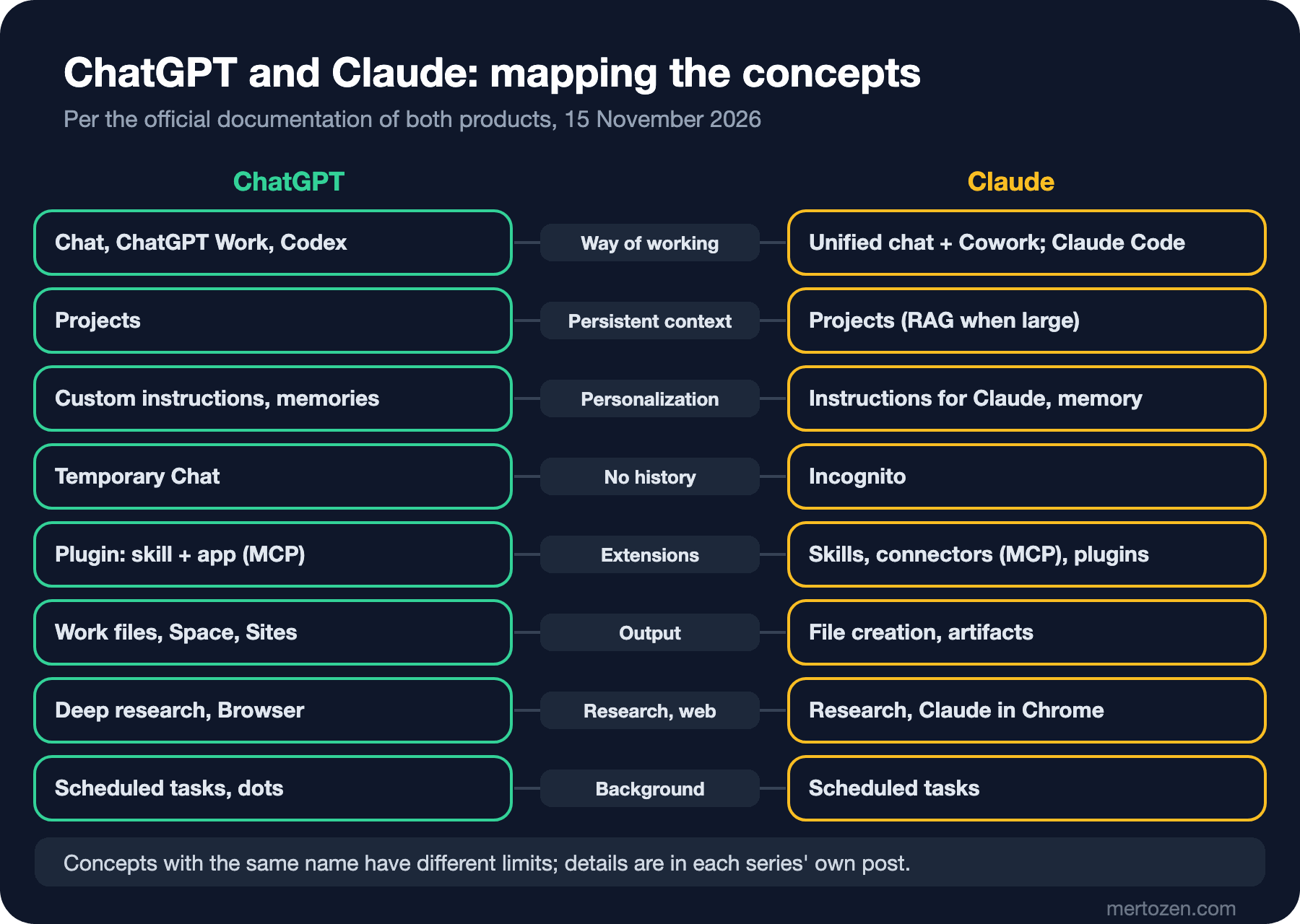
In 2026 the two products arrived at a similar structure. ChatGPT has three modes: Chat, ChatGPT Work and Codex (first post). In Claude, from 16 September 2026, chat and Cowork are being merged into one experience gradually across accounts, and there is no need to choose a separate mode for long tasks; the coding agent, Claude Code, is a separate product. Both sides have Projects; ChatGPT has custom instructions and memories, Claude has Instructions for Claude and memory; for a chat that does not go into history, ChatGPT has Temporary Chat and Claude has incognito.
On the extension side, both products are moving toward the same two building blocks. For connecting to outside systems both use MCP: in ChatGPT a remote MCP server is connected as an app inside a plugin (fifth post), in Claude as a custom connector. For recurring work both use skills, and in both a skill is a folder containing a SKILL.md file; the ChatGPT documentation bases this on the open agent skills standard. A plugin, in both products, is the unit that packages skills and connections together. As we will see below, this similarity is the most concrete way to reduce vendor lock-in.
A Job-by-Job Comparison
Research. In ChatGPT a multi-source report is produced with deep research in Work; the plan can be edited before it starts, specific sites can be chosen as trusted sources, and usage comes out of the Work and Codex limit (sixth post). In Claude, Research is available on paid plans; according to the Working with Claude series post "Research and Web Search with Claude: Cited Research and Verification" (/en/blog/claude-research-web-search-kaynakli-arastirma), connector tools run during Research without asking for approval on each use. On both sides a citation is an address, not evidence.
Long documents and persistent context. In ChatGPT projects the file limit is 5, 25 or 40 depending on the plan (fourth post). In Claude projects, once the knowledge grows Claude switches to working with RAG; the details are in "Claude Projects: A Persistent Workspace with Project Knowledge, Instructions and RAG" (/en/blog/claude-projects-project-knowledge-rag). The same point holds on both sides: in a large set of sources the model may not always find the relevant part, and naming the document in your question helps.
Files, decks and sharing. ChatGPT Work creates documents, presentations, spreadsheets and PDF files, refined with annotations on the desktop (seventh post); pages and slides the team edits together live in Space, and small web tools in Sites (eighth post). In Claude, Excel, PowerPoint, Word and PDF files are created in a sandbox, and artifacts have been available on all plans including Free since 16 September 2026; the details are in "Claude Artifacts and File Creation: Excel, PowerPoint, Word, PDF and Interactive Visuals" (/en/blog/claude-artifacts-dosya-uretimi).
Coding. Codex on the ChatGPT side, Claude Code on the Claude side. Comparing them takes more detail than fits in this series; they are covered separately in the OpenAI Codex and Claude Code series.
Work in the browser. ChatGPT has Work's cloud browser, a built-in browser on the desktop and a browser extension for Chrome, Edge, Brave, Opera and Vivaldi (sixth post). In Claude, Claude in Chrome is available on paid plans and works only in Chrome; there is also a built-in browser in the Desktop app. The details are in "Agentic Work with Claude: Cowork Tasks, Claude in Chrome and Safe Permission Settings" (/en/blog/claude-agentic-isler-cowork-claude-in-chrome). The documentation of both products warns that instructions on a page can be misleading or malicious; Claude's documentation names prompt injection as the biggest risk and recommends a separate browser profile.
Work that keeps running in the background. Both sides have scheduled tasks. ChatGPT additionally has tasks triggered by app events (web and mobile) and, on eligible Pro, Business Premium and organization accounts, dots, an always-on agent (seventh post); no feature with a one-to-one match appears in the sources of the Working with Claude series.
Integration. The remote MCP server written for Bookstore in the AI Agents and MCP series can be connected to both products: in ChatGPT as a plugin's app, in Claude as a custom connector. On the Claude side, according to "Claude Connectors and MCP: Connecting Google Drive, GitHub, Slack and Your Own MCP Server" (/en/blog/claude-connectors-mcp-custom-connector), custom connectors are available on all plans including Free, Free is limited to one, and the server must be reachable from the public internet over HTTPS on port 443.
Privacy, Plans and Limits
For the three topics asked about most in a decision meeting, this is what the documentation of the two products says:
| Topic | ChatGPT | Claude |
|---|---|---|
| Model training on personal plans | On Free, Plus and Pro, "Improve the model for everyone" is on by default; Settings > Data controls | Free, Pro, Max and Ultra are consumer plans; the "Help improve our AI models" setting is under Settings > Privacy |
| Model training on business plans | Business, Enterprise and Edu data is not used for training by default | Team, Enterprise and API data is not used for training by default |
| Feedback | On personal plans, the whole chat you gave feedback on may be used for training even with the setting off | A conversation you gave feedback on may be used for training and kept for up to 5 years; the exception also applies on commercial plans |
| Chats that leave no history | Temporary Chat; may be kept for up to 30 days for safety | Incognito; kept for 30 days by default, cannot be opened inside a project |
| Paid individual plans | Go $8, Plus $20, Pro $100, $200 or $500 (monthly) | Pro $20 ($17 annually), Max $100, Ultra $200 (monthly) |
| Team plan | Business: $25 per user per month, $20 annually; at least 2 users | Team standard: $25 per seat per month, $20 annually; 2–150 people |
| Limit model | Work and Codex share one pool; five-hour window and weekly limits, currently no five-hour limit on Pro | Five-hour and weekly limits; no five-hour limit on Ultra for verified accounts |
The details of the Claude side, including notes on KVKK, are in "Getting Started with the Claude Apps: Web, Desktop, Mobile, Plans and Usage Limits" (/en/blog/claude-uygulamalari-planlar-usage-limitleri) and "Privacy and Data Controls in Claude: Model Training, Retention, KVKK and Organization Settings" (/en/blog/claude-privacy-data-controls-kvkk). The table leads to a notable conclusion: the business defaults and team plan prices of the two products are very close. The real difference is between a personal account and a business account, not between the two products. The riskiest thing the Bookstore team did for a year was not which tool it chose, but processing company data in personal accounts.
Bookstore: Both at Once?
For the six-person Bookstore team the arithmetic is simple: ChatGPT Business and a Claude Team standard seat both cost $25 per person per month with monthly billing, so each comes to $150 a month; buying both comes to $300. Money alone does not decide it. The real cost is two separate data policies, two admin panels, two lists of plugins and connectors, and the time the team spends asking "which tool was that job in?".
Our suggestion for the team is to pick one primary tool that carries most of the work, and to decide with the team's own jobs rather than a benchmark table. If support, product and sales lean toward ChatGPT for Work's file creation, Space and scheduled tasks, while development leans toward Claude out of its Claude Code habits, buying the second tool only for that team is reasonable. Whatever the choice, three things should stay portable:
- Prompts and task descriptions live in the repository as plain text, not in a product's settings screen.
- Team rules are written as skills in the
SKILL.mdformat; the same folder structure is used in both products and tested separately in each. - Access to Bookstore data goes through one remote MCP server; if the tool changes, only the connection changes, not the server.
Building Your Own Task Set
The answer to the quality question is not in a general benchmark but in the team's own work. The approach from the LLM Fundamentals series posts "LLM Hallucination and Reliability: Cite, Verify, Measure" and "LLM Cost, Latency and Model Choice: From Tokens to the Bill" applies here too: a small, fixed task set, criteria written in advance and blind scoring. For Bookstore, 8–10 real jobs are enough: a refund reply, a PRD draft, the sales analysis from the seventh post, an institutional quote e-mail, an API change note. Collect the results in a file like this:
task_id,task,tool,plan,model_or_setting,date,correct,complete,
sources_ok,edits_needed_min,usage_note,reviewer_score_1_5
T01,refund reply (masked),chatgpt,business,,,,,,,,
T01,refund reply (masked),claude,team,,,,,,,,
T03,q3 sales analysis,chatgpt,business,,,,,,,,
T03,q3 sales analysis,claude,team,,,,,,,,
You fill in the empty columns after each run. The rules are what matter: give both tools the same input and the same masked data, make sure the person scoring does not know which tool produced which answer, always include jobs whose correct answer is known (such as the check table in the sales analysis), and write the date and settings on every row. When you run the same set again three months later the models will have changed; without dates you cannot compare the results.
In Production
Record the decision with a date. Every row in this post is the state on 15 November 2026. Write in the decision document which page you looked at on which day; when you reopen the decision a year later you will know what changed.
Fix the account type first. Whichever product is chosen, the first job is to process company data in the business workspace and to clean up old chats in personal accounts.
Migrate step by step. Move the jobs that did well in the task set first; rebuild scheduled tasks, plugins and skills one at a time and review the first runs.
Common Pitfalls
Deciding with a benchmark table. Someone else's task set does not measure your work; a table with an unclear source and date measures nothing at all.
Mapping product names one to one. Projects in ChatGPT and Projects in Claude share a name, but their limits and behavior differ; check the details of every mapping in its own post.
Making price the only criterion. The team plans are very close; the difference is in data policy, admin controls and the team's habits.
Building a setup that cannot move. Keeping instructions only in one product's settings screen means rewriting everything when the tool changes.
A Small Experiment
★☆☆ List ten jobs you gave an AI tool in the last month and write one of this post's job headings next to each: research, document, file, coding, browser, background work.
★★☆ Build an 8-task set for your own team, try both tools with the same input using the file structure above, and score blind. In which jobs is there really a difference, and in which is there none?
★★★ Write a one-page tool decision for your team: the primary tool, who gets the second tool, the data rule, the skill and MCP plan for portability, and the date the decision will be reviewed.
This post closes the Working with ChatGPT series. Over eleven posts we went from modes and plans to model choice, personalization, Projects, plugins and MCP, research and the browser, big tasks with Work, Space and Sites, images and voice, and privacy settings. To walk the same path on the Claude side, start with the first post of the Working with Claude series (/en/blog/claude-uygulamalari-planlar-usage-limitleri); the details of Codex are in the OpenAI Codex series.