

Tool Use with Claude: Client Tools, the Tool Loop, Strict Mode and Server Tools
For tool use in Claude you define each tool with a name, a description and a strict JSON Schema, run the tools while stop_reason is tool_use and send all tool_results back in a single user message; authorization belongs inside the tool. tool_choice any returning 400 on Opus 5.5, parallel calls, web search and tool search, the SDK's tool runner and testing the loop with a fake HttpMessageHandler.
Version note: The code in this post was built with .NET 10, Anthropic C# SDK 13.8.0 and Claude API version 2026-10-21, and its unit tests were run. The tool loop tests use the SDK's real client with a fake HttpMessageHandler that never touches the network; the responses are fixtures derived from the documentation's samples. Tool use, strict mode, server tool and tool runner details were taken on 15 November 2026 from the platform.claude.com documentation. This post is based on the official documentation.
Guess First
Order lookup is being added to the shopping assistant of Bookstore, the online bookstore used as the shared example across this site's series. In the first attempt Emre writes "Show users only their own orders" in the system prompt and gives the get_order_status tool an order number and access to all orders. In testing, Alan asks about Ada's order 1042 and gets the answer. Emre then adds tool_choice: {"type": "any"} to force the tool; when the model is switched to Opus 5.5, the requests start returning 400.
What is your guess? How reliable is an authorization rule that lives in the prompt? And why is forced tool choice not accepted at all on some models? We covered the provider-neutral logic of tool calling ("the model does not call a function, it asks for a call") in the eleventh and twelfth posts of the LLM Fundamentals series, and the agent loop and its stop condition in the second post of the AI Agents and MCP series. In this post we look at their counterparts in the Claude API: client tool definitions, the tool loop, strict mode, server tools and the SDK's tool runner.
Defining a Client Tool: name, description, input_schema, strict
A client tool is a tool that runs in your code. It is defined in the request's tools field with a name, a description and an input_schema in JSON Schema form. The name must match the pattern ^[a-zA-Z0-9_-]{1,128}$. First Bookstore's order model:
namespace Bookstore.Api.Ordering;

public sealed record Order(string Id, Guid CustomerId, string Status, DateTime PlacedAtUtc, IReadOnlyList<string> Isbns);

public interface IOrderRepository
{
    Order? Find(string orderId);
}

public sealed class InMemoryOrderRepository : IOrderRepository
{
    public static readonly Guid Ada = Guid.Parse("6f1c2a54-0d7e-4b8a-9a3f-1d2e3c4b5a60");
    public static readonly Guid Alan = Guid.Parse("0b9e8d7c-6a5f-4e3d-8c2b-1a0f9e8d7c6b");

    private static readonly Order[] Orders =
    [
        new("1042", Ada, "Shipped", new DateTime(2026, 11, 12, 9, 30, 0, DateTimeKind.Utc), ["9780441172719"]),
        new("1043", Alan, "Preparing", new DateTime(2026, 11, 14, 16, 5, 0, DateTimeKind.Utc), ["9780141439587", "9780547928227"]),
    ];

    public Order? Find(string orderId) => Orders.FirstOrDefault(o => o.Id == orderId);
}

// The signed-in customer; authentication itself is covered in the ASP.NET Core Web API series.
public sealed record CurrentCustomer(Guid Id);
Then the two tools:
using System.Text.Json;
using Anthropic.Models.Messages;
using Bookstore.Api.Catalog;
using Bookstore.Api.Ordering;

namespace Bookstore.Api.Assistant;

public sealed class BookstoreTools(IBookRepository books, IOrderRepository orders)
{
    public const string SearchBooks = "search_books";
    public const string GetOrderStatus = "get_order_status";

    public static readonly ToolUnion SearchBooksTool = new Tool
    {
        Name = SearchBooks,
        Description = "Searches the Bookstore catalog by title, author or topic words. Returns up to 5 books with ISBN, title, author and price in TRY. "
                      + "Use it whenever the customer asks for a book recommendation or whether a book is in stock. Do not use it for order questions.",
        Strict = true,
        InputSchema = new InputSchema(new Dictionary<string, JsonElement>
        {
            ["type"] = JsonSerializer.SerializeToElement("object"),
            ["properties"] = JsonSerializer.SerializeToElement(new
            {
                query = new { type = "string", description = "Words to search for, for example 'fantasy' or 'Austen'." },
                max_price = new { type = "number", description = "Optional upper price limit in TRY." },
            }),
            ["required"] = JsonSerializer.SerializeToElement(new[] { "query" }),
            ["additionalProperties"] = JsonSerializer.SerializeToElement(false),
        }),
    };

    public static readonly ToolUnion GetOrderStatusTool = new Tool
    {
        Name = GetOrderStatus,
        Description = "Returns the status, order date and ISBNs of one order of the signed-in customer. "
                      + "Use it when the customer asks where an order is. It only sees the signed-in customer's own orders.",
        Strict = true,
        InputSchema = new InputSchema(new Dictionary<string, JsonElement>
        {
            ["type"] = JsonSerializer.SerializeToElement("object"),
            ["properties"] = JsonSerializer.SerializeToElement(new
            {
                order_id = new { type = "string", description = "The order number, for example '1042'." },
            }),
            ["required"] = JsonSerializer.SerializeToElement(new[] { "order_id" }),
            ["additionalProperties"] = JsonSerializer.SerializeToElement(false),
        }),
    };

    public static IReadOnlyList<ToolUnion> Definitions => [SearchBooksTool, GetOrderStatusTool];

    // ...
The define tools page says the most important factor in tool performance is a detailed description, and recommends at least 3–4 sentences per tool: what the tool does, when to use it (and when not), what each parameter means, what it does not return. The page's other advice helps too: group related operations into fewer tools, prefix names with the service as the number of tools grows, and return only the fields the model needs for its next step. There is a warning as well: if a parameter asks the model "why it made this call", ask for a short explanation rather than its reasoning; otherwise the reasoning_extraction refusal we saw in the second post can come. Tool design in detail is in the third post of the AI Agents and MCP series.
Strict Mode and tool_choice
strict: true guarantees that the model generates the tool input to match the schema. The strict tool use page describes it as grammar-constrained sampling, limiting the model's token choices to output that fits the schema. Without strict the model can send a number as a string such as "2" or leave out a required field; with strict, input always matches the schema and the tool name is always valid. There are two conditions: objects must have additionalProperties: false, and the schema must stay within the same JSON Schema subset as structured outputs. The limits are the same too: at most 20 strict tools per request, 24 optional parameters in total across all strict schemas, and at most 16 parameters that use anyOf or type arrays. The documentation points out one more detail: the capitalization of enum values is not guaranteed, so compare case-insensitively.
Emre's second problem was in tool_choice. According to the define tools page, Fable 5.2, Opus 5.5, Sonnet 5.5 and Fable 5.1 reject requests whose tool_choice type is any or tool with a 400. On these models you use auto (the default) or none; strict is recommended for schema-valid input, and structured outputs from the sixth post for a fixed JSON output. Forced tool choice works on Haiku 5.5, but so that nothing breaks when the model changes, Bookstore stays with auto and says when to use the tool in the description and the system prompt.
The Tool Loop: tool_use, tool_result and Parallel Calls
When the model wants to call a tool, the response comes with stop_reason: "tool_use" and one or more tool_use blocks in content, each with an id, a name and an input. The sample response from the documentation:
{
  "id": "msg_01Aq9w938a90dw8q",
  "model": "claude-opus-5-5",
  "stop_reason": "tool_use",
  "role": "assistant",
  "content": [
    {
      "type": "text",
      "text": "I'll check the current weather in San Francisco for you."
    },
    {
      "type": "tool_use",
      "id": "toolu_01A09q90qw90lq917835lq9",
      "name": "get_weather",
      "input": { "location": "San Francisco, CA", "unit": "celsius" }
    }
  ]
}
You run the tool and send the result back as a tool_result block, matched by tool_use_id. The rules on the handle tool calls and parallel tool use pages are short but strict: right after the assistant's tool_use message comes a user message with the tool results, and no other message can come in between; all tool_result blocks must be in a single user message; in that message the tool_result blocks come first, and any text comes after them. The stop reasons page also describes a trap: adding text right after tool results can make the model end its turn with an empty answer.
Claude 4 and later models call several tools in the same response when that helps. The documentation leaves the execution order to you: running independent read-only tools in parallel and tools with side effects one after another is reasonable. With disable_parallel_tool_use: true in tool_choice the model can be limited to at most one tool per turn.
We write the loop ourselves:
using Anthropic;
using Anthropic.Models.Messages;
using Bookstore.Api.Ai;
using Bookstore.Api.Ordering;
using Microsoft.Extensions.Options;

namespace Bookstore.Api.Assistant;

public sealed record AgentAnswer(string Text, ReplyOutcome Outcome, int Rounds, IReadOnlyList<string> ToolCalls, TokenUsage Usage);

public sealed class AssistantAgent(
    IAnthropicClient claude,
    BookstoreTools tools,
    IOptions<ClaudeOptions> options,
    ILogger<AssistantAgent> logger)
{
    public const int MaxRounds = 5;

    public const string SystemPrompt = """
        You are the shopping assistant of Bookstore, an online bookstore. Answer in the customer's language.
        Use search_books for book questions and get_order_status for order questions; never guess prices or order states.
        Use web search only for questions about an author's life, and cite the source.
        If a tool returns an error, explain it briefly and ask the customer for what is missing.
        """;

    public MessageCreateParams BuildRequest(IReadOnlyList<MessageParam> messages) => new()
    {
        Model = options.Value.Model,
        MaxTokens = 4096,
        System = SystemPrompt,
        Tools = [.. BookstoreTools.Definitions, BookstoreTools.AuthorWebSearchTool],
        Messages = messages,
    };

    public async Task<AgentAnswer> AskAsync(string question, CurrentCustomer customer, CancellationToken cancellationToken)
    {
        List<MessageParam> messages = [new UserMessageParam { Content = question }];
        List<string> toolCalls = [];
        long input = 0, output = 0;

        for (int round = 1; round <= MaxRounds; round++)
        {
            Message response = await claude.Messages.Create(BuildRequest(messages), cancellationToken);
            ClaudeReply reply = ClaudeReplyReader.Read(response);
            input += reply.Usage.Input;
            output += reply.Usage.Output;
            TokenUsage usage = new(input, output, 0, 0, 0);

            if (reply.Outcome is not (ReplyOutcome.NeedsTools or ReplyOutcome.Paused))
            {
                return new AgentAnswer(reply.Text, reply.Outcome, round, toolCalls, usage);
            }

            // The assistant turn goes back unchanged, including thinking and tool_use blocks.
            messages.Add(new AssistantMessageParam { Content = reply.AssistantContent.ToList() });

            if (reply.Outcome == ReplyOutcome.Paused)
            {
                // pause_turn: a server tool loop hit its limit; sending the turn back lets Claude continue.
                continue;
            }

            List<ContentBlockParam> results = [];
            foreach (ContentBlock block in response.Content)
            {
                if (block.TryPickToolUse(out ToolUseBlock? call))
                {
                    toolCalls.Add(call.Name);
                    results.Add(tools.Execute(call, customer));
                }
            }

            // Every tool_result goes back in ONE user message, and nothing comes before them.
            messages.Add(new UserMessageParam { Content = results });
            logger.LogInformation("Round {Round}: ran {Count} tool call(s)", round, results.Count);
        }

        logger.LogWarning("Stopped after {MaxRounds} rounds", MaxRounds);
        return new AgentAnswer("I could not finish this request. A team member will help you.", ReplyOutcome.Unknown,
            MaxRounds, toolCalls, new TokenUsage(input, output, 0, 0, 0));
    }
}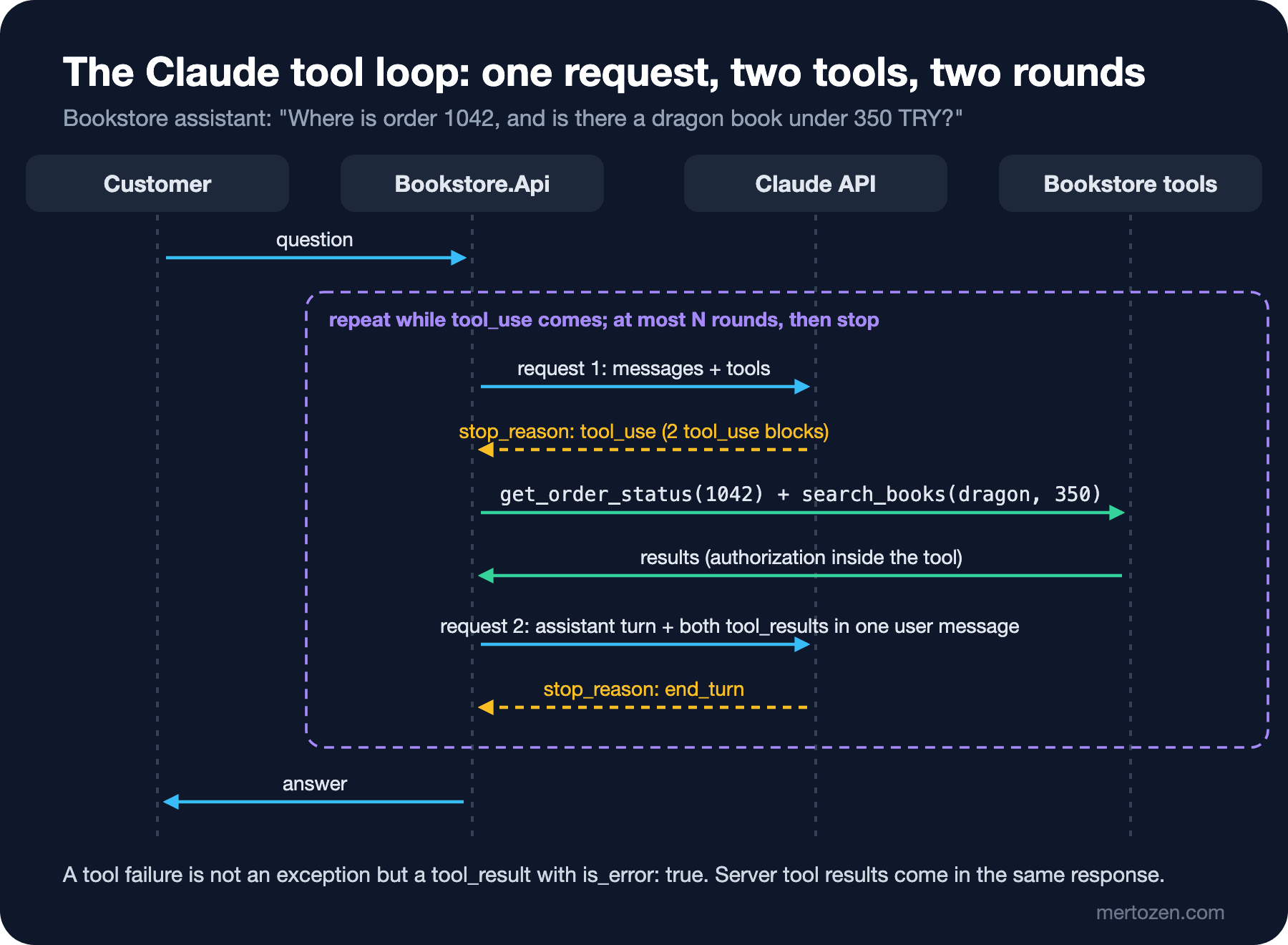
There are four decisions in this loop. At most 5 rounds: even if the model keeps calling tools, the loop stops and the user gets a fixed message; an agent without a stop condition is the shortest path to the "denial of wallet" problem from the seventh post of the LLM Application Security series. The assistant turn goes back with its blocks as they are, as in the second post; the thinking documentation requires sending thinking blocks back within a turn that uses tools. If pause_turn comes (when a server tool loop reaches its limit), we send the turn back and continue. And one tool_result per tool_use, all in one message.
Authorization Inside the Tool
Which customer get_order_status runs for does not come from the model. The model gives only the order number; the customer is taken from the authenticated user in the endpoint and passed to the tool from code:
        // The customer comes from the authenticated user, never from the request body or the model.
        app.MapPost("/api/assistant/ask", async Task<IResult> (
            AssistantQuestion body, ClaimsPrincipal user, AssistantAgent agent, CancellationToken ct) =>
        {
            if (!Guid.TryParse(user.FindFirstValue(ClaimTypes.NameIdentifier), out Guid customerId))
            {
                return TypedResults.Unauthorized();
            }

            return TypedResults.Ok(await agent.AskAsync(body.Question, new CurrentCustomer(customerId), ct));
        });
While the tool runs, it checks in code whether the order belongs to this customer:
    public string Run(string name, IReadOnlyDictionary<string, JsonElement> input, CurrentCustomer customer) => name switch
    {
        SearchBooks => RunSearch(input),
        GetOrderStatus => RunOrderStatus(input, customer),
        _ => throw new ToolInputException($"Unknown tool '{name}'."),
    };

    public ToolResultBlockParam Execute(ToolUseBlock call, CurrentCustomer customer)
    {
        try
        {
            return new ToolResultBlockParam(call.ID) { Content = Run(call.Name, call.Input, customer) };
        }
        catch (ToolInputException ex)
        {
            // The model gets the error as a result and can correct itself; it is not an exception for the API.
            return new ToolResultBlockParam(call.ID) { Content = ex.Message, IsError = true };
        }
    }

    private string RunSearch(IReadOnlyDictionary<string, JsonElement> input)
    {
        string query = input["query"].GetString() ?? string.Empty;
        decimal? maxPrice = input.TryGetValue("max_price", out JsonElement price) ? price.GetDecimal() : null;

        var found = books.Search(query, maxPrice).Take(5)
            .Select(b => new { isbn = b.Isbn, title = b.Title, author = b.Author, price_try = b.Price });
        return JsonSerializer.Serialize(found);
    }

    private string RunOrderStatus(IReadOnlyDictionary<string, JsonElement> input, CurrentCustomer customer)
    {
        string orderId = input["order_id"].GetString() ?? string.Empty;
        Order? order = orders.Find(orderId);

        // The authorization check lives in code, not in the prompt: another customer's order looks like a missing one.
        if (order is null || order.CustomerId != customer.Id)
        {
            throw new ToolInputException($"No order {orderId} was found for this customer. Ask the customer to check the number.");
        }

        return JsonSerializer.Serialize(new { order_id = order.Id, status = order.Status, placed_at_utc = order.PlacedAtUtc, isbns = order.Isbns });
    }
}

public sealed class ToolInputException(string message) : Exception(message);
Another customer's order comes back as "not found"; that way the model cannot even learn that the order exists. This is the answer to the question in Guess First: the "show only their own orders" rule in the system prompt is a request, not a check. The user's message or text inside a tool result can try to get around it. Excessive agency and narrowing tool permissions are covered in detail in the fourth post of the LLM Application Security series. The handle tool calls page adds another warning: tool results can carry content outside your control (a web page, an incoming e-mail); keep that content inside the tool_result block, not in the system prompt or in plain user text.
Errors come back as results, not exceptions: a tool_result with is_error: true. The documentation recommends that the error message say what went wrong and what the model should do next; our message says "ask the customer to check the number".
Server Tools: Web Search, Web Fetch, Code Execution and Tool Search
Server tools run on Anthropic's servers. You only send the definition; if the model uses the tool, the result comes in the same response as a server_tool_use and its matching result block (for example web_search_tool_result). You do not need to send a tool_result. We added web search to the Bookstore assistant for questions about authors:
    // Author questions: a server tool that Anthropic runs; its results come back in the same response.
    public static readonly ToolUnion AuthorWebSearchTool = new WebSearchTool20260318
    {
        MaxUses = 3,
        AllowedDomains = ["en.wikipedia.org"],
        AllowedCallers = [WebSearchTool20260318AllowedCaller.Direct],
    };
Watch the version names. The web search documentation lists three versions: web_search_20250305 is basic search, web_search_20260209 adds dynamic filtering (the model filters the results with code it writes and takes only the relevant part into context), and web_search_20260318 adds a response inclusion setting on top. 20260209 and later call search from inside code execution by default; a direct call needs allowed_callers: ["direct"]. According to the documentation this setting is required on models that do not support programmatic tool calling, and this configuration without dynamic filtering is also eligible for ZDR. That is why we set Direct. allowed_domains limits the search to en.wikipedia.org; max_uses caps the number of searches in a turn.
Server tool errors are not HTTP errors either. If a search fails, the API still returns 200, and the error is inside the result (sample from the documentation):
{
  "type": "web_search_tool_result",
  "tool_use_id": "srvtoolu_a93jad",
  "content": {
    "type": "web_search_tool_result_error",
    "error_code": "max_uses_exceeded"
  }
}
There are two more cases. If the server tool loop hits the default limit of 10 iterations in a request, stop_reason: "pause_turn" comes; you send the response back as is to continue. If the model calls both a server tool and a client tool in the same turn, the API returns without running the server tool; the response has a server_tool_use with no result, and stop_reason is tool_use. According to the server tools page you then send a user message containing only the client tools' tool_result blocks and keep the tools array the same; the API runs the waiting server tool on the next request. Our loop handles both correctly.
Prices as of 15 November 2026: web search is 10 dollars per 1,000 searches plus the input tokens of the search results; web fetch has no charge beyond tokens. Code execution is free when used with the 20260209 or later versions of web search or web fetch; on its own it is billed by execution time (1,550 free hours per organization per month, then 0.05 dollars per hour per container). We will look at code execution and skills in detail in the ninth post.
As the number of tools grows, one more server tool helps: tool search. According to the tool search page, the model starts to struggle to pick the right tool once there are more than 30–50 tools, and large tool definitions fill the context. When you set defer_loading: true on definitions, those tools do not enter the context up front; when the model needs them it searches with tool_search_tool_regex_20251119 or tool_search_tool_bm25_20251119 and loads only what it finds. The tool search tool itself cannot be deferred.
The SDK's Tool Runner (beta)
The C# SDK has a helper that runs the loop for you: client.Beta.Messages.ToolRunner(...). The tool runner page lists it as beta. Each tool is a BetaRunnableTool: a Definition and a Run delegate that runs when the tool is called. The same order tool with the runner:
using System.Text.Json;
using Anthropic;
using Anthropic.Helpers.Beta;
using Anthropic.Models.Beta.Messages;
using Bookstore.Api.Ai;
using Bookstore.Api.Ordering;
using Microsoft.Extensions.Options;
using BetaInputSchema = Anthropic.Models.Beta.Messages.InputSchema;
using BetaMessageCreateParams = Anthropic.Models.Beta.Messages.MessageCreateParams;

namespace Bookstore.Api.Assistant;

// The same assistant with the SDK's tool runner (beta): the SDK runs the loop.
public sealed class ToolRunnerAssistant(IAnthropicClient claude, BookstoreTools tools, IOptions<ClaudeOptions> options)
{
    public async Task<string> AskAsync(string question, CurrentCustomer customer, CancellationToken cancellationToken)
    {
        BetaRunnableTool orderStatus = new()
        {
            Name = BookstoreTools.GetOrderStatus,
            Definition = new BetaTool
            {
                Name = BookstoreTools.GetOrderStatus,
                Description = "Returns the status of one order of the signed-in customer.",
                Strict = true,
                InputSchema = new BetaInputSchema(new Dictionary<string, JsonElement>
                {
                    ["type"] = JsonSerializer.SerializeToElement("object"),
                    ["properties"] = JsonSerializer.SerializeToElement(new { order_id = new { type = "string" } }),
                    ["required"] = JsonSerializer.SerializeToElement(new[] { "order_id" }),
                    ["additionalProperties"] = JsonSerializer.SerializeToElement(false),
                }),
            },
            Run = (call, _) =>
            {
                try
                {
                    return Task.FromResult<BetaToolResultBlockParamContent>(tools.Run(call.Name, call.Input, customer));
                }
                catch (ToolInputException ex)
                {
                    // The runner turns BetaToolError into a tool_result with is_error: true.
                    throw new BetaToolError(ex.Message);
                }
            },
        };

        BetaToolRunner runner = claude.Beta.Messages.ToolRunner(
            new BetaMessageCreateParams
            {
                Model = options.Value.Model,
                MaxTokens = 4096,
                System = AssistantAgent.SystemPrompt,
                Messages = [new BetaUserMessageParam { Content = question }],
            },
            [orderStatus],
            maxIterations: AssistantAgent.MaxRounds);

        BetaMessage final = await runner.RunUntilDoneAsync(cancellationToken);
        return string.Concat(final.Content.Select(b => b.TryPickText(out BetaTextBlock? text) ? text.Text : string.Empty));
    }
}
RunUntilDoneAsync runs the loop until the model stops calling tools or the maxIterations limit is reached. To control the error content, the documentation recommends throwing BetaToolError; the runner turns it into a result with is_error: true. The documentation also says when to go back to a manual loop: when you need human approval, custom logging or conditional execution. When a tool such as order cancellation is added to Bookstore, it will need an approval step; that is why our main path is the manual loop, and the runner is an option for short, read-only scenarios. The design of human approval is in the seventh post of the AI Agents and MCP series.
Testing the Loop Without the API
AnthropicClient's HttpClient property can be set. Using it with an HttpMessageHandler that returns prepared JSON and records the body the SDK sends lets us test the SDK's real serialization and real response parsing without touching the network:
using System.Net;
using System.Text;
using Anthropic;

namespace Bookstore.Api.Tests;

// Answers SDK requests with prepared JSON and records what the SDK sent; nothing leaves the process.
public sealed class FakeClaudeHandler(params string[] responses) : HttpMessageHandler
{
    private readonly Queue<string> _responses = new(responses);

    public List<string> RequestBodies { get; } = [];
    public List<HttpRequestMessage> Requests { get; } = [];

    public AnthropicClient CreateClient() =>
        new() { ApiKey = "fake-api-key-for-tests", HttpClient = new HttpClient(this), MaxRetries = 0 };

    protected override async Task<HttpResponseMessage> SendAsync(HttpRequestMessage request, CancellationToken cancellationToken)
    {
        Requests.Add(request);
        RequestBodies.Add(await request.Content!.ReadAsStringAsync(cancellationToken));
        return new HttpResponseMessage(HttpStatusCode.OK)
        {
            Content = new StringContent(_responses.Dequeue(), Encoding.UTF8, "application/json"),
        };
    }
}
The first response is a fixture shaped like the tool_use response in the documentation but calling our two tools in parallel; the second is end_turn:
using System.Text.Json;
using Anthropic.Models.Messages;
using Bookstore.Api.Ai;
using Bookstore.Api.Assistant;
using Bookstore.Api.Catalog;
using Bookstore.Api.Ordering;
using Microsoft.Extensions.Logging.Abstractions;
using Microsoft.Extensions.Options;

namespace Bookstore.Api.Tests;

public sealed class AssistantAgentTests
{
    // Shape of the tool_use response in the "Handle tool calls" page, with our two tools called in parallel.
    private const string ToolUseResponse = """
        {"id":"msg_01","type":"message","role":"assistant","model":"claude-haiku-5-5",
         "content":[
           {"type":"text","text":"Let me check both."},
           {"type":"tool_use","id":"toolu_01","name":"get_order_status","input":{"order_id":"1042"}},
           {"type":"tool_use","id":"toolu_02","name":"search_books","input":{"query":"dragon","max_price":350}}],
         "stop_reason":"tool_use","stop_sequence":null,"usage":{"input_tokens":900,"output_tokens":120}}
        """;

    private const string FinalResponse = """
        {"id":"msg_02","type":"message","role":"assistant","model":"claude-haiku-5-5",
         "content":[{"type":"text","text":"Order 1042 has shipped. The Hobbit is 310 TRY."}],
         "stop_reason":"end_turn","stop_sequence":null,"usage":{"input_tokens":1150,"output_tokens":40}}
        """;

    private static AssistantAgent CreateAgent(FakeClaudeHandler handler) => new(
        handler.CreateClient(),
        new BookstoreTools(new InMemoryBookRepository(), new InMemoryOrderRepository()),
        Options.Create(new ClaudeOptions()),
        NullLogger<AssistantAgent>.Instance);

    [Fact]
    public async Task AskAsync_RunsBothToolsAndSendsResultsInOneUserMessage()
    {
        FakeClaudeHandler handler = new(ToolUseResponse, FinalResponse);

        AgentAnswer answer = await CreateAgent(handler).AskAsync(
            "Where is order 1042, and do you have a dragon book under 350 TRY?",
            new CurrentCustomer(InMemoryOrderRepository.Ada), CancellationToken.None);

        Assert.Equal(ReplyOutcome.Complete, answer.Outcome);
        Assert.Equal(2, answer.Rounds);
        Assert.Equal(["get_order_status", "search_books"], answer.ToolCalls);

        JsonElement second = JsonDocument.Parse(handler.RequestBodies[1]).RootElement;
        JsonElement[] messages = second.GetProperty("messages").EnumerateArray().ToArray();
        Assert.Equal(["user", "assistant", "user"], messages.Select(m => m.GetProperty("role").GetString()));

        JsonElement[] results = messages[2].GetProperty("content").EnumerateArray().ToArray();
        Assert.All(results, r => Assert.Equal("tool_result", r.GetProperty("type").GetString()));
        Assert.Equal(["toolu_01", "toolu_02"], results.Select(r => r.GetProperty("tool_use_id").GetString()));
        Assert.Contains("Shipped", results[0].GetProperty("content").GetString());
        Assert.Contains("The Hobbit", results[1].GetProperty("content").GetString());
    }

    [Fact]
    public async Task AskAsync_AnotherCustomersOrder_IsAnErrorResultNotData()
    {
        FakeClaudeHandler handler = new(ToolUseResponse, FinalResponse);

        await CreateAgent(handler).AskAsync("Where is order 1042?",
            new CurrentCustomer(InMemoryOrderRepository.Alan), CancellationToken.None);

        JsonElement orderResult = JsonDocument.Parse(handler.RequestBodies[1]).RootElement
            .GetProperty("messages")[2].GetProperty("content")[0];
        Assert.True(orderResult.GetProperty("is_error").GetBoolean());
        Assert.DoesNotContain("Shipped", orderResult.GetProperty("content").GetString());
    }
}
The third test checks the headers the SDK sends and the tool definitions:
    [Fact]
    public async Task AskAsync_SdkSendsApiVersionAndStrictTools()
    {
        FakeClaudeHandler handler = new(FinalResponse);

        await CreateAgent(handler).AskAsync("Hi", new CurrentCustomer(InMemoryOrderRepository.Ada), CancellationToken.None);

        Assert.Equal("2026-10-21", handler.Requests[0].Headers.GetValues("anthropic-version").Single());
        Assert.Equal("Bearer", handler.Requests[0].Headers.Authorization?.Scheme);

        JsonElement tools = JsonDocument.Parse(handler.RequestBodies[0]).RootElement.GetProperty("tools");
        Assert.True(tools[0].GetProperty("strict").GetBoolean());
        Assert.False(tools[0].GetProperty("input_schema").GetProperty("additionalProperties").GetBoolean());
        Assert.Equal("web_search_20260318", tools[2].GetProperty("type").GetString());
    }
Passed! - Failed: 0, Passed: 21, Skipped: 0, Total: 21, Duration: 58 ms - Bookstore.Api.Tests.dll (net10.0)These tests confirmed three things for us: SDK 13.8.0 really sends anthropic-version: 2026-10-21 and Authorization: Bearer, the strict tool definition goes out with additionalProperties: false, and in the loop's second request both tool results are in a single user message. That message itself:
{
  "role": "user",
  "content": [
    {
      "type": "tool_result",
      "tool_use_id": "toolu_01",
      "content": "{\"order_id\":\"1042\",\"status\":\"Shipped\",\"placed_at_utc\":\"2026-11-12T09:30:00Z\",\"isbns\":[\"9780441172719\"]}"
    },
    {
      "type": "tool_result",
      "tool_use_id": "toolu_02",
      "content": "[{\"isbn\":\"9780547928227\",\"title\":\"The Hobbit\",\"author\":\"J. R. R. Tolkien\",\"price_try\":310.00}]"
    }
  ]
}
rounds=2 tools=get_order_status,search_books input=2050 output=160
In Production
Round and token limits. MaxRounds alone is not enough; each round's input is larger than the previous one because the history and tool results pile up. Sum usage per round and stop when a budget is exceeded. Task budgets (beta) from the third post are another option for agent loops.
The size of a tool result. A search tool that returns a thousand rows fills the whole context. Limit the results (5 books in our case) and send only the fields that are needed.
Tools with side effects. Running reading tools in parallel is safe; running writing tools is not. Tools such as cancelling an order or starting a return should be idempotent and ask the user for approval; the model may make the same call twice.
The cost of server tools. Web search is billed per search and also grows input tokens with its results. Set max_uses and a domain list, and track usage in the usage.server_tool_use field.
Not trusting tool results. A web page or a customer note can contain text such as "forget the previous instructions". Keep tool results inside tool_result and never leave authorization decisions to that content.
Common Pitfalls
Matching tool input as a string. input is a JSON object; read its fields as JsonElement, do not join strings and parse them.
Splitting tool results into separate user messages. All tool_result blocks must be in one message, at the start; otherwise the API returns an error or parallel calling breaks.
Leaving the authorization check to the model. A rule in the prompt is not a check; the customer identity must come from code and be checked inside the tool.
Using tool_choice: any on Opus 5.5 or Sonnet 5.5. It returns a 400; use auto and strict.
Taking a server tool error for an exception. Search errors arrive inside a 200 response, in the result block.
Not setting a stop condition. A loop without a round limit can repeat the same call forever after a tool error.
A Small Experiment
★☆☆ Add a test to AssistantAgentTests that confirms the result is is_error: true when the model calls a tool name that does not exist (get_wishlist).
★★☆ Add a get_book_details(isbn) tool to BookstoreTools as strict. Use a pattern in the schema for a 13-digit ISBN and check that it fits the supported regex features in the documentation.
★★★ Add an approval step to the loop: when the cancel_order tool is called, the loop stops and returns a confirmation question to the user; when the approval comes, a tool_result is sent with the same tool_use_id and the loop continues. Store the conversation state with IConversationStore from the second post.
With tools we tied the model's calls to a schema. In the sixth post we tie the model's answer itself to a schema: structured outputs with output_config.format, generating JSON Schema from C# records, and catching a return request that fits the schema but breaks a business rule.