

Prompt Caching in Claude: Cache Breakpoints, TTL and Cutting Costs by up to 90%
For prompt caching in Claude you put stable content (tools, system) first, end it with a cache_control breakpoint and add top-level automatic caching for the conversation; you confirm the cache works with cache_read_input_tokens in usage and with cache diagnostics. 5-minute and 1-hour TTL prices, the 512-token minimum, a cost calculation for 1,000 requests, silent breakers such as DateTime.Now, compaction and context editing.
Version note: The code in this post was built with .NET 10, Anthropic C# SDK 13.8.0 and Claude API version 2026-10-21, and its unit tests were run. The tests use the SDK's real client with a fake HttpMessageHandler that never touches the network; the fake responses are derived from the examples on the prompt caching and cache diagnostics pages. The cost table is the calculation that the post's tool makes with the price list. Prices and behavior were taken on 15 November 2026 from the platform.claude.com documentation. This post is based on the official documentation.
Guess First
The support bot we wrote in the second post for Bookstore, the online bookstore used as the shared example across this site's series, no longer runs on a five-line instruction. Gül's team asked for every answer to rest on the return, shipping and payment policy, so Emre added the policy and the category tree to the system prompt. The real document in production is tens of thousands of tokens. At the end of the month Selin looks at the bill: almost all input tokens come from this same text. We send the same 40,000 tokens again on every request, and we pay for them again.
Emre turns on prompt caching, and in testing cache_read_input_tokens comes back full. A week later the bill is high again. What is your guess? Why might the cache have stopped working, and how do you notice without getting an error? The general cost calculation was covered in the sixteenth post of the LLM Fundamentals series, and context management in long conversations in the fourth post of the AI Agents and MCP series. In this post we look at the Claude API's prompt caching mechanism, its counterpart in the C# SDK, and how to confirm that the cache really works.
How Does Prompt Caching Work?
The mechanism the prompt caching page describes is a prefix match. If a request has a cache breakpoint, the API checks whether the part from the start of the request up to that breakpoint was written to the cache recently. If it was, the API reads that part without processing it again; if not, it processes the whole prompt and writes the prefix to the cache once the response starts. The order of the prefix is fixed: tools first, then system, then messages. That is why changing a tool definition invalidates the whole cache, and changing the system prompt invalidates system and messages.
Three rules explain the whole behavior. First, writes happen only at the breakpoint: the hash of the prefix up to the breakpoint block is written as one entry, and no entries are created for earlier positions. Second, reads search backwards: if the API finds no entry for the hash at the breakpoint, it walks back block by block looking for an entry that an earlier request wrote. Third, this lookback covers at most 20 blocks. If the conversation pushes a breakpoint more than 20 blocks past the last written entry, no match is found.
The cache lives for 5 minutes by default and is refreshed for free on every read. The documentation stresses an important detail: the lifetime is measured from the start of the request, not the end of the response. After a stream that took 4 minutes, the request that reuses the same prefix must start within about 1 minute.
There is also a minimum. On Opus 5.5, Sonnet 5.5, Haiku 5.5 and Fable 5.2, the shortest cacheable prompt is 512 tokens. Putting cache_control on a shorter prefix gives no error; the request is processed without caching, and both cache fields in usage come back as 0. That is why the support bot's old five-line system prompt would never have been cached.
Bookstore Support Bot: Two Breakpoints
We gather the long, stable part in its own class:
// The long, stable part of the support prompt. It is built once and sent byte-for-byte the same on every request.
public sealed class SupportKnowledge(string policy, IEnumerable<string> categoryPaths)
{
    public string Text { get; } = policy.TrimEnd() + "\n\n## Category tree\n\n" + RenderCategoryTree(categoryPaths);

    // The same paths in any order give the same text; a cache hit needs a byte-identical prefix.
    public static string RenderCategoryTree(IEnumerable<string> categoryPaths) =>
        string.Join('\n', categoryPaths
            .Select(path => path.Trim())
            .Where(path => path.Length > 0)
            .Distinct(StringComparer.Ordinal)
            .Order(StringComparer.Ordinal)
The policy text and the category list go into the assembly as embedded resources and are read once when the application starts. The policy file in the repository is a sample of a few KB; the production text is much longer, and you can see its real token count with count_tokens from the second post. RenderCategoryTree sorts the list with StringComparer.Ordinal. Today the categories come from a file, tomorrow they may come from a database; whatever the source and whatever the order, the text must stay the same. A cache hit needs a byte-identical prefix.
The method that builds the request:
    public static MessageCreateParams BuildRequest(
        IReadOnlyList<MessageParam> history,
        SupportKnowledge knowledge,
        ClaudeOptions settings,
        string? previousMessageId = null)
    {
        MessageCreateParams request = new()
        {
            Model = settings.Model,
            MaxTokens = MaxTokens,
            System = new List<TextBlockParam>
            {
                new() { Text = SystemPrompt },
                // Breakpoint 1: the end of the stable system prompt; conversation turns never change this entry.
                new() { Text = knowledge.Text, CacheControl = new CacheControlEphemeral() },
            },
            Messages = history,
            // Breakpoint 2 (automatic caching): moves to the last block as the conversation grows.
            CacheControl = new CacheControlEphemeral(),
        };

        if (!settings.CacheDiagnostics)
        {
            // Assigning null would send "diagnostics": null; leave the property unset instead.
            return request;
        }

        // previous_message_id is null on the first turn: opt in without anything to compare.
        return request with { Diagnostics = new DiagnosticsParam { PreviousMessageID = previousMessageId } };
    }
We use two breakpoints. The first is an explicit cache_control on the second system block, where the policy ends. The second is the top-level CacheControl; this setting, which the documentation calls "automatic caching", puts the breakpoint on the last cacheable block and moves it forward as the conversation grows. According to the multi-turn table in the documentation, on each new request everything up to the previous turn is read from the cache, and only the last assistant answer and the new user message are written.
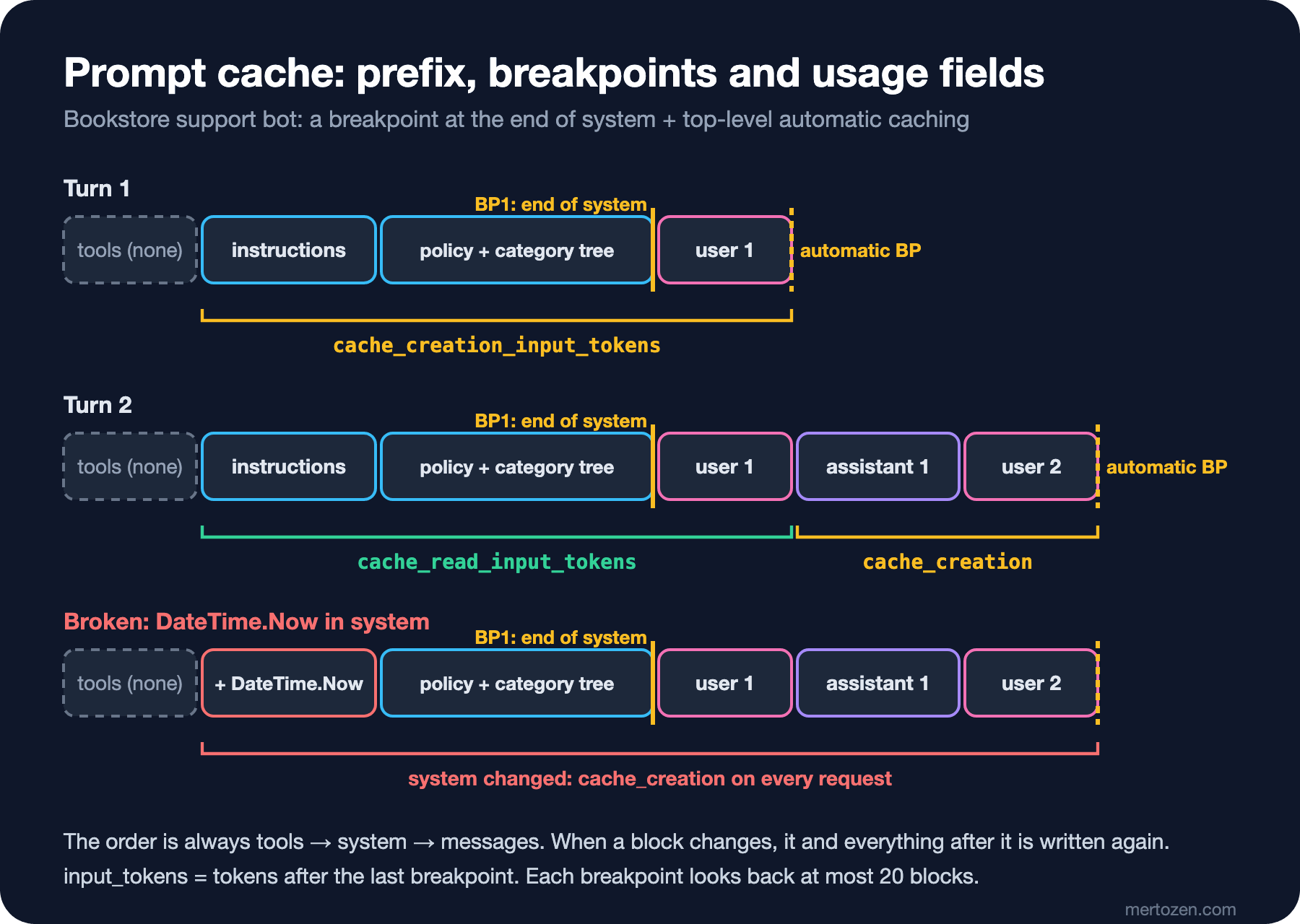
Why is one automatic breakpoint not enough? The documentation's compaction page answers this: when the conversation is summarized or the history is trimmed, the messages part changes. With a separate breakpoint at the end of system, the policy entry is not affected; only the conversation part is written again. According to the documentation a request can have at most 4 breakpoints, and automatic caching uses one of them. Placing a breakpoint is free in itself; you pay only for the tokens written and read.
TTL, Prices and 1,000 Requests
The price multipliers are clear in the documentation. A write with the 5-minute TTL costs 1.25 times the base input price, a write with the 1-hour TTL 2 times. A read is normally 0.1 times; on Opus 5.5 and Sonnet 5.5 it is 0.05, on Fable 5.2 0.025 times. These multipliers stack with other price modifiers such as the batch discount. We added a 1-hour write column to ClaudePricing from the third post and built a small cost model on top of it:
namespace Bookstore.Api.Ai;

// A series of requests that share one cacheable prefix. Price math only; no API call.
public sealed record CacheScenario(long PrefixTokens, long SuffixTokens, long OutputTokens, int Requests, int CacheWrites);

public static class PromptCacheCostModel
{
    public static decimal WithoutCache(string model, CacheScenario s) =>
        s.Requests * ClaudePricing.EstimateUsd(model,
            new TokenUsage(s.PrefixTokens + s.SuffixTokens, s.OutputTokens, CacheRead: 0, CacheWrite: 0, Thinking: 0));

    // CacheWrites requests write the prefix (the first one, or after the entry expired); the others read it.
    public static decimal WithCache(string model, CacheScenario s)
    {
        TokenUsage write = new(s.SuffixTokens, s.OutputTokens, CacheRead: 0, CacheWrite: s.PrefixTokens, Thinking: 0);
        TokenUsage read = new(s.SuffixTokens, s.OutputTokens, CacheRead: s.PrefixTokens, CacheWrite: 0, Thinking: 0);
        return s.CacheWrites * ClaudePricing.EstimateUsd(model, write)
               + (s.Requests - s.CacheWrites) * ClaudePricing.EstimateUsd(model, read);
    }
}
We added a cache command to the evaluation tool. The assumptions: a stable 40,000-token prefix, 600 tokens of conversation and a 250-token answer per request, 1,000 requests. The "1 write" column is the case where the prefix is written once and then always read; the "every write" column is the case where every request writes the cache again:
dotnet run --project tools/Bookstore.ClaudeEval -- cache 40000 600 250 1000
Assumed: prefix=40000 suffix=600 output=250 requests=1000
model                  no cache    1 write  every write   saving
claude-fable-5-2         334.80      23.19       414.80     93 %
claude-opus-5-5          167.40      15.59       207.40     91 %
claude-sonnet-5-5         83.70       7.80       103.70     91 %
claude-haiku-5-5           4.19       0.59         5.19     86 %
This table is not a measurement but a calculation with the documented price list. Still, it shows two things clearly. A healthy cache cuts the cost of this scenario on Sonnet 5.5 by about 91%. A broken cache, on the other hand, costs more than no caching at all: every request writes the prefix again at 1.25 times the price. The bill in Guess First is most likely this last column.
When should you choose the 1-hour TTL? According to the documentation, if a prompt is used more often than every 5 minutes, the 5-minute cache is enough because every read refreshes it for free. One hour makes sense for prefixes used less often than every 5 minutes but more often than once an hour: a customer who takes time to answer, or a side agent that runs longer than 5 minutes. The documentation also notes that cache hits are not deducted from the rate limit. In the SDK the 1-hour TTL is written like this and produces the documented JSON:
    [Fact]
    public void OneHourTtl_IsSerializedAsDocumented()
    {
        CacheControlEphemeral oneHour = new() { Ttl = Ttl.Ttl1h };

        Assert.Equal("""{"type":"ephemeral","ttl":"1h"}""", JsonSerializer.Serialize(oneHour));
    }
Both TTLs can be used in the same request, but 1-hour entries must come before 5-minute ones. In our layout this is natural: if the policy block moves to 1 hour, the conversation's automatic breakpoint comes after it.
Confirming That the Cache Works
The first signal is usage. According to the documentation, cache_read_input_tokens are the tokens read from the cache, cache_creation_input_tokens the tokens written to the cache in this request, and input_tokens the tokens after the last breakpoint that do not go into the cache. Total input is the sum of the three; looking at input_tokens and thinking "our prompt is small" is wrong. The ClaudeReplyReader we have used since the second post already read both cache fields; we added them to the support service's log line.
The second signal is cache diagnostics. This feature left beta on 23 September 2026 and no longer needs a beta header. When you send a diagnostics object in a request, the API stores the request's fingerprint under the response id; if you pass that id as previous_message_id on the next request, it compares the two requests and tells you where the prefix first diverged. According to the documentation the fingerprint consists only of hashes and token estimates; the prompt content is not stored. We added the last response id to the conversation record and log the result from the response:
    // diagnostics is null when nothing diverged; cache_miss_reason is null while the comparison is still running.
    private void LogCacheMiss(Guid conversationId, Diagnostics? diagnostics)
    {
        if (diagnostics?.CacheMissReason is not { } reason)
        {
            return;
        }

        logger.LogWarning(
            "Support {ConversationId}: prompt cache miss reason={Reason} missedTokens={MissedTokens}",
            conversationId, reason.Type.Raw(), reason.CacheMissedInputTokens);
    }
The diagnostics field in the response has three states: null (nothing diverged, or the first turn), cache_miss_reason: null (the comparison has not finished yet, check the next turn) and a filled-in cache_miss_reason. The reason types are model_changed, system_changed, tools_changed, messages_changed, previous_message_not_found and unavailable. We used the documented example response as a test fixture:
{"id":"msg_01Xyz","type":"message","role":"assistant","model":"claude-haiku-5-5",
 "content":[{"type":"text","text":"..."}],
 "stop_reason":"end_turn",
 "usage":{"input_tokens":42,"cache_read_input_tokens":0,"cache_creation_input_tokens":41850,"output_tokens":210},
 "diagnostics":{"cache_miss_reason":{"type":"system_changed","cache_missed_input_tokens":41850}}}
One SDK detail paid off here. On the first attempt we wrote Diagnostics = settings.CacheDiagnostics ? new() { ... } : null, and the test broke when the feature was off. When a property is explicitly set to null, the SDK writes null into the JSON instead of leaving the field out:
MessageCreateParams a = new() { Model = "claude-haiku-5-5", MaxTokens = 10, Messages = [new UserMessageParam { Content = "x" }], Diagnostics = null };
MessageCreateParams b = new() { Model = "claude-haiku-5-5", MaxTokens = 10, Messages = [new UserMessageParam { Content = "x" }] };
Console.WriteLine(JsonSerializer.Serialize(a.RawBodyData));
Console.WriteLine(JsonSerializer.Serialize(b.RawBodyData));
{"model":"claude-haiku-5-5","max_tokens":10,"messages":[{"role":"user","content":"x"}],"diagnostics":null}
{"model":"claude-haiku-5-5","max_tokens":10,"messages":[{"role":"user","content":"x"}]}The documentation does not say how the API treats "diagnostics": null; we removed the uncertainty by not setting the property at all. The same rule holds for every optional field in the SDK: if you do not want to send a field, do not assign null to it, leave it alone.
The real test is that two turns send the same prefix:
    [Fact]
    public async Task TwoTurns_SendTheSamePrefixAndChainDiagnostics()
    {
        (SupportChatService service, FakeClaudeHandler handler, _) = Create(FirstTurn, SecondTurnSystemChanged);
        Guid conversation = Guid.NewGuid();

        await service.SendAsync(conversation, "Can I return a book?", null, CancellationToken.None);
        await service.SendAsync(conversation, "What if it arrived damaged?", null, CancellationToken.None);

        JsonElement first = JsonDocument.Parse(handler.RequestBodies[0]).RootElement;
        JsonElement second = JsonDocument.Parse(handler.RequestBodies[1]).RootElement;

        // tools -> system -> messages: everything before the new turn must be byte-identical.
        Assert.Equal(first.GetProperty("system").GetRawText(), second.GetProperty("system").GetRawText());
        Assert.Equal(first.GetProperty("messages")[0].GetRawText(), second.GetProperty("messages")[0].GetRawText());
        Assert.Equal(3, second.GetProperty("messages").GetArrayLength());

        Assert.Equal("""{"previous_message_id":null}""", first.GetProperty("diagnostics").GetRawText());
        Assert.Equal("msg_turn1", second.GetProperty("diagnostics").GetProperty("previous_message_id").GetString());
    }
Passed! - Failed: 0, Passed: 35, Skipped: 0, Total: 35, Duration: 58 ms - Bookstore.Api.Tests.dll (net10.0)Silent Breakers
Changes that break the cache give no error; the only symptom is read tokens dropping to zero and the bill going up. The documentation's invalidation table and the diagnostics page list the most common causes.
Putting a value that changes on every request into the system prompt: a line like $"Today is {DateTime.Now}" makes everything after system be written again on every request. If you need a changing value, it belongs in the new user message or in a mid-conversation system message. The mid-conversation system messages we saw in the second post are the way to add instructions without breaking the cache on Opus 5.5, Sonnet 5.5, Haiku 5.5 and Fable 5.2.
A tool list whose order changes or that is serialized unstably. Building the tools on every request from a HashSet or from an unordered database query means tools_changed. BookstoreTools.Definitions from the fifth post is a list with a fixed order. In the tool loop every round sends the same tools and the growing history again, so we turned on automatic caching there too:
    public MessageCreateParams BuildRequest(IReadOnlyList<MessageParam> messages) => new()
    {
        Model = options.Value.Model,
        MaxTokens = 4096,
        System = SystemPrompt,
        Tools = [.. BookstoreTools.Definitions, BookstoreTools.AuthorWebSearchTool],
        Messages = messages,
        // Every round resends tools, system and the growing history; the breakpoint follows the last block.
        CacheControl = new CacheControlEphemeral(),
    };
Changing parameters that affect the prompt. According to the documentation, tool_choice and adding images break the messages cache, turning web search or citations on or off breaks the system cache, and changing speed breaks the system and messages caches. The thinking setting and output_config.effort can also affect the tools and system caches depending on the model; setting effort explicitly to the model's default is the same as not sending it. The output_config.format change from the sixth post is on this list too.
Changing the model. The cache is per model. If an A/B test or a fallback picks another model, the documentation reports it as model_changed.
Re-serializing the history. When you send the assistant answer and the tool results back, do not touch them; this series' habit of new ContentBlockParam(block.Json) makes sure of exactly that. Trimming the history produces messages_changed.
The Tool Loop and Long Conversations
When a conversation approaches the context window, there are two beta features, and both interact with the cache. Compaction replaces older turns with a summary that Claude writes on the server. The on-demand version is enabled with the compact-2026-09-04 beta header, the version that runs by itself once a threshold is reached with compact-2026-01-12; the documentation recommends the on-demand one where it is available. The summary is new content, so it is written to the cache again; that is why the separate breakpoint at the end of system matters. Context editing (context-management-2025-06-27) removes old tool results or thinking blocks by rule. Removing content breaks the cache from that point on; the documentation therefore suggests clear_at_least, so that each clearing removes enough tokens to be worth the cache write. The general strategy for agent context is in the fourth post of the AI Agents and MCP series.
In Production
Track the cache hit ratio as a metric. If the ratio cache_read_input_tokens / (input_tokens + cache_read_input_tokens + cache_creation_input_tokens) drops after a deploy, something that changes has most likely entered the prefix. With diagnostics on, the reason type in the log points straight at the place.
Think about parallel requests. According to the documentation a cache entry becomes available only after the first response starts. A batch job that sends a hundred requests with the same prefix at the same moment writes it a hundred times. Waiting for the first request's response and then going parallel, or the documented pre-warm request with max_tokens: 0, solves this; a pre-warm request returns empty content and stop_reason: max_tokens, and only the cache write is charged.
Do not forget workspaces. On the Claude API the cache is kept separately per workspace. If the support bot and the catalog service are in different workspaces, they cannot read each other's cache even when they share the same policy.
Version the prefix. When the policy text changes, the first request writes the cache again; that is an expected cost. A text that is regenerated with small differences on every deploy is not. That is why we normalize line endings: a file checked out on Windows and a build on Linux must not produce different bytes.
Common Pitfalls
Putting changing content before the breakpoint. If the time, a request id or a user name sits in the system prompt, the cache is written again on every request.
Trying to cache a short prompt. A prefix below 512 tokens is processed without caching and without an error; both cache fields being 0 is the sign.
Taking input_tokens for the total input. With caching on, the real volume is in cache_read_input_tokens.
Putting the breakpoint on a block that changes on every request. The breakpoint belongs on the last block that stays the same between requests, not on the new message that changes. Automatic caching already does this for the conversation.
Assigning null to an optional SDK field. The field is sent as null; if you do not want to send it, do not set it.
Putting the 1-hour TTL everywhere. For a frequently used prefix the 5-minute cache refreshes for free; one hour doubles the write price.
A Small Experiment
★☆☆ Run the evaluation tool's cache command with your own assumptions: lower the prefix to 2,000 tokens and the number of requests to 20. Find out how the saving changes and at what point caching no longer pays for itself.
★★☆ Add a property to SupportKnowledge that computes the hash of the policy text with SHA256.HashData and log it at startup. Build on two different machines and confirm that the hashes match.
★★★ Write a test in PromptCachingTests for a variation that marks the policy block with the 1-hour TTL: confirm through the JSON that the 1-hour breakpoint comes before the 5-minute automatic one. Then use the CacheWrite1h field of ClaudePricing to calculate in which request interval the 1-hour cache is cheaper than the 5-minute one.
Prompt caching makes text that repeats across requests cheaper. In the eighth post we move to another discount: running thousands of non-urgent requests at half price with the Message Batches API, and uploading the same PDF once with the Files API to use it in several requests.