

What Is Structured Data? Schema.org, JSON-LD and What Google Actually Does with It

Structured data means telling machines explicitly what a page is about, using the schema.org vocabulary and a syntax such as JSON-LD; Google uses it to understand pages and for rich result eligibility, but markup neither guarantees rich results nor is presented as a ranking factor. We write the same data in Microdata, RDFa and JSON-LD, dump the entity graph of a Bookstore page with .NET 10 and look at consumers beyond Google.
Version note: This post is based on schema.org 30.1 (16 September 2026) and the state of Google Search Central's structured data documentation in November 2026; the code was built and run with .NET 10 and AngleSharp 1.10.
Guess First
A new post is live on the Bookstore blog: "5 C# Books for Beginners". In sprint planning a teammate suggests: "Let's add a JSON-LD block to the page; Google will show stars and a date in the result, and we'll move up in the rankings." Three questions: Does a correctly written structured data block guarantee an enhanced appearance in Google? Does it raise rankings? And is every type defined on schema.org a feature with a counterpart in Google?
By the end of the post the answer to all three will be "no", but behind each "no" there is a "because" that explains why we still write structured data.
HTML Carries Meaning for Humans, Guesswork for Machines
A reader looking at the post in a browser understands at a glance that the big text is the title, the small name below it is the author, and the date next to it is the publication date. HTML carries part of this meaning: h1 is a heading, the time element is a point in time. But HTML does not say whether the text "Ada Kaplan" is a person, a book series or a character mentioned on the page. A search engine tries to infer that from layout, links and language; in other words, it guesses.
Structured data turns that guess into an explicit statement: "This page is a BlogPosting. Its headline is this. Its author is a Person named Ada Kaplan. It was first published at 2026-11-10T09:30:00+03:00." That takes two separate things, and mixing them up is the source of most confusion around structured data:
- Vocabulary: which concepts and properties exist.
BlogPosting,Person,author,datePublishedare words whose meaning is defined on schema.org. - Syntax: how you write those words into the page. JSON-LD, Microdata and RDFa carry the same vocabulary in three different forms.
The vocabulary decides what you say; the syntax decides how you write it. Whether you write the right vocabulary for a Google feature in the wrong syntax, or write a type Google does not recognize in the right syntax, the result is the same: nothing.
Vocabulary: Where Schema.org Came From
The idea is not new. In 1999 the W3C proposed RDF, the Resource Description Framework: every piece of information is a "subject, predicate, object" triple, such as "this post, author, Ada Kaplan". In the mid-2000s the microformats movement offered a lighter answer to the same need: embedding person and event data in HTML with fixed class names such as the vcard class of hCard. Both were widely used, but search engines had no shared dictionary; each supported different formats to different degrees.
Schema.org was announced on 2 June 2011 as a joint initiative of Google, Bing (Microsoft) and Yahoo to fill that gap; Yandex joined in November of the same year. Schema.org's own "About" page lists these four as the founding companies. Today the vocabulary is developed in the open in a community group at the W3C and published in regular releases. Release 30.1, which this post is based on, is dated 16 September 2026; the previous major release, 30.0, came out on 19 March 2026. We will come back to why following the release notes is part of maintenance in the last post of the series.
Syntax: The Same Data, Three Forms
The three snippets below describe the headline, author and publication date of the Bookstore post. The first is Microdata: the meaning is written into the visible HTML with the itemscope, itemtype and itemprop attributes.
<article itemscope itemtype="https://schema.org/BlogPosting">
  <h1 itemprop="headline">5 C# Books for Beginners</h1>
  <p>By <span itemprop="author" itemscope itemtype="https://schema.org/Person">
    <span itemprop="name">Ada Kaplan</span></span>,
    <time itemprop="datePublished" datetime="2026-11-10T09:30:00+03:00">2026-11-10</time></p>
</article>
The second is RDFa: same idea, different attribute names (vocab, typeof, property).
<article vocab="https://schema.org/" typeof="BlogPosting">
  <h1 property="headline">5 C# Books for Beginners</h1>
  <p>By <span property="author" typeof="Person">
    <span property="name">Ada Kaplan</span></span>,
    <time property="datePublished" datetime="2026-11-10T09:30:00+03:00">2026-11-10</time></p>
</article>
The third is JSON-LD: the meaning sits in a separate script block, apart from the visible HTML, as JSON.
<script type="application/ld+json">
{
  "@context": "https://schema.org",
  "@type": "BlogPosting",
  "headline": "5 C# Books for Beginners",
  "author": { "@type": "Person", "name": "Ada Kaplan" },
  "datePublished": "2026-11-10T09:30:00+03:00"
}
</script>
We gave all three to schema.org's Schema Markup Validator as HTML and dumped the extracted data as plain text. All three formats produced exactly the same structure, with no errors and no warnings:
microdata BlogPosting 0 0 ['headline = 5 C# Books for Beginners', 'datePublished = 2026-11-10T09:30:00+03:00', 'author -> Person', '  name = Ada Kaplan']
rdfa BlogPosting 0 0 ['headline = 5 C# Books for Beginners', 'datePublished = 2026-11-10T09:30:00+03:00', 'author -> Person', '  name = Ada Kaplan']
jsonld BlogPosting 0 0 ['headline = 5 C# Books for Beginners', 'datePublished = 2026-11-10T09:30:00+03:00', 'author -> Person', '  name = Ada Kaplan']
The two zeros on each line are the error and warning counts. To the machine the three forms are equivalent; the difference is for the developer who writes and maintains the code. Google's introduction to structured data says the same: all three formats are acceptable and treated equally as long as they are valid and implemented properly, but Google recommends JSON-LD because it is the easiest to implement and maintain. According to the same page, Google can also read JSON-LD blocks that JavaScript injects into the page later.
| Criterion | Microdata / RDFa | JSON-LD |
|---|---|---|
| Relation to visible HTML | On the same elements | In a separate script block |
| When the design changes | Markup can break with the template | Independent of the template |
| Nesting and reuse | Tied to the element tree | Linked freely with @id |
| Server-side generation | Spread across the whole view | One serializer output |
For an ASP.NET Core developer the last row is decisive: you can generate JSON-LD from typed C# objects in one place and embed it in the layout. How to generate it safely is the topic of the second post in the series.
What the Machine Sees: An Entity Graph
Thinking of structured data as a graph, rather than "some JSON added to the page", makes every later decision easier. Each type is a node (an entity), and each property is either an edge to another node or a plain value.
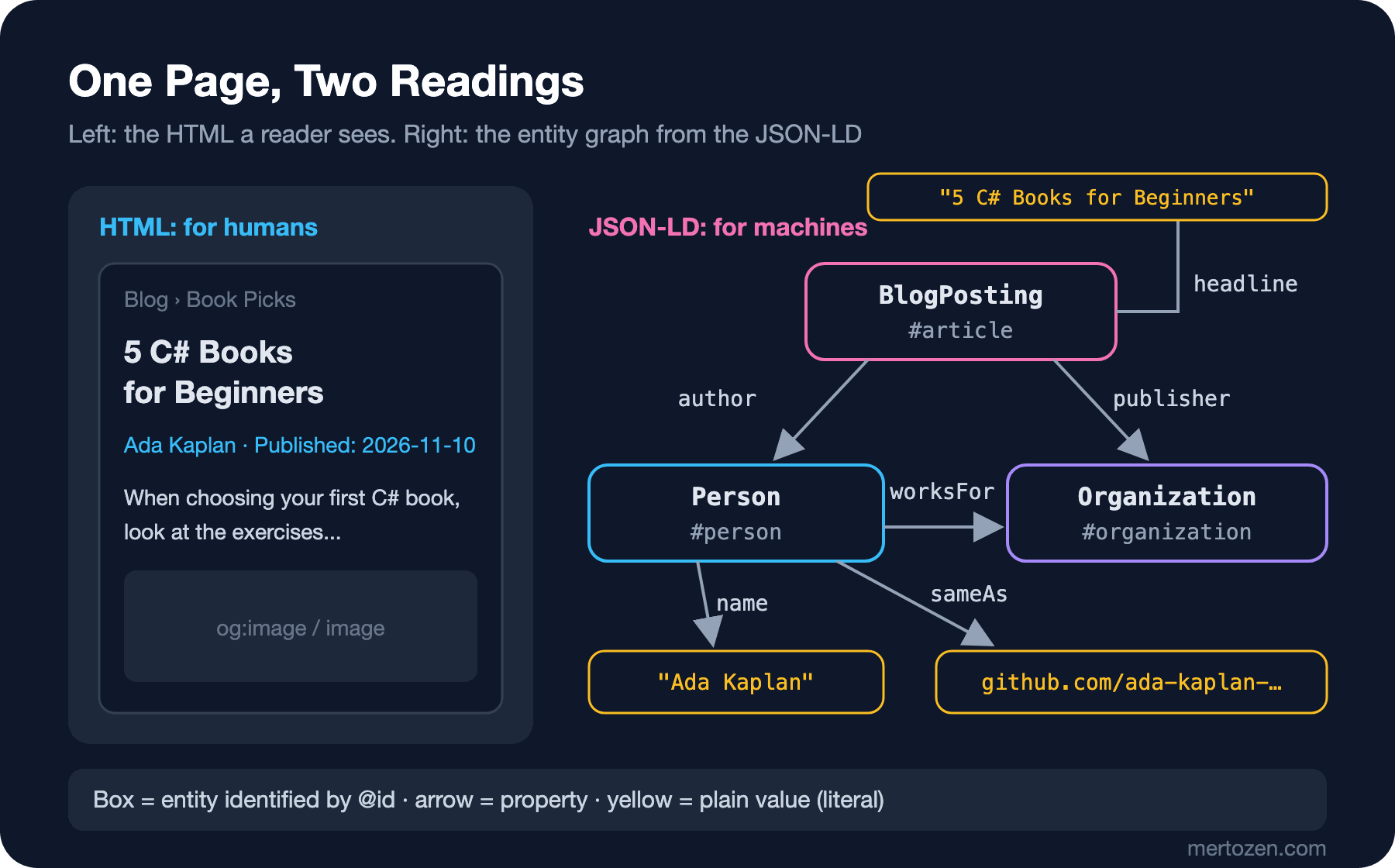
To see this concretely, we wrote a small console app that reads the page produced by Bookstore's ASP.NET Core 10 application and dumps its JSON-LD as "subject, property, object" lines. It parses the HTML with AngleSharp rather than a regex; the second post shows why.
using System.Text.Json;
using AngleSharp.Html.Parser;

// Usage: dotnet run -- <url> [base-to-shorten]
string url = args[0];
string shortBase = args.Length > 1 ? args[1] : "";

using var http = new HttpClient();
string html = await http.GetStringAsync(url);
var document = new HtmlParser().ParseDocument(html);

int blank = 0;
foreach (var script in document.QuerySelectorAll("script[type='application/ld+json']"))
{
    using JsonDocument json = JsonDocument.Parse(script.TextContent);
    JsonElement root = json.RootElement;
    IEnumerable<JsonElement> nodes = root.TryGetProperty("@graph", out JsonElement graph)
        ? graph.EnumerateArray()
        : [root];
    foreach (JsonElement node in nodes)
    {
        Walk(node);
    }
}

string Walk(JsonElement node)
{
    string subject = node.TryGetProperty("@id", out JsonElement id) ? Short(id.GetString()!) : $"_:b{blank++}";
    foreach (JsonProperty property in node.EnumerateObject())
    {
        if (property.Name is "@id" or "@context")
        {
            continue;
        }
        JsonElement[] values = property.Value.ValueKind == JsonValueKind.Array
            ? [.. property.Value.EnumerateArray()]
            : [property.Value];
        foreach (JsonElement value in values)
        {
            string predicate = property.Name == "@type" ? "a" : property.Name;
            Console.WriteLine($"{subject}  {predicate}  {Describe(value)}");
        }
    }
    return subject;
}

string Describe(JsonElement value) => value.ValueKind switch
{
    // an object with only @id is a link to a node described elsewhere
    JsonValueKind.Object when value.EnumerateObject().Count() == 1 && value.TryGetProperty("@id", out JsonElement id)
        => Short(id.GetString()!),
    JsonValueKind.Object => Walk(value),
    JsonValueKind.String => Quote(value.GetString()!),
    _ => value.GetRawText(),
};

string Short(string iri) => "<" + (shortBase.Length > 0 ? iri.Replace(shortBase, "") : iri) + ">";

static string Quote(string text) => text.Length > 38 ? $"\"{text[..35]}...\"" : $"\"{text}\"";
Run against the English post, with the breadcrumb lines filtered out, the output looks like this:
$ dotnet run -- http://localhost:5321/en/blog/csharp-books-for-beginners https://bookstore.example | grep -v -E "_:b|breadcrumb"
</en/blog/csharp-books-for-beginners#article>  a  "BlogPosting"
</en/blog/csharp-books-for-beginners#article>  headline  "5 C# Books for Beginners"
</en/blog/csharp-books-for-beginners#article>  description  "When choosing your first C# book, l..."
</en/blog/csharp-books-for-beginners#article>  image  "https://bookstore.example/images/cs..."
</en/blog/csharp-books-for-beginners#article>  datePublished  "2026-11-10T09:30:00+03:00"
</en/blog/csharp-books-for-beginners#article>  dateModified  "2026-11-12T14:05:00+03:00"
</en/blog/csharp-books-for-beginners#article>  author  </authors/ada-kaplan#person>
</en/blog/csharp-books-for-beginners#article>  publisher  </#organization>
</en/blog/csharp-books-for-beginners#article>  mainEntityOfPage  "https://bookstore.example/en/blog/c..."
</en/blog/csharp-books-for-beginners#article>  inLanguage  "en"
</en/blog/csharp-books-for-beginners#article>  isPartOf  </#website>
</authors/ada-kaplan#person>  a  "Person"
</authors/ada-kaplan#person>  name  "Ada Kaplan"
</authors/ada-kaplan#person>  url  "https://bookstore.example/en/author..."
</authors/ada-kaplan#person>  jobTitle  "Senior Software Developer"
</authors/ada-kaplan#person>  worksFor  </#organization>
</authors/ada-kaplan#person>  sameAs  "https://github.com/ada-kaplan-example"
</authors/ada-kaplan#person>  sameAs  "https://www.linkedin.com/in/ada-kap..."
</#organization>  a  "Organization"
</#organization>  name  "Bookstore"
</#organization>  url  "https://bookstore.example/"
</#organization>  logo  "https://bookstore.example/images/lo..."
</#organization>  sameAs  "https://github.com/bookstore-example"
</#website>  a  "WebSite"
</#website>  name  "Bookstore"
</#website>  url  "https://bookstore.example/"
</#website>  inLanguage  "tr"
</#website>  inLanguage  "en"
</#website>  publisher  </#organization>
To the right of the author line there is no text but an identifier, </authors/ada-kaplan#person>. It is the @id of the node defined below as Person. That same node is connected to the Organization through worksFor, and the post points to the same Organization through publisher. Google's general structured data guidelines explicitly recommend linking related items that are not nested with @id. Building this graph step by step is the subject of the third post in the series.
What Google Actually Does with It
Google's documentation says structured data serves two purposes. The first is understanding: grasping what the page is about and how the things on it relate to each other. The second is appearance: some types make a page eligible for enhanced result displays called rich results. Eligible, not guaranteed. The general guidelines lock this down from two sides: items missing required properties are not eligible for rich results, and even complete, correct markup does not guarantee that a rich result will be shown.
On rankings, Google's wording is careful. No official document presents structured data as a ranking factor. On the contrary, it separates the two explicitly in two places. According to the general guidelines, a page that gets a manual action for a structured data violation loses its rich result eligibility, but this does not affect how it ranks in Google web search. The 2023 blog post that restricted FAQ and HowTo rich results also said the change should not be seen as a ranking change. The success stories cited on Google's intro page (a 25% higher click-through rate on Rotten Tomatoes pages with structured data, an 82% higher click-through rate on Nestlé pages shown as rich results, and so on) are also about how you appear and get clicked, not about rankings. Those numbers are the companies' own measurements; they tell you nothing about what will happen on your site.
Here are the answers to the first two questions: markup does not guarantee rich results, and Google does not present it as a ranking tool. It is worth writing because it lowers the chance that Google misunderstands the page and because it is the prerequisite for being a rich result candidate.
Being on Schema.org Is Not Being a Google Feature
Schema.org is a dictionary; Google uses only part of it, for specific features. Google's intro page draws the line itself: the authority on how Search behaves is Search Central's documentation, not schema.org; schema.org has many properties Google does not need, and other platforms may use them. The types Google supports are listed on Search Central's "Structured data search gallery" page, and that list changes.
An example from mertozen.com: the JSON-LD of its blog posts declares a CreativeWorkSeries through isPartOf. That is perfectly valid schema.org and correctly says the post belongs to a series. But Google's gallery has no "series" rich result. So this line is information that may help Google understand the page, but it will not change anything on screen. The speakable property used on the same site is still marked beta in Google's documentation and comes with serious restrictions, and the FAQ rich result was removed completely in 2026. Which type is in which state is the subject of the fourth post in the series.
That answers the third question: not every schema.org type is a Google feature. Before adding a type, ask two questions: "Does this describe what the page really is?" and "Does it have a counterpart in Google, or am I writing it only for meaning?" The answer to the second may be "only for meaning", and that is legitimate, as long as your expectations are right.
Consumers Other than Google
Google is not the only system that reads structured data. Bing announced JSON-LD support in Bing Webmaster Tools in 2018, but it does not document how it uses each type in search results in as much detail as Google. Most of the markup you write for Bing is the same schema.org vocabulary you write for Google, so it is not extra work.
Social networks mostly read Open Graph (og:title, og:image), a separate protocol, for link previews; that topic is outside this series. The one place they meet is the image. On 2 March 2026 Google added a "specify a preferred image with metadata" section to its image SEO and Discover documentation and wrote that it uses both schema.org markup and the og:image meta tag when choosing thumbnails in Search and Discover. The practical upshot: make image in the JSON-LD and og:image point to the same representative image, not the cover in one and the logo in the other.
On AI answer engines there are plenty of claims and little evidence. We read Google's guide for generative AI features in the second post of the GEO series, "Google's AI Search Guide: What to Do and What to Skip": Google says no special schema.org markup is needed to appear in AI Overviews and AI Mode, and structured data is not a prerequisite for it. Unless there is primary-source evidence of how other AI products use structured data, read any "schema for AI" promise with the note that Google does not confirm it.
In Production
The markup must match the visible content. Google's quality guidelines ask you not to mark up content hidden from readers and to make the page body describe the same things the markup describes. A title changed in the CMS while the JSON-LD keeps the old one is the most common and quietest inconsistency, so generate the JSON-LD from the same model the view uses; do not keep a second, hand-written copy.
Count the markup produced by plugins and ready-made components. When a CMS plugin adds an Article, the theme adds a WebPage and you add a BlogPosting by hand, the page ends up with three blocks that repeat and sometimes contradict each other. Google decides which one is right, and that decision may not be the one you wanted. Searching a page's source for application/ld+json before release shows at once how many blocks there are.
Accept the maintenance cost up front. The types Google supports change, and schema.org ships several releases a year. Every type is a contract someone has to follow; not adding a type you do not need is also a decision.
Common Pitfalls
Marking up invisible content to chase rich results. Review ratings that are not on the page, a Q&A list the reader cannot see, or text inside a hidden div directly violate Google's structured data guidelines. The result is a manual action, visible in Search Console's Manual Actions report. According to the guidelines it removes the page's rich result eligibility; the statement that it does not affect ranking does not mean "no risk", it only says what the penalty targets.
Expecting "we added markup, rankings will go up". Google does not promise that; if traffic changed after adding markup, rule out the other variables first. Measuring the effect is the job of the upcoming Analytics and Measurement series.
Confusing valid with eligible. Passing the Schema Markup Validator with zero errors shows that the markup is valid schema.org; it does not show that the properties required for a Google rich result are complete. The difference between the two tools is covered in the last post of the series.
Marking everything up as Thing or WebPage. Google's guidelines ask you to use the most specific applicable type and property; for a blog post, BlogPosting says far more than WebPage.
A Small Experiment
★☆☆ Open a post page on three sites you follow and search the source for application/ld+json. How many blocks are there, which types are used, and is the same information repeated in more than one block?
★★☆ Add a dateModified to the Microdata snippet above, then move the same data to the RDFa and JSON-LD forms. Run all three as HTML in the Schema Markup Validator and confirm the extracted structure is identical.
★★★ Extend GraphDump to report @id references that point to an identifier no node on the page defines ("dangling" references). Remove the WebSite @id that the Bookstore post references through isPartOf from the graph and watch the tool catch it.
In this post we covered what structured data is and what Google uses it for. In the next post we go down to JSON-LD itself: what @context, @type, @id and @graph do, how to generate JSON-LD from typed records in ASP.NET Core, and why a </script> in a headline can break the whole page.