

Other Types and Retired Rich Results: VideoObject, SoftwareApplication, Speakable and the Story of FAQ and HowTo
VideoObject is a candidate for video features only on a watch page focused on a single video, SoftwareApplication produces no rich result without a rating or review, and speakable is still an English, news-focused beta. We take the dates of the rich results retired between 2023 and 2026, from HowTo to FAQ, from Google's changelog, and discuss whether retired markup has to be deleted and what it means for mertozen.com, with .NET 10 examples.
Version note: This post is based on the state of Google Search Central's Video, Software App and Speakable documentation and its changelog in November 2026; the code was built and run with .NET 10.
Guess First
The tool pages on mertozen.com carry a WebApplication block and a FAQPage block; blog posts carry speakable, and the video list page has a VideoObject for each video. Four questions: Is a free web tool, with no ratings or reviews, eligible for the Software App rich result in Google? What does FAQ markup show in Google in 2026? Who does speakable on a Turkish blog post work for? And do ten VideoObject nodes on a page that lists ten videos make those videos appear as videos in Google?
All four answers run along the line "the markup is valid, but the expected thing does not happen". This post draws where that line is using Google's own documentation and tells the story of the rich results retired since 2023.
VideoObject: The Required Three and creator
Google's Video documentation requires three properties for VideoObject: name, thumbnailUrl and uploadDate. The recommended ones include contentUrl (the video file itself, which Google prefers most), embedUrl (the player's URL, if there is no contentUrl), description, duration (the ISO 8601 duration format, for example PT19M3S), expires, interactionStatistic and region restrictions. On 24 September 2026 the creator property was added to the documentation: the person or organization that created or published the video, with name and url. The same change notes that author is also supported, so existing author markup did not become invalid.
Bookstore's CMS returns a video's duration as a TimeSpan and its description as HTML. Both need converting before they go into the markup:
using System.Net;
using System.Text.Encodings.Web;
using System.Text.Json;
using System.Text.Json.Serialization;
using System.Text.RegularExpressions;
using System.Text.Unicode;
using System.Xml;
// What the CMS returns for a video: duration as TimeSpan, description as HTML
var cmsVideo = new
{
YoutubeId = "abc123XYZ00",
Title = "Bookstore: Caching the Catalog Page",
DescriptionHtml = "<p>We cache the <strong>catalog</strong> page & measure it.</p>",
Duration = new TimeSpan(0, 19, 3),
PublishedAt = new DateTimeOffset(2026, 10, 25, 21, 47, 0, TimeSpan.FromHours(3)),
};
var video = new VideoObjectNode(
Id: "https://bookstore.example/videos/caching-the-catalog-page#video",
Name: cmsVideo.Title,
Description: ToPlainText(cmsVideo.DescriptionHtml),
ThumbnailUrl: [$"https://img.youtube.com/vi/{cmsVideo.YoutubeId}/hqdefault.jpg"],
UploadDate: cmsVideo.PublishedAt,
Duration: XmlConvert.ToString(cmsVideo.Duration),
EmbedUrl: $"https://www.youtube.com/embed/{cmsVideo.YoutubeId}",
Creator: new PersonRef("https://bookstore.example/authors/ada-kaplan#person", "Ada Kaplan"));
var options = new JsonSerializerOptions
{
WriteIndented = true,
DefaultIgnoreCondition = JsonIgnoreCondition.WhenWritingNull,
Encoder = JavaScriptEncoder.Create(UnicodeRanges.All),
};
Console.WriteLine(JsonSerializer.Serialize(video, options));
// Google ignores HTML tags in description; send the text, not the markup
static string ToPlainText(string html) =>
WebUtility.HtmlDecode(Regex.Replace(html, "<[^>]+>", " ")).Trim().Replace(" ", " ");
record PersonRef(
[property: JsonPropertyName("@id")] string Id,
[property: JsonPropertyName("name")] string Name)
{
[JsonPropertyName("@type"), JsonPropertyOrder(-1)] public string Type => "Person";
}
record VideoObjectNode(
[property: JsonPropertyName("@id")] string Id,
[property: JsonPropertyName("name")] string Name,
[property: JsonPropertyName("description")] string Description,
[property: JsonPropertyName("thumbnailUrl")] IReadOnlyList<string> ThumbnailUrl,
[property: JsonPropertyName("uploadDate")] DateTimeOffset UploadDate,
[property: JsonPropertyName("duration")] string Duration,
[property: JsonPropertyName("embedUrl")] string EmbedUrl,
[property: JsonPropertyName("creator")] PersonRef Creator)
{
[JsonPropertyName("@context"), JsonPropertyOrder(-2)] public string Context => "https://schema.org";
[JsonPropertyName("@type"), JsonPropertyOrder(-1)] public string Type => "VideoObject";
}{
"@context": "https://schema.org",
"@type": "VideoObject",
"@id": "https://bookstore.example/videos/caching-the-catalog-page#video",
"name": "Bookstore: Caching the Catalog Page",
"description": "We cache the catalog page \u0026 measure it.",
"thumbnailUrl": [
"https://img.youtube.com/vi/abc123XYZ00/hqdefault.jpg"
],
"uploadDate": "2026-10-25T21:47:00+03:00",
"duration": "PT19M3S",
"embedUrl": "https://www.youtube.com/embed/abc123XYZ00",
"creator": {
"@type": "Person",
"@id": "https://bookstore.example/authors/ada-kaplan#person",
"name": "Ada Kaplan"
}
}XmlConvert.ToString(TimeSpan) produces the ISO 8601 duration without hand-built string concatenation. The description was converted to plain text: Google's documentation says HTML tags inside description are ignored, so the tags gain nothing and only clutter the markup. uploadDate came out with its offset; without a time zone Google assumes Googlebot's.
The real decision is not in the markup but in the page. Google's video documentation requires a watch page to be a candidate for video features: a page whose main purpose is to show a single video. A blog post reviewing an embedded video, a product page with a 360-degree video, or a category page listing several videos with equal weight do not count as watch pages. The video on such pages can still appear as a text result or as an image result with a video badge, but it is not a candidate for video features. The watch page must also be indexed, the video must be embedded on it, it must not be hidden behind other elements, and it must have a valid thumbnail at a stable URL. Videos embedded from a platform such as YouTube are accepted; Google may index the same video both on your page and on the platform's page.
On mertozen.com the /videolar list produces a VideoObject for every video on the page, and the video descriptions come from the CMS as HTML (they start with \u003Cp\u003E in the JSON-LD). By Google's definition the list page is not a watch page; the page that matters for video features is the video detail page, which produces a single VideoObject through BuildVideo in the controller. The markup on the list page does no harm, but it does not bring video features either.
SoftwareApplication: Why a Free Tool Is Not a Candidate
Google's Software App documentation requires three things: name, offers.price (0 if free) and a rating or a review, that is aggregateRating or review. The recommended ones are applicationCategory (one of the values on Google's list, for example DeveloperApplication) and operatingSystem. The WebApplication and MobileApplication types are supported.
The node on mertozen.com's JSON Formatter page is this:
{
  "@type": "WebApplication",
  "name": "JSON Formatter",
  "description": "Pretty-print, minify or validate JSON and find the broken line. Runs entirely in your browser; nothing is sent to a server.",
  "url": "https://www.mertozen.com/en/araclar/json-formatter",
  "inLanguage": "en",
  "applicationCategory": "DeveloperApplication",
  "operatingSystem": "Any (web browser)",
  "isAccessibleForFree": true,
  "offers": {
    "@type": "Offer",
    "price": "0",
    "priceCurrency": "TRY"
  },
  "author": {
    "@type": "Person",
    "name": "Mert Özen",
    "url": "https://www.mertozen.com/hakkimda"
  }
}
name and offers.price are there, and applicationCategory is a valid value from Google's list. What is missing is a rating or a review, so the page is not a candidate for the Software App rich result. The markup is valid schema.org and describes the tool correctly; it just does not produce an appearance in Google. The priceCurrency value of TRY on the English page is a small inconsistency too; as long as the price is zero it has no practical effect.
The only honest way to close this gap is to collect real user reviews and show them on the page. Rating and review markup is subject to Google's review snippet guidelines; in January 2025 those guidelines recommended accepting only ratings that come with review text and an author name, and in July 2026 they added an item about fake and undisclosed incentivized reviews. Putting a rating that is not on the page into the markup is the shortest path to the manual action we discussed in the first post.
Speakable: Beta, Narrow and English
speakable marks the parts of a page best suited to being read aloud by a voice assistant, with cssSelector or xPath. Google's documentation still presents the feature as beta and keeps its scope narrow: users in the US with Google Home devices set to English, and publishers producing English content. The documentation ties the feature to news results and answers to topical news queries; it asks for each marked section to be roughly a 20 to 30 second read of two or three sentences, and for things like datelines and photo captions not to be marked.
mertozen.com publishes speakable on every blog post with the h1 and .post-summary selectors; the site's CLAUDE.md file defines this as a GEO rule. According to Google's documentation this markup triggers no Google feature on Turkish posts; on English posts it could only matter for content that falls within the news publisher scope. There is no primary-source evidence that any AI product uses speakable for citations; Google does not confirm it. The markup is harmless and cheap, but today the answer to "why is it here?" is not "because it has an effect in Google". Whether it stays is the site owner's decision.
The Story of the Retired: 2023–2026
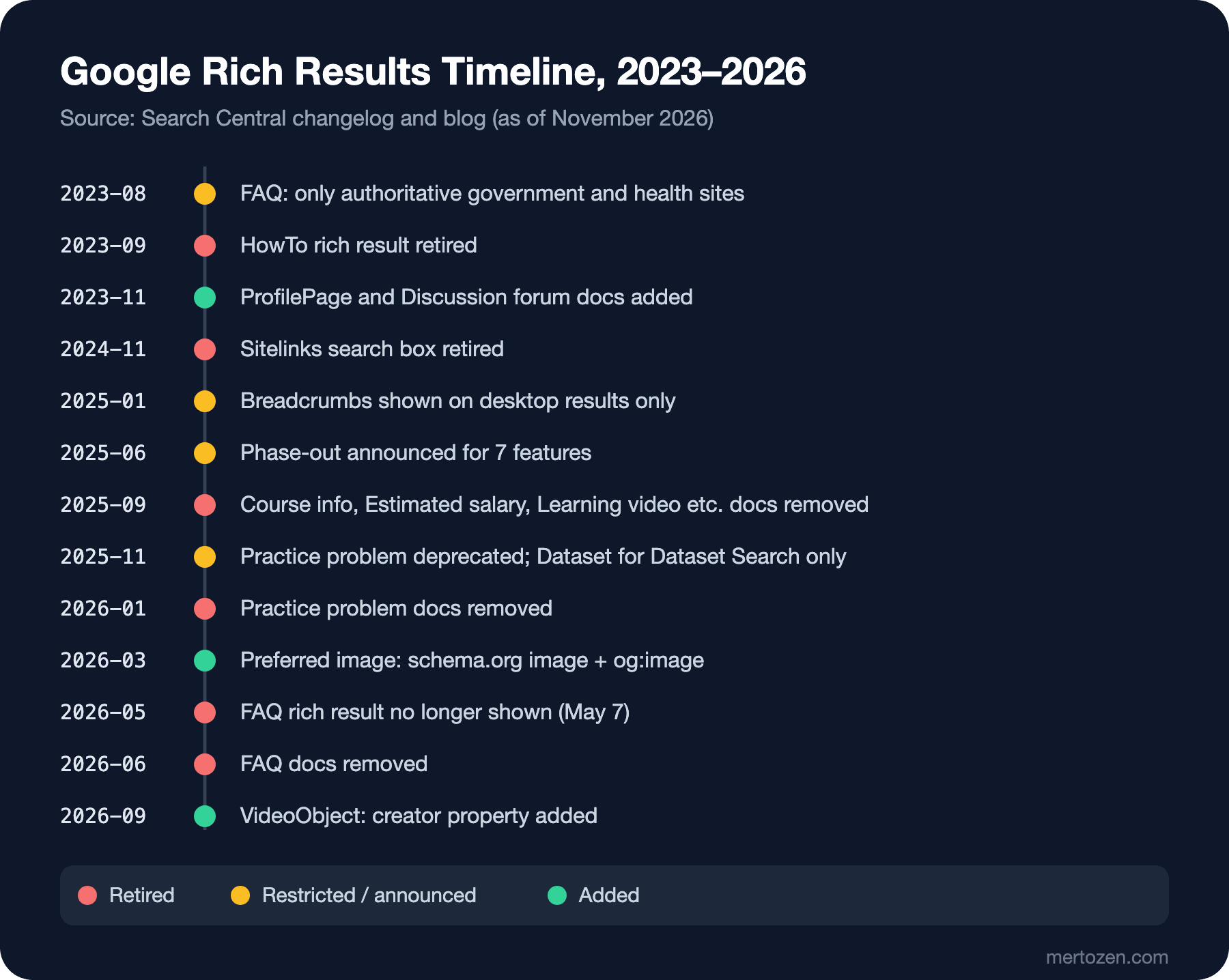
Over the last three years Google's rich result catalog has shrunk. The dates come from the Search Central changelog and blog:
- HowTo: on 8 August 2023 it was first reduced to desktop only; on 13 September 2023 it was removed from desktop too and its documentation was deleted.
- FAQ: on 8 August 2023 it was restricted to well-known, authoritative government and health sites. On 8 May 2026 a deprecation notice was added to the documentation, stating that the feature had not been shown in Google since 7 May 2026; on 15 June 2026 the documentation was removed completely.
- Sitelinks search box: not shown since 21 November 2024; its documentation was removed on 29 November 2024. The
WebSitemarkup used for site names remains supported. - The 2025 wave: on 12 June 2025 a phase-out was announced for Book actions, Course info, ClaimReview, Estimated salary, Learning video, Special announcement and Vehicle listing. On 9 September 2025 the documentation for Course info, Estimated salary, Learning video, Special announcement and Vehicle listing was deleted; by then it had been announced that these types and ClaimReview would be removed from Search Console reports and the Rich Results Test. Book actions came off the list on 5 November 2025, because a Search feature still uses that markup.
- 5 November 2025: Practice problem was deprecated, and it was clarified that Dataset markup is used only in Dataset Search, not in Google Search. The Practice problem documentation was deleted on 6 January 2026.
Google's reasoning was the same each time: these features are rarely used and no longer add enough value to the results page. None of the announcements described this as a ranking change; the 2025 announcement also noted separately that the use of these types outside Google Search is not affected.
Do You Have to Delete Retired Markup?
No. The 2023 HowTo and FAQ announcement said unused structured data does not cause problems for Search and that there is no need to remove it proactively. Google said something similar about the sitelinks search box: the markup can stay and does not produce errors in Search Console reports. In the 2025 wave it was stressed that the use of these types outside Google Search is not affected.
But "not required" is not the same as "keep it". Ask three questions for every retired type. Does this markup serve a consumer other than Google Search? ClaimReview may matter in other tools such as Google's Fact Check Explorer; a FAQPage, unless another system is documented to use it, is only maintenance cost. Is the code that produces the markup tested? An untested JSON block that nobody looks at may one day drift away from the visible content and fall into the "invisible content" trap from the first post. And should the visible content on the page stay? The "FAQ" section on mertozen.com's tool pages may be useful to readers; the end of the FAQ rich result makes only its FAQPage markup pointless, not the section itself. The SearchAction on the home page is in the same position: harmless, but useless since November 2024.
On the Map: When Are Other Types Relevant?
Google's gallery has types that a tech blog does not need directly but that are worth knowing. Q&A and Discussion forum are for community pages where users ask questions and write answers; the comments under a blog post do not fall into that scope. Course list is for pages that list several courses; it becomes relevant if you publish a paid training series. Event is for events with a date and a place; a meetup or webinar announcement. Product is for product pages with a price, stock status and reviews; Bookstore's book pages are its domain, and that topic is outside the scope of this series. The common rule does not change: choose the type by what the page really is, not to catch an appearance from the gallery.
In Production
Add Google's changelog as a source to follow. Every date in this post comes from a single page, developers.google.com/search/updates; a type's deprecation notice usually shows up there weeks before the removal.
For a retired type, look at Search Console first. The rich result report and Rich Results Test support can drop before the type itself; for the six types in 2025, reporting ended in September and API support in December 2025. A dashboard that relies on those reports goes quietly empty on those dates.
Put video markup on the watch page. Marking up a video embedded in a post with VideoObject is not invalid, but the real investment for video features is the page focused on the single video.
Common Pitfalls
Saying "Search Console no longer shows errors, so it is fixed" for a retired type. There are no errors because the type left the report, not because the markup is doing anything.
Making up an aggregateRating for Software App. The field Google requires cannot be filled without real reviews visible on the page.
Treating speakable as a GEO tool. Google's documentation describes it in the context of voice assistants and news; every claim beyond that needs a primary source.
Putting the HTML from the CMS into a video description as is. Google ignores the tags; what is left is a hard-to-read and needlessly large string.
A Small Experiment
★☆☆ List which pages on your own site carry FAQPage, HowTo or a WebSite with potentialAction. Which of them serves a consumer other than Google?
★★☆ Add an interactionStatistic (a view count with WatchAction) to the VideoObject example and check what XmlConvert.ToString produces for a video with a TimeSpan.Zero duration.
★★★ Add a test to Bookstore that keeps a list of the types named in Google's changelog and warns the build if one of them appears in a page's JSON-LD.
We now know what each piece of markup is for. In the last post of the series we move on to verifying all of it automatically: the difference between the Rich Results Test and the Schema Markup Validator, Search Console reports, and tests that check structured data in CI with xUnit and Playwright.