

From Semantic Kernel to Microsoft Agent Framework: History, Support Status and Migrating Old Code
Semantic Kernel still gets critical bug and security fixes, but new features go to Microsoft Agent Framework; the official commitment is at least one year after MAF GA (April 3, 2026). We build the history from NuGet and GitHub dates, run an old SK agent against a local model, migrate it to MAF and derive the mapping table.
Version note: The code in this post was built and run with .NET 10, Microsoft.SemanticKernel 1.82.0, Microsoft.SemanticKernel.Agents.Core 1.82.0, Microsoft.Agents.AI 1.28.0, Microsoft.Extensions.AI 10.11.0, OllamaSharp 5.5.2 and Ollama 0.34.4 (qwen3:4b).
Guess First
You just joined the team and inherited the Bookstore order assistant written in 2024. The code uses Semantic Kernel (SK): a Kernel, a plugin marked with [KernelFunction], a ChatCompletionAgent. Your manager asks three things: Is this code still supported? Do we have to migrate? If we do, how much work is it?
It's tempting to answer the first question from a blog post or a forum. In this post we read the dates from NuGet, GitHub and Microsoft's own blog posts. Then we run the old assistant against the same local model and migrate it to Microsoft Agent Framework (MAF). The migration will take less time than you expect. But running the old code will give us a surprise.
2023 to 2026: Who, When, Why?
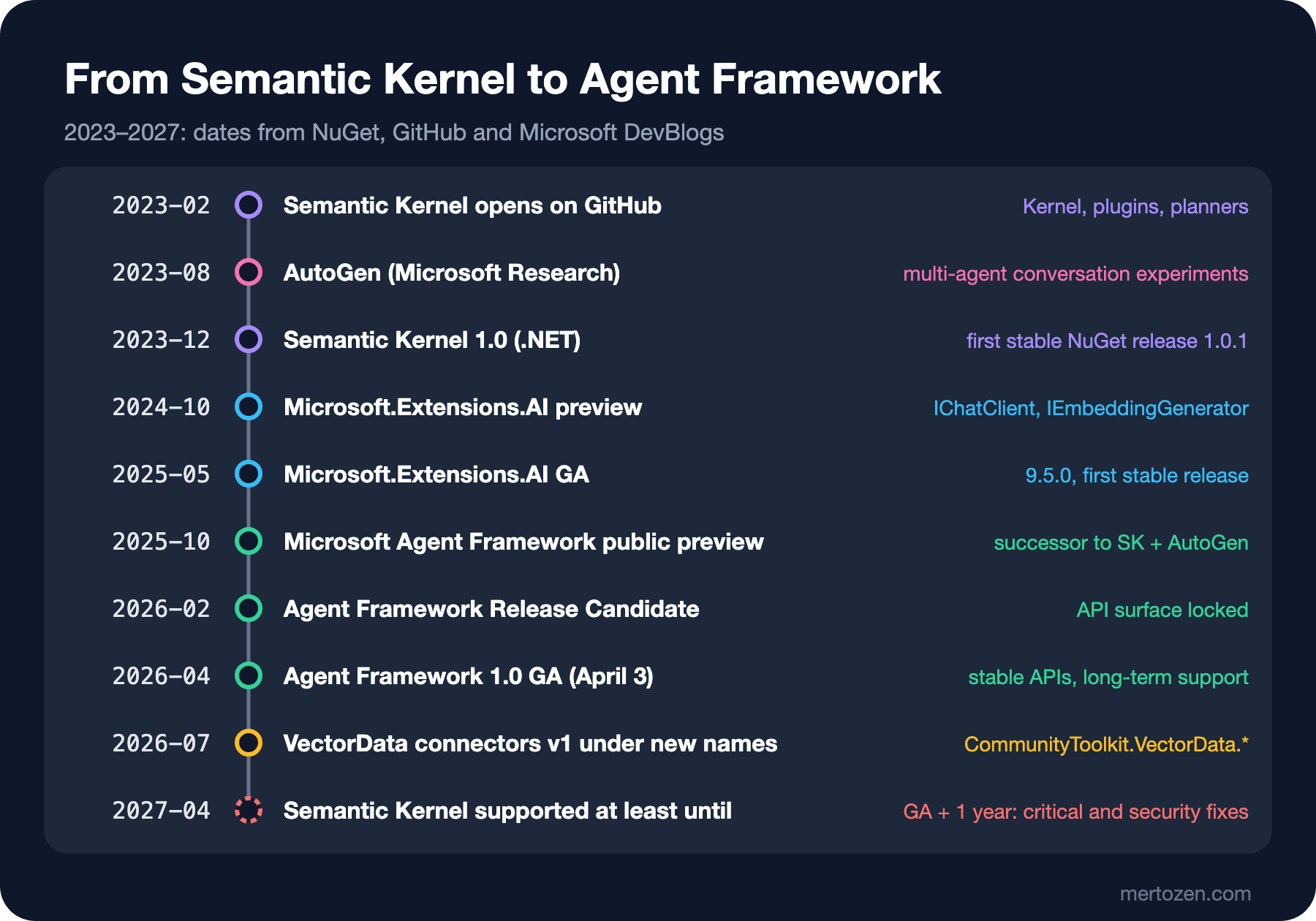
Semantic Kernel's GitHub repository was created on February 27, 2023. ChatGPT's API (Application Programming Interface) was brand new, and there was no standard way to wire an LLM (Large Language Model) call into a .NET application. SK filled that gap with a Kernel object: services (model connections), plugins (methods marked with [KernelFunction]) and prompt templates lived in one place. Planners, which let the model break a goal into steps, were the most talked-about feature of that early period. The .NET package became stable on December 18, 2023 with 1.0.1.
The same year AutoGen came out of Microsoft Research (repository: August 2023). AutoGen experimented with multi-agent scenarios where several agents solve a task by talking to each other. So Microsoft ended up with two separate ecosystems. SK stood for the enterprise side (Dependency Injection, telemetry, filters, type safety), AutoGen for agent orchestration experiments.
The third piece came from the .NET team. Microsoft.Extensions.AI (MEAI) appeared on NuGet as a preview on October 8, 2024 and became stable on May 16, 2025 with 9.5.0. MEAI isn't a framework but a layer of shared types: IChatClient, ChatMessage, AIFunction, IEmbeddingGenerator. Every post in this series sat on that layer. Over time SK also started using these types next to its own.
Microsoft Agent Framework (MAF) is where these three lines meet. Its first preview packages appeared on NuGet on October 1, 2025. The Release Candidate came in February 2026, and on April 3, 2026 it became GA (General Availability) with 1.0. The MAF documentation describes the framework plainly as "the direct successor to SK and AutoGen, created by the same teams". SK's GitHub README now opens with the sentence "Semantic Kernel is now Microsoft Agent Framework". AutoGen's README says the project is archived and receives no bug or security fixes.
Along the way some parts of SK split off. The planners (Handlebars and OpenAI planner) were deprecated in May 2025 in favor of function calling. The vector store connectors, which don't depend on Semantic Kernel, became v1 in July 2026 under the name CommunityToolkit.VectorData.*. We used these packages in this series' "Microsoft.Extensions.VectorData" post.
The Old Code: A Semantic Kernel Agent
The plugin and filter of the assistant we inherited are typical SK code. Packages: Microsoft.SemanticKernel and Microsoft.SemanticKernel.Agents.Core 1.82.0.
public sealed class OrderPlugin
{
    [KernelFunction, Description("Returns the shipping status of a Bookstore order.")]
    public string GetOrderStatus([Description("The order number")] int orderId) =>
        orderId == 1042 ? "Shipped on 2026-11-06, 2 items, tracking BKS-1042." : "Order not found.";
}

public sealed class LoggingFilter : IFunctionInvocationFilter
{
    public async Task OnFunctionInvocationAsync(FunctionInvocationContext context, Func<FunctionInvocationContext, Task> next)
    {
        Console.WriteLine($"[filter] {context.Function.PluginName}.{context.Function.Name}({string.Join(", ", context.Arguments.Select(a => $"{a.Key}={a.Value}"))})");
        await next(context);
    }
}
The original project connected to the model through SK's cloud connector. Since we don't work with cloud providers in this post, we had to switch the model connection to a local Ollama. For that we used SK's MEAI bridge: we turned OllamaSharp's IChatClient into SK's IChatCompletionService with AsChatCompletionService(). The first attempt looked like this:
IKernelBuilder kernelBuilder = Kernel.CreateBuilder();
kernelBuilder.Services.AddSingleton<IChatCompletionService>(
    new OllamaApiClient(
        new HttpClient { BaseAddress = new Uri("http://localhost:11434"), Timeout = TimeSpan.FromMinutes(10) },
        "qwen3:4b").AsChatCompletionService());
kernelBuilder.Services.AddSingleton<IFunctionInvocationFilter, LoggingFilter>();
kernelBuilder.Plugins.AddFromType<OrderPlugin>("Orders");
Kernel kernel = kernelBuilder.Build();
> Where is my order 1042?
> How many items were in it?
That's the surprise from the opening. The program ran without errors, but both answers are empty and the [filter] line never appeared. An empty answer plus a filter that never fired show that the model produced a tool request but nobody ran it: the agent was left with a message without text. After the fix below, the filter fires for the same question. In SK's own connectors the function calling loop lived inside the connector. When an IChatClient goes through the bridge, you have to add the loop to the pipeline yourself. SK provides the UseKernelFunctionInvocation() extension for that. According to its XML (Extensible Markup Language) documentation it adds a variant of FunctionInvokingChatClient that knows about KernelFunctions and SK filters (KernelFunctionInvokingChatClient) to the pipeline:
using Bookstore.Assistant;
using Microsoft.Extensions.AI;
using Microsoft.Extensions.DependencyInjection;
using Microsoft.SemanticKernel;
using Microsoft.SemanticKernel.Agents;
using Microsoft.SemanticKernel.ChatCompletion;
using OllamaSharp;

IKernelBuilder kernelBuilder = Kernel.CreateBuilder();
IChatClient ollama = new ChatClientBuilder(new OllamaApiClient(
        new HttpClient { BaseAddress = new Uri("http://localhost:11434"), Timeout = TimeSpan.FromMinutes(10) },
        "qwen3:4b"))
    .UseKernelFunctionInvocation()
    .Build();
kernelBuilder.Services.AddSingleton<IChatCompletionService>(ollama.AsChatCompletionService());
kernelBuilder.Services.AddSingleton<IFunctionInvocationFilter, LoggingFilter>();
kernelBuilder.Plugins.AddFromType<OrderPlugin>("Orders");
Kernel kernel = kernelBuilder.Build();

ChatCompletionAgent agent = new()
{
    Name = "BookstoreAssistant",
    Instructions = "You are the Bookstore assistant. Use tools for order questions. Answer in one short sentence.",
    Kernel = kernel,
    Arguments = new KernelArguments(new PromptExecutionSettings
    {
        FunctionChoiceBehavior = FunctionChoiceBehavior.Auto(),
    }),
};

AgentThread thread = new ChatHistoryAgentThread();
foreach (string question in new[] { "Where is my order 1042?", "How many items were in it?" })
{
    Console.WriteLine($"> {question}");
    await foreach (AgentResponseItem<ChatMessageContent> item in agent.InvokeAsync(question, thread))
    {
        Console.WriteLine(item.Message.Content);
        thread = item.Thread;
    }
}
> Where is my order 1042?
[filter] Orders.GetOrderStatus(orderId=1042)
Your order 1042 was shipped on November 6, 2026, with 2 items and tracking number BKS-1042.
> How many items were in it?
Your order 1042 contained 2 items.Now the tool runs, the filter fires and the second question is answered in the context of the first. This is the starting point of the migration. The SK-specific parts of the code: the Kernel and its builder, the plugin registration, [KernelFunction], KernelArguments + FunctionChoiceBehavior, ChatHistoryAgentThread, and the InvokeAsync stream that returns an AgentResponseItem per message.
The Same Agent with Agent Framework
Let's write the same behavior with MAF. Package: Microsoft.Agents.AI 1.28.0. [KernelFunction] disappears from the tool class, the method body stays the same:
public sealed class OrderTools
{
    [Description("Returns the shipping status of a Bookstore order.")]
    public string GetOrderStatus([Description("The order number")] int orderId) =>
        orderId == 1042 ? "Shipped on 2026-11-06, 2 items, tracking BKS-1042." : "Order not found.";
}
using Bookstore.Assistant;
using Microsoft.Agents.AI;
using Microsoft.Extensions.AI;
using OllamaSharp;
IChatClient chatClient = new OllamaApiClient(
new HttpClient { BaseAddress = new Uri("http://localhost:11434"), Timeout = TimeSpan.FromMinutes(10) },
"qwen3:4b");
OrderTools tools = new();
AIAgent agent = chatClient
.AsAIAgent(
instructions: "You are the Bookstore assistant. Use tools for order questions. Answer in one short sentence.",
name: "BookstoreAssistant",
tools: [AIFunctionFactory.Create(tools.GetOrderStatus)])
.AsBuilder()
.Use(async (agent, context, next, cancellationToken) =>
{
// The counterpart of the old IFunctionInvocationFilter: function invocation middleware
Console.WriteLine($"[middleware] {context.Function.Name}({string.Join(", ", context.Arguments.Select(a => $"{a.Key}={a.Value}"))})");
return await next(context, cancellationToken);
})
.Build();
AgentSession session = await agent.CreateSessionAsync();
foreach (string question in new[] { "Where is my order 1042?", "How many items were in it?" })
{
Console.WriteLine($"> {question}");
AgentResponse response = await agent.RunAsync(question, session);
Console.WriteLine(response.Text);
}> Where is my order 1042?
[middleware] GetOrderStatus(orderId=1042)
Your order #1042 is shipped on 2026-11-06 with 2 items and tracking number BKS-1042.
> How many items were in it?
Your order #1042 contained 2 items.The behavior is the same and the sentences differ slightly; same model, but now driven by the prompt another framework builds. The code got noticeably shorter. No Kernel, no plugin registration, no FunctionChoiceBehavior: ChatClientAgent adds a FunctionInvokingChatClient itself if the client doesn't have one. That's why the "tool never ran" problem from the SK version above doesn't happen here. The filter became middleware. Instead of creating the thread ourselves, we let the agent create it with CreateSessionAsync. Instead of InvokeAsync's message-by-message stream, RunAsync returns a single AgentResponse. The tool call messages are inside it, and we read the text from Text.
The Mapping Table
The "Semantic Kernel to Microsoft Agent Framework Migration Guide" page on Microsoft Learn groups the differences under eleven headings. These are the mappings we ran into in the Bookstore assistant:
| Semantic Kernel | Agent Framework | Note |
|---|---|---|
Microsoft.SemanticKernel, .Agents | Microsoft.Agents.AI, Microsoft.Extensions.AI | Message and content types come from MEAI |
Kernel + Plugins.AddFromType<T>() | None; tools go straight to the agent | The Kernel object disappears entirely |
[KernelFunction] | AIFunctionFactory.Create(...) + [Description] | The attribute is not required |
ChatCompletionAgent, OpenAIAssistantAgent, AzureAIAgent | ChatClientAgent (AsAIAgent) | One agent type, the provider is chosen through IChatClient |
AgentThread, ChatHistoryAgentThread | AgentSession (CreateSessionAsync) | The agent creates the session |
InvokeAsync / InvokeStreamingAsync | RunAsync / RunStreamingAsync | Non-streaming returns a single AgentResponse |
KernelArguments + PromptExecutionSettings | ChatOptions, ChatClientAgentRunOptions | MEAI options types |
FunctionChoiceBehavior.Auto() | Default behavior | ChatClientAgent adds function invocation when needed |
IFunctionInvocationFilter, IAutoFunctionInvocationFilter | Function invocation middleware | AsBuilder().Use(...) |
services.AddKernel() + keyed Agent | AddKeyedSingleton<AIAgent> or AddAIAgent | Hosting is covered in the previous post of this series |
Microsoft.SemanticKernel.Connectors.* (vector store) | CommunityToolkit.VectorData.* | The Microsoft.Extensions.VectorData abstraction |
Migrating Step by Step
In a real project a migration doesn't fit in a single commit. The order that works for the Bookstore assistant:
Step one: move the model connection to IChatClient. If the SK project still connects models through SK connectors such as AddOpenAIChatCompletion, switch that to an MEAI provider first and hand it to SK with AsChatCompletionService(). SK still works, but the model side now uses the type MAF will use too. As we saw above, don't forget UseKernelFunctionInvocation() in this step, and verify with a test that the tools really run.
Step two: turn plugins into plain classes. The [KernelFunction] attribute goes, [Description] stays. The method bodies don't change; only where they are registered does. Protect the tools with model-independent unit tests, as in this series' "Testing Code That Uses IChatClient" post.
Step three: move filters to middleware. IFunctionInvocationFilter maps to function invocation middleware. IPromptRenderFilter has no direct counterpart, because MAF has no prompt template rendering step; similar checks are done in agent run or IChatClient middleware. The GuardRun and AuthorizeOrders examples from this series' "Middleware, Context Providers and Session Persistence in Agent Framework" post are the template for this step.
Step four: replace the agent and the thread. AsAIAgent instead of ChatCompletionAgent, CreateSessionAsync instead of ChatHistoryAgentThread. If you store threads in a database, the storage format changes. MAF hands you the session as JSON (JavaScript Object Notation) through SerializeSessionAsync; for old thread records you need either a one-off conversion script or a decision that "old conversations are read-only".
Step five: change the DI (Dependency Injection) registration and hosting, and remove the SK packages from the project. Once the packages are gone, the compiler shows you the last remaining references.
Support Status: Read It from the Official Source
Now back to the first opening question: "Is SK still supported?" It's tempting but wrong to take the answer from a third-party blog. The primary source is the post "Semantic Kernel and Microsoft Agent Framework" published on Microsoft's Semantic Kernel blog on October 7, 2025. According to it, the team will keep fixing critical bugs and security issues, while the majority of new features will be built for MAF. The support period is tied to two conditions: as long as a substantial number of developers use SK, and for at least one year after MAF reaches GA.
Since MAF became GA on April 3, 2026, the lower bound of that commitment falls around April 2027. That date is not an "end of support" day announced by Microsoft but an inference from two official dates; what the blog says is "at least one year". The same post says it is "perfectly fine" to keep using SK for existing projects and recommends starting new projects with MAF.
The practical consequence: an application on SK won't break tomorrow, but it won't get new features either. There's no calendar table like .NET's release support either. So it's healthier to plan the migration as "at the next big change" rather than "when we're forced to". Re-check the support status every quarter in the SK repository's README and on Microsoft DevBlogs.
In Production
- Pin the behavior before migrating. Verify with model-independent tests and a small evaluation set that the old and new code make the same tool calls for the same question. Even in this post the two versions called the same tool with the same argument, but the sentences differed.
- Telemetry names change. SK's own activity sources and log categories become MEAI's GenAI spans in MAF. Update dashboards and alerts as part of the migration.
- Stored threads are the riskiest part. An SK
ChatHistoryand a MAF session JSON don't share a format. During the transition you need either a layer that can read both or a decision to close old conversations. - MAF ships a minor version almost every week (1.24 to 1.28 in October and November 2026). Plan package updates after the migration too, pin versions and run the tests on every update.
Common Pitfalls
The first pitfall is reading SK's support period from a blog post or a forum answer. As we saw above, the official commitment is "at least one year" and tied to a condition. Definite sentences like "SK ends in 2026" or "SK will never end" are not in the primary source.
The second is trying to port planner-based code one to one. SK's Handlebars and OpenAI planners were deprecated in May 2025. MAF has no "planner" API that corresponds to them. The model moves step by step by calling tools itself. And if the flow really consists of fixed steps, that's a job for workflows. Instead of porting planner code, first ask: "is this an agent, a workflow, or just a function?"
The third is this post's surprise itself: forgetting to add function invocation when using SK through an IChatClient bridge. The program doesn't fail, the tool doesn't run, the answer comes back empty. When you build this bridge in the first migration step, write a test that verifies the tool really runs.
The fourth is keeping both frameworks side by side for a long time. During the transition the same application may contain both SK and MAF. But two telemetry setups, two tool registrations and two session formats double the maintenance load. Migrate module by module and finish each module completely.
Finally, treating code from AutoGen the same as SK code. AutoGen's README says the project is archived and doesn't even get security fixes; unlike SK, there is no support commitment. If you have a project on AutoGen, its migration priority is higher. MAF has a separate migration guide for AutoGen.
A Small Experiment
★☆☆ In the legacy project, use MEAI's UseFunctionInvocation() instead of UseKernelFunctionInvocation(). Does the tool run, and is the [filter] line written? Why?
★★☆ Rewrite LoggingFilter as an IAutoFunctionInvocationFilter and stop the loop after the first tool call with context.Terminate = true. How would you build the same behavior with MAF middleware, and why does the documentation's warning on this matter?
★★★ Add a step to the legacy project that writes the contents of the ChatHistoryAgentThread to JSON. Then write a converter that reads this JSON into a MAF AgentSession: turn SK's ChatMessageContents into MEAI ChatMessages and continue the conversation with agent.RunAsync. What information gets lost?
This post ends the .NET and AI (Artificial Intelligence) series. Over fourteen posts we started from a single IChatClient call and moved through the middleware pipeline, ASP.NET Core integration, streaming, chat history, tool calling, cost, telemetry, vector stores, testing and evaluation, and from there to agents with Microsoft Agent Framework and hosting them. Every example ran against a local model with real outputs, small-model mistakes included. The next step is two series built on this foundation: the RAG (Retrieval-Augmented Generation) series, where we build systems that answer from documents, and the AI Agents and MCP (Model Context Protocol) series, which covers agent patterns, multi-agent workflows and MCP.