

The IChatClient Pipeline: ChatClientBuilder, Middleware Order and Your Own DelegatingChatClient
In ChatClientBuilder the first middleware added is outermost, and order changes behavior: with the cache outside function invocation the tool never runs, inside it the tool reads fresh data on every request. We write two DelegatingChatClient classes for Bookstore, a token budget and personal data masking, and show with a real run how forgetting the streaming override silently leaks data.
Version note: The code in this post was built and run with .NET 10, Microsoft.Extensions.AI 10.11.0, OllamaSharp 5.5.2 and a local Ollama 0.34.4 (gemma3:4b, qwen3:4b).
Guess First
You added a stock lookup tool to the Bookstore assistant and put a cache in the pipeline. The two chains below use the same packages and the same middleware; the only difference is the order:
// A
builder.UseDistributedCache(cache).UseFunctionInvocation();
// B
builder.UseFunctionInvocation().UseDistributedCache(cache);
You ask the same question ("How many copies of Refactoring are in stock?") twice. On the second request, for A and B separately, how many times does the pipeline go to the model and how many times does the stock tool run? And one more: in your own middleware you overrode only GetResponseAsync. The application's chat screen receives the answer as a stream. Does your middleware run on that screen?
We will see both answers with real runs in the middle of the post. Hint: in B the second request never reaches the model, yet the tool still runs.
ChatClientBuilder: Who Builds the Chain?
In the first post of the series we saw the layered structure of IChatClient on a map. In this post we go down to the middle layer, the middleware pipeline of MEAI (Microsoft.Extensions.AI). The mechanism is very close to ASP.NET Core's HTTP (Hypertext Transfer Protocol) middleware pipeline; like the app.Use(...) chain we saw in the ASP.NET Core Web API (Application Programming Interface) series, each link calls the next one. The difference: the links carry IEnumerable<ChatMessage> and ChatOptions instead of an HTTP request, and each link is itself an IChatClient.
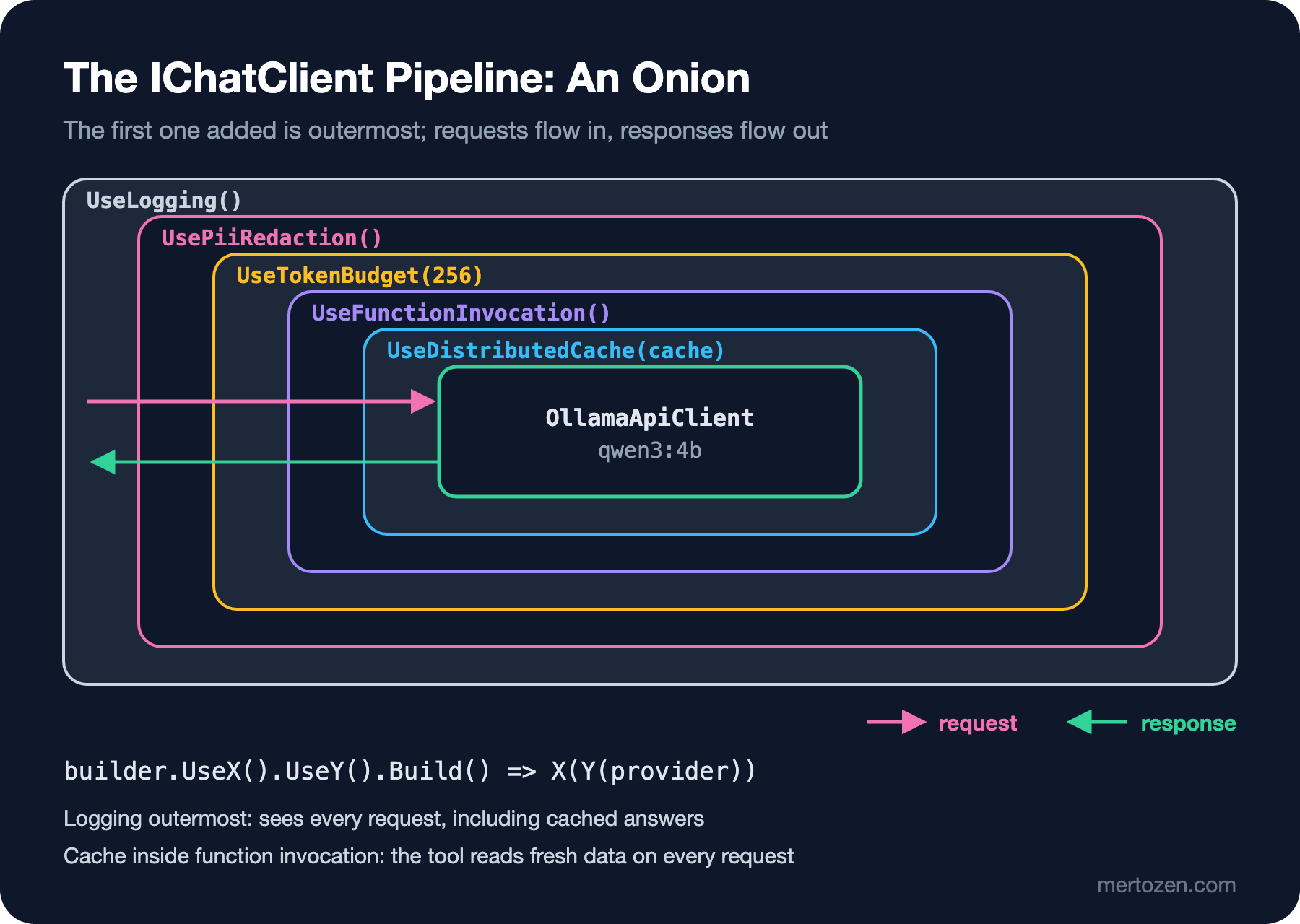
ChatClientBuilder builds the chain. You get a builder from the provider, add links with Use... calls and get a single IChatClient back from Build(). The rule: the first one added is the outermost. a.AsBuilder().UseX().UseY().Build() results in X(Y(a)); the request goes to X first, then Y, and finally the provider, and the response comes back the other way.
My first attempt hit a compiler error I didn't expect:
IChatClient chat = new OllamaApiClient(ollama, "gemma3:4b").AsBuilder()
    .UsePiiRedaction()
    .Build();
error CS0121: The call is ambiguous between the following methods or properties: 'Microsoft.Extensions.AI.ChatClientBuilderChatClientExtensions.AsBuilder(Microsoft.Extensions.AI.IChatClient)' and 'Microsoft.Extensions.AI.EmbeddingGeneratorBuilderEmbeddingGeneratorExtensions.AsBuilder<TInput, TEmbedding>(Microsoft.Extensions.AI.IEmbeddingGenerator<TInput, TEmbedding>)'OllamaApiClient implements both IChatClient and IEmbeddingGenerator, both interfaces have an AsBuilder() extension, and the compiler can't tell which one you mean. The fix is to pin the variable's type. Throughout the post I'll use a small local function for that:
Uri ollama = new("http://localhost:11434");

// OllamaApiClient is both IChatClient and IEmbeddingGenerator: pin the type to IChatClient for AsBuilder().
// A local model can be slow: raise HttpClient's default 100-second timeout.
IChatClient Ollama(string model) =>
    new OllamaApiClient(new HttpClient { BaseAddress = ollama, Timeout = TimeSpan.FromMinutes(5) }, model);
The timeout line also came from a real error. When you give OllamaApiClient only an address, it creates its own HttpClient, whose default timeout is 100 seconds. The first time I ran the ordering experiment below, while sharing the same Ollama with other work, qwen3:4b's thinking time went past that limit and the request failed with TaskCanceledException: The request was canceled due to the configured HttpClient.Timeout of 100 seconds elapsing. We will handle timeouts and retries properly with IHttpClientFactory in the next post.
Use Overloads: Middleware Without a Class
ChatClientBuilder.Use has four overloads. Two take a factory: Use(inner => new MyClient(inner)), and Use((inner, services) => ...) for pulling services from DI (Dependency Injection). The other two let you define middleware without writing a class. The overload that takes a single delegate is for work done before and after calling next; the same delegate is used for both GetResponseAsync and GetStreamingResponseAsync. To see what actually reaches the provider in Bookstore, I wrote a "wire tap" like this:
// Single-delegate middleware that shows what actually reaches the provider (runs for both streaming and non-streaming)
static ChatClientBuilder UseWireTap(ChatClientBuilder builder) =>
    builder.Use(async (messages, options, next, ct) =>
    {
        string user = messages.Last(m => m.Role == ChatRole.User).Text;
        Console.WriteLine($"  [wire] maxOutputTokens={options?.MaxOutputTokens}, user=\"{user}\"");
        await next(messages, options, ct);
    });
This delegate can't see the response; next returns a Task, not a ChatResponse. If you need to read or change the response, you use the fourth overload: two separate delegates, one returning Task<ChatResponse> and one returning IAsyncEnumerable<ChatResponseUpdate>. Microsoft Learn draws this line explicitly: when the different return types need different implementations, use the overload with two delegates.
There is also a ready-made helper: ConfigureOptions. On every call it creates a copy of ChatOptions and fills it with your delegate; it doesn't touch the instance the caller passed. It's ideal for defaults: .ConfigureOptions(o => o.Temperature ??= 0).
Your Own DelegatingChatClient: A Token Budget
When a delegate isn't enough, when you need state or a testable class, you derive from DelegatingChatClient. The base class forwards both methods and Dispose to the inner client; you override only what you want to change. Bookstore's first need is cost control: no request should produce an answer longer than 256 tokens, and users shouldn't send the model a novel.
using Microsoft.Extensions.AI;

namespace Bookstore.Assistant.Pipeline;

public sealed class TokenBudgetChatClient(IChatClient innerClient, int maxOutputTokens, int maxPromptChars)
    : DelegatingChatClient(innerClient)
{
    public override Task<ChatResponse> GetResponseAsync(
        IEnumerable<ChatMessage> messages, ChatOptions? options = null, CancellationToken cancellationToken = default)
    {
        EnsurePromptFits(messages);
        return base.GetResponseAsync(messages, WithCap(options), cancellationToken);
    }

    public override IAsyncEnumerable<ChatResponseUpdate> GetStreamingResponseAsync(
        IEnumerable<ChatMessage> messages, ChatOptions? options = null, CancellationToken cancellationToken = default)
    {
        EnsurePromptFits(messages);
        return base.GetStreamingResponseAsync(messages, WithCap(options), cancellationToken);
    }

    // Don't touch the caller's ChatOptions instance: clone it and change the clone
    private ChatOptions WithCap(ChatOptions? options)
    {
        ChatOptions copy = options?.Clone() ?? new ChatOptions();
        if (copy.MaxOutputTokens is null || copy.MaxOutputTokens > maxOutputTokens)
        {
            copy.MaxOutputTokens = maxOutputTokens;
        }
        return copy;
    }

    private void EnsurePromptFits(IEnumerable<ChatMessage> messages)
    {
        int length = messages.Sum(m => m.Text.Length);
        if (length > maxPromptChars)
        {
            throw new PromptTooLongException(length, maxPromptChars);
        }
    }
}

public sealed class PromptTooLongException(int length, int limit)
    : Exception($"Prompt has {length} characters; the limit is {limit}.")
{
    public int Length { get; } = length;
    public int Limit { get; } = limit;
}
I set the prompt limit in characters instead of tokens. Only the model's tokenizer knows the real token count, and as we saw in the tokens post of LLM (Large Language Model) Fundamentals, Turkish text takes more tokens than English. A character limit is a rough but cheap pre-check; you read the exact count from the Usage the provider returns. When I tried it with a text repeated 150 times, the request was stopped before reaching the model:
PromptTooLongException: Prompt has 5249 characters; the limit is 4000.Let's look at the output side with a real request as well. The caller sends MaxOutputTokens = 2_000, and the middleware lowers it to 64:
GetResponseAsync:
  [wire] maxOutputTokens=64, user="My email is [email] and my card is [card]. Recommend one book about refactoring in one sentence."
  finishReason=length, outputTokens=64
  Okay, based on your email and card (which I unfortunately can't see!), I recommend **"Refactoring: Improving the Design of Existing Code" by Martin Fowler** – a classic that provides a comprehensive guide to systematically improving the structure and quality of your code.

To help me give you a more tailored
  caller's options after call: MaxOutputTokens=2000
GetStreamingResponseAsync:
  [wire] maxOutputTokens=64, user="My email is [email] and my card is [card]. Recommend one book about refactoring in one sentence."
Notice three things. The wire tap shows that the value reaching the provider is 64. The answer was cut in the middle of a sentence and FinishReason came back as length; the budget really was enforced, but not showing users half a sentence is also your job (a system prompt asking for short answers, or a "the answer was cut" notice in the UI when length comes back). And after the call the caller's shared instance is still 2000: because the middleware works on a copy via Clone(), other requests sharing the same options were not affected.
Middleware That Masks Personal Data
The second need: e-mail addresses and card numbers in user messages should not reach the model, especially a cloud provider. PII (Personally Identifiable Information) masking is not a security layer but a data minimization step; still, cutting off data the model never needs to see is a good default.
using System.Text.RegularExpressions;
using Microsoft.Extensions.AI;

namespace Bookstore.Assistant.Pipeline;

public sealed partial class PiiRedactingChatClient(IChatClient innerClient) : DelegatingChatClient(innerClient)
{
    public override Task<ChatResponse> GetResponseAsync(
        IEnumerable<ChatMessage> messages, ChatOptions? options = null, CancellationToken cancellationToken = default) =>
        base.GetResponseAsync(Redact(messages), options, cancellationToken);

    public override IAsyncEnumerable<ChatResponseUpdate> GetStreamingResponseAsync(
        IEnumerable<ChatMessage> messages, ChatOptions? options = null, CancellationToken cancellationToken = default) =>
        base.GetStreamingResponseAsync(Redact(messages), options, cancellationToken);

    // Mask only TextContent in user messages; leave other contents alone
    private static List<ChatMessage> Redact(IEnumerable<ChatMessage> messages) =>
    [
        .. messages.Select(m => m.Role != ChatRole.User
            ? m
            : new ChatMessage(m.Role, [.. m.Contents.Select(c => c is TextContent t ? new TextContent(Mask(t.Text)) : c)])
            {
                AuthorName = m.AuthorName,
                MessageId = m.MessageId,
            }),
    ];

    internal static string Mask(string text) =>
        CardRegex().Replace(EmailRegex().Replace(text, "[email]"), "[card]");

    [GeneratedRegex(@"[\w.+-]+@[\w-]+\.[\w.-]+")]
    private static partial Regex EmailRegex();

    [GeneratedRegex(@"\b(?:\d[ -]?){12,15}\d\b")]
    private static partial Regex CardRegex();
}
Two details matter. The middleware doesn't modify the caller's message list; it creates new ChatMessage instances, so the chat history the application keeps retains the original text. And it only touches TextContent; other contents such as images or tool results pass through unchanged.
Microsoft Learn's advice for component authors is to add a Use* extension method for each middleware. That keeps the chain readable:
using Microsoft.Extensions.AI;

namespace Bookstore.Assistant.Pipeline;

public static class PipelineExtensions
{
    public static ChatClientBuilder UseTokenBudget(
        this ChatClientBuilder builder, int maxOutputTokens = 256, int maxPromptChars = 4_000) =>
        builder.Use(inner => new TokenBudgetChatClient(inner, maxOutputTokens, maxPromptChars));

    public static ChatClientBuilder UsePiiRedaction(this ChatClientBuilder builder) =>
        builder.Use(inner => new PiiRedactingChatClient(inner));
}
And this is the chain that produced the output above:
IChatClient chat = UseWireTap(
        Ollama("gemma3:4b").AsBuilder()
            .UsePiiRedaction()
            .UseTokenBudget(maxOutputTokens: 64)
            .ConfigureOptions(o => o.Temperature ??= 0))
    .Build();

ChatOptions shared = new() { MaxOutputTokens = 2_000 };
The wire tap is innermost, right above the provider. That's why it sees the text sent to the model: [email] and [card]. The model also noticed it had received masked text and added "which I unfortunately can't see!" to its answer. Even a small model can say that data is missing; in production you manage this with the system prompt.
If You Forget the Streaming Override
Back to the second question from Guess First. I wrote the same masking with a class that overrides only GetResponseAsync:
using Microsoft.Extensions.AI;

namespace Bookstore.Assistant.Pipeline;

// Wrong: only GetResponseAsync is overridden
public sealed class NaiveRedactingChatClient(IChatClient innerClient) : DelegatingChatClient(innerClient)
{
    public override Task<ChatResponse> GetResponseAsync(
        IEnumerable<ChatMessage> messages, ChatOptions? options = null, CancellationToken cancellationToken = default) =>
        base.GetResponseAsync(
            [.. messages.Select(m => m.Role == ChatRole.User ? new ChatMessage(m.Role, PiiRedactingChatClient.Mask(m.Text)) : m)],
            options, cancellationToken);
}
I sent the same question first normally, then as a stream:
GetResponseAsync:
  [wire] maxOutputTokens=32, user="My email is [email] and my card is [card]. Recommend one book about refactoring in one sentence."
GetStreamingResponseAsync:
  [wire] maxOutputTokens=32, user="My email is ada@example.com and my card is 4111 1111 1111 1111. Recommend one book about refactoring in one sentence."
The compiler gave no warning and the tested path (non-streaming) worked, but on the streaming request the e-mail and card number went to the model untouched. The method of DelegatingChatClient that you don't override forwards the request to the inner client without touching it. Since chat UIs almost always stream, this bug lives silently on the most used path. The rule: if you write a DelegatingChatClient, override both methods or use the single-delegate Use overload, and call both paths in your tests.
Why Order Matters: Cache and Function Invocation
Let's measure the opening question with a real tool. I use qwen3:4b for tool calling; every call to get_stock increments a counter, and a middleware right above the provider counts every round trip to the model:
async Task RunOrderAsync(bool cacheOutside)
{
    int modelCalls = 0, toolCalls = 0;
    IDistributedCache cache = new MemoryDistributedCache(Options.Create(new MemoryDistributedCacheOptions()));

    AIFunction getStock = AIFunctionFactory.Create(
        (string title) =>
        {
            toolCalls++;
            return new { title, inStock = 3 };
        },
        "get_stock",
        "Returns how many copies of a book are in stock.");

    ChatClientBuilder builder = Ollama("qwen3:4b").AsBuilder();
    builder = cacheOutside
        ? builder.UseDistributedCache(cache).UseFunctionInvocation()
        : builder.UseFunctionInvocation().UseDistributedCache(cache);

    // Count every round trip to the provider
    IChatClient chat = builder
        .Use(async (messages, options, next, ct) =>
        {
            modelCalls++;
            await next(messages, options, ct);
        })
        .Build();

    ChatOptions options = new()
    {
        Tools = [getStock],
        Temperature = 0,
        Seed = 42,
    };

    Console.WriteLine(cacheOutside ? "cache OUTSIDE function invocation:" : "cache INSIDE function invocation:");
    for (int i = 1; i <= 2; i++)
    {
        modelCalls = toolCalls = 0;
        ChatResponse response = await chat.GetResponseAsync("How many copies of Refactoring are in stock?", options);
        Console.WriteLine($"  request {i}: modelCalls={modelCalls}, toolCalls={toolCalls}, answer=\"{response.Text.Trim()}\"");
    }
}
cache OUTSIDE function invocation:
request 1: modelCalls=2, toolCalls=1, answer="There are currently **3 copies** of *Refactoring* in stock."
request 2: modelCalls=0, toolCalls=0, answer="There are currently **3 copies** of *Refactoring* in stock."
cache INSIDE function invocation:
request 1: modelCalls=2, toolCalls=1, answer="There are currently **3 copies** of *Refactoring* in stock."
request 2: modelCalls=0, toolCalls=1, answer="There are currently **3 copies** of *Refactoring* in stock."The first requests are the same in both cases: the model first asks for a get_stock call, FunctionInvokingChatClient runs the tool and sends the result back, and the model writes the answer in the second round. Two model calls, one tool call.
The difference is in the second request. With the cache outside (A), the result of the whole conversation was stored as a single entry; the request never gets down to the function invocation layer, and neither the model nor the tool runs. With the cache inside (B), the function invocation layer runs every time and asks the cache about each model round separately. The first round (only the user message) comes from the cache, the tool really runs, and the second round (user message + tool result) also comes from the cache, because the stock is still 3 and the message history is identical.
Which one is right? It depends on the question. A is the cheapest, but even if the stock drops from 3 to 0, it keeps saying "3 copies" until the cache entry expires; that's dangerous for tools that read live data. In B the tool reads fresh data on every request; if the data hasn't changed the model rounds still come from the cache, and if it has, the second round misses the cache and the model writes the answer with the new result. Bookstore has live data like stock and order status, so I choose B. For telemetry and logging the general rule is to keep them outermost: you want to see every request, including answers served from the cache. We cover the OpenTelemetry side in detail in post 8.
GetService and the Dispose Chain
GetService<T>() walks inward along the chain: each DelegatingChatClient first checks whether it is the requested type, and if not, passes the question to its inner client. That lets you reach a specific link even after the pipeline is built; for example, chat.GetService<FunctionInvokingChatClient>() lets you read the function invocation settings. In our chain:
GetService<TokenBudgetChatClient>: True
GetService<OllamaApiClient>: True
Dispose follows the same path. DelegatingChatClient.Dispose also disposes the inner client, so when you dispose the outermost client the whole chain down to the provider is closed. Two consequences: if you share the same provider instance between two pipelines, disposing one breaks the other; and if your middleware owns a resource (such as a RateLimiter), you must close it in your Dispose(bool) override.
In Production
Test middleware without a provider. TokenBudgetChatClient and PiiRedactingChatClient are plain C#; put a fake IChatClient that records incoming messages underneath them and you can test both methods. These tests run in milliseconds and catch the forgotten streaming path.
Document the order. Above the lines that build the pipeline, write one sentence on why they are in that order. Six months later, when someone says "let's move the cache to the outside, it'll be faster", that comment explains why live stock data would go stale.
Know the limits of masking. Regex-based masking catches common formats; an IBAN (International Bank Account Number) written without spaces, a phone number spelled out in words, or text inside an image won't match the regex. For sensitive data the real fix is not to put it in the prompt at all and to give tools the user's identity from the session; we will see that together with tool calling in post 6.
Common Pitfalls
First, forgetting the streaming override. We saw it above: a clean build, a green non-streaming test, and no middleware on the chat screen.
Second, mutating a shared ChatOptions instance. Applications often create the options once and use them on every request. If a middleware writes options.MaxOutputTokens = 64 directly, the change leaks into every later request, and it isn't thread-safe either. Clone() first, then change; or use ConfigureOptions.
Third, building the order at random because "everything runs anyway". Cache, function invocation, telemetry and masking behave differently in different orders. For example, if masking ends up inside the cache, the cache key is computed from the unmasked text and personal data is written to the cache store.
Fourth, calling AsBuilder() directly on OllamaApiClient and then spreading (IChatClient) casts across the code to get rid of CS0121. Pin the type once, where you create the client.
A Small Experiment
★☆☆ Move the wire tap to the outside of the chain, before UsePiiRedaction(). What does the user= line in the output show? Why did maxOutputTokens change?
★★☆ Put UsePiiRedaction() inside UseDistributedCache(cache) (cache outside, masking inside). Ask the same question with the e-mail twice and find out which text the cache key was computed from. Hint: you can derive from DistributedCachingChatClient and override GetCacheKey, or wrap IDistributedCache in a small class that prints the keys passed to SetAsync.
★★★ Using the two-delegate Use overload, write a "banned word" middleware: if the answer mentions a competing bookstore (with sample data, e.g. OtherBooks), it should replace the answer in non-streaming mode and cut the stream in streaming mode. Think about why changing the answer is much harder in streaming: the word may arrive split across two updates.
We have seen how to build the pipeline and write our own links. In the next post we move this pipeline into ASP.NET Core's DI container: AddChatClient, two keyed clients named "fast" and "smart", picking the provider with the options pattern, secrets, and adding timeouts and retries to the provider's HttpClient.