

The .NET AI Stack: Where Microsoft.Extensions.AI, VectorData, Evaluation and Agent Framework Fit
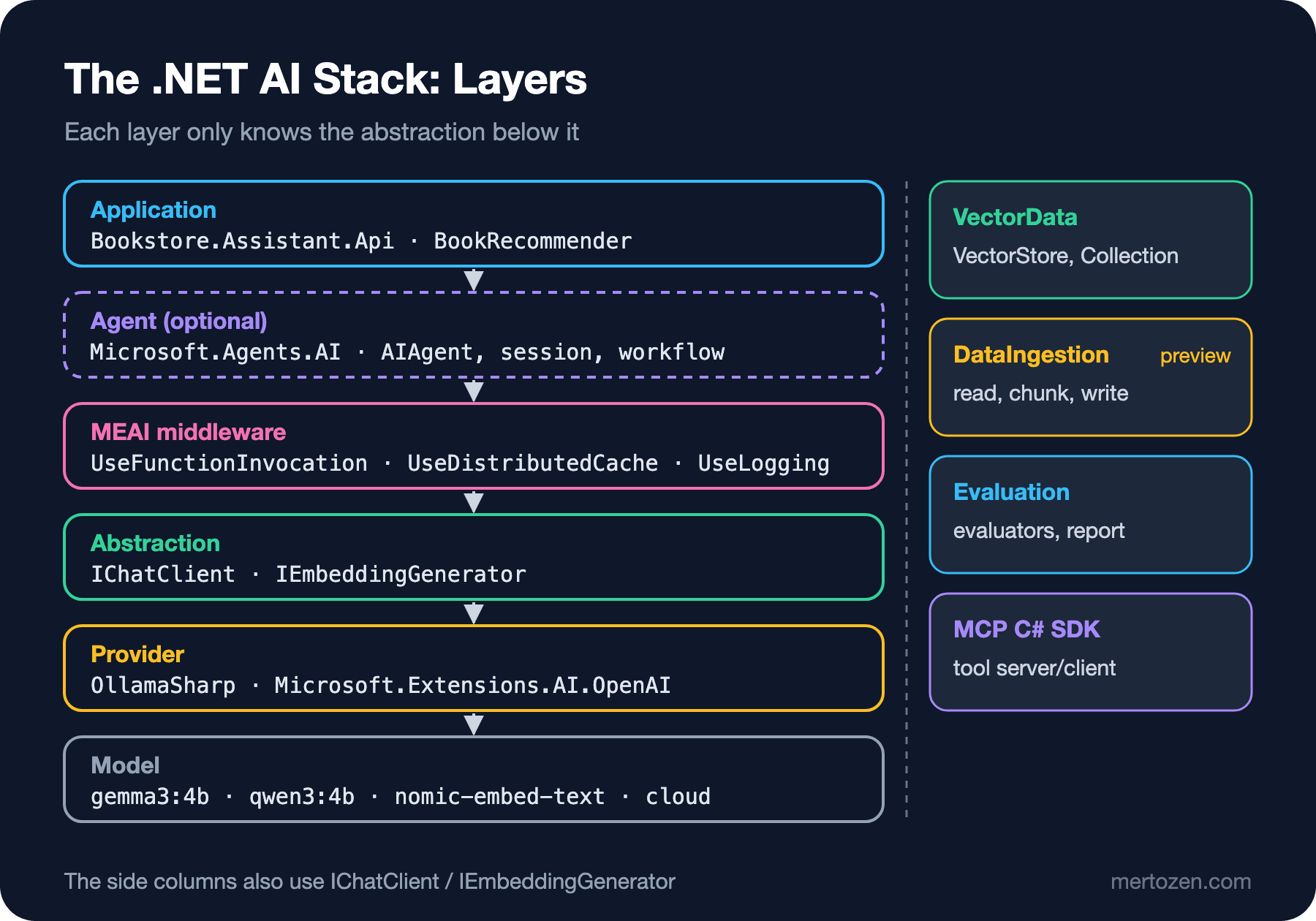
An application takes Microsoft.Extensions.AI plus a provider package, while a library depends only on Abstractions; VectorData, DataIngestion, Evaluation and Agent Framework sit on top of or next to that IChatClient layer. We map the packages, run the aichatweb template against a local Ollama and fix three real errors that appear at the layer boundaries.
Version note: The code in this post was built and run with .NET 10, Microsoft.Extensions.AI 10.11.0, OllamaSharp 5.5.2, Microsoft.Extensions.AI.Templates 10.11.0-preview.3 and a local Ollama 0.34.4 (gemma3:4b, qwen3:4b, nomic-embed-text).
Guess First
The Bookstore team has been asked to "add an assistant that recommends books". Someone searches NuGet for AI (Artificial Intelligence) and gets Microsoft.Extensions.AI, Microsoft.Extensions.AI.Abstractions, Microsoft.Agents.AI, Microsoft.SemanticKernel, Microsoft.Extensions.VectorData.Abstractions, Microsoft.Extensions.DataIngestion, OllamaSharp and ModelContextProtocol. All of them are signed by Microsoft or show up in Microsoft's documentation. Which one do you install?
Two more questions. If you create Microsoft's official aichatweb template with the Ollama option and run it against the models on your machine, will the first message get an answer? And if you move the recommendation logic into a class library, which package should that library depend on?
By the end of this post you will know which layer each package lives in. The answer to the template question will be "no, and then yes after three separate errors"; we will see all three with their real logs.
The Package Map: Which Package Solves Which Problem?
In the LLM (Large Language Model) Fundamentals series we used IChatClient as a concept: one interface, two methods, code that does not know which model sits behind it. In this series we take the same interface into a real ASP.NET Core application. First, let's map the pieces. I checked the versions on NuGet on the day this post was written:
| Package | Version | What it provides |
|---|---|---|
Microsoft.Extensions.AI.Abstractions | 10.11.0 | Shared types such as IChatClient, IEmbeddingGenerator, ChatMessage, ChatOptions, AIFunction |
Microsoft.Extensions.AI | 10.11.0 | ChatClientBuilder and ready-made middleware: function invocation, caching, logging, OpenTelemetry, chat reducer |
OllamaSharp | 5.5.2 | The Ollama provider; implements IChatClient and IEmbeddingGenerator directly |
Microsoft.Extensions.AI.OpenAI | 10.11.0 | AsIChatClient(), which turns the OpenAI SDK's (Software Development Kit) clients into IChatClient |
Microsoft.Extensions.VectorData.Abstractions | 10.11.0 | The vector store abstraction: VectorStore, VectorStoreCollection, record attributes |
Microsoft.Extensions.DataIngestion | 10.11.0-preview.1 | A pipeline that reads documents, chunks them and writes them to a vector store (preview) |
Microsoft.Extensions.AI.Evaluation.* | 10.11.0 | Evaluators that measure answer quality, plus reporting; the NLP (Natural Language Processing) and Safety packages are still preview |
Microsoft.Agents.AI | 1.28.0 | Microsoft Agent Framework: AIAgent, sessions, agent middleware, workflows |
ModelContextProtocol | 2.4.0 | The official C# SDK for MCP (Model Context Protocol): servers and clients |
Read the table top to bottom and a layered structure appears. At the bottom is the model: gemma3 running in Ollama, or a model in the cloud. Above it, the provider package translates the model's own HTTP (Hypertext Transfer Protocol) API (Application Programming Interface) into IChatClient. Above that sit the middleware components of MEAI (Microsoft.Extensions.AI). At the top is your application, or an agent written with Microsoft Agent Framework (MAF). VectorData, DataIngestion and Evaluation stand next to this vertical line as helper columns that use the same abstractions.
Abstraction and Middleware: Which Package Should a Library Reference?
Microsoft's documentation draws the line clearly: libraries that implement the abstractions typically reference only Microsoft.Extensions.AI.Abstractions, while applications take Microsoft.Extensions.AI plus one or more provider packages. Let's put Bookstore's recommendation logic into a class library and follow that rule:
using Microsoft.Extensions.AI;

namespace Bookstore.Recommendations;

// The library only knows the abstraction: no provider, no model, no middleware
public sealed class BookRecommender(IChatClient chat)
{
    private const string SystemPrompt =
        "You are a bookstore assistant. Recommend exactly one book in one sentence.";

    public async Task<Recommendation> RecommendAsync(string likedBook, CancellationToken ct = default)
    {
        List<ChatMessage> messages =
        [
            new(ChatRole.System, SystemPrompt),
            new(ChatRole.User, $"I liked {likedBook}. What should I read next?"),
        ];

        ChatResponse response = await chat.GetResponseAsync(
            messages, new ChatOptions { Temperature = 0, Seed = 42 }, ct);

        return new Recommendation(response.Text, response.Usage?.InputTokenCount, response.Usage?.OutputTokenCount);
    }
}

public sealed record Recommendation(string Text, long? InputTokens, long? OutputTokens);
The application picks the provider, adds the middleware and hands the library a ready IChatClient:
using Bookstore.Recommendations;
using Microsoft.Extensions.AI;
using Microsoft.Extensions.Logging;
using OllamaSharp;

using ILoggerFactory loggerFactory = LoggerFactory.Create(b => b.AddConsole().SetMinimumLevel(LogLevel.Debug));

// Provider layer: OllamaSharp implements IChatClient directly
IChatClient provider = new OllamaApiClient(new Uri("http://localhost:11434"), "gemma3:4b");

// Middleware layer: from the Microsoft.Extensions.AI package
IChatClient chat = provider
    .AsBuilder()
    .UseLogging(loggerFactory)
    .Build();

// Ask for the metadata service to identify the provider at the core of the pipeline
ChatClientMetadata? metadata = chat.GetService<ChatClientMetadata>();
Console.WriteLine($"Provider: {metadata?.ProviderName}, endpoint: {metadata?.ProviderUri}, model: {metadata?.DefaultModelId}");
Console.WriteLine($"Outer client: {chat.GetType().Name}, inner: {chat.GetService<OllamaApiClient>()?.GetType().Name}");

// Application layer: the library's only dependency is IChatClient
BookRecommender recommender = new(chat);
Recommendation result = await recommender.RecommendAsync("Clean Code");

Console.WriteLine(result.Text);
Console.WriteLine($"Tokens: in={result.InputTokens}, out={result.OutputTokens}");
Provider: ollama, endpoint: http://localhost:11434/, model: gemma3:4b
Outer client: LoggingChatClient, inner: OllamaApiClient
dbug: Microsoft.Extensions.AI.LoggingChatClient[1723383095]
GetResponseAsync invoked.
dbug: Microsoft.Extensions.AI.LoggingChatClient[1553703230]
GetResponseAsync completed.
If you enjoyed “Clean Code,” you might find “The Pragmatic Programmer” a fantastic next read to deepen your understanding of software development principles and best practices.
Tokens: in=41, out=33All three layers are visible in the output. The actual type of chat is LoggingChatClient, the outermost middleware. GetService<T>() walks inward through the chain and finds the OllamaApiClient at the bottom and its metadata. BookRecommender knows none of this; remove logging, add a cache or swap the model and not a single line of the library changes.
The package tree confirms the split:
dotnet list Bookstore.Recommendations package --include-transitive
   Top-level Package                           Requested   Resolved
   > Microsoft.Extensions.AI.Abstractions      10.11.0     10.11.0

dotnet list Bookstore.Cli package --include-transitive
   Top-level Package                           Requested   Resolved
   > Microsoft.Extensions.AI                   10.11.0     10.11.0
   > Microsoft.Extensions.Logging.Console      10.0.14     10.0.14
   > OllamaSharp                               5.5.2       5.5.2
The library depends only on Abstractions. That matters because the team consuming your library may use a different provider, a different MEAI version or their own middleware. Had the library depended on OllamaSharp, everyone using it would have to carry the Ollama package too.
The Provider Layer: Ollama, OpenAI and Azure
The provider package speaks the model's own protocol. For Ollama we use OllamaSharp in this series; OllamaApiClient implements both IChatClient and IEmbeddingGenerator. The Microsoft.Extensions.AI.Ollama package Microsoft published earlier never left preview and is marked deprecated on NuGet; the Microsoft Learn samples now use OllamaSharp as well.
For OpenAI and OpenAI-compatible services, the Microsoft.Extensions.AI.OpenAI package turns the official OpenAI .NET SDK's ChatClient into an IChatClient via AsIChatClient(). For Azure OpenAI, the AzureOpenAIClient from the Azure.AI.OpenAI package is used with the same extension. We wrote code that picks the provider from configuration in the LLM Fundamentals post "Provider-Independent LLM Code"; I won't repeat it here. In this series cloud provider code is compiled and shown but not run: we use no API keys, and every real output comes from the local Ollama.
The Data, Evaluation and Agent Layers
On to the side columns of the map. Each one corresponds to a post in this series or a later one.
Microsoft.Extensions.VectorData does for vector stores what IChatClient does for chat: you describe a record model with attributes and the InMemory, PostgreSQL (pgvector), Qdrant, Redis or SQL (Structured Query Language) Server provider changes behind it. The provider package names have changed too; what used to be Microsoft.SemanticKernel.Connectors.* now lives on NuGet as CommunityToolkit.VectorData.* (for example CommunityToolkit.VectorData.PgVector 1.0.2). The details are in post 9 of this series.
Microsoft.Extensions.DataIngestion is the pipeline that reads documents, splits them into chunks and writes them to a vector store. It is still preview today, and you need to know that before taking it to production. The full RAG (Retrieval-Augmented Generation) pipeline is the subject of the upcoming RAG series.
Microsoft.Extensions.AI.Evaluation turns the question "is the model answering well?" into test code: LLM-based evaluators such as relevance and coherence, NLP metrics that need no LLM, response caching and the dotnet aieval report. We will run it inside xUnit in post 10.
Microsoft Agent Framework is the top layer. According to Microsoft Learn, MAF is the direct successor of Semantic Kernel and AutoGen, written by the same teams; it combines AutoGen's simple agent abstractions with Semantic Kernel's enterprise features such as session management, middleware and telemetry. The package dependency shows this: Microsoft.Agents.AI 1.28.0 depends on Microsoft.Extensions.AI 10.11.0. In other words MAF does not bring its own model layer; it builds on IChatClient. Keep this sentence from the documentation in mind throughout the series: if you can solve a task with a function, write a function instead of an agent. We move to MAF in post 11.
The last piece is MCP. The ModelContextProtocol package is the official C# SDK for writing servers that expose tools and resources over a standard protocol, and clients that use them. Agent patterns and MCP are covered in the upcoming AI Agents and MCP series.
Reading the aichatweb Template Layer by Layer
Let's not leave the map on paper. Microsoft's .NET AI template sets up almost all of these layers in one project. I installed the template package and created a project with the Ollama option, passing models that are already on my machine (the template's defaults are llama3.2 and all-minilm):
dotnet new install Microsoft.Extensions.AI.Templates::10.11.0-preview.3.26513.7
dotnet new aichatweb -n BookstoreChat --provider ollama --ChatModel gemma3:4b --EmbeddingModel nomic-embed-text
The AI part of the generated Program.cs looks like this:
IChatClient chatClient = new OllamaApiClient(new Uri("http://localhost:11434"),
    "gemma3:4b");
IEmbeddingGenerator<string, Embedding<float>> embeddingGenerator = new OllamaApiClient(new Uri("http://localhost:11434"),
    "nomic-embed-text");

var vectorStorePath = Path.Combine(AppContext.BaseDirectory, "vector-store.db");
var vectorStoreConnectionString = $"Data Source={vectorStorePath}";
builder.Services.AddSqliteVectorStore(_ => vectorStoreConnectionString);
builder.Services.AddSqliteCollection<Guid, IngestedChunk>(IngestedChunk.CollectionName, vectorStoreConnectionString);

builder.Services.AddSingleton<DataIngestor>();
builder.Services.AddSingleton<SemanticSearch>();
builder.Services.AddKeyedSingleton("ingestion_directory", new DirectoryInfo(Path.Combine(builder.Environment.WebRootPath, "Data")));
builder.Services.AddChatClient(chatClient).UseFunctionInvocation().UseLogging();
builder.Services.AddEmbeddingGenerator(embeddingGenerator);
You can read the layers straight from it. Provider: two OllamaApiClient instances, one for chat and one for embeddings. Middleware: UseFunctionInvocation() and UseLogging() added to the builder returned by AddChatClient(...); we will look at the DI (Dependency Injection) registration in detail in post 3. VectorData: AddSqliteVectorStore and AddSqliteCollection from the CommunityToolkit.VectorData.SqliteVec package, which is in preview. DataIngestion: IngestionPipeline, SemanticSimilarityChunker and VectorStoreWriter inside DataIngestor. Application: a Blazor page that puts two tools (LoadDocuments and Search) into ChatOptions.Tools and streams the answer.
When I ran it and asked the first question, the page said "An unhandled error has occurred". The first error in the log:
fail: Microsoft.Extensions.AI.LoggingChatClient[1784604714]
      GetStreamingResponseAsync failed.
      System.Text.Json.JsonException: The JSON value could not be converted to System.String. Path: $.properties.filenameFilter.type | LineNumber: 0 | BytePositionInLine: 265.
       ---> System.InvalidOperationException: Cannot get the value of a token type 'StartArray' as a string.
The template writes OllamaSharp 5.4.12 into the .csproj, while Microsoft.Extensions.AI is 10.11.0. The newer MEAI emits the type of a nullable tool parameter (string? filenameFilter) as an array, ["string","null"], in the JSON (JavaScript Object Notation) schema; the old OllamaSharp reads it expecting a single string and blows up. Upgrading OllamaSharp to 5.5.2 made this error go away. The second error:
fail: Microsoft.Extensions.AI.LoggingChatClient[1784604714]
      GetStreamingResponseAsync failed.
      OllamaSharp.Models.Exceptions.ModelDoesNotSupportToolsException: registry.ollama.ai/library/gemma3:4b does not support tools
The template's chat flow relies on tool calling, and gemma3 does not support tools. I switched the chat model to qwen3:4b, which does. The third error came during ingestion:
fail: Microsoft.Extensions.DataIngestion.IngestionPipeline[6]
      An error occurred while ingesting document 'Example_Emergency_Survival_Kit.pdf'.
      Microsoft.Extensions.VectorData.VectorStoreException: Call to vector store failed.
       ---> Microsoft.Data.Sqlite.SqliteException (0x80004005): SQLite Error 1: 'Dimension mismatch for inserted vector for the "embedding" column. Expected 384 dimensions but received 768.'.
The template hardcodes the vector size as 384 in the IngestedChunk class, and the comment next to it says "384 is the default vector size for the nomic-embed-text embedding model". But 384 is the size for all-minilm, the template's default model; nomic-embed-text produces 768-dimensional vectors and the SQLite column rejects them. After setting VectorDimensions to 768 and deleting the old vector-store.db, both documents were written with Succeeded: 'True'. When I asked about the GPS (Global Positioning System) watch in the sample document, the assistant showed "Loading relevant documents", then "Searching: GPS watch functions", and gave a correct answer about the watch. The system prompt asked for a citation tag at the end of the answer; the 4B-parameter model did not produce it.
All three errors happened at a layer boundary: version compatibility between the provider and MEAI, the capability the application needs (tool calling) versus the one the model offers, and the embedding model versus the vector store schema. This series deals with these boundaries one by one.
The Setup for the Series
The template is a starting point; instead of it, the series builds an ASP.NET Core Web API that grows step by step: Bookstore.Assistant.Api. The domain is the same Bookstore as in the site's other series: Book, Author, Order, Customer, Inventory. Models are chosen by role: gemma3:4b for default chat, gemma3:12b as the "strong model", qwen3:4b for tool calling and to show how a reasoning model behaves, and nomic-embed-text for embeddings. Each post's version note says which model actually ran in that post. All of them run in the local Ollama. In each post I will also say what changes with a cloud provider.
I won't repeat what LLM Fundamentals covered: tokens and tokenizers, the context window, sampling, prompt writing, structured output, how tool calling works, embeddings and the cost calculation are all there. The question here is not "how does it work?" but "how does it work reliably in production?".
In Production
Manage version compatibility in one place. MEAI ships a minor version every month, and provider packages move on their own schedule. As the template example shows, the build can succeed and you can still hit a schema mismatch at runtime. Keep versions in one file with Central Package Management (Directory.Packages.props), upgrade the provider when you upgrade MEAI, and keep a smoke test that runs at least one tool calling request end to end.
Take the preview label seriously. DataIngestion, the SqliteVec provider, Evaluation's NLP and Safety packages and MAF's hosting packages are preview today. A preview package's API can break in a minor release. If you take one to production, pin the version, follow the release notes and keep the code behind a small adapter.
Verify model capabilities at startup. The answers to "does this model support tools?" and "what is the embedding size?" come from configuration, and they can be wrong. Generating one embedding at startup and comparing its size with the schema, or sending one small request with a tool, catches the error before the first user does.
Common Pitfalls
First, still treating Semantic Kernel as the "default". Semantic Kernel keeps getting updates on NuGet (1.82.0 today), but Microsoft points new code to Microsoft.Extensions.AI and agents to MAF. Starting a new project from Kernel-based code in an old blog post means a migration job tomorrow. The history and the migration are in post 14.
Second, taking a preview package to production without noticing. dotnet new aichatweb gives you a project with preview DataIngestion and preview SqliteVec packages. The template is for prototypes; you need to know which package is preview by reading the .csproj.
Third, depending on a concrete provider when writing a library. Had BookRecommender asked for OllamaApiClient, you could not hand it a fake client in tests, and another team could not switch to OpenAI. The library asks for IChatClient; the application picks the provider.
Fourth, trusting the template's comments and constants. In the vector size example the comment was wrong and the error only showed up at the first ingestion. When you change models, check the dimension, tool support and context window in the model's own documentation.
A Small Experiment
★☆☆ Change the model in Bookstore.Cli to gemma3:12b and ask the same question. How did the Provider line and the token counts change? Did you have to change a single line in BookRecommender?
★★☆ In the aichatweb project, set VectorDimensions back to 384 without changing the embedding model, but this time don't delete vector-store.db. Which error do you get? Think about what should happen when the schema of an existing collection doesn't match the schema in the new code.
★★★ Create a test project for Bookstore.Recommendations and write a small fake client that implements IChatClient and returns a fixed answer. Verify that RecommendAsync builds the messages sent to the model correctly without ever going to Ollama. We will grow this idea in post 10.
The map is ready. In the next post we go down to the layer in the middle of it, the MEAI middleware pipeline: how the ChatClientBuilder chain is built, why order matters, and how to write our own DelegatingChatClient classes for Bookstore that enforce a token budget and mask personal data.