

Hosting Agents in ASP.NET Core: AddAIAgent, OpenAI-Compatible Endpoints, AG-UI and A2A
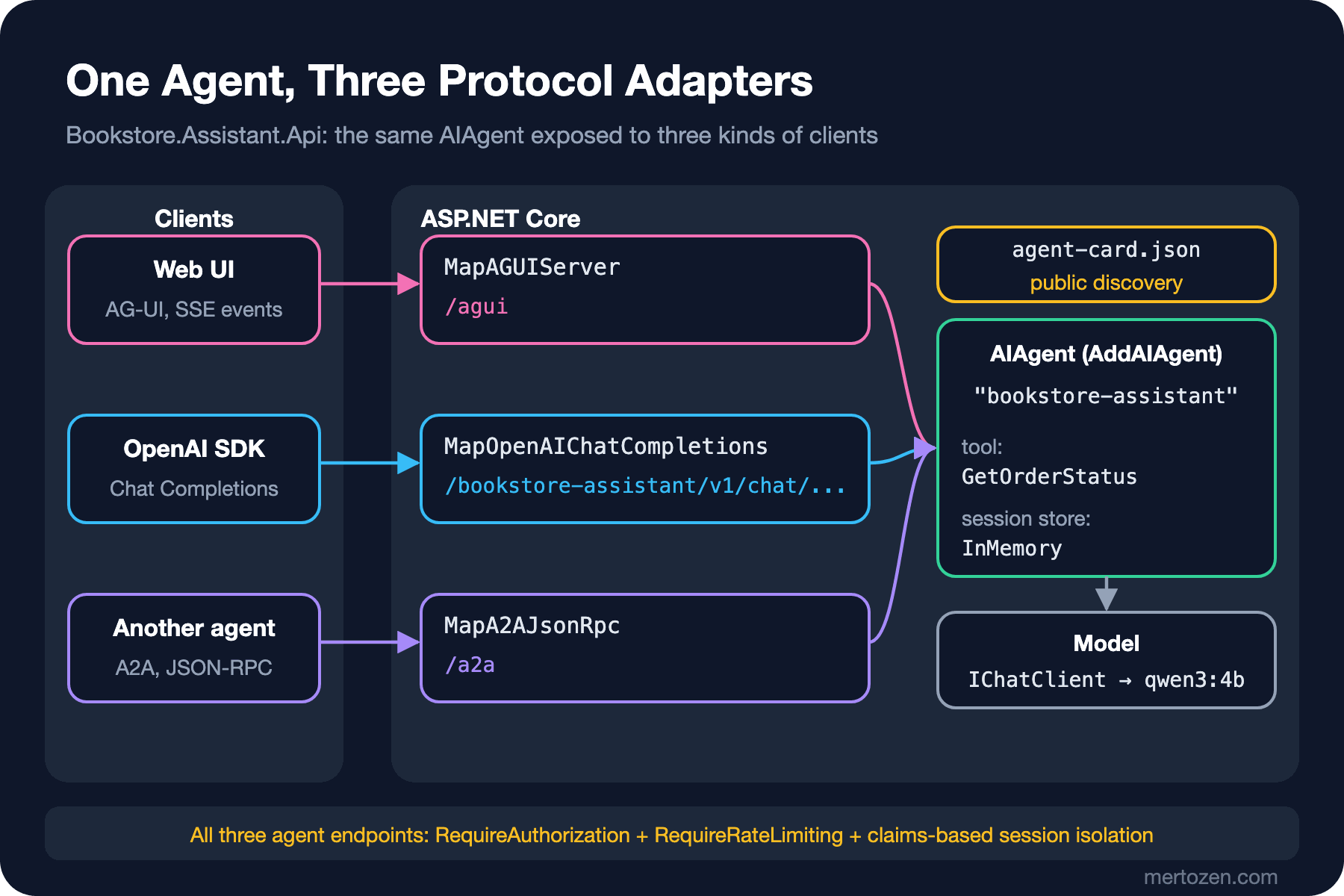
You register an agent in DI with AddAIAgent and expose it over three protocols with MapOpenAIChatCompletions, MapAGUIServer and MapA2AJsonRpc; the agent is written once and the adapters only translate the format. With real calls we look at an OpenAI response with multiple choices, an AG-UI stream that carries reasoning to the browser, the A2A agent card, and claims-based session isolation with rate limiting.
Version note: The code in this post was built and run with .NET 10, Microsoft.Agents.AI 1.28.0, Microsoft.Agents.AI.Hosting 1.28.0-preview.261106.1, Microsoft.Agents.AI.Hosting.OpenAI 1.28.0-alpha.261106.1, Microsoft.Agents.AI.Hosting.AGUI.AspNetCore 1.28.0-preview.261106.1, Microsoft.Agents.AI.Hosting.A2A.AspNetCore 1.28.0-preview.261106.1, OllamaSharp 5.5.2 and Ollama 0.34.4 (qwen3:4b).
Guess First
The Bookstore assistant is an agent now. Three teams want to use it. The web team wants to connect it to the chat window in the browser. The reporting team wants to call it with the OpenAI SDK (Software Development Kit) they already have. The logistics team's own agent wants to ask this agent about order status. Will you write three separate endpoints, or three separate agents?
Also think about this: the Agent-User Interaction Protocol (AG-UI) request body contains a threadId. If Ada guesses Alan's thread id and sends it, can she continue Alan's conversation?
The answer: one agent, three adapters. The answer to the second question depends on your settings. With the defaults it isn't safe.
The Hosting Layer: Putting the AIAgent into DI
In this series' "Getting Started with Microsoft Agent Framework" post we created the agent by hand with AsAIAgent. In an ASP.NET Core Web API (Application Programming Interface) project the agent should live in the DI (Dependency Injection) container like any other service. The Microsoft.Agents.AI.Hosting package brings AddAIAgent for that. The protocol adapters ship in separate packages:
<ItemGroup>
  <PackageReference Include="Microsoft.Agents.AI" Version="1.28.0" />
  <PackageReference Include="Microsoft.Agents.AI.Hosting" Version="1.28.0-preview.261106.1" />
  <PackageReference Include="Microsoft.Agents.AI.Hosting.OpenAI" Version="1.28.0-alpha.261106.1" />
  <PackageReference Include="Microsoft.Agents.AI.Hosting.AGUI.AspNetCore" Version="1.28.0-preview.261106.1" />
  <PackageReference Include="Microsoft.Agents.AI.Hosting.A2A.AspNetCore" Version="1.28.0-preview.261106.1" />
  <PackageReference Include="OllamaSharp" Version="5.5.2" />
</ItemGroup>
Watch the version labels. The core Microsoft.Agents.AI is stable 1.28.0, but every hosting package is preview and the OpenAI adapter is alpha. So the agent itself is GA (General Availability), the layer that exposes it is not yet. That is also why the API names in this post changed over the last few releases: some documentation samples still say MapAGUI while the method in 1.28 is MapAGUIServer. Checking the XML (Extensible Markup Language) documentation of the version you use before writing code is the safest route.
One Agent, Three Adapters: Program.cs
using System.Security.Claims;
using System.Threading.RateLimiting;
using A2A;
using A2A.AspNetCore;
using Bookstore.Assistant;
using Microsoft.Agents.AI.Hosting;
using Microsoft.Agents.AI.Hosting.AGUI.AspNetCore;
using Microsoft.AspNetCore.Authentication;
using Microsoft.Extensions.AI;
using OllamaSharp;

WebApplicationBuilder builder = WebApplication.CreateBuilder(args);

builder.Services.AddSingleton<IChatClient>(new OllamaApiClient(
    new HttpClient { BaseAddress = new Uri("http://localhost:11434"), Timeout = TimeSpan.FromMinutes(10) },
    "qwen3:4b"));
builder.Services.AddSingleton<OrderTools>();

// One agent: registered in DI, tool and session store added through the builder
IHostedAgentBuilder assistant = builder
    .AddAIAgent("bookstore-assistant",
        instructions: "You are the Bookstore assistant. Use tools for order questions. Answer in one short sentence.")
    .WithAITool(sp => AIFunctionFactory.Create(sp.GetRequiredService<OrderTools>().GetOrderStatus))
    .WithInMemorySessionStore();

// Three protocol adapters
builder.Services.AddOpenAIChatCompletions();
builder.Services.AddAGUIServer();
assistant.AddA2AServer();

// Identity, per-user session isolation and rate limiting
builder.Services.AddAuthentication("DemoApiKey")
    .AddScheme<AuthenticationSchemeOptions, DemoApiKeyHandler>("DemoApiKey", null);
builder.Services.AddAuthorization();
builder.Services.AddHttpContextAccessor();
builder.Services.UseClaimsBasedAgentIsolation();
builder.Services.AddRateLimiter(o =>
{
    o.RejectionStatusCode = StatusCodes.Status429TooManyRequests;
    o.AddPolicy("agent", http => RateLimitPartition.GetFixedWindowLimiter(
        http.User.FindFirstValue(ClaimTypes.NameIdentifier) ?? "anonymous",
        _ => new FixedWindowRateLimiterOptions { PermitLimit = 3, Window = TimeSpan.FromMinutes(1) }));
});

WebApplication app = builder.Build();
app.UseAuthentication();
app.UseAuthorization();
app.UseRateLimiter();

app.MapOpenAIChatCompletions(assistant).RequireAuthorization().RequireRateLimiting("agent");
app.MapAGUIServer(assistant, "/agui").RequireAuthorization().RequireRateLimiting("agent");
app.MapA2AJsonRpc(assistant, "/a2a").RequireAuthorization().RequireRateLimiting("agent");

// The agent card is for discovery and is public; the endpoint itself is not
app.MapWellKnownAgentCard(new AgentCard
{
    Name = "bookstore-assistant",
    Description = "Answers Bookstore order status questions.",
    Version = "1.0.0",
    SupportedInterfaces = [new AgentInterface { Url = "http://localhost:19662/a2a", ProtocolBinding = "JSONRPC" }],
    DefaultInputModes = ["text"],
    DefaultOutputModes = ["text"],
    Skills = [new AgentSkill { Id = "order-status", Name = "Order status", Description = "Looks up the shipping status of an order." }],
});

app.Run();
AddAIAgent returns an IHostedAgentBuilder. The agent's name ("bookstore-assistant") is also its keyed service key. It finds the IChatClient in DI, and we add the tool with WithAITool. The tool factory receives an IServiceProvider, so the service behind the tool comes from DI. WithInMemorySessionStore keeps conversations in memory. In production you need a persistent AgentSessionStore instead; in the previous post of this series we saw how to turn a session into JSON (JavaScript Object Notation) and store it.
Then we hand the same builder to three Map... calls. The agent is defined once; the adapters only translate the incoming request into messages the AIAgent understands, and the response into their own protocol's format.
The OpenAI-Compatible Endpoint
The reporting team's OpenAI SDK, or any Chat Completions client, can connect to this endpoint. The route contains the agent name:
curl -s localhost:19662/bookstore-assistant/v1/chat/completions -H 'X-Api-Key: demo-key-ada' \
  -H 'Content-Type: application/json' \
  -d '{"model":"bookstore-assistant","messages":[{"role":"user","content":"Where is my order 1042?"}]}'
{
"id": "chatcmpl-Z1L8U2CeLMlz8ZaSRFb13d9s82cHx",
"object": "chat.completion",
"created": 1794122805,
"model": "bookstore-assistant",
"choices": [
{
"index": 0,
"finish_reason": "stop",
"message": {
"role": "assistant",
"tool_calls": [
{
"id": "8f3f7a4e",
"type": "function",
"function": {
"name": "GetOrderStatus",
"arguments": "{\"orderId\":1042}"
}
}
]
}
},
{
"index": 1,
"finish_reason": "stop",
"message": {
"role": "assistant",
"content": "Your order 1042 is shipped on 2026-11-06 with 2 items and tracking number BKS-1042."
}
}
],
"usage": {
"completion_tokens": 360,
"prompt_tokens": 531,
"total_tokens": 891,
...
}
}The answer is correct, but the shape needs attention. The two messages the agent produced came back as two separate choices: choices[0] is the tool call that already ran on the server, choices[1] is the actual answer. A standard OpenAI client usually looks only at choices[0], and when it sees tool_calls it assumes it has to run the tool itself. This package is alpha; don't hand it to the reporting team as "OpenAI-compatible" before testing the client side against this behavior. The model field contains the agent's name, not the model's. The client never sees the qwen3:4b behind it.
AG-UI: An Event Stream for the Web UI
AG-UI is an event protocol that flows between the agent and the user interface over SSE (Server-Sent Events). The AG-UI page on Microsoft Learn says the protocol is still under development and subject to change. The request consists of a threadId, a runId and messages:
curl -s -N localhost:19662/agui -H 'X-Api-Key: demo-key-ada' -H 'Content-Type: application/json' \
  -d '{"threadId":"thread-ada-1","runId":"run-1","messages":[{"id":"m1","role":"user","content":"Where is my order 1042?"}]}'
The response is a stream of 382 events. Below are the lines that show the order of event types; we shortened the rawEvent fields:
data: {"type":"RUN_STARTED","threadId":"thread-ada-1","runId":"run-1"}
data: {"type":"REASONING_START","messageId":"msg_mi9vIdNSC6SG1CqEB08lOeZb"}
data: {"type":"REASONING_MESSAGE_CONTENT","messageId":"msg_mi9vIdNSC6SG1CqEB08lOeZb","delta":"Okay"}
data: {"type":"REASONING_MESSAGE_CONTENT","messageId":"msg_mi9vIdNSC6SG1CqEB08lOeZb","delta":","}
data: {"type":"REASONING_MESSAGE_CONTENT","messageId":"msg_mi9vIdNSC6SG1CqEB08lOeZb","delta":" the"}
...
data: {"type":"TOOL_CALL_START","toolCallId":"ab5670ff","toolCallName":"GetOrderStatus","parentMessageId":"d756ec30f89245839f91b8fd56fc74ce","rawEvent":{...}}
data: {"type":"TOOL_CALL_ARGS","toolCallId":"ab5670ff","delta":"{\"orderId\":1042}","rawEvent":{...}}
data: {"type":"TOOL_CALL_END","toolCallId":"ab5670ff","rawEvent":{...}}
data: {"type":"TOOL_CALL_RESULT","messageId":"ab5670ff","toolCallId":"ab5670ff","content":"\"Shipped on 2026-11-06, 2 items, tracking BKS-1042.\"","rawEvent":{...}}
...
data: {"type":"TEXT_MESSAGE_CONTENT","messageId":"729f7287262e4486b7ac6b0de5824eb5","delta":"Your","rawEvent":{...}}
data: {"type":"TEXT_MESSAGE_CONTENT","messageId":"729f7287262e4486b7ac6b0de5824eb5","delta":" order","rawEvent":{...}}
...
data: {"type":"TEXT_MESSAGE_END","messageId":"729f7287262e4486b7ac6b0de5824eb5"}
data: {"type":"RUN_FINISHED","threadId":"thread-ada-1","runId":"run-1","outcome":{"type":"success"},"usage":[{"model":"qwen3:4b","inputTokens":523,"outputTokens":389,"totalTokens":912}]}
For a web UI this is a much richer stream than Chat Completions. When a tool call starts, an "looking up your order" indicator can appear and disappear when the result arrives, and the text can be written token by token. The counts tell another story, though. 325 of the 382 events are REASONING_MESSAGE_CONTENT: the model's 1,199-character internal reasoning went to the browser word by word. The answer text is only 35 events. On top of that, every TEXT_MESSAGE_CONTENT event, even for a one-character delta, carries a rawEvent object with modelId and createdAt. The whole stream for a one-sentence answer is about 57 KB. In scenarios that need tool approval, AG-UI's interrupt mechanism comes into play. The Angular side belongs to the upcoming AI (Artificial Intelligence) Interfaces with Angular series.
A2A: Agent to Agent
The A2A (Agent2Agent) protocol is designed for one agent to discover another and hand it work. Discovery happens through an agent card at a well-known address:
curl -s localhost:19662/.well-known/agent-card.json
{
    "name": "bookstore-assistant",
    "description": "Answers Bookstore order status questions.",
    "version": "1.0.0",
    "supportedInterfaces": [
        {
            "url": "http://localhost:19662/a2a",
            "protocolBinding": "JSONRPC",
            "protocolVersion": "1.0"
        }
    ],
    "capabilities": {},
    "skills": [
        {
            "id": "order-status",
            "name": "Order status",
            "description": "Looks up the shipping status of an order.",
            "tags": []
        }
    ],
    "defaultInputModes": [
        "text"
    ],
    "defaultOutputModes": [
        "text"
    ]
}
The logistics team's agent reads this card and sends a JSON-RPC (JSON Remote Procedure Call) request to /a2a. In A2A 1.0 the method name is SendMessage and the role values are ROLE_USER and ROLE_AGENT:
curl -s localhost:19662/a2a -H 'X-Api-Key: demo-key-ada' -H 'Content-Type: application/json' \
  -d '{"jsonrpc":"2.0","id":1,"method":"SendMessage","params":{"message":{"messageId":"m1","role":"ROLE_USER","parts":[{"text":"Where is my order 1042?"}]}}}'
{"jsonrpc":"2.0","id":1,"result":{"message":{"role":"ROLE_AGENT","parts":[{"text":""},{"text":"Your order 1042 is shipped with tracking number BKS-1042, delivered on 2026-11-06 with 2 items."}],"messageId":"c2f1e32cb05747bcadb9c427e0b8af71","contextId":"9978bdae5f8c4e0d98f491405ba00cb6"}}}
Two things stand out in the response. The first part is empty text; the text content of the first model round, the one that made the tool call, was empty and the adapter carried it along. The second matters more: the model turned "shipped" into "delivered on 2026-11-06". The tool says "handed to the carrier", the model says "delivered". The same agent, the same question, produced three different sentences over three protocols, and one of them is wrong. A protocol adapter doesn't make the model more accurate. For that you need the evaluations from this series' "Testing Code That Uses IChatClient" post.
There is also contextId: the conversation identifier in A2A. If the client sends it with the next message, the same session continues.
Authentication, Per-User Sessions and Rate Limiting
The XML documentation of the hosting packages repeats the same warning over and over: AddOpenAIChatCompletions, AddAGUIServer and UseClaimsBasedAgentIsolation don't configure authentication or authorization; they expect you to protect the endpoints. Above we added RequireAuthorization() to all three. The authentication in the sample is for demo purposes only: a small handler that maps the value of the X-Api-Key header to a customer id in configuration.
// Demo only: use JWT/OpenID Connect in a real application
public sealed class DemoApiKeyHandler(
    IOptionsMonitor<AuthenticationSchemeOptions> options, ILoggerFactory logger, UrlEncoder encoder, IConfiguration config)
    : AuthenticationHandler<AuthenticationSchemeOptions>(options, logger, encoder)
{
    protected override Task<AuthenticateResult> HandleAuthenticateAsync()
    {
        if (!Request.Headers.TryGetValue("X-Api-Key", out StringValues key))
        {
            return Task.FromResult(AuthenticateResult.NoResult());
        }

        string? customerId = config[$"DemoApiKeys:{key}"];
        if (customerId is null)
        {
            return Task.FromResult(AuthenticateResult.Fail("Unknown API key."));
        }

        ClaimsIdentity identity = new([new Claim(ClaimTypes.NameIdentifier, customerId)], Scheme.Name);
        return Task.FromResult(AuthenticateResult.Success(
            new AuthenticationTicket(new ClaimsPrincipal(identity), Scheme.Name)));
    }
}
In a real application you would use JWT (JSON Web Token) or OpenID Connect instead; the details are in the Authentication series. What matters is the NameIdentifier claim the handler produces. UseClaimsBasedAgentIsolation partitions sessions by this claim. The package documentation stresses that the claim must uniquely identify the user: display names, email aliases and other mutable or non-unique claims are not safe isolation keys.
A request without a key, and rate limiting:
curl -s -i localhost:19662/bookstore-assistant/v1/chat/completions \
  -H 'Content-Type: application/json' -d '{"model":"x","messages":[{"role":"user","content":"hi"}]}'
HTTP/1.1 401 Unauthorized

for i in 1 2 3 4; do curl -s -o /dev/null -w "request $i: %{http_code}\n" \
  localhost:19662/bookstore-assistant/v1/chat/completions \
  -H 'X-Api-Key: demo-key-ada' -H 'Content-Type: application/json' -d '{}'; done
request 1: 400
request 2: 400
request 3: 400
request 4: 429
We ran the rate limit experiment on purpose with broken request bodies: since the rate limiter runs before the endpoint, every request spends a permit, but none of them reaches the model. The fourth request got 429. A request sent at the same time with Alan's key got 400, so Alan's quota is separate. The partition key is the user claim, not the IP (Internet Protocol) address. As we saw in this series' "Controlling LLM (Large Language Model) Cost" post, a real agent endpoint should limit the token budget as well as the request count. Here every permit means more than one model call once tool rounds are included.
A Thread Id Is Not Authorization
Let's try the second opening question. Alan knows Ada's thread id (thread-ada-1) and writes to the same thread with his own key. Then Ada asks the same question with her key. In both outputs we joined the text deltas from the SSE stream and added the input token count from the RUN_FINISHED event:
curl -s -N localhost:19662/agui -H 'X-Api-Key: demo-key-alan' -H 'Content-Type: application/json' \
  -d '{"threadId":"thread-ada-1","runId":"run-x","messages":[{"id":"m9","role":"user","content":"Which order number did I ask about earlier in this thread?"}]}'
I don't have access to previous messages in this thread, so I can't determine which order number you're referring to.
RUN_FINISHED usage: inputTokens 172

curl -s -N localhost:19662/agui -H 'X-Api-Key: demo-key-ada' -H 'Content-Type: application/json' \
  -d '{"threadId":"thread-ada-1","runId":"run-y","messages":[{"id":"m10","role":"user","content":"Which order number did I ask about earlier in this thread?"}]}'
You asked about order number 1042 earlier in this thread.
RUN_FINISHED usage: inputTokens 304
Alan sent the same threadId but could not see Ada's conversation. The input to the model is 172 tokens, just the system prompt and Alan's question. Ada's request is 304 tokens and the model remembers 1042. UseClaimsBasedAgentIsolation makes this happen: the key in the session store is no longer just the thread id but a composite key with the user's NameIdentifier claim. Remove that line and two users share the same conversation through the same thread id. In the words of the AG-UI documentation, a thread id is a correlation identifier, not an authentication boundary.
Which One When?
| Adapter | Who uses it | Strength | Watch out |
|---|---|---|---|
AG-UI (MapAGUIServer) | Your own web/mobile UI | Separate events for tools, reasoning and text; approval flow through interrupts | Reasoning and rawEvent reach the browser; the protocol is still changing |
OpenAI-compatible (MapOpenAIChatCompletions) | Teams and tools with an existing OpenAI client | Connect without writing a new client | Alpha; a multi-message answer comes back as several choices |
A2A (MapA2AJsonRpc) | Other agents, other teams' services | Discovery through the agent card, conversations through contextId | The card is public; keep internal details out of it |
In Production
WithInMemorySessionStoreis only for single-instance development. When a second pod starts or the app restarts, conversations are lost. Use a persistentAgentSessionStore.- Agent endpoints take long: a single request in this post took several minutes on a shared local Ollama. Set reverse proxy timeouts and SSE buffering accordingly. The
X-Accel-Bufferingnote from this series' streaming post applies to AG-UI too. - If you don't want reasoning to reach the browser in AG-UI, filter it on the agent side or choose a model/setting that doesn't produce reasoning. Reasoning can contain the model's interpretation of system instructions and tool results.
- Think of the agent card as an API catalog: public. Don't put internal service names, authorization details or test environment addresses there.
- The packages are preview and alpha. Pin the version and re-verify the names and behavior of the Map/Add APIs on every update.
Common Pitfalls
The most dangerous pitfall is exposing an internal agent as a public endpoint without authentication. MapAGUIServer and MapOpenAIChatCompletions add no authorization check at all; if you don't write RequireAuthorization(), all of the agent's tools are open to the internet. If the tools have side effects such as cancelling orders, that is a direct security hole.
The second is treating threadId as authorization. The AG-UI documentation says it plainly: thread and run ids are protocol data, not authorization credentials. You have to build isolation from the user claim.
The third is rate limiting by IP address. All users behind the same corporate network share one quota, and mobile users' IPs keep changing. The authenticated user's claim is a better partition key.
Finally, copying API names from blog posts. Even while this post was being written, the method names in the documentation samples differed from those in the 1.28 packages. The XML documentation of the version you use is the most current source.
A Small Experiment
★☆☆ Remove RequireAuthorization() from the MapAGUIServer line and send an AG-UI request without a key. Under which user did it run, and which partition was its session written to?
★★☆ Expose the same agent in the OpenAI Responses API format with MapOpenAIResponses. How are the tool call and the actual text represented in the response to the same question; does the multiple-choices behavior of Chat Completions show up here too?
★★★ Make the rate limit policy token-based: 2,000 tokens per user per minute. Hint: read the usage values from the RUN_FINISHED event and the Chat Completions response in a middleware and accumulate them per user.
The agent is now out there over three protocols, safely and per user. In the last post of the series we look back: the road from Semantic Kernel to Microsoft Agent Framework, the support status, and migrating an old Semantic Kernel (SK) project step by step.