

React'te Test: Vitest, React Testing Library ve MSW ile API Mock'lamak
React'i test etmenin pratik yolu, kodu kullanıcı gibi sorgulayan React Testing Library'yi Vite'la aynı config'i kullanan Vitest'le çalıştırmak ve API'yi kodu değiştirmeden network seviyesinde MSW ile taklit etmek. Bookstore'da saf applyChange fonksiyonunu, renderHook ile useDebouncedValue ve useCart'ı, user-event ile BookCard'ı ve memory router'daki gerçek route ağacıyla katalog ve checkout ekranlarını test ediyor; getBy/findBy farkını ve store sızmasını gerçek hata çıktılarıyla gösteriyoruz.
Sürüm notu: Bu yazıdaki örnekler React 19.3, Vitest 5.1, jsdom 31, React Testing Library 16.3 (@testing-library/dom 10.4), user-event 14.6, jest-dom 7.0, Mock Service Worker (MSW) 3.0, TanStack Query 5.107, React Router 8.5, Zustand 5.1, TypeScript 7.0, Vite 8.3 ve Node.js 24 ile denenmiştir.
Önce Tahmin Et
Sitedeki serilerin ortak örnek uygulaması Bookstore'un (bir online kitapçı) React istemcisi on iki yazıdır büyüyor: katalog, kitap detayı, sunucuda tutulan sepet, optimistic update, checkout formu, router middleware'i. Şimdiye kadar her davranışı Playwright ile tarayıcıda elle doğruladık. Bu yazıda o davranışları kalıcı testlere çeviriyoruz.
Üç soru. Katalog testinin ilk satırında "4 book(s) found" yazısını getByText ile ararsan test geçer mi? Testler çalışırken Bookstore API kapalı; apiFetch'in yaptığı fetch'i kim cevaplıyor ve uygulama kodunda bunun için ne değişti? Son olarak: bir test Ada'yı sign in yapıyor, bir sonraki test sign in olmamış bir kullanıcıyı bekliyor. Aradaki store'u sıfırlamazsan ikinci test ne görür? Üçünün de cevabı aşağıda gerçek test çıktısıyla.
Vitest: Vite ile Aynı Config
Vitest, Vite'ın üzerine kurulu bir test runner. Ayrı bir build hattı kurmuyor: vite.config.ts'i okuyor, aynı plugin'leri (React Compiler dahil), aynı @/ alias'ını ve aynı TypeScript dönüşümünü kullanıyor. Kurulum altı paket:
npm install -D vitest@5.1.0 jsdom@31.0.1 @testing-library/react@16.3.3 @testing-library/dom@10.4.2 @testing-library/user-event@14.6.10 @testing-library/jest-dom@7.0.1 msw@3.0.6Config'e tek bir test bloğu ekliyoruz; package.json'a da "test": "vitest" script'i. vitest terminalde watch modunda çalışıyor, CI'da ya da --run ile bir kez çalışıp çıkıyor:
/// <reference types="vitest/config" />
// ...
  test: {
    // Node içinde bir DOM: document, window ve localStorage'ı jsdom sağlar
    environment: 'jsdom',
    setupFiles: ['./src/test/setup.ts'],
  },
Testler Node'da çalışıyor; document, window ve localStorage'ı jsdom sağlıyor. Alternatifi happy-dom: daha hafif ve genelde daha hızlı, ama bazı tarayıcı API'lerinde jsdom kadar eksiksiz değil. Bu uygulamanın on bir testiyle ikisini de üçer kez çalıştırdık:
$ npx vitest run                          # environment: 'jsdom' (vite.config.ts)
      Tests  11 passed (11)
   Duration  1.45s · 864ms · 857ms        (three runs)
$ npx vitest run --environment happy-dom
      Tests  11 passed (11)
   Duration  763ms · 848ms · 741ms        (three runs)
Fark 100 ms civarında; bu ölçekte seçim sebebi değil. jsdom'da kaldık. Angular tarafında da durum aynı: Angular 22'nin unit-test builder'ı da Vitest ve jsdom kullanıyor (Frontend Testleri serisinin ilk yazısı "Angular 22'de Test Altyapısı: Vitest, unit-test Builder'ı, jsdom ve Neyi Hangi Seviyede Test Etmeli?"). Hangi seviyede ne kadar test yazılacağı o serinin konusu.
Her test dosyasından önce çalışan setup dosyası:
import '@testing-library/jest-dom/vitest';
import { cleanup } from '@testing-library/react';
import { afterAll, afterEach, beforeAll } from 'vitest';
import { useAuthStore } from '@/features/auth/authStore';
import { useClientStore } from '@/shared/clientStore';
import { queryClient } from '@/shared/queryClient';
import { carts } from '@/test/handlers';
import { server } from '@/test/server';

// Handler'ı olmayan bir istek gerçek network'e gitmek yerine testi düşürür
beforeAll(() => server.listen({ onUnhandledFrame: 'error' }));

afterEach(() => {
  cleanup();
  server.resetHandlers();
  carts.clear();
  // Module seviyesindeki store'lar ve cache'ler testten uzun yaşar: başlangıç hâline döndür
  queryClient.clear();
  useAuthStore.setState(useAuthStore.getInitialState(), true);
  useClientStore.setState(useClientStore.getInitialState(), true);
  localStorage.clear();
});

afterAll(() => server.close());
Vitest varsayılan olarak describe, it, expect'i global yapmıyor; testlerde bunları vitest'ten import ediyoruz. Testing Library, global afterEach bulursa render edilen component'leri kendisi temizliyor; global olmadığı için cleanup()'ı biz çağırıyoruz. İlk satır jest-dom'un toBeInTheDocument, toHaveFocus gibi matcher'larını expect'e ekliyor.
Saf Fonksiyonla Başla: applyChange
Beşinci yazıda sepeti useReducer ile yazarken reducer'ın en kolay test edilen parça olacağını söylemiştik. Sekizinci yazıda sepet sunucuya taşındı ve reducer kalktı; onun yerini optimistic update'in kullandığı saf applyChange fonksiyonu aldı. Aynı mantık geçerli: React yok, DOM (tarayıcının sayfayı tuttuğu node ağacı) yok, mock yok; girdi ver, çıktıyı kontrol et.
import { describe, expect, it } from 'vitest';
import { applyChange } from '@/features/cart/cartLines';
import type { Cart } from '@/features/cart/types';

const cart: Cart = {
  id: 'cart-1',
  currency: 'TRY',
  items: [{ isbn: '9780441172719', title: 'Dune', unitPrice: 489, quantity: 1, lineTotal: 489 }],
  total: 489,
};

describe('applyChange', () => {
  it('adds a new book, keeps the lines sorted by title and recalculates the total', () => {
    const next = applyChange(cart, { isbn: '9780141439587', title: 'Emma', unitPrice: 249.9, quantity: 2 });

    expect(next.items.map((line) => line.title)).toEqual(['Dune', 'Emma']);
    expect(next.items[1].lineTotal).toBeCloseTo(499.8);
    expect(next.total).toBeCloseTo(988.8);
  });

  it('changes the quantity of a book that is already in the cart', () => {
    const next = applyChange(cart, { isbn: '9780441172719', title: 'Dune', unitPrice: 489, quantity: 3 });

    expect(next.items).toHaveLength(1);
    expect(next.total).toBe(1467);
  });

  it('removes the line when the quantity is 0', () => {
    expect(applyChange(cart, { isbn: '9780441172719', title: 'Dune', unitPrice: 489, quantity: 0 }).items).toEqual([]);
  });

  it('does not touch the cart it was given', () => {
    const frozen = Object.freeze({ ...cart, items: Object.freeze([...cart.items]) as Cart['items'] });

    applyChange(frozen, { isbn: '9780141439587', title: 'Emma', unitPrice: 249.9, quantity: 1 });

    expect(frozen.items).toHaveLength(1);
  });
});
Son test fonksiyonun girdisini değiştirmediğini Object.freeze ile kontrol ediyor; donmuş bir array'e push etmeye çalışan bir implementasyon burada TypeError fırlatırdı. Para değerlerinde toBeCloseTo kullanmamızın sebebi floating point: 249,9 × 2 tam olarak 499,8 çıkmıyor. Hesabı component'ten saf bir fonksiyona çıkarmanın faydası bu: test milisaniyeler sürüyor.
Kullanıcı Gibi Sorgula: Testing Library ve user-event
React Testing Library'nin yaklaşımı şu: test, kullanıcının gördüğü ve yaptığı şeyle konuşmalı; component'in state'i, hangi hook'u kullandığı ya da CSS class'ları testin konusu değil. Bunun pratikteki karşılığı sorguların öncelik sırası: önce getByRole ve getByLabelText gibi herkesin erişebildiği isimlerle, en son getByTestId ile ara.
import { render, screen } from '@testing-library/react';
import userEvent from '@testing-library/user-event';
import { MemoryRouter } from 'react-router';
import { expect, it, vi } from 'vitest';
import { BookCard } from '@/features/catalog/BookCard';
import { testBooks } from '@/test/books';

const dune = testBooks[0];

it('adds the picked number of copies and resets the counter', async () => {
  const user = userEvent.setup();
  const onAdd = vi.fn();
  // BookCard bir <Link> render eder; onun da çevresinde bir router olmalı
  render(<MemoryRouter><BookCard book={dune} quantityInCart={0} onAdd={onAdd} /></MemoryRouter>);

  await user.click(screen.getByRole('button', { name: 'More copies of Dune' }));
  await user.click(screen.getByRole('button', { name: 'More copies of Dune' }));
  await user.click(screen.getByRole('button', { name: 'Add 3 to cart' }));

  expect(onAdd).toHaveBeenCalledExactlyOnceWith(dune, 3);
  expect(screen.getByRole('button', { name: 'Add 1 to cart' })).toBeInTheDocument();
  expect(screen.getByRole('button', { name: 'Fewer copies of Dune' })).toBeDisabled();
});
Butonları aria-label'larıyla bulduk: "More copies of Dune". Bu label'ı yazmamış olsaydık buton yalnız "+" olarak okunurdu ve test onu ismiyle bulamazdı; ekran okuyucu kullanıcısı da bulamazdı. Role sorguları bu yüzden accessibility'yi de dolaylı olarak test ediyor.
userEvent.setup() ile gelen user.click, gerçek bir tıklamanın ürettiği event'leri (pointerdown, mousedown, focus, pointerup, click…) sırayla gönderiyor; user.type her harf için keydown, input ve keyup üretiyor. Testing Library'nin eski fireEvent'i ise tek bir event gönderiyor. Form ve input testlerinde fark önemli; user-event'in method'ları promise döndürdüğü için her birini await etmek gerekiyor. onAdd yerine verdiğimiz vi.fn() burada doğru araç: callback component'in dışa açık sözleşmesi, onu kontrol etmek implementation detail değil.
Custom Hook Testi: renderHook
Bir hook'u test etmek için onu kullanan bir component gerekir; renderHook bu component'i bizim için oluşturuyor ve hook'un döndürdüğünü result.current'ta veriyor. Yedinci yazıdaki useDebouncedValue'yu Vitest'in fake timer'larıyla test ediyoruz:
import { act, renderHook } from '@testing-library/react';
import { afterEach, beforeEach, expect, it, vi } from 'vitest';
import { useDebouncedValue } from '@/shared/useDebouncedValue';

beforeEach(() => vi.useFakeTimers());
afterEach(() => vi.useRealTimers());

it('returns the new value only after it has been stable for the delay', () => {
  const { result, rerender } = renderHook(({ value }) => useDebouncedValue(value, 300), { initialProps: { value: 'du' } });

  rerender({ value: 'dun' });
  act(() => vi.advanceTimersByTime(200));
  rerender({ value: 'dune' });
  act(() => vi.advanceTimersByTime(299));
  expect(result.current).toBe('du');

  act(() => vi.advanceTimersByTime(1));
  expect(result.current).toBe('dune');
});
Zamanı ilerleten satırlar act içinde: timer'ın tetiklediği setState'i React'in işlemesi ve DOM'u güncellemesi act bitmeden tamamlanıyor. 300 ms beklemek yerine test 9 ms sürüyor ve sınırı (299 ms'de eski, 300 ms'de yeni değer) tam olarak kontrol ediyor.
useCart daha ilginç: TanStack Query'ye, Zustand store'una ve API'ye bağlı. Hook'u bir QueryClientProvider ile sarmak için küçük bir yardımcı yazdık:
import { QueryClient, QueryClientProvider } from '@tanstack/react-query';
import { render } from '@testing-library/react';
import type { ReactNode } from 'react';
import { createMemoryRouter, RouterProvider } from 'react-router';
import { routes } from '@/app/router';
import { queryClient } from '@/shared/queryClient';

// Her teste yeni bir cache; retry yok, böylece hata üç denemeden sonra değil hemen görünür
export function createTestQueryClient() {
  return new QueryClient({ defaultOptions: { queries: { retry: false }, mutations: { retry: false } } });
}

export function withQueryClient(client: QueryClient) {
  return ({ children }: { children: ReactNode }) => <QueryClientProvider client={client}>{children}</QueryClientProvider>;
}
Her test kendi QueryClient'ını alıyor, böylece cache testler arasında taşınmıyor. retry: false önemli: TanStack Query'nin varsayılanı başarısız bir query'yi üç kez yeniden denemek; testte bu, hatanın saniyeler sonra görünmesi demek.
import { act, renderHook, waitFor } from '@testing-library/react';
import { http, HttpResponse } from 'msw';
import { expect, it } from 'vitest';
import { useCart } from '@/features/cart/useCart';
import { testBooks } from '@/test/books';
import { server } from '@/test/server';
import { createTestQueryClient, withQueryClient } from '@/test/render';

const [dune, emma] = testBooks;

it('creates a server cart on the first add and shows the saved lines', async () => {
  const { result } = renderHook(() => useCart(), { wrapper: withQueryClient(createTestQueryClient()) });

  act(() => result.current.add(dune, 2));

  await waitFor(() => expect(result.current.itemCount).toBe(2));
  expect(result.current.cartId).not.toBeNull();
  expect(result.current.total).toBe(978);
});

it('rolls back the optimistic change and exposes the error when the server refuses it', async () => {
  const { result } = renderHook(() => useCart(), { wrapper: withQueryClient(createTestQueryClient()) });
  act(() => result.current.add(dune, 1));
  await waitFor(() => expect(result.current.itemCount).toBe(1));

  // Yalnız bu test için: API 409 döner, ama ancak test izin verdiğinde
  let answer = () => {};
  const answered = new Promise<void>((resolve) => { answer = resolve; });
  server.use(http.put('/api/carts/:cartId/items/:isbn', async () => {
    await answered;
    return HttpResponse.json({ title: 'Not enough stock', status: 409 },
      { status: 409, headers: { 'Content-Type': 'application/problem+json' } });
  }));
  act(() => result.current.add(emma, 1));

  // Optimistic: sunucu cevap vermeden Emma sepette
  await waitFor(() => expect(result.current.itemCount).toBe(2));
  answer();
  await waitFor(() => expect(result.current.error?.message).toBe('Not enough stock'));
  expect(result.current.lines.map((line) => line.title)).toEqual(['Dune']);
});
İkinci test optimistic update'in iki yarısını ayrı ayrı görüyor. Sunucunun cevabını bir promise'e bağladık: handler answered'ı bekliyor, test önce Emma'nın sepette göründüğünü kontrol ediyor, sonra answer() ile cevabı serbest bırakıyor ve rollback'i bekliyor. İlk denememizde bu kontrolü waitFor olmadan, act'ten hemen sonra yazmıştık ve test "expected 1 to be 2" ile düştü: onMutate içindeki await queryClient.cancelQueries(...) yüzünden optimistic değişiklik bile mutate çağrısıyla aynı anda değil, biraz sonra uygulanıyor. Sekizinci yazıda hata state'ini neden useMutationState ile okuduğumuzu da bu test koruyor.
MSW ile API'yi Network Seviyesinde Mock'lamak
Yukarıdaki testlerde gerçek bir HTTP isteği yok, ama apiFetch da değişmedi. Bunu MSW yapıyor: istekleri network seviyesinde yakalayıp cevaplayan bir kütüphane. Tarayıcıda bir Service Worker ile, Node'da ise fetch'i ve Node'un HTTP module'lerini yakalayan interceptor'larla çalışıyor. Handler'lar API'nin URL'lerini ve cevap şekillerini taklit ediyor:
import { http, HttpResponse } from 'msw';
import type { Cart } from '@/features/cart/types';
import type { BookSummary, PagedResult } from '@/features/catalog/types';
import { testBooks } from '@/test/books';

// Bellekteki sepetler; gerçek API'nin veritabanında tuttuğu gibi. Her testten sonra temizlenir
export const carts = new Map<string, Cart>();

function cartView(cart: Cart): Cart {
  return { ...cart, total: cart.items.reduce((sum, line) => sum + line.lineTotal, 0) };
}

// Bookstore.Api ile aynı URL'ler ve cevap şekilleri; test edilen koddaki fetch hiç değişmez
export const handlers = [
  http.get('/api/books', ({ request }) => {
    const url = new URL(request.url);
    const search = (url.searchParams.get('search') ?? '').toLowerCase();
    const page = Number(url.searchParams.get('page') ?? '1');
    const pageSize = Number(url.searchParams.get('pageSize') ?? '8');
    const found = testBooks.filter((b) => b.title.toLowerCase().includes(search) || b.author.toLowerCase().includes(search));
    const items: BookSummary[] = found.slice((page - 1) * pageSize, page * pageSize)
      .map(({ isbn, title, author, category, price, publishedYear }) => ({ isbn, title, author, category, price, publishedYear }));
    return HttpResponse.json<PagedResult<BookSummary>>({ items, total: found.length, page, pageSize });
  }),

  http.get('/api/books/:isbn', ({ params }) => {
    const book = testBooks.find((b) => b.isbn === params.isbn);
    return book ? HttpResponse.json(book) : new HttpResponse(null, { status: 404 });
  }),
  // ...
import { setupServer } from 'msw/node';
import { handlers } from '@/test/handlers';
// Node'da MSW: fetch'i network seviyesinde yakalar, uygulamanın apiFetch'i değişmeden çalışır
export const server = setupServer(...handlers);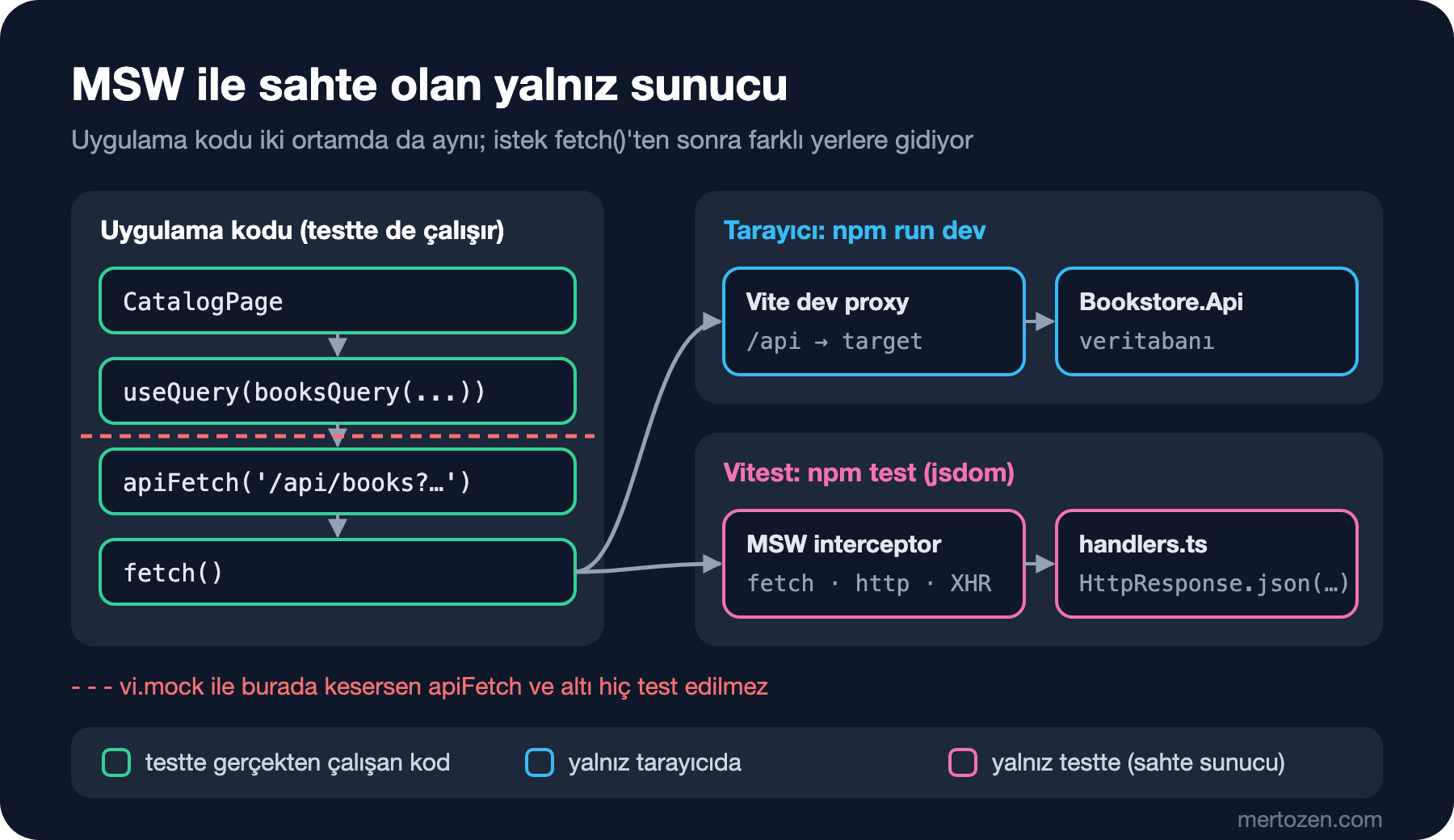
Bu yaklaşımın vi.mock ile apiFetch'i ya da useQuery'yi taklit etmekten farkı, test edilen kodun sınırı. MSW ile component, hook, TanStack Query, apiFetch ve Problem Details ayrıştırması gerçekten çalışıyor; yalnız kablonun ucundaki sunucu sahte. apiFetch'i mock'lasaydın Content-Type kontrolündeki bir hatayı hiçbir test yakalamazdı.
Setup dosyasında onUnhandledFrame: 'error' verdik. MSW 3.0 ile bu seçeneğin adı değişti; MSW 2'deki onUnhandledRequest artık onUnhandledFrame. Handler'ı olmayan bir istek test sırasında şöyle görünüyor (checkout testinden POST /api/orders handler'ını çıkardık):
[MSW] Error: intercepted a request without a matching request handler:

  • POST /api/orders

  • Request body: {"cartId":"cart-1","customerName":"Ada Lovelace","customerEmail":"ada@example.com"}

If you still wish to intercept this unhandled request, please create a request handler for it.
Read more: https://mswjs.io/docs/http/intercepting-requests

TestingLibraryElementError: Unable to find an element with the text: The CustomerEmail field is not a valid e-…
Önce Tahmin Et'teki ikinci sorunun cevabı bu: fetch'i MSW cevaplıyor ve uygulama kodunda hiçbir şey değişmedi. Aynı handler'lar msw/browser ile geliştirme sırasında tarayıcıda da kullanılabiliyor; MSW 3'te bunun için bir Vite plugin'i de var (msw/vite). Biz geliştirmede gerçek API kopyasını kullanmaya devam ediyoruz.
Bütün Ekranı Test Etmek: Memory Router ve Gerçek Route Ağacı
Katalog sayfası tek başına render edilemiyor: useSearchParams bir router, useCart bir QueryClient istiyor, sepet özeti layout'ta. Her şeyi taklit etmek yerine dokuzuncu yazıdaki route ağacının kendisini kullanıyoruz. router.tsx'te tek değişiklik route listesini ayrıca export etmek oldu; test bu listeyi createMemoryRouter ile, adres çubuğu olmayan bir router'da açıyor:
// Gerçek route ağacı bir memory router'da: loader, middleware ve lazy route'lar tarayıcıdaki gibi çalışır.
// Loader'lar uygulamanın paylaşılan queryClient'ını kullanır; provider da aynısını alır (setup.ts her testten sonra temizler).
export function renderApp(path: string) {
  const router = createMemoryRouter(routes, { initialEntries: [path] });
  render(<QueryClientProvider client={queryClient}><RouterProvider router={router} /></QueryClientProvider>);
  return router;
}
import { screen, within } from '@testing-library/react';
import userEvent from '@testing-library/user-event';
import { expect, it } from 'vitest';
import { renderApp } from '@/test/render';
it('searches the catalog, keeps the search in the URL and adds a book to the cart', async () => {
const user = userEvent.setup();
const router = renderApp('/');
// findBy* API cevabı render edilene kadar bekler (varsayılan 1 sn)
expect(await screen.findByText('4 book(s) found')).toBeInTheDocument();
await user.type(screen.getByRole('searchbox', { name: 'Search books' }), 'austen');
expect(await screen.findByText('2 book(s) found')).toBeInTheDocument();
expect(router.state.location.search).toBe('?q=austen');
const titles = within(screen.getByRole('list')).getAllByRole('link').map((link) => link.textContent);
expect(titles).toEqual(['Emma', 'Pride and Prejudice']);
await user.click(screen.getAllByRole('button', { name: 'Add 1 to cart' })[0]);
expect(await screen.findByText(/Cart: 1 item\(s\)/)).toBeInTheDocument();
});Önce Tahmin Et'teki ilk sorunun cevabı: ilk satırı getByText ile yazınca test hemen düşüyor:
 FAIL  src/features/catalog/CatalogPage.test.tsx > searches the catalog, keeps the search in the URL and adds a book to the cart
TestingLibraryElementError: Unable to find an element with the text: 4 book(s) found. This could be because the text is broken up by multiple elements. In this case, you can provide a function for your text matcher to make your matcher more flexible.
 ❯ Object.getElementError node_modules/@testing-library/dom/dist/config.js:37:19
 ❯ node_modules/@testing-library/dom/dist/query-helpers.js:76:38
 ❯ node_modules/@testing-library/dom/dist/query-helpers.js:52:17
 ❯ node_modules/@testing-library/dom/dist/query-helpers.js:95:19
 ❯ src/features/catalog/CatalogPage.test.tsx:11:17
      9|
     10|   // findBy* waits (1 s by default) until the API answer has been rend…
     11|   expect(screen.getByText('4 book(s) found')).toBeInTheDocument();
       |                 ^
getBy* o anki DOM'a bakıyor; ilk render'da kitaplar henüz gelmemiş, ekranda "Loading…" var. findBy* bir promise döndürüyor ve eleman görünene kadar (varsayılan 1 saniye) tekrar tekrar arıyor. Kural basit: asenkron olarak görünecek bir şey için findBy, olmaması gereken bir şey için queryBy (null döner, hata fırlatmaz), o an orada olması gereken için getBy. Arama kutusuna yazılan "austen" 300 ms debounce'tan sonra istek atıyor; findByText bunu da bekliyor, test içinde timer'la oynamadık.
Checkout testi onuncu yazıdaki sunucu hatası eşlemesini koruyor. MSW'nin bize verdiği şey, gerçek API'yle üretmesi zor olan cevapları kolayca üretebilmek: zod'un geçerli saydığı bir e-posta için API'nin validation hatası döndürdüğü durum.
it('shows the API validation error next to the email field', async () => {
  // Route'un beklediği durumu hazırla: sign in olmuş bir kullanıcı ve tek satırlık bir sepet
  useAuthStore.getState().signIn({ name: 'Ada Lovelace', email: 'ada@example.com' });
  carts.set('cart-1', { id: 'cart-1', currency: 'TRY', total: 489,
    items: [{ isbn: '9780441172719', title: 'Dune', unitPrice: 489, quantity: 1, lineTotal: 489 }] });
  useClientStore.getState().setCartId('cart-1');
  // Bookstore.Api'nin onuncu yazıda döndürdüğü 400 Problem Details gövdesinin aynısı
  server.use(http.post('/api/orders', () => HttpResponse.json({
    title: 'One or more validation errors occurred.', status: 400,
    errors: { CustomerEmail: ['The CustomerEmail field is not a valid e-mail address.'] },
  }, { status: 400, headers: { 'Content-Type': 'application/problem+json' } })));
  const user = userEvent.setup();
  renderApp('/checkout');

  await user.type(await screen.findByLabelText('Street and number'), 'Main Street 1');
  await user.type(screen.getByLabelText('City'), 'Ankara');
  await user.type(screen.getByLabelText('Postal code'), '06100');
  await user.click(screen.getByRole('button', { name: 'Place order' }));

  const email = screen.getByLabelText('Email');
  expect(await screen.findByText('The CustomerEmail field is not a valid e-mail address.')).toBeInTheDocument();
  expect(email).toHaveAttribute('aria-invalid', 'true');
  expect(email).toHaveAccessibleDescription('The CustomerEmail field is not a valid e-mail address.');
  expect(email).toHaveFocus();
});

it('sends a signed-out user to the sign-in page and remembers where they wanted to go', async () => {
  const router = renderApp('/checkout');

  expect(await screen.findByRole('heading', { name: 'Sign in' })).toBeInTheDocument();
  expect(router.state.location.pathname + router.state.location.search).toBe('/sign-in?redirectTo=%2Fcheckout');
});
Hata mesajını yalnız ekranda aramadık: aria-invalid, toHaveAccessibleDescription ile mesajın input'a aria-describedby ile bağlı olduğu ve focus'un o alana gittiği de kontrol ediliyor. Bu testler ilk tam koşuda başka bir şey de yakaladı:
stderr | src/features/checkout/CheckoutPage.test.tsx > shows the API validation error next to the email field
No `HydrateFallback` element provided to render during initial hydration
Uygulama doğrudan /checkout ya da bir kitap adresiyle açıldığında React Router ilk loader'lar bitene kadar bir şey göstermiyor ve bu uyarıyı veriyordu. Tarayıcıda kontrol ettik: kitap isteği sürerken #root boştu ve konsolda aynı uyarı vardı. Root route'a bir HydrateFallback ekledik ve uyarı kayboldu:
// İlk route'un loader'ları çalışırken uygulamanın yerine gösterilir (/checkout ya da /books/:isbn ile ilk açılış)
export function InitialLoading() {
  return <p className="progress" role="status">Loading page…</p>;
}
Angular TestBed ile Kıyas
Angular'da component testi TestBed ile bir test module'ü kurarak başlıyor; React'te böyle bir katman yok, component bir fonksiyon ve onu ihtiyaç duyduğu provider'larla sarıp render ediyorsun.
| Angular | React (bu yazı) |
|---|---|
TestBed.configureTestingModule({ providers }) | Provider'larla sarılmış render(...) ya da renderHook(..., { wrapper }) |
fixture.detectChanges(), zoneless'ta whenStable() | Gerek yok; act ve findBy* render'ı bekler |
TestBed.inject(Service) ile service testi | Hook için renderHook, saf mantık için düz fonksiyon testi |
HttpTestingController | MSW handler'ları (fetch kim yaparsa yapsın) |
RouterTestingHarness | createMemoryRouter(routes) |
| Angular Testing Library | React Testing Library (aynı @testing-library/dom sorguları) |
En büyük fark HttpTestingController satırında. Angular'ın aracı yalnız HttpClient'ı yakalıyor ve her isteği test içinde tek tek cevaplamanı istiyor; MSW fetch'in kendisini yakalıyor ve handler'lar kalıcı. Angular'da da MSW kullanılabiliyor; Frontend Testleri serisinin beşinci yazısı "Angular Testinde Bağımlılıkları Taklit Etmek: Provider Override, vi.fn, ng-mocks, MSW ve RouterTestingHarness" ikisini yan yana anlatıyor. Testing Library sorguları iki tarafta da aynı paketten geldiği için getByRole bilgisi doğrudan taşınıyor.
Üretimde Dikkat
Bütün suite bir saniyenin altında çalışıyor:
 RUN  v5.1.0 C:/Users/user/bookstore-react

 ✓ src/shared/useDebouncedValue.test.ts > returns the new value only after it has been stable for the delay 8ms
 ✓ src/features/cart/cartLines.test.ts > applyChange > adds a new book, keeps the lines sorted by title and recalculates the total 6ms
 ✓ src/features/cart/cartLines.test.ts > applyChange > changes the quantity of a book that is already in the cart 0ms
 ✓ src/features/cart/cartLines.test.ts > applyChange > removes the line when the quantity is 0 0ms
 ✓ src/features/cart/cartLines.test.ts > applyChange > does not touch the cart it was given 0ms
 ✓ src/features/catalog/BookCard.test.tsx > adds the picked number of copies and resets the counter 61ms
 ✓ src/features/cart/useCart.test.tsx > creates a server cart on the first add and shows the saved lines 63ms
 ✓ src/features/checkout/CheckoutPage.test.tsx > shows the API validation error next to the email field 175ms
 ✓ src/features/checkout/CheckoutPage.test.tsx > sends a signed-out user to the sign-in page and remembers where they wanted to go 7ms
 ✓ src/features/cart/useCart.test.tsx > rolls back the optimistic change and exposes the error when the server refuses it 160ms
 ✓ src/features/catalog/CatalogPage.test.tsx > searches the catalog, keeps the search in the URL and adds a book to the cart 422ms

 Test Files  6 passed (6)
      Tests  11 passed (11)
   Start at  05:41:43
   Duration  1.03s (environment 46%, tests 24%, setup 19%, transform 6%, import 5%, worker 1%)
CI'da npm test -- --run yeterli; watch modu terminal dışında zaten kapanıyor. Hız korunmalı: en yavaş test, gerçek route ağacını açan ve debounce'u bekleyen katalog testi (420 ms). Bu tür testlerin sayısı arttıkça süre de artar; saf fonksiyon ve hook testleri ucuz, ekran testleri pahalı.
jsdom bir tarayıcı değil: layout hesaplamıyor, CSS uygulamıyor, scroll yok. On ikinci yazıdaki virtualized tablo jsdom'da satır göstermez, çünkü kutunun yüksekliği 0. Bu tür davranışlar için Vitest Browser Mode testleri gerçek Chromium'da çalıştırıyor (Frontend Testleri serisinde "Vitest Browser Mode: Angular Testlerini Gerçek Chromium, Firefox ve WebKit'te Çalıştırmak"). Uygulamanın API ve veritabanıyla birlikte, gerçek tarayıcıda baştan sona test edilmesi ise E2E (End-to-End; uçtan uca) testlerin işi; Integration ve E2E Test serisinin "Playwright'a Giriş: Playwright Test mi Playwright for .NET mi, Locator'lar, Auto-wait ve Trace Viewer" ve "Bookstore'u Uçtan Uca Test Etmek: API, Angular ve Veritabanını Birlikte Ayağa Kaldırmak" yazıları bunu anlatıyor.
MSW handler'ları API'nin bir kopyası olduğu için API değişince eskiyebilir. Handler'ların döndürdüğü tipleri uygulamanın kendi tipleriyle (PagedResult<BookSummary>, Cart) yazdık; bir alan adı değişirse TypeScript iki tarafı birlikte uyarıyor. API'nin gerçekten bu şekli döndürdüğünü ise contract testleri garanti ediyor (Integration ve E2E Test serisinde "Angular ile API Arasındaki Contract: OpenAPI Dokümanı, Breaking Change Tespiti ve Ne Zaman Pact?").
Sık Düşülen Tuzaklar
Implementation detail'i test etmek: bir component'in state'ini, kaç kez render edildiğini ya da container.querySelector('.book-card') ile CSS class'ını kontrol eden testler, davranış aynı kaldığı hâlde refactoring'de kırılır. Testi kullanıcı açısından yaz: hangi metni görüyor, hangi butona basıyor. data-testid son çare; çoğu zaman eksik bir accessible name'in işareti.
Testler arasında state sızması: React'te component'ler her testte yeniden oluşuyor, ama module seviyesindeki store'lar ve cache'ler oluşmuyor. Setup'taki useAuthStore sıfırlamasını çıkarınca, Ada'yı sign in yapan testten sonra gelen test şöyle düştü:
   × sends a signed-out user to the sign-in page and remembers where they wanted to go 1007ms
 FAIL  src/features/checkout/CheckoutPage.test.tsx > sends a signed-out user to the sign-in page and remembers where they wanted to go
TestingLibraryElementError: Unable to find role="heading" and name "Sign in"
Önce Tahmin Et'teki üçüncü sorunun cevabı: ikinci test hâlâ sign in olmuş bir kullanıcı görüyor; middleware onu geçiriyor, checkout loader'ı sepeti bulamıyor ve kullanıcı sepet sayfasına gidiyor. Daha kötüsü, test dosyadaki sırasına göre geçip kalıyor. Zustand'ın testing rehberi çok sayıda store için vi.mock('zustand') ile her store'u otomatik sıfırlayan bir yol gösteriyor; iki store için getInitialState() ile açıkça sıfırlamak yeterli. persist middleware'i localStorage'a yazdığı için onu da temizliyoruz.
Asenkron güncellemeyi beklememek: getBy ile hemen kontrol etmek ya da user-event method'larını await etmemek. Konsolda "not wrapped in act(...)" uyarısı görürsen genellikle testin, React'in henüz bitirmediği bir güncellemeden önce bittiğini gösterir; çözüm act eklemek değil, görünmesini beklediğin şeyi findBy ya da waitFor ile beklemek.
Network yerine kütüphaneyi mock'lamak: vi.mock('@tanstack/react-query') ile useQuery'yi sahte bir değer döndürür hâle getirmek, test edilen kodun yarısını devre dışı bırakır; cache key hatası, enabled koşulu, hata ayrıştırması test edilmeden kalır.
Küçük Bir Deneme
★☆☆ CartPanel için bir test yaz: sepette Dune varken "Remove"a bas, "Removed Dune." mesajını ve "Undo" butonunu bul, "Undo"ya basınca satırın geri geldiğini kontrol et.
★★☆ Undo süresinin dolduğunu test et: fake timer'ları user-event ile birlikte kullanmak için userEvent.setup({ advanceTimers: vi.advanceTimersByTime }) gerekiyor. 5 saniye sonra mesajın kaybolduğunu queryByRole('status') ile kontrol et.
★★★ Kitap detay sayfasında olmayan bir ISBN (kitabın uluslararası standart numarası) için loader'ın 404 fırlattığını ve RouteErrorPage'in "404 Not Found" gösterdiğini test et. Sonra handler'ı 500 dönecek şekilde server.use ile değiştir ve ekranda ne göründüğüne bak; beklediğin bu mu?
Uygulamanın davranışı artık testlerle korunuyor. Sıradaki yazıda Bookstore SPA'sını (single-page application; tek HTML sayfasında çalışan uygulama) uçtan uca bitireceğiz: feature klasörlerine public API vereceğiz, demo sign-in yerine cookie ile çalışan bir BFF (Backend for Frontend; frontend'e özel sunucu katmanı) kuracağız, import.meta.env ve secret'ların yerini konuşacağız ve build çıktısını cache header'larıyla deploy edeceğiz.