

Narrowing It Down: Binary Search, git bisect run and Delta Debugging
The fastest way to find a bug is to halve the range at every step: in code, across layers, over commits and in the input. git bisect run skips a broken commit with exit code 125 and finds the faulty refactoring among 31 commits in 7 tests; the ddmin algorithm shrinks a 5,000-line import file to 3 lines.
Version note: The code in this post was built and run with .NET 10; the git bisect examples were run with Git 2.54.
Guess First
You have two versions: in v1.8.0 the order total is correct, in v1.10.0 order #10482 comes out 1 kuruş short. There are 30 commits between the two tags, 31 counting v1.8.0 itself. One of those commits is unfinished work and doesn't build. You search for the commit that introduced the bug automatically with git bisect run. How many times does the script run?
The second question is about a different bug: the catalog import throws an exception on a 5,000-line CSV (Comma-Separated Values) file. An algorithm that shrinks the file automatically ends up with how many lines that still produce the error, and how many times does it run the import to get there? The answers to both questions are in the output of the real runs in this post.
Narrowing Down: Binary Search Everywhere
Agans' fourth rule is "Divide and Conquer": split the range containing the bug in two at every step. Searching a 1,024-element range one by one takes 1,024 steps in the worst case; halving takes 10. In debugging, though, the "range" isn't always an array. Lines of code, layers, commits, input lines and configuration keys are all ranges too, and the same idea works on all of them: take a measurement in the middle, learn which half holds the bug, and forget the other half.
In code, the simplest form is putting a log line or a Debug.Assert in the middle of the flow. If the order total is wrong and the calculation goes through five steps, print the output of the third step. If the value is right there, the bug is in step four or five; if it's wrong, it's in the first three. Another way is disabling: temporarily turn off the discount calculation; does the difference go away?
In a layered system the same question is asked at the layer boundaries. In the Bookstore the user sees the total on an Angular screen; the value comes from an API (Application Programming Interface) call, and the API writes to the database. If the total field in the response in the browser's Network panel is 178.46, stop looking at Angular; the bug is in the backend. If the value the API calculates and the value written to the database are the same, leave the database too. In our case all three measurements show 178.46, and the bug, as we saw in the previous two posts, is in the line calculation inside the API.
But even after "which line" is answered, one question remains: accounting had never seen this difference in the reconciliations of earlier weeks. When, and with which change, did the bug arrive? Knowing that is valuable in two ways. The person who made the change and the PR (pull request) tell us the intent: maybe the rounding rule was changed on purpose and the invoice side was never updated. And it lets us see what else the same commit broke.
Finding the Commit Automatically with git bisect run
We covered the manual use of git bisect, trying the code at each step and typing git bisect good or git bisect bad, in the Git series post "Git bisect and git worktree: Finding the Bad Commit and Two Branches at Once". Here we hand the work to a script. git bisect run runs the command you give it at every step and marks the commit based on the exit code. According to the Git documentation the rule is: 0 is good, 1 to 127 (except 125) is bad, 125 means "this commit can't be tested, skip it". Any other code, 255 for example, aborts the bisect entirely.
First, a small program that does the test. Since the code in the repository changes at every bisect step, we keep the check program outside the repository; the Git documentation also considers it safer for scripts to live outside the repository. The program references the repository's Bookstore.Ordering project by path and calculates order #10482 with each commit's own code:
using Bookstore.Ordering;

// Order #10482 from ticket #4127; the invoice says 178.47
List<OrderLine> lines =
[
    new("978-605-0000-01-1", 12.45m, 1, 0.10m),
    new("978-605-0000-02-8", 89.90m, 1, 0.00m),
    new("978-605-0000-03-5", 45.50m, 2, 0.15m),
];

decimal total = new OrderService().CalculateTotal(lines);
Console.WriteLine(FormattableString.Invariant($"total = {total}"));
return total == 178.47m ? 0 : 1;
OrderService.CalculateTotal is a public API that exists in every commit of this range. Binding the probe to it is a deliberate choice: had we bound it to a class whose internals change (such as the PriceCalculator added later), it wouldn't build on older commits. Now the script bisect will call:
#!/bin/sh
# exit 0 = good, 1-127 except 125 = bad, 125 = skip (this commit cannot be tested)
cd "$(dirname "$0")"
dotnet build Probe -v q -nologo > /dev/null 2>&1 || exit 125
dotnet run --project Probe --no-build
If the build fails we return 125. This matters: if a commit that doesn't build counts as "bad", bisect blames the wrong commit. Saying a commit can't be tested is better than lying about it. We start bisect and hand it the script:
$ git bisect start v1.10.0 v1.8.0
Bisecting: 14 revisions left to test after this (roughly 4 steps)
[d70e8e016db0eace38f03bc605508256f9f0e36d] WIP installments
$ git bisect run ../bisect/order-total.sh
running '../bisect/order-total.sh'
Bisecting: 14 revisions left to test after this (roughly 4 steps)
[5d956711e7e4d6143640bbdd7182623e9f024aed] Add inventory reservation
running '../bisect/order-total.sh'
total = 178.47
Bisecting: 13 revisions left to test after this (roughly 4 steps)
[dc3e1c229c3d6c5d98b24de4564a60450e8da824] Fix installments build
running '../bisect/order-total.sh'
total = 178.46
Bisecting: 6 revisions left to test after this (roughly 3 steps)
[d2e87b0da22167f351c661e35b6bb93b0d3e08f0] Docs: ordering overview
running '../bisect/order-total.sh'
total = 178.47
Bisecting: 3 revisions left to test after this (roughly 2 steps)
[6b6e917b554584173ee2b3f387b13930ac0f3598] Extract PriceCalculator from OrderService
running '../bisect/order-total.sh'
total = 178.46
Bisecting: 1 revision left to test after this (roughly 1 step)
[8ea4570ea40f696f8d220e947877e9d436adf12a] Inventory: warehouse list
running '../bisect/order-total.sh'
total = 178.47
Bisecting: 0 revisions left to test after this (roughly 0 steps)
[dfdd6eed04341206cb6d3363664a56fc603e09bf] Customer: address validation
running '../bisect/order-total.sh'
total = 178.47
6b6e917b554584173ee2b3f387b13930ac0f3598 is the first bad commit
commit 6b6e917b554584173ee2b3f387b13930ac0f3598
Author: Linus <linus@example.com>
Date:   Sat Sep 5 14:00:00 2026 +0300

    Extract PriceCalculator from OrderService

 src/Bookstore.Ordering/OrderService.cs    | 11 +----------
 src/Bookstore.Ordering/PriceCalculator.cs |  9 +++++++++
 2 files changed, 10 insertions(+), 10 deletions(-)
 create mode 100644 src/Bookstore.Ordering/PriceCalculator.cs
bisect found first bad commit
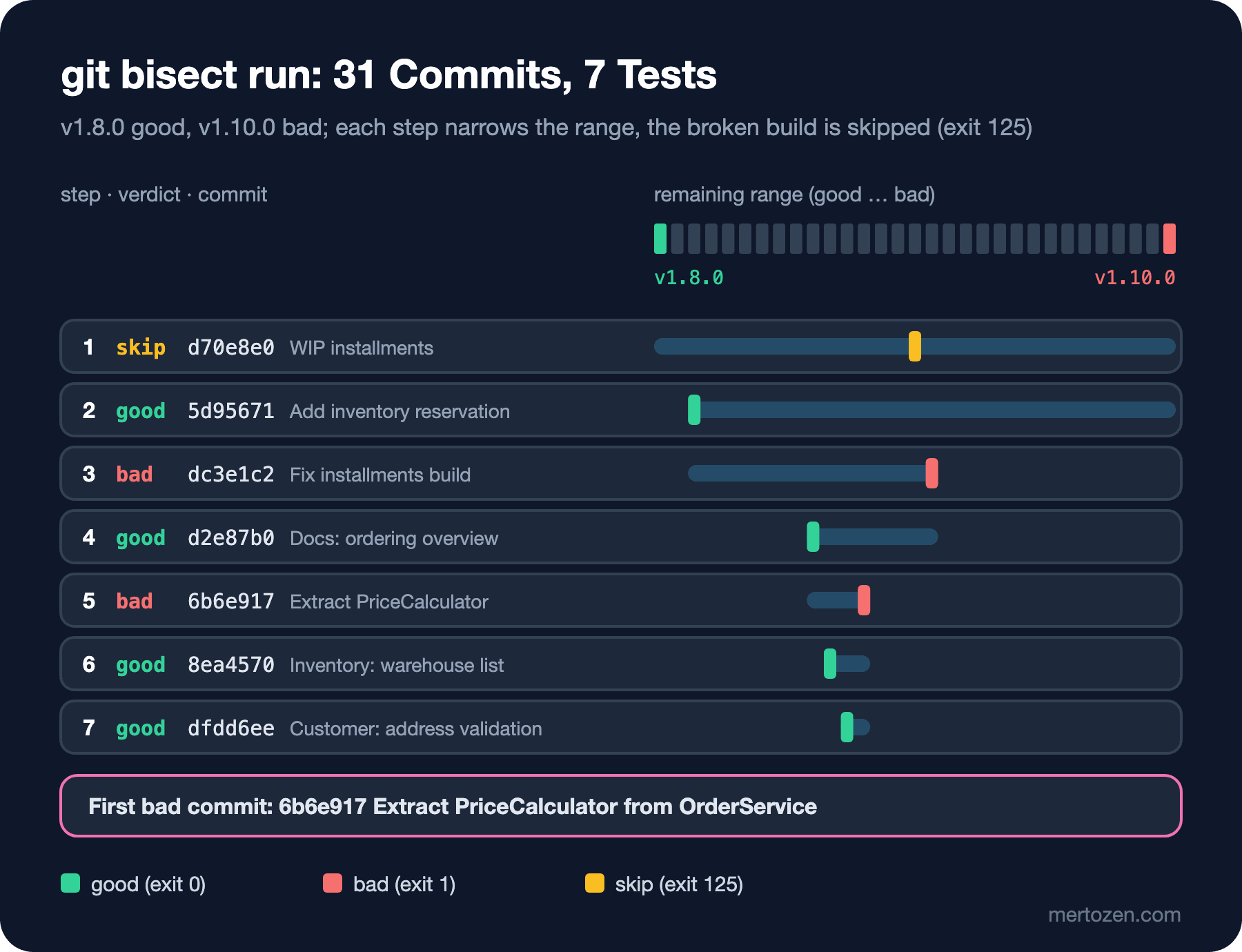
The answer to the first question: the script ran 7 times and found the first bad commit in 8 seconds. The first stop was the commit right in the middle, which happened to be the WIP installments commit that doesn't build; the script returned 125 and bisect skipped it and picked another commit. After that the range halved at every step until a single commit was left. The steps look like this:
The diff of the commit it found tells the whole story at a glance:
diff --git a/src/Bookstore.Ordering/OrderService.cs b/src/Bookstore.Ordering/OrderService.cs
index 362be69..d333a71 100644
--- a/src/Bookstore.Ordering/OrderService.cs
+++ b/src/Bookstore.Ordering/OrderService.cs
@@ -4,14 +4,5 @@ public sealed record OrderLine(string Isbn, decimal UnitPrice, int Quantity, dec

 public sealed class OrderService
 {
-    public decimal CalculateTotal(IReadOnlyList<OrderLine> lines)
-    {
-        decimal total = 0;
-        foreach (OrderLine line in lines)
-        {
-            decimal unit = Math.Round(line.UnitPrice * (1 - line.DiscountRate), 2, MidpointRounding.AwayFromZero);
-            total += unit * line.Quantity;
-        }
-        return total;
-    }
+    public decimal CalculateTotal(IReadOnlyList<OrderLine> lines) => lines.Sum(PriceCalculator.LineTotal);
 }
In the second half of the diff, the new PriceCalculator.cs file, the same line reads Math.Round(line.UnitPrice * (1 - line.DiscountRate), 2); the MidpointRounding.AwayFromZero argument was dropped during the move. The commit message is "Extract PriceCalculator", a refactoring that shouldn't change behaviour. Nobody changed the rounding rule on purpose; an argument quietly disappeared, and the compiler couldn't notice, because both overloads are valid. This detail will be one of the main inputs to the root cause analysis we do in post 11 of this series.
When bisect is done, go back to the branch you started from with git bisect reset. Saving the session with git bisect log > bisect.log is also a good habit: if you realise you marked a step wrong, delete that line from the file and replay the session correctly with git bisect replay bisect.log. This record is the bisect counterpart of Agans' "audit trail" rule.
The Danger of Bisecting with a Flaky Test
Bisect trusts the answer of every step blindly. A single wrong "good" or "bad" sends the search into the wrong half, and at the end bisect points at the wrong commit with complete confidence. That's why the test in a bisect script must be deterministic. Our check is a pure calculation; it's deterministic. If you use a test that goes over the network, depends on time or is sensitive to thread ordering, things are different.
The maths is simple. Suppose the test is red on bad commits only 20% of the time. With a single run, the chance of taking a bad commit for a good one is 80%. With five runs that chance is 0.8 to the power of 5, about 33%; with twenty runs, about 1.2%. So a script like the one below helps, but you have to choose the number of repetitions according to how flaky the test is:
#!/bin/sh
# for a flaky check: one red run out of five marks the commit bad
cd "$(dirname "$0")"
dotnet build Probe -v q -nologo > /dev/null 2>&1 || exit 125
for i in 1 2 3 4 5; do
    dotnet run --project Probe --no-build > /dev/null || exit 1
done
exit 0
When I ran the same bisect with this script, it again found the same commit, 6b6e917, in 7 steps; naturally, since our test is deterministic anyway. The real solution is making the flaky test deterministic before you put it into bisect: pinning time with TimeProvider, randomness with a seed and the external service with a fake.
Two more practical notes. First, in a history full of merge commits, git bisect start --first-parent searches only the merges that entered the main branch; you can first find which PR brought the bug and then dig into that PR. Second, time per step matters: our step takes around 1 second; in a real solution build and test can take several minutes per step. For 30 commits that's still 5 steps, but for 5,000 commits it's 13 steps; there is no comparison with looking by hand.
Delta Debugging: Shrinking the Input Automatically
Bisect narrows the history of changes. Sometimes what needs narrowing is the input: the bug shows up for a particular file, request or data set, and that input is huge. The Bookstore's catalog import blows up on a CSV file from a supplier:
Unhandled exception. System.ArgumentException: An item with the same key has already been added. Key: 9786051012077
   at System.Collections.Generic.Dictionary`2.TryInsert(TKey key, TValue value, InsertionBehavior behavior)
   at System.Collections.Generic.Dictionary`2.Add(TKey key, TValue value)
   at Bookstore.Catalog.BookImporter.Import(IReadOnlyList`1 lines) in ./BookImporter.cs:line 20
   at Program.<Main>$(String[] args) in ./Program.cs:line 4
The import code looks like this:
namespace Bookstore.Catalog;

public sealed record ImportedBook(string Isbn, string Title, decimal Price, int Stock);

public static class BookImporter
{
    public static Dictionary<string, ImportedBook> Import(IReadOnlyList<string> lines)
    {
        string[] header = lines[0].Split(',');
        int isbnCol = Array.IndexOf(header, "isbn");
        int titleCol = Array.IndexOf(header, "title");
        int priceCol = Array.IndexOf(header, "price");
        int stockCol = Array.IndexOf(header, "stock");

        Dictionary<string, ImportedBook> books = [];
        foreach (string line in lines.Skip(1))
        {
            string[] cells = line.Split(',');
            string isbn = cells[isbnCol].Replace("-", "");
            books.Add(isbn, new ImportedBook(isbn, cells[titleCol],
                decimal.Parse(cells[priceCol], System.Globalization.CultureInfo.InvariantCulture),
                int.Parse(cells[stockCol])));
        }
        return books;
    }
}
The error message names a key, but that key may not appear in the file in its hyphen-free form; and on its own it doesn't tell you which lines produce the error. Halving 5,000 lines by hand is one way, but if the bug depends on two lines being present together, plain halving doesn't work: neither half produces the bug on its own. The ddmin algorithm from Andreas Zeller and Ralf Hildebrandt's paper "Simplifying and Isolating Failure-Inducing Input", published in 2002 in the IEEE's (Institute of Electrical and Electronics Engineers) Transactions on Software Engineering, handles that case too. The algorithm splits the input into n chunks; it tries each chunk on its own first, then each chunk's complement (everything except that chunk). It keeps the smallest candidate that still fails; if none fails, it makes the chunks smaller (doubles n) and tries again. The result is 1-minimal: removing any one of the remaining lines makes the failure go away.
namespace Bookstore.Tools;

public static class DeltaDebugger
{
    // Zeller's ddmin: returns a 1-minimal failing subset of the input
    public static List<T> Minimize<T>(List<T> input, Func<List<T>, bool> fails)
    {
        List<T> current = input;
        int n = 2;
        while (current.Count >= 2)
        {
            List<List<T>> chunks = Split(current, n);
            bool reduced = false;

            foreach (List<T> chunk in chunks)
            {
                if (fails(chunk))
                {
                    current = chunk;
                    n = 2;
                    reduced = true;
                    break;
                }
            }

            if (!reduced)
            {
                for (int i = 0; i < chunks.Count; i++)
                {
                    List<T> complement = chunks.Where((_, j) => j != i).SelectMany(c => c).ToList();
                    if (fails(complement))
                    {
                        current = complement;
                        n = Math.Max(n - 1, 2);
                        reduced = true;
                        break;
                    }
                }
            }

            if (!reduced)
            {
                if (n >= current.Count) break;
                n = Math.Min(n * 2, current.Count);
            }
        }
        return current;
    }

    private static List<List<T>> Split<T>(List<T> items, int n)
    {
        List<List<T>> result = [];
        int start = 0;
        for (int i = 0; i < n; i++)
        {
            int size = (items.Count - start) / (n - i);
            result.Add(items.GetRange(start, size));
            start += size;
        }
        return result;
    }
}
The most critical part of the algorithm is the predicate that answers "does it still fail?". We keep it deliberately narrow here: only the same failure, an ArgumentException whose message starts the same way, counts as "fails". Any other exception isn't the bug we are looking for:
using Bookstore.Catalog;
using Bookstore.Tools;

List<string> lines = File.ReadAllLines("books-import.csv").ToList();
int tests = 0;

bool Fails(List<string> candidate)
{
    tests++;
    try
    {
        BookImporter.Import(candidate);
        return false;
    }
    catch (ArgumentException ex) when (ex.Message.StartsWith("An item with the same key"))
    {
        return true;   // the same failure we are hunting
    }
    catch (Exception)
    {
        return false;  // a different failure does not count
    }
}

Console.WriteLine($"input lines: {lines.Count}, fails: {Fails(lines)}");
List<string> minimal = DeltaDebugger.Minimize(lines, Fails);
Console.WriteLine($"minimal lines: {minimal.Count}, tests run: {tests}");
minimal.ForEach(Console.WriteLine);
input lines: 5000, fails: True
minimal lines: 3, tests run: 291
isbn,title,price,stock
978-605-1012-07-7,Clean Pages 1207,531.00,40
9786051012077,Quiet Compiler 4388,707.00,34The answer to the second question: 5,000 lines came down to 3, and the import ran 291 times to get there. The three remaining lines explain the cause themselves: the header line and two spellings of the same ISBN (International Standard Book Number). 978-605-1012-07-7 on line 1,208 and 9786051012077 on line 4,389 become the same key once the hyphens are removed. Spotting these two lines, more than 3,000 lines apart, by scrolling through the file in an editor would have been close to impossible. 291 runs sounds like a lot, but each one takes milliseconds; the whole thing takes less than a second.
This minimal input can now become a regression test directly: an xUnit test that checks, with a three-line CSV, what the import should do (throw, merge the second line, log a warning). Which behaviour is right is a business decision; but now it's clear what the decision is about.
Configuration Bisect: Narrowing Down an Environment Difference
The same idea applies to configuration. Say a behaviour shows up in staging and not in production, and there are 40 differences between the two environments' appsettings files and environment variables. Apply half of the 40, that is 20, to staging: did the bug disappear? If so, the cause is among those 20; if not, it's in the other 20. In about 6 steps you get down to a single key. Feature flags work the same way: turn off half first, then half of the remaining half.
If you can't get down to a single key, that is if the bug shows up only when two settings are present together, that's exactly the case ddmin solves. You pass the list of keys as the input and write a predicate that starts the app with those settings. NuGet package versions are a similar range: if 12 packages went up at once in an update, you can find which one changed the behaviour by reverting versions half at a time.
In Production
For bisect to be reliable, every commit must be buildable and testable under the same conditions. If package versions aren't pinned (no lock file, or floating versions), an old commit builds today with different packages and the test result doesn't reflect that day's behaviour. Run bisect on a machine with a known build environment, ideally the same image as your CI (Continuous Integration).
Don't connect a bisect script to production, to a shared test database or to a payment provider's sandbox. Every step changes the code and runs the script again; a test with side effects repeats those side effects at every step. The script has to run in its own small, isolated world: our probe only does a calculation in memory.
If you take the input for delta debugging from production, the shrunk result is real data too. Before putting the three-line minimal file into the repository as a test fixture, make sure no customer or supplier data is left in it; anonymise the values if needed and confirm that the predicate still says "fails".
Common Pitfalls
The sneakiest pitfall is more than one bug producing the same symptom. Write the predicate loosely and ddmin finds not the bug you are after but the bug that's easiest to produce. I changed the predicate above to "any exception" and ran it on the same file:
catch (Exception ex) when (ex.Message.Length > 0)

input lines: 5000, fails: True
minimal lines: 2, tests run: 17
978-605-1025-00-0,Quiet Compiler 2500,691.90,12
978-605-1025-01-1,Clean Pages 2501,358.50,9
The result came much faster, in just 17 tests, and it's completely wrong: two random lines, no duplicate ISBN. ddmin threw away the header line; in a file without a header the first data line is taken as the header, Array.IndexOf returns -1 and cells[-1] throws an IndexOutOfRangeException. That's a bug too, but not our bug. Bisect has the same pitfall: bisect with the criterion "tests are red" and you find the commit that brought any red test in the range, not the bug you are looking for. Always tie the criterion to one specific symptom.
The second pitfall is keeping the bisect script inside the repository. As bisect changes commits, the script itself may change, or not exist at all in older commits. Keep the script and the check program outside the repository.
The third pitfall is counting commits that don't build as "bad". A script that returns 1 when dotnet build fails sends bisect chasing the build error instead of the bug. A build error is 125.
The fourth pitfall is taking the commit found as proof. Bisect tells you "the first commit where the behaviour changed"; confirm why that commit is wrong by reading the diff and, if needed, running a single-variable experiment on that commit. In our case the diff clearly shows the missing argument.
A Small Experiment
★☆☆ In your own project, count the commits between the last two tags with git log --oneline v1..v2 | wc -l and work out how many steps bisect needs in the worst case. Then actually run it with a small deterministic test.
★★☆ Try DeltaDebugger.Minimize on a character-level input: shrink a long string that crashes a JSON (JavaScript Object Notation) parser to the shortest string that gives the same exception. Don't forget to tie the predicate to the exception type and message.
★★★ Change the bisect script so that at every step it applies a hot-fix commit with git cherry-pick --no-commit, runs the test and then undoes it with git reset --hard. This technique, described in the Git documentation, helps when another bug masks the test in part of the range.
We now know on which line, with which commit and with which input the bug appears. In the next post we change perspective and look at the place where the bug describes itself to us, the error message and the stack trace: the anatomy of .NET exceptions, async stacks and Angular's error codes such as NG0100.