

Debugging Is a Method: Observation, Hypothesis, Experiment and the 9 Rules
Debugging is done with a method, not with guesses: a loop of observation, testable hypothesis, prediction, experiment and conclusion. Starting from a 1 kuruş order total mismatch, we cover Agans' 9 rules, the cost of shotgun debugging and the debugging journal with real outputs.
Version note: The code in this post was built and run with .NET 10.
Guess First
Monday morning, a ticket arrives from accounting: "In the payment provider's reconciliation report, the amount charged for some orders is 1 kuruş less than the invoice. Example: #10482, charged 178.46 TL, invoiced 178.47 TL. Not all orders, just some." The order has three lines: a 12.45 TL book with a 10% discount, an 89.90 TL book with no discount, and two copies of a 45.50 TL book with a 15% discount.
Two questions. First: which of those three lines does the 1 kuruş difference come from? Second: if we apply a 10% discount to every one of the 9,000 prices between 10.00 and 99.99 TL, for how many prices do the checkout's calculation and the invoice's calculation disagree? You will find the answer in the middle of the post, in the output of a real run.
Why Debugging Needs a Method
Most developers who open this ticket start by reading the code and thinking "where could this go wrong". A few minutes later they have three or four guesses: maybe the payment provider rounds, maybe the shipping fee gets mixed in, maybe something uses double. Then they change the most plausible one, deploy and wait. Note the word in the ticket: "some". If the symptom does not show up on every order, two quiet days after a change prove nothing.
Debugging is a search problem: you are looking for the point where the system's correct behaviour and the observed behaviour diverge. Search by guessing and you depend on luck; search with a method and every step shrinks the search space. This series is about that method: this post covers the loop itself and David J. Agans' rules, and the following posts cover reproducing, narrowing down, reading stack traces, using the debugger at an advanced level, and diagnosing production with logs, dumps and traces. I won't repeat the basic debugger concepts such as breakpoints, stepping and the call stack; they are in the C# Fundamentals series post "Debugging in C#: Breakpoints, the Call Stack, Debug.Assert and Compiler Warnings".
Look First: Calculating the Ticket's Order Line by Line
Before building theories in our heads, let's take the only concrete data we have, #10482, and put the two calculations side by side. PriceCalculator on the checkout side is a trimmed-down version of the production calculation; InvoiceCalculator is the C# equivalent of the calculation the invoice service uses:
namespace Bookstore.Ordering;

public sealed record OrderLine(string Isbn, decimal UnitPrice, int Quantity, decimal DiscountRate);

public static class PriceCalculator
{
    public static decimal DiscountedUnitPrice(OrderLine line) =>
        Math.Round(line.UnitPrice * (1 - line.DiscountRate), 2);

    public static decimal LineTotal(OrderLine line) => DiscountedUnitPrice(line) * line.Quantity;

    public static decimal OrderTotal(IEnumerable<OrderLine> lines) => lines.Sum(LineTotal);
}

public static class InvoiceCalculator
{
    public static decimal DiscountedUnitPrice(OrderLine line) =>
        Math.Round(line.UnitPrice * (1 - line.DiscountRate), 2, MidpointRounding.AwayFromZero);

    public static decimal OrderTotal(IEnumerable<OrderLine> lines) =>
        lines.Sum(l => DiscountedUnitPrice(l) * l.Quantity);
}
This small console app runs the order through both calculations and also prints the unrounded raw value of every line:
using System.Globalization;
using Bookstore.Ordering;

// keep the output independent of the machine's culture
CultureInfo.DefaultThreadCurrentCulture = CultureInfo.InvariantCulture;
CultureInfo.CurrentCulture = CultureInfo.InvariantCulture;

// order #10482 from the ticket
List<OrderLine> lines =
[
    new("978-605-0000-01-1", UnitPrice: 12.45m, Quantity: 1, DiscountRate: 0.10m),
    new("978-605-0000-02-8", UnitPrice: 89.90m, Quantity: 1, DiscountRate: 0.00m),
    new("978-605-0000-03-5", UnitPrice: 45.50m, Quantity: 2, DiscountRate: 0.15m),
];

foreach (OrderLine line in lines)
{
    decimal raw = line.UnitPrice * (1 - line.DiscountRate);
    Console.WriteLine($"{line.Isbn} raw={raw} checkout={PriceCalculator.DiscountedUnitPrice(line)} invoice={InvoiceCalculator.DiscountedUnitPrice(line)}");
}

Console.WriteLine($"checkout total = {PriceCalculator.OrderTotal(lines)}");
Console.WriteLine($"invoice total  = {InvoiceCalculator.OrderTotal(lines)}");
978-605-0000-01-1 raw=11.2050 checkout=11.20 invoice=11.21
978-605-0000-02-8 raw=89.9000 checkout=89.90 invoice=89.90
978-605-0000-03-5 raw=38.6750 checkout=38.68 invoice=38.68
checkout total = 178.46
invoice total = 178.47Here is the answer to the first question: only the first line differs. 12.45 TL with 10% off is exactly 11.205, right in the middle between two kuruş values. The checkout rounds it to 11.20, the invoice to 11.21. The third line's raw value, 38.675, is also exactly in the middle, yet there both calculations agree. That is the first clue behind the word "some".
Notice that we haven't fixed anything yet and haven't declared anything "certain". We only looked. But looking eliminated two of the three theories we had this morning (the provider's rounding and the shipping fee) in a single run: we produce the difference, and the provider simply charges the amount we send.
The Loop: Observation, Hypothesis, Prediction, Experiment, Conclusion
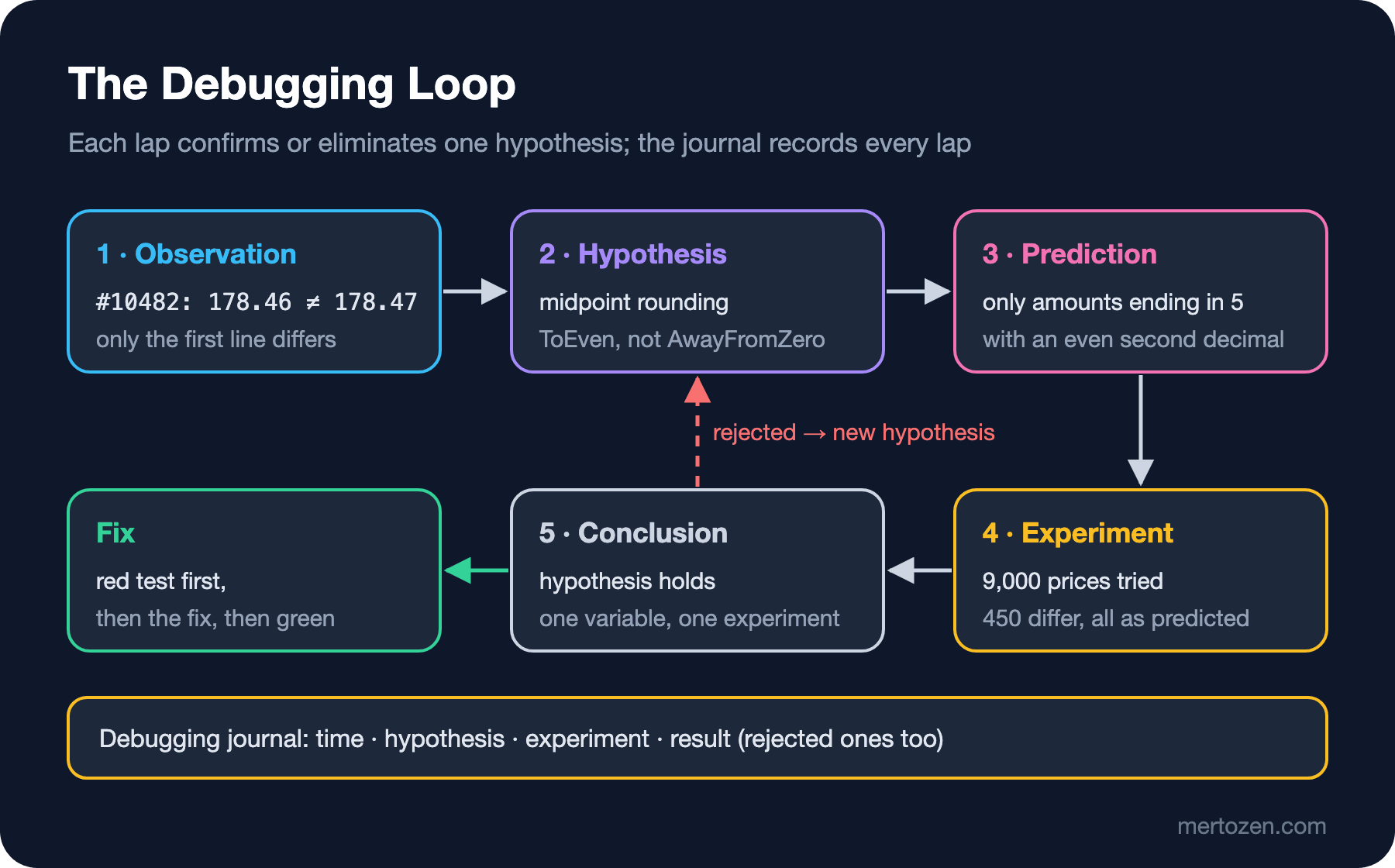
The scientific method fits debugging almost unchanged. Observation: what happens, under which conditions, and under which conditions it doesn't. Hypothesis: a single, testable sentence that could explain it. Prediction: if the hypothesis is true, what should you see somewhere you haven't looked yet? Experiment: the cheapest measurement that tests that prediction. Conclusion: did the prediction hold? If not, the hypothesis is eliminated and the loop starts over with a new one; if it did, you move on to the fix.
The step that makes the difference is the prediction. "Something to do with rounding" isn't a hypothesis, it's a hunch. The testable version is: "Checkout rounds midpoint values with MidpointRounding.ToEven, the invoice with AwayFromZero." That sentence produces a prediction: the difference should appear only for amounts whose raw value is exactly a midpoint and whose second decimal stays even after rounding. 11.205 is in that class (second decimal 0, even); 38.675 is not (second decimal 7, odd; both rules round up). Let's test the prediction in code rather than on paper:
// prediction: only midpoint values with an even second decimal differ
int total = 0, differ = 0;
List<decimal> samples = [];
for (decimal price = 10.00m; price <= 99.99m; price += 0.01m)
{
    OrderLine probe = new("probe", price, 1, 0.10m);
    total++;
    if (PriceCalculator.DiscountedUnitPrice(probe) != InvoiceCalculator.DiscountedUnitPrice(probe))
    {
        differ++;
        if (samples.Count < 4) samples.Add(price);
    }
}
Console.WriteLine($"prices tried = {total}, differ = {differ}, first = {string.Join(", ", samples)}");
prices tried = 9000, differ = 450, first = 10.05, 10.25, 10.45, 10.65The answer to the second question: 450 out of 9,000 prices, exactly 5%. The first four samples match the prediction too: 10.05 with 10% off is 9.045 (a midpoint, second decimal 4), 10.25 gives 9.225, 10.45 gives 9.405. The 10.15 in between gives 9.135; a midpoint, but its second decimal is 3, so both rules give 9.14. The prediction held. It doesn't yet tell us which line of code holds the bug or when it got there; those are the jobs of the next two posts in this series. But we no longer have a "random inconsistency"; we have a behaviour we can predict in advance.
The .NET documentation says it plainly: Math.Round(Decimal, Int32) rounds midpoint values to the nearest even number. This is also called banker's rounding. The "5 and above rounds up" rule many developers learned at school needs a separate argument: MidpointRounding.AwayFromZero.
The Real Cost of Shotgun Debugging
Picture someone trying to solve the same ticket without a method. They round the total once more with Math.Round(total, 2), spot a double somewhere and turn it into a decimal, change the format used when the amount is converted to a string for the payment provider, and deploy all three in one commit. This is called shotgun debugging: firing a spread of pellets at the target and hoping one of them hits.
You pay for it in three ways. First, if the symptom only appears for around 5% of discounted lines anyway, a day or two without complaints after the deploy may be pure chance; you think it's fixed and close the ticket. Second, if one of the three changes really did help, you don't know which one; the other two remain in the code as unnecessary and risky changes. Third, if none of them helped, the system is no longer the system it was when the ticket was opened; the behaviour you are trying to reproduce has changed under three new variables.
Agans' 9 Rules: Catching the Bug
David J. Agans' 2002 book "Debugging: The 9 Indispensable Rules for Finding Even the Most Elusive Software and Hardware Problems" boils this discipline down to nine short rules. They apply everywhere from hardware to software; below I illustrate each one with an example from the .NET and Angular world.
1. Understand the System
You cannot debug a system when you don't know what it does. In this case "understanding" means two things: reading the documentation of Math.Round, and knowing that the order total is calculated in two separate places, at checkout and in the invoice service. On the Angular side the equivalent is knowing which interceptors a request passes through and in what order; that chain is the only way to explain why a header goes missing.
2. Make It Fail
If you can trigger the bug whenever you like, you are halfway there. The order number in the ticket is gold: with that order's lines you can produce the bug on your own machine. Taking it one step further and turning the bug into a failing unit test is the topic of the next post.
3. Quit Thinking and Look
The bug exists because the model in your head and the real system have diverged, so reasoning with the model in your head won't lead you to the bug. Printing the raw values above was exactly this. The tools for looking are detailed logs, the debugger, tracepoints and the network panel. A log line you write in order to look is cheaper than a half-hour argument.
4. Divide and Conquer
Split the range containing the bug in two at every step. Sometimes the range is lines (which line of the order?), sometimes layers (Angular, the API (Application Programming Interface) or the database?), sometimes commits (after which commit?). Post 03 of this series is entirely about this rule: binary search, git bisect run and delta debugging.
5. Change One Thing at a Time
The exact opposite of shotgun debugging. Make one change, measure the result, and undo it if it didn't help. If you change the Math.Round call, a NuGet package version and the configuration at the same time, you learn nothing from the result, whatever it is.
Agans' 9 Rules: Keeping the Discipline
6. Keep an Audit Trail
Write down what you tried, in what order, and what you saw. Memory is an unreliable recording device, especially after 6 p.m. Below is a realistic debugging journal for this ticket:
| Time | Hypothesis | Experiment | Result |
|---|---|---|---|
| 10:05 | The payment provider rounds the amount itself | Check the amount field in the request sent to the provider | Rejected: we sent 178.46 |
| 10:20 | The shipping fee distorts the total | The shipping line of #10482 | Rejected: shipping is free |
| 10:40 | There is a per-line rounding difference | Run the order line by line through both calculations | Holds: only the 11.205 line differs |
| 11:00 | Checkout rounds ToEven, the invoice AwayFromZero | Test the prediction with 9,000 prices | Holds: 450 differ, all as predicted |
Writing down the rejected hypotheses matters. The line that saves a teammate who comes back to the ticket two days later from spending half an hour on "maybe it's the payment provider" is the first one. The journal will also be the raw material for the timeline of the postmortem we write in post 11 of this series.
7. Check the Plug
Question the most obvious assumptions. Is the version running in production the version you think it is? Is the Angular app loading the new bundle, or is the browser using the old index.html from its cache? Is the API connected to the staging database? Is the process you are debugging really the process receiving the request? A simple health endpoint returning the app's version and commit hash lets you apply this rule in seconds.
8. Get a Fresh View
When you are buried too deep in a problem, you keep accepting the same assumption as true. Explain it to a teammate; if nobody is around, explain it to the rubber duck on your desk. Rubber duck debugging is a technique popularised by Andrew Hunt and David Thomas' book The Pragmatic Programmer (1999): while explaining the problem out loud, step by step, you get stuck on a sentence that starts with "here Math.Round already rounds to two decimals, so...". Where you get stuck is usually the assumption you never questioned.
When should you ask for help? A practical threshold: if you have been circling the same hypothesis for more than an hour without adding new lines to the journal, stop and explain it to someone. Share the journal when you ask; saying "I tried this, I saw that, I expected this" instead of "it doesn't work" saves the other person's time too.
9. If You Didn't Fix It, It Ain't Fixed
If the bug disappeared by itself, it isn't fixed; it is hiding. The way to prove you fixed it: see the test that shows the bug go red, make the fix, see the test go green, and confirm that the test turns red again when you revert the fix. That last step is the proof that you know what actually fixed it.
In Production
The rules of debugging are the same in production, but the cost of an experiment is different. "Changing something and watching" in production affects real customers, so run experiments with a copy of production data, on your own machine or in a test environment, whenever you can. The data you take from production (order lines, logs, dumps) often contains personal data; strip customer names, addresses and card details before pasting them into a ticket.
The second point is measuring impact. In this case the difference is 1 kuruş per order; it looks small. But at the frequency our prediction implies (a share of the discounted lines) it can affect dozens of orders a day, and accounting has to explain every single difference. Priority is decided by the total impact, not by the size of the symptom. We will calculate the impact in the postmortem in post 11.
Third, deploying the fix doesn't fix the past. The list of orders charged the wrong amount has to go to accounting as separate work.
Common Pitfalls
The first pitfall is mistaking a hypothesis for a fact. Skipping the experiment because "it's definitely rounding" costs hours when a solid-looking hypothesis turns out to be wrong. A hypothesis stays a hypothesis until its prediction holds.
The second is fixing the symptom. A "fix" that adds a kuruş to the total afterwards fixes #10482 but breaks orders that were already correct, like the one with the 38.675 line. A fix made without finding the cause is the source of the next bug.
The third is "works on my machine". What works on your machine may work only because you never tried the data that triggers the behaviour. In this case trying 12.40 instead of 12.45 gives "everything is correct".
The fourth is not keeping a journal and forgetting the rejected hypotheses. Everyone who joins walks down the same wrong path once more.
The fifth is putting off asking for help. Circling alone for an hour isn't heroism; a five-minute question asked with the journal in hand usually saves that hour.
A Small Experiment
★☆☆ Run the scan loop above with discount rates of 15% and 25%. How many prices differ? Predict the result before running it and write the prediction in your journal.
★★☆ Write a retrospective debugging journal for the last bug you solved: time, hypothesis, experiment, result. How many hypotheses did you eliminate, and which one wasted time? Which Agans rule had you skipped?
★★★ Add MidpointRounding.AwayFromZero to PriceCalculator and show that both calculations agree for all 9,000 prices. Then revert the change and confirm that the difference goes back to 450. You will have applied the ninth rule with your own hands.
In the next post we take this ticket seriously and reproduce the bug properly: what information to get from the user, how to check environment differences such as culture and time zone, how to reduce the order to a one-line minimal repro, and why you write a failing xUnit test before the fix.