

Multi-Agent Systems: Handoff, Group Chat, Orchestration and A2A
Several agents bring specialization, isolation and parallelism, paid for with a token multiplier and coordination errors. We run MAF's sequential, concurrent, handoff, group chat and Magentic orchestrations on Bookstore, see a handoff where the specialist hands back without calling its tool and a group chat that won't end, with real output, and hand work to an agent in another service over A2A.
Version note: The code in this post was built with .NET 10, Microsoft.Extensions.AI 10.11.0, OllamaSharp 5.5.2, Microsoft.Agents.AI 1.28.0, Microsoft.Agents.AI.Workflows 1.28.0, Microsoft.Agents.AI.A2A and Microsoft.Agents.AI.Hosting.A2A.AspNetCore 1.28.0-preview.261106.1 and run against the qwen3:4b and gemma3:4b models on a local Ollama 0.34.4.
Guess First
We split Bookstore support across three agents: a triage agent that routes incoming messages, an order agent that looks after orders (it has get_order_status) and a catalog agent for the catalog. The customer asks: "Has my order 1044 shipped yet?" The real status of 1044 is Processing, meaning it hasn't shipped.
Guess: does the answer come back correct? Which agent writes it? And how many tool calls are made? In a single-agent design this question would be answered correctly with one tool call. In this post we see, in a real run, how a multi-agent design can get it wrong.
Why More Than One Agent?
Multi-agent has three legitimate justifications. Specialization: each agent gets its own instructions and a small number of tools; instead of one agent with fifteen tools, three agents with four tools each make it easier for each to pick the right tool. Isolation: one agent's context doesn't pollute another's; as in the sub-agent example in the fourth post, the researching agent's tool output doesn't flow into the lead agent's context. Parallelism: independent work proceeds at the same time.
The price also has three items. A token multiplier: every agent sends its own instructions, its own tool definitions and the conversation it inherited to the model again; the same job costs several times the tokens of a single agent. Coordination errors: information gets lost between agents, a task goes to the wrong agent, two agents hand work back and forth. Debugging difficulty: a bug no longer sits in a single loop's trace but in the messaging between agents. The rule from the first post applies here too: don't make a job multi-agent when a single agent with well-designed tools can solve it.
MAF's Built-in Orchestrations
Microsoft Agent Framework (MAF) ships ready-made workflow builders for common multi-agent structures. AgentWorkflowBuilder in the Microsoft.Agents.AI.Workflows 1.28.0 package offers these entry points:
| Orchestration | Entry point | What it does |
|---|---|---|
| Sequential | BuildSequential, CreateSequentialBuilderWith | Agents run in order, each takes the previous one's output |
| Concurrent | BuildConcurrent, CreateConcurrentBuilderWith | The same input goes to all agents, responses are collected |
| Handoff | CreateHandoffBuilderWith | An agent hands the conversation to another agent by calling a handoff tool |
| Group chat | CreateGroupChatBuilderWith | A manager (e.g. RoundRobinGroupChatManager) picks who speaks, agents write to a shared chat |
| Magentic | CreateMagenticBuilderWith | An orchestrator plans, tracks progress in a ledger and replans when needed |
All of them run on the workflow infrastructure we saw in the previous post: supersteps, events, checkpoints. Sequential and concurrent are the agent versions of prompt chaining and parallelization from the fifth post. What's new are handoff and group chat, where control passes between agents.
Handoff: Triage and Specialists
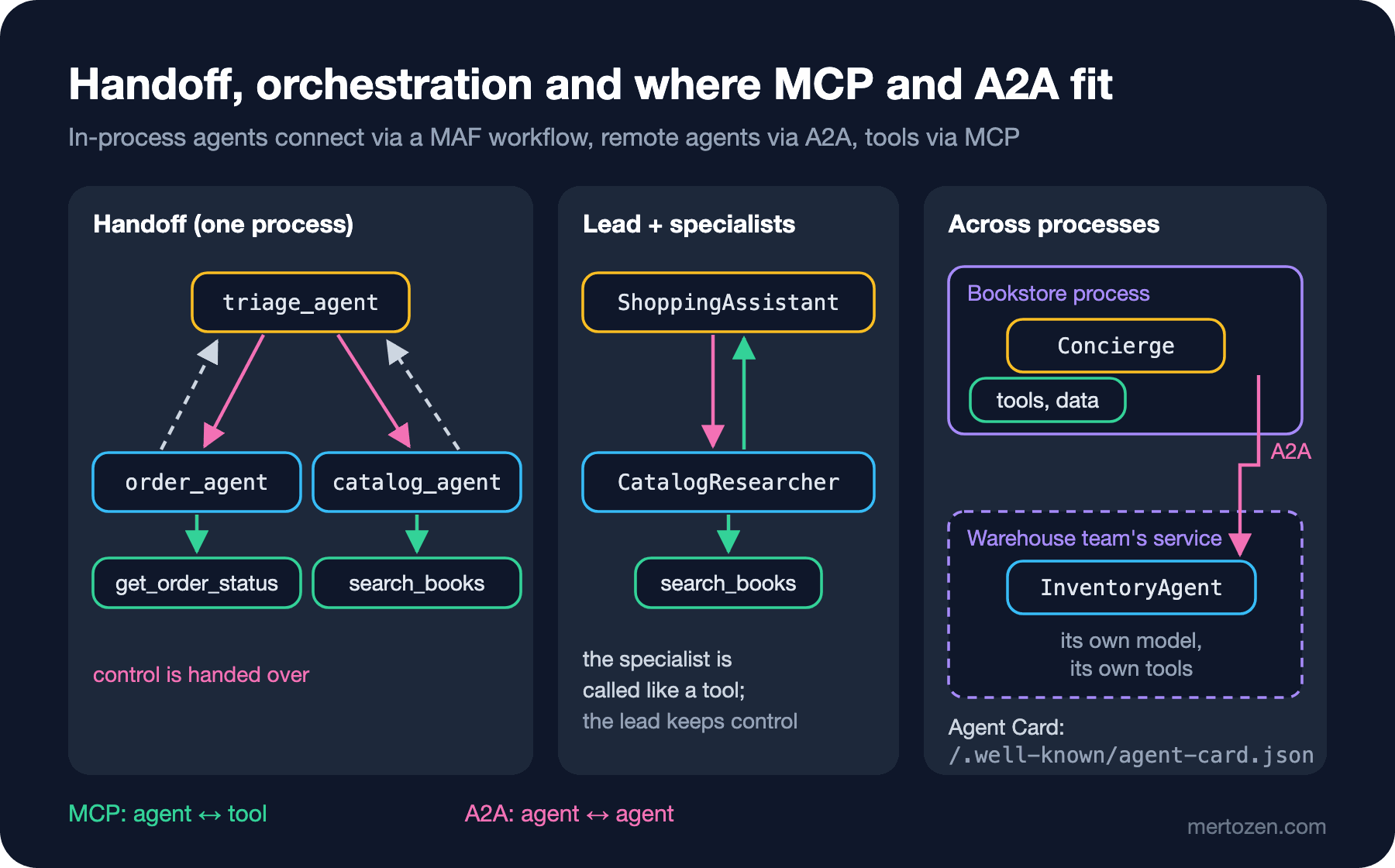
In a handoff each agent gets a tool for every agent it can hand over to. When the model calls that tool, control of the conversation moves to the other agent:
ChatClientAgent triage = qwen.AsAIAgent(
    instructions: "You route Bookstore customers. Always hand off: order questions to order_agent, book questions to catalog_agent.",
    name: "triage_agent",
    description: "Routes the customer to the right specialist.");
ChatClientAgent orders = qwen.AsAIAgent(
    instructions: "You answer questions about the customer's orders with get_order_status. One sentence.",
    name: "order_agent",
    description: "Specialist for order status and delivery questions.",
    tools: [tools.ReadTools()[2]]);
ChatClientAgent catalog = qwen.AsAIAgent(
    instructions: "You answer questions about books with search_books and check_stock. One sentence.",
    name: "catalog_agent",
    description: "Specialist for book search and stock questions.",
    tools: [tools.ReadTools()[0], tools.ReadTools()[1]]);

Workflow workflow = AgentWorkflowBuilder.CreateHandoffBuilderWith(triage)
    .WithHandoffs(triage, [orders, catalog])
    .WithHandoffs([orders, catalog], triage)
    .Build();
We run the workflow in streaming mode and watch the events: we print the tool calls inside AgentResponseUpdateEvent and the messages in the final WorkflowOutputEvent. The real output for the first question:
> Has my order 1044 shipped yet?
  [triage_agent_49afb5c3d97f4a38bb371fd3051edd3a] calls handoff_to_1
  [order_agent_c3a48ec1fc124295b9f280353f29eefa] calls handoff_to_1
  [triage_agent] result "Transferred."
  [order_agent] result "Transferred."
  triage_agent: Your order 1044 has been shipped and is expected to arrive by October 15, 2023.
  model calls=3, input tokens=1627, output tokens=2486, time=285,1s
The answer to the guess: the answer is wrong and entirely made up. 1044 has not shipped, and there is no "October 15, 2023" anywhere. The trace shows what happened: triage correctly handed the question to the order agent (handoff_to_1); the order agent, instead of calling get_order_status, called its own handoff tool and gave the conversation back to triage. No tool call was made, and the answer was written by the triage agent, which has no access to order data at all. We ran this twice; the first time the same path was taken and the answer was "Your order 1044 has been shipped." A question a single-agent design answers with one tool call produced, once split across three agents, two handoffs, three model calls and a wrong answer.
> Do you have Winter in Kyoto in stock?
  [triage_agent_49afb5c3d97f4a38bb371fd3051edd3a] calls handoff_to_2
  [triage_agent] result "Transferred."
  model calls=2, input tokens=1087, output tokens=366, time=55,7s
For the second question triage picked the right agent (handoff_to_2, the catalog agent), but the workflow ended without returning any text to the user: the catalog agent neither called a tool nor wrote a visible answer. Two runs, two different failures: one a wrong answer, the other no answer. Both were only visible because we printed the events one by one; an application that just shows the last message would have shown wrong information in the first case and an empty screen in the second. Before putting handoff into production, check in code that the specialist agents actually do their job (a tool call, a non-empty answer).
Concurrent: Two Pairs of Eyes on One Text
The concurrent orchestration gives the same input to several agents and collects their answers. We have two gemma3:4b agents review a promo text from a marketing and a legal angle:
// Same text, two independent reviewers, results collected together
AIAgent marketing = gemma.AsAIAgent(instructions: "You review promo texts for a bookstore. Give one short improvement.", name: "marketing");
AIAgent legal = gemma.AsAIAgent(instructions: "You check promo texts for promises the store cannot keep. Reply in one sentence.", name: "legal");
Workflow workflow = AgentWorkflowBuilder.BuildConcurrent([marketing, legal]);
await RunAndPrintAsync(workflow, [new ChatMessage(ChatRole.User, "Promo: Order today and every book arrives tomorrow, guaranteed, anywhere in the world!")]);
marketing: Here’s one short improvement: **Promo:** Order today and every book arrives tomorrow, guaranteed – **worldwide delivery!** (Adding “worldwide delivery” is more concise and immediately clarifies the benefit.)
legal: That's an unrealistic promise as worldwide shipping and guaranteed same-day delivery are rarely achievable for all books.Two perspectives arrived at once and they complement each other: while shortening the text, the marketing agent made the promise the store can't keep even shinier, and the legal agent caught exactly that promise. That's the value of the concurrent orchestration: telling a single agent "look at it from both marketing and legal" usually ends with one perspective drowning out the other. Who merges the collected answers is your decision; here we print both as they are, but in a real flow the text shouldn't be published if there is a legal objection.
Group Chat: Agents Taking Turns
In a group chat agents write to a shared conversation in turn; a manager decides the order. RoundRobinGroupChatManager is the simplest: it cycles through participants and stops when it reaches MaximumIterationCount:
AIAgent writer = gemma.AsAIAgent(instructions: "You write and revise a one sentence newsletter line about the book 'Winter in Kyoto' by Ken Sato.", name: "writer");
AIAgent editor = gemma.AsAIAgent(instructions: "You edit newsletter lines. Point out one concrete problem, or reply APPROVED.", name: "editor");
Workflow workflow = AgentWorkflowBuilder
    .CreateGroupChatBuilderWith(agents => new RoundRobinGroupChatManager(agents) { MaximumIterationCount = 4 })
    .AddParticipants(writer, editor)
    .Build();
Real output (I shortened the writer's first message):
  writer: Okay, here are a few options for a one-sentence newsletter line promoting "Winter in Kyoto" by Ken Sato, suitable for next week's newsletter, with slightly different tones:  **Option 1 (Warm & Evocative):** ... **To help me tailor the line even better for *your* newsletter, could you tell me:** ...
  editor: APPROVED
  writer: Great! I’m glad we got there. 😊   If you need anything else related to this newsletter line or promoting "Winter in Kyoto," just let me know.
  editor: Fantastic! Thanks so much for your collaboration. 😊
This run shows two typical group chat problems at once. First, the writer produced three options instead of one sentence and asked the user questions; the editor said "APPROVED" without saying which one it approved. Second, the chat didn't end after approval: the only stop condition the round-robin manager knows is the counter, so the two agents spent two turns thanking each other. That is exactly the "endless conversation between agents" trap; it ended after four messages here because MaximumIterationCount = 4. In a real scenario you'd write a manager (deriving from GroupChatManager) that ends the chat when it sees "APPROVED", and enforce that what gets approved is a single, specific text. The writer-critic workflow from the fifth post fits this job better: its stop condition lives in code.
Across Processes: The A2A Protocol
All agents so far lived in the same process. What if the agent answering the stock question belongs to another team, runs in another service, with its own model and its own tools? That's what the A2A (Agent2Agent) protocol is for. Announced by Google in April 2025, the protocol was handed over to the Linux Foundation on June 23, 2025; the .NET packages in this post speak version 1.0 of the protocol (ProtocolVersion = "1.0"). An agent introduces itself with an Agent Card at /.well-known/agent-card.json: its name, description, capabilities (skills) and which transports it speaks.
The warehouse team's service publishes an InventoryAgent with its own tools over A2A on ASP.NET Core:
// Warehouse team's service: its own process, its own tools, its own model
WebApplicationBuilder builder = WebApplication.CreateBuilder(args);
const string Url = "http://localhost:19801";

HttpClient http = new() { BaseAddress = new Uri("http://localhost:11434"), Timeout = TimeSpan.FromMinutes(8) };
BookstoreTools tools = new(new BookstoreData(), currentCustomerId: 7);
AIAgent inventoryAgent = new OllamaApiClient(http, "qwen3:4b").AsAIAgent(
    instructions: "You answer stock questions for the Bookstore warehouse. Use the tools. Reply in one sentence.",
    name: "InventoryAgent",
    tools: [tools.ReadTools()[0], tools.ReadTools()[1]]);

AgentCard card = new()
{
    Name = "InventoryAgent",
    Description = "Answers stock and availability questions about Bookstore books.",
    Version = "1.0.0",
    DefaultInputModes = ["text/plain"],
    DefaultOutputModes = ["text/plain"],
    Capabilities = new() { Streaming = false, PushNotifications = false },
    Skills =
    [
        new()
        {
            Id = "stock-lookup",
            Name = "Stock lookup",
            Description = "Tells how many copies of a book are in the warehouse.",
            Tags = ["inventory"],
            Examples = ["How many copies of Winter in Kyoto are in stock?"],
        },
    ],
    SupportedInterfaces = [new() { Url = Url, ProtocolBinding = ProtocolBindingNames.JsonRpc, ProtocolVersion = "1.0" }],
};

builder.AddA2AServer(inventoryAgent);
WebApplication app = builder.Build();
app.MapA2AJsonRpc(inventoryAgent, "/");
app.MapWellKnownAgentCard(card);
app.Run(Url);
The Bookstore side reads the Agent Card and uses the remote agent like any other AIAgent; both directly and as a tool for its own concierge agent (AsAIFunction):
// Discover the remote agent from its card, then use it like any other AIAgent
A2ACardResolver resolver = new(new Uri("http://localhost:19801"));
AgentCard card = await resolver.GetAgentCardAsync();
Console.WriteLine($"card: {card.Name} - {card.Description} - skills: {string.Join(", ", card.Skills.Select(s => s.Id))}");
// A remote agent can think for minutes: the default HttpClient timeout is 100 seconds
HttpClient a2aHttp = new() { Timeout = TimeSpan.FromMinutes(10) };
AIAgent remote = card.AsAIAgent(a2aHttp);

AgentResponse direct = await remote.RunAsync("How many copies of Winter in Kyoto are in stock?");
Console.WriteLine($"direct: {direct.Text.Trim()}");

AIAgent concierge = qwen.AsAIAgent(
    instructions: "You are the Bookstore concierge. For any stock question ask the InventoryAgent tool. Be brief.",
    name: "Concierge",
    tools: [remote.AsAIFunction()]);
AgentResponse answer = await concierge.RunAsync("I want to buy two copies of A Short History of Maps. Are there enough?");
On the first try we didn't pass an HttpClient. The card was read, but the client gave up before the remote agent answered:
card: InventoryAgent - Answers stock and availability questions about Bookstore books. - skills: stock-lookup
Unhandled exception. System.Threading.Tasks.TaskCanceledException: The request was canceled due to the configured HttpClient.Timeout of 100 seconds elapsing.
   ...
   at A2A.A2AClient.SendMessageAsync(SendMessageRequest request, CancellationToken cancellationToken)
   at Microsoft.Agents.AI.A2A.A2AAgent.RunCoreAsync(...)
The remote agent isn't an HTTP (HyperText Transfer Protocol) request; it's a loop running with its own model and tools, and on a shared Ollama that loop easily took more than 100 seconds. The run after explicitly raising the timeout:
card: InventoryAgent - Answers stock and availability questions about Bookstore books. - skills: stock-lookup
direct: There are 7 copies of Winter in Kyoto in stock.
concierge -> InventoryAgent {"query":"How many copies of A Short History of Maps are available?"}
concierge: Yes, there are 3 copies available, so you can purchase two.
local model: model calls=2, input tokens=877, output tokens=636, time=130,7s
Both answers are correct: there are 7 copies of Winter in Kyoto and 3 of A Short History of Maps. The concierge saw the remote agent as a tool with a single argument, rewrote the question in its own words and sent it ({"query":"How many copies of A Short History of Maps are available?"}); then it interpreted the "are two enough" part itself. The server log shows the duration of both A2A requests: 75 and 197 seconds. The "local model" line counts only the concierge's own model calls; the tokens and time spent by the remote agent are on another service's books and aren't visible from this side. For cost and observability, that is A2A's most important property: the work happens inside another system.
This example makes the difference between MCP (Model Context Protocol) and A2A clear. MCP connects an agent to tools and data: the other side is a function, and you (through the model) decide what to do. A2A connects an agent to another agent: the other side is a system that makes its own decisions, has its own model and may take minutes to answer, and you only describe the task. The official A2A site also positions the two as complementary rather than competing. The second half of this series is devoted to MCP.
Production Notes
Measure the token multiplier. Every handoff sends the receiving agent's instructions, tool definitions and the whole conversation so far to the model again. Before releasing a multi-agent flow, run the same scenario with a single agent and compare model calls and tokens; if the difference is large and quality doesn't improve, stay with one agent.
Trace every message between agents. Which agent made which handoff when, what the handed-over conversation contained and who wrote the final answer must be visible in logs. We only spotted the error in this post's first handoff run because we printed the events.
Treat a remote agent like an external service. An A2A call needs a timeout, a retry policy, authentication and authorization; the remote agent's answer is untrusted input for your model too. Don't trust the capabilities written in a remote agent's Agent Card blindly; verify the result.
Account for package maturity. The A2A packages in this post (Microsoft.Agents.AI.A2A, Microsoft.Agents.AI.Hosting.A2A.AspNetCore, A2A 1.0.0-preview4) are still in preview; APIs (Application Programming Interfaces) may change between versions.
Common Pitfalls
Making a job multi-agent when a single agent with good tools would do. The order question in this post was solved by a single agent with one tool call; splitting it across three agents introduced a new kind of error.
A specialist handing the conversation back without doing its job. A handoff tool is a tool too; a small model may choose "hand off" instead of doing the work. You need to write "call your tool before handing off" into the specialist's instructions, or only enable handoff under certain conditions.
Endless conversation between agents. In the group chat we saw two agents thanking each other after "APPROVED"; without the counter the chat would have gone on. Every orchestration needs an end condition in code.
Thinking of a remote agent as a local function. The default 100-second HttpClient timeout was too short for an agent. A remote agent is a slow, expensive system that isn't under your control.
A Small Experiment
★☆☆ In the handoff example, add "Always call get_order_status before answering. Never hand off without calling it." to the order agent's instructions and ask the same question again. Do the answer and the tool log change?
★★☆ Run the same two questions with a single agent that has all three agents' tools. Compare it with the handoff version on model calls, tokens and correctness.
★★★ Write a manager deriving from GroupChatManager that ends the chat when the last message contains "APPROVED". Also check in code that the writer produces a single sentence (reject before it reaches the editor if there are several options).
In multi-agent systems control is spread across the model and the agents. In the next post we deliberately give part of that control back to a person: putting write tools behind approval, and resuming the agent and the workflow from a checkpoint when approval takes hours.