

Remote MCP Servers in ASP.NET Core: Streamable HTTP, Stateless Mode, State Handles and Authorization
In ASP.NET Core you build a remote MCP server with WithHttpTransport and MapMcp, run it in stateless mode and protect it as an OAuth resource server: tokens must be issued for this server, and state handles must be bound to the user. With curl output we look at protected resource metadata, the audience error, the cost of statelessness with two instances, asking for confirmation via MRTR with a signed requestState, and Mcp-Method/Mcp-Name header validation.
Version note: The code in this post was built and run with .NET 10, ASP.NET Core 10, ModelContextProtocol.AspNetCore 2.4.0 and Microsoft.AspNetCore.Authentication.JwtBearer 10.0.14.
Guess First
The Bookstore MCP (Model Context Protocol) server is now live over HTTP (HyperText Transfer Protocol). Alice calls create_basket and gets the handle bsk_52421f52b401. Bob also has a valid access token; somehow he learns Alice's handle and calls add_to_cart with that basketId. Both users' tokens are valid. What happens?
The answer depends entirely on your code. Since there is no session at the protocol level, the server has only two things: the identity in the token and the handle in the argument. If you did not bind the handle to the user, Bob adds a book to Alice's basket. In this post we move the tools from post 9 to ASP.NET Core and try this problem, authorization, asking for confirmation with MRTR (Multi Round-Trip Requests) and the new mandatory headers one by one with curl.
From stdio to HTTP: WithHttpTransport and MapMcp
The package for a remote server is ModelContextProtocol.AspNetCore. The tool definitions stay the same; only the host and the transport change:
using System.Text;
using Bookstore.Mcp.HttpServer;
using Microsoft.AspNetCore.Authentication.JwtBearer;
using Microsoft.AspNetCore.DataProtection;
using Microsoft.IdentityModel.Tokens;
using ModelContextProtocol.AspNetCore;
using ModelContextProtocol.AspNetCore.Authentication;

WebApplicationBuilder builder = WebApplication.CreateBuilder(args);

const string McpUrl = "http://localhost:19850/mcp";
string issuer = builder.Configuration["Auth:Issuer"]!;
byte[] signingKey = Encoding.UTF8.GetBytes(builder.Configuration["Auth:DevSigningKey"]!);

builder.Services.AddAuthentication(o =>
    {
        o.DefaultAuthenticateScheme = JwtBearerDefaults.AuthenticationScheme;
        o.DefaultChallengeScheme = McpAuthenticationDefaults.AuthenticationScheme;
    })
    .AddJwtBearer(o =>
    {
        o.MapInboundClaims = false;
        o.TokenValidationParameters = new TokenValidationParameters
        {
            ValidIssuer = issuer,
            ValidAudience = McpUrl, // RFC 8707: the token must be issued for THIS server
            IssuerSigningKey = new SymmetricSecurityKey(signingKey),
        };
    })
    .AddMcp(o => o.ResourceMetadata = new()
    {
        Resource = McpUrl,
        AuthorizationServers = { issuer },
        ScopesSupported = ["bookstore.basket"],
    });

builder.Services.AddAuthorization();

// Keys stay in the project folder for the demo; in production use a shared key ring
builder.Services.AddDataProtection()
    .PersistKeysToFileSystem(new DirectoryInfo(Path.Combine(builder.Environment.ContentRootPath, "dp-keys")));

builder.Services.AddSingleton<BasketStore>();
builder.Services.AddMcpServer(o => o.ServerInfo = new() { Name = "bookstore-http", Version = "1.0.0" })
    .WithHttpTransport(o => o.SessionMode = HttpServerSessionMode.Stateless) // the 2.x default, stated explicitly
    .WithTools<BasketTools>();

WebApplication app = builder.Build();

app.UseAuthentication();
app.UseAuthorization();
app.MapMcp("/mcp").RequireAuthorization();

app.Run(); // --urls http://localhost:19850
We will get to the authentication part shortly. First the transport: WithHttpTransport(...) adds Streamable HTTP and MapMcp("/mcp") maps the single MCP endpoint. The server in this post accepts only POST for MCP; a GET request gets 405, because 2026-07-28 has no GET stream opened from server to client.
To send a JSON (JavaScript Object Notation) based JSON-RPC (Remote Procedure Call) request with curl I wrote a small helper. Every POST carries MCP-Protocol-Version and Mcp-Method, and tools/call also carries Mcp-Name; the _meta in the body is the same as in post 8:
#!/bin/bash
# usage: mcp.sh <token-file> <method> <name-or-empty> <params-json-without-meta>
TOKEN=$(cat "$1"); METHOD=$2; NAME=$3; PARAMS=$4
META='"_meta":{"io.modelcontextprotocol/protocolVersion":"2026-07-28","io.modelcontextprotocol/clientInfo":{"name":"curl","version":"8"},"io.modelcontextprotocol/clientCapabilities":{"elicitation":{}}}'
BODY="{\"jsonrpc\":\"2.0\",\"id\":$RANDOM,\"method\":\"$METHOD\",\"params\":{${PARAMS:+$PARAMS,}$META}}"
H=(-H "Authorization: Bearer $TOKEN" -H "Content-Type: application/json" -H "Accept: application/json, text/event-stream" -H "MCP-Protocol-Version: 2026-07-28" -H "Mcp-Method: $METHOD")
[ -n "$NAME" ] && H+=(-H "Mcp-Name: $NAME")
curl -s -w "\nHTTP %{http_code}\n" -X POST http://localhost:19850/mcp "${H[@]}" -d "$BODY"
Stateless Mode: Scaling Without Sticky Sessions
In SDK (Software Development Kit) 1.x the HTTP transport was stateful by default: the server opened an in-memory session for each client and tied requests to it with the Mcp-Session-Id header. With two instances behind a load balancer, a second request landing on the other machine could not find the session; the fix was sticky sessions or a shared session store. In 2.x the default of HttpServerTransportOptions.SessionMode is Stateless. The SDK documentation recommends stating this setting explicitly, as above, so that a future default change cannot silently change your behavior; if older clients need sessions, there is also a migration mode called StatefulForInitializeClients.
I saw what stateless means by running two instances: the same DLL (Dynamic-Link Library), one on 19850, one on 19851. I created Alice's basket on A and went to B with the same handle:
basket=bsk_3acd36248b0d
data: {"result":{"content":[{"type":"text","text":"Basket bsk_3acd36248b0d: 1 item(s)"}],"resultType":"complete","_meta":{"io.modelcontextprotocol/serverInfo":{"name":"bookstore-http","version":"1.0.0"}}},"id":24980,"jsonrpc":"2.0"}
== same handle, instance B
data: {"result":{"content":[{"type":"text","text":"An error occurred invoking 'add_to_cart': Basket bsk_3acd36248b0d was not found. Call create_basket first."}],"isError":true,"resultType":"complete","_meta":{"io.modelcontextprotocol/serverInfo":{"name":"bookstore-http","version":"1.0.0"}}},"id":26798,"jsonrpc":"2.0"}
On the protocol side everything is fine: B accepted the request, validated the token and ran the tool. The problem is my BasketStore, because the baskets live in A's memory. A stateless protocol does not mean state disappears; it means state becomes your responsibility. The handle travels with the request, while the data itself has to live somewhere both instances can see, in Redis or a database. Notice also that the responses start with data:: here the C# SDK returns an SSE (Server-Sent Events) stream scoped to the request instead of a single JSON body. The spec allows both forms and requires clients to support both.
State Handles: Binding basketId to the User
The spec's security section gives this topic its own heading, "state handle hijacking": possessing a handle is not authentication, handles must be unguessable, and they should be bound to the user on the server side. I wrote the store accordingly:
using System.Collections.Concurrent;

namespace Bookstore.Mcp.HttpServer;

public sealed record BasketLine(int BookId, int Quantity);

public sealed class Basket(string id, string ownerId)
{
    public string Id { get; } = id;
    public string OwnerId { get; } = ownerId;
    public List<BasketLine> Lines { get; } = [];
}

// In-memory for the demo. With several instances behind a load balancer this must be
// Redis or a database: the handle travels with the request, the data must not live in one process.
public sealed class BasketStore
{
    private readonly ConcurrentDictionary<string, Basket> _baskets = new();

    public Basket Create(string ownerId)
    {
        string id = "bsk_" + Convert.ToHexString(Guid.NewGuid().ToByteArray())[..12].ToLowerInvariant();
        Basket basket = new(id, ownerId);
        _baskets[id] = basket;
        return basket;
    }

    // The handle alone is not enough: the basket must belong to the caller
    public Basket? Get(string basketId, string ownerId) =>
        _baskets.TryGetValue(basketId, out Basket? basket) && basket.OwnerId == ownerId ? basket : null;
}
The tools receive the user through a ClaimsPrincipal parameter. The SDK keeps this parameter out of the schema; the model cannot see or fill it. The user id comes from the sub claim in the token:
[McpServerTool(Name = "create_basket")]
[Description("Creates an empty basket and returns its basketId. Pass the basketId to the other basket tools.")]
public string CreateBasket(ClaimsPrincipal user) => baskets.Create(UserId(user)).Id;

[McpServerTool(Name = "add_to_cart")]
[Description("Adds a book to a basket created with create_basket.")]
public string AddToCart(
    ClaimsPrincipal user,
    [Description("basketId returned by create_basket")] string basketId,
    [Description("Book id, e.g. 3")] int bookId,
    [Description("How many copies (1-5)")] int quantity = 1)
{
    Basket basket = baskets.Get(basketId, UserId(user))
        ?? throw new McpException($"Basket {basketId} was not found. Call create_basket first.");
    basket.Lines.Add(new BasketLine(bookId, Math.Clamp(quantity, 1, 5)));
    return $"Basket {basket.Id}: {basket.Lines.Sum(l => l.Quantity)} item(s)";
}

private static string UserId(ClaimsPrincipal user) =>
    user.FindFirstValue("sub") ?? throw new McpException("No user in the access token.");
The real output of the Guess First scenario; first Alice, then Bob with the same handle:
== alice add
data: {"result":{"content":[{"type":"text","text":"Basket bsk_52421f52b401: 2 item(s)"}],"resultType":"complete","_meta":{"io.modelcontextprotocol/serverInfo":{"name":"bookstore-http","version":"1.0.0"}}},"id":1163,"jsonrpc":"2.0"}
== bob add to alice basket
data: {"result":{"content":[{"type":"text","text":"An error occurred invoking 'add_to_cart': Basket bsk_52421f52b401 was not found. Call create_basket first."}],"isError":true,"resultType":"complete","_meta":{"io.modelcontextprotocol/serverInfo":{"name":"bookstore-http","version":"1.0.0"}}},"id":18910,"jsonrpc":"2.0"}
Bob gets "not found" rather than "forbidden", so he cannot even learn that the handle exists. The same decision as get_order_status in post 9.
Authorization: An MCP Server Is an OAuth Resource Server
The spec's authorization section draws the roles clearly: a protected MCP server is an OAuth 2.1 resource server, the MCP client is an OAuth client, and an authorization server issues the token. We covered OAuth itself, the authorization code flow and PKCE (Proof Key for Code Exchange) in the "The Logic of OAuth 2.0" post of the Authentication and Authorization series and in "Protecting the API", which covers protecting an API (Application Programming Interface); here we look at what MCP adds on top.
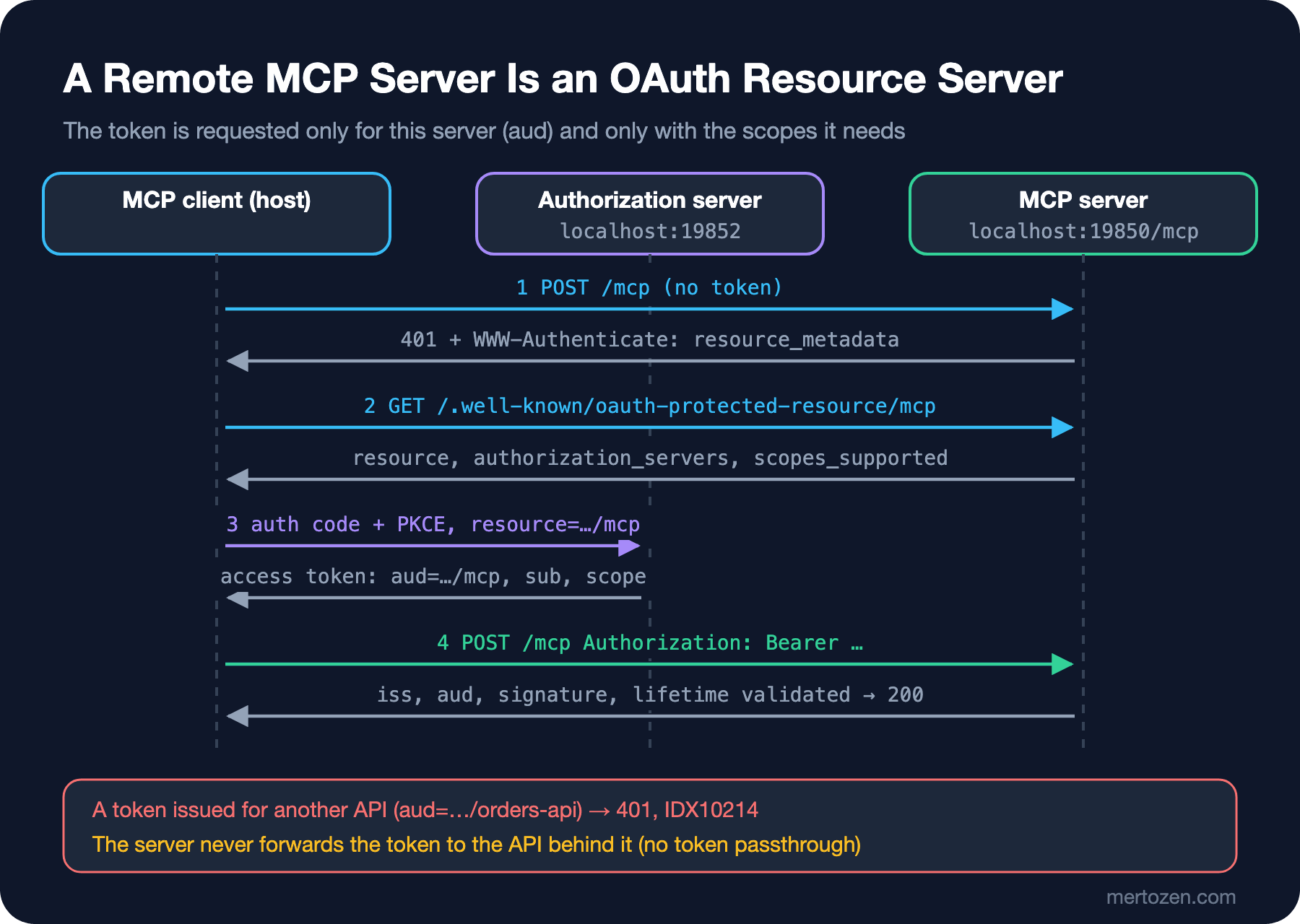
The first two steps of the flow are the server's job. A request without a token gets 401, and the WWW-Authenticate header tells the client where to look:
HTTP/1.1 401 Unauthorized
Content-Length: 0
Date: Sun, 08 Nov 2026 07:01:27 GMT
Server: Kestrel
WWW-Authenticate: Bearer resource_metadata="http://localhost:19850/.well-known/oauth-protected-resource/mcp"
The document at that address is the protected resource metadata from RFC (Request for Comments) 9728; it is generated from the ResourceMetadata we passed to AddMcp(...):
{"resource":"http://localhost:19850/mcp","authorization_servers":["http://localhost:19852"],"bearer_methods_supported":["header"],"scopes_supported":["bookstore.basket"]}From here the client finds the authorization server, reads its metadata, identifies itself and takes the user through the authorization code + PKCE flow. When requesting the token it must put the server's canonical URI (Uniform Resource Identifier) into the resource parameter from RFC 8707, so that the token is issued only for this server. The way a client identifies itself also changed in 2026-07-28: the recommended path is Client ID Metadata Documents, where the client's identity is the URL (Uniform Resource Locator) of a JSON document published over HTTPS (HTTP Secure). Dynamic Client Registration is deprecated and kept only for backward compatibility.
I did not run a real authorization server for this post; setting up Keycloak or OpenIddict is not its subject. I minted the tokens with a small console program in the work folder, signing them with the key the server validates against. This is only a test tool; in production the signing key lives in the authorization server, not in the server, and the server only knows the public key through JWKS (JSON Web Key Set). What we can see here is why it matters that a token was issued for the right place. I minted two tokens for Alice: one with aud=http://localhost:19850/mcp, the other from the same issuer but for a different API, aud=http://localhost:19860/orders-api. A request with the second one:
HTTP 401
info: Microsoft.AspNetCore.Authentication.JwtBearer.JwtBearerHandler[1]
      Failed to validate the token.
      Microsoft.IdentityModel.Tokens.SecurityTokenInvalidAudienceException: IDX10214: Audience validation failed. See https://aka.ms/identitymodel/app-context-switches
The signature is valid, the issuer is right, the token has not expired; but it was not issued for this server. The spec makes this check mandatory: an MCP server only accepts tokens issued for itself and never forwards a token it received to an API behind it. The second rule is called the "token passthrough" ban; if the MCP server needs to call the order API behind it, it obtains its own token for that API. In post 13 we discuss why this ban exists, together with the confused deputy problem.
One more detail: the 401 challenge produced by the SDK has no scope parameter. In that case the spec tells the client to request all the scopes in scopes_supported; so put only the smallest set the basic functionality needs into that list. An all-encompassing scope such as bookstore.* widens the blast radius of a stolen token from the basket to orders, and from orders to returns.
Asking for Confirmation with MRTR: InputRequiredException
clear_basket is irreversible; we want to ask the user. In 2025 the server would send an elicitation/create request to the client and wait for the answer over the session. Without a session there is no connection for the server to wait on. MRTR's answer: the server returns an interim result saying "I need this information", and the client collects the answer and repeats the same call:
[McpServerTool(Name = "clear_basket", Destructive = true)]
[Description("Removes every item from a basket. Asks the user to confirm first.")]
public string ClearBasket(
    McpServer server,
    RequestContext<CallToolRequestParams> context,
    ClaimsPrincipal user,
    [Description("basketId returned by create_basket")] string basketId)
{
    string userId = UserId(user);
    Basket basket = baskets.Get(basketId, userId)
        ?? throw new McpException($"Basket {basketId} was not found.");

    if (context.Params!.RequestState is { } state && context.Params.InputResponses is { } responses)
    {
        // requestState came back through the client: verify it before trusting it
        ConfirmState confirmed = Unprotect(state);
        if (confirmed.UserId != userId || confirmed.BasketId != basketId)
        {
            throw new McpException("The confirmation does not match this request.");
        }

        ElicitResult? answer = responses["confirm"].Deserialize(InputResponse.ElicitResultJsonTypeInfo);
        if (answer?.Action != "accept")
        {
            return $"Basket {basketId} was not cleared: the user declined.";
        }

        basket.Lines.Clear();
        return $"Basket {basketId} is now empty.";
    }

    if (!server.IsMrtrSupported)
    {
        return "This client cannot confirm actions; clear the basket from the website instead.";
    }

    throw new InputRequiredException(
        inputRequests: new Dictionary<string, InputRequest>
        {
            ["confirm"] = InputRequest.ForElicitation(new ElicitRequestParams
            {
                Message = $"Remove all {basket.Lines.Count} line(s) from basket {basketId}?",
                RequestedSchema = new(),
            }),
        },
        requestState: _stateProtector.Protect(
            JsonSerializer.Serialize(new ConfirmState(userId, basketId)), TimeSpan.FromMinutes(5)));
}
_stateProtector is an ITimeLimitedDataProtector from ASP.NET Core Data Protection, and Unprotect is a small helper that turns a CryptographicException into a "confirmation expired or was modified" message. Why all this effort? Because the spec treats requestState as attacker-controlled input: if it influences authorization or business logic, its integrity must be protected with HMAC (Hash-based Message Authentication Code) or AEAD (Authenticated Encryption with Associated Data), and it should contain the user, a short expiry and which request it belongs to. Data Protection gives us all three: an encrypted and signed payload, a timestamp, and the user and basket inside.
The first round, with curl:
data: {"result":{"inputRequests":{"confirm":{"method":"elicitation/create","params":{"mode":"form","message":"Remove all 1 line(s) from basket bsk_52421f52b401?","requestedSchema":{"type":"object","properties":{}}}}},"requestState":"CfDJ8EsWxdwsesFPgrgDsoFZKoN_NqDMtPZFq8mnnwh1SssSbHQNDFt3AAnI1GXI15WEM9vmlXi6ErtZLWymaJjOeJ55zC9apo2JAJJagfik57q0pzGha4V30EE3Qd2e2oo_vSPbnCl-Knhzivk_W4kKiniKHchrUXUkafMUsNyB-w_Ilr2pT__T58TttdABLBo_yw","resultType":"input_required","_meta":{"io.modelcontextprotocol/serverInfo":{"name":"bookstore-http","version":"1.0.0"}}},"id":3889,"jsonrpc":"2.0"}resultType: "input_required", an inputRequests map and an opaque requestState. In the second round the client comes back with the same arguments, a new id, inputResponses and the requestState echoed back unchanged. First with a state whose last two characters were changed, then with the correct one:
== tampered
data: {"result":{"content":[{"type":"text","text":"An error occurred invoking 'clear_basket': The confirmation has expired or was modified. Call clear_basket again."}],"isError":true,"resultType":"complete","_meta":{"io.modelcontextprotocol/serverInfo":{"name":"bookstore-http","version":"1.0.0"}}},"id":21094,"jsonrpc":"2.0"}
== round 2 accept
data: {"result":{"content":[{"type":"text","text":"Basket bsk_52421f52b401 is now empty."}],"resultType":"complete","_meta":{"io.modelcontextprotocol/serverInfo":{"name":"bookstore-http","version":"1.0.0"}}},"id":6073,"jsonrpc":"2.0"}
The server remembered nothing between the two rounds; another instance could have handled the second round, as long as the Data Protection key ring is shared. In post 12 we will see the C# client drive these rounds by itself.
Headers, Long-Running Work and the Tasks Extension
With 2026-07-28 the headers became a mirror of the body, and the server must verify that the two agree. create_basket in the body, a different name in the header:
== mismatch
{"error":{"code":-32020,"message":"Header mismatch: Mcp-Name header value 'search_books' does not match body value 'create_basket'."},"id":7,"jsonrpc":"2.0"}
HTTP 400
== missing name
{"error":{"code":-32020,"message":"Missing required Mcp-Name header."},"id":7,"jsonrpc":"2.0"}
HTTP 400
== GET
HTTP 405
This check is a security feature: if a gateway let the request through by reading the header ("search_books is public") while the server ran create_basket from the body, two components would have read the same request differently. You can move tool parameters into headers too: a parameter marked with [McpHeader("Region")] gets x-mcp-header in the schema and the client sends it as the Mcp-Param-Region header; a gateway routing by region does not have to open the body.
For work that takes minutes rather than seconds, such as reindexing a catalog, the SDK has the opt-in ModelContextProtocol.Extensions.Tasks package: .WithTasks(store) on the server and CallToolWithPollingAsync on the client. Tasks moved out of the core into an extension in 2026-07-28 and are not compatible with the experimental Tasks of 1.x. InMemoryMcpTaskStore is for development only; work that must survive restarts and span instances needs a durable IMcpTaskStore of your own.
In Production
First, shared state. A stateless protocol pushes three things into a shared place: application data (the baskets), the Data Protection key ring (so requestState can be opened on another instance) and the task store if you have one. It is easy to test all three on a single instance and call it done; an integration test with two instances shows the problem before deployment.
Second, Origin validation. The spec requires the server to validate the incoming Origin header against DNS (Domain Name System) rebinding attacks and to return 403 if it is invalid. For a server not meant to be called from a browser, CORS (Cross-Origin Resource Sharing) should stay off; if it is called from a browser, set up a restrictive policy like the one in the SDK's sample, allowing only known origins, only POST and only the headers you need.
Third, rate limiting and size. Every tools/call means a database query behind it, maybe an LLM (Large Language Model) call. The rate limiting middleware from the ASP.NET Core Web API series applies here too; use the token's sub as the partition key instead of the IP (Internet Protocol) address. Thanks to the Mcp-Method and Mcp-Name headers, per-tool limits at the gateway are possible as well.
Fourth, logs and traces. The server's log is now the answer to "who called which tool with which arguments". Don't write the token to the log; write sub, the client id and the tool name. In post 14 we will use these records to find failed agent trajectories.
Common Pitfalls
First, treating a state handle as authentication. Even if bsk_52421f52b401 is unguessable, it can end up in logs, screenshots or the model's answer. If you don't compare the handle with the user in the token on every request, the basket belongs to whoever knows the handle.
Second, leaving an unauthenticated HTTP server on localhost. The thought "it's only on my machine anyway" collapses with DNS rebinding: a malicious web page can use your browser to send requests to localhost:19850. The first choice for a local server is stdio; if HTTP is a must, bind only to 127.0.0.1, validate Origin and require a token.
Third, switching off the audience check. Writing ValidateAudience = false during testing silences the error immediately; but if that line reaches production, a token the same authorization server issued for any other API becomes valid on this server. The IDX10214 error above is not an obstacle but proof that the protection works.
Fourth, returning requestState as plain JSON or Base64. The client is not supposed to read it, which does not mean it cannot. Changing an unsigned state that contains a basket id to clear someone else's basket is a one-line job against a server that skips the check.
A Small Experiment
★☆☆ Move BasketStore onto IDistributedCache and repeat the two-instance test. Does add_to_cart on B work now? And is the OwnerId check still in place?
★★☆ Send the requestState from the first round of clear_basket with Bob's token. Which check stops the request: the basket owner, or the user inside the state? What changes if you remove one of them?
★★★ Add a second scope to the server: bookstore.basket.clear. If clear_basket is called without it, return 403 with WWW-Authenticate: Bearer error="insufficient_scope", scope="bookstore.basket.clear" as in the spec. Is it better to do this inside the tool, in an endpoint filter, or with an authorization policy?
So far we have written the same Bookstore server twice in C#. In the next post we switch to TypeScript: tool registration with Zod schemas, the decision between SDK v1 and v2, and the different answers the C# and TypeScript servers give to the same input.